2019 VOLVO XC60 TWIN ENGINE light
[x] Cancel search: lightPage 250 of 695

||
KEY, LOCKS AND ALARM
* Option/accessory.248
Speed reminder (On/Off):
Setting interval: 0-250 km/h (0-160 mph)
Default setting: 50, 70 and 90 km/h (30, 45and 55 mph)
Increments: 1 km/h (1 mph)
Maximum number of simultaneous remind-ers: 6
Driver support functions
The following driver support functions will alwaysbe active for a Red Key user:
Blind Spot Information (BLIS)*
Lane Keeping Aid (LKA)*
Distance Alert*
City Safety
Driver Alert Control (DAC)*
Road Sign Information*
Related information
Red Key - restricted remote key* (p. 247)
Detachable key blade
The remote key contains a detachable metal keyblade that can be used to activate a number offunctions and preform certain actions.
A Volvo workshop can provide you with the keyblade's unique code, which is recommended incase you need to order a new key blade.
Using the detachable key blade
The detachable key blade can be used to:
manually open the left-side front door if cen-tral locking cannot be activated with theremote key.
emergency lock all doors.
activate/deactivate the rear door mechanicalchild safety locks.
The button-less Key Tag10 does not have adetachable key blade. If needed, use the standardremote key's detachable key blade.
Detaching the key blade
Hold the remote key with the front side(with the Volvo logo) facing up and move thebutton on the key ring section to the right.Slide the front cover slightly upward.
The cover will loosen and can beremoved from the key.
Remove the key blade by pulling it up.
10Supplied with vehicles equipped with keyless locking/unlocking (Passive Entry*).
Page 256 of 695

||
KEY, LOCKS AND ALARM
* Option/accessory.254
Rubberized pressure plate on the tailgate used only forunlocking.
NOTE
Please be aware that the system could beactivated in a car wash if the remote key iswithin range.
Keyless locking
All of the doors have to be closed before thevehicle can be locked. However, the tailgate canbe open when a door handle is used for locking.
–To lock, touch the marked area on the out-side of one of the door handles after thedoor is closed or press the button on the
lower edge of the tailgate12 before it isclosed.
>The lock indicator light in the windshieldwill flash to confirm that the vehicle islocked.
To close all door windows at the same time -place your finger on the pressure-sensitiveindentation on the outside of the door handle andhold it there until the side windows have closed.
Locking when the tailgate is open
NOTE
If the vehicle is locked and the tailgate is stillopen, make sure that the remote key is notleft in the cargo compartment when the tail-gate is closed and the entire vehicle is locked.
If the key is detected in the vehicle, the tail-gate will not lock when it is closed.
Keyless unlocking
–To unlock, grasp a door handle or press therubberized pressure plate on the undersideof the tailgate handle.
>The lock indicator light in the windshieldwill go out to confirm that the vehicle isunlocked. Open the doors or tailgate asusual.
Automatic relocking
If none of the doors or tailgate are opened withintwo minutes after being unlocked, they will auto-matically relock. This function reduces the risk ofinadvertently leaving the vehicle unlocked.
Related information
Keyless unlock settings* (p. 255)
Keyless tailgate unlock* (p. 255)
Keyless and touch-sensitive surfaces*(p. 252)
12Applies to vehicles with power tailgate*.
Page 257 of 695

KEY, LOCKS AND ALARM
* Option/accessory.255
Keyless unlock settings*
Several different sequences are available forkeyless unlocking.
1.Tap Settings in the center display's Topview.
2.Tap My CarLockingKeyless Unlock
3. Select alternative:
All Doors
- unlocks all doors at the same time.
Single Door
- unlocks the selected door.
Related information
Keyless locking and unlocking* (p. 253)
Keyless and touch-sensitive surfaces*(p. 252)
Keyless tailgate unlock*
The tailgate can be opened using the remotekey. The key only needs to be within range, e.g.in a pocket or bag.
The tailgate is held closed by an electronic lock-ing mechanism.
To open the tailgate:
1.Lightly press the rubberized pressure plateon the underside of the tailgate handle.
> The lock will disengage.
NOTE
One of the vehicle's remote keys must bewithin range behind the vehicle for unlockingto be possible.
2. Lift the outer handle to fully open the tail-gate.
CAUTION
Only light pressure on the rubberized pres-sure plate is necessary to release the tail-gate's locking mechanism.
Use the handle to lift the tailgate and donot apply force to the rubberized pressureplate. Too much force can damage thepressure plate's electrical connections.
Hands-free unlocking of the tailgate is also pos-sible using a foot movement under the rearbumper; see the separate section.
WARNING
Do not drive with the tailgate open. Toxicexhaust fumes can be sucked into the vehiclethrough the cargo compartment.
Related information
Keyless locking and unlocking* (p. 253)
Keyless and touch-sensitive surfaces*(p. 252)
Remote key range (p. 242)
Foot movement tailgate operation* (p. 264)
Page 258 of 695

KEY, LOCKS AND ALARM
* Option/accessory.256
Antenna locations for the start andlock system
The vehicle is equipped with a keyless start and
lock system13 that uses a number of integratedantennas positioned throughout the vehicle.
Under the cup holder in the front section ofthe tunnel console
In the upper front section of the left-side rear
door14
In the upper front section of the right-side
rear door14
In the cargo compartment14
WARNING
Individuals with an implanted pacemakershould not allow the pacemaker to comecloser than 22 cm (9 in.) to the Keyless sys-tem antennas. The aim of this is to preventdisturbances between the pacemaker and theKeyless system.
Related information
Keyless and touch-sensitive surfaces*(p. 252)
Remote key range (p. 242)
Locking and unlocking from insidethe vehicle
The doors and tailgate can be locked andunlocked from inside the vehicle using the cen-tral lock buttons in the front doors. The lock but-tons in the rear doors* can be used to lock/unlock that particular door.
Central locking
Button with indicator light for locking and unlocking infront door.
Unlocking using the front door buttons
–Press the button to unlock all side doorsand the tailgate.
13The keyless lock system only applies to vehicles equipped with keyless locking and unlocking (Passive Entry*).14Only in vehicles equipped with keyless locking and unlocking (Passive Entry*).
Page 259 of 695
KEY, LOCKS AND ALARM
* Option/accessory.257
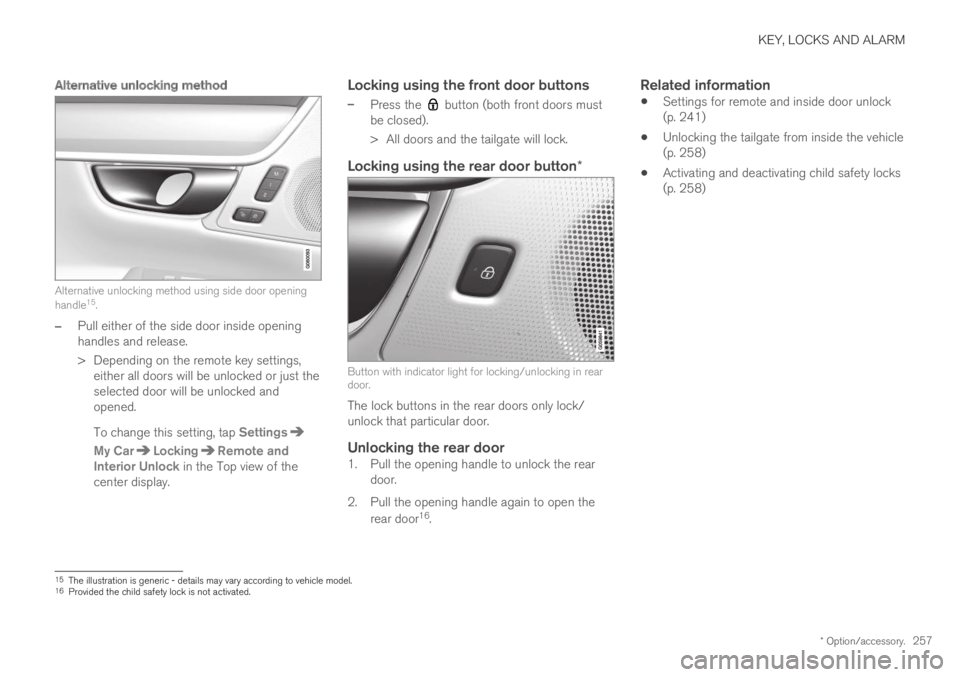
Alternative unlocking method
Alternative unlocking method using side door openinghandle15.
–Pull either of the side door inside openinghandles and release.
>Depending on the remote key settings,either all doors will be unlocked or just theselected door will be unlocked andopened.
To change this setting, tap Settings
My CarLockingRemote andInterior Unlock in the Top view of thecenter display.
Locking using the front door buttons
–Press the button (both front doors mustbe closed).
>All doors and the tailgate will lock.
Locking using the rear door button *
Button with indicator light for locking/unlocking in reardoor.
The lock buttons in the rear doors only lock/unlock that particular door.
Unlocking the rear door
1. Pull the opening handle to unlock the reardoor.
2. Pull the opening handle again to open the
rear door16.
Related information
Settings for remote and inside door unlock(p. 241)
Unlocking the tailgate from inside the vehicle(p. 258)
Activating and deactivating child safety locks(p. 258)
15The illustration is generic - details may vary according to vehicle model.16Provided the child safety lock is not activated.
Page 261 of 695

KEY, LOCKS AND ALARM
259
2. Press the button on the driver's door controlpanel.
>The message Rear child lock Activatedwill be shown in the instrument panel andthe indicator light will illuminate to showthat the child safety locks are activated.
When the electric child safety locks are activated:
the rear windows can only be opened usingthe driver's door control panel
the rear doors cannot be opened from theinside.
To deactivate the child safety locks:
–Press the button on the driver's door controlpanel.
>The message Rear child lockDeactivated will be shown in the instru-ment panel and the indicator light will goout to show that the child safety locks aredeactivated.
When the ignition is switched off, the current set-ting will be saved. If the child safety locks wereactivated when the ignition was switched off, theywill remain activated the next time the ignition isstarted.
SymbolMessageMeaning
Rear childlock Acti-vated
The child safetylocks are acti-vated.
Rear childlock Deacti-vated
The child safetylocks are deacti-vated.
Activating and deactivating manual
child safety locks
Manual child safety lock (this is not the manual doorlock).
–Use the detachable key blade in the remotekey to turn the control.
The door cannot be opened from the inside.
The door can be opened from both the out-side and the inside.
NOTE
The door's knob control only locks thatspecific door, not both rear doors simulta-neously.
There are no manual child safety locks onmodels equipped with electronic childsafety locks.
Related information
Locking and unlocking from inside the vehi-cle (p. 256)
Detachable key blade (p. 248)
Page 262 of 695
KEY, LOCKS AND ALARM
* Option/accessory.260
Automatic locking when driving
The doors and tailgate will automatically lockwhen the vehicle begins to move.
Related information
Locking and unlocking from inside the vehi-cle (p. 256)
Opening and closing the power
tailgate*
The tailgate can be opened and closed automat-ically with the optional power tailgate.
Opening
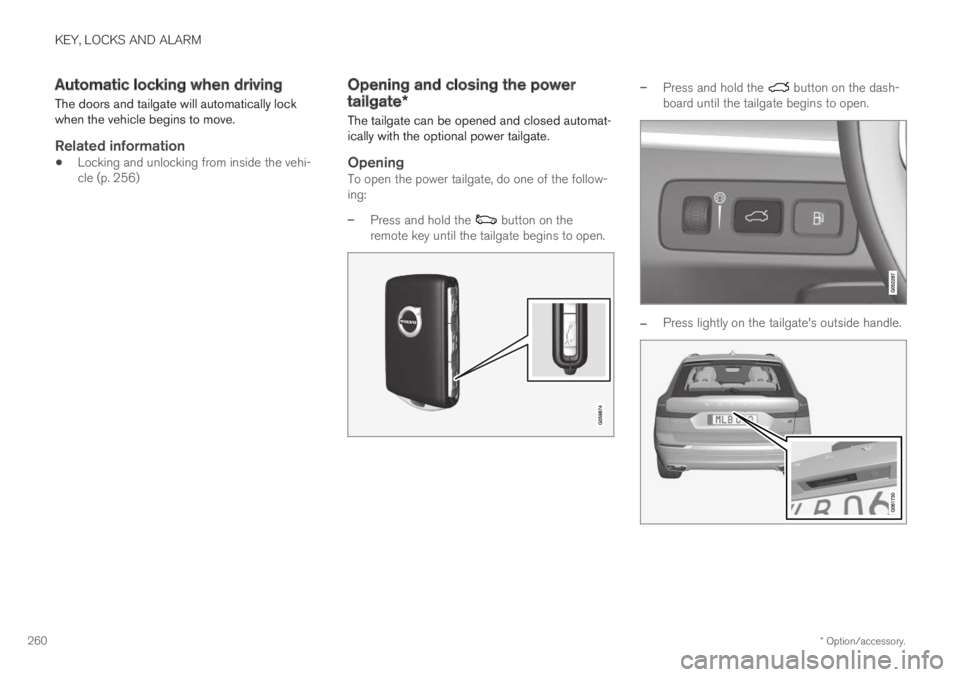
To open the power tailgate, do one of the follow-ing:
–Press and hold the button on theremote key until the tailgate begins to open.
–Press and hold the button on the dash-board until the tailgate begins to open.
–Press lightly on the tailgate's outside handle.
Page 268 of 695

KEY, LOCKS AND ALARM
* Option/accessory.266
Activating and deactivating privatelocking
Private locking is activated using the functionbutton in the center display and a PIN code.
NOTE
For the valet lock function to be activated thecar must be in at least ignition mode I.
Entering security code before initial use
The first time the function is used, a securitycode must be selected. This code can then beused to deactivate private locking if the selectedPIN code has been lost or forgotten. The securitycode functions as a PUK (security) code for allPIN codes used for private locking.
Save the security code in a safe place.
To create a security code:
1. Tap the button for private locking in Functionview.
> A pop-up window will appear.
2.Enter your security code.
> The security code is saved. The privatelocking function is now ready for activa-tion.
If the system has been reset, the above proce-dure will need to be repeated.
Activating private locking
1. Tap the button for private locking in Functionview.
> A pop-up window will appear.
2.Enter the code you would like to use tounlock the tailgate and tap Confirm.
>The tailgate will lock. A green indicatorlight will illuminate next to the button inFunction view to confirm locked status.
Deactivating private locking
1. Tap the button for private locking in Functionview.
> A pop-up window will appear.
2.Enter the code used for locking and tapConfirm.
>The tailgate will unlock. The green indica-tor light next to the button in Functionview will go out to confirm unlocked sta-tus.
NOTE
If you have forgotten or lost your PIN code orif the PIN code has been entered incorrectlymore than three times, the security code canbe used to deactivate private locking.
NOTE
If private locking is activated and the vehicleis unlocked using Volvo On Call* or the VolvoOn Call* app, private locking will be deacti-vated automatically.