2019 VOLVO S90 TWIN ENGINE brake
[x] Cancel search: brakePage 375 of 669

DRIVER SUPPORT
}}
373
Run-Off Mitigation with steeringassistance
This sub-function is intended to help reduce therisk of the vehicle inadvertently running off theroad by actively steering the vehicle back ontothe road.
The function is active at speeds between65-140 km/h (40-87 mph) on roads with clearlyvisible traffic lane markings/lines.
The system uses a camera to monitor the edgesof the road and the painted side marker lines. Ifthe vehicle is about to cross the edge of the road,the function will attempt to steer the vehicle backonto the road. If this is not sufficient to keep thevehicle on the road, the brakes will also beapplied.
However, the function will not provide eithersteering assistance or braking if the turn signal isused. The function will also not be activated if itdetects that the driver is actively operating thevehicle.
After the system has automatically intervened,this text message will appear in the instrumentpanel:
Collision avoidance assistance –Automatic intervention
WARNING
The "Steering assistance at risk of run-off" subfunction is supplementary driversupport intended to help improve drivingsafety – it cannot handle all situations inall traffic, weather and road conditions.
The function cannot detect barriers, railsor similar obstacles at the side of theroad.
"Steering assistance at risk of run-off" isnot a substitute for the driver's attentionand judgment. The driver is alwaysresponsible for ensuring the vehicle isdriven in a safe manner, at the appropri-ate speed, with an appropriate distance toother vehicles, and in accordance withcurrent traffic rules and regulations.
Related information
Steering assistance at risk of collision(p. 372)
Run-Off Mitigation with steeringassistance levels
This function has two activation levels for inter-vention:
Steering assistance only
Steering assistance with braking
Steering assistance only
Intervention with steering assistance.
Page 385 of 669

DRIVER SUPPORT
}}
383
Park Assist front, rear and sides
Park Assist has different parameters dependingon which part of the vehicle is approaching anobstacle.
Front camera
Continuous tone warning signal when the obstacle isless than approx. 30 cm (1 ft) from the vehicle 107.
Park Assist's front sensors are automatically acti-vated when the engine is started. They are activeat speeds below 10 km/h (6 mph).
The distance monitored extends approx. 80 cm(2.5 ft) in front of the vehicle.
NOTE
The Parking Assist system is deactivatedwhen the parking brake is applied or when Pis selected on vehicles with automatic trans-mission.
CAUTION
When installing auxiliary lights: Make surethese do not obscure the sensors – the auxili-ary lights could be perceived as an obstacle.
Back
Continuous tone warning signal when the obstacle isless than approx. 30 cm (1 ft) from the vehicle 107
The rear sensors will be activated if the vehiclebegins rolling backward or if reverse gear isengaged.
The distance monitored extendsapprox. 1.5 meters (5 ft) behind the vehicle.
The Parking Assist system's rear sensors will beautomatically deactivated if the vehicle is backingup with a trailer connected to the vehicle's elec-trical system.
NOTE
When reversing with e.g. a trailer or bike car-rier on the trailer hitch – without Volvo originaltrailer cables – the Parking Assist system mayhave to be turned off manually to prevent thesensors from reacting to these.
107The illustration is generic - details may vary according to vehicle model.
Page 387 of 669
DRIVER SUPPORT
* Option/accessory.385
Park Assist limitations
Park Assist may not be able to detect all condi-tions in all situations and functionality may there-fore be limited in certain cases.
The driver should be aware of the following limi-tations for Park Assist:
WARNING
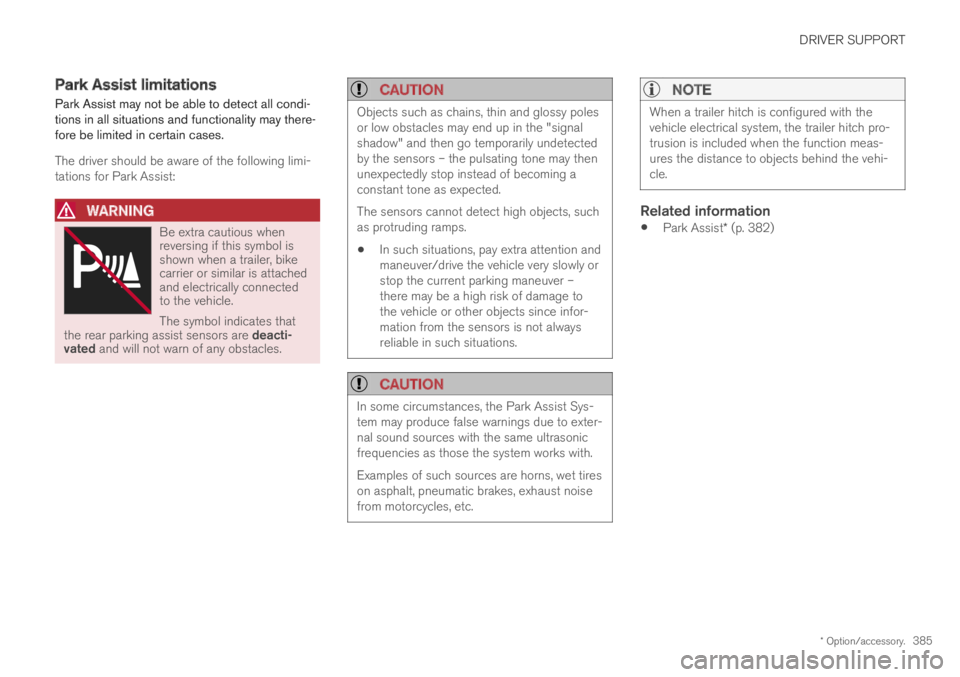
Be extra cautious whenreversing if this symbol isshown when a trailer, bikecarrier or similar is attachedand electrically connectedto the vehicle.
The symbol indicates thatthe rear parking assist sensors are deacti-vated and will not warn of any obstacles.
CAUTION
Objects such as chains, thin and glossy polesor low obstacles may end up in the "signalshadow" and then go temporarily undetectedby the sensors – the pulsating tone may thenunexpectedly stop instead of becoming aconstant tone as expected.
The sensors cannot detect high objects, suchas protruding ramps.
In such situations, pay extra attention andmaneuver/drive the vehicle very slowly orstop the current parking maneuver –there may be a high risk of damage tothe vehicle or other objects since infor-mation from the sensors is not alwaysreliable in such situations.
CAUTION
In some circumstances, the Park Assist Sys-tem may produce false warnings due to exter-nal sound sources with the same ultrasonicfrequencies as those the system works with.
Examples of such sources are horns, wet tireson asphalt, pneumatic brakes, exhaust noisefrom motorcycles, etc.
NOTE
When a trailer hitch is configured with thevehicle electrical system, the trailer hitch pro-trusion is included when the function meas-ures the distance to objects behind the vehi-cle.
Related information
Park Assist* (p. 382)
Page 400 of 669

DRIVER SUPPORT
* Option/accessory.398
Park Assist Pilot*
Park Assist Pilot (PAP117) helps the driver pullinto and out of parking spaces.
PAP first checks whether thereis sufficient space and thensteers the car into the space.
The center display uses sym-bols, graphics and messages toinform the driver of what stepsneed to be taken and when.
WARNING
The PAP function is supplementary driversupport intended to facilitate driving andhelp make it safer – it cannot handle allsituations in all traffic, weather and roadconditions.
Pay particular attention to people andanimals near the vehicle.
PAP is not a substitute for the driver'sattention and judgment. The driver isalways responsible for ensuring the vehi-cle is driven in a safe manner, at theappropriate speed, with an appropriatedistance to other vehicles, and in accord-ance with current traffic rules and regula-tions.
NOTE
The PAP function measures the space andsteers the vehicle – the driver's role is to:
keep close watch of the area around thevehicle
follow the instructions on the center dis-play
change gears (reverse/forward) – a"ping" sound indicates when the drivershould change gears
regulate and maintain a safe speed
apply the brakes and stop.
Related information
Types of parking with Park Assist Pilot(p. 398)
Parking with Park Assist Pilot (p. 400)
Leaving a parking space with Park AssistPilot (p. 402)
Park Assist Pilot* limitations (p. 403)
Recommended maintenance for Park AssistPilot (p. 405)
Park Assist Pilot* messages (p. 406)
Types of parking with Park AssistPilot
Park Assist Pilot (PAP118) can be used for thefollowing types of parking.
117Park Assist Pilot118Park Assist Pilot
Page 402 of 669

DRIVER SUPPORT
400
Parking with Park Assist Pilot
Park Assist Pilot (PAP119) helps the driver parkusing three different steps. The function can alsohelp the driver pull out of a parking space.
NOTE
The PAP function measures the space andsteers the vehicle – the driver's role is to:
keep close watch of the area around thevehicle
follow the instructions on the center dis-play
change gears (reverse/forward) – a"ping" sound indicates when the drivershould change gears
regulate and maintain a safe speed
apply the brakes and stop.
Information about the actions required by thedriver are provided in the center display usingsymbols, graphics and/or text.
PAP can be activated if the following criteria havebeen met after the engine is started:
No trailer is hitched to the vehicle
Your vehicle's speed is lower than 30 km/h(20 mph).
NOTE
The distance between the vehicle and parkingspots should be 0.5-1.5 meters (1.6-5.0 ft)when PAP is looking for parking.
Parking
PAP parks the vehicle using the following steps:
1. The system searches for and measurespotential parking spaces.
2. The vehicle is steered while it is backing intothe parking space.
3. The vehicle is positioned in the parkingspace (the driver may be prompted to shiftgears).
Searching for and measuring potential
parking spots
The function can be activatedin the center display's Functionview.
It can also be accessed fromthe camera views.
Parallel parking overview.
Perpendicular parking overview.
To do so:
119Park Assist Pilot
Page 406 of 669

||
DRIVER SUPPORT
404
The parking sequence is cancelled
A parking sequence will be cancelled if:
the driver moves the steering wheel
the vehicle's speed exceeds 7 km/h (4 mph)
the driver taps Cancel in the center display
when the anti-lock brakes or the Electronicstability control are engaged - e.g. when awheel loses grip on a slippery road
when the power steering works at reducedpower - e.g. during cooling due to overheat-ing (see section "Speed-dependent steeringforce").
A message in the center display will explain whythe parking sequence was cancelled.
CAUTION
Under certain circumstances, PAP may not beable to find parking spaces – one reason maybe that the sensors are disrupted by externalsound sources that emit the same ultrasonicfrequencies that the system works with.
Examples of such sources include horns, wettires on asphalt, pneumatic brakes, exhaustnoise from motorcycles, etc.
NOTE
Dirt, ice and snow covering the sensorsreduce their function and can make measure-ment impossible.
Driver responsibility
The driver should keep in mind that PAP is aparking aid ‒ not an infallible fully automatic sys-tem. The driver must always be prepared to takecontrol and cancel a parking sequence if neces-sary.
There are a number of things to keep in mindwhen parking, including:
The driver is always responsible for determin-ing if the space suggested by PAP is suita-ble for parking.
Do not use PAP when using snow chains ora temporary spare tire.
Do not use PAP if there are any objects pro-truding from the vehicle.
Heavy rain or snowfall may inhibit PAP's abil-ity to accurately measure a parking space.
While searching and measuring the parkingspace, PAP may be unable to detect objectslocated far into the space.
PAP may not suggest parking spaces onnarrow streets if it does not detect sufficientspace for maneuvering the vehicle.
Use approved tires121 inflated to the correcttire pressure because this affects PAP's abil-ity to provide parking assistance.
PAP's function is based on the way the vehi-cles are parked behind and in front of yourparking space. If they are, for example,parked too close to the curb, there is a riskthat your vehicle's tires or wheel rims couldbe damaged by the curb during the parkingprocedure.
Perpendicular parking spaces may not bedetected or may be suggested unnecessarilyif a parked vehicle is sticking out more thanother parked vehicles.
PAP is intended to provide parking assis-tance on straight streets, not sections ofstreet with sharp curves or bends. Alwaysmake sure that your vehicle is parallel to rel-evant parking spaces when PAP is measur-ing the parking space.
CAUTION
Switching to another approved wheel and/ortire dimension could change the tire circum-ference, which would then require the PAPsystem to be updated. Consult a workshop –an authorized Volvo workshop is recom-mended.
121"Approved tires" refers to tires of the same type and make as the vehicle's original, factory-installed tires.
Page 410 of 669

HYBRID INFORMATION
408
General information about TwinEngine
Twin Engine vehicles are driven just like anyother vehicle, but certain functions differ from avehicle powered exclusively by gasoline. Theelectric motor powers the vehicle primarily at lowspeeds; the gasoline engine is used at higherspeeds or during more active driving.
The instrument panel displays Twin Engine-spe-cific information - charging information, selecteddrive mode, distance to discharged battery andhybrid battery charge level.
Different drive modes can be selected while driv-ing, e.g. electric power only or, if more power isneeded, a combination of electric and gasolinepower. The vehicle calculates the optimal combi-nation of driveability, driving experience, environ-mental impact and fuel economy for the selecteddrive mode.
In order to function optimally, the hybrid battery(and its electrical drive systems) and the gasolineengine (and its drive systems) must be at thecorrect operating temperature. Battery capacitycan be considerably reduced if the battery is toocold or too hot. Preconditioning prepares thevehicle's drive systems and passenger compart-ment before driving to help reduce both wear andenergy consumption. It also helps increase thehybrid battery's range.
The hybrid battery which powers the electricmotor is recharged using the charging cable. It
can also be recharged during light braking andthrough engine braking in gear position B. Thecombustion engine can also help recharge thehybrid battery.
Important
No electrical current
Keep in mind that if there is no electrical currentto the vehicle, i.e. the ignition is switched off orthe start battery is discharged, certain functionssuch as brakes, power steering, etc. will not work.
WARNING
If the vehicle does not have electrical currentand both the electric motor and the gasolineengine are switched off, the brakes cannot beused to stop the vehicle.
Towing not permitted
Never tow a Twin Engine vehicle behind anothervehicle, as this could damage the electric motor.
Exterior engine noise
WARNING
Please be aware that there is no sound fromthe engine when the vehicle is being poweredby the electric motor and it may be difficult todetect by children, pedestrians, cyclists andanimals. This is especially true at low speeds.
High-voltage electrical current
WARNING
A number of electrical components in TwinEngine Plug-in Hybrid vehicles use high-volt-age current and can be extremely dangerousif handled incorrectly. These components andany orange wiring in the vehicle may only behandled by trained and qualified Volvo servicetechnicians.
Do not touch anything that is not clearly descri-bed in this Owner's Manual.
Related information
Charging the hybrid battery (p. 409)
Hybrid gauge (p. 83)
Drive modes (p. 446)
Starting and stopping preconditioning(p. 225)
Hybrid battery (p. 605)
Factors affecting electric motor range(p. 455)
Page 412 of 669

||
HYBRID INFORMATION
410
Charging cable handle and charging socket.
Charging status is indicated in three ways:
The indicator lights in the charging module(the unit connected to the wall outlet).
Indicator light in the vehicle's chargingsocket.
Images and text in the instrument panel.
The start battery is charged while the hybrid bat-tery is charging and stops charging when thehybrid battery is fully charged.
If the hybrid battery's temperature is below-10 ºC (14 ºF) or above 40 ºC (104 ºF), some ofthe vehicle's functions may be reduced or notavailable at all.
The electric motor cannot be used if the battery'stemperature is too low or too high. If the PUREdrive mode is selected, the gasoline engine willstart.
Charging using the gasoline engine
The vehicle generates electrical current to charge thebattery, e.g. when the driver lightly presses the brakepedal or when engine braking is used on downgrades.
The vehicle can also generate current to thehybrid battery to charge it.
The hybrid battery can also be recharged bylightly depressing the brake pedal, i.e. duringlight braking. This converts the vehicle'skinetic energy to electrical energy, which isused to charge the hybrid battery.
In gear position B, the electric motor brakesthe vehicle when the accelerator pedal isreleased and the hybrid battery is rechargedat the same time.
The combustion engine can also helprecharge the hybrid battery.
Related information
Charge cable (p. 411)
Charging current (p. 411)
Opening and closing the charging socketcover (p. 414)
Initiating hybrid battery charging (p. 415)
Stopping hybrid battery charging (p. 421)
Charging status in the charging cable'scharging module (p. 417)
Charging status in the vehicle's chargingsocket (p. 417)
Charging status in the instrument panel(p. 419)
Twin Engine symbols and messages in theinstrument panel (p. 422)
Gear selector positions for automatic trans-missions (p. 440)
Changing drive mode (p. 449)
Long-term storage of vehicles with hybridbatteries (p. 424)