2019 VOLVO S60 TWIN ENGINE trunk
[x] Cancel search: trunkPage 256 of 645

||
KEY, LOCKS AND ALARM
254
To create a security code:
1. Tap the button for private locking in Functionview.
> A pop-up window will appear.
2.Enter the desired security code and pressConfirm.
>The security code is saved. The privatelocking function is now ready for activa-tion.
Activating private locking
NOTE
The rear seat must be in the upright positionwhen private locking is activated in order forthe seats to lock.
1. Tap the button for private locking in Functionview.
> A pop-up window will appear.
2.Enter the code you would like to use tounlock the trunk lid and rear seats and tapConfirm.
>The trunk lid and rear seats will lock. Agreen indicator light will illuminate next tothe button in Function view to confirmlocked status.
Deactivating private locking
1. Tap the button for private locking in Functionview.
> A pop-up window will appear.
2.Enter the code used for locking and tapConfirm.
>The trunk lid and rear seats will unlock.The green indicator light next to the but-ton in Function view will go out to confirmunlocked status.
Forgotten PIN code
If you have forgotten your PIN code or entered itincorrectly more than three times, the securitycode can be used to deactivate private locking.
If the vehicle is unlocked using Volvo On Call orthe Volvo On Call app, private locking will beautomatically deactivated.
Forgotten security code
If you have forgotten your security code, contactan authorized Volvo retailer for assistance deacti-vating private locking.
Related information
Private Locking (p. 253)
Page 257 of 645

KEY, LOCKS AND ALARM
255
Alarm
The alarm emits sound and light signals if any-one without a valid remote key attempts to breakinto the vehicle or interferes with the start batteryor alarm siren.
When armed, the alarm will be triggered if:
the hood, trunk lid or any door is opened.
a battery cable is disconnected.
the alarm siren is disconnected.
Alarm signals
The following occurs if the alarm is triggered:
A siren will sound for 30 seconds or until thealarm is turned off.
The hazard warning flashers will flash for5 minutes or until the alarm is turned off.
If the reason the alarm was triggered is not recti-
fied, the alarm cycle will repeat up to 10 times14.
Alarm indicator
A red indicator light on the dashboard shows thestatus of the alarm:
Indicator off - the alarm is disarmed.
Indicator flashes once every two seconds -the alarm is armed.
The indicator flashes quickly after the alarmhas been disabled for up to 30 seconds oruntil the ignition is put in I mode – the alarmhas been triggered.
In the event of alarm system failure
If a problem is detected in the alarmsystem, a symbol and the messageAlarm system failure Servicerequired will appear in the instrumentpanel. Contact a workshop - an authorized Volvoworkshop is recommended.
NOTE
Do not attempt to repair or alter any of thecomponents in the alarm system yourself. Anysuch attempt could affect the terms and con-ditions of your insurance policy.
Related information
Arming and disarming the alarm (p. 256)
14Certain markets only.
Page 258 of 645

KEY, LOCKS AND ALARM
* Option/accessory.256
Arming and disarming the alarm
The alarm is armed when the vehicle is locked.
Arming the alarm
Lock and arm the vehicle by
pressing the lock button on the remote key
.
touch the marked surface on the outside ofthe door handle or the rubberized pressure
plate on the trunk lid15.
A red LED light on the dashboard will flash every othersecond when the vehicle is locked and the alarm isarmed.
Disarming the alarm
Unlock and disarm the vehicle alarm by
pressing the unlock button on the remote
key .
grip a door handle or lightly press the trunk
lid's rubberized button15.
Disarming the alarm without a functioning
remote key
The vehicle can be unlocked and disarmed evenif the remote key is not functioning, e.g. if thebattery is discharged.
1. Open the driver's door using the detachablekey blade.
> This will trigger the alarm.
Location of the backup key reader in the cup holder.
2. Place the remote key on the key symbol inthe backup reader in the tunnel console'scup holder.
3.Turn the start knob clockwise and release.
> The alarm will be disarmed.
Turning off a triggered alarm
–Press the unlock button on the remote keyor put the ignition into mode I by turning thestart knob clockwise and then releasing it.
Automatically arming and disarming the
alarm
Automatically arming the alarm helps preventinadvertently leaving the vehicle without alarmprotection.
If the vehicle is unlocked using the remote key(and the alarm is disarmed) but none of thedoors or trunk lid is opened within two minutes,the alarm will be automatically rearmed. The vehi-cle will also re-lock.
On some markets, the alarm will be automaticallyarmed following a slight delay after the driver'sdoor has been opened and closed without beinglocked.
To change this setting:
1.Tap Settings in the center display's Topview.
2.Tap My CarLocking.
3.Select Passive Arming Deactivation totemporarily deactivate the function.
15Vehicles with keyless locking and unlocking*.
Page 305 of 645

DRIVER SUPPORT
* Option/accessory.303
Park Assist Camera *
Blind sectors
There are "blind" sectors between the cameras' fields ofvision.
With Park Assist Camera's 360° view* selected,objects/obstacles may not be detected if theyare located in the "joints" where the edges of theindividual camera views meet.
WARNING
Even if it seems as though only a fairly smallsection of the screen image is obstructed, thismay mean that a relatively large sector is hid-den and obstacles there may not be detecteduntil they are very near the vehicle.
Defective camera
If a camera sector is dark andcontains this symbol, this indi-cates that the camera is notfunctioning properly.
See the following illustration foran example.
The vehicle's left-side camera is malfunctioning.
A dark camera sector may also be displayed inthe following situations, but without the defectivecamera symbol:
a door is open
the trunk lid is open
a rearview mirror is folded in
Lighting conditions
The camera image is automatically adjustedaccording to the current lighting conditions. Thismeans that the brightness and quality of the
image may vary slightly. Poor lighting conditionsmay result in reduced image quality.
Rear Park Assist Camera
WARNING
Be extra cautious whenreversing if this symbol isshown when a trailer, bikecarrier or similar is attachedand electrically connectedto the vehicle.
The symbol indicates thatthe rear parking assist sensors are deacti-vated and will not warn of any obstacles.
NOTE
A bike carrier and other accessories mountedon the rear of the vehicle can obscure thecamera's view.
Related information
Camera (p. 299)
Radar sensor (p. 297)
Recommended camera and radar sensormaintenance (p. 304)
Park Assist Camera* (p. 355)
Page 377 of 645

HYBRID INFORMATION
}}
375
Gear selector positions for automatic trans-missions (p. 406)
Towing using a towline (p. 438)
Charging the hybrid battery
In addition to the conventional fuel tank, yourvehicle is also equipped with a rechargeablelithium-ion hybrid battery.
WARNING
California Proposition 65
Operating, servicing and maintaining a pas-senger vehicle can expose you to chemicalsincluding engine exhaust, carbon monoxide,phthalates, and lead, which are known to theState of California to cause cancer and birthdefects or other reproductive harm. To mini-mize exposure, avoid breathing exhaust, donot idle the engine except as necessary, serv-ice your vehicle in a well ventilated area andwear gloves or wash your hands frequentlywhen servicing your vehicle. For more infor-mation go to www.P65Warnings.ca.gov/passenger-vehicle.
The hybrid battery can be recharged using thecharging cable stored in a storage space in thetrunk.
WARNING
The hybrid electrical system in your vehicleuses high voltage electrical current. Any dam-age to this system or to the hybrid batterymay result in the danger of overheating, fire,or serious injury. If the vehicle is involved in acollision or subjected to flooding, fire, etc.,have it inspected by a trained and qualifiedVolvo service technician. Prior to this inspec-tion, the vehicle should be parked outdoors ata safe distance from any building or poten-tially flammable materials.
The hybrid battery's charging time depends onthe charging current used.
NOTE
The capacity of the hybrid battery diminishessomewhat with age and use, which couldresult in increased use of the gasoline engineand consequently, slightly higher fuel con-sumption.
WARNING
If the hybrid battery needs to be replaced, thismay only be done by a Volvo retailer orauthorized Volvo workshop.
Page 383 of 645

HYBRID INFORMATION
}}
381
WARNING
The charging cable must be groundedwhen in use. It is equipped with a cordwith a grounding conductor and agrounding plug. The plug must beinserted into an appropriate outlet that isproperly installed and grounded inaccordance with all local codes and ordi-nances and is not damaged in any way.
Children should be supervised when inthe vicinity of the charging cable when itis plugged in.
High voltage is present in your electricmeter housing and power distributionservice panel. Contact with high voltagecan cause death or serious personalinjury.
Do not use the charging cable if it isdamaged in any way. A damaged or mal-functioning charging cable may only berepaired by a workshop – an authorizedVolvo workshop is recommended.
Always position the charging cable sothat it will not be driven over, stepped on,tripped over or otherwise damaged, orcause personal injury.
Disconnect the charger from the wall out-let before cleaning it.
Never connect the charging cable to anextension cord or a multiple plug socket.
Also, refer to the manufacturer's instructionsfor using the charging cable and its compo-nents.
CAUTION
Make sure that the 120/240 V outlet (AC,alternating current) has a power capacity suf-ficient for charging electric vehicles. If you areuncertain of the capacity, have the outletchecked by a licensed electrician.
Take out the charging cable from the storagecompartment on the right side of the trunk. Notethat the ignition must be switched off completelybefore charging.
Plug the charging cable into a 120/240 Voutlet. Never use an extension cord.
Open the charger door. Push the charginghandle all the way into the vehicle's socket.
Page 388 of 645

HYBRID INFORMATION
* Option/accessory.386
Stopping hybrid battery charging
To stop charging of the hybrid battery, unlockthe vehicle, unplug the charging cable from thevehicle's charging socket and then unplug thecable from the 120/240 V outlet (alternatingcurrent).
CAUTION
Before the charging cable is removed fromthe vehicle's charging socket, the vehiclemust be unlocked using the unlock button onthe remote key. This must be done even if thevehicle's doors are already unlocked. If thevehicle is not unlocked using the unlock but-ton, the charging cable or system may bedamaged.
NOTE
Always unlock the vehicle so that charging iscut off before the connection to the120/240 V outlet (AC, alternating current) isdisconnected. Note that the charging cablemust be disconnected from the vehicle'scharging socket before it is disconnectedfrom the 120/240 V outlet, partly to preventdamage to the system and party to preventunintentional interruption of charging.
Unlock the vehicle with the remote key.Charging will stop.
Press the lock button on the chargingcable's handle. The handle will be released/unlocked. Unplug the cable from the vehi-cle's charging socket and close the chargerdoor.
Unplug the cable from the 120/240 V outlet.
Stow the charging cable in the storage com-partment on the right side of the trunk.
Charging cable automatically locks
If the charging cable cannot be removed from thecharging socket, it will automatically lock intoplace again after unlocking to maximize chargingand range and to enable preconditioning beforedriving. The charging cable can be removed againif the vehicle is unlocked using the remote key.For vehicles with Passive Entry*, the handle canbe used to lock and unlock.
Related information
Opening and closing the charging socketcover (p. 380)
Charge cable (p. 377)
Charging the hybrid battery (p. 375)
Initiating hybrid battery charging (p. 380)
Page 397 of 645
STARTING AND DRIVING
* Option/accessory.395
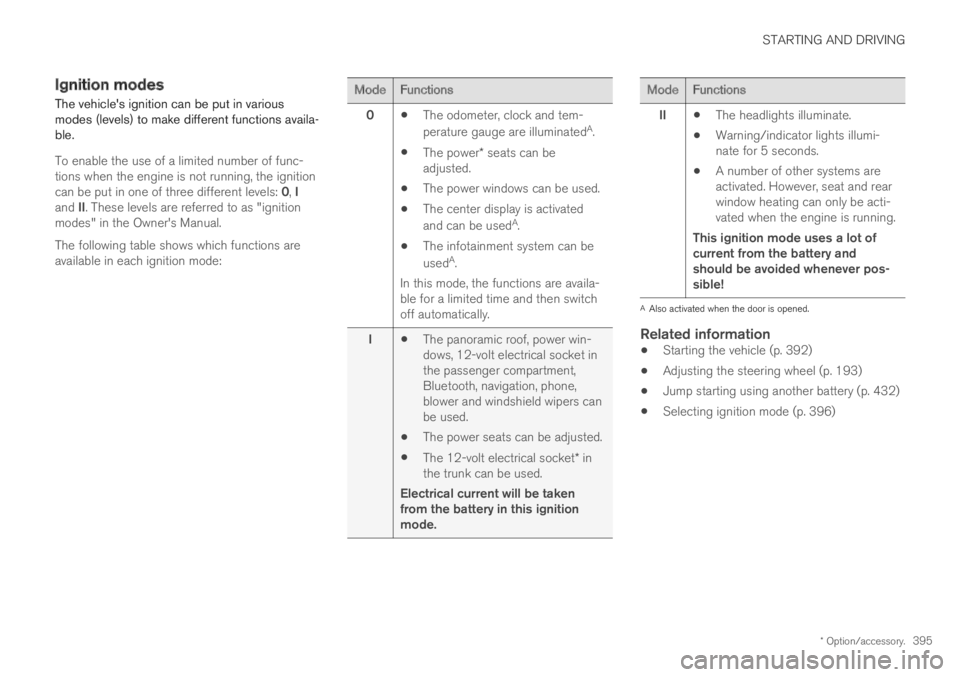
Ignition modes
The vehicle's ignition can be put in variousmodes (levels) to make different functions availa-ble.
To enable the use of a limited number of func-tions when the engine is not running, the ignitioncan be put in one of three different levels: 0, Iand II. These levels are referred to as "ignitionmodes" in the Owner's Manual.
The following table shows which functions areavailable in each ignition mode:
ModeFunctions
0The odometer, clock and tem-
perature gauge are illuminatedA.
The power* seats can beadjusted.
The power windows can be used.
The center display is activated
and can be usedA.
The infotainment system can be
usedA.
In this mode, the functions are availa-ble for a limited time and then switchoff automatically.
IThe panoramic roof, power win-dows, 12-volt electrical socket inthe passenger compartment,Bluetooth, navigation, phone,blower and windshield wipers canbe used.
The power seats can be adjusted.
The 12-volt electrical socket* inthe trunk can be used.
Electrical current will be takenfrom the battery in this ignitionmode.
ModeFunctions
IIThe headlights illuminate.
Warning/indicator lights illumi-nate for 5 seconds.
A number of other systems areactivated. However, seat and rearwindow heating can only be acti-vated when the engine is running.
This ignition mode uses a lot ofcurrent from the battery andshould be avoided whenever pos-sible!
AAlso activated when the door is opened.
Related information
Starting the vehicle (p. 392)
Adjusting the steering wheel (p. 193)
Jump starting using another battery (p. 432)
Selecting ignition mode (p. 396)