2019 VOLKSWAGEN TRANSPORTER Opening the menu instrument cluster Settings
[x] Cancel search: Opening the menu instrument cluster SettingsPage 27 of 486
Using the menus in the instrument cluster
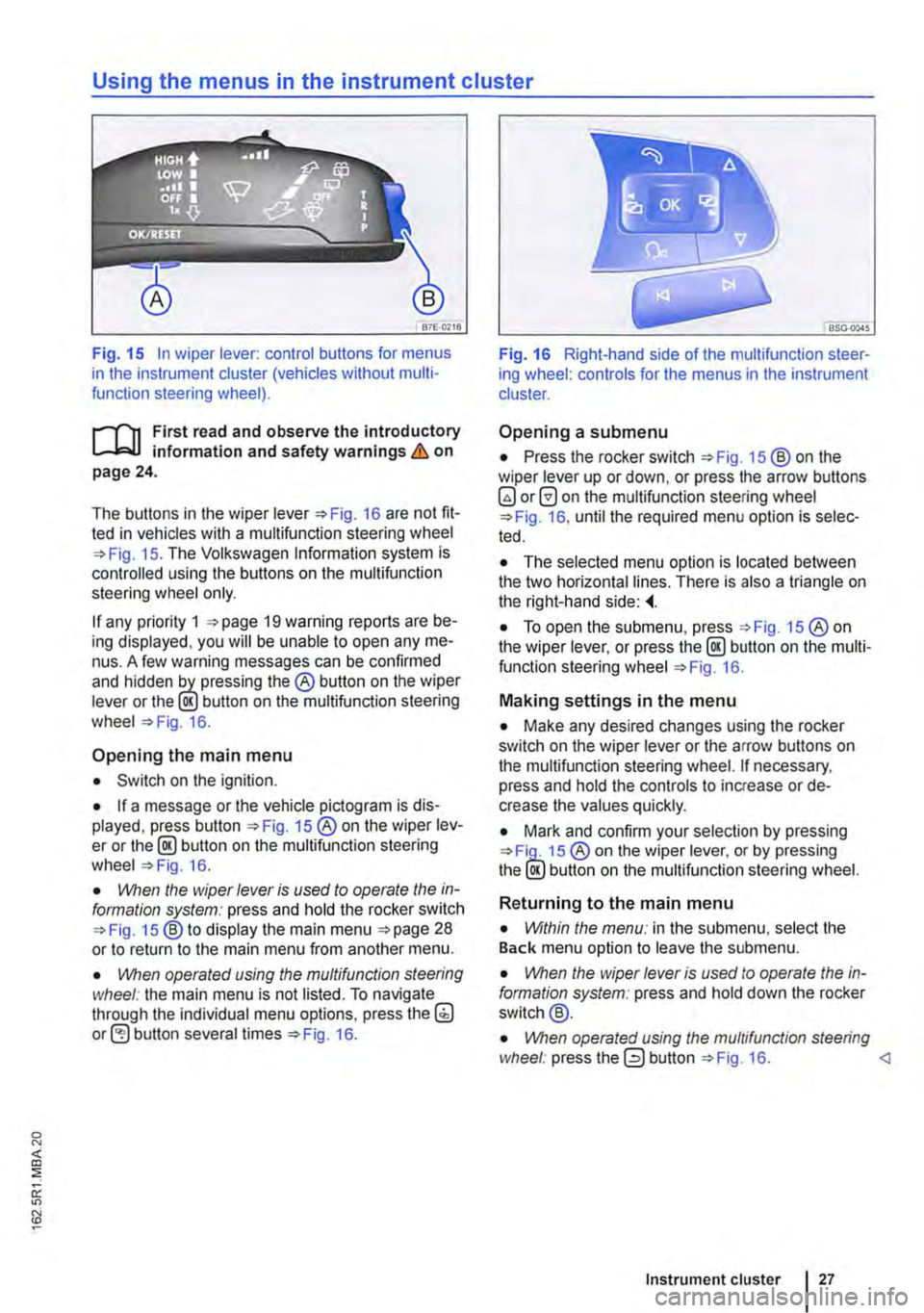
Fig. 15 In wiper lever: control buttons for menus in the instrument cluster (vehicles without multi-function steering wheel).
r--f"n First read and observe the introductory L-J,:.lJ information and safety warnings & on page 24.
The buttons in the wiper Fig. 16 are not fit-ted in vehicles with a multifunction steering wheel 15. The Volkswagen Information system is controlled using the buttons on the multifunction steering wheel only.
If any priority 1 19 warning reports are be-ing displayed, you will be unable to open any me-nus. A few warning messages can be confirmed and hidden the® button on the wiper lever or the lE!.) button on the multifunction steering wheel 16.
Opening the main menu
• Switch on the ignition.
• If a message or the vehicle pictogram is dis-played, press button 15 ®on the wiper lev-er or the@ button on the multifunction steering wheel 16.
• VVhen the wiper lever is vsed to operate the in-formation system: press and hold the rocker switch 15 ®to display the main menu 28 or to return to the main menu from another menu.
• \!Vhen operated vsing the mvltifvnction steering wheel: the main menu is not listed. To navigate through the individual menu options, press the(;) button several times 16.
Fig. 16 Right-hand side of the multifunction steer-ing wheel: controls for the menus in the instrument cluster.
Opening a submenu
• Press the rocker switch 15 ®on the wiper lever up or down, or press the arrow buttons 0 on the multifunction steering wheel 16, until the required menu option is selec-ted.
• The selected menu option is located between the two horizontal lines. There is also a triangle on the right-hand side:
• To open the submenu, press 15 ®on the wiper lever, or press the @ button on the multi-function steering wheel 16.
Making settings in the menu
• Make any desired changes using the rocker switch on the wiper lever or the arrow buttons on the multifunction steering wheel. If necessary, press and hold the controls to increase or de-crease the values quickly.
• Mark and confirm your selection by pressing 15 ® on the wiper lever, or by pressing the lE!.) button on the multifunction steering wheel.
Returning to the main menu
• Within the menv: in the submenu, select the Back menu option to leave the submenu.
• \!Vhen the wiper lever is vsed to operate the in-formation system: press and hold down the rocker switch@.
• \!Vhen operated vsing the mvltifvnc/ion steering wheel: press the 0 button 16.
Page 31 of 486

Convenience submenu
m First read and observe the introductory information and safety warnings & on page 24.
Convenience sub-menu Function
Alarm conf. Switching the acoustic re-confirmation function for activating the anti-theft alarm on or page 39.
(Auto Lock): automatically locks all the doors and the tailgate once a speed of approximately 15 km/h (9 m ph) is reached. To unlock Auto Lock while the vehicle is stationary, press the central locking button, use the door lever or remove the key from the ignition when the function Unlock is active.
Auto Unlock (Auto Unlock): all doors and the tailgate are unlocked when the
Central locking vehicle key is removed from the ignition.
39 Depending on the settings, the following doors will be unlocked when the vehicle is unlocked using the vehicle key: -All doors: all doors are unlocked. Door un--Single door: only the driver door is unlocked when the vehicle locking key is used to unlock the vehicle. All the other doors and the tail-gate will not be unlocked until the button @ is pressed for a sec-end time. -Vehicle side: the doors on the driver side are unlocked.
Settings for the electric windows: all the windows can be opened or closed when Window oper. locking or unlocking the vehicle. This opening function can only be activated for the driver door 55.
Factory setting The functions in the Convenience submenu are reset to the factory settings.
Back The display returns to the Settings menu.
[QJ First read and observe the introductory information and safety warnings & on page 24.
Lights & Vision Function submenu
Coming Home Settings for how long the vehicle should be lit once it is locked or unlocked, or for
Leaving Home switching the function on or off 112.
Footwell light For setting the brightness of the footwelllight or switching the function on or off.
Daytime running Switches daytime running lights on and off. 1 i ghts
Lane change Switching the lane change flash (Lane eh. flash) on or off. When the lane change flash function is switched on, the turn signal will flash at least 3 times when the tum flash signal and main beam lever is gently tapped 106.
Switching travel mode on and off. When the travel mode is switched on, the head-lights of a left-hand drive vehicle will be adjusted for use on the left-hand side of
Travel mode the road and those in a right-hand drive vehicle for use on the right-hand side of the road. Adjust the headlights in countries in which the traffic drives on the other side of the road. Travel mode may only be used for a short period of time and must be deactivated as soon as it is no longer required.
Instrument cluster 31
Page 470 of 486
Supplementary heater . . . . . . • . . . . . . . . 345 Winter diesel . . . . . . . . . . . . . . . . . . . . . . 345
Diesel engines Technical data . . . . . . . . . . . • . . . . . . . . . 455
Diesel partlcutate filter . . . . . . • . . . . . . . . . 409 ............................. 408 Gear-change indicator . . . . . . . . . . . . . . . 268 Indicator lamp . . . . . . . . . . . • . . . . . . . . . 407 Regeneration . . . . . . . . . . . . . . . . . . . . . . 409 Things to note . . . . . . . . . . . . . . . . . . . . . 346
Differential lock see Brake support systems . . . . . . . . . . . 275
Digital clock . . . . . . . . . . . . . . . . . . . . . . . . . . 20
Digital voice enhancement . . . . . . . . . . . . . 173 Setting the volume . . . . . . . . • . . • . . . . . . 173 Switching on and off . . . . . . . . . . . . . . . . . 173
Dimensions . . . . . . . . . . . . . . . . . . . . . . . . . 452
Dipped beam headlights . . . . . . . . . . . . . . . 108
Display Adaptive cruise control . . . . . . . . . . . . . . . 300
Displays . . . . . . . . . . . . . . . . . . . . . . . . . . 20, 21 Area monitoring system . . . . . . . . . . . . . . 308 Front Assist .. .. .. .. .. .. .. .. .. . .. .. 308 Instrument cluster . . . . . . . . . . . . . . . . . . . 21
Disposal Airbag system . . . . . . . . . . . . . . . . . . . . . 407 Belt tensioner . . . . . . . . . . . . • . . . . . . . . . . 87 End-of-life vehicle . . . . . . . . . . . . . . . . . . 407
Door arresters . . . . . . . . . . . . . . . . . . . . . . . . 54
Door release lever . . . . . . . . . . . . . . . . . . . . 5, 9
Doors .................•............. 45 Manual opening . . . . . . . . . . . . . . . . . . . . 414 Warning lamp . . . . . . . . . • . . . . . • . . . . . . . 45
Drawbar load . . . . . . . . . . . . . . . . . . . . . . . . 140 Loading the trailer . . . . . . . . • . . . . . . . . . 146
Drawers .....................•....... 76
Drink holder . . . . . . . . . . . . . . . . . . . . . • . . . 153 California . . . . . . . . . • . . • . . . . . . . . • . . . 215 Centre console . . . . . . . . . . . . . . . . . . . . . 154 Living area . . . . . . . . . . . . . . . . . . . . . . . . 154
Driver Alert System . . . . . . . . . . . . . . . . . . . 315 Fault . . . . . . . . . . . . . . . . • . . . . . . . . • . . . 316 Function . . . . . . . . . . . . . • . . . . . • . . • . . . 316 Operation by the user . . • . . . . . . . . • . . . 316 Switching on and off........ . . . . . . . . . 316
Driver assist systems see Assist systems . . . . . . . . . . . . . . . . . 282 Driver door Overview ........................... 9
Driving Before setting off . . . . . . . . . . . . . . . . . . . . 33 Data recording . . . . . . . . . . . . . . . . . . . . . 398 Driving abroad . . . • . . . . . . . . . . . . . . . . . . 34 Driving tips . . . . . . . . . . . . . . . . . . . . . . . . . 33 Economically . . . . . . . . . . . . . . . . . . . . . . 278 Engine and transmission guard . . . . . . . . . 33
470 I Index
Fuel gauge . . . . . . . . . . . . . . . . . . . . . . . . 341 Fuel level too low . . . . . . . . . . . . . . . . . . . 341 Off-road driving . . . . . . . . . . . . . . . . . . . . . 33 Parking on a downward incline . . . . . . . . 272 Parking on an upward incline . . . . . . . . . . 272 Preparing for a journey . . . . . . . . . . . . . . . 33 Pulling away on an incline . . . . . . . . . . . . 267 Stopping on an incline . . . . . . . . . . . . . . . 267 Through salt water . . . . . . . . . . . . . . . . . . . 35 Towing ........................... 448 Water on the roads . . . . . . . . . . . • . . . . . . . 35 With a trailer . . . . . . . . . . . . . . . . . . . . . . . 146 with dual clutch gearbox . . . . . . . . . . . . . 266 With Loaded vehicle . . . . . . . . . . . . . . . . . 125 With respect for the environment . . . . . . . 278
Driving abroad Checklist . . . . . . . . . . . . . . . . . . . . . . . . . . 34 Headlights . . . . . . . . . . . . . . . . . • . . • . . . . 111
Driving economically . . . . . . . . . . . . . . . . . 278
Driving safely . . . . . . . . . . . . . . . . . . . . . . . . . 33
Driving through salt water . . . . . . . . . . . . . . 35
Driving through water . . . . . . . . . . • . . . . . . . 35
Driving tips . . . . . . . . . . . . . . . . . . . . . . . . . . . 33 Spare wheel . . . . . . . . . . . . . . . . . . . . . . . 374
Driving with respect for the environment . 278
DSG see Dual clutch gearbox . . . • . . • . . . . . . 266
DSG dual clutch gearbox Changing gear . . . . . . . . . . . . . . . . . . . . . 264 Fault . . . . . . . . . . . . . . . . . . . . . . . . . . . . . 267 Malfunction . . . . . . . . . . . . . . . . . . . . . . . . 268 Pulling away on an incline . . . . . . . . . . . . 267 Safety interlock for ignition key . . . . . . . . 258 Stopping on an incline . . . . . . . . . . . . . . . 267
Dual clutch gearbox . . . . . . . . . . . . . . 260, 266 also refer to Changing gears . . . . . . . . . . 260 Coasting function . . . . . . . . . . . . . . . . . . . 266 Driving . . . . . . . . . . . . . . . . . • . . . . . . . . . 266 Dual clutch gearbox . . . . . . . . . . . . . . . . . 266 Kickdown function . . . . . . . . . . . . . . . . . . 266 Towing ........................... 447 Unlocking the selector lever lock manually .4.15
Dual clutch gearbox DSG . . . . . . . . . . . . . . 264
Dust filter . . . . . . . . . . . . . . . . . . . . . . . . . . . 322
DVD player . . . . . . . . • . . • . . . . . . . . . . . . . . 167 Main menu . . . . . . . . . • . . • . . . . . . . . . . . 171 Settings . . . . . . . . . . . . . . . . . . . . . . . . . . 171
DVE ................................ 173
Dynamic headlight range control .....•... 113
E
E10 Refuelling . . . . . . . . . . . . . . . . . . . • . . . . . 344 EDL see Brake support systems . . . . . . . . . . . 275