2019 VAUXHALL INSIGNIA Parking
[x] Cancel search: ParkingPage 137 of 345
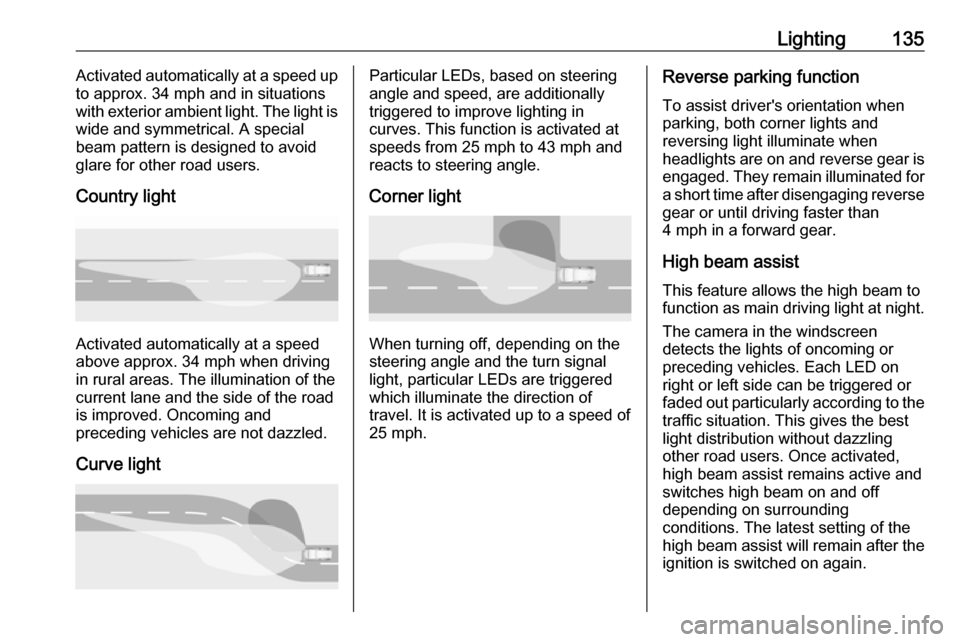
Lighting135Activated automatically at a speed up
to approx. 34 mph and in situations
with exterior ambient light. The light is wide and symmetrical. A special
beam pattern is designed to avoid
glare for other road users.
Country light
Activated automatically at a speed
above approx. 34 mph when driving
in rural areas. The illumination of the current lane and the side of the roadis improved. Oncoming and
preceding vehicles are not dazzled.
Curve light
Particular LEDs, based on steering
angle and speed, are additionally
triggered to improve lighting in
curves. This function is activated at
speeds from 25 mph to 43 mph and
reacts to steering angle.
Corner light
When turning off, depending on the
steering angle and the turn signal light, particular LEDs are triggered
which illuminate the direction of
travel. It is activated up to a speed of
25 mph.
Reverse parking function
To assist driver's orientation when
parking, both corner lights and
reversing light illuminate when
headlights are on and reverse gear is engaged. They remain illuminated for
a short time after disengaging reverse gear or until driving faster than
4 mph in a forward gear.
High beam assistThis feature allows the high beam to
function as main driving light at night.
The camera in the windscreen
detects the lights of oncoming or
preceding vehicles. Each LED on
right or left side can be triggered or
faded out particularly according to the traffic situation. This gives the best
light distribution without dazzling
other road users. Once activated,
high beam assist remains active and switches high beam on and off
depending on surrounding
conditions. The latest setting of the
high beam assist will remain after the ignition is switched on again.
Page 141 of 345

Lighting139Parking lights
When the vehicle is parked, the
parking lights on one side can be
activated:
1. Switch off ignition.
2. Move turn signal lever all the way up (right parking lights) or down
(left parking lights).
Confirmed by a signal and the
corresponding turn signal control
indicator.
Reversing lights
The reversing light comes on when
the ignition is on and reverse gear is
selected.
Misted light covers
The inside of the light housing may
mist up briefly in poor, wet and cold weather conditions, in heavy rain or
after washing. The mist disappears
quickly by itself; to help switch on the
headlights.Interior lighting
Instrument panel illumination control
Brightness of the following lights can
be adjusted in position AUTO when
the light sensor detects night
conditions, or in position 8 or 9.
● instrument panel illumination
● Info-Display
● illuminated switches and operation elements
Push and then turn A until the desired
brightness is obtained.
Page 157 of 345

Infotainment system155Overview*:Enter an address or keyword.;:Store address as a favourite.':Display recent addresses.&:Close the address bar.+:Zoom in.–:Zoom out.%:Go to the Options menu.7:Display traffic information list
(netwerk connection
necessary).
N | Mainzer Straße : Touch to display
additional information about the
current location.
Navigation optionsThe following settings are adjustable
in the Options menu %:
● Map view
● Activate / deactivate traffic on map and automatic rerouting
● Select which points of interests are shown on the map
● Select the routing options and the
map colours, look for map
updates, change home and work
address, etc.
● Indicate routes that should be avoided
● Edit destinations
Starting a route guidance 1. To start a route guidance, touch *.
2. Enter an address, choose a favourite or choose a point of
interest.
Points of interest are sorted by
different categories (fuel, parking,
food, etc.).
3. Touch Go and the route guidance
is started.
Different routes can also be
displayed before touching Go.Active route guidance
The following actions are possible
during an active route guidance:
● Toggling between time of arrival, remaining distance and
remaining travel time by touching
the time and distance information on the screen.
● Muting the voice prompts by touching ?.
● Displaying detailed information on upcoming navigation
manoeuvres by touching the
green navigation bar.
Voice prompts can be replayed
and single navigation
Page 158 of 345

156Infotainment systemmanoeuvres can be deleted bytouching /. The route will be
recalculated.
Stopping a route guidance To stop an active route guidance,touch & next to the green navigation
bar.
Connected navigation
The connected navigation function
includes live traffic information,
personalised search and routing,
predictive navigation as well as
parking and fuel price information.
Live traffic The connected navigation function
indicates real-time traffic information
like traffic jams and road works. To
display the traffic information list,
touch 7 on the navigation screen.
Traffic information along the route
and nearby will be displayed as a list.
On the navigation screen, road works
will be indicated by road signs and
traffic density will be indicated by
orange and red roads. Traffic densitywill also be indicated when the traffic
information list is empty due to no
incidents like road works or accidents.
Notice
Using the connected navigation
function consumes OnStar data or
mobile data. Additional costs could
emerge.
Network connection
To use the connected navigation
function, a network connection is
necessary. OnStar or a mobile
hotspot, e.g. mobile phone, can be
used.
When connected to a hotspot, the Wi-
Fi symbol will appear in the bottom
bar. If a mobile phone is connected
via Bluetooth, the Wi-Fi symbol will
only appear for a few seconds but the Wi-Fi symbol will appear in the
extended status view.
Connected navigation will be
indicated by the word LIVE on the
traffic symbol 7 on the navigation
screen.Notice
When no traffic information are
available although LIVE is indicated
on the traffic symbol 7, the network
connection might be interrupted.
Wait some minutes until the network
connection is built up again.
Personalised search and routing
The connected navigation function
includes personalised search and
routing. The system learns the
driver's pattern and suggests routes
and points of interest that fit the
driver's individual needs and
interests.
Predictive navigation
Predictive navigation is a
personalised and increasingly useful
function that detects common
destinations like home and work.
Additionally, the predictive navigation function understands the driver's
patterns and uses historical driving
and traffic data to predict usual traffic
conditions.
Page 159 of 345

Infotainment system157The predictive navigation function
can be activated or deactivated in the
Settings menu. To go to the Settings
menu, go to the Options menu % on
the navigation screen and select
Settings .
Parking information and fuel
prices
The connected navigation function
indicates parking and fuel price
information. When the vehicle is
reaching a densely populated
destination, and if the system
determines that parking may be
limited then it will attempt to display nearby parking destinations with price
information if available. The function
also indicates real-time fuel prices if
available.
To display the parking and fuel prices
as well as opening hours and
telephone numbers, if available,
touch the point of interest on the map or see the results of the points of
interest search.Online map updates
The navigation map can be updated
when a new version is available. The
updates are also based on the driver's driving patterns by considering
updates of typically driven places.
To update the navigation map, a
network connection is necessary.
Whether the map content is up to
date, is indicated in the Settings menu
in the Options menu %. If desired,
automatic map updates can be
activated. Additionally, a message
will be displayed if the update
exceeds 250 MB.Speech recognition
General information
Embedded speech recognition
This application is only applicable to
Multimedia Navi Pro.
The embedded speech recognition of the Infotainment system enables
operation of various functions of the
Infotainment system via voice input. It
recognises commands and numeric
sequences. The commands and
numeric sequences can be spoken
without a voice pause between the
individual words.
In the event of incorrect operation or
commands, the speech recognition
gives visual and / or acoustic
feedback and requests to re-enter the desired command. Apart from this,
the speech recognition
acknowledges important commands
and will enquire if necessary.
In general, there are different ways to
speak commands for performing the
desired actions.
Page 177 of 345

Driving and operating175Driving and
operatingDriving hints ............................... 176
Control of the vehicle ...............176
Steering ................................... 176
Starting and operating ...............176
New vehicle running-in ............176
Power button ........................... 177
Retained power off ..................178
Starting the engine ..................178
Overrun cut-off ........................ 180
Stop-start system ....................180
Parking .................................... 182
Engine exhaust .......................... 183
Exhaust filter ............................ 183
Catalytic converter ...................184
AdBlue ..................................... 185
Automatic transmission ..............187
Manual transmission ..................192
Drive systems ............................ 192
All-wheel drive ......................... 192
Brakes ........................................ 193
Antilock brake system .............193
Parking brake .......................... 194Brake assist............................. 195
Hill start assist ......................... 195
Ride control systems .................196
Traction Control system ..........196
Electronic Stability Control ......197
Interactive driving system ........199
Driver assistance systems .........201
Cruise control .......................... 201
Speed limiter ........................... 202
Adaptive cruise control ............204
Forward collision alert .............214
Following distance indication ...217
Active emergency braking .......218
Front pedestrian protection .....221
Parking assist .......................... 223
Side blind spot alert .................229
Lane change alert ....................231
Panoramic view system ...........232
Rear view camera ...................235
Rear cross traffic alert .............236
Traffic sign assistant ................238
Lane keep assist .....................242
Fuel ............................................ 244
Fuel for petrol engines .............244
Fuel for diesel engines ............246
Refuelling ................................ 246
Trailer hitch ................................ 248
General information .................248Driving characteristics and
towing tips .............................. 249
Trailer towing ........................... 249
Towing equipment ...................250
Trailer stability assist ...............251
Page 179 of 345

Driving and operating177Power button
Electronic key must be inside the
vehicle.
Accessory power mode
Press Engine Start/Stop once without
operating clutch or brake pedal. The yellow LED in the button illuminates.
Steering wheel lock is released and
some electrical functions are
operable, ignition is off.Ignition on power mode
Press and hold Engine Start/Stop for
six seconds without operating clutch
or brake pedal. The green LED in the button illuminates, diesel engine ispreheating. Control indicators
illuminate and most electrical
functions are operable.Engine start
Press Engine Start/Stop briefly while:
● manual transmission: operating clutch pedal,
● automatic transmission: operating brake pedal with
selector lever in P or N.
Starting the engine 3 178.Ignition off
Press Engine Start/Stop briefly when
Autostop is activated or when engine is running and vehicle is stationary.
Automatic transmission: apply the
parking brake and engage P.
Press Engine Start/Stop briefly
without operating clutch or brake pedal when in ignition on power
mode.
Some functions remain active until
driver's door is opened, provided the
ignition was on previously.Emergency engine shut off during
driving
Press Engine Start/Stop for more
than two seconds or press twice
briefly within five seconds 3 178.
Steering wheel lock The steering wheel lock activates
automatically when:
● The vehicle is stationary.
● The ignition has been switched off.
● The driver's door is opened.
To release steering wheel lock, open
and close driver's door and switch on accessory mode or start the engine
directly.9 Warning
If the vehicle battery is discharged,
the vehicle must not be towed,
tow-started or jump-started as the
steering wheel lock cannot be
disengaged.
Page 181 of 345

Driving and operating179Press Engine Start/Stop briefly: an
automatic procedure operates the
starter with a short delay until the engine is running.
To switch off the engine when vehicle
is stationary, press
Engine Start/Stop briefly. Automatic
transmission: apply the parking brake
and engage P.
To start the engine during an
Autostop:
Manual transmission: during an
Autostop, the engine can be started
by depressing the clutch pedal
3 180.
Automatic transmission: during an
Autostop, the engine can be started
by releasing the brake pedal 3 180.
Emergency engine shut off during driving
If the engine needs to be switched off during driving in case of emergency,
press Engine Start/Stop for more than
two seconds or press twice briefly
within five seconds.9 Danger
Switching off the engine during
driving may cause loss of power
support for brake and steering
systems. Assistance systems and
airbag systems are disabled.
Lighting and brake lights will
extinguish. Therefore power down the engine and ignition while
driving only when required in case of emergency.
Starting the vehicle at low
temperatures
Starting the engine without additional
heaters is possible down to -25 °С for diesel engines and -30 °C for petrol
engines. Required is an engine oil
with the correct viscosity, the correct fuel, performed services and a
sufficiently charged vehicle battery.
With temperatures below -30 °C the
automatic transmission requires a
warming phase of approx.
five minutes. The selector lever must
be in position P.
Automatic Starter Control
This function controls the engine
starting procedure. The driver does
not need to hold Engine Start/Stop
pressed. Once applied, the system
will go on starting automatically until
the engine is running. Because of the checking procedure, the engine startsrunning after a short delay.
Possible reasons for a non-starting
engine:
● Clutch pedal not operated (manual transmission).
● Brake pedal not operated or selector lever not in P or N
(automatic transmission).
● Timeout occurred.
Turbo engine warm-up
Upon start-up, engine available
torque may be limited for a short time, especially when the engine
temperature is cold. The limitation is
to allow the lubrication system to fully
protect the engine.