Page 403 of 700
4035-7. “SETUP” menu
5
Audio system
YARIS_F_OM_Europe_OM52K19E
Using the “SETUP” menu (“Bluetooth*”
menu)
Select “Pairing” using the tune/scroll knob ( P. 399), and perform the
procedure for registering a portable player. ( P. 402)
Select “List phone” using the tune/scroll knob. ( P. 399) The list of
registered cellular phones will be displayed.
● Connecting the registered cellular phone to the audio system
Select the name of the cellular phone to be connected using the
tune/scroll knob.
Select “Select” using the knob.
● Deleting a registered cellular phone
Select the name of the cellular phone to be deleted using the
tune/scroll knob.
Select “Delete” using the knob.
Press (“Yes”).
*: Bluetooth is a registered trademark of Bluetooth SIG, Inc.
: If equipped
Registering a Bluetooth® device in the system allows the system
to function. The following functions can be used for registered
devices:
Registering a portable player
Listing the registered cellular phones
1
2
1
2
3
Page 404 of 700
4045-7. “SETUP” menu
YARIS_F_OM_Europe_OM52K19E
●Disconnecting the registered cellular phone from the audio system
Select the name of the cellular phone to be disconnected using
the tune/scroll knob.
Select “Disconnect” using the knob.
Press (“Yes”).
Select “List audio” using the tune/scroll knob. ( P. 399) The list of
registered portable players will be displayed.
● Connecting the registered portable player to the audio system
Select the name of the portable player to be connected using the
tune/scroll knob.
Select “Select” using the knob.
● Deleting the registered portable player
Select the name of the portable player to be deleted using the
tune/scroll knob.
Select “Delete” using the knob.
Press (“Yes”).
Listing the registered portable players
1
2
3
1
2
1
2
3
Page 406 of 700
4065-7. “SETUP” menu
YARIS_F_OM_Europe_OM52K19E
If “BT power” is set to on, the registered device will be connected
automatically when the engine switch is turned to the “ACC” position
(vehicles without a smart entry & start system) or ACCESSORY mode
(vehicles with a smart entry & start system).
Select “BT power” using the tune/scroll knob. ( P. 399)
Select “On” or “Off” using the knob.
Select “Bluetooth* info” using the tune/scroll knob. ( P. 399)
● Displaying the device name
Select “Device name” using the tune/scroll knob.
● Displaying the device address
Select “Device address” using the tune/scroll knob.
*: Bluetooth is a registered trademark of Bluetooth SIG, Inc.
If the “Display setting” is set to on, the Bluetooth phone/portable
player connection status will be displayed when the engine switch is
turned to the “ACC” or “ON” position (vehicles without a smart entry &
start system), or ACCESSORY or IGNITION ON mode (vehicles with
a smart entry & start system).
Select “Display setting” using the tune/scroll knob. ( P. 399)
Select “On” or “Off” using the knob.
Setting automatic connection of the device on or off
Displaying the device status
Setting the automatic connection confirmation display to on or off
1
2
1
2
Page 407 of 700
4075-7. “SETUP” menu
5
Audio system
YARIS_F_OM_Europe_OM52K19E
Select “Reset” using the tune/scroll knob. (P. 399)
● Initializing the sound settings
Select “Sound settings” using the tune/scroll knob and press
(“Yes”).
For details about sound settings: P. 364
●Initializing the device information
Select “Car Device Info” using the tune/scroll knob and press
(“Yes”).
Automatic connection of a portable device, automatic connection confirma-
tion display and the passkey will be initialized.
● Initializing the all settings
Select “Reset all” using the tune/scroll knob and press
(“Yes”).
Initialization
Page 410 of 700
4105-7. “SETUP” menu
YARIS_F_OM_Europe_OM52K19E
Select “Delete contacts” using the tune/scroll knob. (P. 399)
Select the desired phone number using the knob and press
(“Yes”).
To delete all the registered phone numbers, select “All delete” using
the knob and press (“Yes”).
Press (“A-Z”) to display the registered names in alphabetical
order of the initial.
Select “Delete other PB” using the tune/scroll knob. ( P. 399)
Select the desired phonebook using the knob and press
(“Yes”).
Select “Call volume” using the tune/scroll knob. ( P. 399)
Change the call volume.
To decrease the volume: Turn the knob counterclockwise.
To increase the volume: Turn the knob clockwise.
To set the volume, press (“Back”).
Deleting a registered phone number
Deleting another cellular phone’s phonebook
Setting call volume
1
2
1
2
1
2
Page 412 of 700
4125-8. Bluetooth® Audio
YARIS_F_OM_Europe_OM52K19E
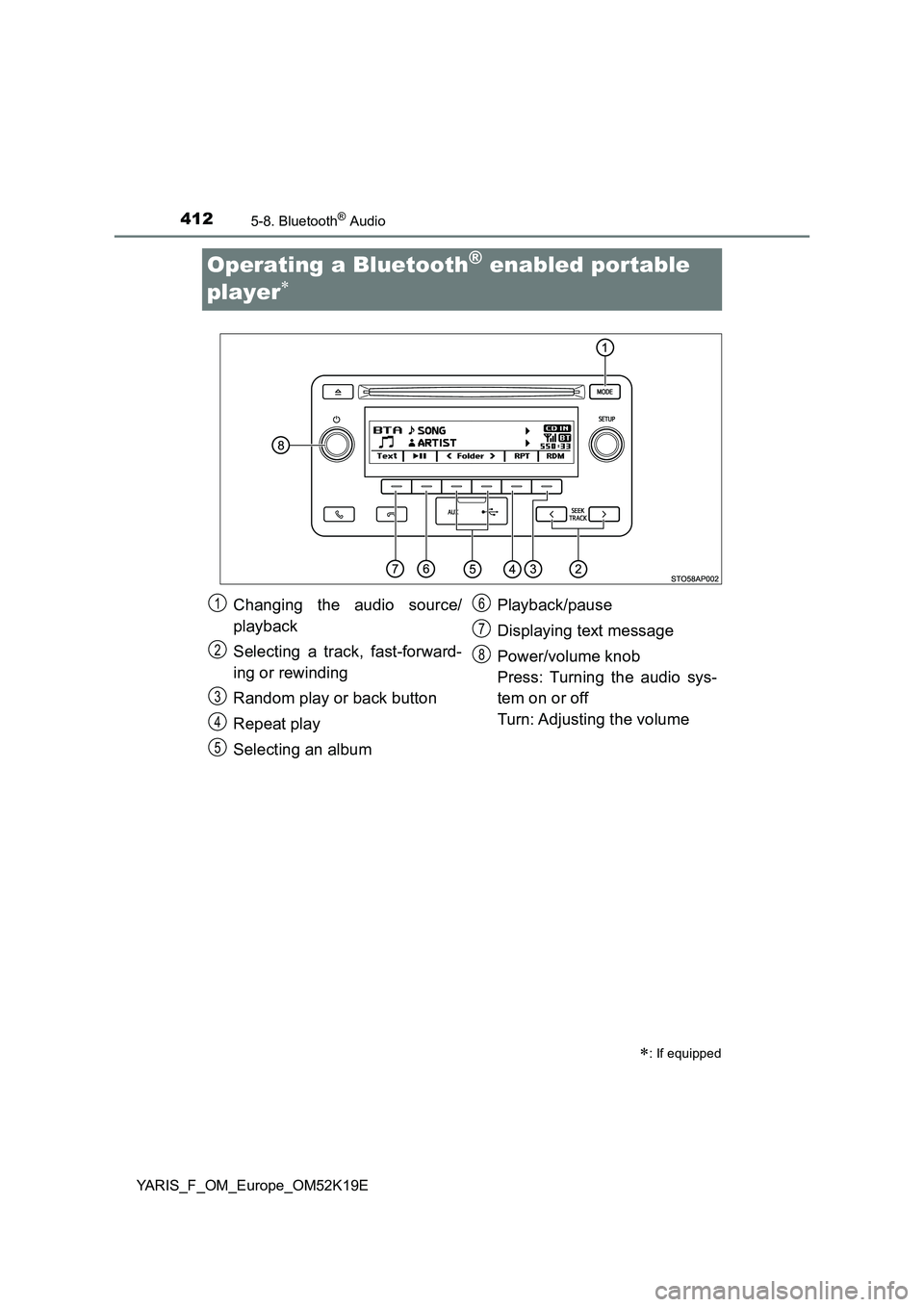
Operating a Bluetooth® enabled portable
player
: If equipped
Changing the audio source/
playback
Selecting a track, fast-forward-
ing or rewinding
Random play or back button
Repeat play
Selecting an album
Playback/pause
Displaying text message
Power/volume knob
Press: Turning the audio sys-
tem on or off
Turn: Adjusting the volume
1
2
3
4
5
6
7
8
Page 414 of 700
4145-8. Bluetooth® Audio
YARIS_F_OM_Europe_OM52K19E
Press ( ).
Press (“Text”) to display or hide the album title.
If there are continuing texts, is displayed.
Press and hold the button to display the remaining texts.
■ Bluetooth® audio system functions
Depending on the portable player that is connected to the system, certain
functions may not be available.
■ Display
P. 373
Playing and pausing tracks
Switching the display
Page 415 of 700
4155-9. Bluetooth® Phone
5
Audio system
YARIS_F_OM_Europe_OM52K19E
Making a phone call
Select “Phonebook” using the tune/scroll knob.
Select the desired name using the knob and press the off-hook
switch.
By pressing (“Add S. Dial”) and one of the speed dial buttons
(from [1] to [5]) while the desired name is selected, it
can be registered as a speed dial.
Press (“A-Z”) to display the registered names in alphabetical
order of the initial.
Select “Speed Dials” using the tune/scroll knob.
Press the desired preset button (from [1] to [5]) and
press the off-hook switch.
To delete a registered speed dial, after selecting the desired preset
button (from [1] to [5]) press (“Delete”) and then
press (“Yes”).
: If equipped
To enter the “Phone” or “TEL” mode, press the off-hook switch.
Dialing by selecting a name
Speed dialing
1
2
1
2