Page 259 of 700

2594-2. Driving procedures
4
Driving
YARIS_F_OM_Europe_OM52K19E
■Deactivation of the temporally gear steps selection mode in the D posi-
tion
In the following situations, temporally gear steps selection mode in the D
position will be deactivated:
● When the vehicle comes to a stop
● If the accelerator pedal is depressed for more than a certain period of time in
one gear step
● When the “+” paddle shift switch is held down for a period of time
■ When driving with the cruise control activated (if equipped)
Even when performing the following actions with the intent of enabling engine
braking, engine braking will not activate because cruise control will not be
canceled.
• While driving in D or 7-speed sport sequential shiftmatic mode, down-
shifting to 6, 5, or 4. ( P. 257)
• When switching the driving mode to sport mode while driving in D posi-
tion. ( P. 256)
■ When the vehicle comes to a stop with the shift lever in the M position
● The transmission will automatically downshift to M1 once the vehicle is
stopped.
● After a stop, the vehicle will start off in M1.
● When the vehicle is stopped, the transmission is set at M1.
■ Shift lock system
The shift lock system is a system to prevent accidental operation of the shift
lever in starting.
The shift lever can be shifted from P only when the engine switch is in the
“ON” position and the brake pedal is being depressed.
Page 260 of 700
2604-2. Driving procedures
YARIS_F_OM_Europe_OM52K19E
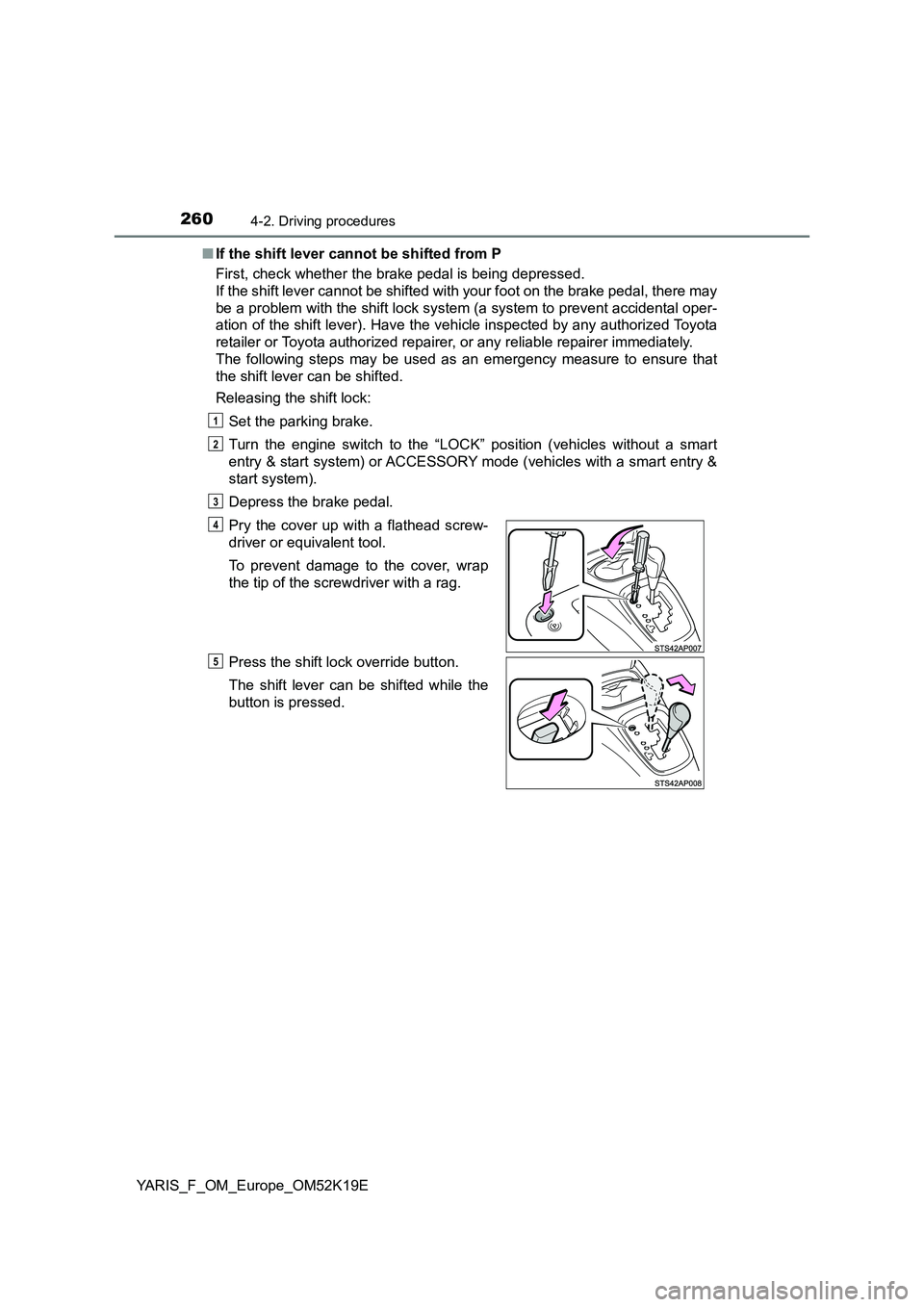
■ If the shift lever cannot be shifted from P
First, check whether the brake pedal is being depressed.
If the shift lever cannot be shifted with your foot on the brake pedal, there may
be a problem with the shift lock system (a system to prevent accidental oper-
ation of the shift lever). Have the vehicle inspected by any authorized Toyota
retailer or Toyota authorized repairer, or any reliable repairer immediately.
The following steps may be used as an emergency measure to ensure that
the shift lever can be shifted.
Releasing the shift lock:
Set the parking brake.
Turn the engine switch to the “LOCK” position (vehicles without a smart
entry & start system) or ACCESSORY mode (vehicles with a smart entry &
start system).
Depress the brake pedal.
Pry the cover up with a flathead screw-
driver or equivalent tool.
To prevent damage to the cover, wrap
the tip of the screwdriver with a rag.
Press the shift lock override button.
The shift lever can be shifted while the
button is pressed.
1
2
3
4
5
Page 261 of 700
2614-2. Driving procedures
4
Driving
YARIS_F_OM_Europe_OM52K19E
■ If the “M” indicator flashes or a buzzer beeps after shifting the shift lever
to M
This may indicate a malfunction in the Multidrive system. Have the vehicle
inspected by any authorized Toyota retailer or Toyota authorized repairer, or
any reliable repairer immediately.
(In this situation, the transmission will operate in the same manner as when
the shift lever is in D.)
■ Downshift restriction warning buzzer (vehicles with a 7-speed sport
sequential shiftmatic mode)
To help ensure safety and driving per formance, downshifting operation may
sometimes be restricted. In some circumstances, downshifting may not be
possible even when the shift lever or paddle shift switches are operated. (A
buzzer will sound twice.)
■ G AI-SHIFT
G AI-SHIFT automatically selects a suitable gear for sporty driving according
to driver’s input and driving conditions. G AI-SHIFT operates automatically
when the shift lever is in D and sport mode is selected for the driving mode.
(Selecting normal mode or shifting the shift lever to the M position cancels
this function.)
■ Engine speed while driving
In the following conditions, the engine speed may become high while driving.
This is due to automatic up-shifting c ontrol or down-shifting implementation to
meet driving conditions. It does not indicate sudden acceleration.
● The vehicle is judged to be driving uphill or downhill
● When the accelerator pedal is released
● With the “SPORT” switch activated, when the brake pedal is depressed
Page 262 of 700
2624-2. Driving procedures
YARIS_F_OM_Europe_OM52K19E
WARNING
■When driving on slippery road surfaces
Do not accelerate or shift gears suddenly.
Sudden changes in engine braking may cause the vehicle to spin or skid,
resulting in an accident.
■ To prevent an accident when releasing the shift lock
Before pressing the shift lock override button, make sure to set the parking
brake and depress the brake pedal.
If the accelerator pedal is accidentally depressed instead of the brake pedal
when the shift lock override button is pressed and the shift lever is shifted
out of P, the vehicle may suddenly start, possibly leading to an accident
resulting in death or serious injury.
Page 265 of 700
2654-2. Driving procedures
4
Driving
YARIS_F_OM_Europe_OM52K19E
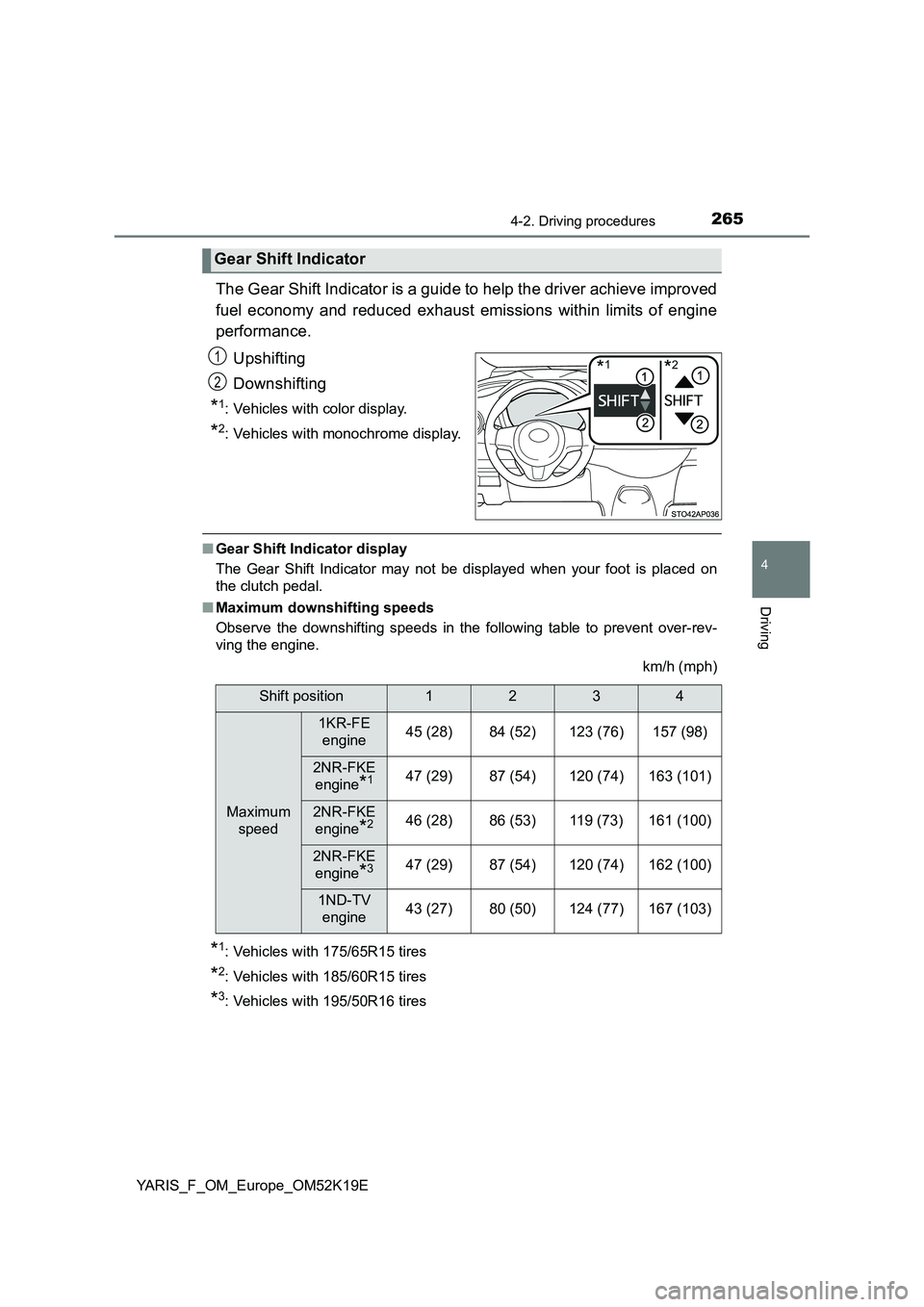
The Gear Shift Indicator is a guide to help the driver achieve improved
fuel economy and reduced exhaust emissions within limits of engine
performance.
Upshifting
Downshifting
*1: Vehicles with color display.
*2: Vehicles with monochrome display.
■ Gear Shift Indicator display
The Gear Shift Indicator may not be displayed when your foot is placed on
the clutch pedal.
■ Maximum downshifting speeds
Observe the downshifting speeds in the following table to prevent over-rev-
ving the engine.
km/h (mph)
*1: Vehicles with 175/65R15 tires
*2: Vehicles with 185/60R15 tires
*3: Vehicles with 195/50R16 tires
Gear Shift Indicator
*1*21
2
Shift position1234
Maximum
speed
1KR-FE
engine45 (28)84 (52)123 (76)157 (98)
2NR-FKE
engine*147 (29)87 (54)120 (74)163 (101)
2NR-FKE
engine*246 (28)86 (53)119 (73)161 (100)
2NR-FKE
engine*347 (29)87 (54)120 (74)162 (100)
1ND-TV
engine43 (27)80 (50)124 (77)167 (103)
Page 267 of 700
267
4
4-2. Driving procedures
Driving
YARIS_F_OM_Europe_OM52K19E
Turn signal lever
Right turn
Lane change to the right (push
and hold the lever partway)
The right hand signals will flash
until you release the lever.
Lane change to the left (push
and hold the lever partway)
The left hand signals will flash until
you release the lever.
Left turn
■ Turn signals can be operated when
Vehicles without a smart entry & start system
The engine switch is in the “ON” position.
Vehicles with a smart entry & start system
The engine switch is in IGNITION ON mode.
■ If the indicator flashes faster than usual
Check that a light bulb in the front or rear turn signal lights has not burned
out.
Operation instructions
1
2
3
4
Page 269 of 700
269
4
4-3. Operating the lights and wipers
Driving
YARIS_F_OM_Europe_OM52K19E
Headlight switch
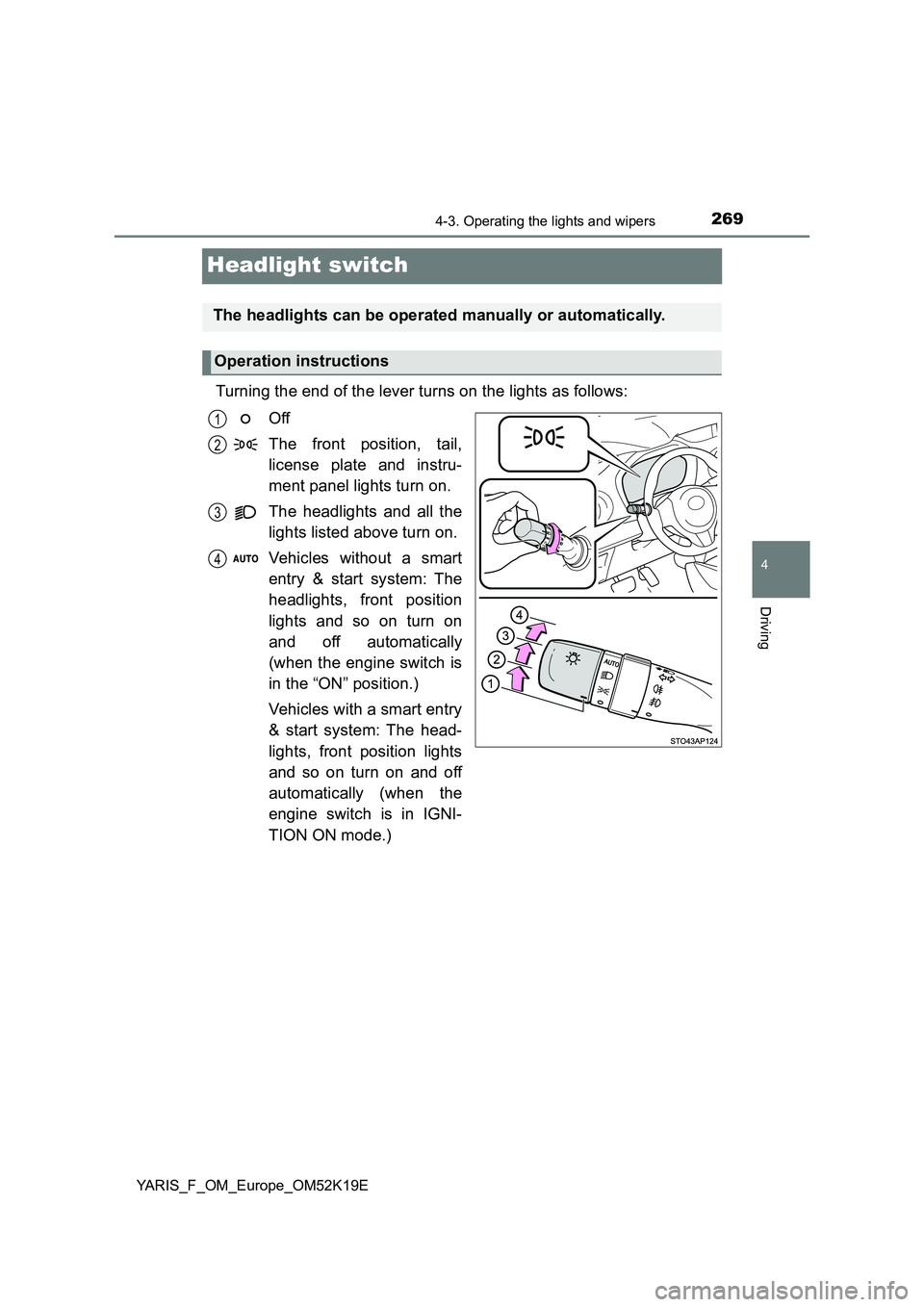
Turning the end of the lever turns on the lights as follows:
Off
The front position, tail,
license plate and instru-
ment panel lights turn on.
The headlights and all the
lights listed above turn on.
Vehicles without a smart
entry & start system: The
headlights, front position
lights and so on turn on
and off automatically
(when the engine switch is
in the “ON” position.)
Vehicles with a smart entry
& start system: The head-
lights, front position lights
and so on turn on and off
automatically (when the
engine switch is in IGNI-
TION ON mode.)
The headlights can be operated manually or automatically.
Operation instructions
1
2
3
4
Page 270 of 700
2704-3. Operating the lights and wipers
YARIS_F_OM_Europe_OM52K19E
With the headlights on, push
the lever away from you to turn
on the high beams.
Pull the lever toward you to the
center position to turn the high
beams off.
Pull the lever toward you and
release it to flash the high
beams once.
You can flash the high beams wi th the headlights on or off.
This system allows the low beam headlights to be turned on for 30
seconds when the engine switch is turned off.
Pull the lever toward you and
release it with the light switch is in
or after turning the
engine switch off.
Pull the lever toward you and
release it again to turn off the
lights.
Turning on the high beam headlights
1
2
Follow me home system (if equipped)