2019 TOYOTA SUPRA boot
[x] Cancel search: bootPage 288 of 456
288
Supra Owner's Manual5-1. MOBILITY
1Switch off compressor.
2Read off the tyre inflation pres-
sure as shown on the tyre pres-
sure indicator.
To be able to continue the journey,
a tyre inflation pressure of at least 2
bar must be reached.
1Unscrew the filler hose of the
sealant container from the tyre
valve.
2Press the red unlocking device.
3Remove the sealant container
from the compressor.
4Pack and store the sealant con-
tainer to avoid soiling the boot.
1Unplug the connector from the
socket in the vehicle interior.
2Drive forwards and backwards
by 10 m, approximately 400
inches, to distribute the sealant
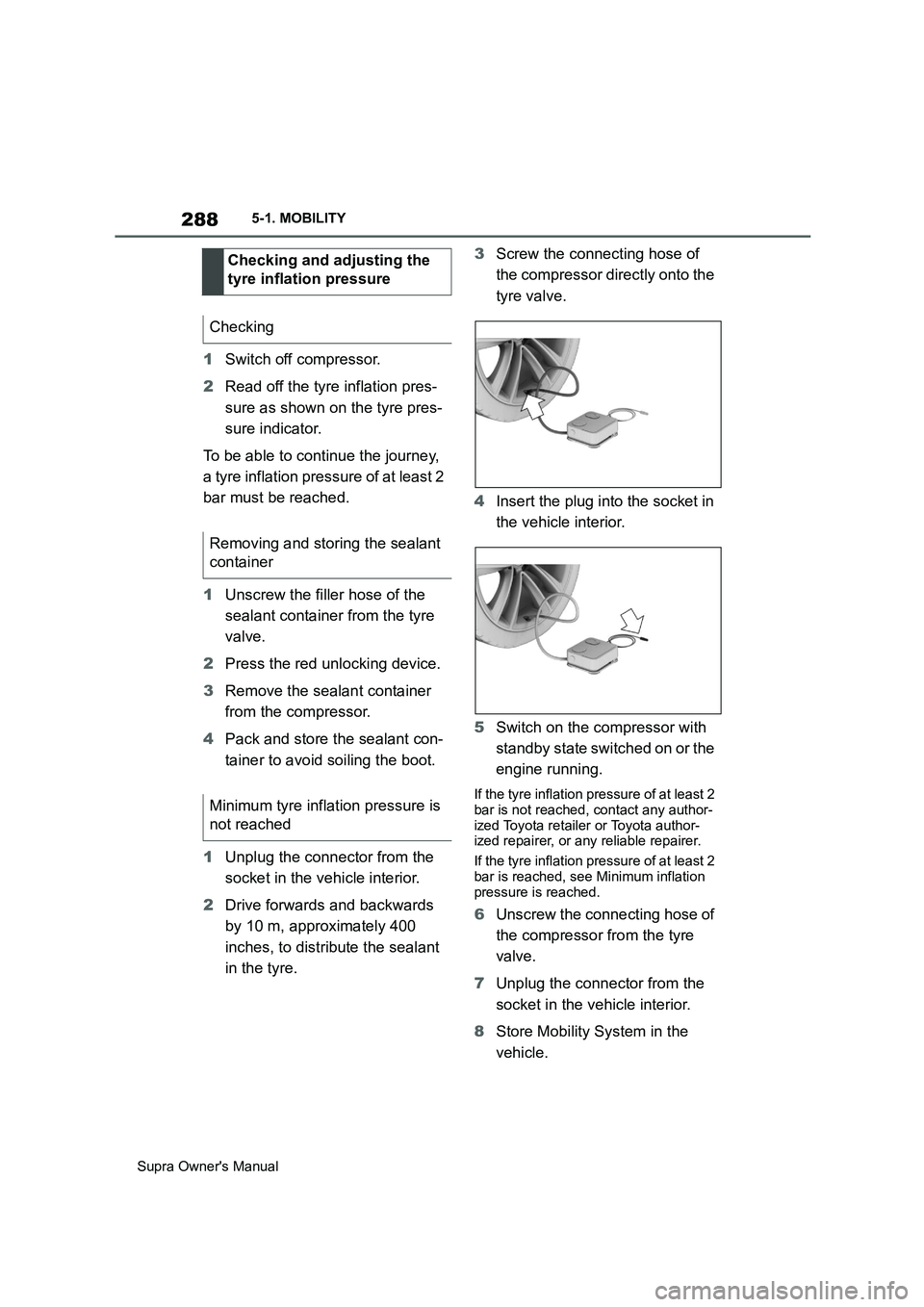
in the tyre.3Screw the connecting hose of
the compressor directly onto the
tyre valve.
4Insert the plug into the socket in
the vehicle interior.
5Switch on the compressor with
standby state switched on or the
engine running.
If the tyre inflation pressure of at least 2
bar is not reached, contact any author-
ized Toyota retailer or Toyota author-
ized repairer, or any reliable repairer.
If the tyre inflation pressure of at least 2
bar is reached, see Minimum inflation
pressure is reached.
6Unscrew the connecting hose of
the compressor from the tyre
valve.
7Unplug the connector from the
socket in the vehicle interior.
8Store Mobility System in the
vehicle. Checking and adjusting the
tyre inflation pressure
Checking
Removing and storing the sealant
container
Minimum tyre inflation pressure is
not reached
Page 303 of 456
303
5
Supra Owner's Manual5-1. MOBILITY
MOBILITY
two wheel studs crosswise until
finger-tight.
If non-original light alloy wheels not
from the vehicle manufacturer are fit-
ted, the wheel studs belonging to the
wheels may also have to be used.
4Tighten the remaining wheels
tuds until finger-tight and then
tighten all the wheel studs
crosswise.
5Turn the jack crank anticlock-
wise to retract the jack and
lower the vehicle.
6Remove the jack and stow it
securely.
1Tighten the wheel studs cross-
wise. The tightening torque
is140 Nm, approximately 101 lb
ft.
2Stow the faulty wheel in the
boot, if necessary.
Due to its size, the faulty wheel cannot
be accommodated under the boot floor.
3Check tyre inflation pressure at
the next opportunity and correct
as necessary.
4Reset the Tyre Pressure Monitor
(TPM).
5Check the tight fit of the wheel
studs using a calibrated torque
wrench.
6Drive to the nearest any author-
ized Toyota retailer or Toyota
authorized repairer, or any relia-ble repairer to have the dam-
aged tyre replaced.
In case of a flat tyre, the emergency
wheel can be used as a replace-
ment for the defective tyre. The
emergency wheel is intended for
short-term use until the defective
wheel has been replaced.
Only fit one emergency wheel at
most.
Additionally, regularly check the
tyre inflation pressure of the emer-
gency wheel in the boot and correct
the pressure if necessary. After changing the wheel
Emergency wheel
Principle
General
Safety note
WARNING
The emergency wheel has special
dimensions. When driving with an
emergency wheel, the driving proper-
ties may change, for example
reduced directional stability when
braking, longer braking distance and
modified self-steering behaviour in
the limit range. There is a danger of
accidents. Drive with care and do not
exceed a speed of 80 km/h, 50 mph.
Page 304 of 456
304
Supra Owner's Manual5-1. MOBILITY
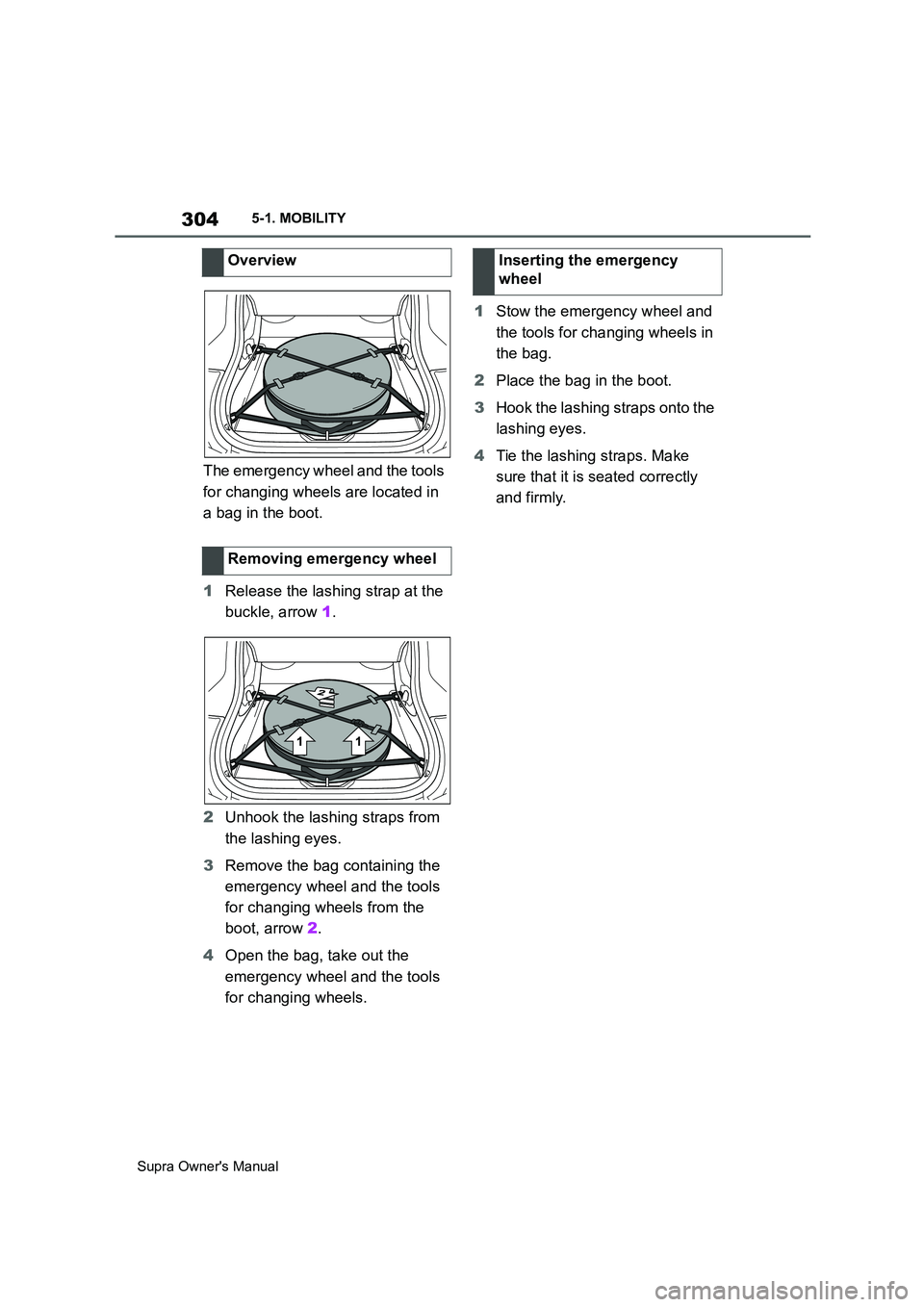
The emergency wheel and the tools
for changing wheels are located in
a bag in the boot.
1Release the lashing strap at the
buckle, arrow 1.
2Unhook the lashing straps from
the lashing eyes.
3Remove the bag containing the
emergency wheel and the tools
for changing wheels from the
boot, arrow 2.
4Open the bag, take out the
emergency wheel and the tools
for changing wheels.1Stow the emergency wheel and
the tools for changing wheels in
the bag.
2Place the bag in the boot.
3Hook the lashing straps onto the
lashing eyes.
4Tie the lashing straps. Make
sure that it is seated correctly
and firmly. Overview
Removing emergency wheel
Inserting the emergency
wheel
Page 326 of 456
326
Supra Owner's Manual5-1. MOBILITY
This chapter describes all standard,
country-specific and special equip-
ment available for the model series.
It may therefore describe equip-
ment and functions which are not
installed in your vehicle, for exam-
ple on account of the optional
equipment selected or the country
specification. This also applies to
safety-relevant functions and sys-
tems. Please comply with the rele-
vant laws and regulations when
using the corresponding functions
and systems.
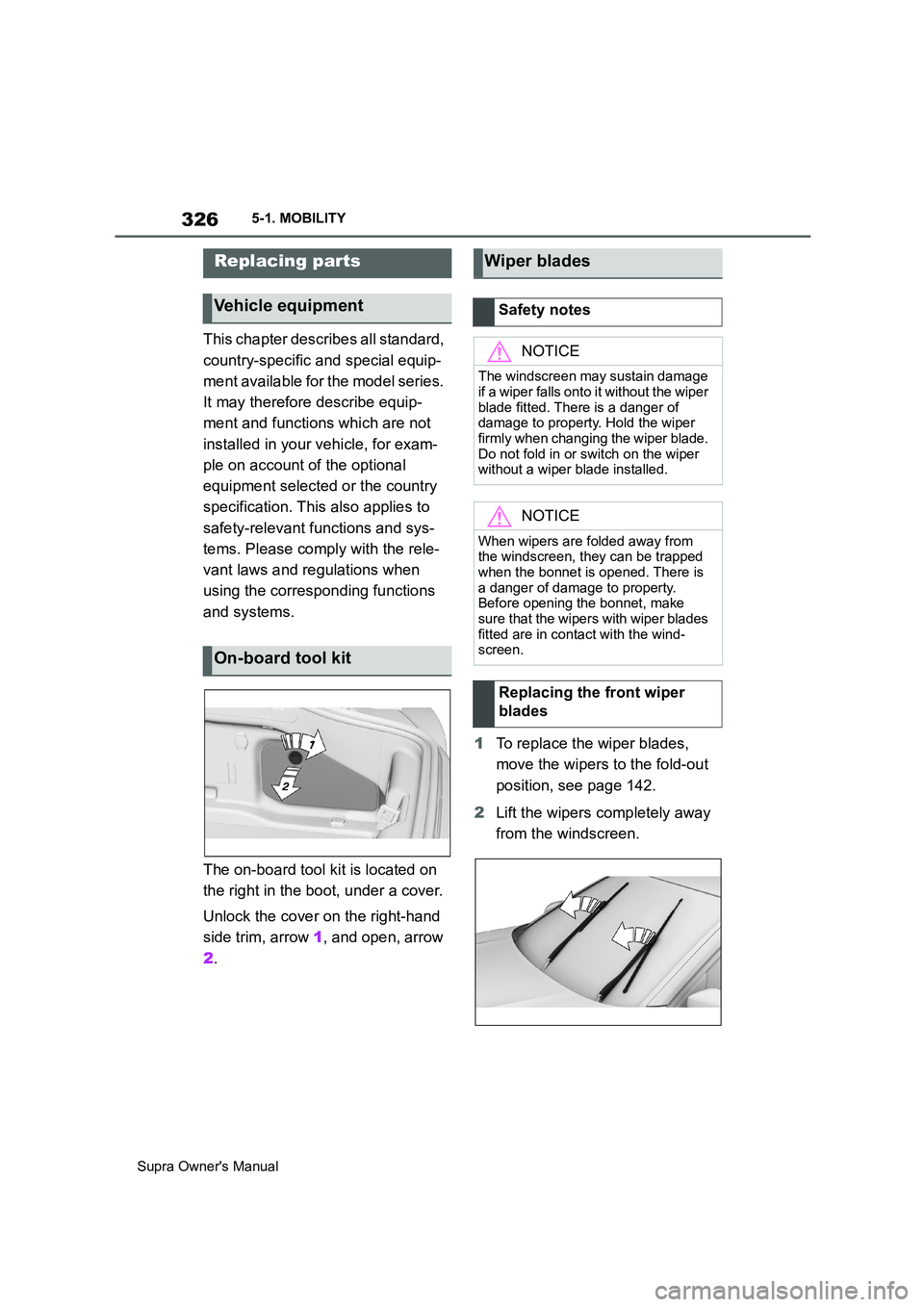
The on-board tool kit is located on
the right in the boot, under a cover.
Unlock the cover on the right-hand
side trim, arrow 1, and open, arrow
2.1To replace the wiper blades,
move the wipers to the fold-out
position, see page 142.
2Lift the wipers completely away
from the windscreen.
Replacing parts
Vehicle equipment
On-board tool kit
Wiper blades
Safety notes
NOTICE
The windscreen may sustain damage
if a wiper falls onto it without the wiper
blade fitted. There is a danger of
damage to property. Hold the wiper
firmly when changing the wiper blade.
Do not fold in or switch on the wiper
without a wiper blade installed.
NOTICE
When wipers are folded away from
the windscreen, they can be trapped
when the bonnet is opened. There is
a danger of damage to property.
Before opening the bonnet, make
sure that the wipers with wiper blades
fitted are in contact with the wind-
screen.
Replacing the front wiper
blades
Page 329 of 456
329
5
Supra Owner's Manual5-1. MOBILITY
MOBILITY
jump-starting connections, see
page 344, in the engine compart-
ment and with the engine switched
off.
Battery chargers developed espe-
cially for the vehicle and suitable for
the on-board network can be
obtained from any authorized
Toyota retailer or Toyota authorized
repairer, or any reliable repairer.
Following an electrical power fail-
ure, some equipment will have to
be reinitialised or individual settings
will need to be updated, for exam-
ple:
Memory function: save positions
again.
Time: update.
Date: update.
Batteries filled with acid should be
transported and stored upright. Pro-
tect batteries against falling over
when in transit.The fuses are located behind a
cover on the right-hand side in the
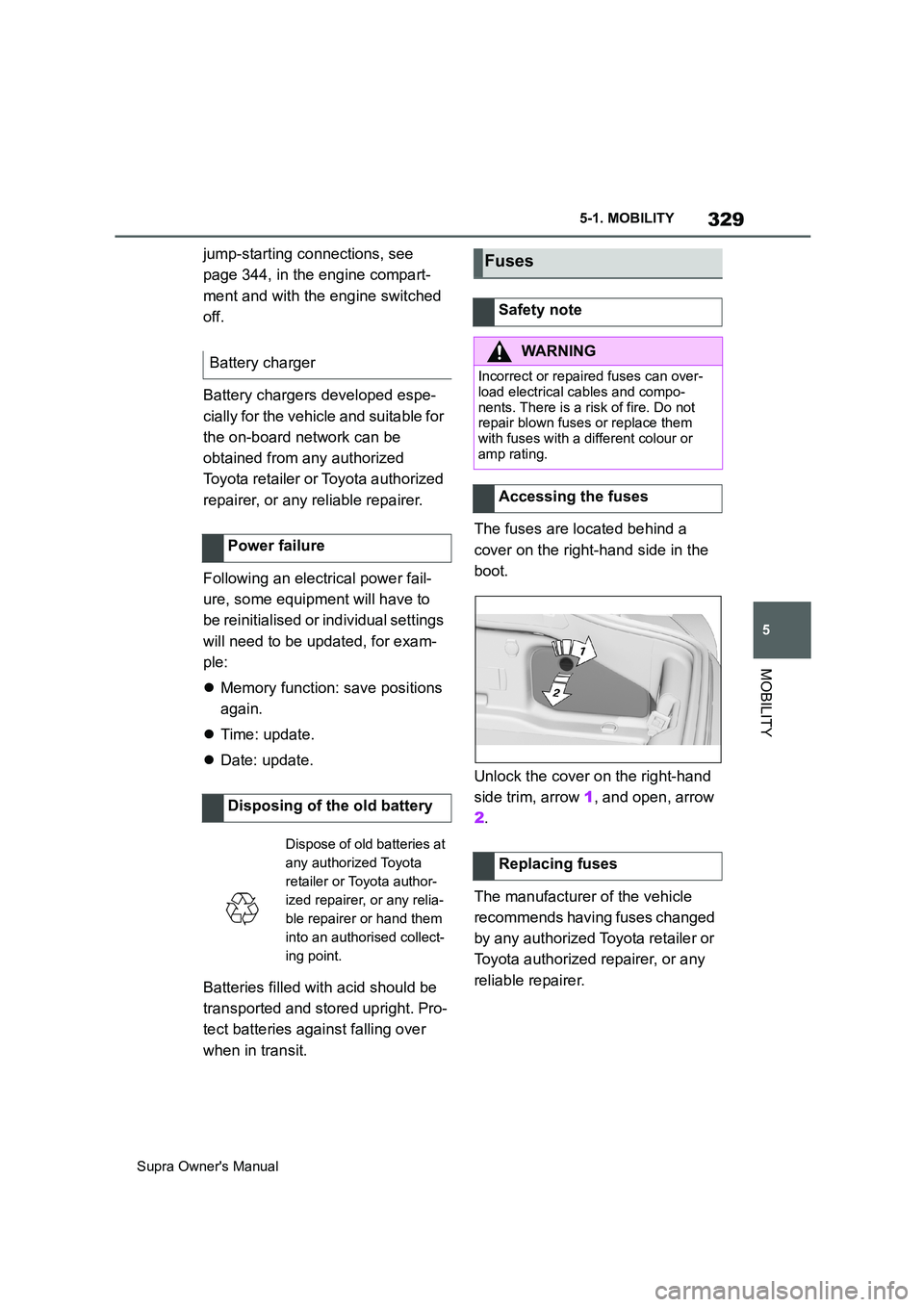
boot.
Unlock the cover on the right-hand
side trim, arrow 1, and open, arrow
2.
The manufacturer of the vehicle
recommends having fuses changed
by any authorized Toyota retailer or
Toyota authorized repairer, or any
reliable repairer. Battery charger
Power failure
Disposing of the old battery
Dispose of old batteries at
any authorized Toyota
retailer or Toyota author-
ized repairer, or any relia-
ble repairer or hand them
into an authorised collect-
ing point.
Fuses
Safety note
WARNING
Incorrect or repaired fuses can over-
load electrical cables and compo-
nents. There is a risk of fire. Do not
repair blown fuses or replace them
with fuses with a different colour or
amp rating.
Accessing the fuses
Replacing fuses
Page 332 of 456
332
Supra Owner's Manual5-1. MOBILITY
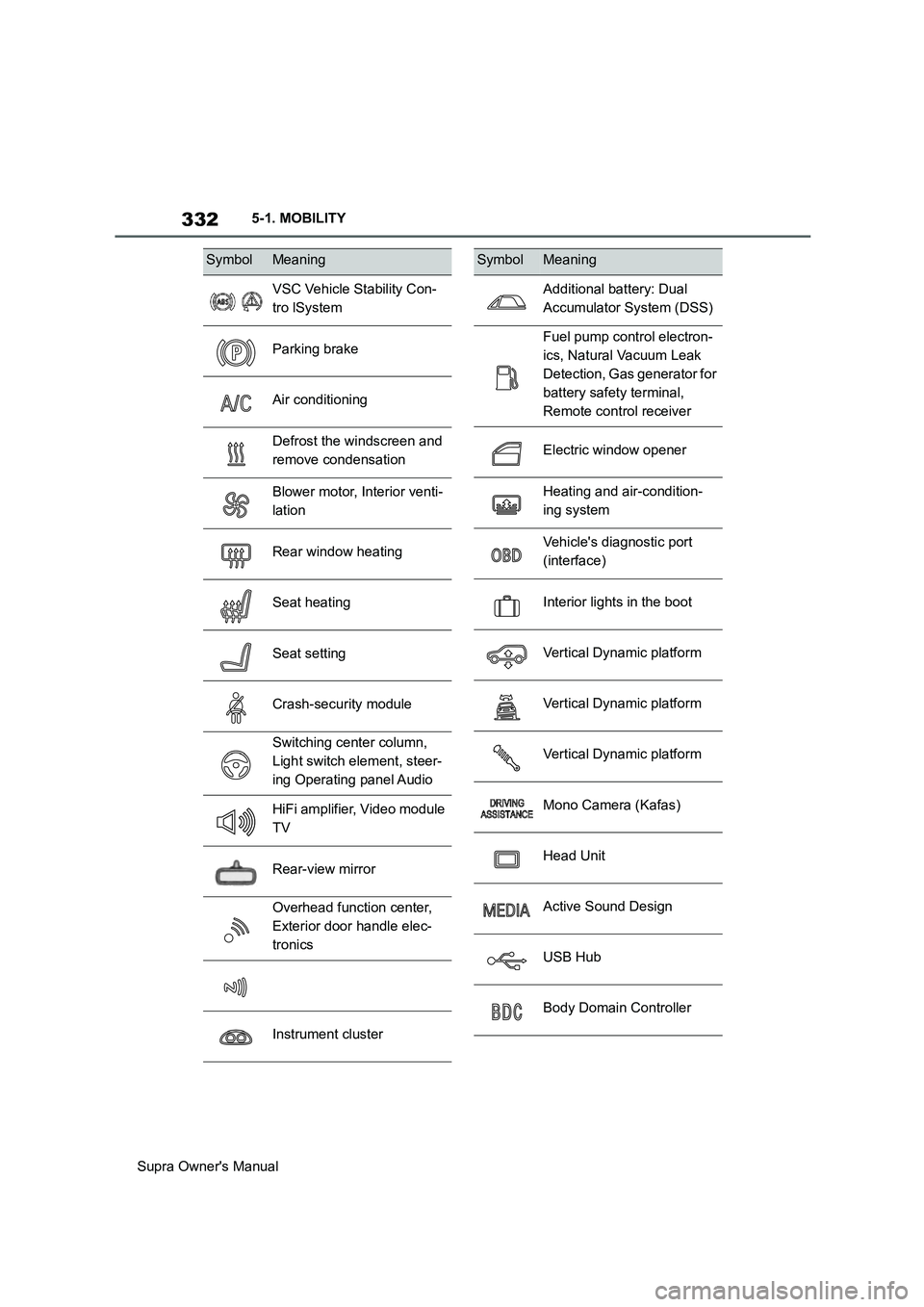
SymbolMeaning
VSC Vehicle Stability Con-
tro lSystem
Parking brake
Air conditioning
Defrost the windscreen and
remove condensation
Blower motor, Interior venti-
lation
Rear window heating
Seat heating
Seat setting
Crash-security module
Switching center column,
Light switch element, steer-
ing Operating panel Audio
HiFi amplifier, Video module
TV
Rear-view mirror
Overhead function center,
Exterior door handle elec-
tronics
Instrument cluster
Additional battery: Dual
Accumulator System (DSS)
Fuel pump control electron-
ics, Natural Vacuum Leak
Detection, Gas generator for
battery safety terminal,
Remote control receiver
Electric window opener
Heating and air-condition-
ing system
Vehicle's diagnostic port
(interface)
Interior lights in the boot
Vertical Dynamic platform
Vertical Dynamic platform
Vertical Dynamic platform
Mono Camera (Kafas)
Head Unit
Active Sound Design
USB Hub
Body Domain Controller
SymbolMeaning
Page 333 of 456
333
5
Supra Owner's Manual5-1. MOBILITY
MOBILITY
This chapter describes all standard,
country-specific and special equip-
ment available for the model series.
It may therefore describe equip-
ment and functions which are not
installed in your vehicle, for exam-
ple on account of the optional
equipment selected or the country
specification. This also applies to
safety-relevant functions and sys-
tems. Please comply with the rele-
vant laws and regulations when
using the corresponding functions
and systems.
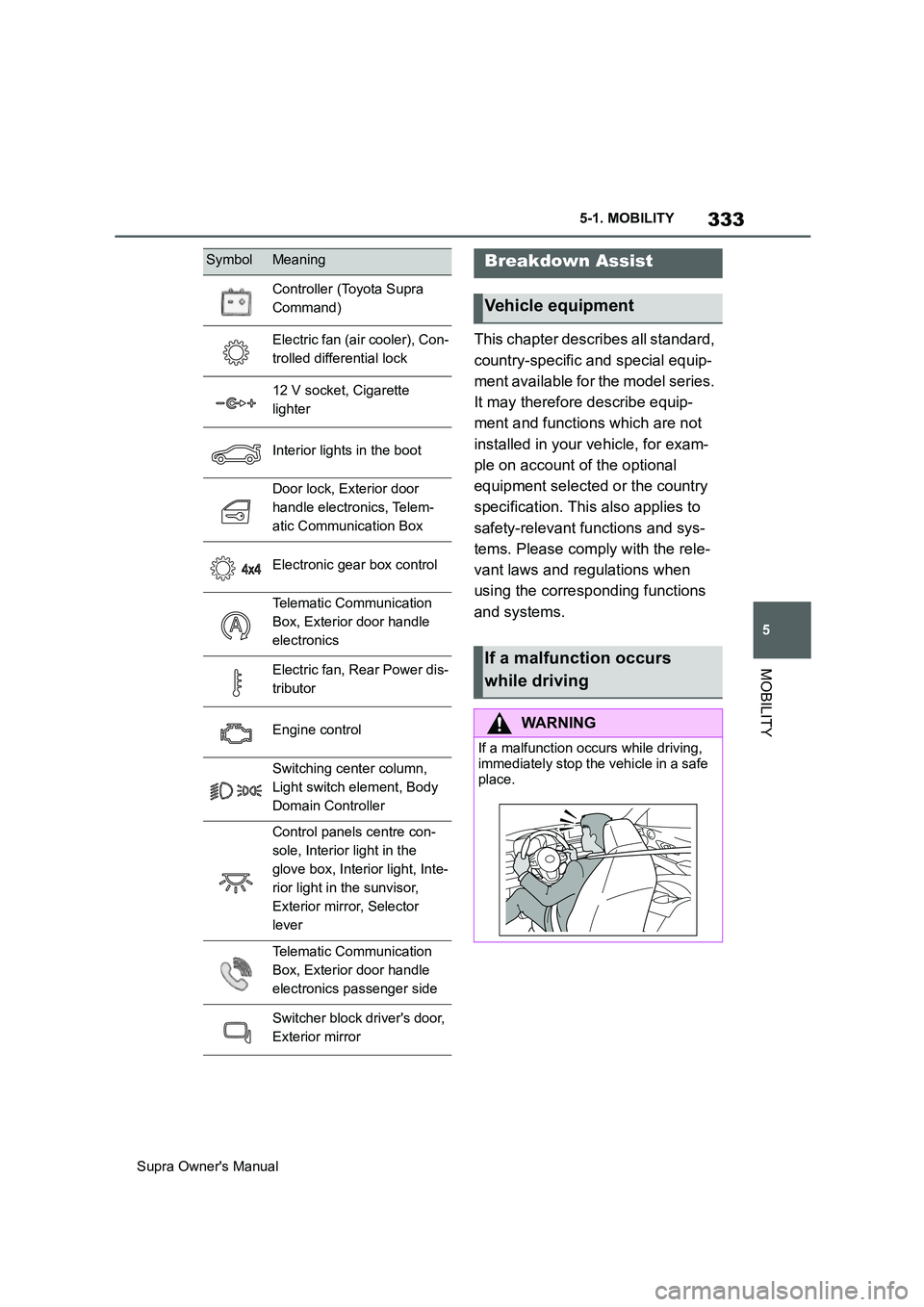
Controller (Toyota Supra
Command)
Electric fan (air cooler), Con-
trolled differential lock
12 V socket, Cigarette
lighter
Interior lights in the boot
Door lock, Exterior door
handle electronics, Telem-
atic Communication Box
Electronic gear box control
Telematic Communication
Box, Exterior door handle
electronics
Electric fan, Rear Power dis-
tributor
Engine control
Switching center column,
Light switch element, Body
Domain Controller
Control panels centre con-
sole, Interior light in the
glove box, Interior light, Inte-
rior light in the sunvisor,
Exterior mirror, Selector
lever
Telematic Communication
Box, Exterior door handle
electronics passenger side
Switcher block driver's door,
Exterior mirror
SymbolMeaningBreakdown Assist
Vehicle equipment
If a malfunction occurs
while driving
WARNING
If a malfunction occurs while driving,
immediately stop the vehicle in a safe
place.
Page 445 of 456
445
Supra Owner's ManualAlphabetical Index
Bonnet ........................................... 306
Boot ............................................... 261
Boot lid ............................................ 85
Boot lid via remote control ............ 77
Boot lid, emergency release .......... 86
Boot, emergency release ............... 86
Bottle holder, see Cupholder....... 261
Brake assist .................................. 216
Brake assist, adaptive .................. 216
Brake lights, see Bulbs and lights
..................................................... 327
Brake system ................................ 267
Braking safely ............................... 270
Braking, notes .............................. 270
Break recommendations, see Driver
Attention Control........................ 213
Breakdown Assist ........................ 336
Breakdown assistance................. 336
Breakdown, help........................... 336
Brightness, Control Display .......... 63
Bulbs and lights ........................... 327
Button SOS, see Automatic emer-
gency call .................................... 338
Button, start/stop.......................... 134
Buttons on the steering wheel ...... 40
C
Call up mirror adjustment .............. 90
Call up seat adjustment ................. 90
Calling up steering wheel adjust-
ment............................................... 90
Camera lenses, care..................... 353
Camera, rear-view camera, without
Surround View ............................ 242
Camera-based assistance systems,
see Toyota Supra Safety ............ 191
Camera-based Cruise Control, see
Adaptive Cruise Control ............ 225
Can holder, see Cupholder .......... 261
Car wash ....................................... 348
Care of displays, screens ............ 354
Care of upholstery fabrics ........... 352
Care products ............................... 350
Care, Head-Up Display ................. 354Care, see Vehicle wash ................ 348
Care, vehicle.................................. 350
Carpet, care ................................... 353
CarPlay, connection to the vehicle70
Carrying children .......................... 109
Carrying children safely ............... 109
Catalytic converter, see Hot exhaust
system ......................................... 267
CBS Condition Based Service ..... 315
CC, see Cruise Control................. 222
Central locking system .................. 81
Central screen, see Control Display
....................................................... 50
Centre console ................................ 42
Changes, technical, see Your own
safety ...............................................6
Changing bulbs, see Bulbs and
lights ............................................ 327
Changing gear, Automatic transmis-
sion .............................................. 143
Chassis number, see Vehicle identifi-
cation number............................... 17
Checking the oil level electronically
..................................................... 309
Child restraint systems, i-Size..... 113
Child restraint systems, see Carry-
ing children safely ...................... 109
Child seat mounting ..................... 110
Child seat mountings, ISOFIX ..... 112
Child seats, see Carrying children
safely ........................................... 109
Chrome surfaces, care ................. 352
Chrome-plated surfaces, care ..... 352
Cleaning of displays, screens ..... 354
Cleaning, Head-Up Display .......... 354
Comfort closing with the remote
control ........................................... 76
Comfort opening using the remote
control ........................................... 76
Compact wheel, see Emergency
wheel ........................................... 303
Compartments in the doors ......... 260
Compressor................................... 286
Condensation when vehicle is
parked.......................................... 271