2019 TOYOTA PROACE VERSO Computer
[x] Cancel search: ComputerPage 3 of 505

.
.
Over view
Instrument panels 13Indicator and warning lamps 15Distance recorders 36Lighting dimmer 37Trip computer 38Touch screen 41Setting the date and time 44
Key 45Key, remote control 45"Smart Entry & Start System" 52Locking / unlocking from inside 64Front doors 65Manual sliding side d o o r (s) 6 6Electric sliding side d o o r (s) 6 8Kick-activated side doors opening and locking 75Rear wing doors with glass windows 79Rear tailgate 81Tailgate rear screen 82Alarm 83Electric windows 86
Steering wheel adjustment 87Front seats 872-seat front bench seat 93Fixed one-piece bench seat 95Fixed rear seat and bench seat 98Rear seat and bench seat on rails 101Captain seat(s) on rails 105Interior fittings 110Seating area fittings 115Skyview® 120Folding and sliding table 121Manual air conditioning 125Dual-zone automatic air conditioning 127Front demist - defrost 131Door mirrors demist - defrost 132Rear screen demist - def rost 13 3Rear Heating - Air Conditioning 136Fuel burner heater/Remote controlled fuel burner heater 137Courtesy lamps 140
M i r r o r s 141Lighting control stalk 144Daytime running lamps 147Automatic illumination of headlamps 147Automatic headlamp dipping 151Interior mood lighting 153Manual headlamp beam height adjustment 153Wiper control stalk 154Automatic rain sensitive wipers 155
Hazard warning lamps 158ER A-GLONASS emergency call system 15 8Hor n 159Electronic stability control (ESC) 159Toyota Traction Select 162Seat belts 164Airbags 168Child seats 173Deactivating the passenger's front airbag 176ISOFIX mountings 183Manual child lock 190Electric child lock 190Child lock on rear windows 191
Eco-driving
Instruments
Access
Ease of use and comfortLighting and visibility
Safety
Labels 10
Contents
Page 8 of 505

7
Locking - unlocking from inside 64Electric sliding d o o r (s) 6 8 -71Electric child lock 190Hazard warning lamps 158Tyre Pressure Warning System (TPWS) 258-260Deactivating Stop & Start 216Deactivating the DSC/ASR system 161
Adjusting the steering wheel 87Hor n 159
Head-up display 218 -219
Instruments and controls (cont.)
Wiper control 154-156Trip computer 38 - 40
Memorising speeds 220Speed limiter 225 -227Cruise control 228 -231Dynamic cruise control 232-238
Instrument panel 13 -14Warning lamps 15-28Coolant temperature 29Ser vice indicator 29 -31Oil level indicator 32AdBlue® range indicators 33 -35Distance recorder 36Gear efficiency indicator 204Lighting dimmer 37Trip computer 38 - 40Setting the time and date 44Driver Attention Alert 247-248
Electric windows 86Adjusting the electric mirrors 141
Toyota Traction Select 161, 162-163Fuel burner heater/Remote controlled fuel burner heater 137-139Alarm 83-85Adjusting the headlamp beam height 153Lane Departure Alert 245 -246Blind Spot Monitoring System 249 -251Automatic headlamp dipping 151-152
Setting the time and date (touch screen) 44Setting the time and date (audio system) 44Rear vision 255 -257Adjustable Speed Limiter (ASL) 220Road Sign Assist 221-224, 227, 230, 234For ward collision warning 239 -242Autonomous emergency braking 242-244Deactivating Stop & Start 216
Lighting control 144-147Direction indicators 146
.
Over view
Page 15 of 505
14
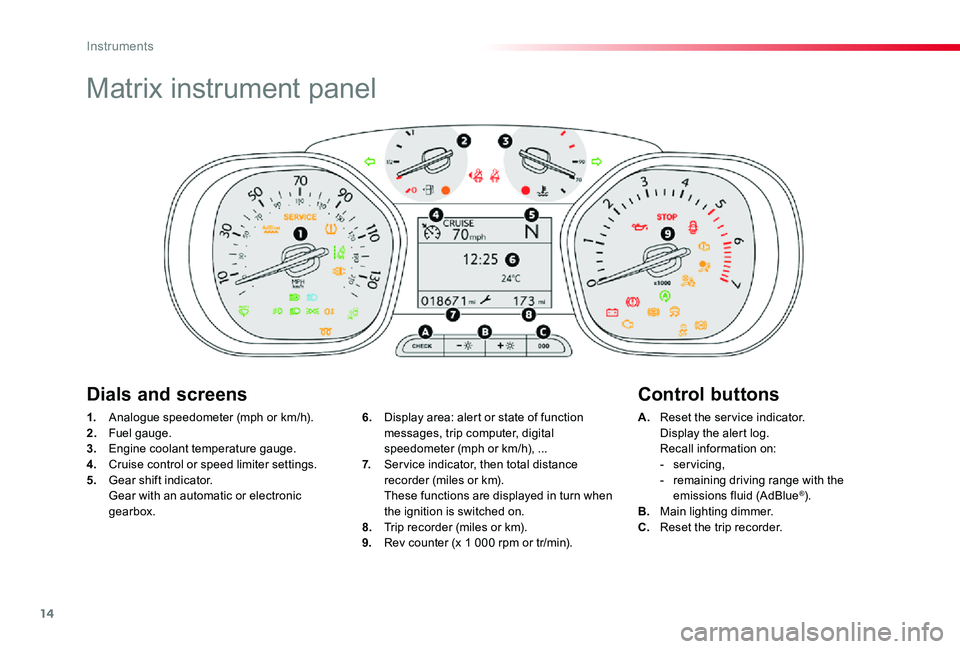
Matrix instrument panel
1. Analogue speedometer (mph or km/h).2. Fuel gauge.3. Engine coolant temperature gauge.4. Cruise control or speed limiter settings.5. Gear shift indicator. Gear with an automatic or electronic gearbox.
A. Reset the service indicator. Display the alert log. Recall information on:- servicing,- remaining driving range with the emissions fluid (AdBlue®).B. Main lighting dimmer.C. Reset the trip recorder.
6. Display area: alert or state of function messages, trip computer, digital speedometer (mph or km/h), ...7. Ser vice indicator, then total distance recorder (miles or km). These functions are displayed in turn when the ignition is switched on.8. Trip recorder (miles or km).9. Rev counter (x 1 000 rpm or tr/min).
Dials and screensControl buttons
Instruments
Page 39 of 505

38
System that gives you information on the current journey (range, fuel consumption…).
Trip computer
Display of information
F Press the button on the end of the wiper control stalk to display the different trip computer tabs in turn.
F Or, depending on equipment, press the thumbwheel on the steering wheel.
- The current information with:● the range,● the current fuel consumption,● the Stop & Start time counter.
Tr i p s "1" and "2" are independent but their use is identical.For example, trip "1" can be used for daily figures, and trip "2" for monthly figures.
- Trip "2" with:● the average speed,● the average fuel consumption,● the distance travelled, for the second trip.
- Trip "1" with:● the average speed,● the average fuel consumption,● the distance travelled, for the first trip.
Depending on equipment, a 2nd trip is available.
Instruments
Page 64 of 505
63
Lost keys, remote control
Visit an authorized Toyota dealer or repairer, or another duly qualified and equipped professional with the vehicle's registration certificate, your personal identification documents and if possible, the label bearing the key code.The an authorized Toyota dealer or repairer, or another duly qualified and equipped professional will be able to retrieve the key code and the transponder code required to order a new key.
Locking the vehicle
Driving with the doors locked may make access to the passenger compartment by the emergency ser vices more difficult in an emergency.As a safety precaution (with children on board), remove the key from the ignition or take the remote control with you when leaving the vehicle, even for a short time.
When purchasing a second-hand vehicle
Have the key codes memorised by an authorized Toyota dealer or repairer, or another duly qualified and equipped professional, to ensure that the keys in your possession are the only ones which can start the vehicle.
Electrical interference
The Smart Entry & Start System remote control may not operate if close to certain electronic devices: telephone, laptop computer, strong magnetic fields, ...
Accumulations (water, dust, grime, salt...) on the inner sur face of the door handle may affect detection.If cleaning the inner sur face of the door handle using a cloth does not restore detection, contact an authorized Toyota dealer or repairer, or another duly qualified and equipped professional.A sudden splash of water (stream of water, high pressure jet washer, …) may be identified by the system as the desire to open the vehicle.
Remote control
The high frequency remote control is a sensitive system; do not operate it while it is in your pocket as there is a possibility that it may unlock the vehicle, without you being aware of it.Do not repeatedly press the buttons of your remote control out of range and out of sight of your vehicle. You run the risk of stopping it from working and the remote control would have to be reinitialised.The remote control does not operate when the key is in the ignition, even when the ignition is switched off.
Anti-theft protection
Do not make any modifications to the electronic engine immobiliser system; this could cause malfunctions.Do not forget to turn the steering to engage the steering lock.
2
Access
Page 115 of 505
114
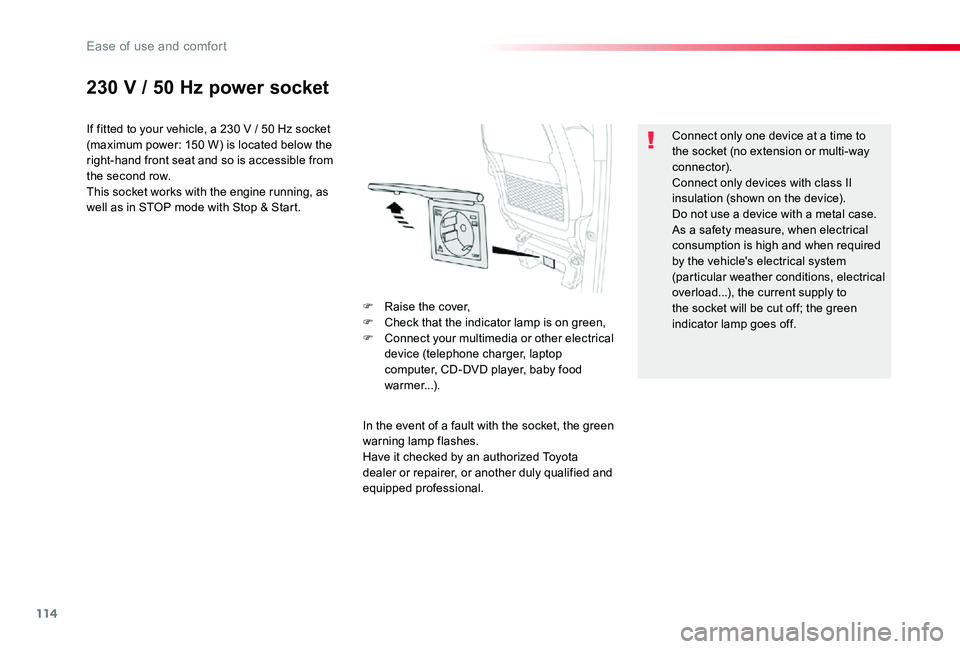
230 V / 50 Hz power socket
If fitted to your vehicle, a 230 V / 50 Hz socket (maximum power: 150 W) is located below the right-hand front seat and so is accessible from the second row.This socket works with the engine running, as well as in STOP mode with Stop & Start.
In the event of a fault with the socket, the green warning lamp flashes.Have it checked by an authorized Toyota dealer or repairer, or another duly qualified and equipped professional.
Connect only one device at a time to the socket (no extension or multi-way connector).Connect only devices with class II insulation (shown on the device).Do not use a device with a metal case.As a safety measure, when electrical consumption is high and when required by the vehicle's electrical system (particular weather conditions, electrical overload...), the current supply to the socket will be cut off; the green indicator lamp goes off.
F Raise the cover,F Check that the indicator lamp is on green,F Connect your multimedia or other electrical device (telephone charger, laptop computer, CD-DVD player, baby food warmer...).
Ease of use and comfort
Page 475 of 505
474
First steps
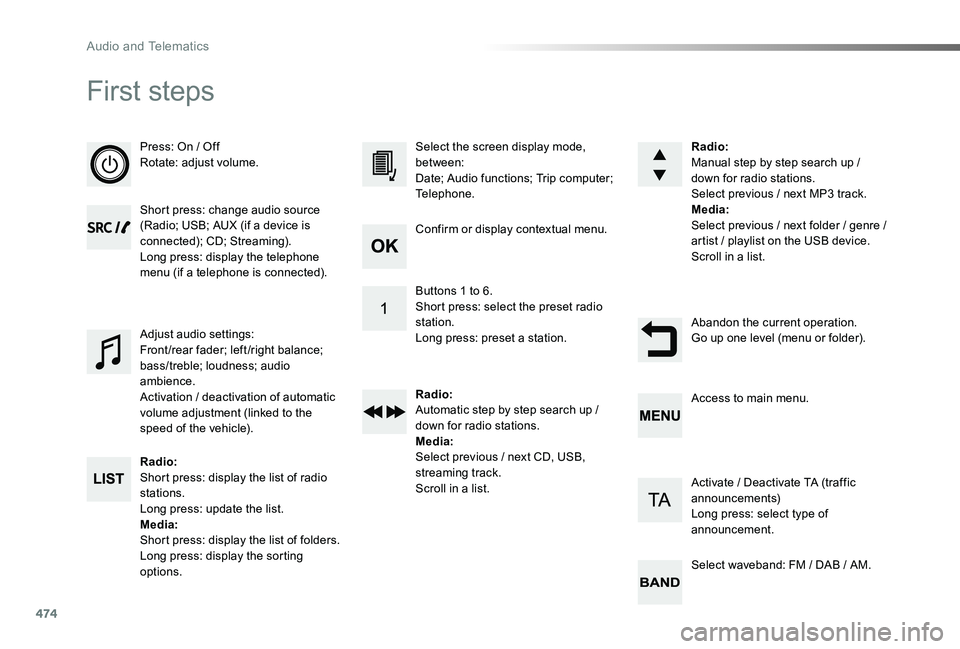
Press: On / OffRotate: adjust volume.
Short press: change audio source (Radio; USB; AUX (if a device is connected); CD; Streaming).Long press: display the telephone menu (if a telephone is connected).
Radio:Short press: display the list of radio stations.Long press: update the list.Media:Shor t press: display the list of folders.Long press: display the sorting options.
Select the screen display mode, between:Date; Audio functions; Trip computer; Telephone.
Adjust audio settings:Front /rear fader; left /right balance; bass/treble; loudness; audio ambience.Activation / deactivation of automatic volume adjustment (linked to the speed of the vehicle).
Radio:Manual step by step search up / down for radio stations.Select previous / next MP3 track.Media:Select previous / next folder / genre / artist / playlist on the USB device.Scroll in a list.
Abandon the current operation.Go up one level (menu or folder).
Confirm or display contextual menu.
Buttons 1 to 6.Short press: select the preset radio station.Long press: preset a station.
Radio:Automatic step by step search up / down for radio stations.Media:Select previous / next CD, USB, streaming track.Scroll in a list.
Access to main menu.
Activate / Deactivate TA (traffic announcements)Long press: select type of announcement.
Select waveband: FM / DAB / AM.
Audio and Telematics
Page 478 of 505
477
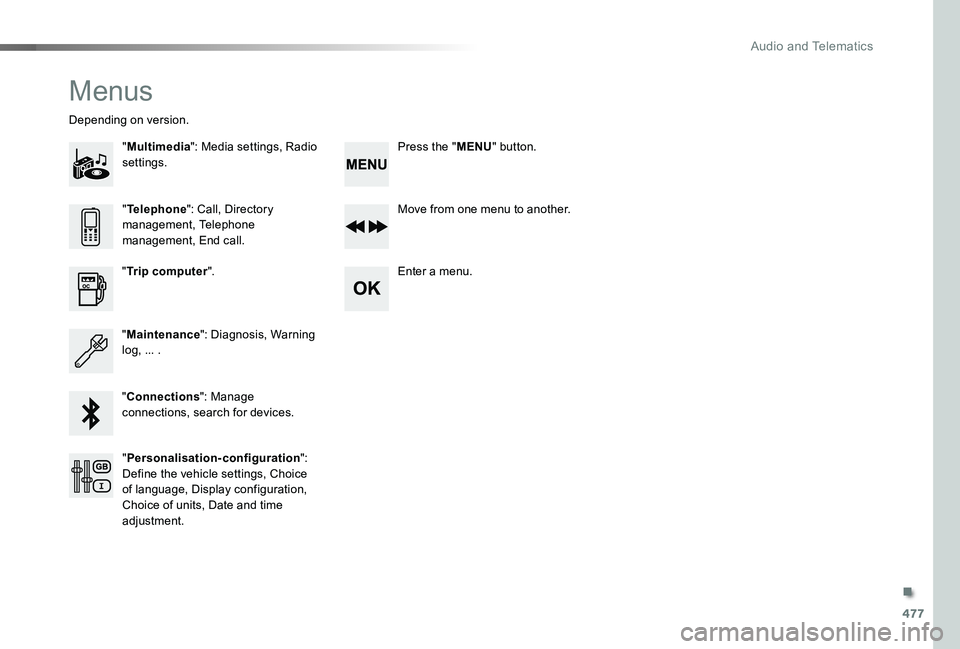
Menus
"Multimedia": Media settings, Radio settings.
Depending on version.
Move from one menu to another.
Enter a menu."Trip computer".
"Maintenance": Diagnosis, Warning log, ... .
"Connections": Manage connections, search for devices.
"Telephone": Call, Directory management, Telephone management, End call.
"Personalisation-configuration": Define the vehicle settings, Choice of language, Display configuration, Choice of units, Date and time adjustment.
Press the "MENU" button.
.
Audio and Telematics