2019 TOYOTA PRIUS PLUS spec
[x] Cancel search: specPage 114 of 568
1142. Instrument cluster
PRIUS +_OM_OM47D30E_(EE)
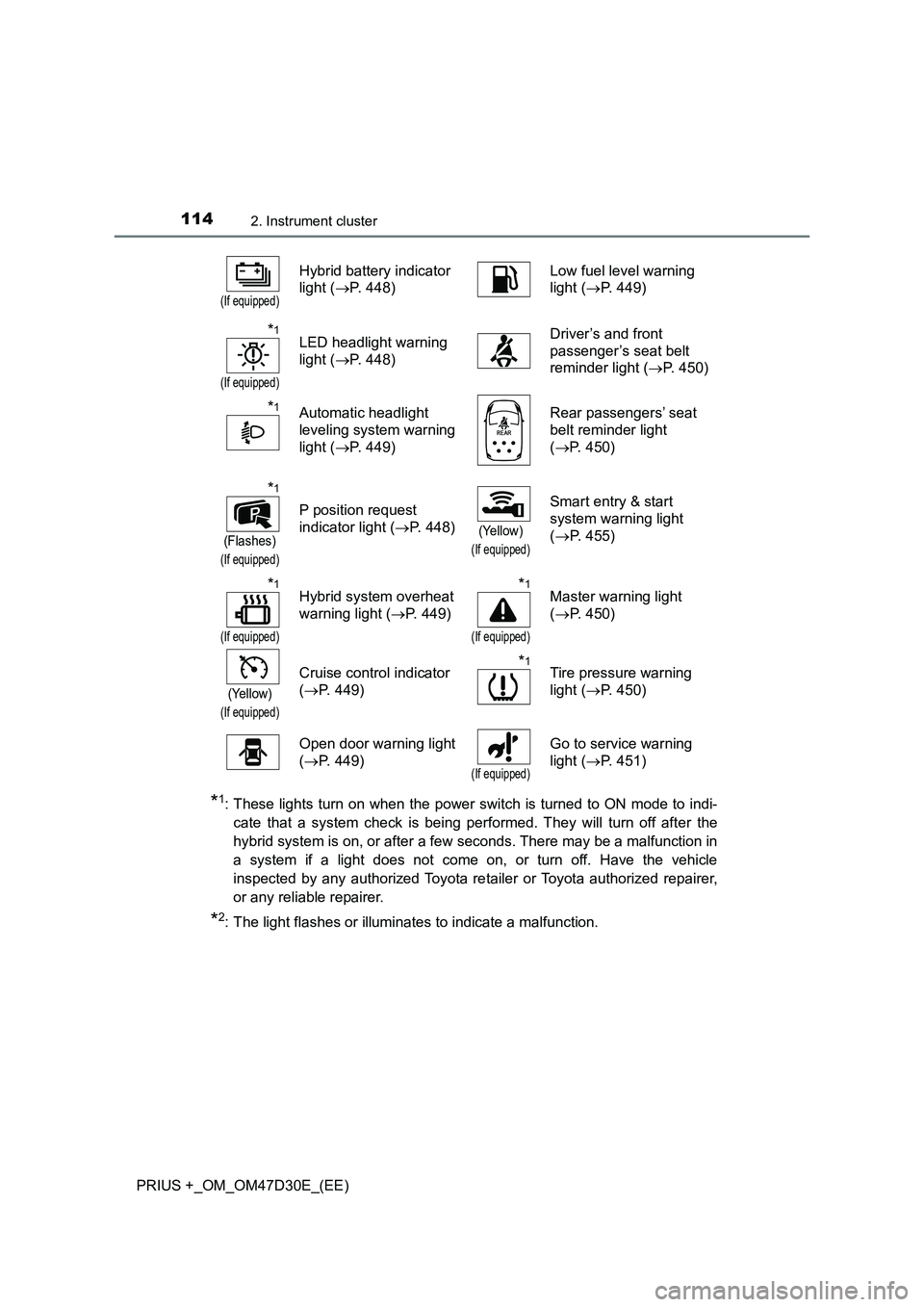
*1: These lights turn on when the power switch is turned to ON mode to indi-
cate that a system check is being performed. They will turn off after the
hybrid system is on, or after a few seconds. There may be a malfunction in
a system if a light does not come on, or turn off. Have the vehicle
inspected by any authorized Toyota retailer or Toyota authorized repairer,
or any reliable repairer.
*2: The light flashes or illuminates to indicate a malfunction.
(If equipped)
Hybrid battery indicator
light (P. 448)Low fuel level warning
light (P. 449)
*1
(If equipped)
LED headlight warning
light (P. 448)Driver’s and front
passenger’s seat belt
reminder light (P. 450)
*1Automatic headlight
leveling system warning
light (P. 449)Rear passengers’ seat
belt reminder light
(P. 450)
*1
(Flashes)
(If equipped)
P position request
indicator light (P. 448)
(Yellow)
(If equipped)
Smart entry & start
system warning light
(P. 455)
*1
(If equipped)
Hybrid system overheat
warning light (P. 449)*1
(If equipped)
Master warning light
(P. 450)
(Yellow)
(If equipped)
Cruise control indicator
(P. 449)*1Tire pressure warning
light (P. 450)
Open door warning light
(P. 449)
(If equipped)
Go to service warning
light (P. 451)
Page 116 of 568
1162. Instrument cluster
PRIUS +_OM_OM47D30E_(EE)
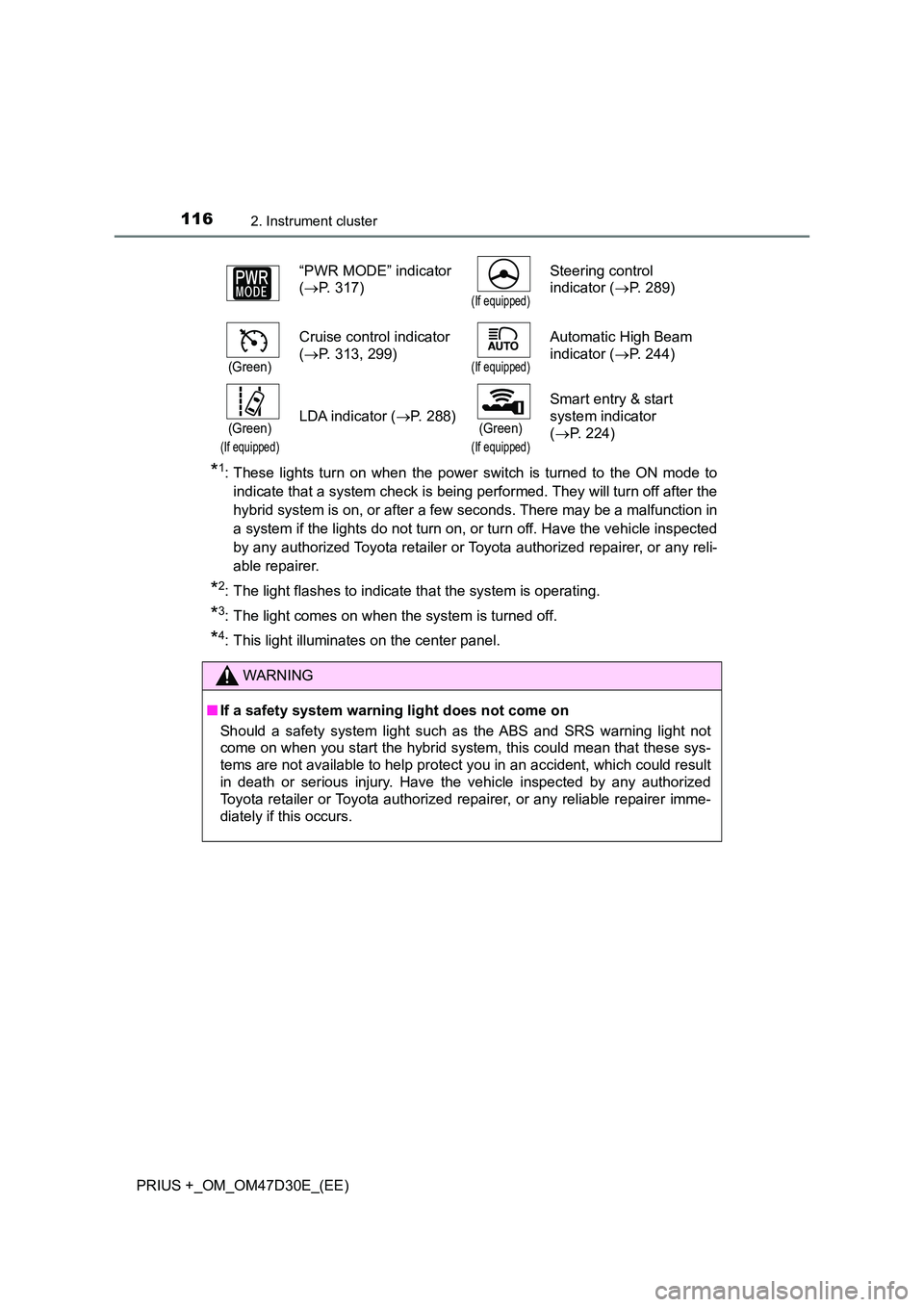
*1: These lights turn on when the power switch is turned to the ON mode to
indicate that a system check is being performed. They will turn off after the
hybrid system is on, or after a few seconds. There may be a malfunction in
a system if the lights do not turn on, or turn off. Have the vehicle inspected
by any authorized Toyota retailer or Toyota authorized repairer, or any reli-
able repairer.
*2: The light flashes to indicate that the system is operating.
*3: The light comes on when the system is turned off.
*4: This light illuminates on the center panel.
“PWR MODE” indicator
( P. 317)(If equipped)
Steering control
indicator ( P. 289)
(Green)
Cruise control indicator
( P. 313, 299)(If equipped)
Automatic High Beam
indicator ( P. 244)
(Green)
(If equipped)
LDA indicator (P. 288)(Green)
(If equipped)
Smart entry & start
system indicator
( P. 224)
WARNING
■If a safety system warning light does not come on
Should a safety system light such as the ABS and SRS warning light not
come on when you start the hybrid system, this could mean that these sys-
tems are not available to help protect you in an accident, which could result
in death or serious injury. Have the vehicle inspected by any authorized
Toyota retailer or Toyota authorized repairer, or any reliable repairer imme-
diately if this occurs.
Page 147 of 568
1473-2. Opening, closing and locking the doors
3
Operation of each component
PRIUS +_OM_OM47D30E_(EE)
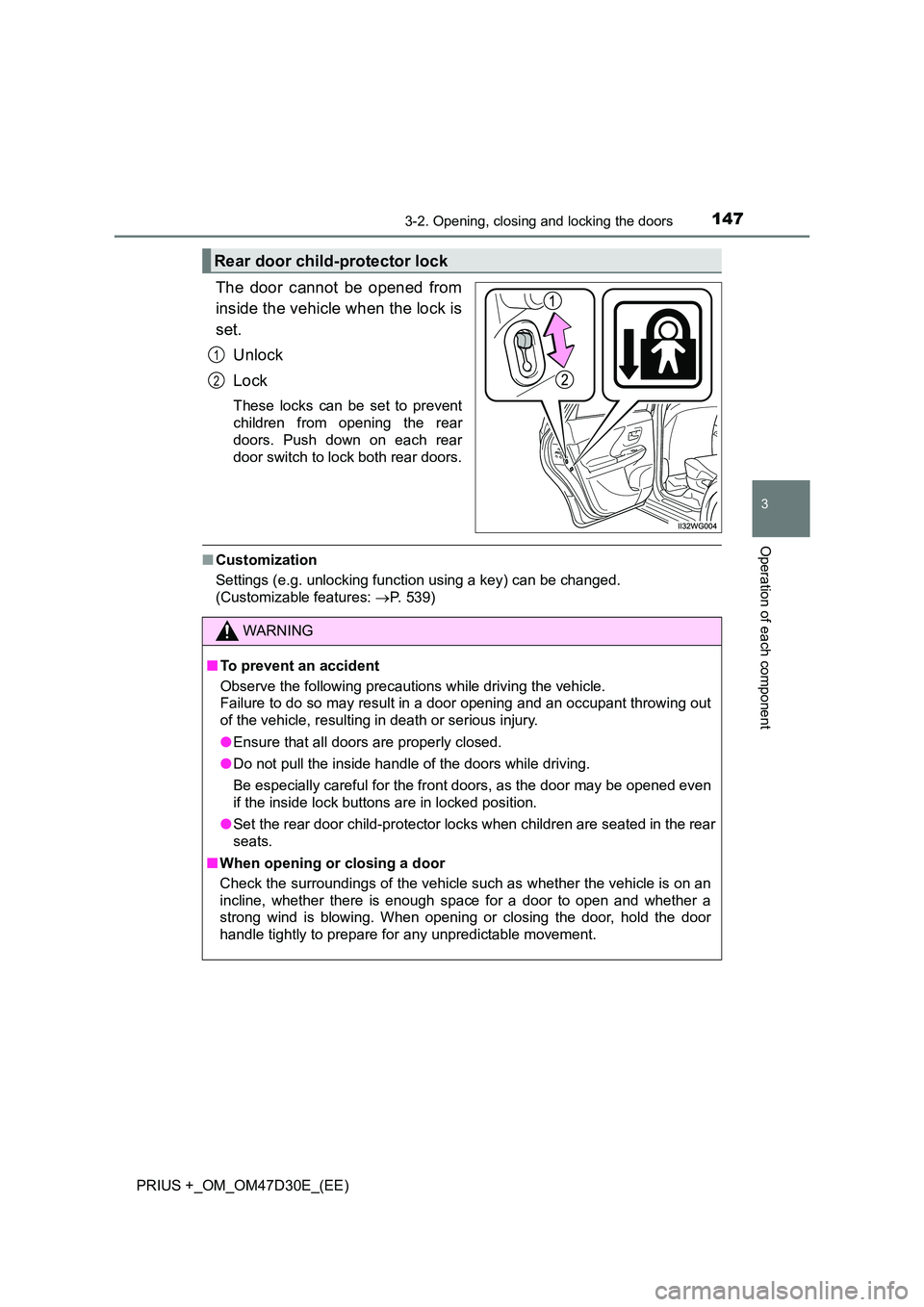
The door cannot be opened from
inside the vehicle when the lock is
set.
Unlock
Lock
These locks can be set to prevent
children from opening the rear
doors. Push down on each rear
door switch to lock both rear doors.
■ Customization
Settings (e.g. unlocking function using a key) can be changed.
(Customizable features: P. 539)
Rear door child-protector lock
1
2
WARNING
■To prevent an accident
Observe the following precautions while driving the vehicle.
Failure to do so may result in a door opening and an occupant throwing out
of the vehicle, resulting in death or serious injury.
● Ensure that all doors are properly closed.
● Do not pull the inside handle of the doors while driving.
Be especially careful for the front doors, as the door may be opened even
if the inside lock buttons are in locked position.
● Set the rear door child-protector locks when children are seated in the rear
seats.
■ When opening or closing a door
Check the surroundings of the vehicle such as whether the vehicle is on an
incline, whether there is enough space for a door to open and whether a
strong wind is blowing. When opening or closing the door, hold the door
handle tightly to prepare for any unpredictable movement.
Page 201 of 568
2013-3. Adjusting the seats
3
Operation of each component
PRIUS +_OM_OM47D30E_(EE)
WARNING
■Head restraint precautions
Observe the following precautions regarding the head restraints. Failure to
do so may result in death or serious injury.
● Use the head restraints designed for each respective seat.
● Adjust the head restraints to the correct position at all times.
● After adjusting the head restraints, push down on them and make sure
they are locked in position.
● Do not drive with the head restraints removed.
Page 209 of 568

2093-5. Opening and closing the windows
3
Operation of each component
PRIUS +_OM_OM47D30E_(EE)■Catch protection function
If an object becomes caught between the door and window while the window
is opening, window movement is stopped.
■When the window cannot be opened or closed
When the jam protection function or catch protection function operates
unusually and the door window cannot be opened or closed, perform the fol-
lowing operations with the power window switch of that door.
●Stop the vehicle. With the power switch in ON mode, within 4 seconds of the
jam protection function or catch protection function activating, continuously
operate the power window switch in the one-touch closing direction or one-
touch opening direction so that the door window can be opened and closed.
●If the door window cannot be opened and closed even when performing the
above operations, perform the following procedure for function initialization.
Turn the power switch to ON mode.
Pull and hold the power window switch in the one-touch closing direction
and completely close the door window.
Release the power window switch for a moment, resume pulling the
switch in the one-touch closing direction, and hold it there for approxi-
mately 6 seconds or more.
Press and hold the power window switch in the one-touch opening direc-
tion. After the door window is completely opened, continue holding the
switch for an additional 1 second or more.
Release the power window switch for a moment, resume pushing the
switch in the one-touch opening direction, and hold it there for approxi-
mately 4 seconds or more.
Pull and hold the power window switch in the one-touch closing direction
again. After the door window is completely closed, continue holding the
switch for a further 1 second or more.
If you release the switch while the window is moving, start again from the
beginning.
If the window reverses and cannot be fully closed or opened, have the vehicle
inspected by any authorized Toyota retailer or Toyota authorized repairer, or
any reliable repairer.
1
2
3
4
5
6
Page 210 of 568
2103-5. Opening and closing the windows
PRIUS +_OM_OM47D30E_(EE)
WARNING
Observe the following precautions.
Failing to do so may result in death or serious injury.
■ Closing the windows
● The driver is responsible for all the power window operations, including the
operation for the passengers. In order to prevent accidental operation,
especially by a child, do not let a child operate the power windows. It is
possible for children and other passengers to have body parts caught in
the power window. Also, when riding with a child, it is recommended to use
the window lock switch. ( P. 208)
● When exiting the vehicle, turn the power switch off, carry the key and exit
the vehicle along with the child. T here may be accidental operation, due to
mischief, etc., that may possibly lead to an accident.
■ Jam protection function
● Never use any part of your body to intentionally activate the up jam protec-
tion function.
● The up jam protection function may not work if something gets jammed
just before the window is fully closed. Be careful not to get any part of your
body jammed in the window.
■ Catch protection function
● Never use any part of your body or clothing to intentionally activate the
catch protection function.
● The catch protection function may not work if something gets caught just
before the window is fully opened. Be careful not to get any part of your
body or clothing caught in the window.
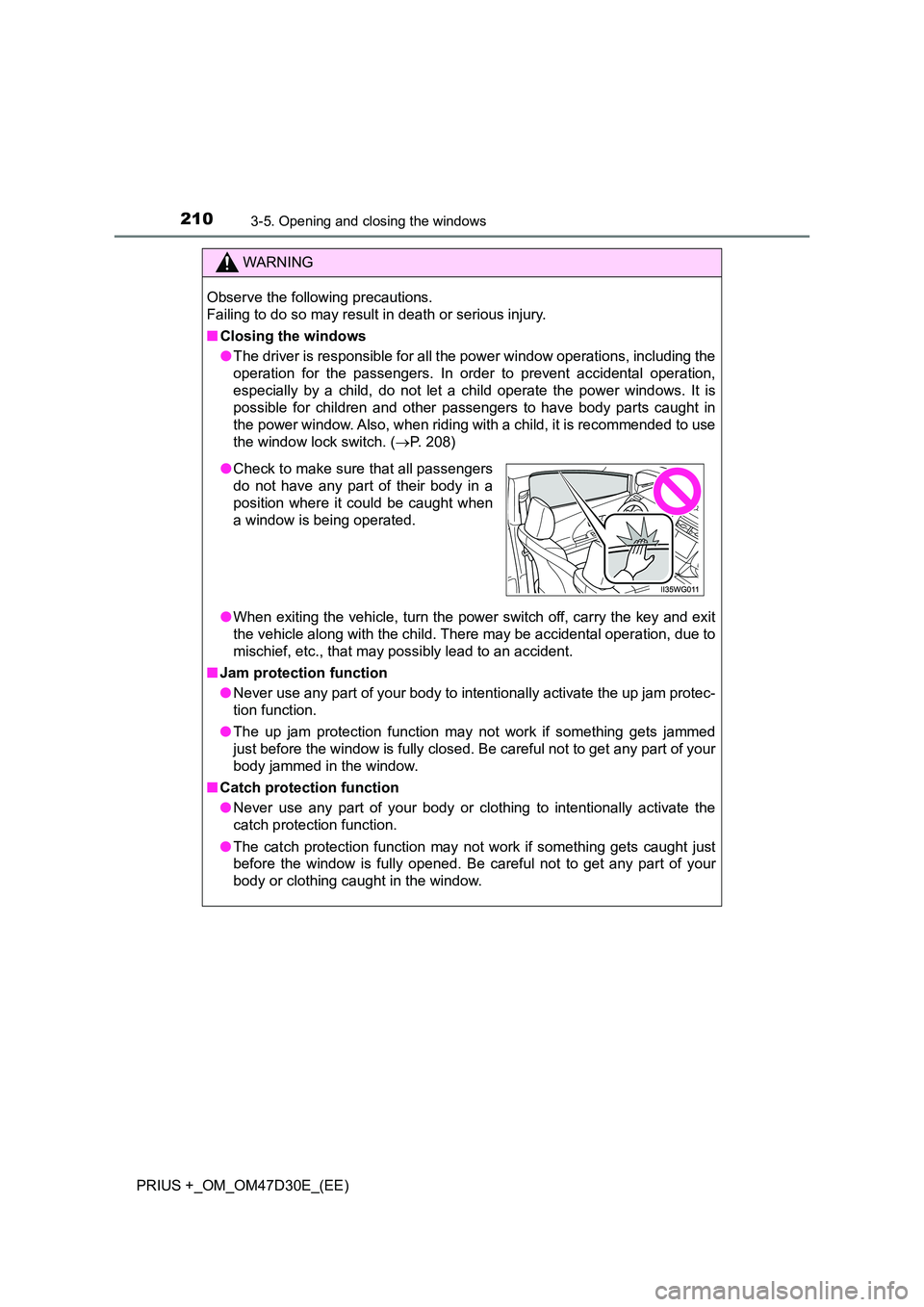
● Check to make sure that all passengers
do not have any part of their body in a
position where it could be caught when
a window is being operated.
Page 228 of 568

2284-2. Driving procedures
PRIUS +_OM_OM47D30E_(EE)
■Auto power off function
If the vehicle is left in ACCESSORY mode for more than 20 minutes or ON
mode (the hybrid system is not operating) for more than an hour with the shift
position in P, the power switch will automatically turn off. However, this func-
tion cannot entirely prevent the 12-volt battery discharge. Do not leave the
vehicle with the power switch in ACCESSORY or ON mode for long periods
of time when the hybrid system is not operating.
■Sounds and vibrations specific to a hybrid vehicle
P. 8 4
■Electronic key battery depletion
P. 142
■When the ambient temperature is low, such as during winter driving con-
ditions
When starting the hybrid system, the flashing time of the “READY” indicator
may be long. Leave the vehicle as it is until the “READY” indicator is steady
on, as steady means the vehicle is able to move.
■Conditions affecting operation
P. 156
■Note for the entry function
P. 157
■If the hybrid system does not start
The immobilizer system may not have been deactivated. (P. 91)
Contact any authorized Toyota retailer or Toyota authorized repairer, or any
reliable repairer.
■When “ENTRY & START SYSTEM CHECK HAVE YOUR VEHICLE
CHECKED BY A DEALER” is displayed on the multi-information display
(if equipped)
The system may be malfunctioning. Have the vehicle inspected by any autho-
rized Toyota retailer or Toyota authorized repairer, or any reliable repairer
immediately.
Page 229 of 568

2294-2. Driving procedures
4
Driving
PRIUS +_OM_OM47D30E_(EE)■If the “READY” indicator does not come on
In the event that the “READY” indicator does not come on even after perform-
ing the proper procedures for starting the vehicle, contact any authorized
Toyota retailer or Toyota authorized repairer, or any reliable repairer immedi-
ately.
■If the hybrid system is malfunctioning
P. 460
■If the electronic key battery is depleted
P. 417
■Operation of the power switch
●If the switch is not pressed shortly and firmly, the power switch mode may
not change or the hybrid system may not start.
●If attempting to restart the hybrid system immediately after turning the power
switch off, the hybrid system may not start in some cases. After turning the
power switch off, please wait a few seconds before restarting the hybrid sys-
tem.
■Automatically P position selection function
P. 236
■When the shift control system malfunctions
The power switch will not be able to be turned off. In such a case, the switch
can be turned off after applying the parking brake.
Have the vehicle inspected by any authorized Toyota retailer or Toyota autho-
rized repairer, or any reliable repairer immediately.
■Meter display
When the power switch is turned off, each display will turn off as follows.
●The shift position indicator will turn off after approximately 2 seconds.
●EV driving ratio and average fuel consumption after hybrid system started,
turn off after approximately 6 seconds.
●The odometer, clock, etc. will turn off after approximately 30 seconds.
(Each display will also turn off immediately if a door is locked before 30 sec-
onds has elapsed.)