Page 144 of 568
1443-2. Opening, closing and locking the doors
PRIUS +_OM_OM47D30E_(EE)
Side doors
◆Smart entry & start system
Carry the electronic key to enable this function.
Grip the driver’s door handle
or front passenger door han-
dle with the sensor (if
equipped) to unlock the door.
Make sure to touch the sensor
on the back of the handle.
The doors cannot be unlocked
for 3 seconds after the doors are
locked.
Touch the lock sensor (indentation on the upper part of the front
door handle) to lock the doors.
Check that the door is securely locked.
◆Wireless remote control
Locks all the doors
Check that the door is securely
locked.
Unlocks all the doors
The vehicle can be locked and unlocked using the entry func-
tion, wireless remote control or door lock switch.
Unlocking and locking the doors from the outside
1
2
1
2
Page 145 of 568

1453-2. Opening, closing and locking the doors
3
Operation of each component
PRIUS +_OM_OM47D30E_(EE)
■Operation signals
The emergency flashers flash to indicate that the doors have been locked/
unlocked. (Locked: Once; Unlocked: Twice)
■Security feature
If a door is not opened within approximately 30 seconds after the vehicle is
unlocked, the security feature automatically locks the vehicle again.
■When the door cannot be locked by the lock sensor on the upper part of
the door handle
■Door lock buzzer
If an attempt to lock the doors is made when a door is not fully closed, a
buzzer sounds continuously for 5 seconds. Fully close the door to stop the
buzzer, and lock the vehicle once more.
■Setting the alarm (if equipped)
Locking the doors will set the alarm system. (P. 104)
■If the smart entry & start system or the wireless remote control does not
operate properly
●Use the mechanical key to lock and unlock the doors. (P. 511)
●Replace the key battery with a new one if it is depleted. (P. 417) If the door will not lock even when the top-
side sensor area is touched, try touching
both the topside and underside sensor
areas at the same time.
Page 146 of 568
1463-2. Opening, closing and locking the doors
PRIUS +_OM_OM47D30E_(EE)
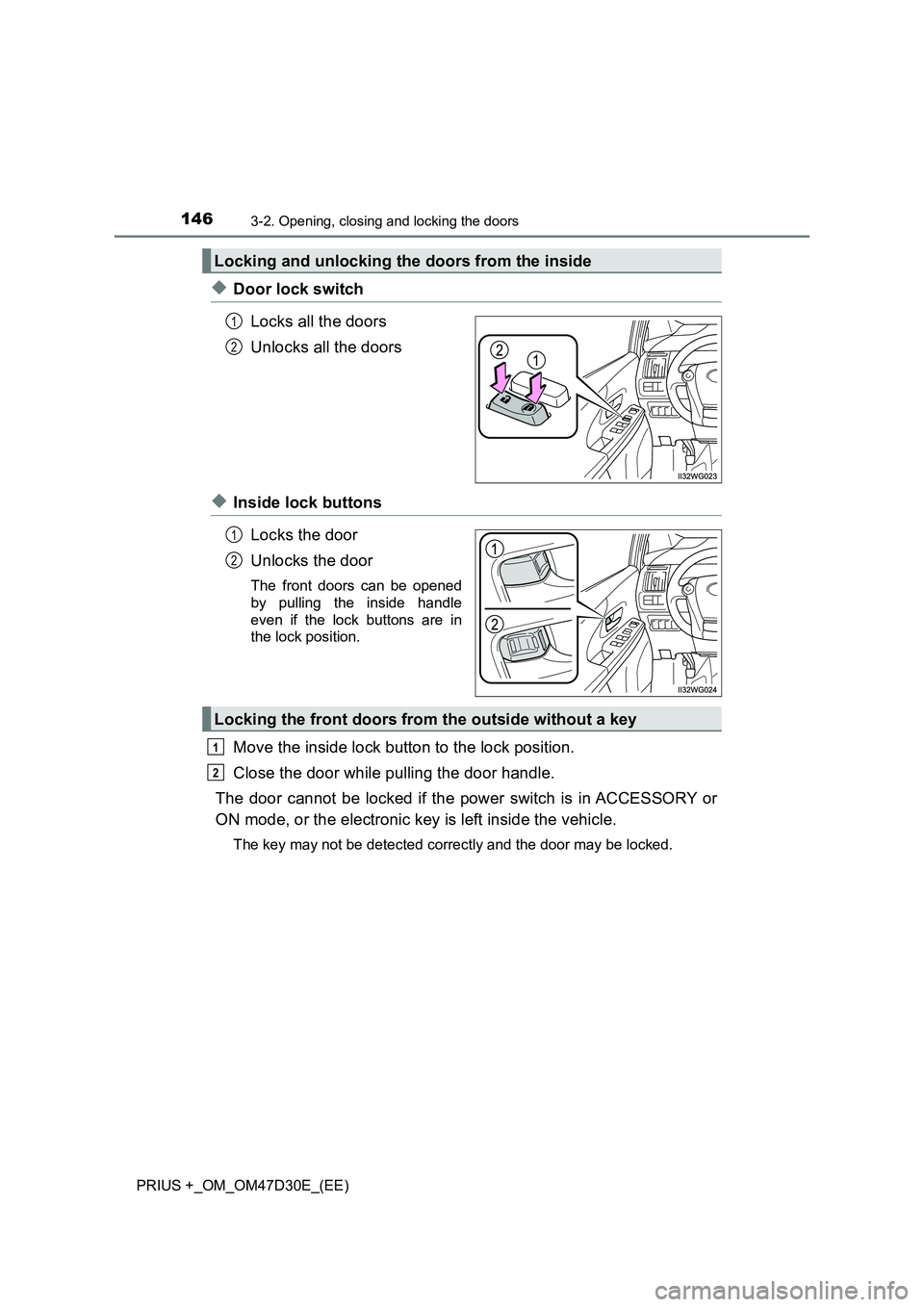
◆Door lock switch
Locks all the doors
Unlocks all the doors
◆Inside lock buttons
Locks the door
Unlocks the door
The front doors can be opened
by pulling the inside handle
even if the lock buttons are in
the lock position.
Move the inside lock button to the lock position.
Close the door while pulling the door handle.
The door cannot be locked if the power switch is in ACCESSORY or
ON mode, or the electronic key is left inside the vehicle.
The key may not be detected correctly and the door may be locked.
Locking and unlocking the doors from the inside
1
2
1
2
Locking the front doors from the outside without a key
1
2
Page 147 of 568
1473-2. Opening, closing and locking the doors
3
Operation of each component
PRIUS +_OM_OM47D30E_(EE)
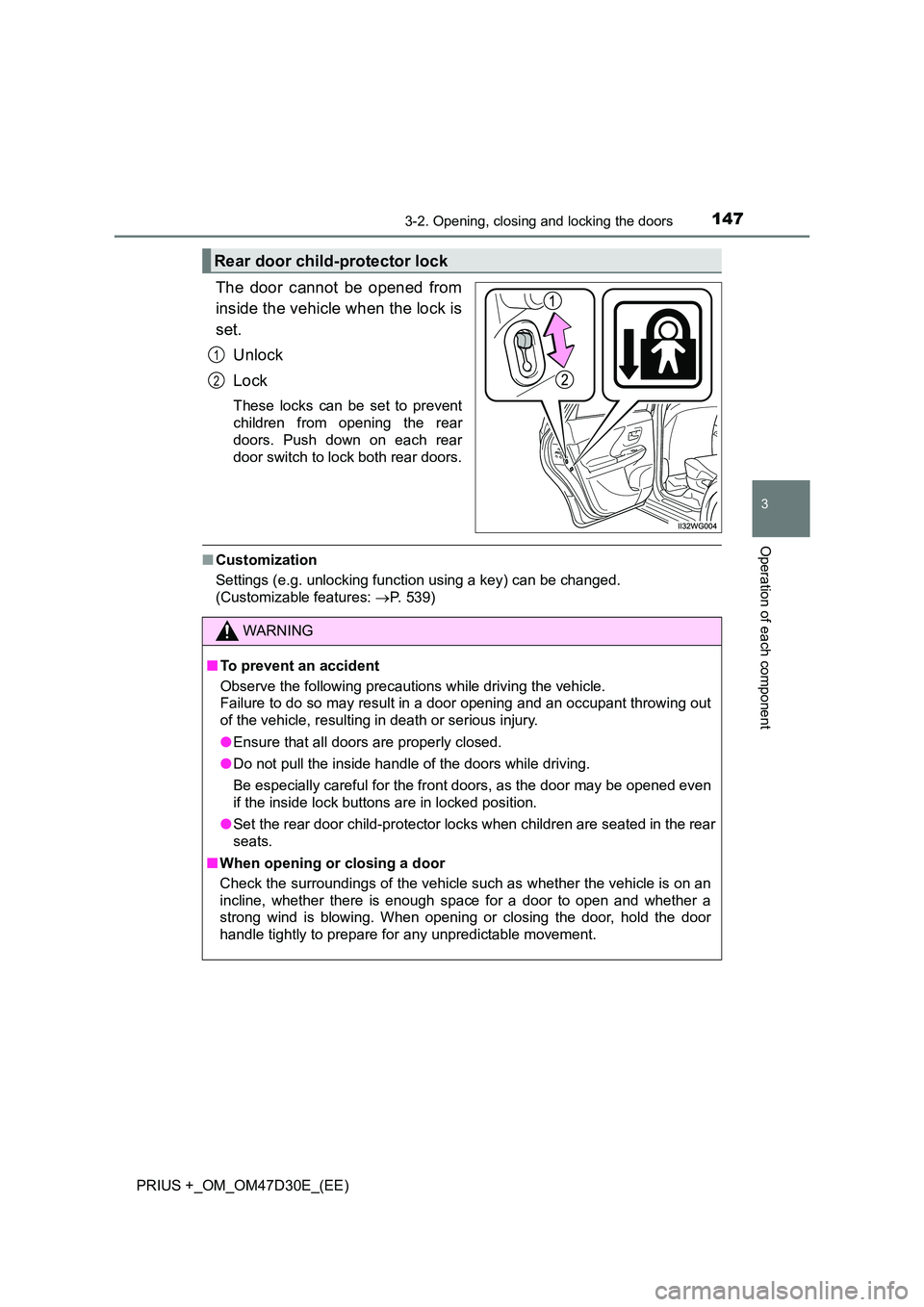
The door cannot be opened from
inside the vehicle when the lock is
set.
Unlock
Lock
These locks can be set to prevent
children from opening the rear
doors. Push down on each rear
door switch to lock both rear doors.
■ Customization
Settings (e.g. unlocking function using a key) can be changed.
(Customizable features: P. 539)
Rear door child-protector lock
1
2
WARNING
■To prevent an accident
Observe the following precautions while driving the vehicle.
Failure to do so may result in a door opening and an occupant throwing out
of the vehicle, resulting in death or serious injury.
● Ensure that all doors are properly closed.
● Do not pull the inside handle of the doors while driving.
Be especially careful for the front doors, as the door may be opened even
if the inside lock buttons are in locked position.
● Set the rear door child-protector locks when children are seated in the rear
seats.
■ When opening or closing a door
Check the surroundings of the vehicle such as whether the vehicle is on an
incline, whether there is enough space for a door to open and whether a
strong wind is blowing. When opening or closing the door, hold the door
handle tightly to prepare for any unpredictable movement.
Page 148 of 568
1483-2. Opening, closing and locking the doors
PRIUS +_OM_OM47D30E_(EE)
Back door
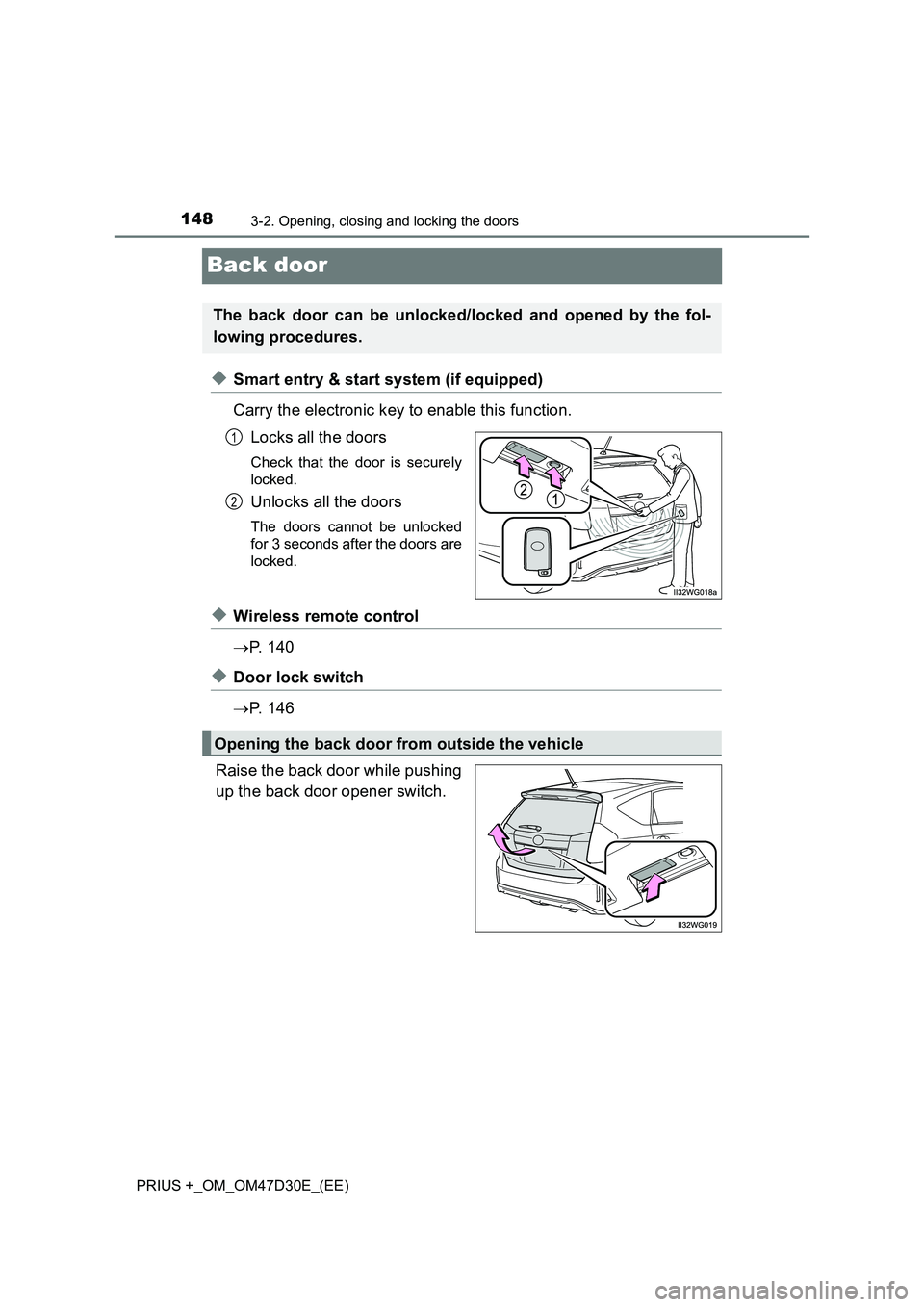
◆Smart entry & start system (if equipped)
Carry the electronic key to enable this function.
Locks all the doors
Check that the door is securely
locked.
Unlocks all the doors
The doors cannot be unlocked
for 3 seconds after the doors are
locked.
◆Wireless remote control
P. 1 4 0
◆Door lock switch
P. 1 4 6
Raise the back door while pushing
up the back door opener switch.
The back door can be unlocked/locked and opened by the fol-
lowing procedures.
1
2
Opening the back door from outside the vehicle
Page 153 of 568

153
3
3-2. Opening, closing and locking the doors
Operation of each component
PRIUS +_OM_OM47D30E_(EE)
Smart entry & start system
●Unlocks and locks the doors (P. 144)
●Unlocks and locks the back door (if equipped) (P. 1 4 8)
●Starts and stops the hybrid system (P. 224)
■Antenna location
■Effective range (areas within which the electronic key is detected)
When starting the hybrid system or changing power switch modes
The system can be operated when the electronic key is inside the vehi-
cle.
The following operations can be performed simply by carrying
the electronic key on your person, for example in your pocket.
The driver should always carry the electronic key.
Antenna outside the cabin (driver’s
side)
*1
Antenna outside the cabin (front pas-
senger’s side)
*1, 2
Antennas inside the cabin
Antenna inside the luggage compart-
ment
Antenna outside the luggage compart-
ment
*2
*1: The illustration is for left-hand drive
vehicles. The antenna locations are
reversed for right-hand drive vehicles.
*2: If equipped
When locking or unlocking the doors
The system can be operated when
the electronic key is within about 0.7
m (2.3 ft.) of driver’s door handle,
front passenger’s door handle
* and
back door opener switch
*. (Only the
doors detecting the key can be oper-
ated.)
*: If equipped
1
2
3
4
5
Page 154 of 568
1543-2. Opening, closing and locking the doors
PRIUS +_OM_OM47D30E_(EE)■Alarms and warning messages
Vehicles without multi-information display
The warning buzzer sounds and the warning light illuminates to protect
against unexpected accidents resulting from erroneous operation or theft of
the vehicle. When the warning light illuminates, take appropriate measures
based on the situation.
Vehicles with multi-information display
An alarm sounds and warning message displays shown on the multi-informa-
tion display are used to protect against unexpected accidents or theft of the
vehicle resulting from erroneous operation. When a warning message is dis-
played, take appropriate measures based on the displayed message.
(P. 458)
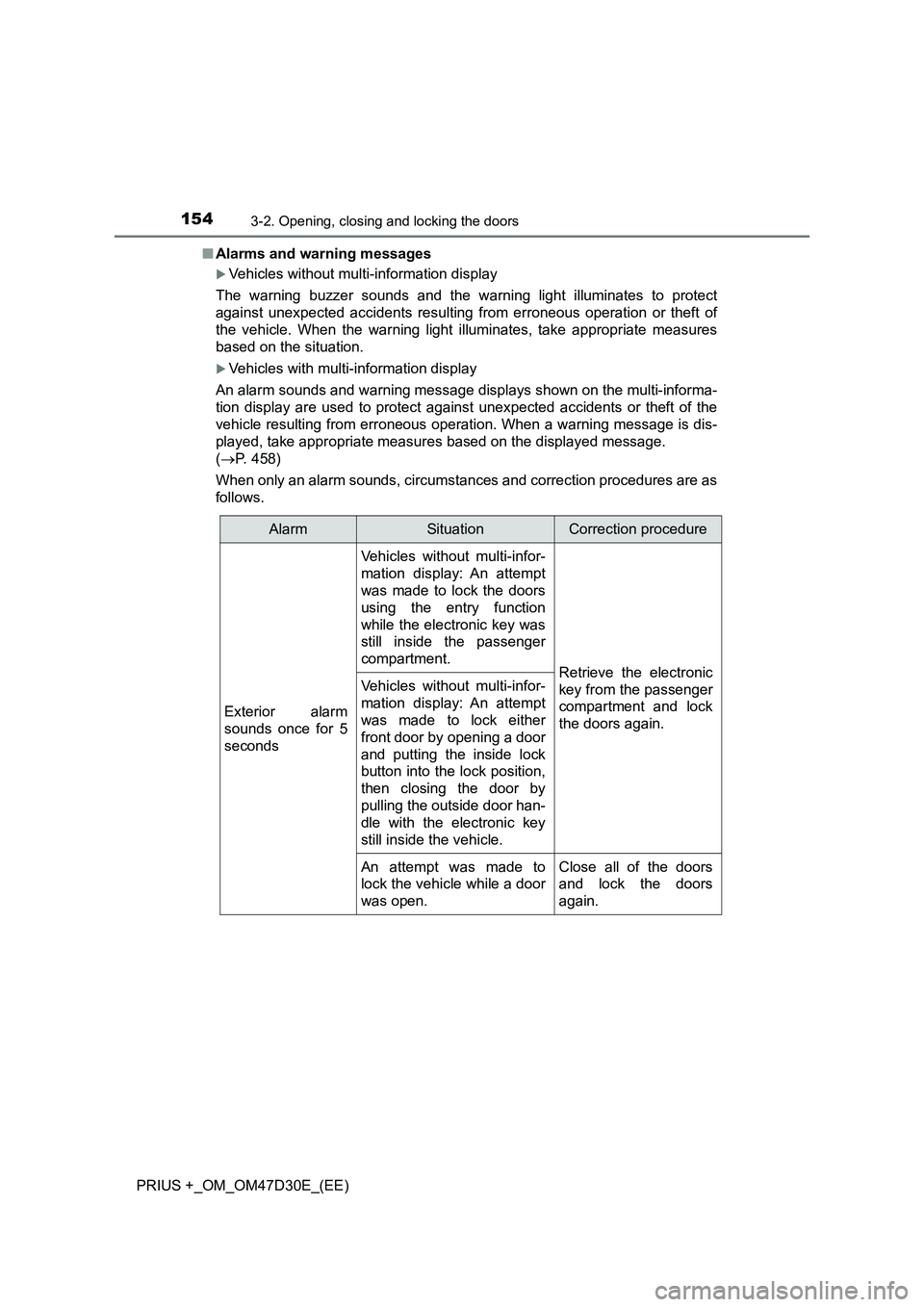
When only an alarm sounds, circumstances and correction procedures are as
follows.
AlarmSituationCorrection procedure
Exterior alarm
sounds once for 5
seconds
Vehicles without multi-infor-
mation display: An attempt
was made to lock the doors
using the entry function
while the electronic key was
still inside the passenger
compartment.
Retrieve the electronic
key from the passenger
compartment and lock
the doors again.Vehicles without multi-infor-
mation display: An attempt
was made to lock either
front door by opening a door
and putting the inside lock
button into the lock position,
then closing the door by
pulling the outside door han-
dle with the electronic key
still inside the vehicle.
An attempt was made to
lock the vehicle while a door
was open.Close all of the doors
and lock the doors
again.
Page 155 of 568

1553-2. Opening, closing and locking the doors
3
Operation of each component
PRIUS +_OM_OM47D30E_(EE)■Battery-saving function
The battery-saving function will be activated in order to prevent the electronic
key battery and the 12-volt battery from being discharged while the vehicle is
not in operation for a long time.
●In the following situations, the smart entry & start system may take some
time to unlock the doors.
• The electronic key has been left in an area of approximately 2 m (6 ft.) of
the outside of the vehicle for 10 minutes or longer.
• The smart entry & start system has not been used for 5 days or longer.
●If the smart entry & start system has not been used for 14 days or longer,
the doors cannot be unlocked at any doors except the driver’s door. In this
case, take hold of the driver’s door handle, or use the wireless remote con-
trol or the mechanical key, to unlock the doors.
■Electronic Key Battery-Saving Function
When battery-saving mode is set, battery depletion is minimized by stopping
the electronic key from receiving radio waves.
Interior alarm
pings repeatedly
The power switch was
turned to ACCESSORY
mode while the driver’s door
was open (The driver’s door
was opened when the
power switch was in
ACCESSORY mode).
Turn the power switch
off and close the
driver’s door.
The driver’s door was
opened while any shift posi-
tion other than P was
selected without turning off
the power switch.
Shift the shift position
to P.
Press twice while pressing and
holding . Confirm that the electronic
key indicator flashes 4 times.
While the battery-saving mode is set, the
smart entry & start system cannot be
used. To cancel the function, press any of
the electronic key buttons.
AlarmSituationCorrection procedure