Page 3 of 56

1
OVERVIEW FEATURES & OPERATIONS TOYOTA SAFETY SENSE SAFETY & EMERGENCY FEATURES
1 Visit your Toyota dealer for information on customizing this feature.2 Programmable by customer. Refer to the Owner’s Manual for instructions and more information.3 HomeLink® is a registered trademark of Gentex Corporation.
INDEX
Engine maintenance 9
Fuel tank door release & cap 8
Hood release 8
Indicator symbols 4-5
Instrument cluster 4
Instrument panel 2-3
Instrument panel light control 9
Keyless entry
1,2 6-7
Smart Key system1,2 7
OVERVIEW
FEATURES & OPERATIONS
Air conditioning/heating 18-19
Audio 20
Auto lock/unlock
1,2 11
Auxiliary storage 23
Clock 22
Continuously variable transmission 10
Cup holders-Adjust size 22
Door locks 12
Driving mode select 11
Garage door opener (HomeLink
®)3 22
Lights1 & turn signals 15
Manual transmission 10
Moonroof 12
Multi-Information Display (MID)
1 17
Parking brake 13
Power outlet 16
Rear seats-Folding 14
Rear view monitor system 23
Seat adjustments-Front 14
Seat heaters 19
Seats-Head restraints 14
Steering lock release 13
Steering wheel switches &
telephone controls (Bluetooth
®) 21
SAFETY & EMERGENCY FEATURES FEATURES & OPERATIONS (continued)
TOYOTA SAFETY SENSE™ P (TSS-P)
Automatic High Beams (AHB) 35
Dynamic Radar
Cruise Control (DRCC) 31-34
Lane Departure Alert with
Steering Assist (LDA w/SA) 28-30
Pre-Collision System with Pedestrian
Detection (PCS w/PD) 25-27
Quick overview-
Toyota Safety Sense
™ P (TSS-P) 24
Sensors 24
BLUETOOTH® DEVICE
PAIRING SECTION 42-51 Floor mat installation 40
Rear door child safety locks 36
Seat belts 36
Seat belts-Shoulder belt anchor 36
Spare tire & tools 38
Star Safety System
TM 39-40
Tire Pressure Monitoring
(warning) System (TPMS) 37
Trunk-Internal release 37 Tilt & telescopic steering wheel 13
TRAC/VSC OFF switch 23
USB media/AUX Port 16
Windows-Power 12
Windshield wipers & washers 16
Page 14 of 56
12
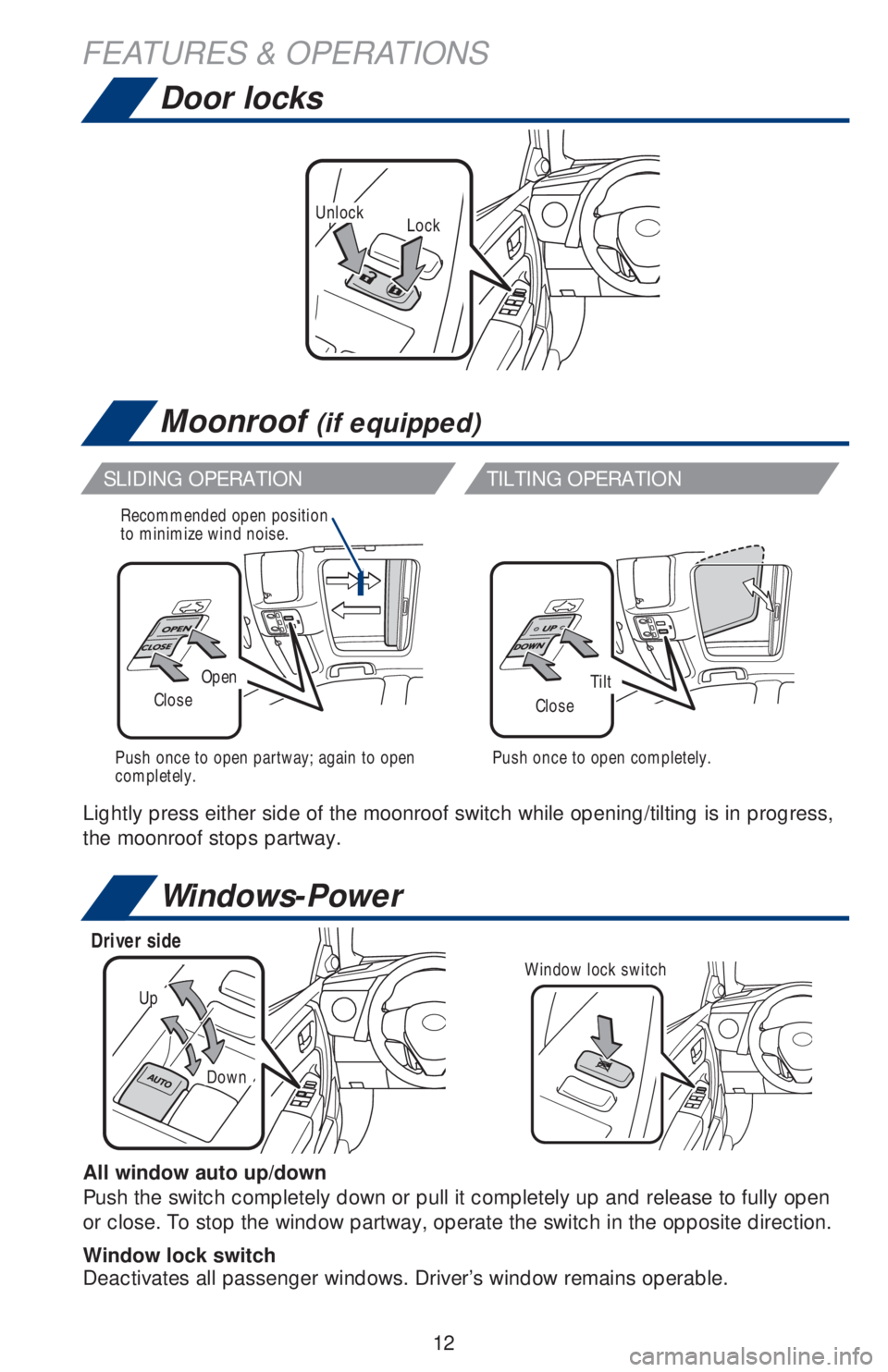
LockUnlock
Door locks
Moonroof (if equipped)
OpenTiltCloseClose
Recommended open position
to minimize wind noise.
Push once to open partway; again to open
completely.Push once to open completely.
Windows-Power
Up
Down
Driver side
Window lock switch
All window auto up/down
Push the switch completely down or pull it completely up and release to fully open
or close. To stop the window partway, operate the switch in the opposite direction.
Window lock switch
Deactivates all passenger windows. Driver’s window remains operable.
SLIDING OPERATION TILTING OPERATION
Lightly press either side of the moonroof switch while opening/tilting is in progress,
the moonroof stops partway.
FEATURES & OPERATIONS
Page 20 of 56
18
FEATURES & OPERATIONS
Air conditioning/heating
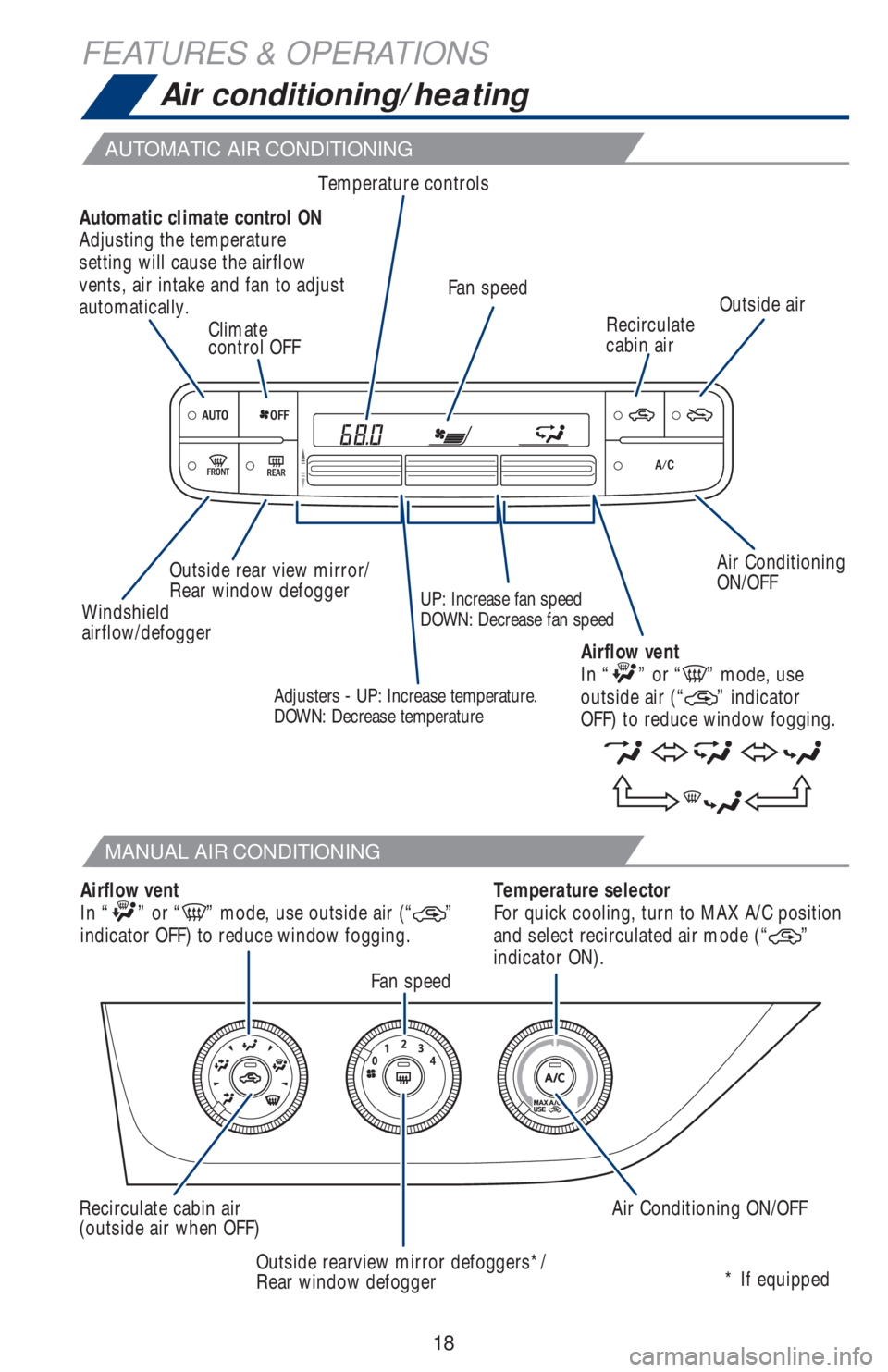
AUTOMATIC AIR CONDITIONING
MANUAL AIR CONDITIONING
Air Conditioning
ON/OFF Temperature controls
Recirculate
cabin airOutside air
Climate
control OFF
Outside rear view mirror/
Rear window defoggerFan speed
* If equipped
Windshield
airflow/defoggerUP: Increase fan speed
DOWN: Decrease fan speed Automatic climate control ON
Adjusting the temperature
setting will cause the airflow
vents, air intake and fan to adjust
automatically.
Temperature selector
For quick cooling, turn to MAX A/C position
and select recirculated air mode (“
”
indicator ON).
Fan speed
Air Conditioning ON/OFF Recirculate cabin air
(outside air when OFF)
Outside rearview mirror defoggers*/
Rear window defogger Airflow vent
In “” or “” mode, use outside air (“”
indicator OFF) to reduce window fogging.Airflow vent
In “
” or “” mode, use
outside air (“” indicator
OFF) to reduce window fogging.Adjusters - UP: Increase temperature.
DOWN: Decrease temperature
Page 51 of 56
49
Pairing your phone is the first step in connecting with your Toyota for hands-free
calling and for audio streaming via Bluetooth. This pairing process is quick and
easy: all Windows Phone mobile digital devices have Bluetooth integrated; all you
have to do is setup the phone and multimedia system to “talk” to each other and
form a connection.
Initiate Bluetooth® on your Windows Phone®
From your APP LIST,
select SETTINGS.Select BLUETOOTH.Ensure
BLUETOOTH
is ON.Phone will seek out
Bluetooth devices
while remaining
discoverable.
While your iPhone device is seeking
out Bluetooth devices, proceed to your
Entune Multimedia Head Unit on your
Toyota vehicle.
Bluetooth® Pairing for Windows Phone and
Entune™ touch screen system
STEP 1STEP 2STEP 3STEP 4
STEP 5
**Do not attempt the Bluetooth® Pairing process while driving.**