Page 370 of 592
3705-4. Other interior features
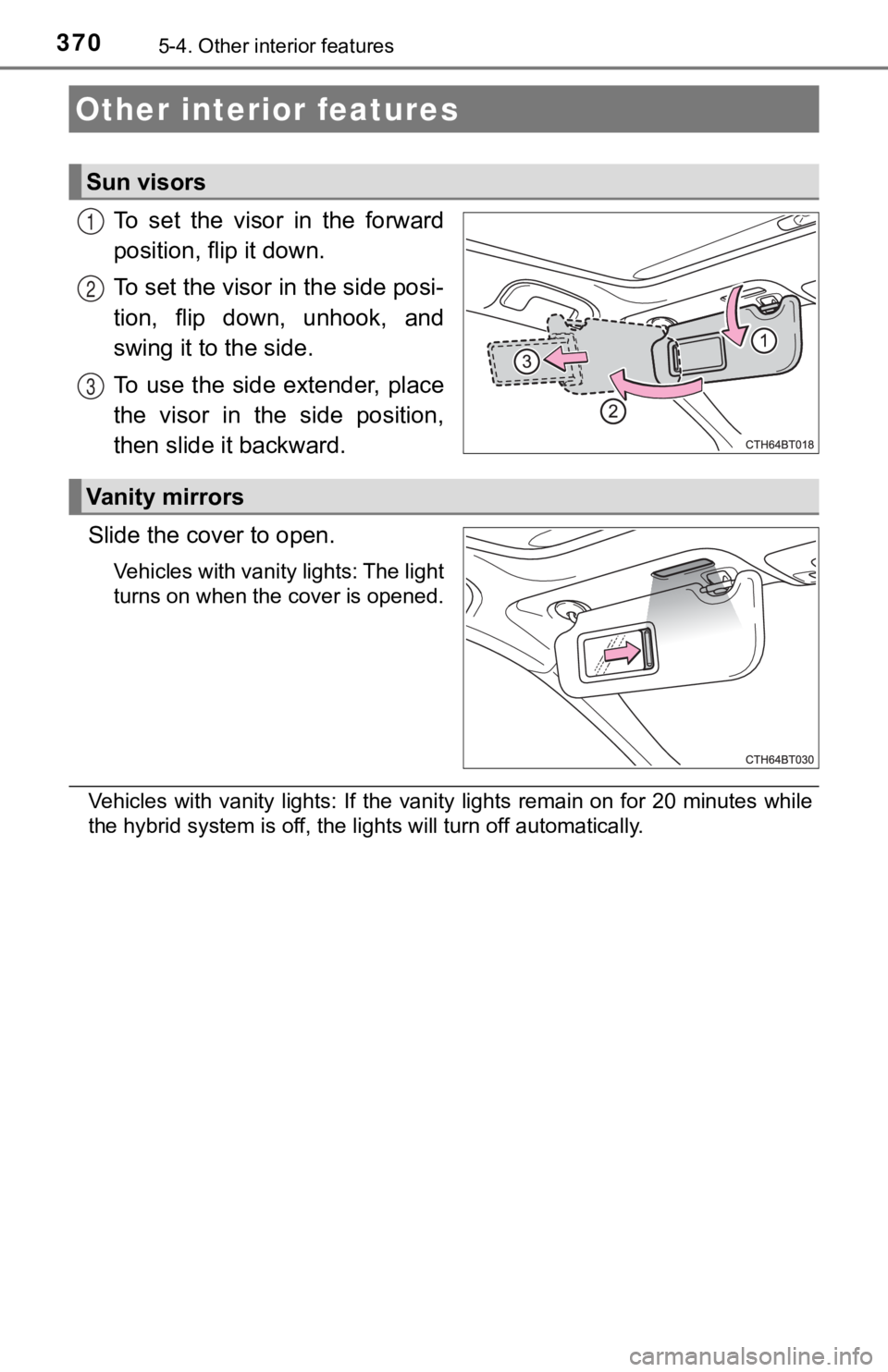
To set the visor in the forward
position, flip it down.
To set the visor in the side posi-
tion, flip down, unhook, and
swing it to the side.
To use the side extender, place
the visor in the side position,
then slide it backward.
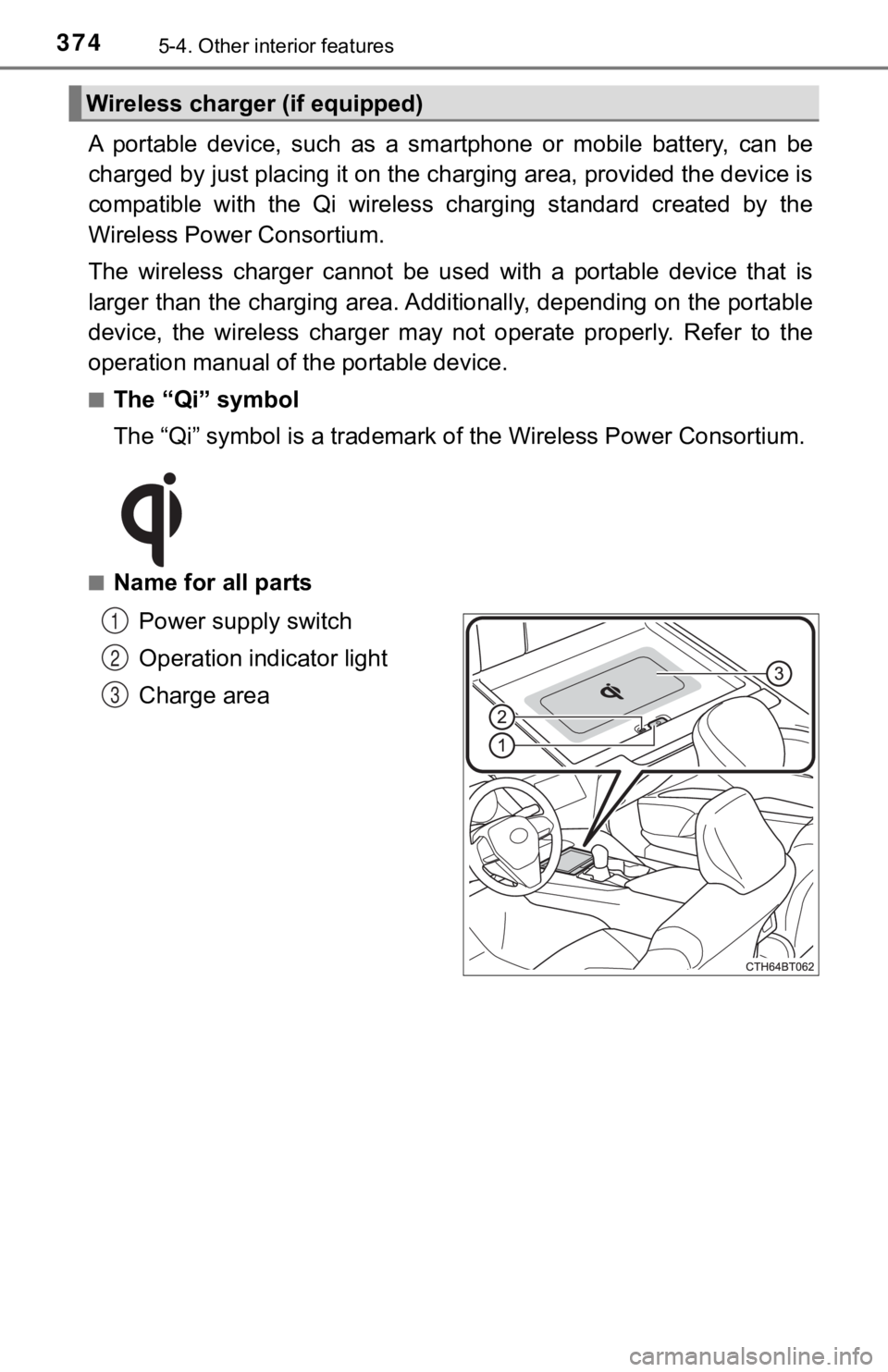
Slide the cover to open.
Vehicles with vanity lights: The light
turns on when the cover is opened.
Vehicles with vanity lights: If the vanity lights remain on for 20 minutes while
the hybrid system is off, the lights will turn off automatically.
Other interior features
Sun visors
1
2
3
Vanity mirrors
Page 374 of 592
3745-4. Other interior features
A portable device, such as a smartphone or mobile battery, can be
charged by just placing it on th e charging area, provided the d evice is
compatible with the Qi wireless charging standard created by th e
Wireless Power Consortium.
The wireless charger cannot be used with a portable device that is
larger than the charging area. Additionally, depending on the p ortable
device, the wireless charger may not operate properly. Refer to the
operation manual of the portable device.
■The “Qi” symbol
The “Qi” symbol is a trademark of the Wireless Power Consortium .
■Name for all parts
Power supply switch
Operation indicator light
Charge area
Wireless charger (if equipped)
1
2
3
Page 375 of 592
3755-4. Other interior features
5
Interior features
■Using the wireless charger
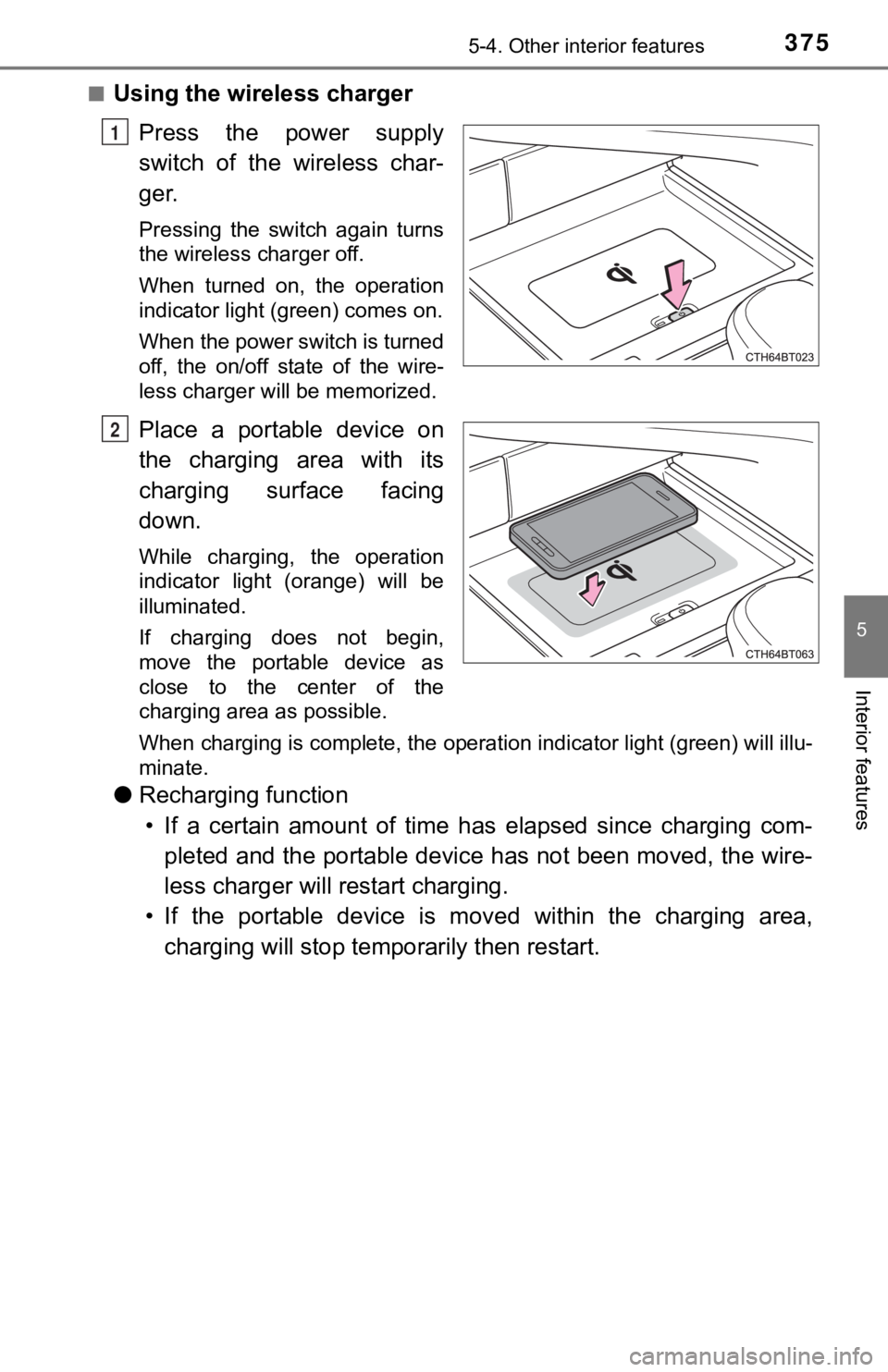
Press the power supply
switch of the wireless char-
ger.
Pressing the switch again turns
the wireless charger off.
When turned on, the operation
indicator light (green) comes on.
When the power switch is turned
off, the on/off state of the wire-
less charger will be memorized.
Place a portable device on
the charging area with its
charging surface facing
down.
While charging, the operation
indicator light (orange) will be
illuminated.
If charging does not begin,
move the portable device as
close to the center of the
charging area as possible.
When charging is complete, the operation indicator light (green ) will illu-
minate.
● Recharging function
• If a certain amount of time has elapsed since charging com- pleted and the portable device has not been moved, the wire-
less charger will restart charging.
• If the portable device is mov ed within the charging area,
charging will stop tempo rarily then restart.
1
2
Page 376 of 592
3765-4. Other interior features
■Operation indicator light status
*: Depending on the portable device, the operation indicator light may stay
illuminated (orange) after charging has completed.
● If the operation indi cator light blinks
If an error is detected, the operation indicator light will bli nk
(orange). Take the appropriate measures according to the table
below.
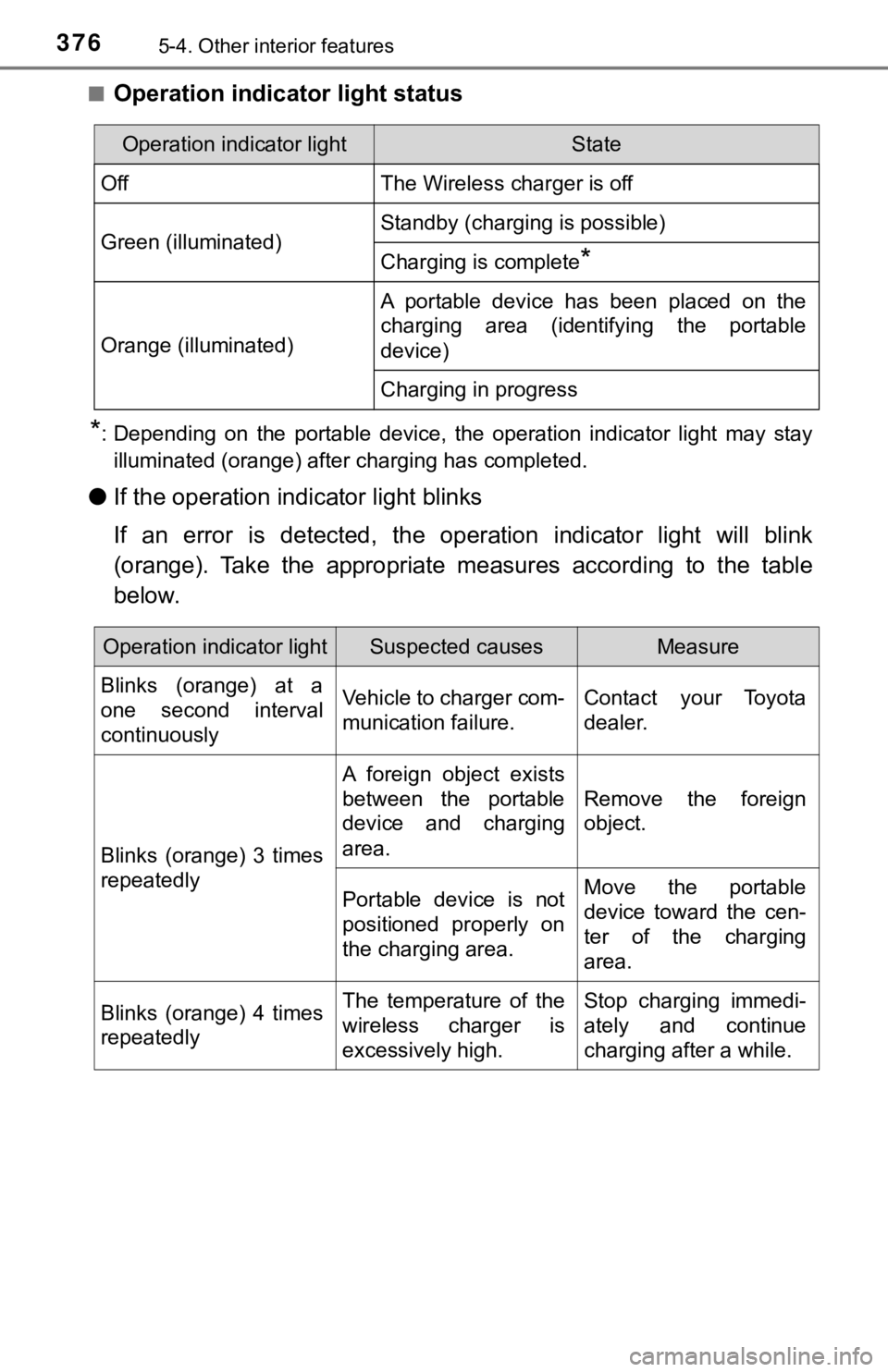
Operation indicator lightState
OffThe Wireless charger is off
Green (illuminated)Standby (charging is possible)
Charging is complete*
Orange (illuminated)
A portable device has been placed on the
charging area (identifying the portable
device)
Charging in progress
Operation indicator lightSuspected causesMeasure
Blinks (orange) at a
one second interval
continuously Vehicle to charger com-
munication failure.
Contact your Toyota
dealer.
Blinks (orange) 3 times
repeatedly A foreign object exists
between the portable
device and charging
area.
Remove the foreign
object.
Portable device is not
positioned properly on
the charging area. Move the portable
device toward the cen-
ter of the charging
area.
Blinks (orange) 4 times
repeatedly The temperature of the
wireless charger is
excessively high.Stop charging immedi-
ately and continue
charging after a while.
Page 377 of 592

3775-4. Other interior features
5
Interior features
■The wireless charger can be operated when
The power switch is in ACCESSORY or ON mode.
■ Portable devices that can be charged
●Portable devices compatible with the Qi wireless charging stand ard can be
charged by the wireless charger. However, compatibility with all devices
which meet the Qi wireless charging standard is not guaranteed.
● The wireless charger is designed to supply low power electricit y (5 W or
less) to a cellular phone, smartphone, or other portable device .
■ If a cover or accessory is attach ed to the portable device
Do not charge a portable device if a cover or accessory which i s not Qi com-
patible is attached. Depending on the type of cover and/or acce ssory
attached, it may not be possible to charge the portable device. If the portable
device is placed on the charging area and does not charge, remo ve the cover
and/or accessories.
■ If interference is heard in AM ra dio broadcasts while charging
Turn off the wireless charger and check if the noise is reduced. If noise is
reduced, press and hold the power supply switch of the wireless charger for 2
seconds. The frequency of the wireless charger is changed and n oise may be
reduced. When the frequency is changed, the operation indicator light will
blink (orange) 2 times.
■ Charging precautions
●If the electronic key cannot be detected in the cabin, charging cannot be
performed. When a door is opened and closed, charging may be te mporarily
suspended.
● While charging, the wireless charger and the portable device wi ll become
warm. This is not a malfunction.
If a portable device becomes warm while charging and charging s tops due
to the protection function of the portable device, wait until t he portable
device cools down and charge it again.
■ Sound generated during operation
When the power supply switch is turned on or while a portable d evice is being
identified, operation sounds may be heard. This is not a malfunction.
■ Cleaning the wireless charger
P. 398
Page 382 of 592
3825-4. Other interior features
NOTICE
■Conditions in which the wireless charger may not operate correctly
In the following situations, the wireless charger may not opera te correctly:
● When a portable device is fully charged
● When there is a foreign object between the charging area and po rtable
device
● When a portable device becomes hot while charging
● When a portable device is placed on the wireless area with its charging
surface facing up
● When a portable device is not centered on the charging area
● When the vehicle is near a TV tower, electric power plant, gas station,
radio station, large display, airport or other facility that ge nerates strong
radio waves or electrical noise
● When the portable device is in contact with, or is covered by a ny of the fol-
lowing metallic objects:
• Cards to which aluminum foil is attached
• Cigarette boxes that have aluminum foil inside
• Metallic wallets or bags
• Coins
• Metal hand warmers
• Media such as CDs and DVDs
● When wireless keys (that emit radio waves) other than those of your vehi-
cle are being used nearby.
If in situations other than above the wireless charger does not operate prop-
erly or the operation indicator light is blinking, the wireless charger may be
malfunctioning. Contact your Toyota dealer.
■ To prevent failure or damage to data
● Do not bring magnetic cards, such as a credit card, or magnetic recording
media, close to the wireless charger while charging. Otherwise, data may
be erased due to the influence of magnetism.
Additionally, do not bring precision instruments such as wrist watches,
close to the wireless charger, as such objects may malfunction.
● Do not leave portable devices in the cabin. The temperature ins ide the
cabin may become high when parked in the sun, and cause damage to the
device.
■ To prevent 12-volt b attery discharge
Do not use the wireless charger for a long period of time with the hybrid sys-
tem stopped.
Page 385 of 592
3855-4. Other interior features
5
Interior features
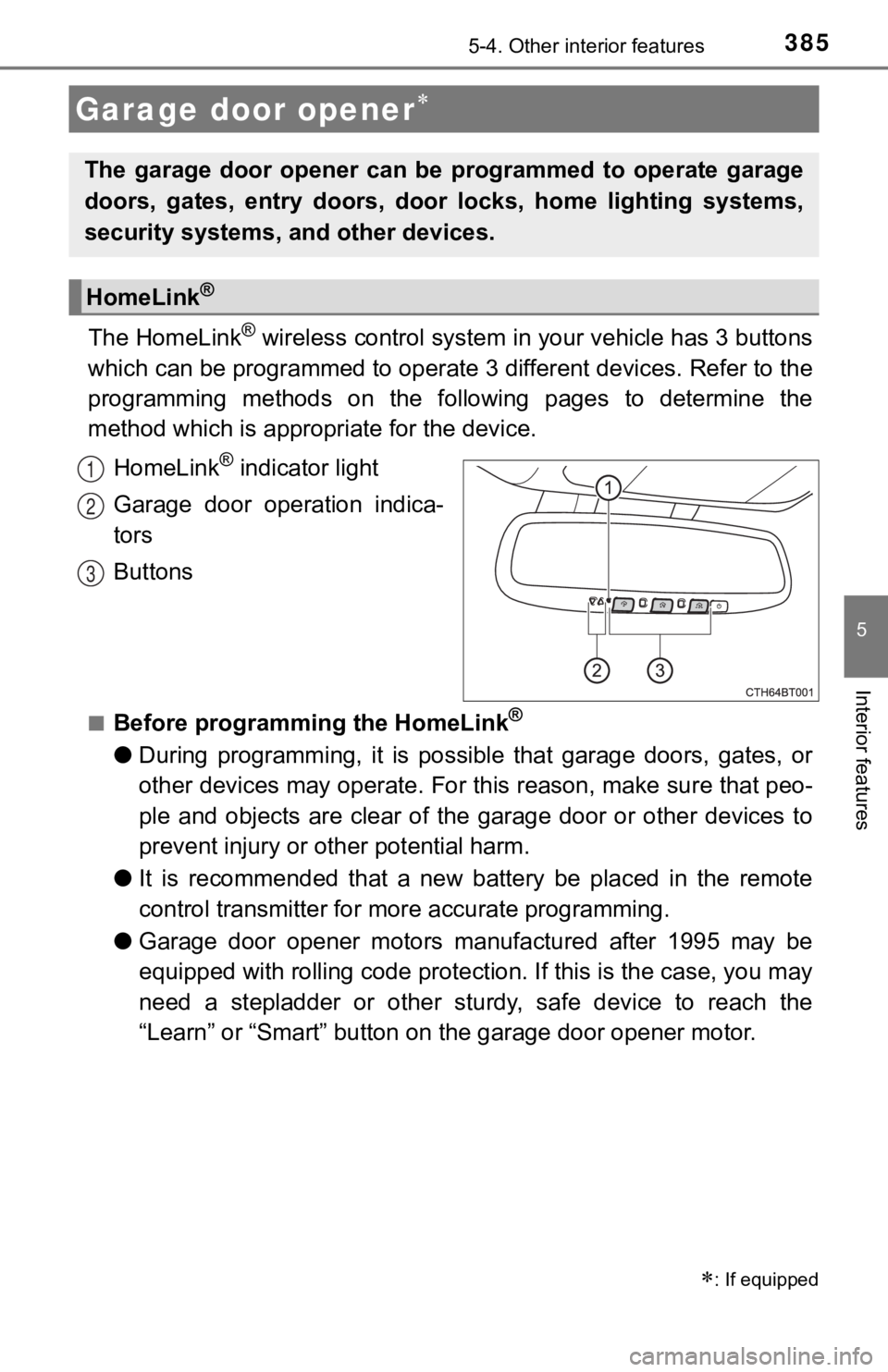
The HomeLink® wireless control system in your vehicle has 3 buttons
which can be programmed to operate 3 different devices. Refer to the
programming methods on the following pages to determine the
method which is approp riate for the device.
HomeLink
® indicator light
Garage door operation indica-
tors
Buttons
■Before programming the HomeLink®
● During programming, it is possible that garage doors, gates, or
other devices may operate. For this reason, make sure that peo-
ple and objects are clear of the garage door or other devices t o
prevent injury or other potential harm.
● It is recommended that a new battery be placed in the remote
control transmitter for mo re accurate programming.
● Garage door opener motors manufactured after 1995 may be
equipped with rolling code pro tection. If this is the case, you may
need a stepladder or other sturdy, safe device to reach the
“Learn” or “Smart” button on the garage door opener motor.
Garage door opener
: If equipped
The garage door opener can be programmed to operate garage
doors, gates, entry doors, door locks, home lighting systems,
security systems, and other devices.
HomeLink®
1
2
3
Page 386 of 592
3865-4. Other interior features
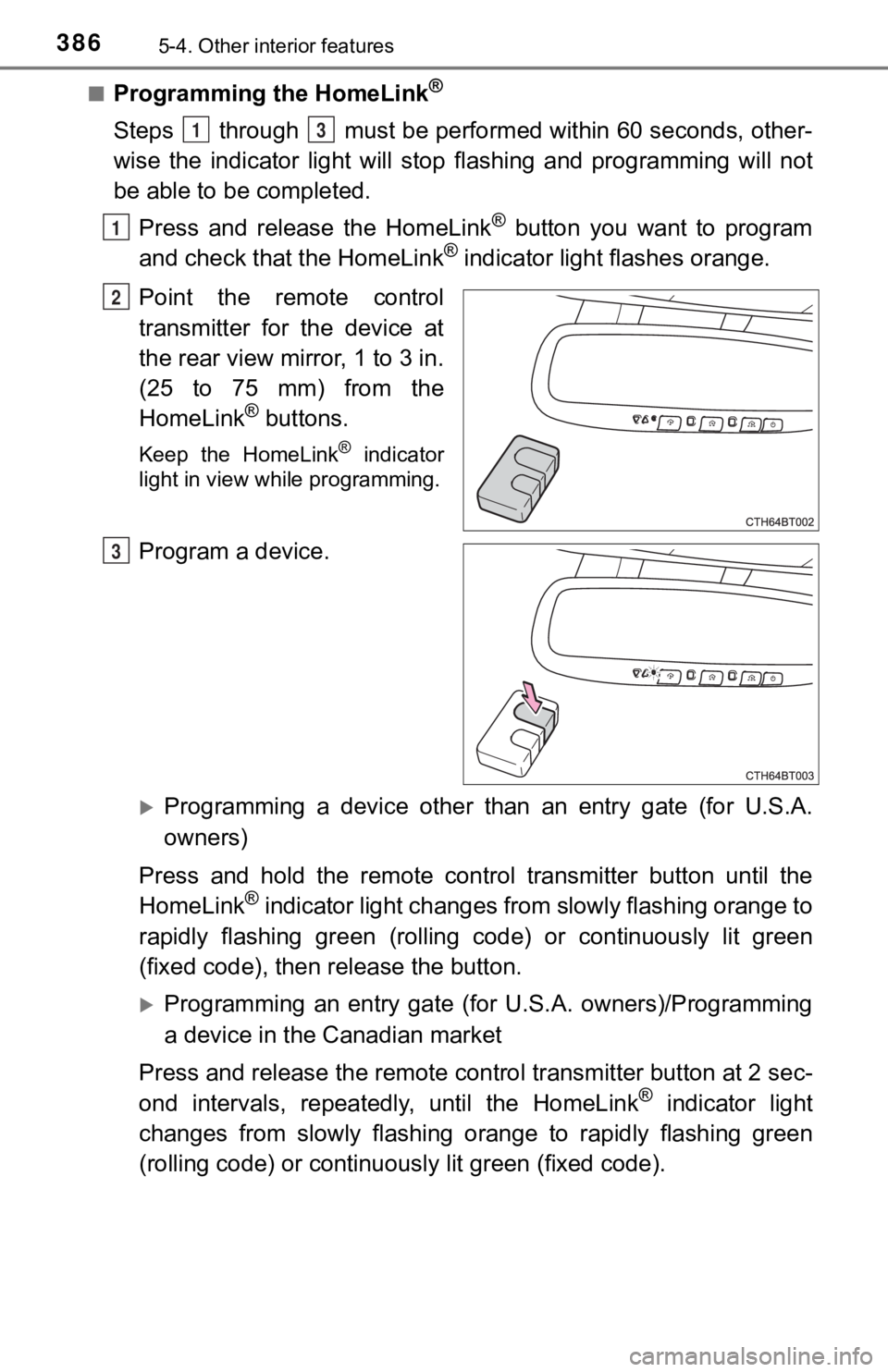
■Programming the HomeLink®
Steps through must be performed within 60 seconds, other-
wise the indicator light will st op flashing and programming wil l not
be able to be completed.
Press and release the HomeLink
® button you want to program
and check that the HomeLink® indicator light flashes orange.
Point the remote control
transmitter for the device at
the rear view mirror, 1 to 3 in.
(25 to 75 mm) from the
HomeLink
® buttons.
Keep the HomeLink® indicator
light in view while programming.
Program a device.
Programming a device other than an entry gate (for U.S.A.
owners)
Press and hold the remote control transmitter button until the
HomeLink
® indicator light changes from slowly flashing orange to
rapidly flashing gre en (rolling code) or continuously lit green
(fixed code), then release the button.
Programming an entry gate (for U.S.A. owners)/Programming
a device in the Canadian market
Press and release the remote con trol transmitter button at 2 sec-
ond intervals, repeatedly, until the HomeLink
® indicator light
changes from slowly flashing orange to rapidly flashing green
(rolling code) or continuous ly lit green (fixed code).
13
1
2
3