Page 157 of 360

Introduction
Function button: function
CLOSE Closes the Configuration Wizard, and
the main menu or last mode in which
you used the Infotainment syst em will
appear
.
NEVER Disables the possibility of changing
the settings of the Infotainment sys-
tem. T
o configur
e the system go to:
System settings and select Con-
figuration wizard .
START Starts up the Configuration Wizard.
A If the system includes navigation, the
date and time are set automatically
by the GPS.
B Search and save the radio stations
with the best reception at that time in
all availabl
e bands.
C Link your mobile phone to the Infotain-
ment system.
D a)
Add your home address using your
current position or by manually enter-
ing an addr
ess.
PREVIOUS
NEXT Pr
evious or next parameter to config-
ure.
When a parameter has been config-
ur
ed, the only way to reconfigure it is
by clicking on it on the main menu, not
by using the Previous/Next buttons.
When you configure a parameter,
will be displayed over it. Function button: function
FINISH Once one or more settings have been
applied, finalise the configuration in
the main menu of the wizzard.
If you hav
e not set all the par
ameters,
the Initial Configuration Wizard will
start the next time you turn the Info-
tainment system on. a)
Only valid for Navi System.
Menu and system settings The settings that can be selected varies de-
pending on the country and the equipment in
question, and on the v
ehicl
e
Page 158 of 360
Infotainment System
Function button: function
Time format : To select the time display format (12
or 24 hours).
Date : To set the current date.
Date format : To select the date display format
(DD.MM.YYYY , YY-MM-DD or MM-DD-YY ).
Language : To select the desired language for texts
and phrases in the voice control syst em.
Additional k
eypad languages : To select additional key-
board languages.
Units : To set the units of measurement of the vehi-
cle
Page 161 of 360

Introduction
display the contexts in which the system op-
er at
es and the main commands.
Fr om her
e you can command the syst
em
based on the context that you want to oper-
ate, or give a voice command directly.
When selecting each of the contexts (Naviga-
tion, Telephone, Radio, Media, Voice control)
a menu will displayed listing the main com-
mands, and providing brief explanations of
how to give each of them, as a help mode.
Voice control (RADIO) Effect
Voice command
LISTEN TO THE RADIO Listen to the radio
SELECT STATION Station STATION NAME 1
Set station
SELECT FREQUENCY Frequency 87.9
Set frequency
CHANGE BAND Band FM
Change bandVoice control (MEDIA)
Effect
Voice command
SOURCE SELECTION Play CD
Listen to CD Effect
Voice command
MUSIC SELECTION Select track / album / ar-
tist / genre Voice control (TELEPHONE)
Effect
Voice command
CALL CONTACTS Call Name Surname
Home
Call Name Surname Mo-
bile
CALL NUMBERS Call 01234
Call number
CALL LIST Show all call
s
Missed call
s
REDIAL Redial
CALL MAILBOX Call mailbox
SMS Read out text message
SERVICE Breakdown call
INFORMATION Information call Voice control (NAVIGATION)*
Effect
Voice command
ENTER THE ADDRESS Enter address
HOME ADDRESS Home address Effect
Voice command
LAST DESTINATIONS Last destinations
NAVIGATION TO CON-
TACTS Navigate t
o Name Sur-
name
ROUTE GUIDANCE Start route guidance
Route information Voice control
Effect
Voice command
VOICE CONTROL Pardon?
Back
Main menu
Cancel voice control
Pause voice control
HELP Help
What can I say?
VOICE BUTTON
Page 175 of 360
Operating modes
Digital radio mode (DAB, DAB + and
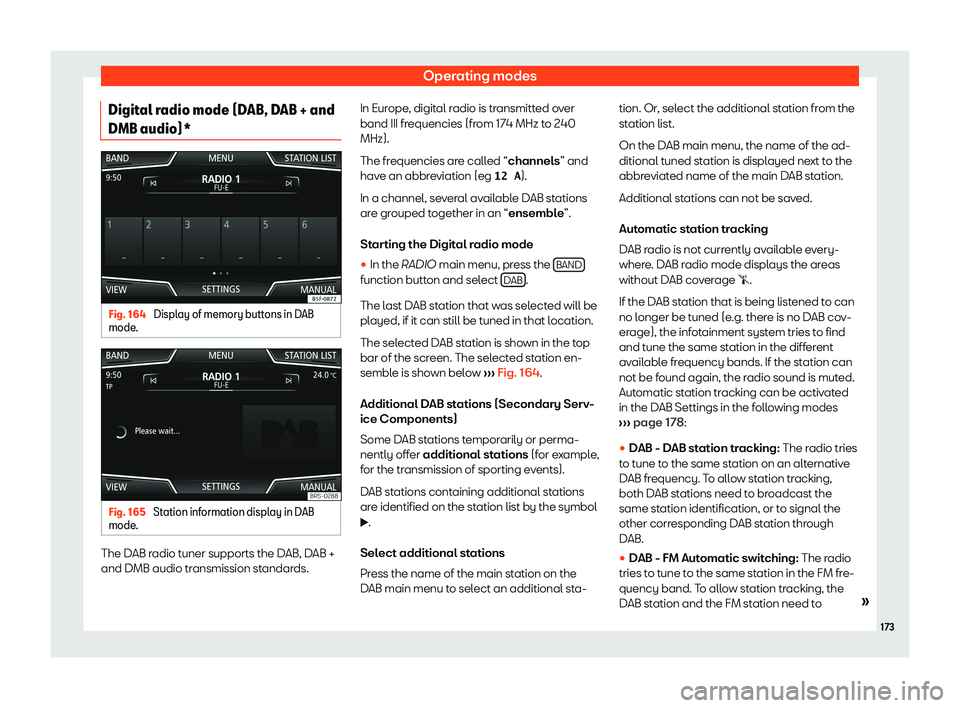
DMB audio)* Fig. 164
Display of memory buttons in DAB
mode . Fig. 165
Station information display in DAB
mode . The DAB radio tuner supports the DAB, DAB +
and DMB audio tr
ansmission st
andards. In Eur
ope , digital radio is transmitted over
band III frequencies (from 174 MHz t
o 240
MHz).
The frequencies are called “channels” and
have an abbreviation (eg 12 A ).
In a channel, several available DAB stations
are grouped together in an “ensemble”.
Starting the Digital radio mode
�
Page 176 of 360
Infotainment System
broadcast the same station identification, or
t o signal the other corr
esponding FM station
thr ough D
AB. When the corresponding FM
station has been found, “FM” is displayed be-
hind the name of the station. If the corre-
sponding DAB station becomes available
again, it returns to DAB mode after a while
and the “FM” identification is concealed.
�
Page 179 of 360
Operating modes
Active TP function and station selection
T r
affic announcements ar e pl
ayed in Audio
mode
.
If a station without the TP function in FM mode
is selected, the radio tries to find stations with
this function in the background. If none are
found, it will be displayed half way up the left
hand side of the screen �.
In AM mode or in Media mode, a traffic sta-
tion is automatically tuned in the background
as long as there is one available. Depending
on the situation this operation may take some
time.
Incoming traffic announcement
In Audio mode, traffic announcements are
played automatically when they are re-
ceived.
While the traffic announcement is playing, a
pop-up window is displayed and the radio
switches, if necessary, to the traffic informa-
tion station.
Media mode is interrupted and the volume is
set as adjusted
Page 196 of 360
Infotainment System
Navigation main menu function buttons
and indicat orsFunction button: function
A The split screen is displayed
Page 199 of 360
Operating modes
Press on the destination to display the
function buttons
Starting rout
e guidance dir
ect to the se-
lected destination. The stages ar e omit
-
ted.
Opening the detailed view of the desti-
nation in question. Available function buttons
New desti-
nation Add a new destination.
Destina-
tions Adding a new destination from My
destinations .
Storing To store the created route in the route
memory.
Start Start route guidance.
Calculate To update the calculated distance and
estimated arrival time. a)
St op T
o stop active route guidance. b)
c Moving a stopover or a destination to
another position on the list. Pr
ess and
dr ag t o mo
v
e the destination.a)
Only displayed with route guidance activated and
when a destination has been added t o the t
our.
b) Only displ ayed with r
oute guidance activated.
Last destinations
List of last destinations. My destinations
�