Page 202 of 348
Interior Fuses
The interior fuse panel is part of the Body Control Module
(BCM) and is located on the driver’s side under the
instrument panel.
Fuse Panel Cover
200 IN CASE OF EMERGENCY
Page 205 of 348
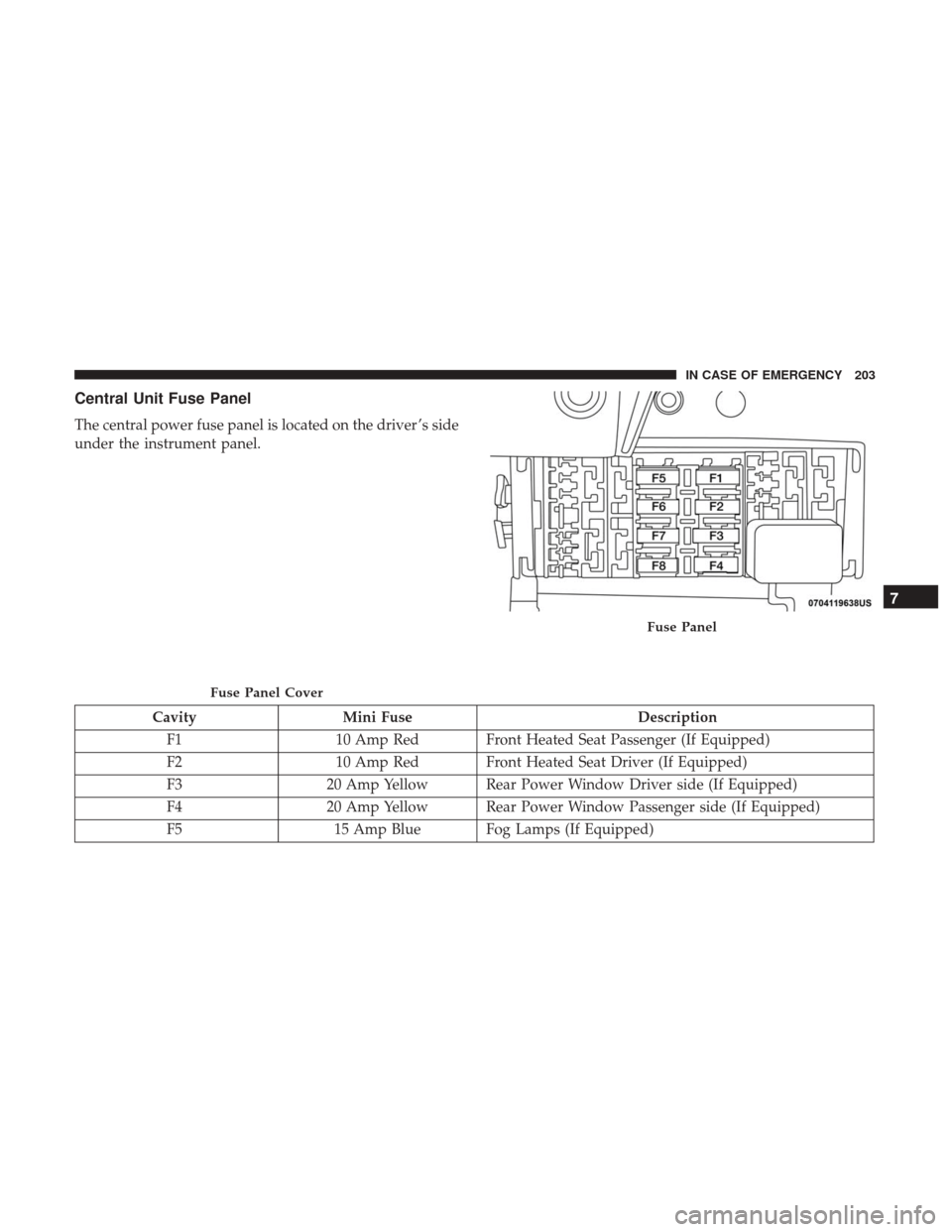
Central Unit Fuse Panel
The central power fuse panel is located on the driver ’s side
under the instrument panel.
CavityMini Fuse Description
F1 10 Amp Red Front Heated Seat Passenger (If Equipped)
F2 10 Amp Red Front Heated Seat Driver (If Equipped)
F3 20 Amp Yellow Rear Power Window Driver side (If Equipped)
F4 20 Amp Yellow Rear Power Window Passenger side (If Equipped)
F5 15 Amp Blue Fog Lamps (If Equipped)
Fuse Panel Cover
Fuse Panel
7
IN CASE OF EMERGENCY 203
Page 235 of 348

SCHEDULED SERVICING
Your vehicle is equipped with an automatic oil change
indicator system. The oil change indicator system will
remind you that it is time to take your vehicle in for
scheduled maintenance.
Based on engine operation conditions, the oil change
indicator message will illuminate. This means that service
is required for your vehicle. Operating conditions such as
frequent short-trips, trailer tow, extended engine idle time,
extremely hot or cold ambient temperatures will influence
when the “Oil Change Required” message is displayed.
Severe Operating Conditions can cause the change oil
message to illuminate as early as 3,500 miles (5,600 km)
since last reset. Have your vehicle serviced as soon as
possible, within the next 500 miles (805 km).
Your authorized dealer will reset the oil change indicator
message after completing the scheduled oil change. If a
scheduled oil change is performed by someone other than
your authorized dealer, the message can be reset by
referring to the steps described under “Oil Change Reset”
in “Instrument Cluster Display” in “Getting To Know Your
Instrument Panel” for further information.NOTE:
Under no circumstances should oil change inter-
vals exceed 10,000 miles (16,000 km), 350 hours of engine
run time or twelve months, whichever comes first. The 350
hours of engine run or idle time is generally only a concern
for fleet customers.
Severe Duty All Models
Change Engine Oil at 4,000 miles (6,500 km) or 350 hours of
engine run time if the vehicle is operated in a dusty and off
road environment or is operated predominantly at idle, or
only very low engine RPM’s. This type of vehicle use is
considered Severe Duty.
Once A Month Or Before A Long Trip:
• Check engine oil level.
• Check windshield washer fluid level.
• Check tire pressure and look for unusual wear or
damage. Rotate tires at the first sign of irregular wear,
even if it occurs before the oil indicator system turns on.
• Check the fluid levels of the coolant reservoir and brake
master cylinder, fill as needed.
• Check function of all interior and exterior lights.
8
SERVICING AND MAINTENANCE 233
Page 288 of 348

IDENTIFICATION DATA
Vehicle Identification Number
The Vehicle Identification Number (VIN) is found on the
left front corner of the instrument panel, visible through
the windshield. This number also appears on the vehicle
frame and underbody as well as the Automobile Informa-
tion Disclosure Label affixed to a window on your vehicle,
the vehicle registration and title.
NOTE:It is illegal to remove or alter the VIN.
BRAKE SYSTEM
Your vehicle is equipped with dual hydraulic brake sys-
tems. If either of the two hydraulic systems loses normal
capability, the remaining system will still function. How-
ever, there will be some loss of overall braking effective-
ness. You may notice increased pedal travel during appli-
cation, greater pedal force required to slow or stop, and
potential activation of the “Brake System Warning Light”.
In the event power assist is lost for any reason (i.e.,
repeated brake applications with the engine off), the brakes
will still function. However, the effort required to brake the
vehicle will be much greater than that required with the
power system operating.
WHEEL AND TIRE TORQUE SPECIFICATIONS
Proper lug nut/bolt torque is very important to ensure that
the wheel is properly mounted to the vehicle. Any time a
wheel has been removed and reinstalled on the vehicle, the
lug nuts/bolts should be torqued using a properly cali-
brated torque wrench using a high quality six sided (hex)
deep wall socket.
Vehicle Identification Number
286 TECHNICAL SPECIFICATIONS
Page 299 of 348

NOTE:
•FCA US LLC or your dealer may contact you directly
regarding software updates.
• To help further improve vehicle security and minimize
the potential risk of a security breach, vehicle owners
should:
• Routinely check www.driveuconnect.com/
support/software-update.html (U.S. Residents) or
www.driveuconnect.ca (Canadian Residents) to learn
about available Uconnect software updates.
• Only connect and use trusted media devices (e.g.
personal mobile phones, USBs, CDs).
Privacy of any wireless and wired communications cannot
be assured. Third parties may unlawfully intercept infor-
mation and private communications without your consent.
For further information, refer to “Onboard Diagnostic
System (OBD II) Cybersecurity” in “Getting To Know Your
Instrument Panel”.
UCONNECT SETTINGS
The Uconnect system uses a combination of buttons on the
touchscreen and buttons on the faceplate located on the
center of the instrument panel that allows you to access and change the customer programmable features. Many
features can vary by vehicle.
CAUTION!
Do NOT attach any object to the touchscreen, doing so
can result in damage to the touchscreen.
Uconnect 3/3 NAV With 5-inch Display Buttons On The
Touchscreen And Buttons On The Faceplate
1 — Uconnect Buttons On The Touchscreen
2 — Uconnect Buttons On The Faceplate
10
MULTIMEDIA 297
Page 311 of 348

The button located in the center of the right hand control to
select the source (AM, FM, SiriusXM, USB, AUX).
The left hand control is a rocker type switch with a
push-button in the center. The function of the left hand
control is different depending on which mode you are in.
The following describes the left hand control operation in
each mode.
Radio Operation
Pushing the top of the switch will “Seek” up for the next
listenable station and pushing the bottom of the switch will
“Seek” down for the next listenable station.
The button located in the center of the left-hand control
will tune to the next preset station that you have pro-
grammed in the radio preset button.
Media Mode
Pushing the top of the switch once goes to the next track on
the selected media (AUX/USB/Bluetooth). Pushing the
bottom of the switch once goes to the beginning of the
current track, or to the beginning of the previous track if it
is within eight seconds after the current track begins to
play.
IPOD/USB/MP3 CONTROL — IF EQUIPPED
The USB Input and Auxiliary Jack is located on the
instrument panel below the Climate Controls. This feature
allows an iPod or external USB device to be plugged into
the USB port.
iPod control supports Mini, 4G, Photo, Nano, 5G iPod and
iPhone devices. Some iPod software versions may not fully
support the iPod control features. Please visit Apple’s
website for software updates.
For further information, refer to the Uconnect Owner ’s
Manual Supplement.
USB Input And AUX Jack
10
MULTIMEDIA 309
Page 333 of 348

Inside Rearview Mirror.......................38
Instrument Cluster ....................... .70, 71
Descriptions .............................82
Display ................................72
Instrument Panel Lens Cleaning ................282
Interior And Instrument Lights ..................43
Interior Appearance Care .....................281
Interior Lights ..............................43
Introduction ................................4
iPod Control ............................. .309
iPod/USB/MP3 Control ..................... .309
Bluetooth Streaming Audio .................309
Jacking And Tire Changing ....................204
Jack Location ............................ .204
Jack Operation ........................ .204, 256
Jump Starting ............................ .220
Key Fob Programming Additional Key Fobs .............19
Key Fob Battery Service (Remote Keyless Entry) .....18
Key Fob Programming (Remote Keyless Entry) ......19
Key-In Reminder ............................20
Keys ....................................16
Replacement .............................21 Sentry (Immobilizer)
.......................20
Lane Change Assist ..........................43
Lap/Shoulder Belts ........................ .100
Latches ................................. .146
Hood ..................................58
Leaks, Fluid ............................. .146
Life Of Tires ............................. .270
Light Bulbs .......................... .145, 191
Lights .................................. .145
AirBag ............................ .74, 143
Brake Assist Warning ......................92
Brake Warning ...........................74
Bulb Replacement ....................... .191
Cruise .................................82
Daytime Running .........................41
Engine Temperature Warning .................76
Exterior ............................ .41, 145
Hazard Warning Flasher ...................191
Headlights ..............................41
Interior ................................
43
Malfunction Indicator (Check Engine) ...........80
Park ............................... .42, 82
Passing ................................42
Seat Belt Reminder ........................7712
INDEX 331