Page 511 of 607
MULTIMEDIA 509
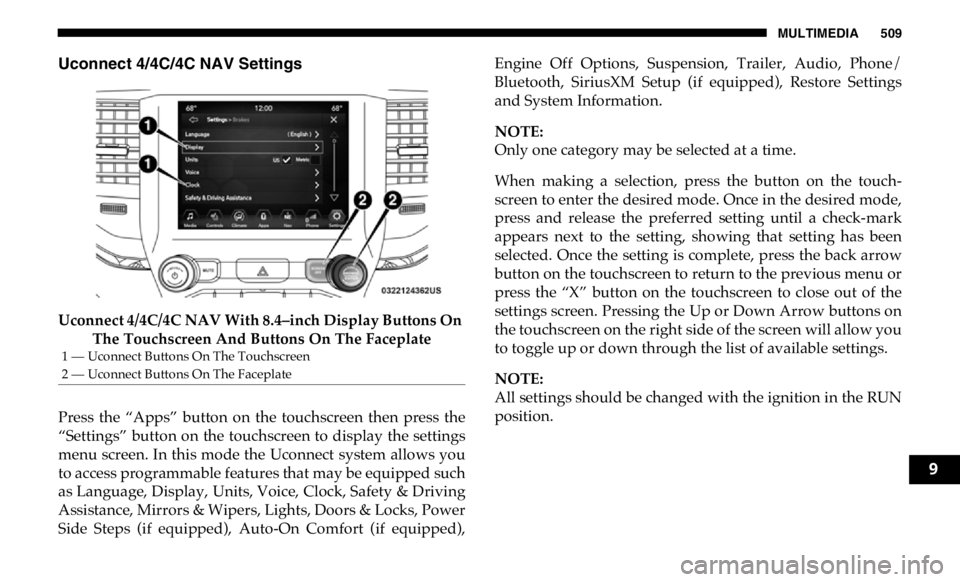
Uconnect 4/4C/4C NAV Settings
Uconnect 4/4C/4C NAV With 8.4–inch Display Buttons On
The Touchscreen And Buttons On The Faceplate
Press the “Apps” button on the touchscreen then press the
“Settings” button on the touchscreen to display the settings
menu screen. In this mode the Uconnect system allows you
to access programmable features that may be equipped such
as Language, Display, Units, Voice, Clock, Safety & Driving
Assistance, Mirrors & Wipers, Lights, Doors & Locks, Power
Side Steps (if equipped), Auto-On Comfort (if equipped), Engine Off Options, Suspension, Trailer, Audio, Phone/
Bluetooth, SiriusXM Setup (if equipped), Restore Settings
and System Information.
NOTE:
Only one category may be selected at a time.
When making a selection, press the button on the touch -
screen to enter the desired mode. Once in the desired mode,
press and release the preferred setting until a check-mark
appears next to the setting, showing that setting has been
selected. Once the setting is complete, press the back arrow
button on the touchscreen to return to the previous menu or
press the “X” button on the touchscreen to close out of the
settings screen. Pressing the Up or Down Arrow buttons on
the touchscreen on the right side of the screen will allow you
to toggle up or down through the list of available settings.
NOTE:
All settings should be changed with the ignition in the RUN
position.1 — Uconnect Buttons On The Touchscreen
2 — Uconnect Buttons On The Faceplate
9
Page 513 of 607
MULTIMEDIA 511
Display Brightness With Headlights
OFF – +
NOTE:
To make changes to the "Display Brightness with Headlights OFF" setting, the headlights must be off and the interior dimmer
switch must not be in the "party" or "parade" positions.
Touchscreen Beep On Off
Controls Screen Time-Out — If
Equipped On Off
Fuel Saver Display in Cluster — If
Equipped On Off
NOTE:
When selected, the system displays fuel saver mode in the instrument cluster.
Navigation Next Turn Pop-ups
Displayed In Cluster — If Equipped On Off
Phone Pop-ups Displayed in Cluster
— If Equipped On OffSetting Name Selectable Options
9
Page 524 of 607

522 MULTIMEDIA
Auto Comfort Systems — If Equipped
After pressing the “Auto-On Comfort” button on the touchscreen, the following settings will be available:
Engine Off Options
After pressing the “Engine Off Options” button on the touchscreen, the following settings will be available: Setting Name Selectable Options
Auto-On Driver Heated/
Ventilated Seat & Steering
Wheel With Vehicle Start —
If Equipped Off Remote Start All Starts
NOTE:
When the “Auto-On Driver Heated/Ventilated Seat & Steering Wheel With Vehicle Start” feature is selected the driver's
heated seat and heated steering wheel will automatically turn on when temperatures are below 40° F (4.4° C). When tempera -
tures are above 80° F (26.7° C), the driver vented seat will turn on.
Setting Name Selectable Options
Engine Off Power Delay – +
NOTE:
When the “Engine Off Power Delay” feature is selected, the power window switches, radio, Uconnect phone system (if
equipped), power sunroof (if equipped), and power outlets will remain active for up to ten minutes after the ignition is cycled
to OFF. Opening either front door will cancel this feature.
Page 528 of 607

526 MULTIMEDIA
Phone/Bluetooth Settings
After pressing the “Phone/Bluetooth Settings” button on the touchscreen, the following settings will be available: AUX Volume Offset
— If Equipped On Off
NOTE:
The “AUX Volume Offset” feature provides the ability to tune the audio level for portable devices connected through the
AUX input.
Auto Play On OffSetting Name Selectable Options
Setting Name Selectable Options
Phone Pop-ups Displayed in Cluster
— If Equipped On Off
Do Not Disturb List of Settings
NOTE:
Press “Do Not Disturb” to access the available settings. The following settings are: Auto Reply (both, text, call), Auto Reply
Message (custom, default) and Custom Auto Reply Message (create message).
Paired Phones and Audio Devices List Of Paired Phones and Audio Sources
NOTE:
The “Paired Phones and Audio Devices” feature shows which phones and audio sources are paired to the Phone and Audio
Sources Settings system. For further information, refer to the Uconnect Owner’s Manual Supplement.
Smartphone Projection Manager On Off
Page 533 of 607
MULTIMEDIA 531
NOTE:
To make changes to the "Display Brightness with Headlights OFF" setting, the headlights must be off and the interior dimmer
switch must not be in the "party" or "parade" positions.
Set Theme Pre-configured Themes
Touchscreen Beep On Off
Controls Screen Time-Out — If
Equipped On Off
Fuel Saver Display — If Equipped On Off
NOTE:
When selected, the system displays fuel saver mode in the instrument cluster.
Navigation Turn-By-Turn Displayed
in Cluster — If Equipped On Off
Phone Pop-Ups Displays In Cluster On Off
Ready To Drive Pop-Ups — If
Equipped On OffSetting Name Selectable Options
9
Page 544 of 607

542 MULTIMEDIA
Engine Off Options
After pressing the “Engine Off Options” button on the touchscreen, the following settings will be available:
Suspension — If Equipped
After pressing the “Suspension” button on the touchscreen, the following settings will be available: Setting Name Selectable Options
Engine Off Power Delay + –
NOTE:
When the “Engine Off Power Delay” feature is selected, the power window switches, radio, Uconnect phone system (if
equipped), power sunroof (if equipped), and power outlets will remain active for up to ten minutes after the ignition is cycled
to OFF. Opening either front door will cancel this feature.
Headlight Off Delay + –
NOTE:
When the “Headlight Off Delay” feature is selected, the driver can choose to have the headlights remain on for 0, 30, 60, or
90 seconds when exiting the vehicle.
Setting Name Selectable Options
Display Suspension
Messages All Warning Only
Tire Jack Mode On Off
NOTE:
When the “Tire Jack Mode” feature is selected, the air suspension system is disabled to assist with changing a spare tire.
Transport Mode On Off
Page 548 of 607
546 MULTIMEDIA
Bluetooth
After pressing the “Bluetooth” button on the touchscreen, the following settings will be available: AUX Volume Offset
— If Equipped On Off
NOTE:
The “AUX Volume Offset” feature provides the ability to tune the audio level for portable devices connected through the
AUX input.
Auto Play On OffSetting Name Selectable Options
Setting Name Selectable Options
Phone Pop-Ups Displayed in
Cluster On Off
Do Not Disturb List of Settings
NOTE:
Press “Do Not Disturb” to access the available settings. The following settings are: Auto Reply (both, text, call), Auto Reply
Message (custom, default) and Custom Auto Reply Message (create message).
Paired Phones and Audio
Devices List Of Paired Phones and Audio Sources
NOTE:
The “Paired Phones and Audio Sources” feature shows which phones and audio sources are paired to the Phone and Audio
Sources Settings system. For further information, refer to the Uconnect Owner’s Manual Supplement.
Page 549 of 607
MULTIMEDIA 547
SiriusXM Setup — If Equipped
After pressing the “SiriusXM Setup” button on the touchscreen, the following settings will be available: Smartphone Device
Mirroring On Off
Enable CarPlay Projections On Off
Automatically Display
Pop-Ups in Cluster On Off
Set as Default Device
On Off
Projection Manager Smartphone Device Mirroring On Smartphone Device Mirroring
OffSetting Name Selectable Options
Setting Name Selectable Options
Sirius All Access Choose a Subscription Package
Add Listener Add up to five profiles
NOTE:
The “Add Listener” feature allows you to add up to five different profiles for customizing personal music or satellite radio
choices.
Listener Items Listening History List Of Options
Tune Start On Off 9


