Page 387 of 607

IN CASE OF EMERGENCY 385
F50 – 20 Amp Yellow Air Suspension Control Module – If Equipped
F51 – 10 Amp Red Ignition Node Module / Keyless Ignition Node Module,
Radio Frequency Hub Module / Electric Steering
Column Lock - If Equipped
F52 – 5 Amp Tan Battery Sensor
F53 – 20 Amp Yellow Trailer Tow – Left Turn/Stop Lights - If Equipped
F54 – 20 Amp Yellow Non Memory Adjustable Pedals - If Equipped
F56 – 15 Amp Blue Additional Diesel Content - If Equipped (DS 1500 Only)
F57 – 20 Amp Yellow TCM/PCM / Solenoid Trans Pressure SW (RFE Trans
Only) – If Equipped (HD Only)
Transmission (DS 1500 Only)
F58 – 10 Amp Red Bed Lighting (LED) – If Equipped (HD Only)
F60 – 15 Amp Blue Underhood Lamp / TCM – If Equipped (DS 1500 Only)
F61 – 10 Amp Red UREA Sensor / PM Sensor – If Equipped (DS 1500 LD
Diesel & Cummins Diesel)
F62 – 10 Amp Red Air Conditioning Clutch
F63 – 20 Amp Yellow Ignition Coils (Gas), Ignition Coils Capacitors (Gas) /
Short Runner Valve Actuator / Urea Heater Control
Unit (DS 1500 LD Diesel) / RLY Coil Feed-SCR (DS 1500
LD Diesel)Cavity Cartridge Fuse Micro Fuse Description
6
Page 388 of 607
386 IN CASE OF EMERGENCY
F64 – 25 Amp Clear Fuel Injectors / Powertrain Control Module / SRV – If
Equipped
F65 – 10 Amp Red MOD Inverter (Wake Up) / Power Port / USB IP /
WCPM – If Equipped (HD Only)
Spare (DS 1500 Only)
F66 – 10 Amp Red Sunroof / Light and Rain Sensor Module / Inside
Rearview Mirror / Passenger Window SW / USB Port
Rear / Feed for R/A RLY #2 Coil – If Equipped
F67 – 10 Amp Red CD / DVD / UCI Port – If Equipped (HD Only)
Bluetooth Hands-Free Module / CD – If Equipped
(DS 1500 Only)
F68 – 10 Amp Red AEB RACAM HTR – If Equipped (HD Only)
F69 – 15 Amp Blue SCR Module – If Equipped (HD Only)
F70 – 30 Amp Green Fuel Pump Motor / K09 RLY Coil Feed (Cummins
Diesel) – If Equipped
F71 – 25 Amp Clear Amplifier / Active Noise Cancelation – If Equipped
(HD Only)
F72 – 10 Amp Red PCM / DC/DC Converter Voltage– If Equipped
(DS 1500 Only)
F73 – 20 Amp Yellow Fuel Transfer Pump (Rear Tank) – If Equipped
(HD Only)Cavity Cartridge Fuse Micro Fuse Description
Page 389 of 607

IN CASE OF EMERGENCY 387
F74 – 20 Amp Yellow Brake Vacuum Pump Gas/Diesel – If Equipped (DS 1500
Only)
F74 – 10 Amp Red Backup Alarm – If Equipped (HD Only)
F75 – 10 Amp Red ATMM / Coil-SCR Module RLY– If Equipped
(HD Only)
Coolant Temperature Valve – If Equipped
(DS 1500 Only)
F76 – 10 Amp Red Electronic Stability Control (HD Only)
Brake System Module / Stop Lamp Switch / Electric
Park Brake / Clutch Pedal Switch (DS 1500 Only)
F77 – 10 Amp Red Drivetrain Control Module / Front Axle Disconnect
Module / TCM (HD Only)
Drivetrain Control Module / ELSD / Front Axle
Disconnect Module / Transmission Control Relay /
RDM / Power Take Off Unit – If Equipped (DS 1500
Only)
F78 – 10 Amp Red Engine Control Module / Powertrain Control Module /
Electric Power Steering (DS 1500 Only)
F78 – 15 Amp Blue Engine Control Module / Powertrain Control Module /
AEB RACM MOD / Feed To AUX PDC Relay Coils (HD
Only)
F79 – 15 Amp Blue ID / Clearance LightsCavity Cartridge Fuse Micro Fuse Description
6
Page 390 of 607

388 IN CASE OF EMERGENCY
F80 – 10 Amp Red Universal Garage Door Opener / Compass /
Anti-Intrusion Module (DS 1500 Only)
ASSY Overhead Console / SW Assist / SW 911 – If
Equipped (HD Only)
F81 – 20 Amp Yellow Trailer Tow Right Turn / Stop Lights - If Equipped
F82 – 10 Amp Red Steering Column Control Module / Cruise Control
F83 – – No Connection
F84 – 15 Amp Blue ASBM / HVAC / ICS / Rear Heated Seat Switches
F85 – 10 Amp Red Airbag Module
F86 – 10 Amp Red Airbag Module
F87 – 10 Amp Red Air Suspension / ITBM / Steering Column Control
Module / MOD Gateway CAN-C Trailer TPM (HD
Only)
Air Suspension / Trailer Tow / DC/DC Converter
(Voltage Stabilizer) / Steering Column Control Module
/ Occupant Classification Sensor (DS 1500 Only)
F88 – 15 Amp Blue Instrument Panel Cluster
F90/F91 – 20 Amp Yellow IGN or BATT Customer Selectable – If Equipped
(HD Only)
Power Outlet (Rear Seats) Customer Selectable (DS 1500
Only)
F93 – 20 Amp Yellow Cigar Lighter - If EquippedCavity Cartridge Fuse Micro Fuse Description
Page 391 of 607

IN CASE OF EMERGENCY 389
F94 – 10 Amp Red Shift-By-Wire / Transfer Case Switch (DS 1500 Only)
Shift-By-Wire / Transfer Case Switch / Module TPM
Trailer (HD Only) / Module Gateway Can-C Trailer
TPM (HD Only)
F95 – 10 Amp Red Rearview Camera / Park Assist / CHMSL Camera /
Blind Spot Sensor / Surround View Camera (HD Only)
Rear Camera / Park Assist / Blind Spot Sensor /
Compass (DS 1500 Only)
F96 – 10 Amp Red Rear Seat Heater Switch / Trunk Lamp With Flashlamp
Charger / Truck Lamp - If Equipped (DS 1500 Only)
Trailer Camera – If Equipped (HD Only)
F97 – 25 Amp Clear Rear Heated Seats And Heated Steering Wheel – If
Equipped (DS 1500 Only)
F97 – 20 Amp Yellow Front Heated Seat Passenger – If Equipped (HD Only)
F98 – 25 Amp Clear Front Heated Seats – If Equipped (DS 1500 Only)
F98 – 20 Amp Yellow Front Heated Seat Driver – If Equipped (HD Only)
F99 – 10 Amp Red HVAC / DASM (DS 1500 Only)
HVAC / In-Car Temperature Sensor / CSG MOD /
Humidity Sensor (HD Only)
F100 – 10 Amp Red Upfitters – If Equipped (HD Only)
F101 – 15 Amp Blue SSV Only
F101 – 20 Amp Yellow Rear Heated Seat Right (HD Only)Cavity Cartridge Fuse Micro Fuse Description
6
Page 492 of 607
490 MULTIMEDIA
UCONNECT SETTINGS
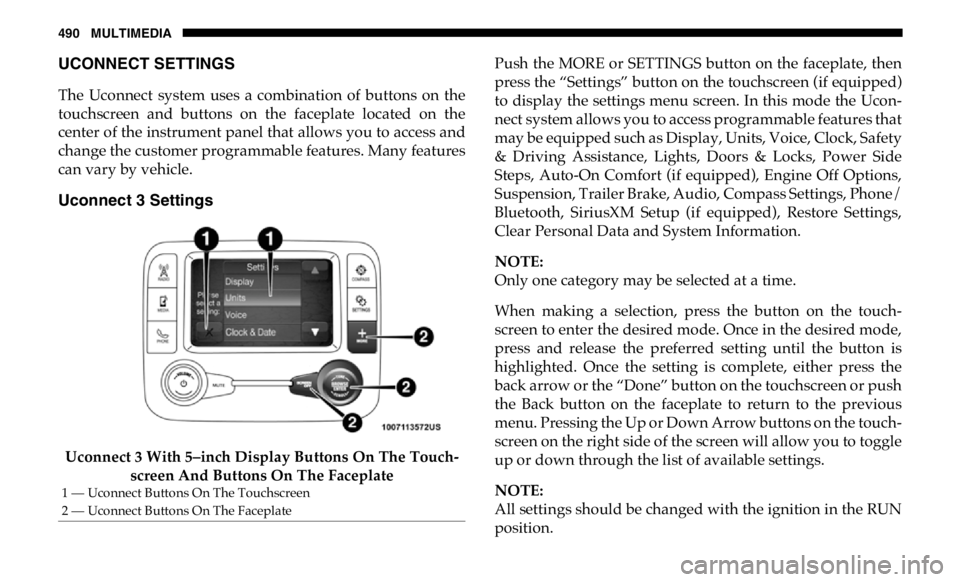
The Uconnect system uses a combination of buttons on the
touchscreen and buttons on the faceplate located on the
center of the instrument panel that allows you to access and
change the customer programmable features. Many features
can vary by vehicle.
Uconnect 3 Settings
Uconnect 3 With 5–inch Display Buttons On The Touch -
screen And Buttons On The Faceplate Push the MORE or SETTINGS button on the faceplate, then
press the “Settings” button on the touchscreen (if equipped)
to display the settings menu screen. In this mode the Ucon -
nect system allows you to access programmable features that
may be equipped such as Display, Units, Voice, Clock, Safety
& Driving Assistance, Lights, Doors & Locks, Power Side
Steps, Auto-On Comfort (if equipped), Engine Off Options,
Suspension, Trailer Brake, Audio, Compass Settings, Phone/
Bluetooth, SiriusXM Setup (if equipped), Restore Settings,
Clear Personal Data and System Information.
NOTE:
Only one category may be selected at a time.
When making a selection, press the button on the touch -
screen to enter the desired mode. Once in the desired mode,
press and release the preferred setting until the button is
highlighted. Once the setting is complete, either press the
back arrow or the “Done” button on the touchscreen or push
the Back button on the faceplate to return to the previous
menu. Pressing the Up or Down Arrow buttons on the touch -
screen on the right side of the screen will allow you to toggle
up or down through the list of available settings.
NOTE:
All settings should be changed with the ignition in the RUN
position.1 — Uconnect Buttons On The Touchscreen
2 — Uconnect Buttons On The Faceplate
Page 508 of 607
506 MULTIMEDIA
Phone/Bluetooth
After pressing the “Phone/Bluetooth” button on the touchscreen, the following settings will be available:
SiriusXM Setup — If Equipped
After pressing the “SiriusXM Setup” button on the touchscreen, the following settings will be available: Setting Name Selectable Options
Paired Phones List of Paired Phones
NOTE:
The “Paired Phones” feature shows which phones are paired to the Phone/Bluetooth system. For further information, refer
to the Uconnect Owner’s Manual Supplement.
Setting Name Selectable Options
Tune Start On Off
Channel Skip List of Channels
NOTE:
SiriusXM can be programmed to exclude undesirable channels while scanning. To make your selection, press the “Channel
Skip” button on the touchscreen, select the channels you would like to skip.
Subscription Info Sirius ID
Page 510 of 607
508 MULTIMEDIA
Clear Personal Data
After pressing the “Clear Personal Data Settings” button on the touchscreen, the following settings will be available:
System Information
After pressing the “System Information” button on the touchscreen, the following settings will be available: Setting Name Selectable Options
Clear Personal Data Yes Cancel
NOTE:
When this feature is selected it will remove all personal data including Bluetooth devices and presets. If “Yes” is selected a
pop-up will appear asking "Are you sure you want to clear all personal data?” select “Yes” to Clear, or “Cancel” to exit.
Setting Name Selectable Options
System Information System Software Information Screen
NOTE:
When the “System Information” feature is selected, a “System Software Information” screen will appear, displaying the
system software version. You can also update your maps with a USB device. Please see an authorized dealer for further infor -
mation.


