Page 608 of 698
Setting NameSelectable Options
Personal Settings Linked To Key Fob — IfEquipped On
Off
NOTE:
•The “Personal Settings Linked To Key Fob” feature provides automatic driver seat positioning to enhance driver
mobility when entering and exiting the vehicle.
•The seats return to the memorized seat location (if “Personal Settings Linked To Key Fob” is set to on) when the
key fob is used to unlock the door.
Power Side Steps — If Equipped
After pressing the “Power Side Steps” button on the
touchscreen, the following settings will be available:
Setting Name Selectable Options
Power Side Steps AutomaticStow
606 MULTIMEDIA
Page 619 of 698

Uconnect 4C NAV With 12–inch Display Settings
Press the “Settings” button on the touchscreen to display
the settings menu screen. In this mode the Uconnect
system allows you to access programmable features that
may be equipped such as Language, Display, Voice Set-
tings, Clock & Date, Camera, Safety & Driving Assistance,
Mirrors and Wipers, Brakes, Lights, Doors & Locks,Auto-On Comfort & Remote Start (if equipped), Engine Off
Options, Suspension, Trailer Brake, Audio Settings,
Bluetooth, SiriusXM Setup (if equipped), and Reset.
NOTE:
Only one category may be selected at a time.
When making a selection, press the button on the touch-
screen to enter the desired mode. Once in the desired
mode, press and release the preferred setting until a
check-mark appears next to the setting, showing that
setting has been selected. Once the setting is complete,
press the back arrow button on the touchscreen to return to
the previous menu or press the “X” button on the touch-
screen to close out of the settings screen. Pressing the Up or
Down Arrow buttons on the touchscreen on the right side
of the screen will allow you to toggle up or down through
the list of available settings.
NOTE: All settings should be changed with the ignition in
the RUN position.
Uconnect 4C NAV With 12–inch Display Buttons On The
Touchscreen And Buttons On The Faceplate
1 — Uconnect Buttons On The Touchscreen
2 — Uconnect Buttons On The Faceplate
10
MULTIMEDIA 617
Page 628 of 698
Brakes
After pressing the “Brake” button on the touchscreen, the
following settings will be available:
Setting NameSelectable Options
Brake Service Ye sN o
NOTE:
Selecting the “Brake Service” feature will display a pop-up asking whether or you would like to retract the park
brakes to all break system service. Auto Park Brake OnOff
Lights
After pressing the “Lights” button on the touchscreen, the
following settings will be available:
Setting Name Selectable Options
Headlight Illumination On Ap- proach –+
NOTE:
When the “Headlight Illumination On Approach” feature is selected, the headlights will activate and remain on for 0,
30, 60, or 90 seconds when the doors are unlocked with the key fob.
626 MULTIMEDIA
Page 629 of 698
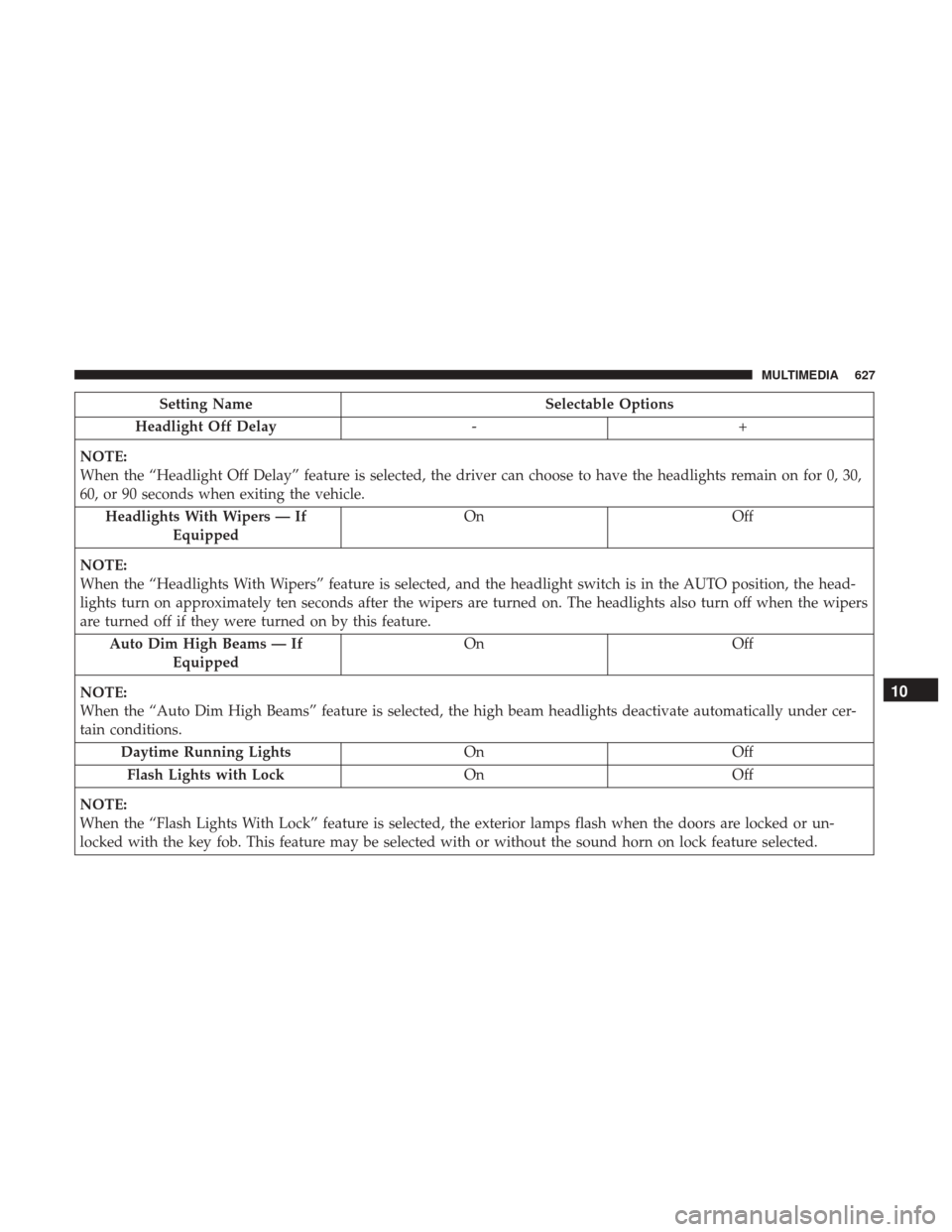
Setting NameSelectable Options
Headlight Off Delay -+
NOTE:
When the “Headlight Off Delay” feature is selected, the driver can choose to have the headlights remain on for 0, 30,
60, or 90 seconds when exiting the vehicle. Headlights With Wipers — If Equipped On
Off
NOTE:
When the “Headlights With Wipers” feature is selected, and the headlight switch is in the AUTO position, the head-
lights turn on approximately ten seconds after the wipers are turned on. The headlights also turn off when the wipers
are turned off if they were turned on by this feature. Auto Dim High Beams — If Equipped On
Off
NOTE:
When the “Auto Dim High Beams” feature is selected, the high beam headlights deactivate automatically under cer-
tain conditions. Daytime Running Lights OnOff
Flash Lights with Lock OnOff
NOTE:
When the “Flash Lights With Lock” feature is selected, the exterior lamps flash when the doors are locked or un-
locked with the key fob. This feature may be selected with or without the sound horn on lock feature selected.
10
MULTIMEDIA 627
Page 630 of 698
Setting NameSelectable Options
Steering Directed Lights OnOff
NOTE:
When the “Steering Directed Lights” feature is selected, the headlights turn with the direction of the steering wheel.
Doors & Locks
After pressing the “Doors & Locks” button on the touch-
screen, the following settings will be available:
Setting Name Selectable Options
Auto Door Locks OnOff
Auto Unlock On Exit OnOff
NOTE:
When the “Auto Unlock On Exit” feature is selected, all doors unlock when the vehicle is stopped and the transmis-
sion is in the PARK or NEUTRAL position and the driver’s door is opened. Flash Lights With Lock OnOff
NOTE:
When the “Flash Lights With Lock” feature is selected, the front and rear turn signals flash when the doors are locked
or unlocked with the key fob. This feature may be selected with or without the “Sound Horn With Lock” feature se-
lected. Sound Horn With Remote Start OnOff
1st Press Of Key Fob Unlocks Driver DoorAll Doors
628 MULTIMEDIA
Page 631 of 698

Setting NameSelectable Options
NOTE:
•When “1st Press Of Key Fob Unlocks: Driver Door” is selected, only the driver’s door unlocks on the first press of
the key fob unlock button. You must push the key fob unlock button twice to unlock the passenger’s doors.
•When “All Doors” is selected, all of the doors unlock on the first push of the key fob unlock button.
•If the vehicle is programmed “1st Press Of Key Fob Unlocks: All Doors”, all doors unlock no matter which Passive
Entry equipped door handle is grasped. If “1st Press Of Key Fob Unlocks: Driver Door” is programmed, only the
driver ’s door unlocks when the driver ’s door is grasped.
•With Passive Entry, if “1st Press Of Key Fob Unlocks: Driver Door” is programmed pushing the handle more than
once only resultsin the driver ’s door opening. If “Driver Door” is selected, once the driver ’s door is opened, the
interior door lock/unlock switch can be used to unlock all doors (or use key fob). Passive Entry — If Equipped On Off
NOTE:
The “Passive Entry” feature allows you to lock and unlock the vehicle’s door(s) without having to push the key fob
lock or unlock buttons. Personal Settings Linked To Key Fob — If Equipped On Off
NOTE:
•The “Personal Settings Linked To Key Fob” feature provides automatic driver seat positioning to enhance driver
mobility when entering and exiting the vehicle.
•The seats return to the memorized seat location (if “Personal Settings Linked To Key Fob” is set to on) when the
key fob is used to unlock the door.
10
MULTIMEDIA 629
Page 663 of 698
SiriusXM Guardian (4C/4C NAV) — If Equipped
CAUTION!
Some SiriusXM Guardian services, including SOS Call
and Roadside Assistance Call will NOT work without
an operable LTE (voice/data) or 3G or 4G (data) net-
work connection compatible with your device.
NOTE: Your vehicle may be transmitting data as autho-
rized by the subscriber.
An included trial and/or subscription is required to take
advantage of the SiriusXM Guardian services in the next
section of this guide. To register with SiriusXM Guardian,
press the Apps button on the 8.4-inch touchscreen to get
started.
NOTE: SiriusXM Guardian is available only on equipped
vehicles purchased within the continental United States,
Alaska, Hawaii, and Canada. Services can only be used
where coverage is available; see coverage map for details.
SOS Call
Theft Alarm Notification
Remote Door Lock/Unlock
Uconnect 4C NAV WIth 12–inch Display Navigation
10
MULTIMEDIA 661
Page 682 of 698

Adaptive Cruise Control (ACC) (Cruise Control) . . . .343
Adding Engine Coolant (Antifreeze).............515
Adding Fuel ............................. .404
Additives, Fuel ........................... .559
Adjust Down .................................47
Forward ................................47
Rearward ...............................47
Up....................................47
Adjustable Pedals ...........................60
Air Bag Air Bag Operation ....................... .247
Air Bag Warning Light .................243, 248
Enhanced Accident Response .............260, 484
Event Data Recorder (EDR) .................485
FrontAirBag .......................... .248
If Deployment Occurs .....................259
Knee Impact Bolsters ..................... .255
Maintaining Your Air Bag System .............262
Maintenance ........................... .262
Redundant Air Bag Warning Light ............244
Transporting Pets ....................... .284
Air Bag Light ...................... .179, 243, 285
Air Cleaner, Engine (Engine Air Cleaner Filter) ......501
Air Conditioner Maintenance ..................503 Air Conditioner Refrigerant
................503, 504
Air Conditioner System ..................... .503
Air Conditioning ............................80
Air Conditioning Filter ....................95, 504
Air Conditioning, Operating Tips ................94
Air Conditioning System ......................93
Air Filter ............................... .501
Air Pressure Tires................................. .533
Air Suspension ........................ .322, 328
Alarm Panic ..................................21
Security Alarm....................... .33, 181
Alterations/Modifications Vehicle .................................6
Android Auto ............................ .667
Antifreeze (Engine Coolant) ................514, 563
Disposal .............................. .516
Anti-Lock
Brake System (ABS) .................198
Anti-Lock Warning Light .....................188
Apple CarPlay ........................... .669
Assist, Hill Start .......................... .200
Audio Systems (Radio) ...................... .569
Auto Down Power Windows ...................96
Automatic Door Locks ........................41
680 INDEX


