2019 Ram 1500 door lock
[x] Cancel search: door lockPage 62 of 698

DRIVER ADJUSTABLE PEDALS — IF EQUIPPED
The adjustable pedals system is designed to allow a greater
range of driver comfort for steering wheel tilt and seat
position. This feature allows the brake and accelerator
pedals to move toward or away from the driver to provide
improved position with the steering wheel.
The adjustable pedal switch is located on the instrument
panel, below the headlight switch.
•The pedals can be adjusted with the ignition OFF. •
The pedals cannotbe adjusted when the vehicle is in
REVERSE or when the Speed Control System or Adap-
tive Cruise Control systems are on. The following mes-
sages will appear on vehicles equipped with an instru-
ment cluster display if the pedals are attempted to be
adjusted when the system is locked out: “Adjustable
Pedal Disabled — Cruise Control Engaged” or “Adjust-
able Pedal Disabled — Vehicle In Reverse”.
NOTE:
• Always adjust the pedals to a position that allows full
pedal travel.
• Further small adjustments may be necessary to find the
best possible seat/pedal position.
• For vehicles equipped with Driver Memory Seat, you
can use your key fob or the memory switch on the
driver ’s door trim panel to return the adjustable pedals
to pre-programmed positions.
• Refer to “Driver Memory Seat” in “Getting To Know
Your Vehicle” for further information.
Adjustable Pedals Switch
60 GETTING TO KNOW YOUR VEHICLE
Page 76 of 698

telltale will illuminate in the instrument cluster display
when these lights are on. Pushing the switch a second time
will turn the lights off.
The cargo light and bed lights (if equipped) will turn on for
approximately 60 seconds when a key fob unlock button is
pushed, as part of the Illuminated Entry feature.
Battery Saver
To protect the life of your vehicle’s battery, load shedding
is provided for both the interior and exterior lights.If the ignition is OFF and any door is left ajar for 10 minutes
or the dimmer control is rotated all the way up to the dome
on position for 10 minutes, the interior lights will automati-
cally turn off.
NOTE:
Battery saver mode is canceled if the ignition is
ON.
If the headlights remain on while the ignition is cycled OFF,
the exterior lights will automatically turn off after eight
minutes. If the headlights are turned on and left on for
eight minutes while the ignition is OFF, the exterior lights
will automatically turn off.
INTERIOR LIGHTS
Courtesy Lights
Courtesy and dome lights are turned on when the front
doors are opened, the ambient dimmer control is rotated to
the highest detent, or the Illuminated Entry ON button is
pushed on the overhead console. Also, if your vehicle is
equipped with Remote Keyless Entry, and the unlock
button is pushed on the key fob, the courtesy and dome
lights will turn on.Bed Light Switch In Truck Bed
74 GETTING TO KNOW YOUR VEHICLE
Page 78 of 698
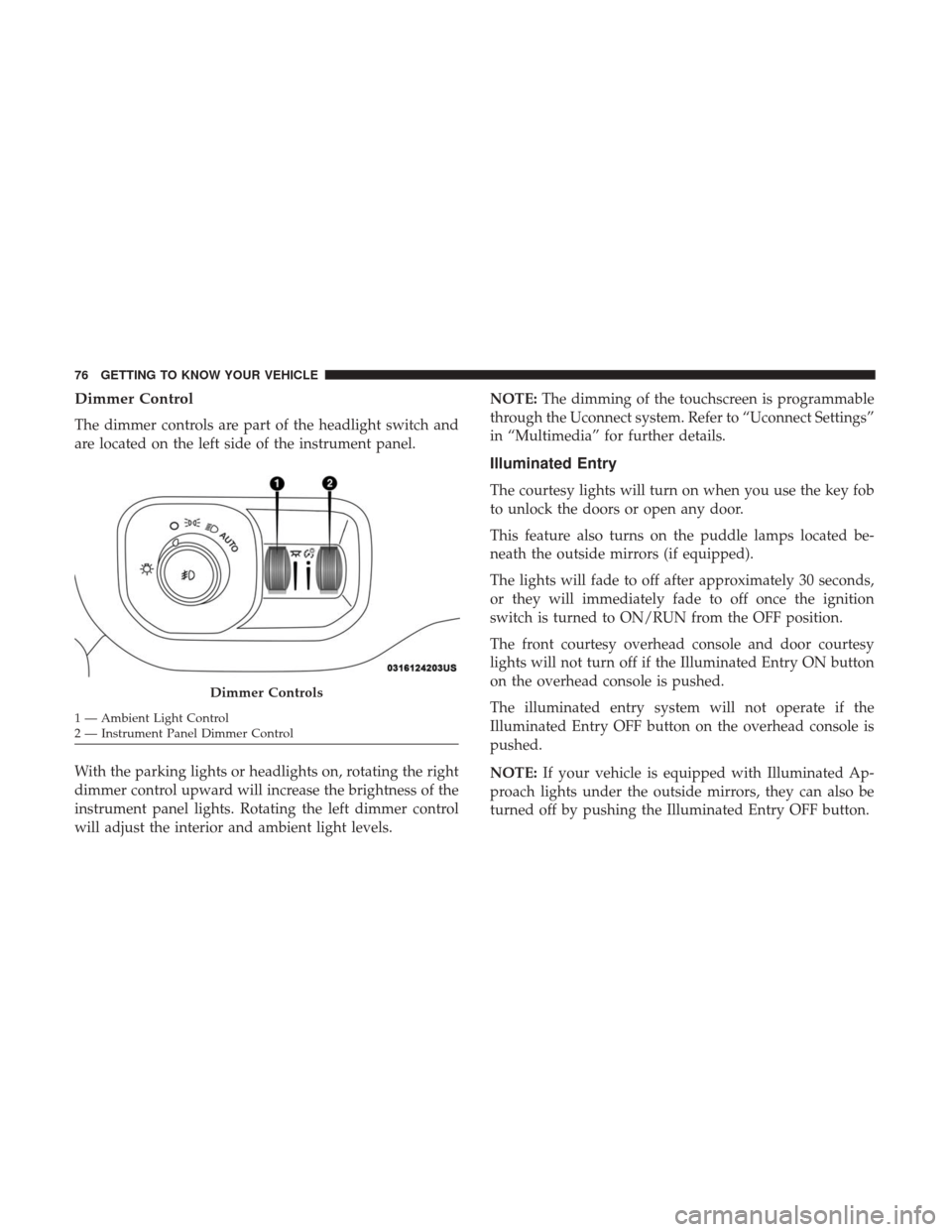
Dimmer Control
The dimmer controls are part of the headlight switch and
are located on the left side of the instrument panel.
With the parking lights or headlights on, rotating the right
dimmer control upward will increase the brightness of the
instrument panel lights. Rotating the left dimmer control
will adjust the interior and ambient light levels.NOTE:
The dimming of the touchscreen is programmable
through the Uconnect system. Refer to “Uconnect Settings”
in “Multimedia” for further details.
Illuminated Entry
The courtesy lights will turn on when you use the key fob
to unlock the doors or open any door.
This feature also turns on the puddle lamps located be-
neath the outside mirrors (if equipped).
The lights will fade to off after approximately 30 seconds,
or they will immediately fade to off once the ignition
switch is turned to ON/RUN from the OFF position.
The front courtesy overhead console and door courtesy
lights will not turn off if the Illuminated Entry ON button
on the overhead console is pushed.
The illuminated entry system will not operate if the
Illuminated Entry OFF button on the overhead console is
pushed.
NOTE: If your vehicle is equipped with Illuminated Ap-
proach lights under the outside mirrors, they can also be
turned off by pushing the Illuminated Entry OFF button.
Dimmer Controls
1 — Ambient Light Control
2 — Instrument Panel Dimmer Control 76 GETTING TO KNOW YOUR VEHICLE
Page 100 of 698

Window Lockout Switch
The window lockout switch on the driver’s door allows
you to disable the window control on the rear passenger
doors. To disable the window controls on the rear passen-
ger doors, push the window lock switch into the latched or
down position. To enable the window controls, push the
window lock switch again and return the switch to the
released or up position.
Power Sliding Rear Window — If Equipped
The switch for the power sliding rear window is located on
the overhead console.
Push the switch rearward to open the glass. Pull the switch
forward to close the glass.
Manual Sliding Rear Window — If Equipped
A locking device in the center of the window helps to
prevent entry from the rear of the vehicle. Squeeze the lock
to release the window.Window Lockout Switch
Rear Window Switch
98 GETTING TO KNOW YOUR VEHICLE
Page 103 of 698

Wind Buffeting
Wind buffeting can be described as the perception of
pressure on the ears or a helicopter-type sound in the ears.
Your vehicle may exhibit wind buffeting with the windows
down, or the sunroof (if equipped) in certain open or
partially open positions. This is a normal occurrence and
can be minimized. If the buffeting occurs with the rear
windows open, then open the front and rear windows
together to minimize the buffeting. If the buffeting occurs
with the sunroof open, adjust the sunroof opening to
minimize the buffeting or open any window.
Sunshade Operation
The sunshade can be opened manually. However, the
sunshade will open automatically as the sunroof opens.
NOTE:The sunshade cannot be closed if the sunroof is
open.
Pinch Protect Feature
This feature will detect an obstruction in the closing of the
sunroof during the Express Close operation. If an obstruc-
tion in the path of the sunroof is detected, the sunroof will
automatically retract. Remove the obstruction if this oc-
curs. NOTE:
If three consecutive sunroof close attempts result in
Pinch Protect reversals, Pinch Protect will disable and the
sunroof must be closed in Manual Mode.
Venting Sunroof — Express
Push and release the Vent button within one half second
and the sunroof will open to the vent position. This is
called “Express Vent”, and it will occur regardless of
sunroof position. During Express Vent operation, any other
actuation of the switch will stop the sunroof.
Sunroof Maintenance
Use only a non-abrasive cleaner and a soft cloth to clean the
glass panel.
Ignition Off Operation
The power sunroof switch will remain active for up to
approximately 10 minutes after the ignition switch is
turned to the OFF/LOCK position. Opening either front
door will cancel this feature.
NOTE: Ignition Off time is programmable through the
Uconnect System. Refer to “Uconnect Settings” in “Multi-
media” for further information.
3
GETTING TO KNOW YOUR VEHICLE 101
Page 108 of 698

Sunroof Maintenance
Use only a non-abrasive cleaner and a soft cloth to clean the
glass panel.
Ignition Off Operation
The power sunroof switch will remain active for up to
approximately 10 minutes after the ignition switch is
turned to the OFF/LOCK position. Opening either front
door will cancel this feature.
NOTE:Ignition Off time is programmable through the
Uconnect System. Refer to “Uconnect Settings” in “Multi-
media” for further information.
HOOD
To Open The Hood
To open the hood, two latches must be released.
1. Pull the hood release lever located below the steering wheel at the base of the instrument panel.
Hood Release Location
106 GETTING TO KNOW YOUR VEHICLE
Page 116 of 698
Using HomeLink
To operate, push and release the programmed HomeLink
button. Activation will now occur for the programmed
device (i.e. garage door opener, gate operator, security
system, entry door lock, home/office lighting, etc.) The
hand-held transmitter of the device may also be used at
any time.
Security
It is advised to erase all channels before you sell or turn in
your vehicle.
To do this, push and hold the two outside buttons for 20
seconds until the orange indicator flashes. Note that all
channels will be erased. Individual channels cannot be
erased.
The HomeLink Universal Transceiver is disabled when the
Vehicle Security Alarm is active.
Troubleshooting Tips
If you are having trouble programming HomeLink, here
are some of the most common solutions:
•Replace the battery in the Garage Door Opener hand-
held transmitter. •
Push the LEARN button on the Garage Door Opener to
complete the training for a Rolling Code.
• Did you unplug the device for programming and re-
member to plug it back in?
If you have any problems, or require assistance, please call
toll-free 1-800-355-3515 or, on the Internet at
HomeLink.com for information or assistance.
General Information
The following regulatory statement applies to all Radio
Frequency (RF) devices equipped in this vehicle:
This device complies with Part 15 of the FCC Rules and
with Innovation, Science and Economic Development
Canada license-exempt RSS standard(s). Operation is sub-
ject to the following two conditions:
1. This device may not cause harmful interference, and
2. This device must accept any interference received, in- cluding interference that may cause undesired opera-
tion.
NOTE: Changes or modifications not expressly approved
by the party responsible for compliance could void the
user ’s authority to operate the equipment.
114 GETTING TO KNOW YOUR VEHICLE
Page 140 of 698
Locking And Unlocking RamBox
Push and release the lock or unlock button on the key fob
to lock and unlock all doors, the tailgate and the RamBox
(if equipped). Refer to “Keys” in “Getting To Know Your
Vehicle” for further details. The RamBox storage bins can
also be locked using the emergency key. To lock and unlock
the storage bin, insert the emergency key into the keyhole
and turn clockwise to lock or counterclockwise to unlock.
Always return the key to the upright (vertical) position
before removing it from the keyhole.
CAUTION!
•Ensure cargo bin lids are closed and latched before
moving or driving vehicle.
• Loads applied to the top of the bin lid should be
minimized to prevent damage to the lid and latching/
hinging mechanisms.
• Damage to the RamBox bin may occur due to heavy/
sharp objects placed in bin that shift due to vehicle
motion. In order to minimize potential for damage,
secure all cargo to prevent movement and protect
inside surfaces of bin from heavy/sharp objects with
appropriate padding.
RamBox Safety Warning
Carefully follow these warnings to help prevent personal
injury or damage to your vehicle:
WARNING!
• Always close the storage bin covers when your
vehicle is unattended.
• Do not allow children to have access to the storage
bins. Once in the storage bin, young children may
not be able to escape. If trapped in the storage bin,
children can die from suffocation or heat stroke.
• In an accident, serious injury could result if the
storage bin covers are not properly latched.
• Do not drive the vehicle with the storage bin covers
open.
• Keep the storage bin covers closed and latched while
the vehicle is in motion.
• Do not use a storage bin latch as a tie down.
138 GETTING TO KNOW YOUR VEHICLE