Page 441 of 698

WARNING!(Continued)
•Never place anything on or near the vehicle’s oper-
able network and GPS antennas. You could prevent
operable network and GPS signal reception, which
can prevent your vehicle from placing an emergency
call. An operable network and GPS signal reception
is required for the SOS Call system to function
properly.
• The SOS Call system is embedded into the vehicle’s
electrical system. Do not add aftermarket electrical
equipment to the vehicle’s electrical system. This
may prevent your vehicle from sending a signal to
initiate an emergency call. To avoid interference that
can cause the SOS Call system to fail, never add
aftermarket equipment (e.g., two-way mobile radio,
CB radio, data recorder, etc.) to your vehicle’s electri-
cal system or modify the antennas on your vehicle. IF
YOUR VEHICLE LOSES BATTERY POWER FOR
ANY REASON (INCLUDING DURING OR AFTER
AN ACCIDENT), THE UCONNECT FEATURES,
APPS AND SERVICES, AMONG OTHERS, WILL
NOT OPERATE.
(Continued)
WARNING! (Continued)
•Modifications to any part of the SOS Call system
could cause the air bag system to fail when you need
it. You could be injured if the air bag system is not
there to help protect you.
SOS Call System Limitations
Vehicles sold in Mexico DO NOThave SOS Call system
capabilities.
SOS or other emergency line operators in Mexico may not
answer or respond to SOS system calls.
If the SOS Call system detects a malfunction, any of the
following may occur at the time the malfunction is de-
tected, and at the beginning of each ignition cycle:
• The overhead console light located between the ASSIST
and SOS buttons will continuously be illuminated red.
• The Device Screen will display the following message:
“Vehicle device requires service. Please contact your
dealer.”
• An In-Vehicle Audio message will state “Vehicle device
requires service. Please contact your dealer.”
7
IN CASE OF EMERGENCY 439
Page 456 of 698

Internal Power Distribution Center
The Power Distribution Center is located under the drivers
side instrument panel. This center contains cartridge fuses,
micro fuses, relays, and circuit breakers. A description ofeach fuse and component may be stamped on the inside
cover, otherwise the cavity number of each fuse is stamped
on the inside cover that corresponds to the following chart.
Cavity
Cartridge Fuse Micro Fuse Description
F01 30 Amp Pink –Trailer Tow Receptacle
F03 –15 Amp Blue Module Seat Heater Front (Pass)
F04 –– Spare
F05 –20 Amp Yellow Module PPU Cooling Fan
F06 40 Amp Green –Mod CBC 4 Exterior Light 2
F07 40 Amp Green –Mod CBC 3 PWR Locks
F08 –– Spare
F09 –– Spare
F10 40 Amp Green –HVAC Blower Motor
F11 –5 Amp Tan Output to Underhood Power Distribition
Center (UPDC) Run Coil
F12 –25 Amp Clear Mod Audio Amplifier / Active Noise Can-
cellation / SW Inverter
F13 –20 Amp Yellow Mod Seat Heater Front (Driver)
F14 –15 Amp Blue Mod Seat Heater Front (Steering Wheel)
F15 –– Spare
454 IN CASE OF EMERGENCY
Page 569 of 698
MULTIMEDIA
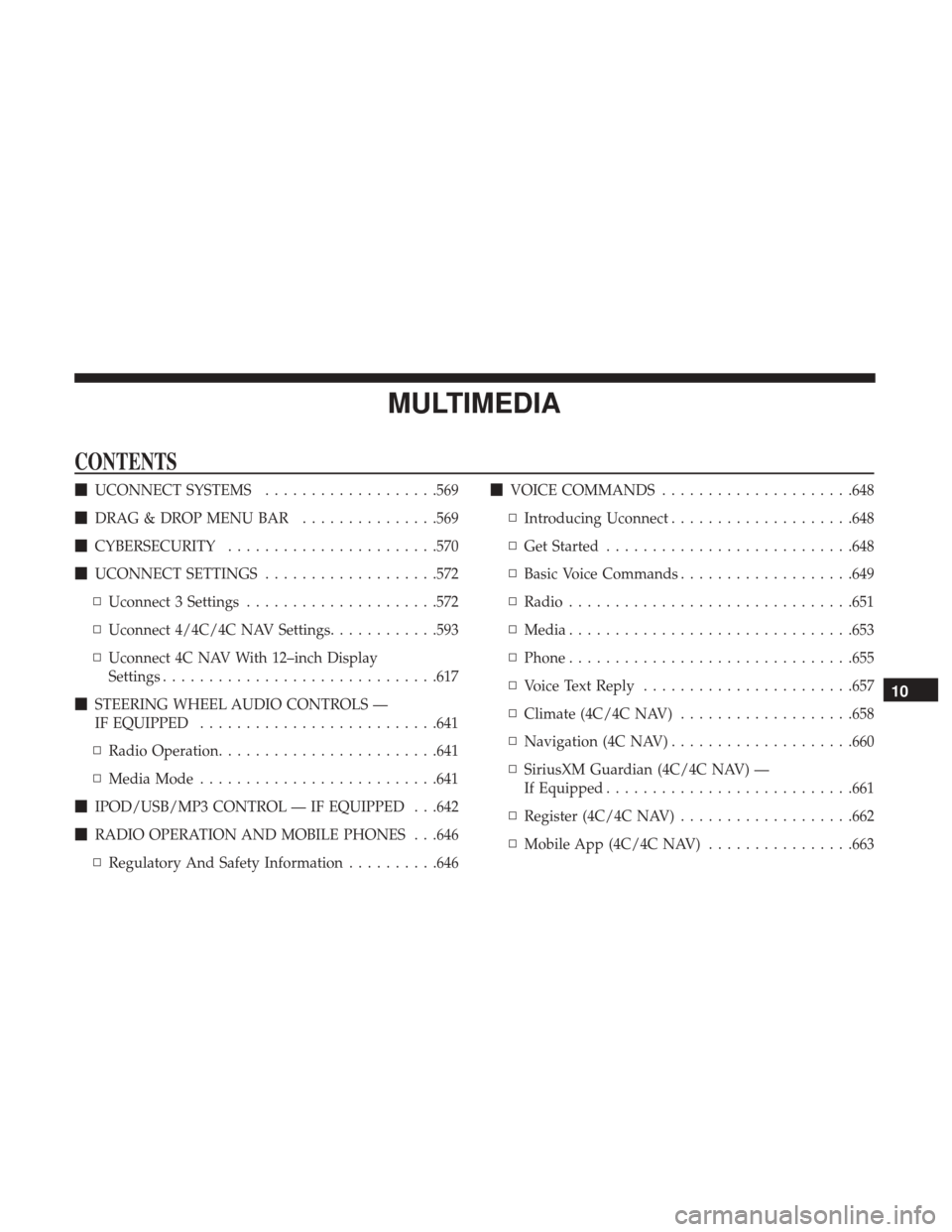
CONTENTS
�UCONNECT SYSTEMS ...................569
� DRAG & DROP MENU BAR ...............569
� CYBERSECURITY ...................... .570
� UCONNECT SETTINGS ...................572
▫ Uconnect 3 Settings .....................572
▫ Uconnect 4/4C/4C NAV Settings ............593
▫ Uconnect 4C NAV With 12–inch Display
Settings ............................. .617
� STEERING WHEEL AUDIO CONTROLS —
IF EQUIPPED ......................... .641
▫ Radio Operation ....................... .641
▫ Media Mode ......................... .641
� IPOD/USB/MP3 CONTROL — IF EQUIPPED . . .642
� RADIO OPERATION AND MOBILE PHONES . . .646
▫ Regulatory And Safety Information ..........646�
VOICE COMMANDS .....................648
▫ Introducing Uconnect ....................648
▫ Get Started .......................... .648
▫ Basic Voice Commands ...................649
▫ Radio .............................. .651
▫ Media .............................. .653
▫ Phone .............................. .655
▫ Voice Text Reply ...................... .657
▫ Climate (4C/4C NAV) ...................658
▫ Navigation (4C NAV) ....................660
▫ SiriusXM Guardian (4C/4C NAV) —
If Equipped .......................... .661
▫ Register (4C/4C NAV) ...................662
▫ Mobile App (4C/4C NAV) ................663
10
Page 574 of 698
UCONNECT SETTINGS
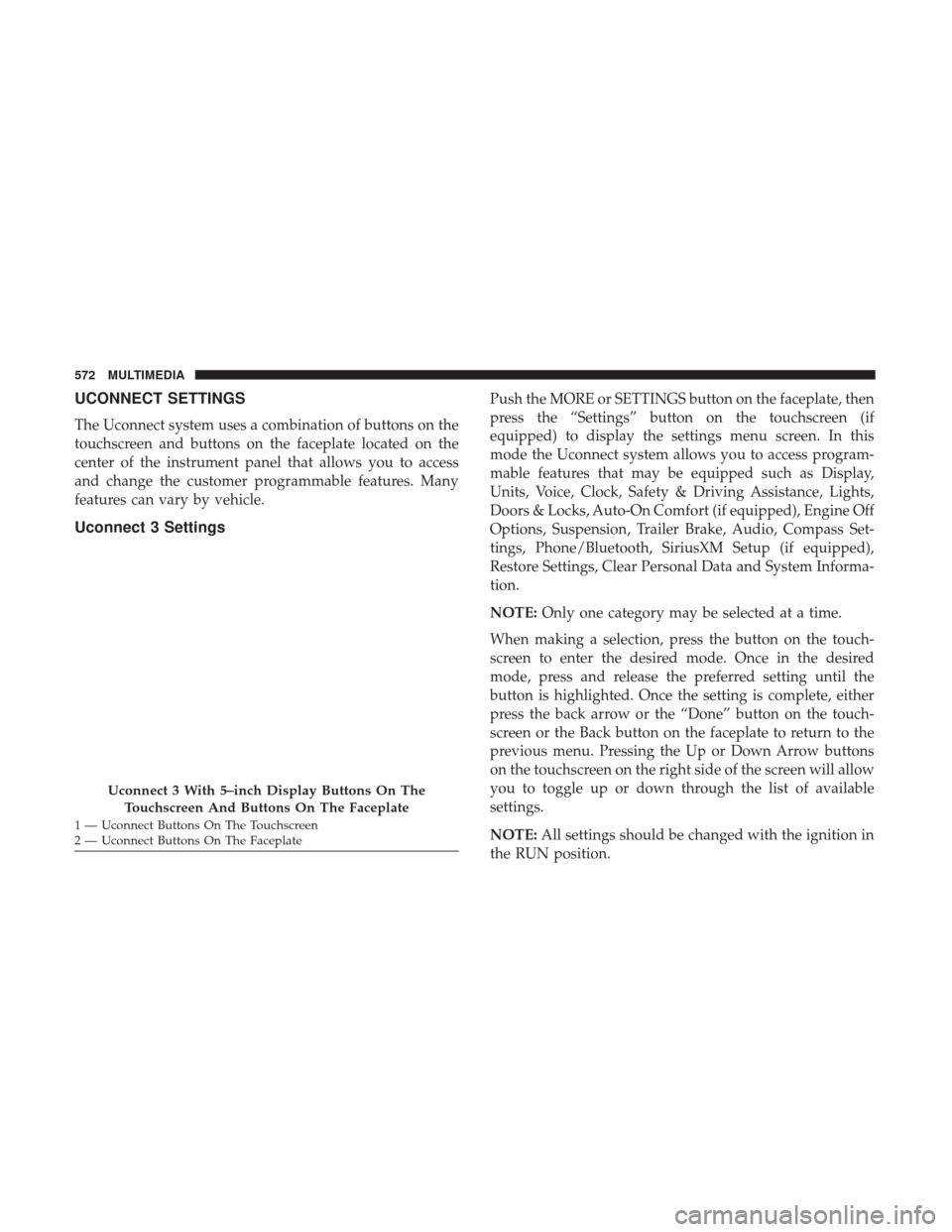
The Uconnect system uses a combination of buttons on the
touchscreen and buttons on the faceplate located on the
center of the instrument panel that allows you to access
and change the customer programmable features. Many
features can vary by vehicle.
Uconnect 3 Settings
Push the MORE or SETTINGS button on the faceplate, then
press the “Settings” button on the touchscreen (if
equipped) to display the settings menu screen. In this
mode the Uconnect system allows you to access program-
mable features that may be equipped such as Display,
Units, Voice, Clock, Safety & Driving Assistance, Lights,
Doors & Locks, Auto-On Comfort (if equipped), Engine Off
Options, Suspension, Trailer Brake, Audio, Compass Set-
tings, Phone/Bluetooth, SiriusXM Setup (if equipped),
Restore Settings, Clear Personal Data and System Informa-
tion.
NOTE:Only one category may be selected at a time.
When making a selection, press the button on the touch-
screen to enter the desired mode. Once in the desired
mode, press and release the preferred setting until the
button is highlighted. Once the setting is complete, either
press the back arrow or the “Done” button on the touch-
screen or the Back button on the faceplate to return to the
previous menu. Pressing the Up or Down Arrow buttons
on the touchscreen on the right side of the screen will allow
you to toggle up or down through the list of available
settings.
NOTE: All settings should be changed with the ignition in
the RUN position.
Uconnect 3 With 5–inch Display Buttons On The
Touchscreen And Buttons On The Faceplate
1 — Uconnect Buttons On The Touchscreen
2 — Uconnect Buttons On The Faceplate 572 MULTIMEDIA
Page 579 of 698
Setting NameSelectable Options
NOTE:
When the vehicle is shifted out of REVERSE (with camera delay turned OFF), the rear camera mode is exited and the
navigation or audio screen appears again. When the vehicle is shifted out of REVERSE (with camera delay turned
ON), the rear view image with dynamic grid lines will be displayed for up to ten seconds after shifting out of RE-
VERSE unless the forward vehicle speed exceeds 8 mph (12 km/h), the transmission is shifted into PARK or the igni-
tion is switched to the OFF position. Rain Sensing Auto Wipers — If Equipped On
Off
NOTE:
When the “Rain Sensing Auto Wipers” feature is selected, the system automatically activates the windshield wipers if
it senses moisture on the windshield. Trailer Length For Blind Spot Alert Auto
Max (39.5 feet)
Hill Start Assist — If Equipped On
Off
NOTE:
When the “Hill Start Assist” feature is selected, the Hill Start Assist (HSA) system becomes active.
10
MULTIMEDIA 577
Page 588 of 698
Audio
After pressing the “Audio” button on the touchscreen, the
following settings will be available:
Setting NameSelectable Options
Balance/Fade FrontBack LeftRight
NOTE:
The “Balance/Fade” feature allows you to adjust the Balance and Fade settings. Press and drag the speaker icon or
use the arrows to adjust, tap the “C” icon to readjust to the center. Equalizer +–
NOTE:
When in the “Equalizer” display you may adjust the Bass, Mid and Treble settings. Speed Adjusted Vol- ume Off
12 3
NOTE:
The “Speed Adjusted Volume” feature increases or decreases volume relative to vehicle speed.
586 MULTIMEDIA
Page 589 of 698
Setting NameSelectable Options
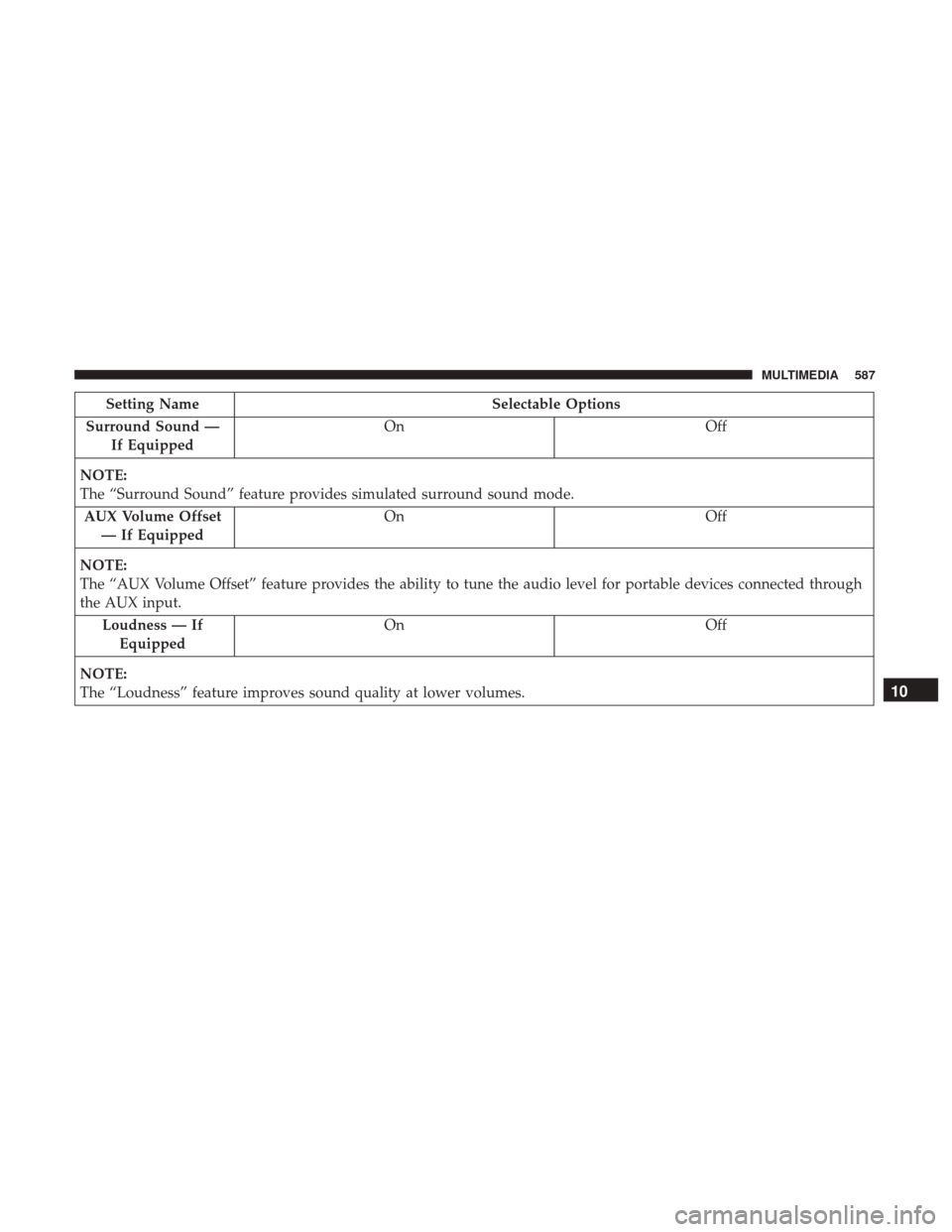
Surround Sound — If Equipped On
Off
NOTE:
The “Surround Sound” feature provides simulated surround sound mode. AUX Volume Offset — If Equipped On
Off
NOTE:
The “AUX Volume Offset” feature provides the ability to tune the audio level for portable devices connected through
the AUX input. Loudness — IfEquipped On
Off
NOTE:
The “Loudness” feature improves sound quality at lower volumes.
10
MULTIMEDIA 587
Page 593 of 698
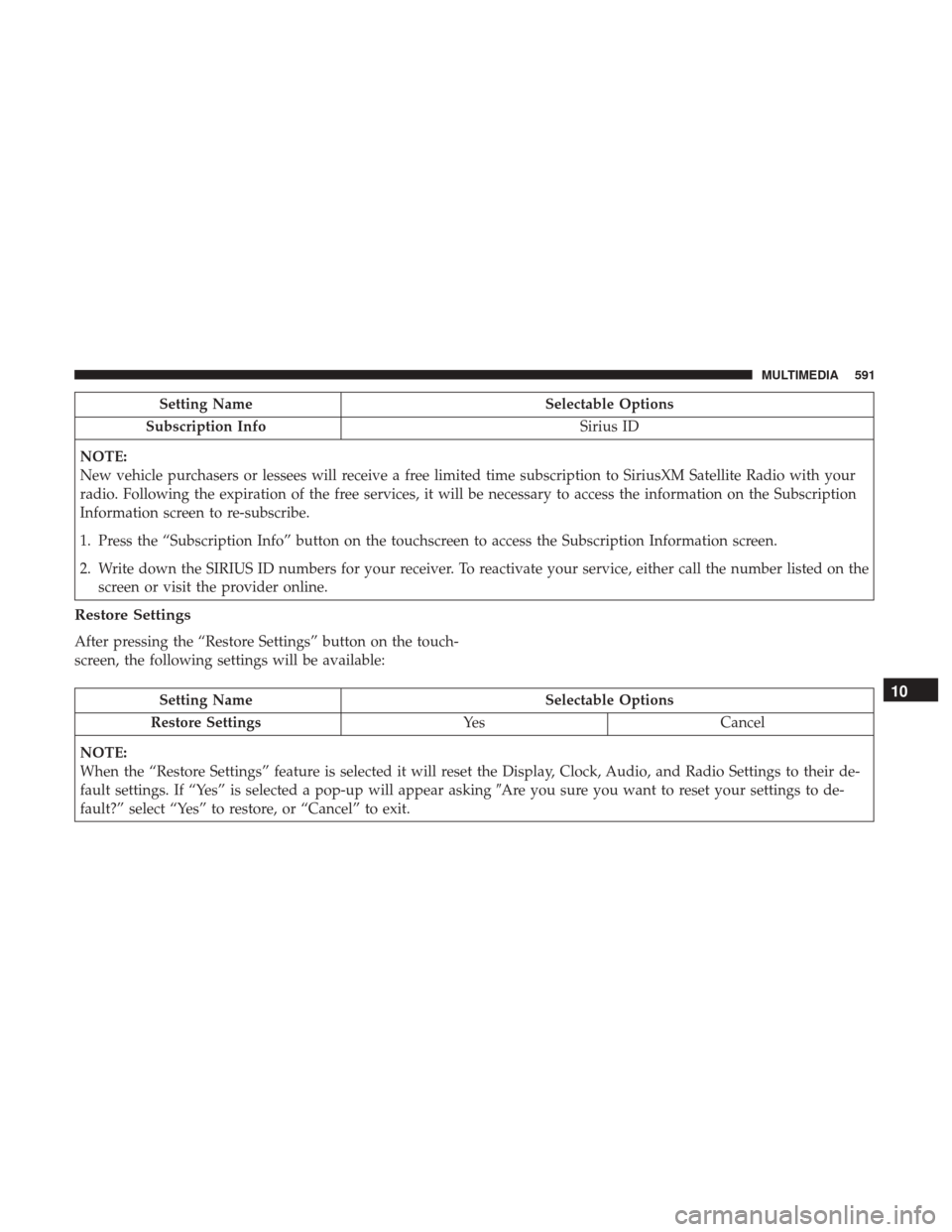
Setting NameSelectable Options
Subscription Info Sirius ID
NOTE:
New vehicle purchasers or lessees will receive a free limited time subscription to SiriusXM Satellite Radio with your
radio. Following the expiration of the free services, it will be necessary to access the information on the Subscription
Information screen to re-subscribe.
1. Press the “Subscription Info” button on the touchscreen to access the Subscription Information screen.
2. Write down the SIRIUS ID numbers for your receiver. To reactivate your service, either call the number listed on the screen or visit the provider online.
Restore Settings
After pressing the “Restore Settings” button on the touch-
screen, the following settings will be available:
Setting Name Selectable Options
Restore Settings YesCancel
NOTE:
When the “Restore Settings” feature is selected it will reset the Display, Clock, Audio, and Radio Settings to their de-
fault settings. If “Yes” is selected a pop-up will appear asking �Are you sure you want to reset your settings to de-
fault?” select “Yes” to restore, or “Cancel” to exit.10
MULTIMEDIA 591