Page 647 of 698
Plugging in a phone or another USB device may cause the
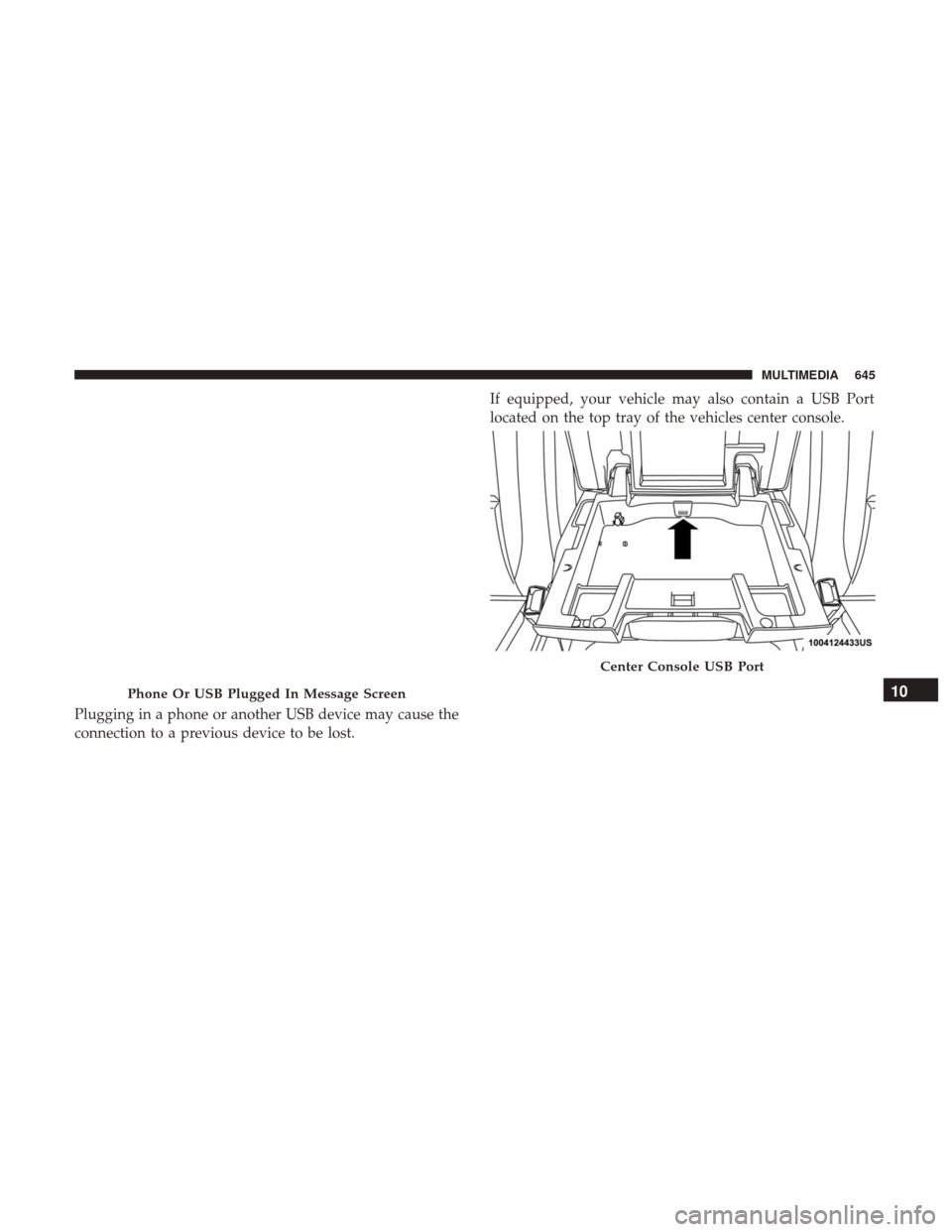
connection to a previous device to be lost.If equipped, your vehicle may also contain a USB Port
located on the top tray of the vehicles center console.
Phone Or USB Plugged In Message Screen
Center Console USB Port
10
MULTIMEDIA 645
Page 648 of 698

If equipped, two Mini-USB Ports (Type C), two Standard
USB Ports (Type A), and one AUX Port may be located to
the left of the center stack, just below the climate controls.
Some USB ports support media and charging. You can use
features, such as Apple CarPlay, Android Auto, Pandora
and others while charging your phone.NOTE:
Plugging in a phone or another USB device may
cause the connection to a previous device to be lost.
For further information, refer to the Uconnect Owner ’s
Manual Supplement or visit UconnectPhone.com.
RADIO OPERATION AND MOBILE PHONES
Under certain conditions, the mobile phone being on in
your vehicle can cause erratic or noisy performance from
your radio. This condition may be lessened or eliminated
by relocating the mobile phone antenna. This condition is
not harmful to the radio. If your radio performance does
not satisfactorily “clear” by the repositioning of the an-
tenna, it is recommended that the radio volume be turned
down or off during mobile phone operation when not
using Uconnect (if equipped).
Regulatory And Safety Information
USA/CANADA
Exposure to Radio Frequency Radiation
The radiated output power of the internal wireless radio is
far below the FCC and IC radio frequency exposure limits.
Nevertheless, the wireless radio will be used in such a
manner that the radio is 20 cm or further from the human
body.Center Console USB/AUX Media Hub
1 — Standard USB Type A Ports
2 — Mini-USB Type C Ports
3 — AUX Port 646 MULTIMEDIA
Page 655 of 698
Media
Uconnect offers connections via USB, Bluetooth and auxil-
iary ports (If Equipped). Voice operation is only available
for connected USB and AUX devices. (Remote CD player
optional and not available on all vehicles.)
Push the VR button
. After the beep, say one of the
following commands and follow the prompts to switch
your media source or choose an artist.
• “Change source to Bluetooth”
• “Change source to AUX”
• “Change source to USB”
• “Play artist Beethoven”; “ Play albumGreatest Hits”; “
Play song Moonlight Sonata”; “ Play genreClassical”
Uconnect 4C NAV With 12–inch Display
10
MULTIMEDIA 653
Page 669 of 698

Using Do Not Disturb
With Do Not Disturb, you can disable notifications from
incoming calls and texts, allowing you to keep your eyes
on the road and hands on the wheel. For your convenience,
there is a counter display to keep track of your missed calls
and text messages while you were using Do Not Disturb.
Do Not Disturb can automatically reply with a text mes-
sage, a call or both, when declining an incoming call and
send it to voicemail.
Automatic reply messages can be:
•“I am driving right now, I will get back to you shortly.”
• Create a custom auto reply message up to 160 characters.
While in Do Not Disturb, Conference Call can be selected
so you can still place a second call without being inter-
rupted by incoming calls.
NOTE:
• Only the beginning of your custom message will be seen
on the touchscreen.
• Reply with text message is not compatible with iPhones.
• Auto reply with text message is only available on
phones that supporting Bluetooth MAP.
Android Auto — If Equipped
NOTE: Feature availability depends on your carrier and
mobile phone manufacturer. Some Android Auto features
may or may not be available in every region and/or
language.
Android Auto allows you to use your voice to interact with
Android’s best-in-class speech technology through your
vehicle’s voice recognition system, and use your smart-
phone’s data plan to project your Android powered smart-
phone and a number of its apps onto your Uconnect
touchscreen. Connect your Android 5.0 (Lollipop), or
higher, to one of the media USB ports, using the factory-
provided USB cable, and press the new Android Auto icon
that replaces your “Phone” icon on the main menu bar to
begin Android Auto. Push and hold the VR button on the
steering wheel, or press and hold the “Microphone” icon
within Android Auto, to activate Android’s VR, which
recognizes natural voice commands, to use a list of your
smartphone’s features:
• Maps
• Music
10
MULTIMEDIA 667
Page 671 of 698

NOTE:Requires compatible smartphone running
Android™ 5.0 Lollipop or higher and download app on
Google Play. Android, Android Auto, and Google Play are
trademarks of Google Inc.
Apple CarPlay — If Equipped
NOTE: Feature availability depends on your carrier and
mobile phone manufacturer. Some Apple CarPlay features
may or may not be available in every region and/or
language.
Apple CarPlay allows you to use your voice to interact
with Siri through your vehicle’s voice recognition system,
and use your smartphone’s data plan to project your
iPhone and a number of its apps onto your Uconnect
touchscreen. Connect your iPhone 5, or higher, to one of
the media USB ports, using the factory-provided Lightning
cable, and press the new CarPlay icon that replaces your
“Phone” icon on the main menu bar to begin Apple
CarPlay. Press and hold the VR button on the steering
wheel, or press and hold the “Home” button within Apple
CarPlay, to activate Siri, which recognizes natural voice
commands to use a list of your iPhone’s features:
• Phone
• Music •
Messages
• Maps
• Additional Apps
Uconnect 4/4C/4C NAV With 8.4–inch Display Apple
CarPlay
10
MULTIMEDIA 669
Page 695 of 698

Tips ..................................422
Trailer And Tongue Weight ..................414
Wiring ............................... .420
Trailer Towing Guide ....................... .414
Trailer Weight ............................ .414
Transfer Case ............................ .522
Electronically Shifted ...................314, 318
Fluid ................................ .566
Transmission ............................. .306
Automatic ......................... .306, 520
Fluid ................................ .566
Maintenance ........................... .520
Shifting .............................. .304
Transporting Pets ......................... .284
Tread Wear Indicators ...................... .536
Turn Signals .....................73, 192, 442, 447
Uconnect Uconnect Settings . . . .572, 580, 582, 604, 607, 628, 630
Uconnect Settings Customer Programmable
Features ............38, 580, 582, 604, 607, 628, 630
Passive Entry Programming ........38, 580, 604, 628
Uconnect Voice Command ....................648
Uniform Tire Quality Grades ..................545 Universal Garage Door Opener (HomeLink)
........109
Universal Transmitter ....................... .109
Unleaded Gasoline ........................ .558
Untwisting Procedure, Seat Belt ................238
USB................................... .642
Utility Rails, Rear Cargo Area ..................145
Vehicle Identification Number (VIN) .............556
Vehicle Loading ....................... .406, 529
Vehicle Modifications/Alterations .................6
Vehicle Storage ......................... .94, 546
Vehicle User Guide In Vehicle Help ...........................18
Navigation ..............................18
Operating Instructions ......................18
Searching User Guide ......................18
Viscosity, Engine Oil ....................... .499
V
oice Recognition System (VR) .................648
Warning Lights (Instrument Cluster Descriptions) . . . .185
Warnings And Cautions .......................5
Warranty Information ...................... .677
Washers, Windshield ..................... .77, 497
Washing Vehicle .......................... .548
12
INDEX 693