Page 575 of 698
Display
After pressing the “Display” button on the touchscreen, the
following settings will be available.
Setting NameSelectable Options
Display Mode AutoManual
Set Language English, Français, Español
Touchscreen Beep OnOff
Fuel Saver Display OnOff
NOTE:
The “Fuel Saver Display” feature will allow you to enable fuel saver mode and will be displayed in the instrument
cluster display.
Units — If Equipped
After pressing “Units” on the touchscreen, the following
will be available:
Setting Name Selectable Options
Units USMetric Custom
10
MULTIMEDIA 573
Page 597 of 698
Setting NameSelectable Options
Display Brightness With Headlights ON –+
NOTE:
To make changes to the �Display Brightness with Headlights ON� setting, the headlights must be on and the interior
dimmer switch must not be in the �party�or�parade� positions.
Display Brightness With Headlights OFF –+
NOTE:
To make changes to the �Display Brightness with Headlights OFF� setting, the headlights must be off and the interior
dimmer switch must not be in the �party�or�parade� positions.
Set Theme Pre-configured Themes
Touchscreen Beep OnOff
Controls Screen Time-Out — If Equipped On
Off
Fuel Saver Display in Cluster — If Equipped On
Off
NOTE:
When selected, the system displays fuel saver mode in the instrument cluster.
10
MULTIMEDIA 595
Page 598 of 698
Setting NameSelectable Options
Navigation Next Turn Pop-ups Dis- played In Cluster — If Equipped On
Off
Phone Pop-ups Displayed in Cluster — If Equipped On
Off
Units
After pressing the “Units” button on the touchscreen, you
may select each unit of measure independently displayed
in the instrument cluster display, and navigation system (if
equipped). The following selectable units of measure are
listed below:
Setting Name Selectable Options
Units USMetric Custom
NOTE: When the “Custom” setting is selected, units will appear according to your personally configured settings. To
configure these settings, press the “Custom” bar. The following settings will appear:
Speed MPH km/h
Distance mi km
Fuel Consumption MPG (US)MPG (UK) L/100 km km/L
Pressure psikPa bar
Temperature °F °C
596 MULTIMEDIA
Page 615 of 698
Phone/Bluetooth Settings
After pressing the “Phone/Bluetooth Settings” button on
the touchscreen, the following settings will be available:
Setting NameSelectable Options
Phone Pop-ups Displayed in Cluster — If Equipped On
Off
Do Not Disturb List of Settings
NOTE:
Press “Do Not Disturb” to access the available settings. The following settings are: Auto Reply (both, text, call), Auto
Reply Message (custom, default) and Custom Auto Reply Message (create message). Paired Phones and Audio Devices List Of Paired Phones and Audio Sources
NOTE:
The “Paired Phones and Audio Devices” feature shows which phones and audio sources are paired to the Phone and
Audio Sources Settings system. For further information, refer to the Uconnect Owner ’s Manual Supplement. Smartphone Projection Manager OnOff
10
MULTIMEDIA 613
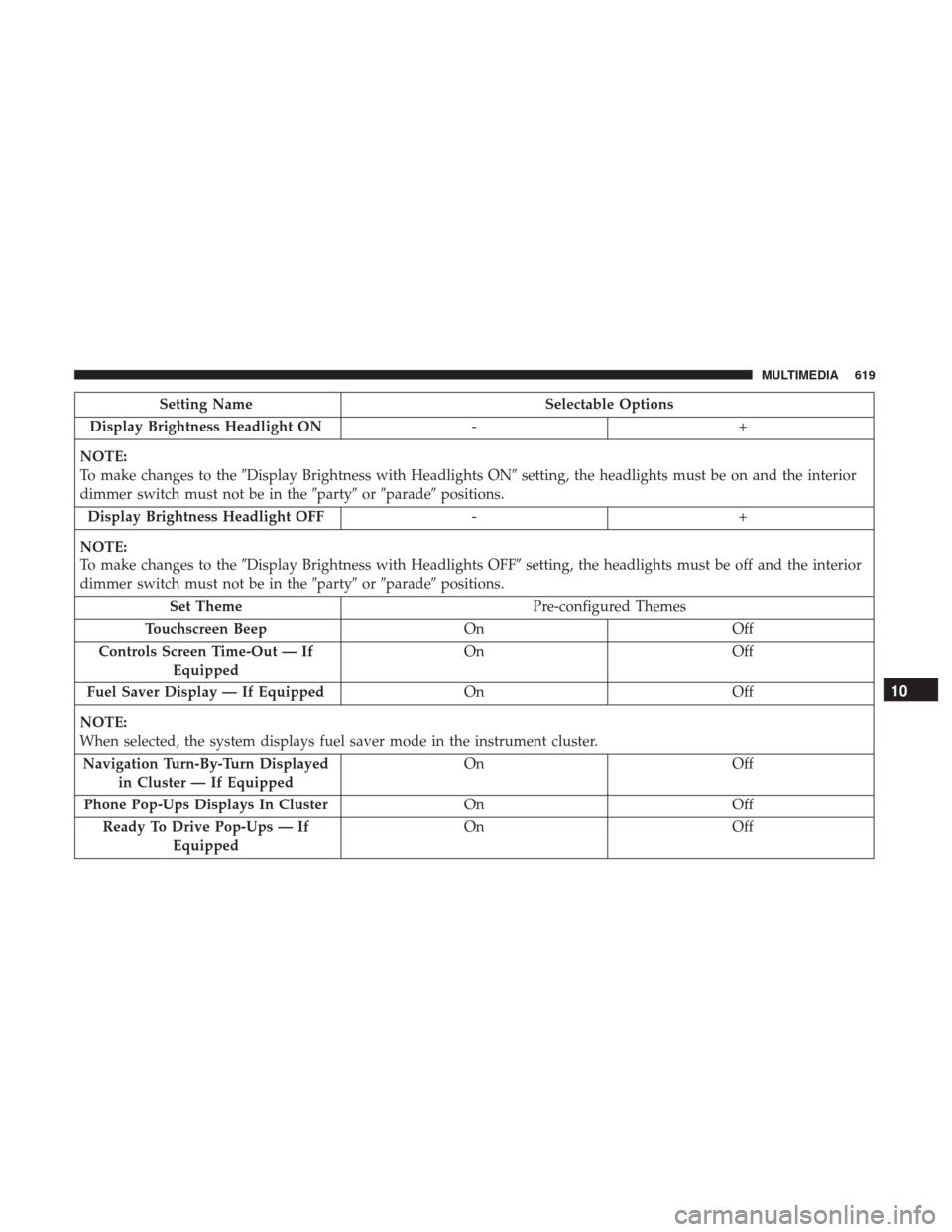
Page 621 of 698
Setting NameSelectable Options
Display Brightness Headlight ON -+
NOTE:
To make changes to the �Display Brightness with Headlights ON� setting, the headlights must be on and the interior
dimmer switch must not be in the �party�or�parade� positions.
Display Brightness Headlight OFF -+
NOTE:
To make changes to the �Display Brightness with Headlights OFF� setting, the headlights must be off and the interior
dimmer switch must not be in the �party�or�parade� positions.
Set Theme Pre-configured Themes
Touchscreen Beep OnOff
Controls Screen Time-Out — If Equipped On
Off
Fuel Saver Display — If Equipped OnOff
NOTE:
When selected, the system displays fuel saver mode in the instrument cluster. Navigation Turn-By-Turn Displayed in Cluster — If Equipped On
Off
Phone Pop-Ups Displays In Cluster OnOff
Ready To Drive Pop-Ups — If Equipped On
Off
10
MULTIMEDIA 619
Page 639 of 698
Setting NameSelectable Options
Paired Phones and Audio Devices List Of Paired Phones and Audio Sources
NOTE:
The “Paired Phones and Audio Sources” feature shows which phones and audio sources are paired to the Phone and
Audio Sources Settings system. For further information, refer to the Uconnect Owner ’s Manual Supplement. Smartphone Device Mirroring OnOff
Enable CarPlay Projections OnOff
Automatically Display Pop-Ups in Cluster On
Off
Set as Default Device OnOff
Projection Manager Smartphone Device Mirroring On Smartphone Device Mirroring Off
SiriusXM Setup — If Equipped
After pressing the “SiriusXM Setup” button on the touch-
screen, the following settings will be available:
Setting Name Selectable Options
Sirius All Access Choose a Subscription Package
Add Listener Add up to five profiles
NOTE:
The “Add Listener” feature allows you to add up to five different profiles for customizing personal music or satellite
radio choices.
10
MULTIMEDIA 637
Page 687 of 698

Glass Cleaning........................... .553
Grocery Bag Retainer .........................55
Gross Axle Weight Rating .....................408
Gross Vehicle Weight Rating ...................408
Guide Body Builders ............................5
GVWR ................................. .406
Hazard Driving Through Flowing, Rising, Or Shallow
Standing Water ......................... .430
Hazard Warning Flashers .....................435
Headlights .............................. .442
Cleaning .............................. .547
High Beam ..............................69
High Beam/Low Beam Select Switch ...........69
Passing ................................71
Switch .................................68
Head Restraints ............................55
Head Rests ................................55
Heated Mirrors .............................66
Heater, Engine Block ....................... .299
High Beam/Low Beam Select (Dimmer) Switch ......69
Hill Descent Control ....................... .208
Hill Descent Control Indicator .................208Hill Start Assist
........................... .200
Hitches Trailer Towing .......................... .413
Hoisting ................................ .522
HomeLink (Garage Door Opener) ...............109
Hood Prop .............................. .106
Hood Release ............................ .106
Ignition ..................................27
Switch .................................27
Illuminated Entry ...........................76
Inside Rearview Mirror ....................61, 436
Instrument Cluster Descriptions ........................... .192
Display .............................. .167
Instrument Panel Lens Cleaning ................552
Integrated Trailer Brake Control ................417
Interior Appearance Care .....................550
Interior Lights ..............................74
Intermittent Wipers (Delay Wipers) ...............
77
Introduction ................................4
In Vehicle Help Vehicle User Guide ........................18
Inverter Outlet (115V) ...................... .13012
INDEX 685
Page 689 of 698

Passing................................71
Seat Belt Reminder ...................... .179
Security Alarm ......................... .181
Service ............................... .441
Traction Control ........................ .206
Turn Signals ................73, 192, 287, 442, 447
Warning Instrument Cluster Descriptions . . . .181, 192
Limited-Slip Differential ..................335, 521
Loading Vehicle ........................... .406
Tires................................. .528
Load Shed Battery Saver Mode .................177
Load Shed Battery Saver On ...................177
Load Shed Electrical Load Reduction .............177
Load Shed Intelligent Battery Sensor .............177
Locks Automatic Door ..........................41
Child Protection ..........................42
Power Door .............................37
Low Tire Pressure System .....................225
Lubrication, Body ......................... .509
Lug Nuts ............................ .556, 557
Maintenance Free Battery .....................497
Maintenance Schedule ...................... .489
Malfunction Indicator Light (Check Engine) . . . .184, 195 Manual
Service ............................... .678
Manual Transmission Fluid Level Check ....................... .522
Lubricant Selection ...................... .566
Media Hub .............................. .642
Memory Feature (Memory Seats) ................43
Memory Seat ........................... .43, 49
Memory Seats And Radio .....................43
Methanol ............................... .560
Mirrors ..................................61
Electric Powered ..........................63
Heated .................................66
Memory ................................49
Outside ................................62
Rearview ........................... .61, 436
Trailer Towing ...........................66
Modifications/Alterations V
ehicle .................................6
Monitor, Tire Pressure System ..................225
Mopar Parts ............................. .677
MP3 Control ............................. .642
Multi-Function Control Lever ...................69
Navigation System (Uconnect GPS) ..............396
12
INDEX 687