2019 Peugeot Partner steering wheel
[x] Cancel search: steering wheelPage 4 of 312

2
.
.
Instrument Panel 11
Warning and indicator lamps 1 3
Indicators
28
Trip computer
3
3
Setting the time and date
3
5
Key
37
Central locking/unlocking
4
8
Doors
5
0
General recommendations for the
sliding side doors
5
0
Rear roof flap
5
2
Alarm
5
3
Electric windows
5
5Tilting rear door windows
5
6
Steering wheel adjustment
5
7
Mirrors
5
7
General recommendations for the seats
5
8
Front seats
5
9
PEUGEOT i- Cockpit
5
9
2-seat front bench seat
6
1
Rear bench seat
6
3
Interior fittings
6
4
Multi-Flex bench seat
7
0
Crew cab
7
2
Heating 75
Manual air conditioning 7 5
Dual-zone automatic air conditioning 7
5
Recirculation of interior air
7
7
Front demist – defrost
7
8
Rear screen and/or door mirrors demisting –
defrosting
79
Additional Heating/Ventilation
7
9Lighting control stalk
8
5
Direction indicators (flashers)
8
6
Automatic illumination of headlamps
8
6
Daytime running lamps/Sidelamps
8
7
Intelligent beam headlights
8
8
Manual headlamp beam height adjustment
9
1
Wiper control stalk
9
1
Changing a wiper blade
9
3
Automatic wiping
9
4
General safety recommendations
9
5
Emergency or assistance call
9
6
Hazard warning lamps
9
7
Horn
97
Electronic stability control (ESC)
9
7
Advanced Grip Control
1
01
Hill Assist Descent Control
1
02
Seat belts
1
03
Airbags
106
Child seats
1
09
Deactivating the front passenger airbag
1
10
Manual child lock
1
14
Electric child lock
1
14
Over view
Instruments Access Ease of use and comfort
Safety
Lighting and visibility
Eco-driving
Eco-driving 8
Eco-coaching 10
Labels
4
Contents
Page 8 of 312

6
Steering mounted controls
1
External lighting/direction
indicators control stalk
Button to change the
Surround Rear Vision view/
voice recognition activation button
2
Wiper/screenwash/trip
computer control stalk
3
Controls to select the
multimedia source (SRC), to
manage music ( LIST) and
to manage phone calls (" telephone" print)
4
Controls for speed limiter/
cruise control/Adaptive cruise control
5
Instrument panel display
mode selection wheel
6
Voice control
Volume adjustment
7
Audio system setting controls
Side switch panel
Manual headlamp beam height
adjustment
DSC/ASR systems Stop & Start
Parking sensors
Additional heating/ventilation
Active Lane Departure Warning
System
Tyre under-inflation detection
Electric child lock
Over view
Page 31 of 312

29
Instrument panel display screen
When stationary, use the left-hand dial on
the steering wheel or the " SET" button in
the instrument panel to navigate through the
menus to configure certain vehicle settings.
Operation of the dial:
-
P
ress: go to the Main menu , confirm the
selection.
-
R
otate (other than in a menu): scroll through
the list of active functions available.
-
R
otate (in a menu): move up or down in the
menu.
Distance recorders
The total and trip distances are displayed for
thirty seconds when the ignition is switched off,
when the driver's door is opened and when the
vehicle is locked or unlocked.
Total distance recorder
It measures the total distance travelled by the
vehicle since its first registration.
Trip distance recorder
It measures the distance travelled since it was
reset by the driver.
Engine coolant temperature
With the engine running, when the needle or
bar graph (depending on version) is:
-
i
n zone A , the temperature of the engine
coolant is correct,
-
i
n zone B , the temperature of the engine
coolant is too high; the maximum
temperature and central STOP warning
lamps come on, accompanied by an audible
signal and a warning message.
Resetting the trip recorder
F
W
ith the ignition on, press the button until
zeros appear.
1
Instruments
Page 36 of 312

34
Display of information
It is displayed successively.
- T rip mileage.
-
Range.
-
C
urrent fuel consumption.
-
A
verage speed.
-
S
top & Start time counter.
-
I
nformation from the speed limit recognition
system.
F
P
ress this button, located on the end of the
wiper control stalk .
F
O
r press the dial on the steering wheel.
Reset trip
The reset is per formed when the trip is
displayed. F
P
ress this button, located on the end of
the wiper control stalk , for more than two
seconds.
F
P
ress the dial on the steering wheel for
more than two seconds.
A few definitions…
Range
(miles or km)
The distance which can still be
travelled with the fuel remaining in the
tank (depending on the average fuel
consumption over the last few miles
(kilometres) travelled).
This value may vary following a change in
the style of driving or the terrain, resulting
in a significant change in the current fuel
consumption. After filling with at least 5
litres of fuel, the
range is recalculated and is displayed if it
exceeds 62 miles (100 km).
If dashes instead of figures continue to
be displayed when driving, contact a
PEUGEOT dealer or a qualified workshop.
Current fuel consumption
(mpg or l/100 km or km/l)
C alculated during the last few
seconds.
This function is only displayed from
19
mph (30 km/h).
Average fuel consumption
(mpg or l/100 km or km/l)
C alculated since the last trip
computer reset.
Average speed
(mph or km/h)
Calculated since the last trip
computer reset.
F
P
ress this button for more than two
seconds.
When the range falls below 19
miles (30
km),
dashes are displayed.
Instruments
Page 59 of 312

57
Steering wheel adjustment
F When stationary, pull the control lever to
release the steering wheel.
F
A
djust the height and reach to suit your
driving position.
F
L
ower the control lever to lock the steering
wheel.
As a safety precaution, these operations
must only be carried out while the vehicle
is stationary.
Mirrors
Door mirrors
Adjustment
As a safety measure, the mirrors should
be adjusted to reduce the blind spots.
The objects obser ved are, in reality, closer
than they appear.
Take this into account when assessing
the distance of vehicles approaching from
behind.
Manual folding
You can manually fold the mirrors (parking
obstruction, narrow garage, etc.)
F
T
urn the mirror towards the vehicle.
Electric folding
F Move control A or turn control C (depending on the version you have) to the right or to
the left to select the corresponding mirror.
F
M
ove control B or C (depending on
the version you have) in any of the four
directions to adjust.
F
R
eturn control A or C (depending on the
version you have) to its centre position.
If your vehicle is fitted with this function, the
mirrors can be folded electrically from the inside,
with the vehicle parked and the ignition on:
Electric unfolding
The electric unfolding of the mirrors is via
the remote control or the key when unlocking
the vehicle. Unless folding was selected with
control A , pull the control back again to the
central position.
The folding/unfolding on locking/unlocking
can be deactivated. Contact a PEUGEOT
dealer or a qualified workshop.
If necessary, it is possible to fold the
mirrors manually. F
P
lace control A in the centre
position.
F
P
ull control A back.
From the outside, lock the vehicle using the
remote control or the key.
3
Ease of use and comfort
Page 61 of 312

59
Front seats
PEUGEOT i-Cockpit
Before going out on the road and to benefit from the
ergonomic layout of the PEUGEOT i- Cockpit, adjust in
the following order:
-
t
he height of the head restraint,
-
t
he seat backrest angle,
-
t
he seat cushion height,
-
t
he longitudinal position of the seat,
-
t
he depth and then the height of the steering wheel,
-
t
he rear view mirror and door mirrors.
Before carrying out the manoeuvres, check
that nothing and no one is obstructing the
moving elements and their locking.
To avoid sudden folding, take care to
hold the backrest and support it until it is
horizontal.
Never put your hand underneath the seat
cushion to guide the seat downwards
or upwards, you could get your fingers
trapped. Place your hand on the grip/strap
(depending on equipment) at the top of the
seat cushion.
Please note: an incorrectly latched
backrest compromises the safety of
passengers in the event of sudden braking
or an impact.
The contents of the boot may be thrown
for ward – risk of severe injury!
Adjustments
Forwards-backwards
Height
(driver only)
F If fitted to your vehicle, pull the control upwards to raise or push it downwards to
lower, as many times as necessary to obtain
the position required.
F
Ra
ise the control and slide the seat
forwards or backwards.
Once these adjustments have been made,
ensure that from your driving position you can
see the "head-up" instrument panel clearly,
over the reduced diameter steering wheel.
3
Ease of use and comfort
Page 92 of 312

90
The system may suffer inter ference or not
work correctly:
-
u
nder poor visibility conditions (snow,
heavy rain, etc.),
-
i
f the windscreen is dirty, misted or
obscured (by a sticker, etc.) in front of
the camera,
-
i
f the vehicle is facing highly reflective
signs.
When the system detects thick fog, it
temporarily deactivates the function.
The system is not able to detect:
-
r
oad users that do not have their own
lighting, such as pedestrians,
-
v
ehicles whose lighting is obscured
(for example: vehicles running behind a
safety barrier on a motor way),
-
v
ehicles at the top or bottom of a
steep slope, on winding roads, on
crossroads.Cornering lighting
If fitted to your vehicle, this system makes use
of the beam from a front foglamp to illuminate
the inside of a bend, when the main or dipped
beam headlamps are on and the vehicle speed
is below 25
mph (40 km/h) (urban driving,
winding road, junctions, parking manoeuvres,
e t c .) .
Without cornering lighting With cornering lighting
Switching on
This system starts:
-
w hen the corresponding direction indicator
is switched on,
or
-
f
rom a certain angle of rotation of the
steering wheel.
Switching off
The system does not operate:
- b elow a certain angle of rotation of the
steering wheel,
-
a
bove 25 mph (40 km/h),
-
w
hen reverse gear is engaged.
Lighting and visibility
Page 99 of 312
97
To reactivate geolocation, simultaneously press
the "Peugeot Connect SOS" and "Peugeot
Connect Assistance" buttons again, followed
by a press on "Peugeot Connect Assistance"
to confirm.If you purchased your vehicle outside the
PEUGEOT dealer network, we invite you
to have a dealer check the configuration of
these ser vices and, if desired, modify it to
suit your wishes. In a multilingual country,
configuration is possible in the official
national language of your choice.
For technical reasons and, in particular,
to improve the quality of PEUGEOT
CONNECT ser vices to customers, the
manufacturer reser ves the right to carry
out updates to the vehicle's on-board
telematic system.
You can deactivate geolocation by
simultaneously pressing the "Peugeot Connect
SOS" and "Peugeot Connect Assistance"
buttons, followed by pressing "Peugeot
Connect Assistance" to confirm.
If you benefit from the Peugeot Connect
Packs offer with the SOS and assistance
pack included, there are additional
ser vices available to you in your personal
space, via the website for your country.
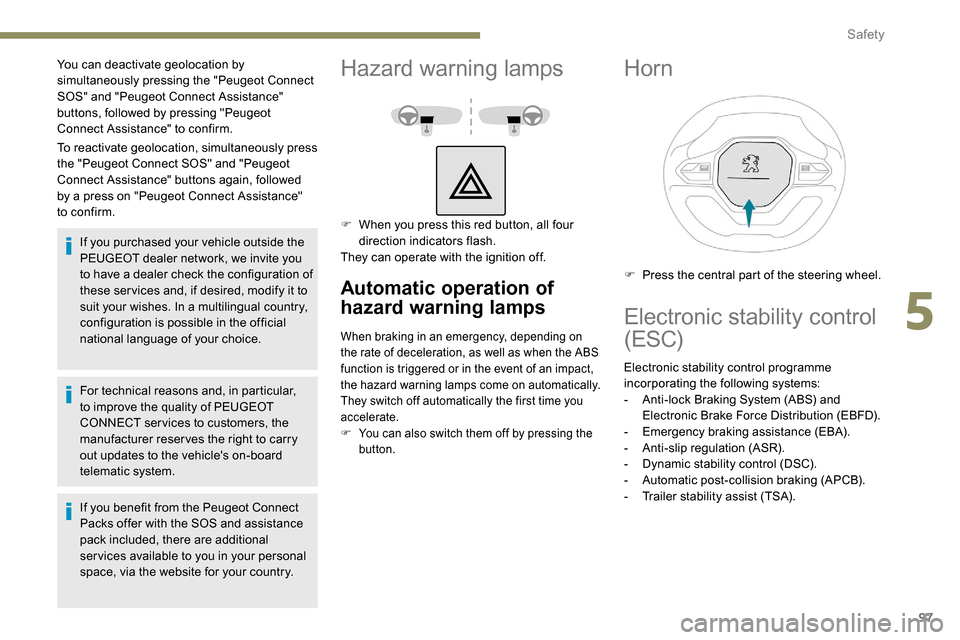
Hazard warning lamps
F When you press this red button, all four direction indicators flash.
They can operate with the ignition off.
Automatic operation of
hazard warning lamps
When braking in an emergency, depending on
the rate of deceleration, as well as when the ABS
function is triggered or in the event of an impact,
the hazard warning lamps come on automatically.
They switch off automatically the first time you
accelerate.
F
Y
ou can also switch them off by pressing the
button.
Horn
F Press the central part of the steering wheel.
Electronic stability control
(ESC)
Electronic stability control programme
incorporating the following systems:
-
A
nti-lock Braking System (ABS) and
Electronic Brake Force Distribution (EBFD).
-
E
mergency braking assistance (EBA).
-
A
nti-slip regulation (ASR).
-
D
ynamic stability control (DSC).
-
A
utomatic post-collision braking (APCB).
-
T
railer stability assist (TSA).
5
Safety