2019 Peugeot Partner Rele
[x] Cancel search: RelePage 65 of 312

63
Never put your hand underneath the seat
cushion to guide the seat downwards or
upwards, you could get your fingers trapped.
Always just use the strap.
Before carrying out these manoeuvres, check
that nothing and nobody is obstructing the
moving elements and their locking.
Folded position
This position allows the transport of high loads
inside the cab.
To replace the seat, push on the yellow crank
under the seat and lower the assembly until the
seat locks into position on the floor.F
L
ift the yellow crank at the base of the seat
to unlock and lift the assembly into folded
position (seat raised against the backrest)
until it locks.
Never put your hand underneath the seat
cushion to guide the seat downwards or
upwards, you could get your fingers trapped.
Place your hand on the front of the seat
cushion.
Before carrying out these manipulations,
check that nothing and nobody is obstructing
the moving elements and their locking.
Rear bench seat
For safety reasons, seat adjustments
must only be made when the vehicle is
stationary.
Folding the backrests
First steps:
F l ower the head restraints,
F
i
f necessary, move the front seats for ward,
F
c
heck that nothing or no person might
inter fere with the folding of the backrests
(clothing, luggage, etc.),
F
c
heck that the outer seat belts are lying flat
on the backrests. The folding of the backrest is
accompanied by a slight lowering of the
corresponding seat cushion.
When the backrest is released, the red
indicator is visible in the release grips on
the outer seats.
F
T
urn backrest release grip 1.
F
G
uide the backrest down to the horizontal
position.
3
Ease of use and comfort
Page 66 of 312

64
Repositioning the backrests
First check that the outer seat belts are
lying vertically flat alongside the backrest
latching rings.
F
P
ut the backrest in the upright position and
push it firmly to latch it home.
F
C
heck that the red indicator in the release
grip 1 is no longer visible.
F
E
nsure that the outer seat belts are not
trapped during the manoeuvre.
Adjusting the height of the
head restraint
The head restraint has a frame with
notches which prevents it from lowering;
this is a safety device in case of impact.
The adjustment is correct when the
upper edge of the head restraint is
level with the top of the head.
Never drive with the head restraints
removed; they must be fitted and correctly
adjusted.
Never drive with passengers seated at
the rear when the head restraints are
removed or not in the high position; the
head restraints must be in place and in the
high position.
For more information on the Seat belts ,
refer to the corresponding section.
F
T
o fit it, pull it upwards as far as possible
(n otc h).
F
T
o remove it, press the lug A and pull it
upwards.
F
T
o put it back in place, engage the head
restraint rods in the openings keeping them
in line with the seat backrest.
F
T
o lower it, press the lug A and push down
on the head restraint at the same time.
Interior fittings
Mats
Fitting
When fitting the mat for the first time, on the
driver's side, use only the fixings provided.
The other mats are simply placed on the
carpet.
Removing
To remove the mat on the driver's side:
F m ove the seat as far back as possible,
F
un
clip the fixings,
F
r
emove the mat.
Ease of use and comfort
Page 68 of 312

66
AC 220V
50Hz120W
220 V/50 Hz power socket
A 220 V/50 Hz socket (max. power: 120 W)
i s installed on the side of the central storage
compartment.
This socket works with the engine running, as
well as in STOP mode of Stop & Start.
F
R
emove the cover.
F
C
heck that the indicator lamp is on and
green.
F
C
onnect your multimedia or other electrical
device (telephone charger, laptop computer,
CD-DVD player, bottle warmer, etc.).
When the USB port is used, the portable
device charges automatically.
A message is displayed if the power drawn
by the portable device exceeds the current
supplied by the vehicle.
For more information on how to use this
equipment, refer to the Audio equipment
and telematics
section.
They also allow a smartphone to be
connected by MirrorLink
TM, Android
Auto® or CarPlay® so that certain
smartphone applications can be used
on the touch screen.
In the event of a fault with the socket, the green
indicator lamp flashes.
Have it checked by a PEUGEOT dealer or a
qualified workshop. Connect only one device at a time to the
socket (no extension lead or multi-socket
connector).
Connect only devices with class II
insulation (shown on the device).
Do not use a device with a metal case
(electric shaver, etc.).
As a safety measure, when electrical
consumption is high and when required by
the vehicle's electrical system (particular
weather conditions, electrical overload,
etc.), the current supply to the socket will
be cut off; the green indicator lamp goes
of f.
Wireless smartphone
charger
It allows the wireless charging of a portable
device, such as a smartphone, using the
principle of magnetic induction, based on the Qi
1.1 standard.
The portable device to be charged must be
compatible with the Qi standard, either by
design or by using a compatible holder or shell.
The charging zone is identified by the Qi
symbol.
To achieve the best results, it is necessary to
use a cable made or approved by the device
manufacturer.
These applications can be managed using the
steering mounted controls or those of the audio
system.
Ease of use and comfort
Page 72 of 312
70
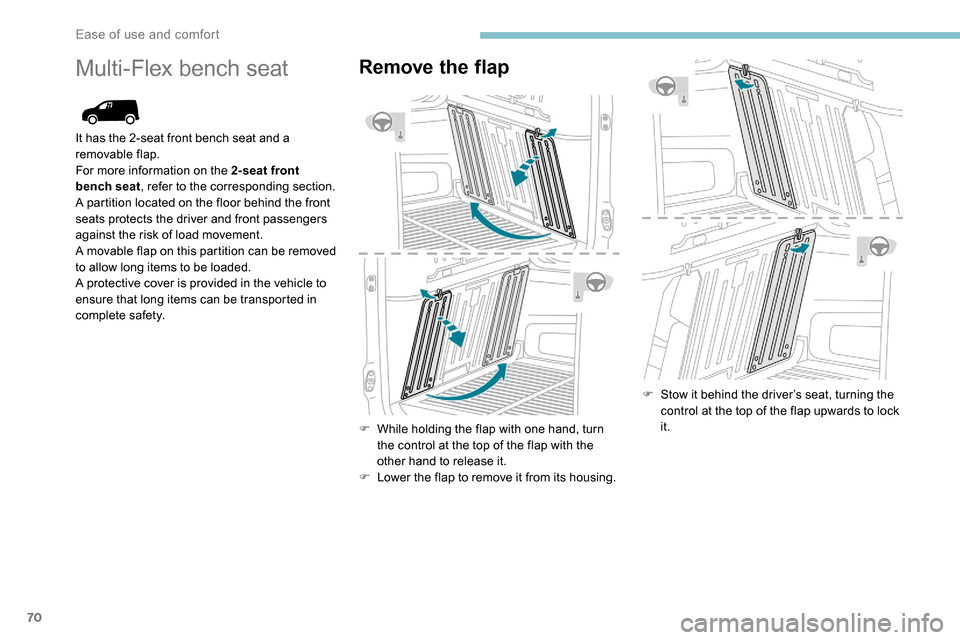
Multi-Flex bench seatRemove the flap
F While holding the flap with one hand, turn the control at the top of the flap with the
other hand to release it.
F
L
ower the flap to remove it from its housing. F
S
tow it behind the driver’s seat, turning the
control at the top of the flap upwards to lock
it.
It has the 2-seat front bench seat and a
removable flap.
For more information on the 2-seat front
bench seat
, refer to the corresponding section.
A partition located on the floor behind the front
seats protects the driver and front passengers
against the risk of load movement.
A movable flap on this partition can be removed
to allow long items to be loaded.
A protective cover is provided in the vehicle to
ensure that long items can be transported in
complete safety.
Ease of use and comfort
Page 74 of 312

72
F Pull out the head restraint rods from the folded backrest, leaving two notches visible.
F
L
oad the objects.
The maximum load permitted on the
folded backrest is 100
kg.
F
P
lace the strap of the cover around the
head restraint.
F
T
ighten the strap using the adjustable
section in order to correctly retain the items
that have been loaded inside the cover.
You can leave the protective cover in
position after use.
Regularly check the condition of the
protective cover.
When signs of wear and tear appear,
contact a PEUGEOT dealer to have it
replaced by a protective cover that meets
the specifications and qualities required
by PEUGEOT and your vehicle.Crew cab
A movable partition that can be placed behind
the 2nd or 1st row of seats protects the driver
and passengers against the risk of load
movement.
A hatch on the partition can be opened to allow
long items to be carried.
A protective cover is provided in the vehicle to
ensure that long items are carried in complete
safety.
Moving the partition
Moving the partition forwards
F Fold the backrests of the row 2 seats and check that they are properly folded.If necessary, adjust the position of the 1st
row seats (move them for wards).
F
R
elease the upper latches A and B .
F
C
heck that latches C and D are fully
retracted.
F
S
lide the partition forwards.
F
L
ock the lower latches C and D then check
that the pins are fully engaged in their
housings.
F
L
ock the upper latches A and B .
Moving the partition backwards
F Release the upper latches A and B .
F R elease the lower latches C and D.
F
S
lide the partition backwards.
F
L
ock the upper latches A and B .
F
R
eturn the backrests of the row 2 seats to
their positions.
Ease of use and comfort
Page 94 of 312

92
Automatic wiping (press down,
then release).
Single wipe (pull the stalk briefly
towards you).
Front screenwash
F Pull the wiper control stalk towards you and hold.
The screenwash and windscreen wiper operate
for as long as the control stalk is pulled.
Termination of the screenwash is followed by a
final wiping cycle.
On vehicles fitted with automatic
air conditioning, any action on the
screenwash control results in temporary
closing of the air intake to avoid odours
inside the passenger compartment.
The screenwash jets are integrated in the
tips of each arm.
The screenwash fluid is sprayed along the
length of the wiper blade. This improves
visibility and reduces the consumption of
screenwash fluid.
In some cases, depending on the contents
or colour of the liquid and on the exterior
brightness, the liquid spray may be hardly
noticeable. To avoid damaging the wiper blades,
do not operate the screenwash if the
screenwash reservoir is empty.
Only operate the screenwash if there
is no risk of the fluid freezing on the
windscreen and hindering visibility. Always
use a screenwash fluid suitable for low
temperatures during the winter period.
Never top up with water.
Rear wiper
Rear wiper selection ring:
Of f.
Intermittent wiping (proportional to
the speed of the vehicle).
Wash-wipe (set duration).
Reverse gear
When reverse gear is engaged, the rear wiper
will come into operation automatically if the
windscreen wipers are operating.
Activation/Deactivation
Activation or deactivation is set via
the vehicle configuration menu.
This system is activated by default.
If a significant accumulation of snow or ice
is present, or when using a bicycle carrier
on the boot, deactivate the automatic rear
w i p e r.
Special position of the
windscreen wipers
This position is used for cleaning or
replacement of the wiper blades. It can also
be useful, in winter (ice, snow), to release the
wiper blades from the windscreen.
or
Lighting and visibility
Page 95 of 312

93
To maintain the effectiveness of the wiper
blades, it is advisable to:
-
h
andle them with care,
-
c
lean them regularly using soapy
water,
-
a
void using them to retain cardboard
on the windscreen,
-
r
eplace them at the first signs of wear.
Before removing a windscreen
wiper blade
F In the minute following ignition switch-off, any operation of the wiper control stalk will
position the wiper blades vertically.
F
P
roceed to the desired operation or to
replacement of the wiper blades.
After refitting a windscreen wiper
blade
F To return the wiper blades to their initial position, switch on the ignition and operate
the wiper stalk.
Changing a wiper blade
Removing/refitting at the front
Do not touch the wiper blade in case you
cause irreparable damage.
Do not release them while moving them –
Risk of damaging the windscreen! F
C
lean the windscreen using a windscreen
cleaning fluid.
Do not apply "Rain X" type beading
products.
F
U
nclip the worn wiper blade closest to you
and remove it.
F
I
nstall the new wiper blade and clip it to the
arm.
F
R
epeat the procedure for the other wiper
blade.
F
S
tarting with the wiper blade closest to you,
once again hold the each arm by the rigid
section, then fold it carefully, guiding it to
the windscreen.
Removing/refitting at the rear
F Hold the arm by the rigid section and lift it to the stop position.
F
C
lean the rear window using windscreen
washing fluid.
F
U
nclip the worn wiper blade and remove it.
F
I
nstall the new wiper blade and clip it to the
arm.
F
O
nce again hold the arm by the rigid section
then fold it carefully, guiding it to the rear
window.
F
C
arry out these wiper blade replacement
operations from the driver's side.
F
S
tarting with the wiper blade farthest from
you, hold each arm by the rigid section and
lift to the stop position.
4
Lighting and visibility
Page 98 of 312

96
Emergency or assistance
call
Peugeot Connect SOS** According to the geographic coverage of "Peugeot Connect SOS", "Peugeot Connect
Assistance" and the official national
language chosen by the owner of the
vehicle.
The list of countries covered and PEUGEOT
CONNECT services is available from
dealers or on the website for your country.
In an emergency, press this
button for more than 2
seconds.
The flashing LED and the voice
message confirm that the call
has been made to the "Peugeot
Connect SOS" ser vice*.
Pressing this button again immediately cancels
the request; the LED goes off.
The LED remains on (without flashing) when
communication is established.
It goes off at the end of the call.
"Peugeot Connect SOS" immediately locates
your vehicle and contacts you in your own
language** , and – if necessary – requests that
relevant emergency services be dispatched**.
In countries where the ser vice is not available,
or when the locating ser vice has been
expressly declined, the call is sent directly If an impact is detected by the airbag
control unit, an emergency call is made
automatically and independently of the
deployment of any airbags.
Operation of the system
When the ignition is switched on, the indicator
lamp comes on for 3
seconds indicating that
the system is operating correctly.
The indicator lamp lights up continuously red:
there is a system fault.
The indicator lamp flashes red: replace the
back-up battery.
In either case, emergency and assistance calls
may not function.
Contact a qualified repairer as soon as
possible. The system’s fault does not prevent the
vehicle from being driven.
Peugeot Connect
Assistance
* In accordance with the general conditions
of use for the ser vice available from dealers
and subject to technological and technical
limitations.
**
D
epending on the geographic coverage of
"Peugeot Connect SOS", "Peugeot Connect
Assistance" and the official national
language chosen by the owner of the
vehicle.
The list of countries covered and telematic
ser vices is available from dealers or on the
website for your country. Press this button for more than
2
seconds to request assistance
if the vehicle breaks down.
A voice message confirms that the call has
been made**.
Pressing this button again immediately cancels
the request.
The cancellation is confirmed by a voice
message.
Geolocation
to the emergency ser vices (112) without the
vehicle location.
Safety