2019 Peugeot Expert Screen
[x] Cancel search: ScreenPage 30 of 324

28
With touch screen
The brightness can be adjusted differently
for day mode and night mode.
F
I
n the Settings
menu, select " Brightness".
Or select " OPTIONS", "Screen configuration "
then " Brightness ".
F
A
djust the brightness by pressing the
arrows or moving the slider.
Trip computer
Information displayed about the current journey
(range, fuel consumption, average speed, etc.).
Display of information
To display the various trip computer tabs in
succession:
With steering mounted controls
F Press the knob on the steering wheel .
F
P
ress this button, located on the end of the
wiper control stalk .
On the instrument panel
F Press this button. The current information is then displayed:
-
t
he range,
-
t
he current fuel consumption,
-
t
he Stop & Start time counter,
-
t
he trip "
1" followed (depending on version)
by trip " 2" with: the average speed, the
average fuel consumption and the distance
travelled for each trip.
Tr i p s " 1" and " 2" are independent but their use
is identical.
For example, trip " 1" can be used for daily
figures and trip " 2" for monthly figures.
Reset trip
The reset is per formed when the trip is
displayed.
F
P
ress the button located on the end of
the wiper control stalk for more than
2
seconds.
Instruments
Page 32 of 324

30
The date and time can be adjusted in the
instrument panel display.F
H
old this button down.
F
P
ress one of these buttons to
select the setting to be changed.
F
P
ress this button briefly to
confirm.
F
P
ress one of these buttons to
change the setting and confirm
again to register the change.With PEUGEOT Connect
Radio
F Select the Settings menu in
the upper banner of the touch
screen.
F
Sel
ect " System configuration ".
F
Sel
ect "Date and time ".
F
Sel
ect " Date " or "Time ".
F
C
hoose the display formats.
F
C
hange the date and/or time using the
numeric keypad.
F
C
onfirm with " OK".
With PEUGEOT Connect
Nav
Setting of the time and date is only available if
synchronisation with the GPS is deactivated.
F
Sel
ect the Settings menu in the
bar of the touch screen.
F
P
ress the " OPTIONS " button to go to the
secondary page.
F
Sel
ect "Set time-date ".
With audio system
F Press the MENU button for access to the
main menu .
F
P
ress the " 7" or " 8" button to select the
" Personalisation-configuration " menu,
then confirm by pressing the OK button.
F
P
ress the " 5" or " 6" button to select the
Display configuration menu, then confirm
by pressing the OKbutton.
F
P
ress the " 5" or " 6" and " 7" or " 8" buttons
to adjust the date and time values, then
confirm by pressing the OK button.
F
Sel
ect the "Date" or "Time " tab. F
S
et the date and/or time using the numeric
keypad.
F
C
onfirm with "
OK".
Additional settings
You can choose:
-
T o change the time zone.
-
T
o change the display format of the date
and time (12h/24h).
-
T
o activate or deactivate the summer time
management function (+1 hour).
-
T
o activate or deactivate the
synchronisation with the GPS (UTC).
The system does not automatically
manage the change between winter and
summer time (depending on the country
of s a l e).
Instruments
Page 37 of 324
35
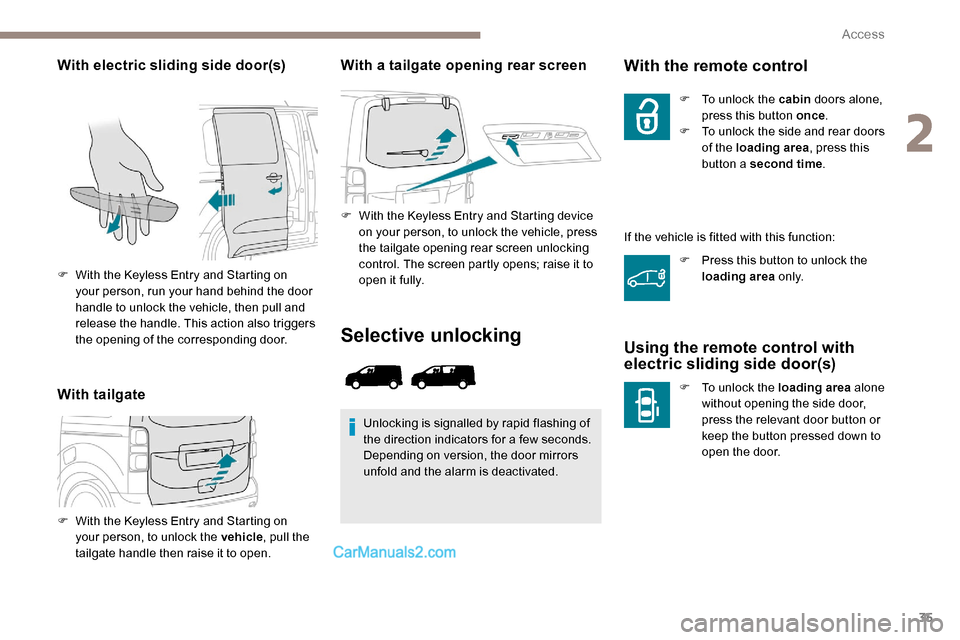
With electric sliding side door(s)
With tailgateWith a tailgate opening rear screen
F With the Keyless Entry and Starting device
on your person, to unlock the vehicle, press
the tailgate opening rear screen unlocking
control. The screen partly opens; raise it to
open it fully.
F
W
ith the Keyless Entry and Starting on
your person, run your hand behind the door
handle to unlock the vehicle, then pull and
release the handle. This action also triggers
the opening of the corresponding door.
F
W
ith the Keyless Entry and Starting on
your person, to unlock the vehicle , pull the
tailgate handle then raise it to open.
Selective unlocking
Unlocking is signalled by rapid flashing of
the direction indicators for a few seconds.
Depending on version, the door mirrors
unfold and the alarm is deactivated.
With the remote control
F To unlock the cabin doors alone,
press this button once .
F
T
o unlock the side and rear doors
of the loading area , press this
button a second time .
If the vehicle is fitted with this function: F
P
ress this button to unlock the
loading area o n l y.
Using the remote control with
electric sliding side door(s)
F To unlock the loading area alone
without opening the side door,
press the relevant door button or
keep the button pressed down to
open the door.
2
Access
Page 44 of 324

42
Locking / unlocking the
loading area
This button is unavailable if the vehicle
has been locked or deadlocked from
outside (using the key, remote control or
Keyless Entry and Starting, depending on
equipment) or if one of the doors is still
open.
Automatic (anti-intrusion
security)
The doors and the tailgate or the side-hinged
doors can lock automatically while driving
(speed above 6 mph (10 km/h)).
To deactivate/reactivate this function (activated
by default):
F
P
ress the button until an audible signal is
heard and/or a message appears in the
screen.
When locking/deadlocking from the
outside
When the vehicle is locked or deadlocked
from the outside, the indicator lamp
flashes and the button is inoperative.
F
A
fter normal locking, pull one of the
interior door controls to unlock the
vehicle.
F
A
fter deadlocking, it is necessary to
use the remote control, Keyless Entry
and Starting or the integral key to
unlock the vehicle.
Driving with the doors locked could make
it more difficult for the emergency ser vices
to enter the vehicle in an emergency. When carrying large objects
with the tailgate or side-
hinged doors open, press
the button to lock just the
cab doors.
When carrying large objects
with the tailgate or side-
hinged doors open, press
the button to lock just the
front and rear doors (sliding
side door).
If one of the doors is open, the central
locking from the inside does not function.
This is signalled by a mechanical noise
from the locks.
If the tailgate or the side-hinged doors are
open, only the other doors are locked. The
indicator lamp in the button remains off. When locking from inside, the door mirrors
do not fold.
Access
Page 47 of 324
45
The button is not operational and pressing
it results in an audible signal, if the speed
of the vehicle is above 20 mph (30 km/h).
The button(s) at the front or on the door
pillar is not operational and pressing it
results in an audible signal, if:
-
t
he vehicle is moving,
-
t
he child lock is on (activated) (for the
buttons on the door pillars),
-
t
he vehicle has been locked or
deadlocked from outside (using
the key, remote control or Keyless
Entry and Starting, depending on
equipment).
The button for the left-hand door is not
operational and pressing it results in an
audible signal if the fuel filler flap is open.General
recommendations for the
sliding side doors
The doors must only be operated when
the vehicle is stationary.
For your safety and for that of your
passengers, as well as for correct
operation of the doors, you are strongly
advised not to drive with a door open.
Always check that it is safe to operate the
door and in particular, be sure not to leave
children or animals near the door controls
without supervision.
The audible warning, the illumination
of the "door open" warning lamp and
the message on the screen are there to
remind you. Contact a PEUGEOT dealer
or a qualified workshop to have this
warning deactivated.
Lock the vehicle when using an automatic
car wash. Before opening or closing or per forming
any movement of the doors, ensure that
no person, animal or object is in the
window frame or could block the desired
movement, inside or outside the vehicle.
If this advice is not followed, injuries or
damage may occur if a part of the body or
an object is trapped or caught.
The doors cannot be opened electrically
above 2 mph (3
km/h ):
-
H
owever, if the doors remained open
when starting, the speed must fall
below 19 mph (30
km/h) before they
can be closed.
-
A
ny attempt to open a door electrically
using the interior handle while driving
results in it only being possible to open
the door manually.
-
I
n this case, the audible warning will be
given, accompanied by the illumination
of the "door open" warning lamp and
the message on the screen. To release
the door and be able to operate it
again, it is necessary to stop the
vehicle.
2
Access
Page 50 of 324

48
Before making the movement with your
foot, ensure that you are steady and well
positioned, so that you do not lose your
balance (rain, snow, ice, mud, etc.).
Take care not to touch the exhaust tailpipe
when making the movement with your foot
- risk of burns.
Make the movement without interruption
and do not repeat it immediately
after wards or several times.
If the door does not open, wait about
2
seconds before trying again.
Do not keep the foot in the air.
Automatic locking
The vehicle locks itself following the hands-free
closing of the sliding door.
Activation/Deactivation
With audio system or touch
screen
By default, hands-free access is activated.
The "Hands-Free Tailgate Access"
function or automatic vehicle locking
when the sliding door is closed is
activated and deactivated via the
vehicle configuration menu.
Operating fault
An audible signal repeated three times
indicates a fault with the system.
Contact a PEUGEOT dealer or a qualified
workshop to have the system checked.
F
P
ut your foot beneath the corner of the rear
bumper, then move the foot at normal speed
with a sweeping side movement.
The sensor detects the foot approaching and
leaving and triggers the opening or closing of
the side door. Confirmation that the door is going to
open or close is signalled by the direction
indicators flashing for a few seconds,
accompanied by an audible signal.
The movement of the door is reversed
if the movement of the foot takes place
during the manoeuvre.
If the vehicle is so equipped, the electric
door mirrors fold/unfold on locking/
unlocking the vehicle.
If your vehicle is not fitted with an alarm,
locking is confirmed by fixed illumination
of the direction indicators for about two
seconds.
Depending on your version, the door
mirrors fold at the same time.
Access
Page 52 of 324
50
Opening to approximately 180°
When parked with the rear
doors open to 90°, the doors
conceal the rear lamps. To
signal the vehicle's position
to other road users driving in
the same direction who may
not have seen the stopped
vehicle, use a warning
triangle or other device
required by the legislation in
your country.
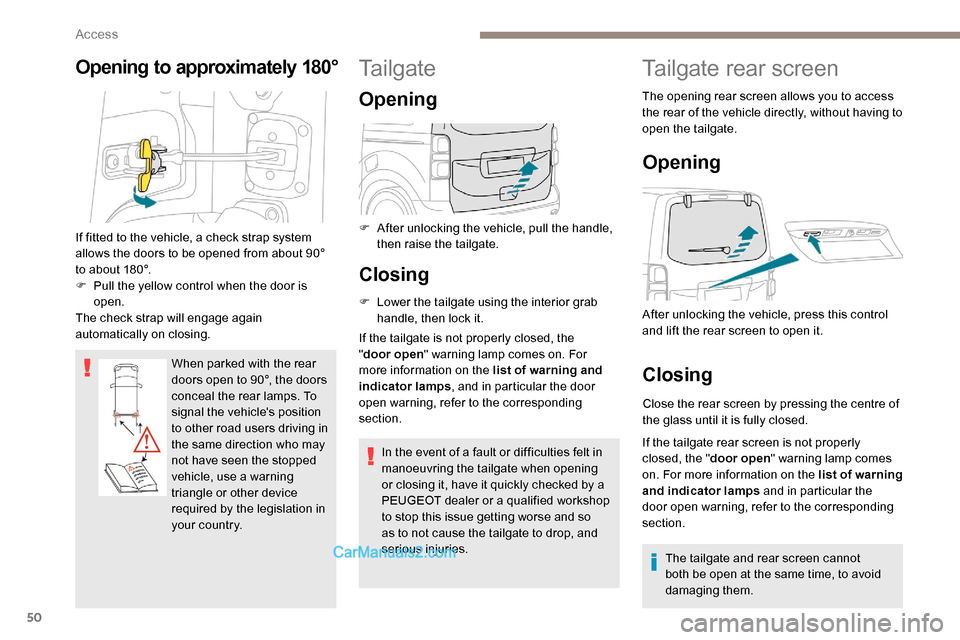
If fitted to the vehicle, a check strap system
allows the doors to be opened from about 90°
to about 180°.
F
P
ull the yellow control when the door is
open.
The check strap will engage again
automatically on closing.
Tailgate
Opening
F After unlocking the vehicle, pull the handle, then raise the tailgate.
Tailgate rear screen
The opening rear screen allows you to access
the rear of the vehicle directly, without having to
open the tailgate.
Opening
Closing
Close the rear screen by pressing the centre of
the glass until it is fully closed.
After unlocking the vehicle, press this control
and lift the rear screen to open it.
Closing
F Lower the tailgate using the interior grab
handle, then lock it.
If the tailgate is not properly closed, the
" door open " warning lamp comes on. For
more information on the list of warning and
indicator lamps , and in particular the door
open warning, refer to the corresponding
section.
In the event of a fault or difficulties felt in
manoeuvring the tailgate when opening
or closing it, have it quickly checked by a
PEUGEOT dealer or a qualified workshop
to stop this issue getting worse and so
as to not cause the tailgate to drop, and
serious injuries. If the tailgate rear screen is not properly
closed, the "
door open" warning lamp comes
on. For more information on the list of warning
and indicator lamps and in particular the
door open warning, refer to the corresponding
section.
The tailgate and rear screen cannot
both be open at the same time, to avoid
damaging them.
Access
Page 62 of 324

60
Heated mirrors
F Press this button.For more information on Rear screen
demisting - defrosting , refer to the
corresponding section.
Rear view mirror
Equipped with an anti-dazzle system, which
darkens the mirror glass and reduces the
nuisance to the driver caused by the sun,
headlamps from other vehicles, etc.
Manual model
Adjustment
F A djust the mirror so that the glass is
directed correctly in the "day" position. Day/night position
Automatic "electrochrome"
model
This system automatically and progressively
changes between day and night use by means
of a sensor measuring the light coming from the
rear of the vehicle. In order to ensure optimum visibility during
your manoeuvres, the mirror lightens
automatically when reverse gear is
engaged.
F
P
ull the lever to change to the "night" anti-
dazzle position.
F
P
ush the lever to change to the normal
"day" position.
Moduwork
When the flap is removed, it is possible
to load long objects underneath the outer
seat.
The outer seat cushion of the bench seat can
be folded onto the backrest to create a loading
area inside the cab.
A removable flap on the partition can be
removed to allow long objects to be loaded.
Ease of use and comfort