2019 NISSAN SENTRA Malfunction
[x] Cancel search: MalfunctionPage 19 of 461
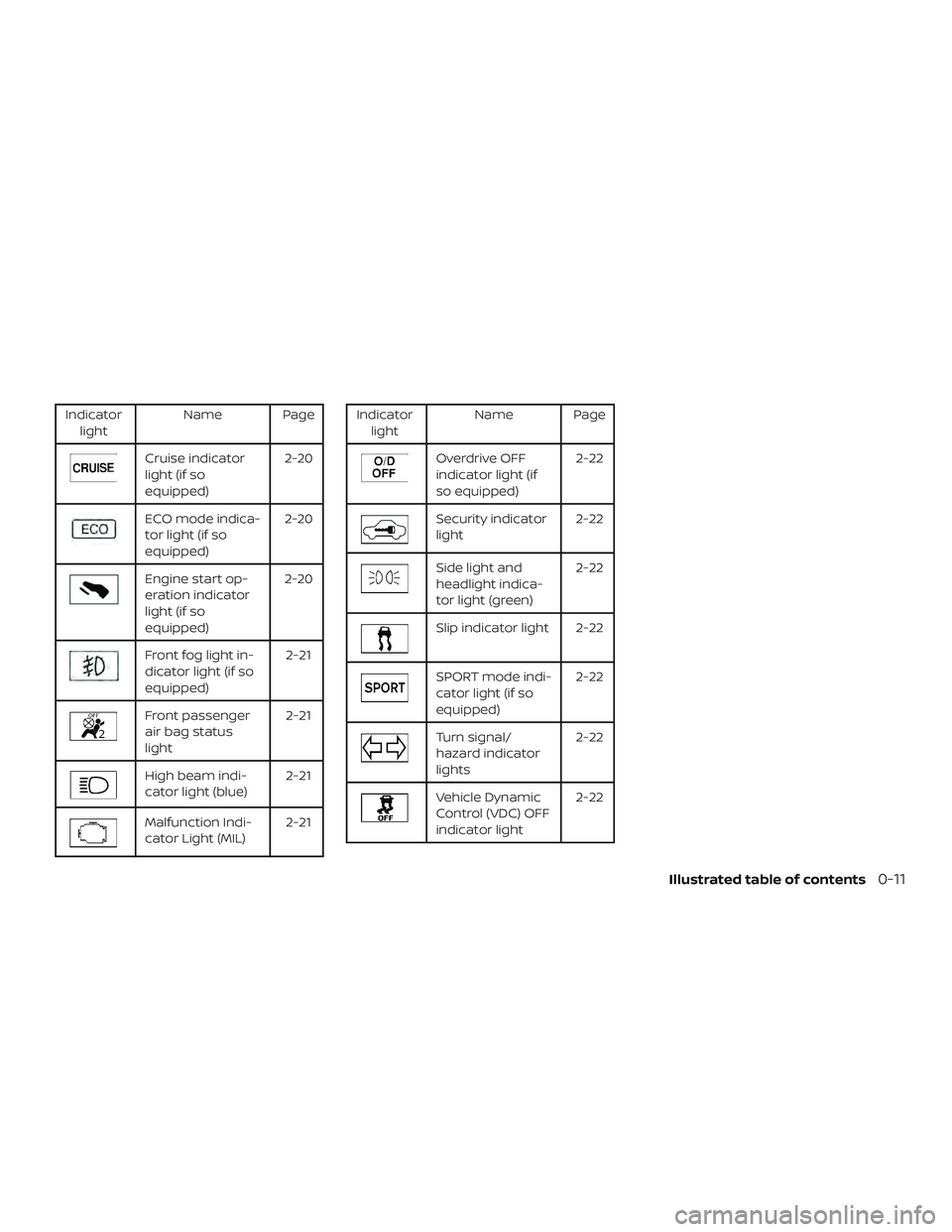
Indicatorlight Name Page
Cruise indicator
light (if so
equipped) 2-20
ECO mode indica-
tor light (if so
equipped)2-20
Engine start op-
eration indicator
light (if so
equipped)2-20
Front fog light in-
dicator light (if so
equipped)
2-21
Front passenger
air bag status
light2-21
High beam indi-
cator light (blue)
2-21
Malfunction Indi-
cator Light (MIL)2-21
Indicator
light Name Page
Overdrive OFF
indicator light (if
so equipped) 2-22
Security indicator
light
2-22
Side light and
headlight indica-
tor light (green)2-22
Slip indicator light 2-22
SPORT mode indi-
cator light (if so
equipped)2-22
Turn signal/
hazard indicator
lights2-22
Vehicle Dynamic
Control (VDC) OFF
indicator light2-22
Illustrated table of contents0-11
Page 34 of 461
WARNING
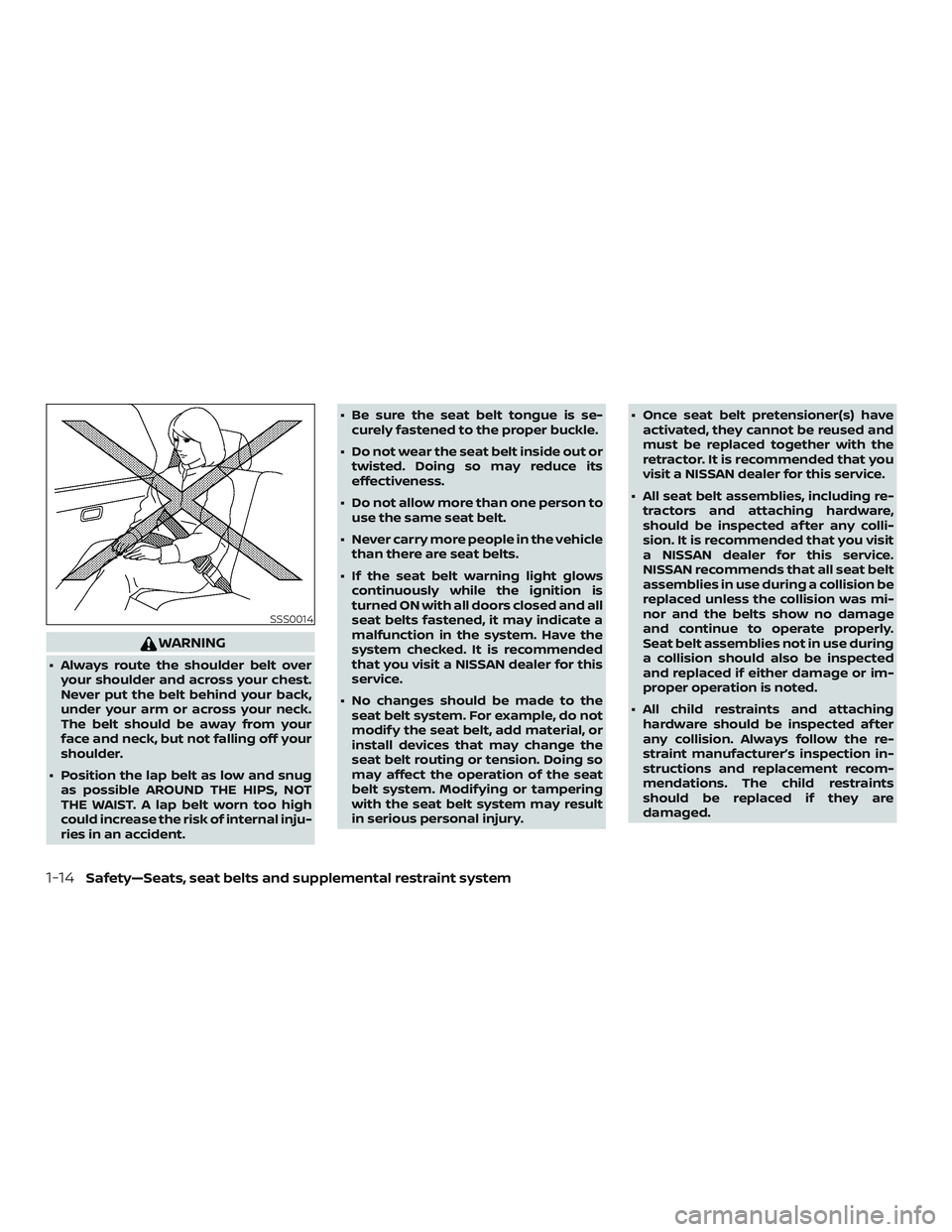
∙ Always route the shoulder belt overyour shoulder and across your chest.
Never put the belt behind your back,
under your arm or across your neck.
The belt should be away from your
face and neck, but not falling off your
shoulder.
∙ Position the lap belt as low and snug as possible AROUND THE HIPS, NOT
THE WAIST. A lap belt worn too high
could increase the risk of internal inju-
ries in an accident. ∙ Be sure the seat belt tongue is se-
curely fastened to the proper buckle.
∙ Do not wear the seat belt inside out or twisted. Doing so may reduce its
effectiveness.
∙ Do not allow more than one person to use the same seat belt.
∙ Never carry more people in the vehicle than there are seat belts.
∙ If the seat belt warning light glows continuously while the ignition is
turned ON with all doors closed and all
seat belts fastened, it may indicate a
malfunction in the system. Have the
system checked. It is recommended
that you visit a NISSAN dealer for this
service.
∙ No changes should be made to the seat belt system. For example, do not
modif y the seat belt, add material, or
install devices that may change the
seat belt routing or tension. Doing so
may affect the operation of the seat
belt system. Modif ying or tampering
with the seat belt system may result
in serious personal injury. ∙ Once seat belt pretensioner(s) have
activated, they cannot be reused and
must be replaced together with the
retractor. It is recommended that you
visit a NISSAN dealer for this service.
∙ All seat belt assemblies, including re- tractors and attaching hardware,
should be inspected af ter any colli-
sion. It is recommended that you visit
a NISSAN dealer for this service.
NISSAN recommends that all seat belt
assemblies in use during a collision be
replaced unless the collision was mi-
nor and the belts show no damage
and continue to operate properly.
Seat belt assemblies not in use during
a collision should also be inspected
and replaced if either damage or im-
proper operation is noted.
∙ All child restraints and attaching hardware should be inspected af ter
any collision. Always follow the re-
straint manufacturer’s inspection in-
structions and replacement recom-
mendations. The child restraints
should be replaced if they are
damaged.
SSS0014
1-14Safety—Seats, seat belts and supplemental restraint system
Page 71 of 461

WARNING
To ensure proper operation of the pas-
senger’s NISSAN Advanced Air bag Sys-
tem, please observe the following
items.
∙ Do not allow a passenger in the rearseat to push or pull on the seatback
pocket.
∙ Do not place heavy loads heavier than 9.1 lbs. (4 kg) on the seatback, head
restraint/headrest or in the seatback
pocket.
∙ Make sure that there is nothing press- ing against the rear of the seatback,
such as a child restraint installed in
the rear seat or an object stored on
the floor.
∙ Make sure that there is no object placed under the front passenger
seat.
∙ Make sure that there is no object placed between the seat cushion and
center console or between the seat
cushion and the door. ∙ If a forward-facing child restraint is
installed in the front passenger seat,
do not position the front passenger
seat so the child restraint contacts the
instrument panel. If the child restraint
does contact the instrument panel,
the system may determine the seat is
occupied and the passenger air bag
may deploy in a collision. Also the
front passenger air bag status light
may not illuminate. For additional in-
formation, refer to “Child restraints” in
this section.
∙ Confirm the operating condition with the front passenger air bag status
light.
∙ If you notice that the front passenger air bag status light is not operating as
described in this section, get the oc-
cupant classification system checked.
It is recommended that you visit a
NISSAN dealer for this service.
∙ Until you have confirmed with a dealer that your passenger seat occu-
pant classification system is working
properly, position the occupants in
the rear seating positions. ∙ Do not position the front passenger
seat so it contacts the rear seat. If the
front seat does contact the rear seat,
the air bag system may determine a
sensor malfunction has occurred and
the front passenger air bag status
light may illuminate and the supple-
mental air bag warning light may
flash.
This vehicle is equipped with the NISSAN
Advanced Air Bag System for the driver and
front passenger seats. This system is de-
signed to meet certification requirements
under U.S. regulations. It is also permitted in
Canada. All of the information, cautions
and warnings in this manual must be fol-
lowed.
The driver supplemental front-impact air
bag is located in the center of the steering
wheel. The front passenger supplemental
front-impact air bag is mounted in the
dashboard above the glove box. The front
air bags are designed to inflate in higher
severity frontal collisions, although they
may inflate if the forces in another type of
collision are similar to those of a higher
severity frontal impact. They may not in-
flate in certain frontal collisions. Vehicle
Safety—Seats, seat belts and supplemental restraint system1-51
Page 75 of 461
bag status light is not illuminated (indicat-
ing that the air bag might inflate in a crash),
it could be that the child restraint or seat
belt is not being used properly. Make sure
that the child restraint is installed properly,
the seat belt is used properly and the occu-
pant is positioned properly. If the air bag
status light is still not illuminated, reposi-
tion the occupant or child restraint in a rear
seat.
If the front passenger air bag status light
will not illuminate even though you believe
that the child restraint, the seat belts and
the occupant are properly positioned, it is
recommended that you take your vehicle
to a NISSAN dealer. A NISSAN dealer can
check system status by using a special
tool. However, until you have confirmed
with a dealer that your air bag is working
properly, reposition the occupant or child
restraint in a rear seat.
The NISSAN Advanced Air Bag System and
front passenger air bag status light will
take a few seconds to register a change in
the front passenger seat status. This is nor-
mal system operation and does not indi-
cate a malfunction.
If a malfunction occurs in the front passen-
ger air bag system, the supplemental airbag warning light, located in the me-
ter and gauges area of the instrument
panel, will be illuminated (blinking or
steadily lit). Have the system checked. It is
recommended that you visit a NISSAN
dealer for this service.
Normal operation
In order for the occupant classification
sensor system to classif y the front passen-
ger based on weight, please follow the pre-
cautions and steps outlined below:
Precautions
∙ Make sure that there are no objects weighing over 9.1 lbs. (4 kg) hanging on
the seat or placed in the seatback
pocket.
∙ Make sure that a child restraint or other object is not pressing against the rear
of the seatback.
∙ Make sure that a rear passenger is not pushing or pulling on the back of the
front passenger seat.
∙ Make sure that the front passenger seat or seatback is not forced back
against an object on the seat or floor
behind it. ∙ Make sure that there is no object placed
under the front passenger seat.
Steps 1. Adjust the seat as outlined in the “Seats” section of this manual. Sit upright, lean-
ing against the seatback, and centered
on the seat cushion with your feet com-
fortably extended to the floor.
2. Make sure there are no objects on your lap.
3. Fasten the seat belt as outlined in the “Seat belts” section of this manual.
Front passenger seat belt buckle sta-
tus is monitored by the occupant clas-
sification system, and is used as an in-
put to determine occupancy status. So,
it is highly recommended that the front
passenger fasten their seat belt.
4. Remain in this position for 30 seconds allowing the system to classif y the
front passenger before the vehicle is
put into motion.
5. Ensure proper classification by check- ing the front passenger air bag status
light.
Safety—Seats, seat belts and supplemental restraint system1-55
Page 81 of 461
When pretensioner(s) activate, smoke is re-
leased and a loud noise may be heard. This
smoke is not harmful and does not indi-
cate a fire. Care should be taken not to
inhale it, as it may cause irritation and
choking. Those with a history of a breath-
ing condition should get fresh air promptly.
Af ter the pretensioner(s’) activation, load
limiters allow the seat belt to release web-
bing (if necessary) to reduce forces against
the chest.
The supplemental air bag warning
light
is used to indicate malfunctions
in the pretensioner system. For additional
information, refer to "Supplemental air bag
warning light" in this section. If the opera-
tion of the supplemental air bag warning
light indicates there is a malfunction, have
the system checked. It is recommended
that you visit a NISSAN dealer for this ser-
vice.
When selling your vehicle, we request that
you inform the buyer about the preten-
sioner system and guide the buyer to the
appropriate sections in this Owner’s
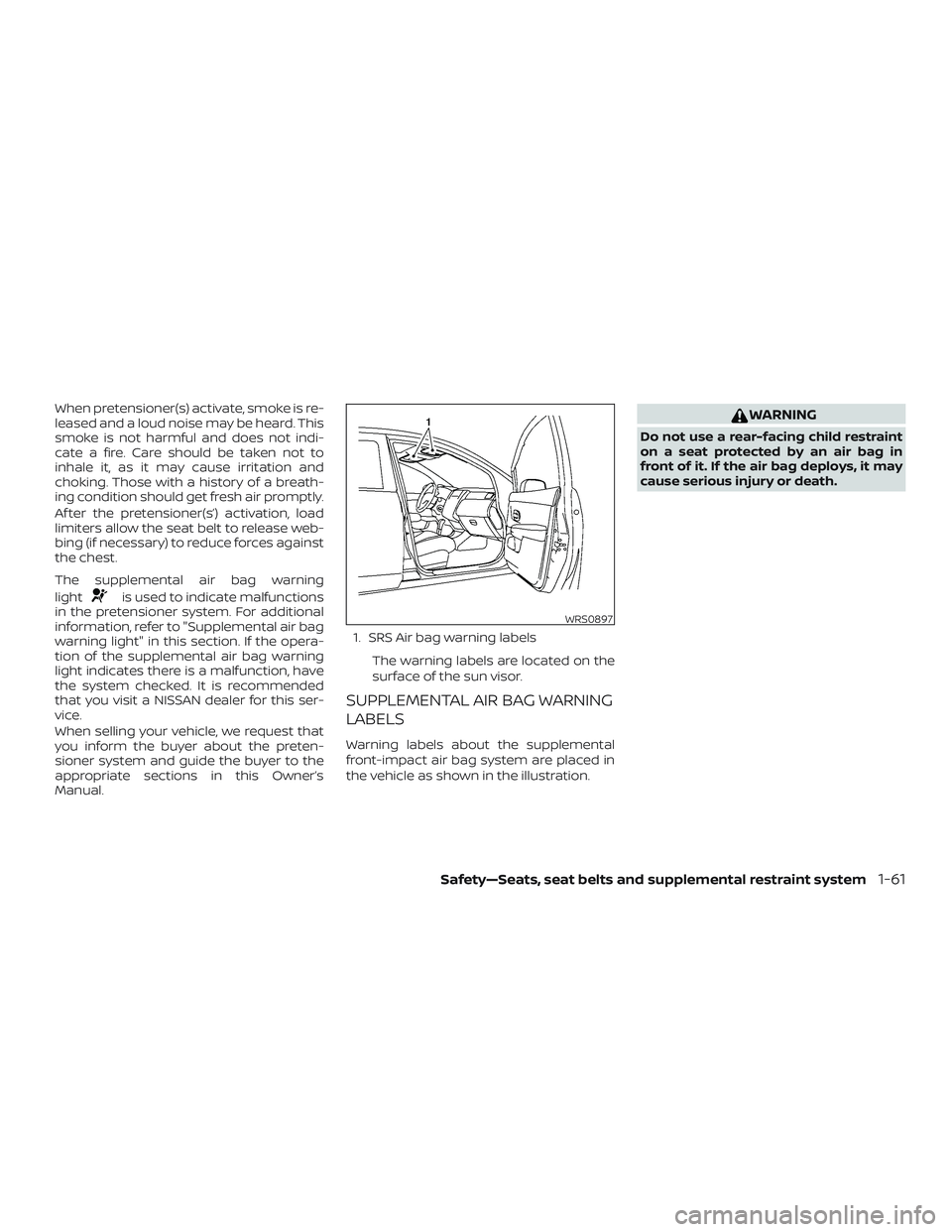
Manual. 1. SRS Air bag warning labels
The warning labels are located on the
surface of the sun visor.
SUPPLEMENTAL AIR BAG WARNING
LABELS
Warning labels about the supplemental
front-impact air bag system are placed in
the vehicle as shown in the illustration.
WARNING
Do not use a rear-facing child restraint
on a seat protected by an air bag in
front of it. If the air bag deploys, it may
cause serious injury or death.
WRS0897
Safety—Seats, seat belts and supplemental restraint system1-61
Page 93 of 461

The low fuel warning light comes on when
the amount of fuel in the tank is getting low.
Refill the fuel tank before the gauge reg-
isters 0 (Empty).
The arrow on the fuel pump symbol
indicates the fuel-filler location.
CAUTION
∙ If the vehicle runs out of fuel, theMalfunction Indicator Light (MIL) may
come on. Refuel as soon as possible.
Af ter a few driving trips. the
light
should turn off. If the light remains on
af ter a few driving trips, have the ve-
hicle inspected. It is recommended
that you visit a NISSAN dealer for this
service.
∙ For additional information, refer to “Malfunction Indicator Light (MIL)” in
this section.
TRIP COMPUTER (if so equipped)
When the ignition switch is placed in the ON
position, the modes of the trip computer
can be selected by pressing the
but-
ton on the steering wheel. The following
modes can be selected:
∙ Trip A
∙ Trip B
∙ ECO Pedal Indicator (if so equipped) ∙ Instant fuel economy
∙ Average fuel economy
∙ Average speed
∙ Distance to empty
∙ Trip computer reset
Type B (if so equipped)
LIC2222
Instruments and controls2-9
Page 97 of 461
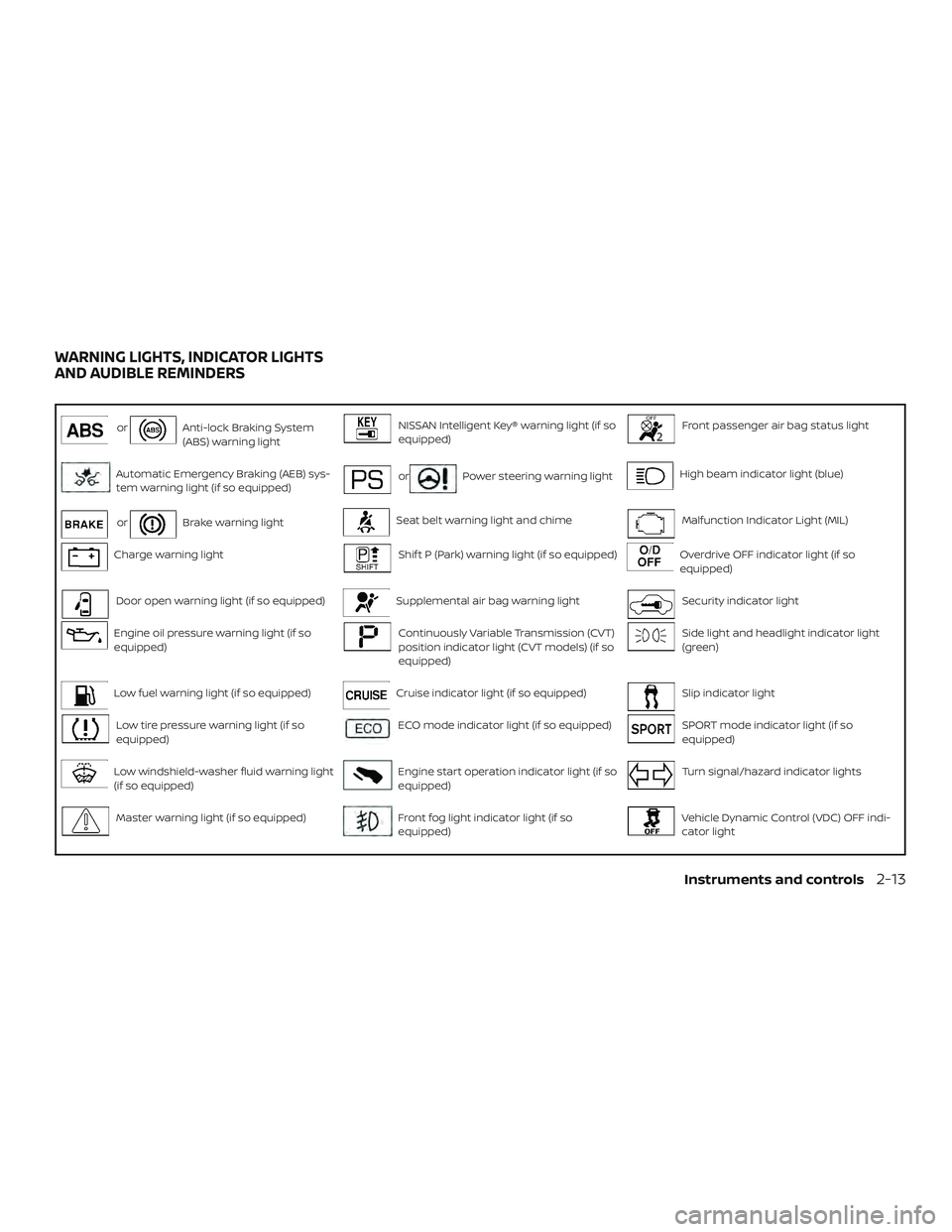
orAnti-lock Braking System
(ABS) warning lightNISSAN Intelligent Key® warning light (if so
equipped)Front passenger air bag status light
Automatic Emergency Braking (AEB) sys-
tem warning light (if so equipped)orPower steering warning lightHigh beam indicator light (blue)
orBrake warning lightSeat belt warning light and chimeMalfunction Indicator Light (MIL)
Charge warning lightShif t P (Park) warning light (if so equipped)Overdrive OFF indicator light (if so
equipped)
Door open warning light (if so equipped)Supplemental air bag warning lightSecurity indicator light
Engine oil pressure warning light (if so
equipped)Continuously Variable Transmission (CVT)
position indicator light (CVT models) (if so
equipped)Side light and headlight indicator light
(green)
Low fuel warning light (if so equipped)Cruise indicator light (if so equipped)Slip indicator light
Low tire pressure warning light (if so
equipped)ECO mode indicator light (if so equipped)SPORT mode indicator light (if so
equipped)
Low windshield-washer fluid warning light
(if so equipped)Engine start operation indicator light (if so
equipped)Turn signal/hazard indicator lights
Master warning light (if so equipped)Front fog light indicator light (if so
equipped)Vehicle Dynamic Control (VDC) OFF indi-
cator light
WARNING LIGHTS, INDICATOR LIGHTS
AND AUDIBLE REMINDERS
Instruments and controls2-13
Page 98 of 461
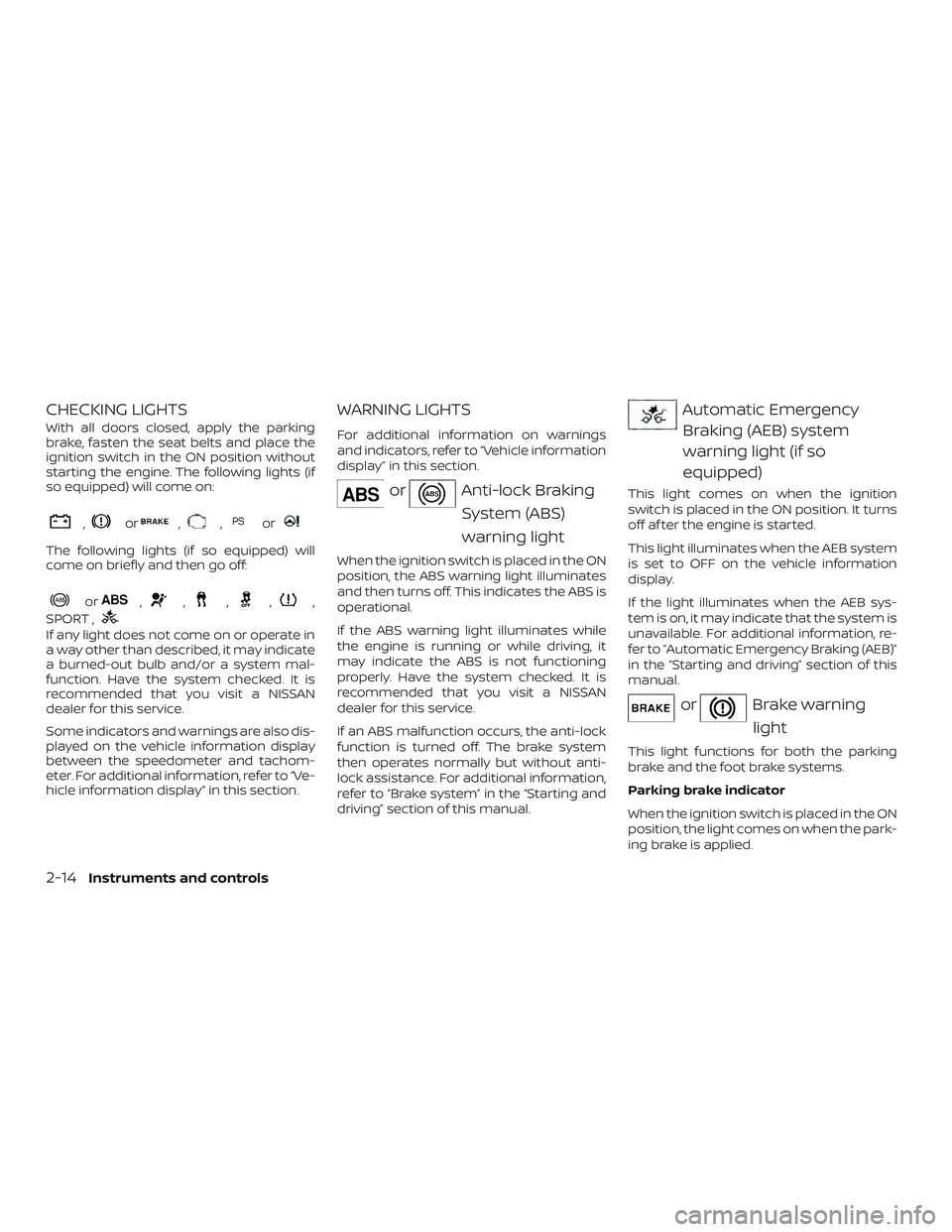
CHECKING LIGHTS
With all doors closed, apply the parking
brake, fasten the seat belts and place the
ignition switch in the ON position without
starting the engine. The following lights (if
so equipped) will come on:
,or,,or
The following lights (if so equipped) will
come on briefly and then go off:
or,,,,,
SPORT ,
If any light does not come on or operate in
a way other than described, it may indicate
a burned-out bulb and/or a system mal-
function. Have the system checked. It is
recommended that you visit a NISSAN
dealer for this service.
Some indicators and warnings are also dis-
played on the vehicle information display
between the speedometer and tachom-
eter. For additional information, refer to “Ve-
hicle information display” in this section.
WARNING LIGHTS
For additional information on warnings
and indicators, refer to “Vehicle information
display” in this section.
orAnti-lock Braking
System (ABS)
warning light
When the ignition switch is placed in the ON
position, the ABS warning light illuminates
and then turns off. This indicates the ABS is
operational.
If the ABS warning light illuminates while
the engine is running or while driving, it
may indicate the ABS is not functioning
properly. Have the system checked. It is
recommended that you visit a NISSAN
dealer for this service.
If an ABS malfunction occurs, the anti-lock
function is turned off. The brake system
then operates normally but without anti-
lock assistance. For additional information,
refer to “Brake system” in the “Starting and
driving” section of this manual.
Automatic EmergencyBraking (AEB) system
warning light (if so
equipped)
This light comes on when the ignition
switch is placed in the ON position. It turns
off af ter the engine is started.
This light illuminates when the AEB system
is set to OFF on the vehicle information
display.
If the light illuminates when the AEB sys-
tem is on, it may indicate that the system is
unavailable. For additional information, re-
fer to “Automatic Emergency Braking (AEB)”
in the “Starting and driving” section of this
manual.
orBrake warning
light
This light functions for both the parking
brake and the foot brake systems.
Parking brake indicator
When the ignition switch is placed in the ON
position, the light comes on when the park-
ing brake is applied.
2-14Instruments and controls