Page 195 of 372
button and af ter
the tone say, RedialŽ.
CONTROL BUTTONS
The control buttons for the Bluetooth®
Hands-Free Phone System are located on
the steering wheel.
PHONE/SEND
Press the
button to initi-
ate a Voice Recognition ses-
sion or answer an incoming
call.You can also use the
button to interrupt the sys-
tem feedback and give a
command at once. For addi-
tional information, refer to
commandsŽ and
ing a callŽ in this section.
PHONE/END
While the voice recognition
system is active, press and
hold the
button for
5 seconds to quit the voice
recognition system at any
time.
Tuning switch
While using the voice recogni-
tion system, tilt the tuning
switch up or down to manu-
ally control the phone system.
LHA2499
Page 199 of 372

button to accept the call.
Press the
button to reject the call.
DURING A CALL
While a call is active, press thebutton
to access additional options. Speak one of
the following commands:
� DigitsŽ … Speak numbers and then
say or say to change
the numbers entered.
� OnŽ or Off Ž … Speak the
command to mute or unmute the sys-
tem.� CallŽ … Speak this command to
transfer the call to the handset. To
transfer the call back from the handset
to the Bluetooth® Hands-Free Phone
System, press the
button and
confirm when prompted.
If supported by the phone, the Bluetooth®
Hands-Free Phone System allows for call
waiting functionality. If a call is received
while another call is already active, a mes-
sage will be displayed on the screen. Press
the
button to hold the active call and
switch to the second call. Press the
button to reject the second call.
While the second call is active, pressing
the
button will allow the same com-
mands that are available during any call
and additional commands:
� CallŽ … Speak this command to
hold the second call and switch back to
the original call.
� Other CallŽ … Speak this command
to stay with the second call and end the
original call.
Press the
button to accept the call.
Press the
button to reject the call.
ENDING A CALL
To end an active call, press thebut-
ton.
TEXT MESSAGING (if so equipped)
Page 201 of 372
button to exit
the text message screen. Press
the
button to access the following
options for replying to the text message:
� Call Back
Speak this command to call the sender
of the text message using the
Bluetooth® Hands-Free Phone System.
� Send Text
Speak this command to send a text
message response to the sender of the
text message.
� Read Text
Speak this command to read the text
message again.
� Previous Text
Speak this command to move to the
previous text message (if available).
� Next Text
Speak this command to move to the
next text message (if available).
NOTE:
Text messages are only displayed if the
vehicle speed is less than 5 mph
(8 km/h).
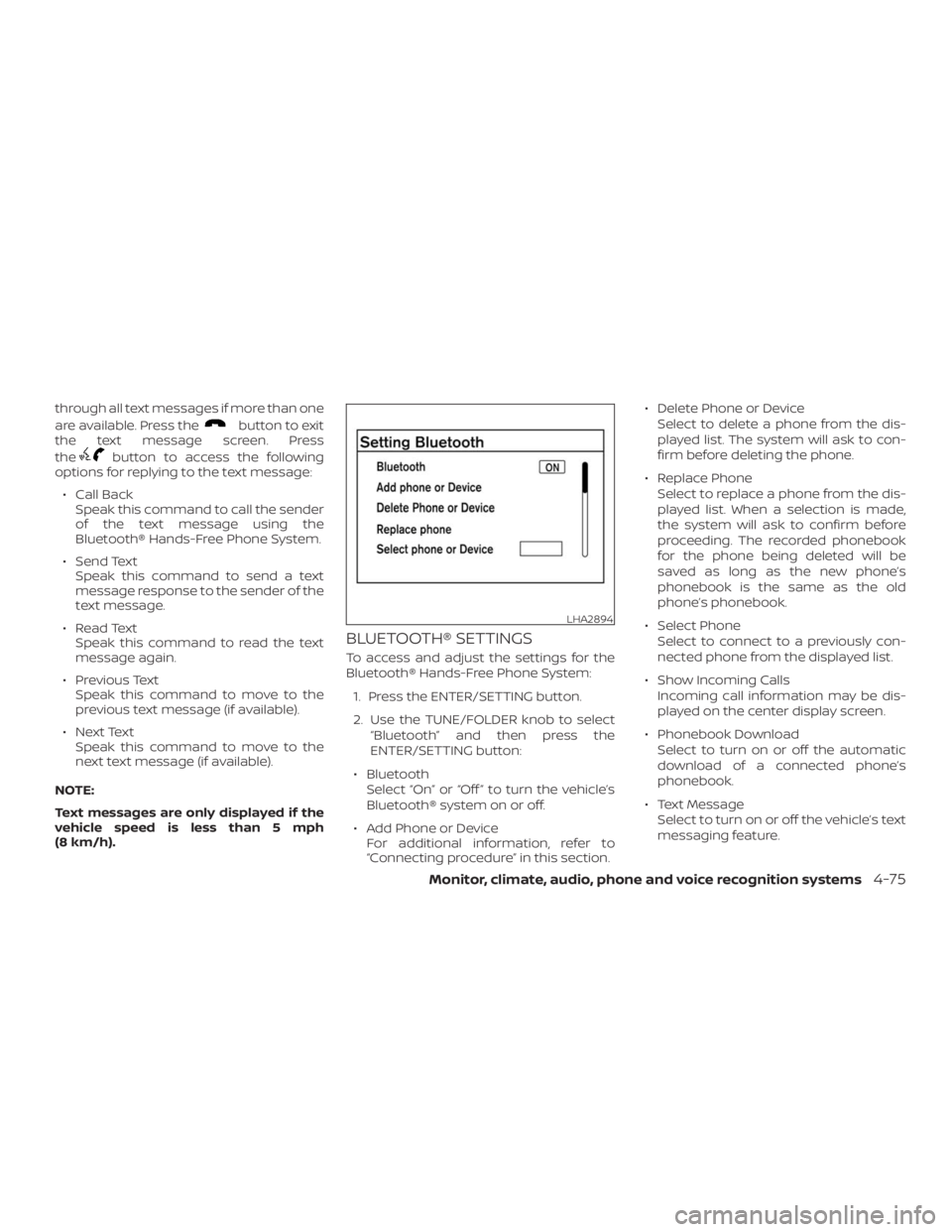
BLUETOOTH® SETTINGS
To access and adjust the settings for the
Bluetooth® Hands-Free Phone System:
1. Press the ENTER/SETTING button.
2. Use the TUNE/FOLDER knob to select
“Bluetooth” and then press the
ENTER/SETTING button:
∙ Bluetooth
Select “On” or “Off ” to turn the vehicle’s
Bluetooth® system on or off.
∙ Add Phone or Device
For additional information, refer to
“Connecting procedure” in this section.∙ Delete Phone or Device
Select to delete a phone from the dis-
played list. The system will ask to con-
firm before deleting the phone.
∙ Replace Phone
Select to replace a phone from the dis-
played list. When a selection is made,
the system will ask to confirm before
proceeding. The recorded phonebook
for the phone being deleted will be
saved as long as the new phone’s
phonebook is the same as the old
phone’s phonebook.
∙ Select Phone
Select to connect to a previously con-
nected phone from the displayed list.
∙ Show Incoming Calls
Incoming call information may be dis-
played on the center display screen.
∙ Phonebook Download
Select to turn on or off the automatic
download of a connected phone’s
phonebook.
∙ Text Message
Select to turn on or off the vehicle’s text
messaging feature.
LHA2894
Page 202 of 372
button. At that time,
pressing the PHONE/SEND
button
will start the Hands Free Phone System.
CAUTION
To avoid discharging the vehicle bat-
tery, use a phone af ter starting the
engine.
BLUETOOTH® HANDS-FREE PHONE
SYSTEM WITH NAVIGATION SYSTEM
(if so equipped)
4-76Monitor, climate, audio, phone and voice recognition systems
Page 205 of 372
button on the steering wheel. The system
voice will stop and a tone will be heard.
Af ter the tone, speak desired command
(displayed on the touch-screen).
One Shot Call
To use the system faster, you may speak
the second level commands with the main
menu command on the main menu. For
example, press the
button and af ter
the tone say, RedialŽ.
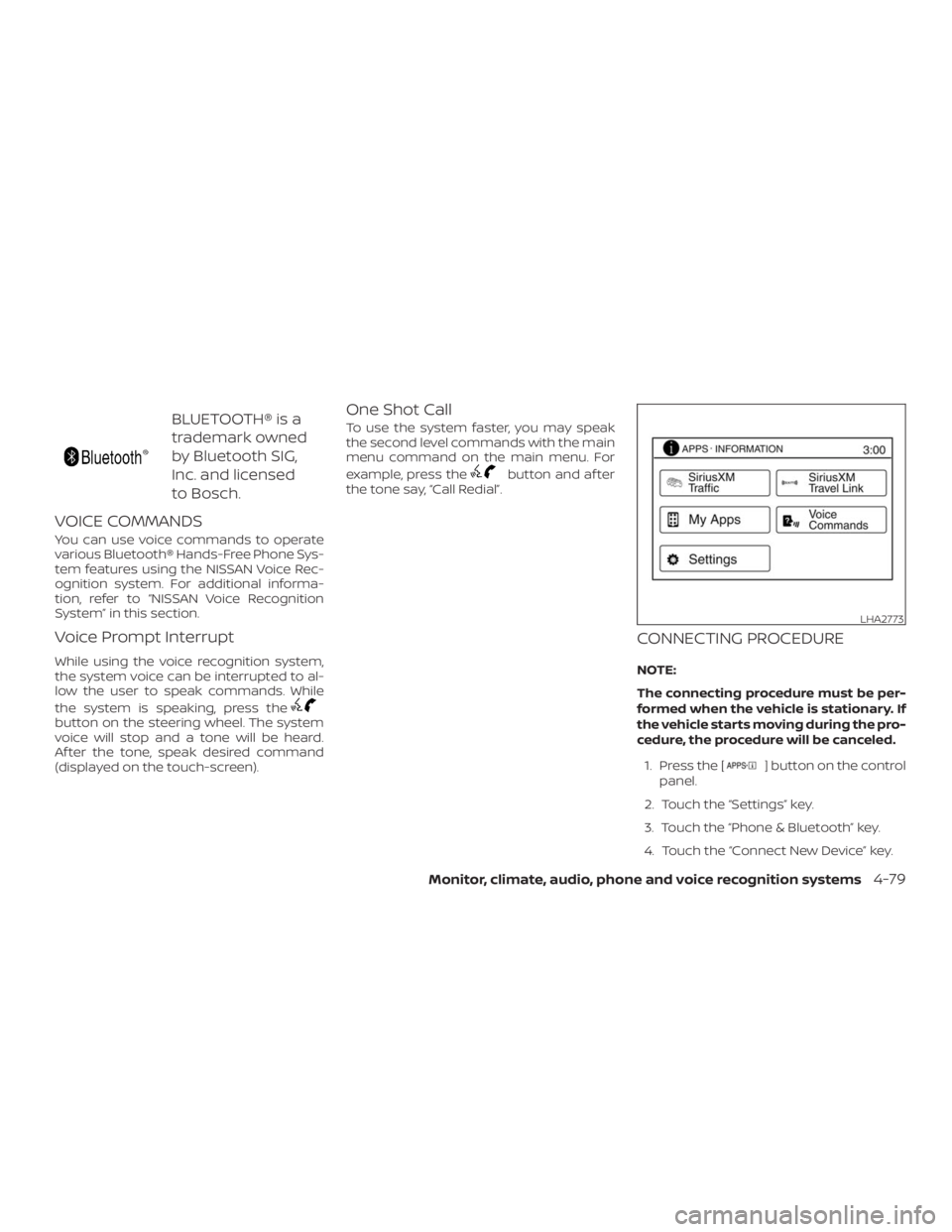
CONNECTING PROCEDURE
NOTE:
The connecting procedure must be per-
formed when the vehicle is stationary. If
the vehicle starts moving during the pro-
cedure, the procedure will be canceled.
1. Press the [
] button on the control
panel.
2. Touch the “Settings” key.
3. Touch the “Phone & Bluetooth” key.
4. Touch the “Connect New Device” key.
LHA2773
Page 208 of 372
button on the steering
wheel.
2. Say af ter the tone.
3. Say TextŽ af ter the tone.The text message, sender and delivery
time are shown on the screen. Use the tun-
ing switch to scroll through all text mes-
sages if more than one are available. Press
the
button to exit the text message
screen. Press the
button to access
the following options for replying to the text
message:
� Call Back
Speak this command to call the sender
of the text message using the
Bluetooth® Hands-Free Phone System.
� Send Text
Speak this command to send a text
message response to the sender of the
text message.� Read Text
Speak this command to read the text
message again.
� Previous Text
Speak this command to move to the
previous text message (if available).
� Next Text
Speak this command to move to the
next text message (if available).
NOTE:
Text messages are only displayed if the
vehicle speed is less than 5 mph
(8 km/h).
4-82Monitor, climate, audio, phone and voice recognition systems
Page 209 of 372
] button.
2. Touch the key.
3. Touch the & BluetoothŽ key.
LHA2844
Page 210 of 372
![NISSAN NV200 2019 Owners Manual ] button.
2. Touch the key.
3. Touch the & BluetoothŽ key.
4. Touch the SettingsŽ key and ad-
just the following settings as desired:
� Sort Phonebook By:
Touch NameŽ or NameŽ to
choose how p](/manual-img/5/56819/w960_56819-209.png "NISSAN NV200 2019 Owners Manual ] button.
2. Touch the key.
3. Touch the & BluetoothŽ key.
4. Touch the SettingsŽ key and ad-
just the following settings as desired:
� Sort Phonebook By:
Touch NameŽ or NameŽ to
choose how p")
] button.
2. Touch the key.
3. Touch the & BluetoothŽ key.
4. Touch the SettingsŽ key and ad-
just the following settings as desired:
� Sort Phonebook By:
Touch NameŽ or NameŽ to
choose how phonebook entries are al-
phabetically displayed on the screen.
� Use Phonebook From:
Touch to use the
phonebook. Touch cardŽ to use the
phonebook on the SIM card. Select
to use both sources.
� Download Phonebook Now:
Touch to download the phonebook to
the vehicle from the chosen source.
� Record Name for Phonebook Entry:
Touch to record a name for a phone-
book entry for use with the NISSAN
Voice Recognition System.� Phone Notifications for:
Notifications may be displayed on the
center display screen.
� Text Messaging:
Touch to toggle the text message func-
tionality on or off.
� Show Incoming Text for:
Text notifications may be displayed on
the center display screen. Touch Ž to
turn off all text notifications.
� Auto Reply:
Touch to toggle the auto reply function-
ality on or off.
� Auto Reply Message:
Touch to indicate preferred message to
be sent when ReplyŽ function is
activated.
� Use Signature:
Touch to toggle on or off the addition of
the vehicle signature to outgoing mes-
sages.
� Custom Text Messages:
Touch this option to select a custom
message to edit. There are 4 customer
message slots available.
TROUBLESHOOTING GUIDE
The system should respond correctly to all
voice commands without difficulty. If prob-
lems are encountered, try the following so-
lutions.
Where the solutions are listed by number,
try each solution in turn, starting with num-
ber 1, until the problem is resolved.
4-84Monitor, climate, audio, phone and voice recognition systems
![NISSAN NV200 2019 Owners Manual ] button.
2. Touch the key.
3. Touch the & BluetoothŽ key.
LHA2844](/manual-img/5/56819/w960_56819-208.png "NISSAN NV200 2019 Owners Manual ] button.
2. Touch the key.
3. Touch the & BluetoothŽ key.
LHA2844")