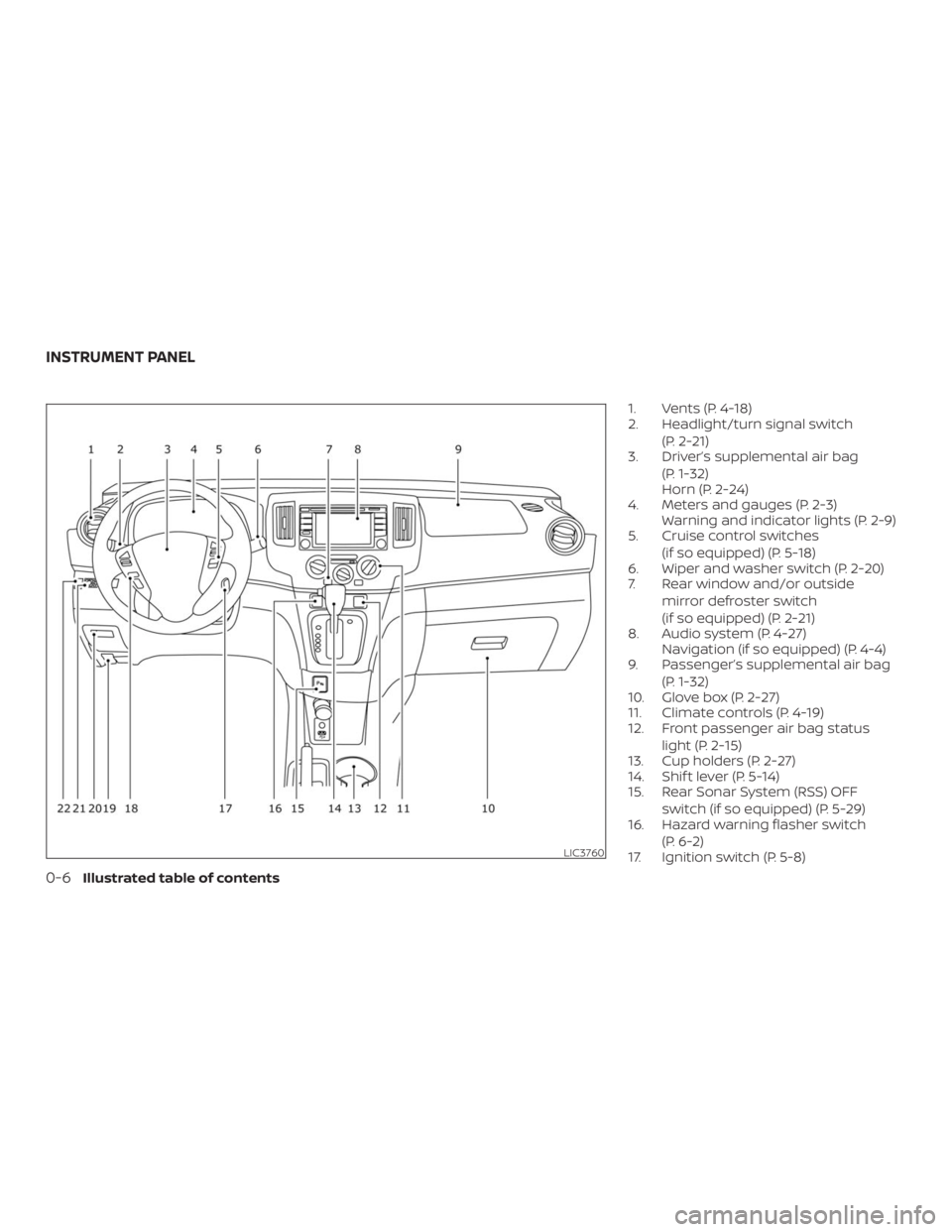
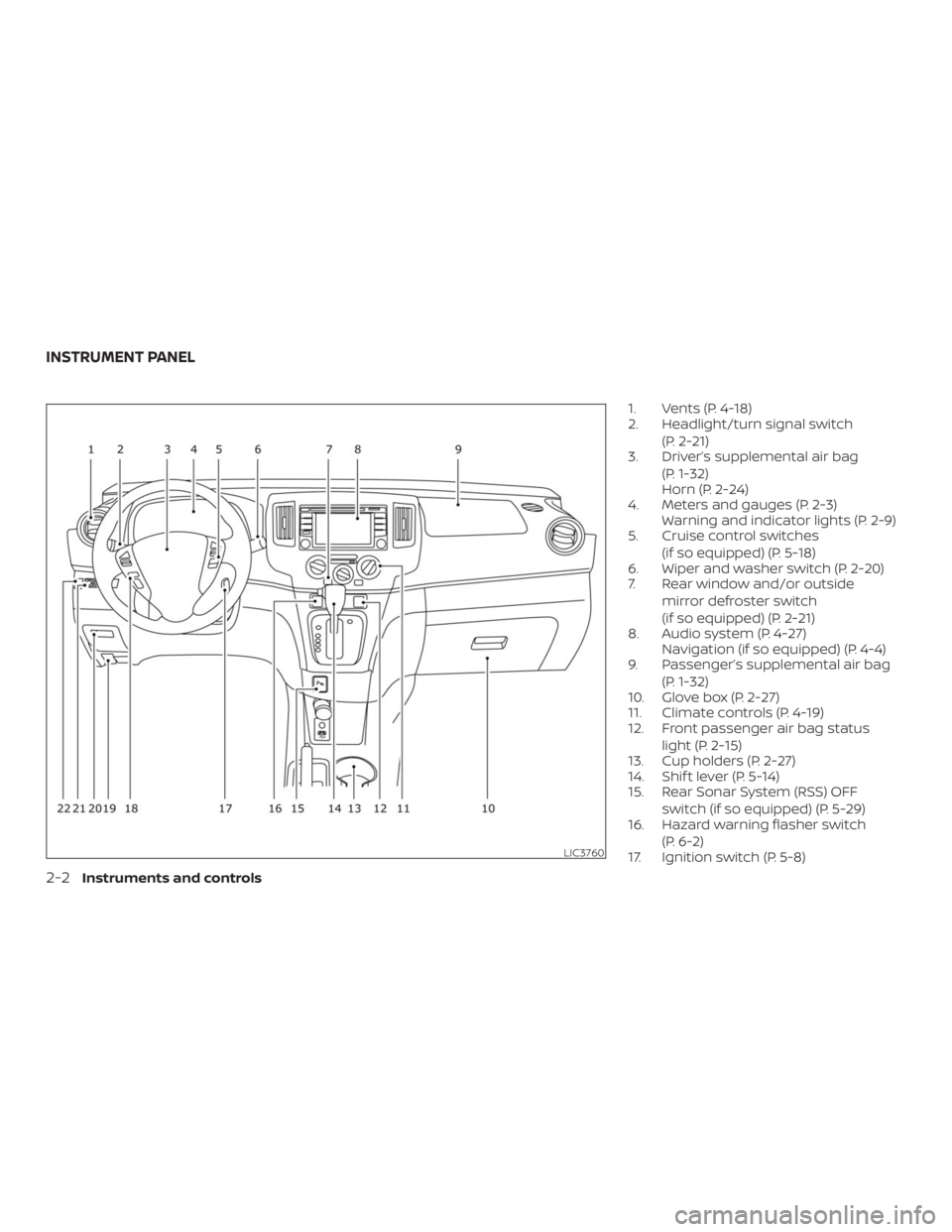
Page 16 of 372
Page 61 of 372
WARNING
The front passenger air bag is designed
to automatically turn OFF under some
conditions. Read this section carefully
to learn how it operates. Proper use of
the seat, seat belt and child restraints is
necessary for most effective protec-
tion. Failure to follow all instructions in
this manual concerning the use of
seats, seat belts and child restraints can
increase the risk or severity of injury in
an accident.Status light
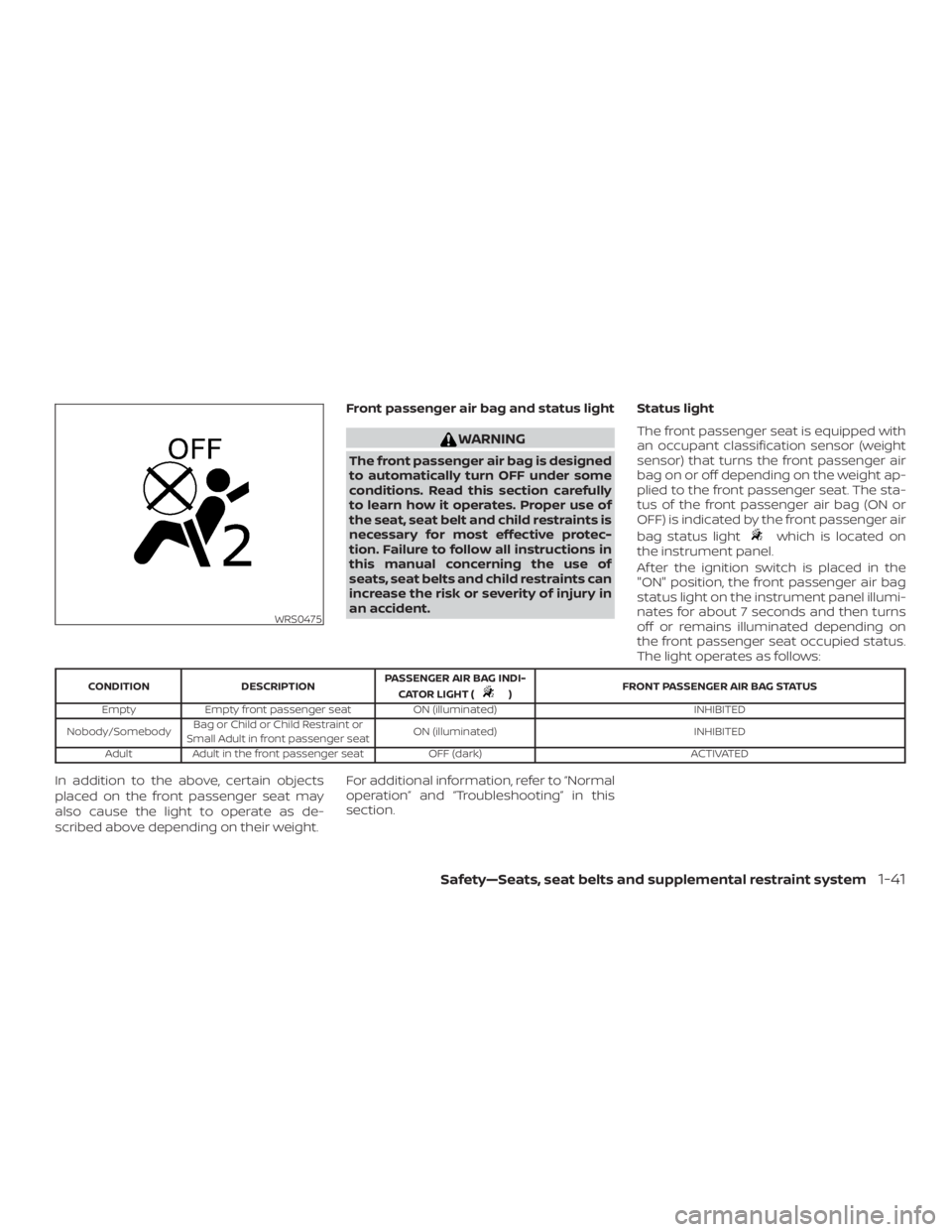
The front passenger seat is equipped with
an occupant classification sensor (weight
sensor) that turns the front passenger air
bag on or off depending on the weight ap-
plied to the front passenger seat. The sta-
tus of the front passenger air bag (ON or
OFF) is indicated by the front passenger air
bag status light
which is located on
the instrument panel.
Af ter the ignition switch is placed in the
"ON" position, the front passenger air bag
status light on the instrument panel illumi-
nates for about 7 seconds and then turns
off or remains illuminated depending on
the front passenger seat occupied status.
The light operates as follows:
)FRONT PASSENGER AIR BAG STATUS
Empty Empty front passenger seat ON (illuminated) INHIBITED
Nobody/SomebodyBag or Child or Child Restraint or
Small Adult in front passenger seatON (illuminated) INHIBITED
Adult Adult in the front passenger seat OFF (dark) ACTIVATED
In addition to the above, certain objects
placed on the front passenger seat may
also cause the light to operate as de-
scribed above depending on their weight.For additional information, refer to “Normal
operation” and “Troubleshooting” in this
section.
WRS0475
Page 63 of 372
, located in the me-
ter and gauges area of the instrument
panel, will be illuminated (blinking or
steadily lit). Have the system checked. It is
recommended that you visit a NISSAN
dealer for this service.
Normal operation
In order for the occupant classification
sensor system to classif y the front passen-
ger based on weight, please follow the pre-
cautions and steps outlined below:
Precautions
∙ Make sure that there are no objects
weighing over 9.1 lbs. (4 kg) hanging on
the seat or placed in the seatback
pocket.
∙ Make sure that an object is not pressing
against the rear of the seatback.
∙ Make sure that the front passenger
seat or seatback is not forced back
against an object on the seat or floor
behind it.
∙ Make sure that there is no object placed
under the front passenger seat.Steps
1. Adjust the seat as outlined in the “Seats”
section of this manual. Sit upright, lean-
ing against the seatback, and centered
on the seat cushion with your feet com-
fortably extended to the floor.
2. Make sure there are no objects on your
lap.
3. Fasten the seat belt as outlined in the
“Seat belts” section of this manual.
Front passenger seat belt buckle sta-
tus is monitored by the occupant clas-
sification system, and is used as an in-
put to determine occupancy status. So,
it is highly recommended that the front
passenger fasten their seat belt.
4. Remain in this position for 30 seconds
allowing the system to classif y the
front passenger before the vehicle is
put into motion.
5. Ensure proper classification by check-
ing the front passenger air bag status
light.
Safety—Seats, seat belts and supplemental restraint system1-43
Page 65 of 372

WARNING
� Do not place any objects on the steer-
ing wheel pad or on the instrument
panel. Also, do not place any objects
between any occupant and the steer-
ing wheel or instrument panel. Such
objects may become dangerous pro-
jectiles and cause injury if the front air
bags inflate.
� Immediately af ter inflation, several
front air bag system components will
be hot. Do not touch them; you may
severely burn yourself.
� No unauthorized changes should be
made to any components or wiring of
the supplemental air bag system. This
is to prevent accidental inflation of
the supplemental air bag or damage
to the supplemental air bag system.
� Do not make unauthorized changes
to your electrical system,
suspension system or front end struc-
ture. This could affect proper opera-
tion of the front air bag system.� Tampering with the front air bag sys-
tem may result in serious personal in-
jury. Tampering includes changes to
the steering wheel and the instru-
ment panel assembly by placing ma-
terial over the steering wheel pad and
above the instrument panel or by in-
stalling additional trim material
around the air bag system.
� Removing or modif ying the front pas-
senger seat may affect the function of
the air bag system and result in seri-
ous personal injury.
� Modif ying or tampering with the front
passenger seat may result in serious
personal injury. For example, do not
change the front seats by placing ma-
terial on the seat cushion or by install-
ing additional trim material, such as
seat covers, on the seat that are not
specifically designed to assure proper
air bag operation. Additionally, do not
stow any objects under the front pas-
senger seat or the seat cushion and
seatback. Such objects may interfere
with the proper operation of the occu-
pant classification sensor (weight
sensor).
Safety„Seats, seat belts and supplemental restraint system1-45
Page 70 of 372
in the instrument panel,
monitors the circuits for the air bag sys-
tems, pretensioner(s) and all related wiring.
When the ignition switch is placed in the ON
position, the supplemental air bag warning
light illuminates for about 7 seconds and
then turns off. This means the system is
operational.If any of the following conditions occur, the
front air bag, side air bag, curtain air bag
and pretensioner systems need servicing:
� The supplemental air bag warning light
remains on af ter approximately 7 sec-
onds.
� The supplemental air bag warning light
flashes intermittently.
� The supplemental air bag warning light
does not come on at all.
Under these conditions, the front air bag,
side air bag, curtain air bag or pretensioner
systems may not operate properly. They
must be checked and repaired. It is recom-
mended that you visit a NISSAN dealer for
this service.
LRS0100
1-50Safety—Seats, seat belts and supplemental restraint system
Page 74 of 372
Page 79 of 372
indicates that the fuel-filler door
is located on the side of the
vehicle.
check engine light may come on. Re-
fuel as soon as possible. Af ter a few
driving trips, the
light should
turn off. If the light remains on af ter a
few driving trips, have the system
checked. It is recommended that you
visit a NISSAN dealer for this service.
� For additional information, refer to
Indicator Light (MIL)Ž in
this section.
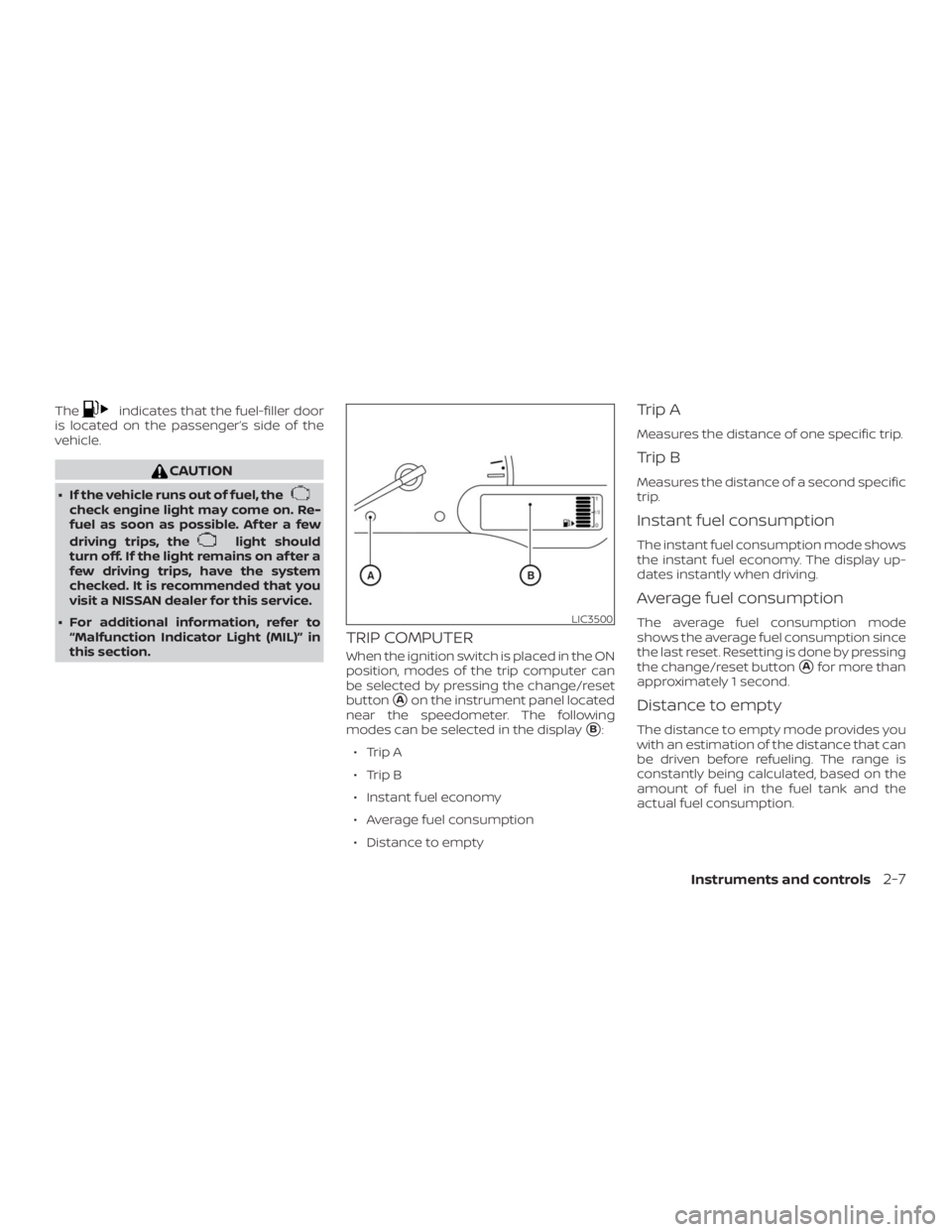
TRIP COMPUTER
When the ignition switch is placed in the ON
position, modes of the trip computer can
be selected by pressing the change/reset
button
�Aon the instrument panel located
near the speedometer. The following
modes can be selected in the display
�B:
∙ Trip A
∙ Trip B
∙ Instant fuel economy
∙ Average fuel consumption
∙ Distance to empty
Trip A
Measures the distance of one specific trip.
Trip B
Measures the distance of a second specific
trip.
Instant fuel consumption
The instant fuel consumption mode shows
the instant fuel economy. The display up-
dates instantly when driving.
Average fuel consumption
The average fuel consumption mode
shows the average fuel consumption since
the last reset. Resetting is done by pressing
the change/reset button
�Afor more than
approximately 1 second.
Distance to empty
The distance to empty mode provides you
with an estimation of the distance that can
be driven before refueling. The range is
constantly being calculated, based on the
amount of fuel in the fuel tank and the
actual fuel consumption.
LIC3500
Page 93 of 372
position,
and the front parking, tail, license plate,
and instrument panel lights will come
on.
�2Rotate the switch to theposition,
and the headlights will come on and all
the other lights remain on.
LIC0388LIC3237
REAR WINDOW AND/OR OUTSIDE
MIRROR DEFROSTER SWITCH (if so
equipped)HEADLIGHT AND TURN SIGNAL
SWITCH
Instruments and controls2-21