2019 NISSAN MURANO change wheel
[x] Cancel search: change wheelPage 281 of 507
Using “Settings” in the vehicle informa-
tion display:1. Af ter starting the engine, press the
button until “Settings” dis-
plays in the vehicle information display
and then press the OK button. Use
the
button to select “Driver Assis-
tance.” Then press the OK button.
2. Select “Lane” and press the OK button.
3. Select “Lane Departure Prevention” and press the OK button to turn the system
on or off.
Using the “Driving Aids” screen in the ve-
hicle information display:
1. Use the
buttons on the steering
wheel to scroll to the Driving Aids
screen.
2. Press the OK button to access the Driver Assistance menu.
3. Select “Lane” and press the OK button until “Lane Prevent” is displayed.
4. Press the
buttons to return to
the Driving Aids screen.
I-LI SYSTEM LIMITATIONS
WARNING
Listed below are the system limitations
for the I-LI system. Failure to follow the
warnings and instructions for proper
use of the I-LI system could result in
serious injury or death.
∙ The I-LI system may activate if you change lanes without first activating
your turn signal or, for example, if a
construction zone directs traffic to
cross an existing lane marker. If this
occurs you may need to apply correc-
tive steering to complete your lane
change.
∙ Because the I-LI may not activate un- der the road, weather, and lane
marker conditions described in this
section, it may not activate every time
your vehicle begins to leave its lane
and you will need to apply corrective
steering.
∙ When the I-LI system is operating, avoid excessive or sudden steering
maneuvers. Otherwise, you could lose
control of the vehicle. ∙ The I-LI system will not operate at
speeds below approximately 37 mph
(60 km/h) or if it cannot detect lane
markers.
∙ Do not use the I-LI system under the following conditions as it may not
function properly:
– During bad weather (rain, fog, snow, etc.).
– When driving on slippery roads, such as on ice or snow.
– When driving on winding or un- even roads.
– When there is a lane closure due to road repairs.
– When driving in a makeshif t or temporary lane.
– When driving on roads where the lane width is too narrow.
– When driving without normal tire conditions (for example, tire wear,
low tire pressure, installation of
spare tire, tire chains, non-
standard wheels).
Starting and driving5-35
Page 282 of 507
– When the vehicle is equipped withnonoriginal brake parts or suspen-
sion parts.
– When you are towing a trailer or other vehicle.
– On roads where there are multiple parallel lane markers; lane mark-
ers that are faded or not painted
clearly; yellow painted lane mark-
ers; non-standard lane markers; or
lane markers covered with water,
dirt, snow, etc.
– On roads where discontinued lane markers are still detectable.
– On roads where there are sharp curves.
– On roads where there are sharply contrasting objects, such as shad-
ows, snow, water, wheel ruts,
seams or lines remaining af ter
road repairs. (The I-LI system could
detect these items as lane
markers.)
– On roads where the traveling lane merges or separates. – When the vehicle’s traveling direc-
tion does not align with the lane
marker.
– When traveling close to the vehicle in front of you, which obstructs the
lane camera unit detection range.
– When rain, snow or dirt adheres to the windshield in front of the lane
camera unit.
– When the headlights are not bright due to dirt on the lens or if the aim-
ing is not adjusted properly.
– When strong light enters the lane camera unit. (For example, the light
directly shines on the front of the
vehicle at sunrise or sunset.)
– When a sudden change in bright- ness occurs. (For example, when
the vehicle enters or exits a tunnel
or under a bridge.)
While the I-LI system is operating, you may
hear a sound of brake operation. This is
normal and indicates that the I-LI system is
operating properly.SYSTEM TEMPORARILY
UNAVAILABLE
Condition A:
The warning and assist functions of the I-LI
system are not designed to work under the
following conditions: ∙ When you operate the lane change sig- nal and change the traveling lanes in
the direction of the signal. (The I-LI sys-
tem will be deactivated for approxi-
mately 2 seconds af ter the lane change
signal is turned off.)
∙ When the vehicle speed lowers to less than approximately 37 mph (60 km/h).
Af ter the above conditions have finished
and the necessary operating conditions
are satisfied, the warning and assist func-
tions will resume.
Condition B:
The assist function of the I-LI system is not
designed to work under the following con-
ditions (warning is still functional): ∙ When the brake pedal is depressed.
∙ When the steering wheel is turned as far as necessary for the vehicle to change
lanes.
5-36Starting and driving
Page 287 of 507
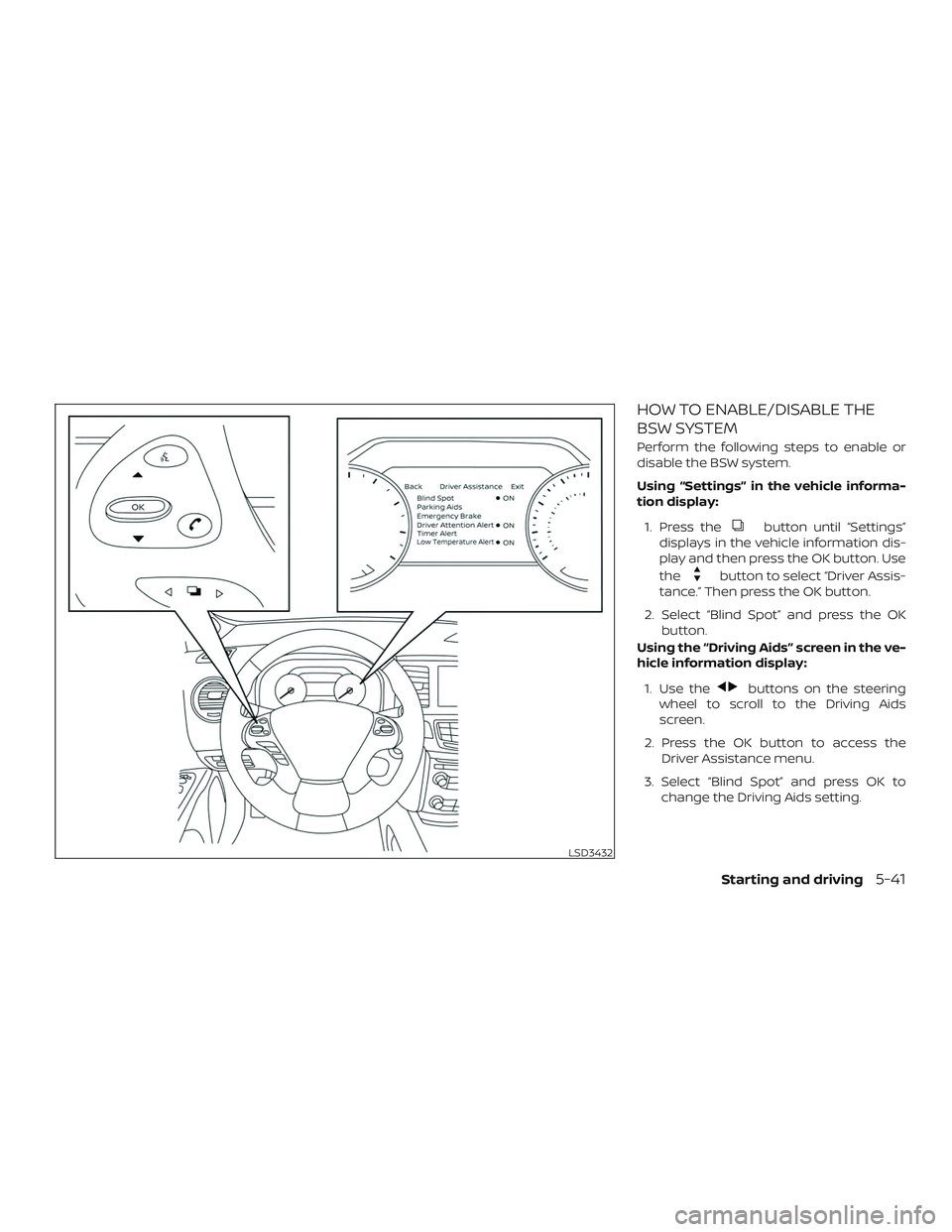
HOW TO ENABLE/DISABLE THE
BSW SYSTEM
Perform the following steps to enable or
disable the BSW system.
Using “Settings” in the vehicle informa-
tion display:1. Press the
button until “Settings”
displays in the vehicle information dis-
play and then press the OK button. Use
the
button to select “Driver Assis-
tance.” Then press the OK button.
2. Select “Blind Spot” and press the OK button.
Using the “Driving Aids” screen in the ve-
hicle information display:
1. Use the
buttons on the steering
wheel to scroll to the Driving Aids
screen.
2. Press the OK button to access the Driver Assistance menu.
3. Select “Blind Spot” and press OK to change the Driving Aids setting.
LSD3432
Starting and driving5-41
Page 298 of 507
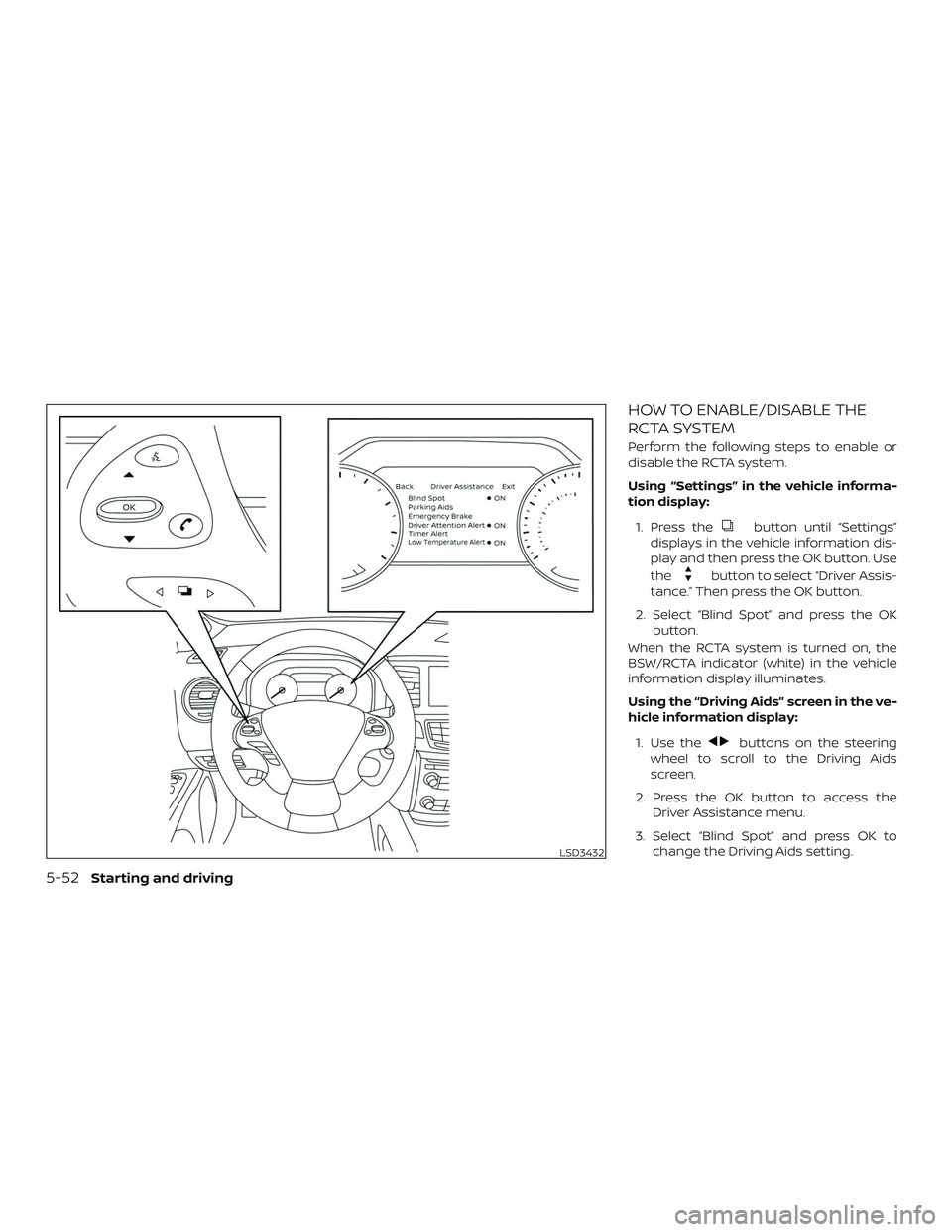
HOW TO ENABLE/DISABLE THE
RCTA SYSTEM
Perform the following steps to enable or
disable the RCTA system.
Using “Settings” in the vehicle informa-
tion display:1. Press the
button until “Settings”
displays in the vehicle information dis-
play and then press the OK button. Use
the
button to select “Driver Assis-
tance.” Then press the OK button.
2. Select “Blind Spot” and press the OK button.
When the RCTA system is turned on, the
BSW/RCTA indicator (white) in the vehicle
information display illuminates.
Using the “Driving Aids” screen in the ve-
hicle information display:
1. Use the
buttons on the steering
wheel to scroll to the Driving Aids
screen.
2. Press the OK button to access the Driver Assistance menu.
3. Select “Blind Spot” and press OK to change the Driving Aids setting.
LSD3432
5-52Starting and driving
Page 312 of 507
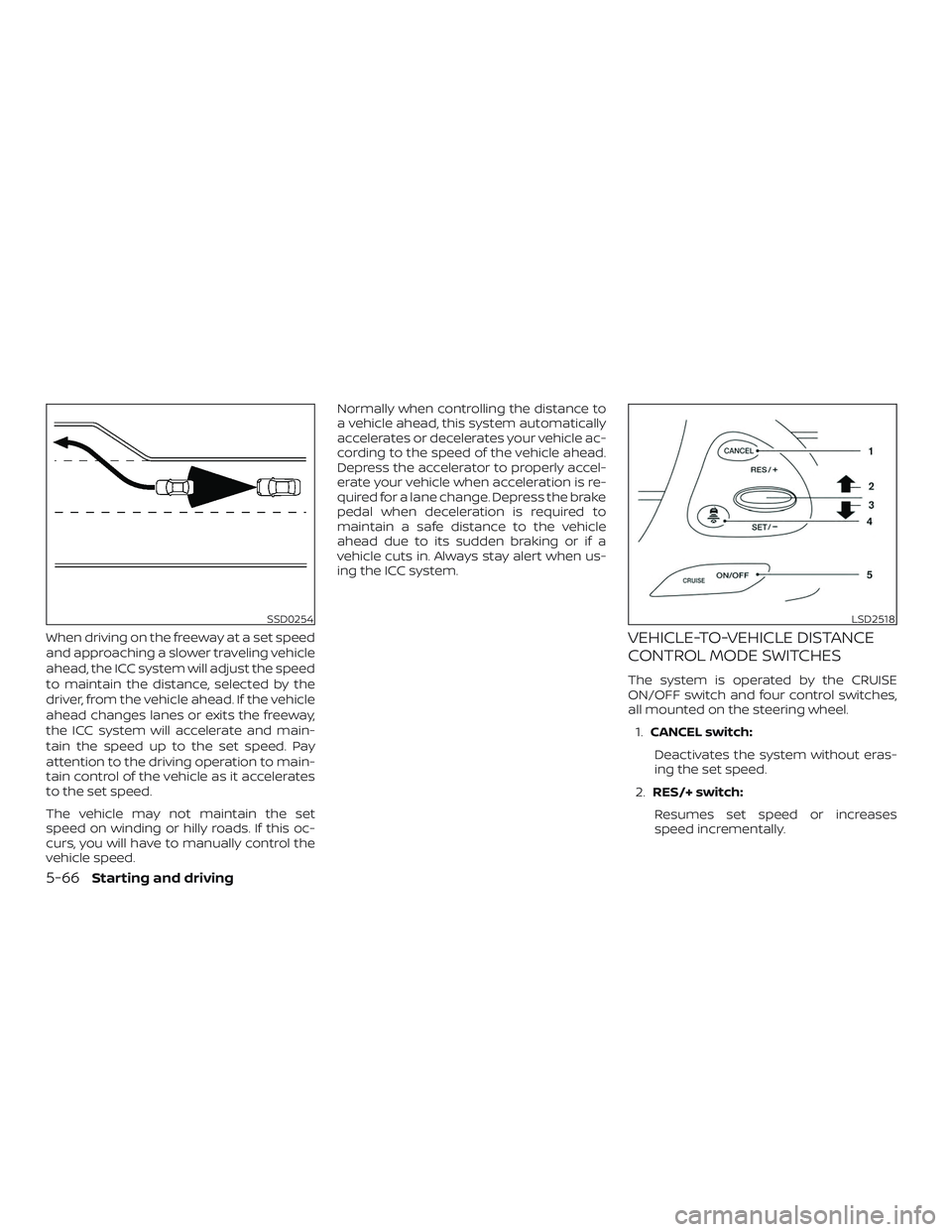
When driving on the freeway at a set speed
and approaching a slower traveling vehicle
ahead, the ICC system will adjust the speed
to maintain the distance, selected by the
driver, from the vehicle ahead. If the vehicle
ahead changes lanes or exits the freeway,
the ICC system will accelerate and main-
tain the speed up to the set speed. Pay
attention to the driving operation to main-
tain control of the vehicle as it accelerates
to the set speed.
The vehicle may not maintain the set
speed on winding or hilly roads. If this oc-
curs, you will have to manually control the
vehicle speed.Normally when controlling the distance to
a vehicle ahead, this system automatically
accelerates or decelerates your vehicle ac-
cording to the speed of the vehicle ahead.
Depress the accelerator to properly accel-
erate your vehicle when acceleration is re-
quired for a lane change. Depress the brake
pedal when deceleration is required to
maintain a safe distance to the vehicle
ahead due to its sudden braking or if a
vehicle cuts in. Always stay alert when us-
ing the ICC system.VEHICLE-TO-VEHICLE DISTANCE
CONTROL MODE SWITCHES
The system is operated by the CRUISE
ON/OFF switch and four control switches,
all mounted on the steering wheel.
1. CANCEL switch:
Deactivates the system without eras-
ing the set speed.
2. RES/+ switch:
Resumes set speed or increases
speed incrementally.
SSD0254LSD2518
5-66Starting and driving
Page 330 of 507
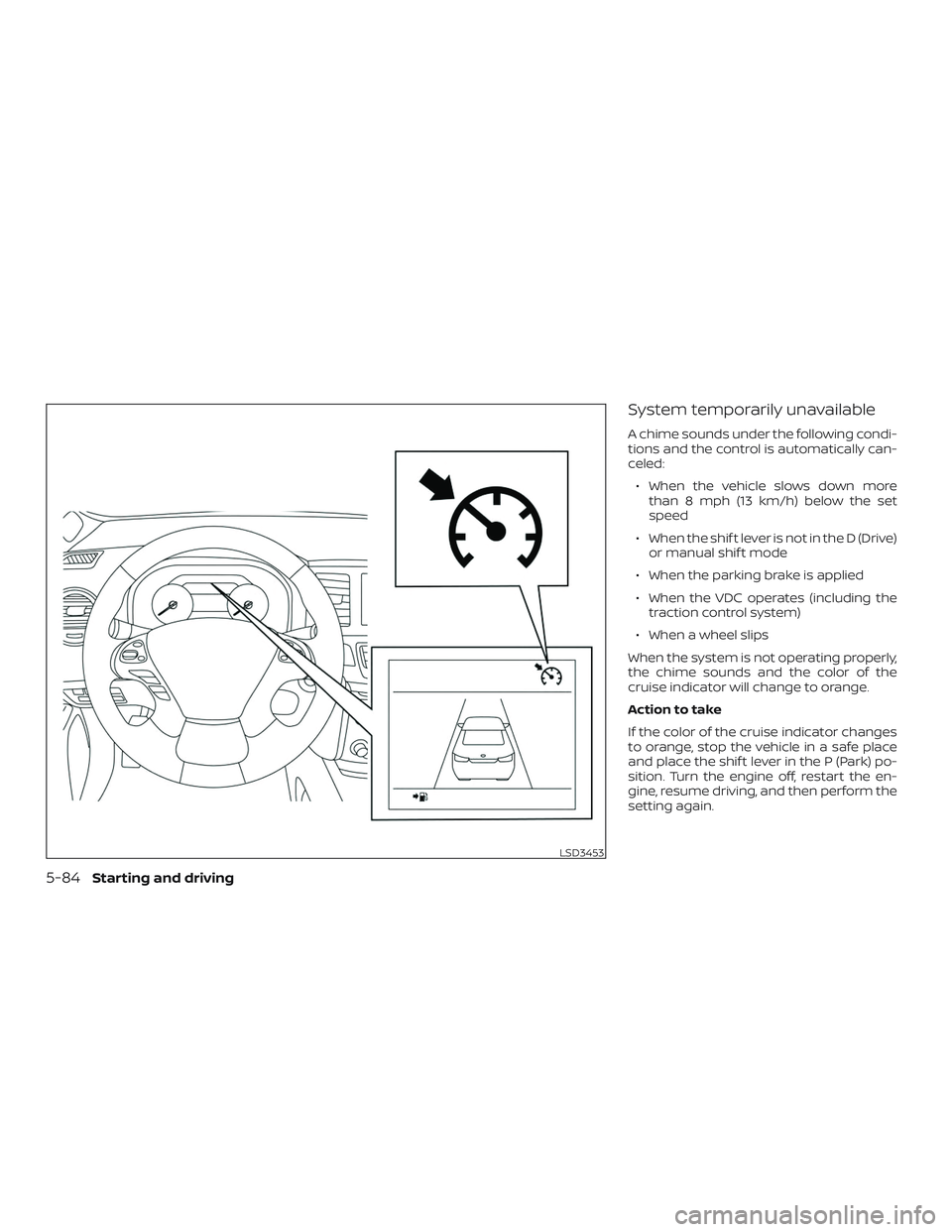
System temporarily unavailable
A chime sounds under the following condi-
tions and the control is automatically can-
celed:∙ When the vehicle slows down more than 8 mph (13 km/h) below the set
speed
∙ When the shif t lever is not in the D (Drive) or manual shif t mode
∙ When the parking brake is applied
∙ When the VDC operates (including the traction control system)
∙ When a wheel slips
When the system is not operating properly,
the chime sounds and the color of the
cruise indicator will change to orange.
Action to take
If the color of the cruise indicator changes
to orange, stop the vehicle in a safe place
and place the shif t lever in the P (Park) po-
sition. Turn the engine off, restart the en-
gine, resume driving, and then perform the
setting again.
LSD3453
5-84Starting and driving
Page 335 of 507
∙ The RAB system may not operate inthe following conditions:
– There is rain, snow, ice, dirt, etc., at- tached to the sonar sensors.
– A loud sound is heard in the area around the vehicle.
– The surface of the obstacle is di- agonal to the rear of the vehicle.
∙ The RAB system may unintentionally operate in the following conditions:
– There is overgrown grass in the area around the vehicle.
– There is a structure (e.g., a wall, toll gate equipment, a narrow tunnel, a
parking lot gate) near the side of
the vehicle.
– There are bumps, protrusions, or manhole covers on the road
surface.
– The vehicle drives through a draped flag or a curtain.
– There is an accumulation of snow or ice behind the vehicle. – An ultrasonic wave source, such as
another vehicle’s sonar, is near the
vehicle.
∙ Once the automatic brake control op- erates, it does not operate again if the
vehicle approaches the same
obstacle.
∙ The automatic brake control can only operate for a short period of time.
Therefore, the driver must depress
the brake pedal.
∙ In the following situations, the RAB system may not operate properly or
may not function sufficiently:
– The vehicle is driven in bad weather (rain, fog, snow, etc.).
– The vehicle is driven on a steep hill.
– The vehicle’s posture is changed (e.g., when driving over a bump).
– The vehicle is driven on a slippery road.
– The vehicle is turned sharply by turning the steering wheel fully.
– Snow chains are used. – Wheels or tires other than NISSAN
recommended are used.
– The brakes are cold at low ambient temperatures or immediately af ter
driving has started.
– The braking force becomes poor due to wet brakes af ter driving
through a puddle or washing the
vehicle.
∙ Turn the RAB system off in the follow- ing conditions to prevent the occur-
rence of an unexpected accident re-
sulting from sudden system
operation:
– The vehicle is towed.
– The vehicle is carried on a flatbed truck.
– The vehicle is on the chassis dynamometer.
– The vehicle drives on an uneven road surface.
Starting and driving5-89
Page 372 of 507
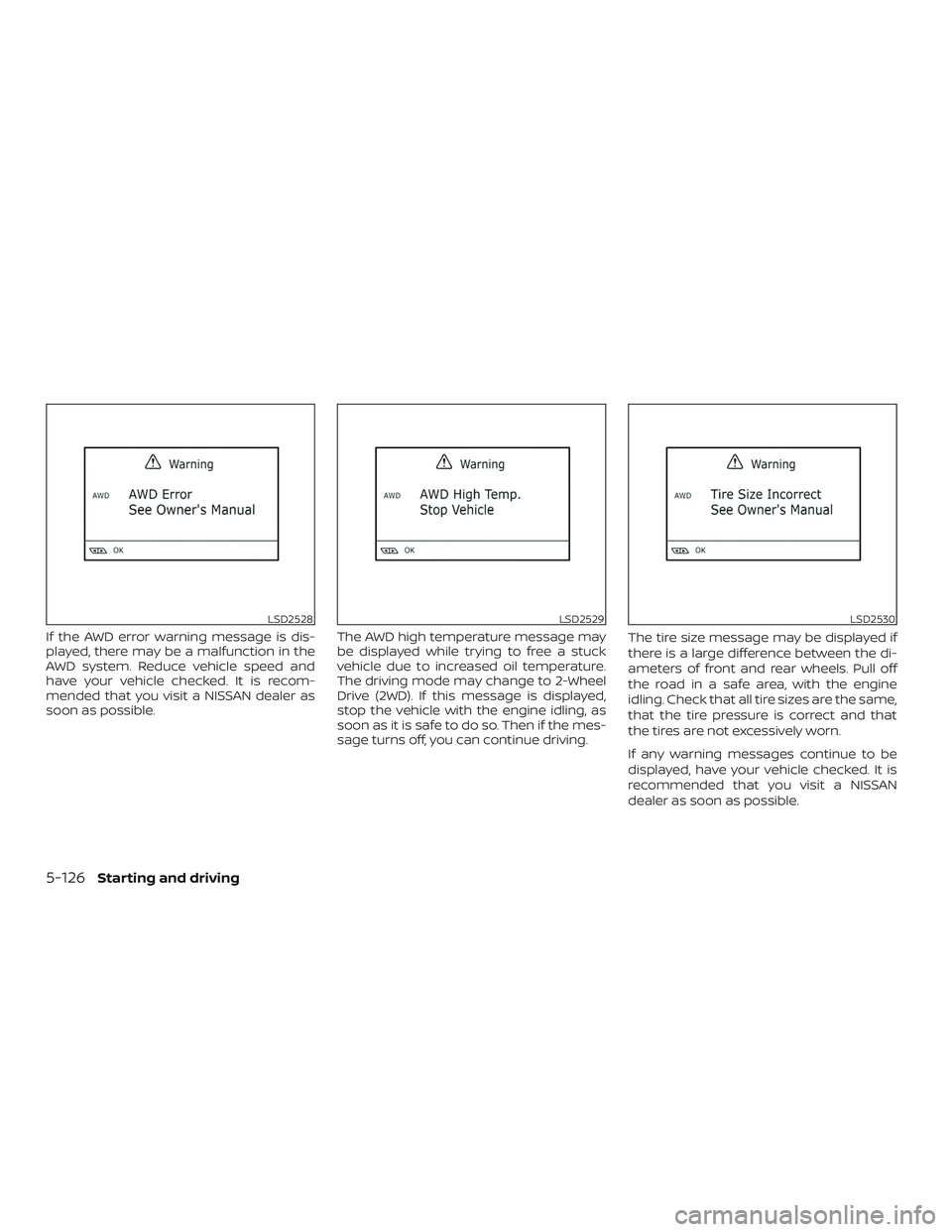
If the AWD error warning message is dis-
played, there may be a malfunction in the
AWD system. Reduce vehicle speed and
have your vehicle checked. It is recom-
mended that you visit a NISSAN dealer as
soon as possible.The AWD high temperature message may
be displayed while trying to free a stuck
vehicle due to increased oil temperature.
The driving mode may change to 2-Wheel
Drive (2WD). If this message is displayed,
stop the vehicle with the engine idling, as
soon as it is safe to do so. Then if the mes-
sage turns off, you can continue driving.The tire size message may be displayed if
there is a large difference between the di-
ameters of front and rear wheels. Pull off
the road in a safe area, with the engine
idling. Check that all tire sizes are the same,
that the tire pressure is correct and that
the tires are not excessively worn.
If any warning messages continue to be
displayed, have your vehicle checked. It is
recommended that you visit a NISSAN
dealer as soon as possible.
LSD2528LSD2529LSD2530
5-126Starting and driving