2019 NISSAN LEAF stop start
[x] Cancel search: stop startPage 432 of 610

Action to take
When the conditions listed above are no
longer present, turn the system off using
the ICC switch. Turn the ICC system back on
to use the system.
Condition B
• When the radar sensor area of the frontbumper is covered with dirt or is ob-
structed, the ICC system will automatically
be canceled.
The chime will sound and the “Not Avail-
able: Front Radar Blocked” warning mes-
sage will appear in the vehicle information
display. Action to take
If the warning message appears, stop the
vehicle in a safe place, place the shif t lever
in the P (Park) position, and turn the EV
system off. When the radar signal is tempo-
rarily interrupted, clean the sensor area of
the front bumper and restart the EV sys-
tem. If the “Not Available: Front Radar
Blocked” warning message continues to
be displayed, have the system checked. It is
recommended that you visit a NISSAN cer-
tified LEAF dealer for this service.• When driving on roads with limited road
structures or bridges (for example, long
bridges, deserts, snowfields, driving next
to long walls), the system may illuminate
the system warning light (orange) and
display the “Not Available: Front Radar
Blocked” message.
Action to take
When the above driving conditions no lon-
ger exist, turn the system back on.
Condition C
When the ICC system is not operating
properly, a chime sounds and the ICC sys-
tem warning light (orange) will come on.
Starting and driving5-73
Page 439 of 610
• When the shif t lever is not in the D (Drive)or B mode
• When the parking brake is applied
• When the VDC operates (including the traction control system)
• When a wheel slips
When the system is not operating properly,
the chime sounds and the color of the
cruise indicator will change to orange.
Action to take
If the color of the cruise indicator changes
to orange, stop the vehicle in a safe place
and place the shif t lever in the P (Park) po-
sition. Turn the EV system off, restart the EV
system, resume driving, and then perform
the setting again.
If it is not possible to set or the indicator
stays on, it may indicate that the system
is malfunctioning. Although the vehicle
is still drivable under normal conditions,
have the vehicle checked. It is recom-
mended that you visit a NISSAN certified
LEAF dealer for this service.
WARNING
Failure to follow the warnings and in-
structions for proper use of the Pro-
PILOT Assist system could result in
serious injury or death.
• ProPILOT Assist is not a self-driving system. Within the limits of its capa-
bilities, as described in this manual,
it helps the driver with certain driv-
ing activities.
• The ProPILOT Assist system is not a replacement for proper driving pro-
cedures and is not designed to cor-
rect careless, inattentive or absent-
minded driving. ProPILOT Assist will
not always steer the vehicle to keep
it in the lane. The ProPILOT Assist
system is not designed to prevent
loss of control. It is the driver’s re-
sponsibility to stay alert, drive
safely, keep the vehicle in the travel-
ing lane, and be in control of the
vehicle at all times. • There are limitations to the ProPILOT
Assist system capability. The Pro-
PILOT Assist system does not func-
tion in all driving, traffic, weather,
and road conditions. It is the driver’s
responsibility to stay alert, drive
safely, keep the vehicle in the travel-
ing lane, and be in control of the
vehicle at all times.
• The ProPILOT Assist system is only an aid to assist the driver and is not a
collision warning or avoidance de-
vice.
• The ProPILOT Assist system is for highway use only and is not in-
tended for city driving. Failure to ap-
ply the brake or steer the vehicle
when necessary may result in a seri-
ous accident.
• Always observe posted speed limits and do not set the speed over them.
• Never take your hands off the steer- ing wheel when driving. Always keep
your hands on the steering wheel
and drive your vehicle safely.
• Never unfasten your safety belt when using ProPILOT Assist. Doing
so automatically cancels the Pro-
PILOT Assist system.
PROPILOT ASSIST (IF SO EQUIPPED)
5-80Starting and driving
Page 442 of 610
NOTE:
Steering Assist is not available in the
conventional (fixed speed) cruise con-
trol mode.
•Vehicle-to-vehicle distance control
mode: The ICC system maintains a se-
lected distance from the vehicle in front
of you within the speed range of 0 to
90 mph (0 to 144 km/h) up to the set
speed. The set speed can be selected
by the driver between 20 to 90 mph
(32 to 144 km/h). When the vehicle
ahead slows to a stop, your vehicle
gradually decelerates to a standstill.
When the vehicle is stopped, the ICC
system maintains braking force to keep
your vehicle stopped.
NOTE:
When your vehicle is stopped for less
than 3 seconds and the vehicle ahead
begins to move, your vehicle will start
moving again automatically.
– When your vehicle is at a standstill for more than 3 seconds and the vehicle
ahead begins to accelerate, push the
RES+ switch or lightly depress the
accelerator pedal. The ICC system
starts to follow the vehicle ahead.
– When no vehicle is detected ahead within the driver selected distance,
the vehicle travels at the speed set
by the driver. The speed must be
above 20 mph (32 km/h) to use this
function.
NOTE:
Even if the Automatic Emergency
Braking (AEB) setting is turned off by
the driver using the “Settings” menu in
the vehicle information display, AEB
will be automatically turned on when
ICC is used.
2. Steering Assist
The Steering Assist function controls
the steering system to help keep your
vehicle within the traveling lane.
When there is no vehicle ahead, Steering
Assist is not available at speeds under
37 mph (60 km/h).
Starting and driving5-83
Page 450 of 610
2. Use thebutton (1) to select “Driver
Assistance.” Then press the OK button
(1).
3. Select “Steering Assist” and press the OK button (1).
NOTE:
•When the Cruise screen is displayed on
the vehicle information display, press
the OK button on the steering wheel to
call up the “Driver Assistance” setting
display.
• When enabling/disabling the system
through the vehicle information display
or when pressing the Steering Assist
switch, the system retains the current
settings even if the EV system is re-
started.
How to cancel the ProPILOT Assist
system
To cancel the ProPILOT Assist system, use
one of the following methods:
• Push the CANCEL switch.
• Tap the brake pedal (except at a standstill). • Push the ProPILOT Assist switch to turn
the system off. The ProPILOT Assist status
indicator will go out.
When the ProPILOT Assist system is can-
celed while the vehicle is stopped, the elec-
tronic parking brake is automatically acti-
vated.
WARNING
To prevent the vehicle from moving or
rolling unexpectedly, which could re-
sult in serious personal injury or prop-
erty damage, before exiting the vehicle
make sure to push the ProPILOT Assist
switch to turn the system off, place the
shif t lever in the P (Park) position, and
turn the EV system off.
INTELLIGENT CRUISE CONTROL
(ICC) (FOR VEHICLES WITH
PROPILOT ASSIST)
WARNING
Failure to follow the warnings and in-
structions for proper use of the ICC
system could result in serious injury or
death.
• The ICC system is only an aid to as- sist the driver and is not a collision
warning or avoidance device. It is
recommended for highway use only
and it is not intended for city driving.
It is the driver’s responsibility to stay
alert, drive safely, and be in control
of the vehicle at all times.
• There are limitations to the ICC sys- tem capability. The ICC system does
not function in all driving, traffic,
weather, and road conditions. It is
the driver’s responsibility to stay
alert, drive safely, keep the vehicle in
the traveling lane, and be in control
of the vehicle at all times.
• Always observe posted speed limits and do not set the speed over them.
Starting and driving5-91
Page 451 of 610
• The ICC system does not react tostationary and slow moving ve-
hicles.
• Always drive carefully and atten- tively when using the ICC system.
Read and understand the Owner’s
Manual thoroughly before using the
ICC system. To avoid serious injury or
death, do not rely on the system to
prevent accidents or to control the
vehicle’s speed in emergency situa-
tions. Do not use the ICC system ex-
cept in appropriate road and traffic
conditions.
ICC system operation
The ICC system is designed to maintain a
selected distance from the vehicle in front
of you and can reduce the speed to match
a slower vehicle ahead. The system decel-
erates the vehicle as necessary and if the
vehicle ahead comes to a stop, the vehicle
decelerates to a standstill. However, the ICC
system can only apply up to 40% of the
vehicle’s total braking power. This system
should only be used when traffic condi-
tions allow vehicle speeds to remain fairly
constant or when vehicle speeds change gradually. If a vehicle moves into the travel-
ing lane ahead or if a vehicle traveling
ahead rapidly decelerates, the distance be-
tween vehicles may become closer be-
cause the ICC system cannot decelerate
the vehicle quickly enough. If this occurs,
the ICC system sounds a warning chime
and blinks the system display to notif y the
driver to take necessary action.
The ICC system cancels and a warning
chime sounds if the speed is below ap-
proximately 15 mph (24 km/h) and a vehicle
is not detected ahead.
The ICC system operates as follows:
• When there are no vehicles traveling
ahead, the ICC system maintains the
speed set by the driver. The set speed
range is between approximately 20 and
90 mph (32 and 144 km/h).
• When there is a vehicle traveling ahead, the ICC system adjusts the speed to
maintain the distance, selected by the
driver, from the vehicle ahead. If the ve-
hicle ahead comes to a stop, the vehicle
decelerates to a standstill. Once your
vehicle stops, the ICC system keeps the
vehicle stopped. • When your vehicle is stopped for less than
3 seconds and the vehicle ahead begins
to move, your vehicle will start moving
again automatically.
• When your vehicle is at a standstill for more than 3 seconds and the vehicle
ahead begins to accelerate, push the RES+
switch or lightly depress the accelerator
pedal. The ICC system starts to follow the
vehicle ahead.
• When the vehicle traveling ahead moves to a different traveling lane, the ICC system
accelerates and maintains vehicle speed
up to the set speed.
The ICC system does not control vehicle
speed or warn you when you approach
stationary and slow moving vehicles. You
must pay attention to vehicle operation to
maintain proper distance from vehicles
ahead when approaching toll gates or traf-
fic congestion.
5-92Starting and driving
Page 453 of 610
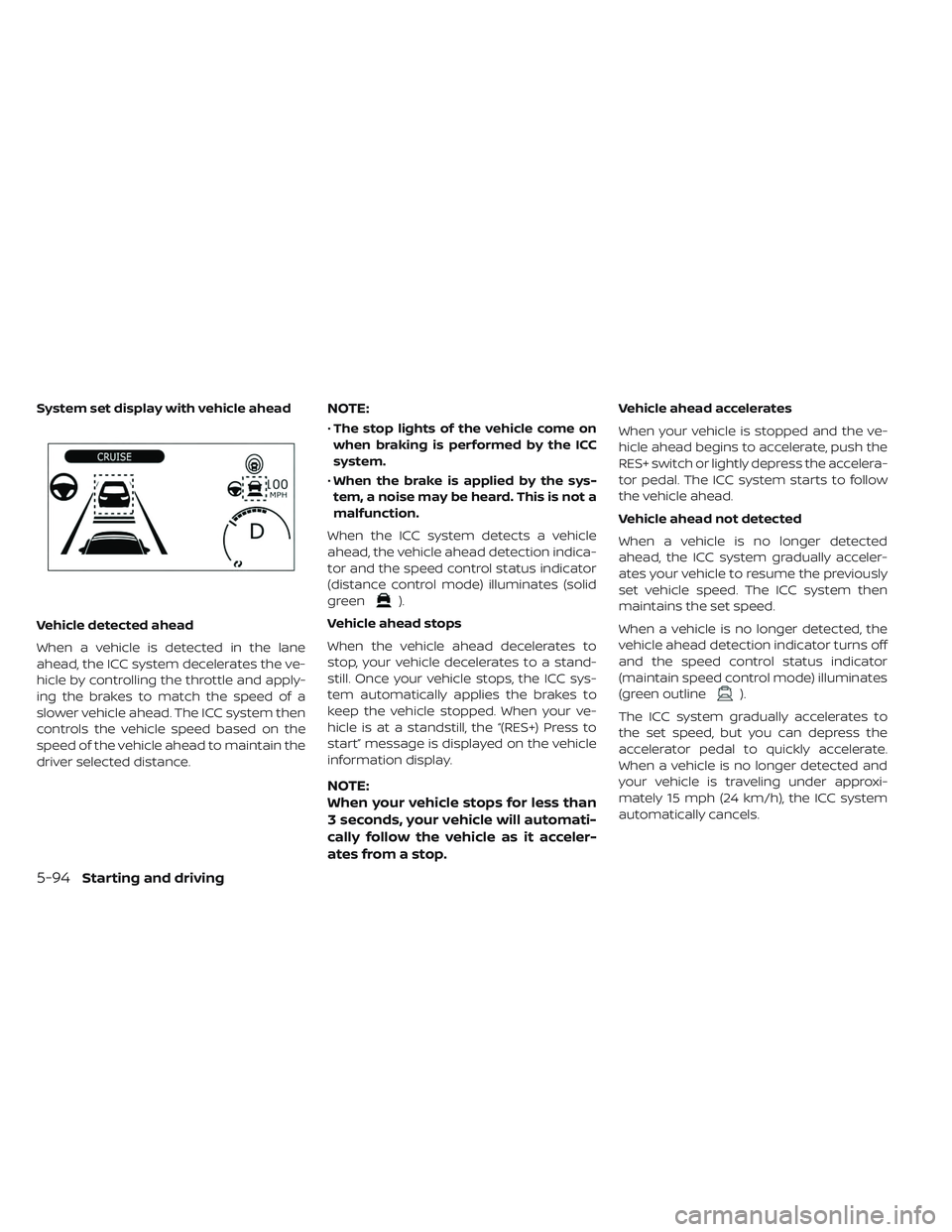
Vehicle detected ahead
When a vehicle is detected in the lane
ahead, the ICC system decelerates the ve-
hicle by controlling the throttle and apply-
ing the brakes to match the speed of a
slower vehicle ahead. The ICC system then
controls the vehicle speed based on the
speed of the vehicle ahead to maintain the
driver selected distance.
NOTE:
•The stop lights of the vehicle come on
when braking is performed by the ICC
system.
• When the brake is applied by the sys-
tem, a noise may be heard. This is not a
malfunction.
When the ICC system detects a vehicle
ahead, the vehicle ahead detection indica-
tor and the speed control status indicator
(distance control mode) illuminates (solid
green
).
Vehicle ahead stops
When the vehicle ahead decelerates to
stop, your vehicle decelerates to a stand-
still. Once your vehicle stops, the ICC sys-
tem automatically applies the brakes to
keep the vehicle stopped. When your ve-
hicle is at a standstill, the “(RES+) Press to
start” message is displayed on the vehicle
information display.
NOTE:
When your vehicle stops for less than
3 seconds, your vehicle will automati-
cally follow the vehicle as it acceler-
ates from a stop.
Vehicle ahead accelerates
When your vehicle is stopped and the ve-
hicle ahead begins to accelerate, push the
RES+ switch or lightly depress the accelera-
tor pedal. The ICC system starts to follow
the vehicle ahead.
Vehicle ahead not detected
When a vehicle is no longer detected
ahead, the ICC system gradually acceler-
ates your vehicle to resume the previously
set vehicle speed. The ICC system then
maintains the set speed.
When a vehicle is no longer detected, the
vehicle ahead detection indicator turns off
and the speed control status indicator
(maintain speed control mode) illuminates
(green outline
).
The ICC system gradually accelerates to
the set speed, but you can depress the
accelerator pedal to quickly accelerate.
When a vehicle is no longer detected and
your vehicle is traveling under approxi-
mately 15 mph (24 km/h), the ICC system
automatically cancels.
System set display with vehicle ahead
5-94Starting and driving
Page 455 of 610

Acceleration when passing
When the ICC system is engaged above
43 mph and following a slower vehicle (be-
low ICC set speed), and the turn signal is
activated to the lef t, the ICC system will
automatically start to accelerate the ve-
hicle to help initiate passing on the lef t and
will begin to reduce the distance to the
vehicle directly ahead. Only the lef t side
turn signal operates this feature. As the
driver steers the vehicle and moves into
the passing lane, if no vehicle is detected
ahead the ICC system will continue to ac-
celerate to the ICC system set speed. If an-
other vehicle is detected ahead, then the
vehicle will accelerate up to the following
speed of that vehicle. If the vehicle is not
steered into the lef t lane to pass, the accel-
eration will stop af ter a short time and re-
gain the set following distance. Accelera-
tion can be stopped at any point by
depressing the brake pedal or the CANCEL
switch on the steering wheel.WARNING
In order to reduce the risk of a collision
that may result in serious injury or
death, please be aware of the follow-
ing:
• This function is only activated with the lef t turn signal and will briefly
accelerate the vehicle even if a lane
change is not initiated. This can in-
clude non-passing situations such
as lef t side exits.
• Ensure that when passing another vehicle, the adjacent lane is clear be-
fore initiating the pass. Sudden
changes in traffic may occur while
passing.
– Always manually steer or brake asneeded
– Never solely rely on the system
ICC system limitations
WARNING
Listed below are the system limita-
tions for the ICC system. Failure to op-
erate the vehicle in accordance with
these system limitations could result
in serious injury or death:
• The ICC system is primarily intended for use on straight, dry, open roads
with light traffic. It is not advisable to
use the ICC system in city traffic or
congested areas.
• The ICC system will not adapt auto- matically to road conditions. This
system should be used in evenly
flowing traffic. Do not use the sys-
tem on roads with sharp curves or
on icy roads, in heavy rain or in fog.
5-96Starting and driving
Page 456 of 610

• As there is a performance limit to thedistance control function, never rely
solely on the ICC system. This sys-
tem does not correct careless, inat-
tentive or absentminded driving or
overcome poor visibility in rain, fog,
or other bad weather. Decelerate the
vehicle speed by depressing the
brake pedal, depending on the dis-
tance to the vehicle ahead and the
surrounding circumstances in order
to maintain a safe distance between
vehicles.
• When the ICC system automatically brings the car to a stop, your vehicle
can automatically accelerate if the
vehicle is stopped for less than ap-
proximately 3 seconds. Be prepared
to stop your vehicle if necessary.
• Always pay attention to the opera- tion of the vehicle and be ready to
manually control the proper follow-
ing distance. The ICC system may
not be able to maintain the selected
distance between vehicles (follow-
ing distance) or selected vehicle
speed under some circumstances. • The system may not detect the ve-
hicle in front of you in certain road or
weather conditions. To avoid acci-
dents, never use the ICC system un-
der the following conditions:
– On roads with heavy, high-speedtraffic or sharp curves
– On slippery road surfaces such as on ice or snow, etc.
– During bad weather (rain, fog, snow, etc.)
– When rain, snow or dirt adhere to the bumper around the distance
sensor
– On steep downhill roads (the ve- hicle may go beyond the set ve-
hicle speed and frequent braking
may result in overheating the
brakes)
– On repeated uphill and downhill roads
– When traffic conditions make it difficult to keep a proper distance
between vehicles because of fre-
quent acceleration or decelera-
tion
–
Interference by other radar sources
• Do not use the ICC system if you are towing a trailer. The system may not
detect a vehicle ahead.
• In some road or traffic conditions, a vehicle or object can unexpectedly
come into the sensor detection zone
and cause automatic braking. Al-
ways stay alert and avoid using the
ICC system where not recom-
mended in this warning section.
The ICC system will not detect the following
objects:
• Stationary or slow moving vehicles
• Pedestrians or objects in the roadway
• Oncoming vehicles in the same lane
• Motorcycles traveling offset in the travel lane
The following are some conditions in which
the radar sensor cannot properly detect a
vehicle ahead and the system may not op-
erate properly:
• When the sensor detection is reduced (conditions such as rain, snow, fog, dust
storms, sandstorms, and road spray from
other vehicles)
Starting and driving5-97