Page 266 of 610
SymptomPossible causeAction to take
When pushing the request
switch or thebutton on
the Intelligent Key to lock the
doorThe outside chime sounds for a few seconds.The Intelligent Key is inside the vehicle
or a cargo area. Carry the Intelligent Key with you.
When pushing the power switch
in the READY to drive position The EV system operation for discharged
Intelligent Key system indicator appears on
the display.
The Intelligent Key battery charge is low.For additional information, refer to
“NISSAN Intelligent Key® battery discharge”
in the “Starting and driving” section of this
manual.
The No Key Detected warning appears on
the display and the inside warning chime
sounds for a few seconds. The Intelligent Key is not in the vehicle. Carry the Intelligent Key with you.
When pushing the power switch The Key System Error indicator appears on
the display. It warns of a malfunction with the Intel-
ligent Key system.It is recommended that you visit a NISSAN
certified LEAF dealer.
Pre-driving checks and adjustments3-13
Page 267 of 610

HOW TO USE REMOTE KEYLESS
ENTRY FUNCTION
WARNING
• Radio waves could adversely affect electric medical equipment. Those
who use a pacemaker should con-
tact the electric medical equipment
manufacturer for the possible influ-
ences before use.
• The Intelligent Key transmits radio waves when the buttons are
pressed. The FAA advises that the
radio waves may affect aircraf t
navigation and communication sys-
tems. Do not operate the Intelligent
Key while on an airplane. Make sure
the buttons are not operated unin-
tentionally when the unit is stored
during a flight.
CAUTION
• Do not allow the Intelligent Key, which contains electrical compo-
nents, to come into contact with
water or salt water. This could affect
the system function.
• Do not drop the Intelligent Key.
• Do not strike the Intelligent Key sharply against another object.
• Do not change or modif y the Intelli- gent Key.
• Wetting may damage the Intelligent Key. If the Intelligent Key gets wet,
immediately wipe until it is com-
pletely dry.
• Do not place the Intelligent Key for an extended period in an area where
temperatures exceed 140°F (60°C).
• Do not attach the Intelligent Key with a key holder that contains a
magnet.
• Do not place the Intelligent Key near equipment that produces a mag-
netic field, such as a TV, audio equip-
ment, personal computers or cellu-
lar phone. The remote keyless entry function can op-
erate all door locks using the remote key-
less entry function of the Intelligent Key.
The remote keyless entry function can
operate at a distance of approximately
33 f t (10 m) from the vehicle. The operating
distance depends upon the conditions
around the vehicle.
The remote keyless entry function will not
operate:
• When the Intelligent Key is not within the
operational range.
• When the doors are open or not closed securely.
• When the Intelligent Key battery is discharged.
CAUTION
When locking the doors using the Intel-
ligent Key, be sure not to leave the key
in the vehicle.
3-14Pre-driving checks and adjustments
Page 268 of 610
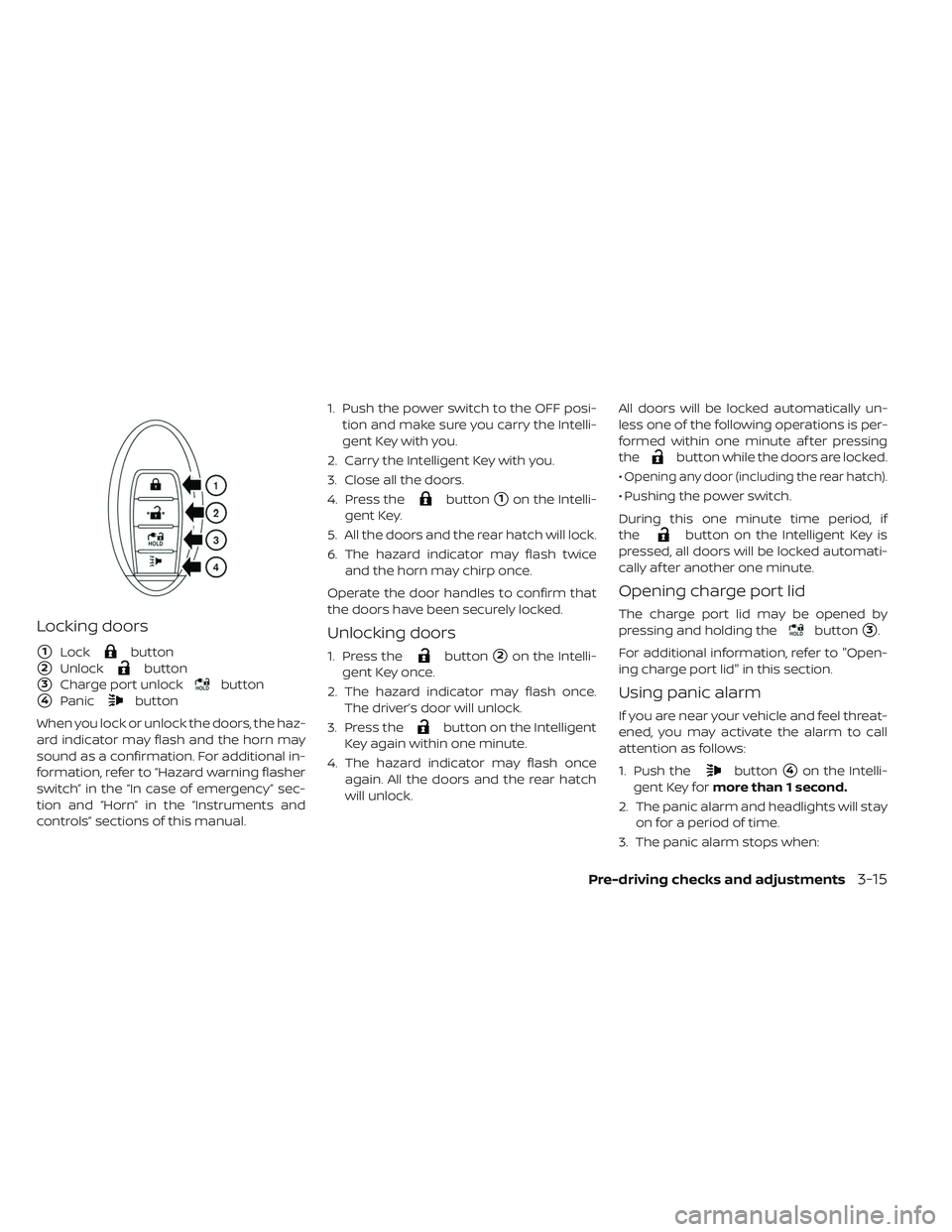
Locking doors
�1Lockbutton
�2Unlockbutton
�3Charge port unlockbutton
�4Panicbutton
When you lock or unlock the doors, the haz-
ard indicator may flash and the horn may
sound as a confirmation. For additional in-
formation, refer to “Hazard warning flasher
switch” in the “In case of emergency” sec-
tion and “Horn” in the “Instruments and
controls” sections of this manual. 1. Push the power switch to the OFF posi-
tion and make sure you carry the Intelli-
gent Key with you.
2. Carry the Intelligent Key with you.
3. Close all the doors.
4. Press the
button�1on the Intelli-
gent Key.
5. All the doors and the rear hatch will lock.
6. The hazard indicator may flash twice and the horn may chirp once.
Operate the door handles to confirm that
the doors have been securely locked.
Unlocking doors
1. Press thebutton�2on the Intelli-
gent Key once.
2. The hazard indicator may flash once. The driver’s door will unlock.
3. Press the
button on the Intelligent
Key again within one minute.
4. The hazard indicator may flash once again. All the doors and the rear hatch
will unlock. All doors will be locked automatically un-
less one of the following operations is per-
formed within one minute af ter pressing
the
button while the doors are locked.
•
Opening any door (including the rear hatch).
• Pushing the power switch.
During this one minute time period, if
the
button on the Intelligent Key is
pressed, all doors will be locked automati-
cally af ter another one minute.
Opening charge port lid
The charge port lid may be opened by
pressing and holding the
button�3.
For additional information, refer to "Open-
ing charge port lid" in this section.
Using panic alarm
If you are near your vehicle and feel threat-
ened, you may activate the alarm to call
attention as follows:
1. Push the
button�4on the Intelli-
gent Key for more than 1 second.
2. The panic alarm and headlights will stay on for a period of time.
3. The panic alarm stops when:
Pre-driving checks and adjustments3-15
Page 269 of 610

• It has run for a period of time, or
• Any of the buttons on the Intelligent Keyis pushed. (Note: The
button must
be pushed for more than 1 second.)
Setting hazard indicator and horn
mode
This vehicle is set in hazard indicator and
horn mode when you first receive the ve-
hicle.
In hazard indicator and horn mode, when
the
button�1is pressed, the hazard
indicator flashes twice and the horn chirps
once. When the
button�2is pressed,
the hazard indicator flashes once. If horns are not necessary, the system can
be switched to the hazard indicator mode.
In hazard indicator mode, when the
button is pressed, the hazard indicator
flashes twice. When the
button is
pressed, neither the hazard indicator nor
the horn operates.
Hazard indicator and horn mode:
Operation DOOR LOCK DOOR UNLOCK
Pushing door handle request switch or rear hatch request switch HAZARD -
twice
OUTSIDE CHIME - twice HAZARD -
once
OUTSIDE CHIME - once
Pressing
orbutton HAZARD -
twice
HORN - once HAZARD -
once
HORN - none
Hazard indicator mode:
Operation DOOR LOCK DOOR UNLOCK
Pushing door handle request switch or rear hatch request switch HAZARD -
twice
OUTSIDE CHIME - none HAZARD - none
OUTSIDE CHIME - none
Pressing
orbutton HAZARD -
twice
HORN - none HAZARD - none
HORN - none
3-16Pre-driving checks and adjustments
Page 270 of 610
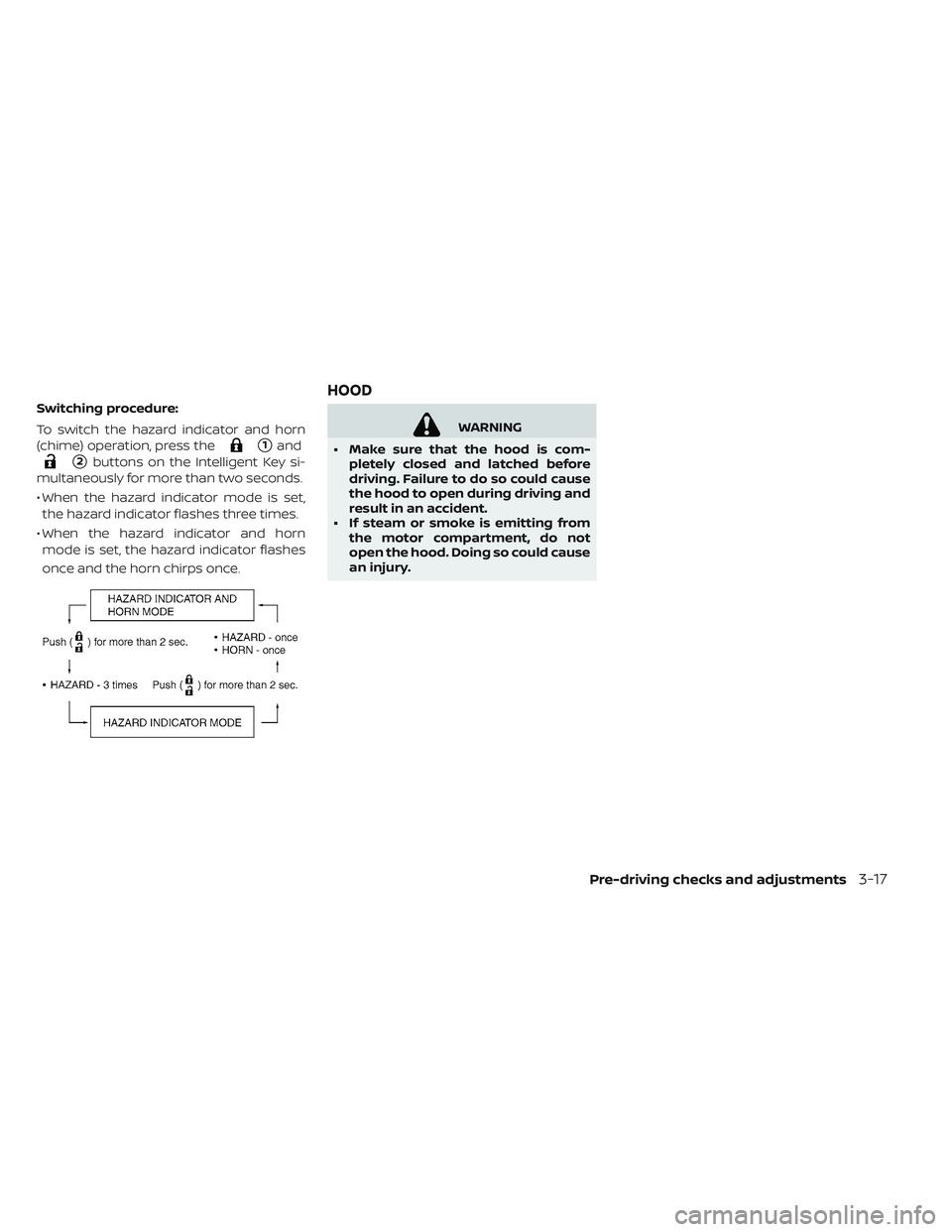
Switching procedure:
To switch the hazard indicator and horn
(chime) operation, press the
�1and
�2buttons on the Intelligent Key si-
multaneously for more than two seconds.
• When the hazard indicator mode is set, the hazard indicator flashes three times.
• When the hazard indicator and horn mode is set, the hazard indicator flashes
once and the horn chirps once.
WARNING
• Make sure that the hood is com- pletely closed and latched before
driving. Failure to do so could cause
the hood to open during driving and
result in an accident.
• If steam or smoke is emitting from the motor compartment, do not
open the hood. Doing so could cause
an injury.
HOOD
Pre-driving checks and adjustments3-17
Page 272 of 610
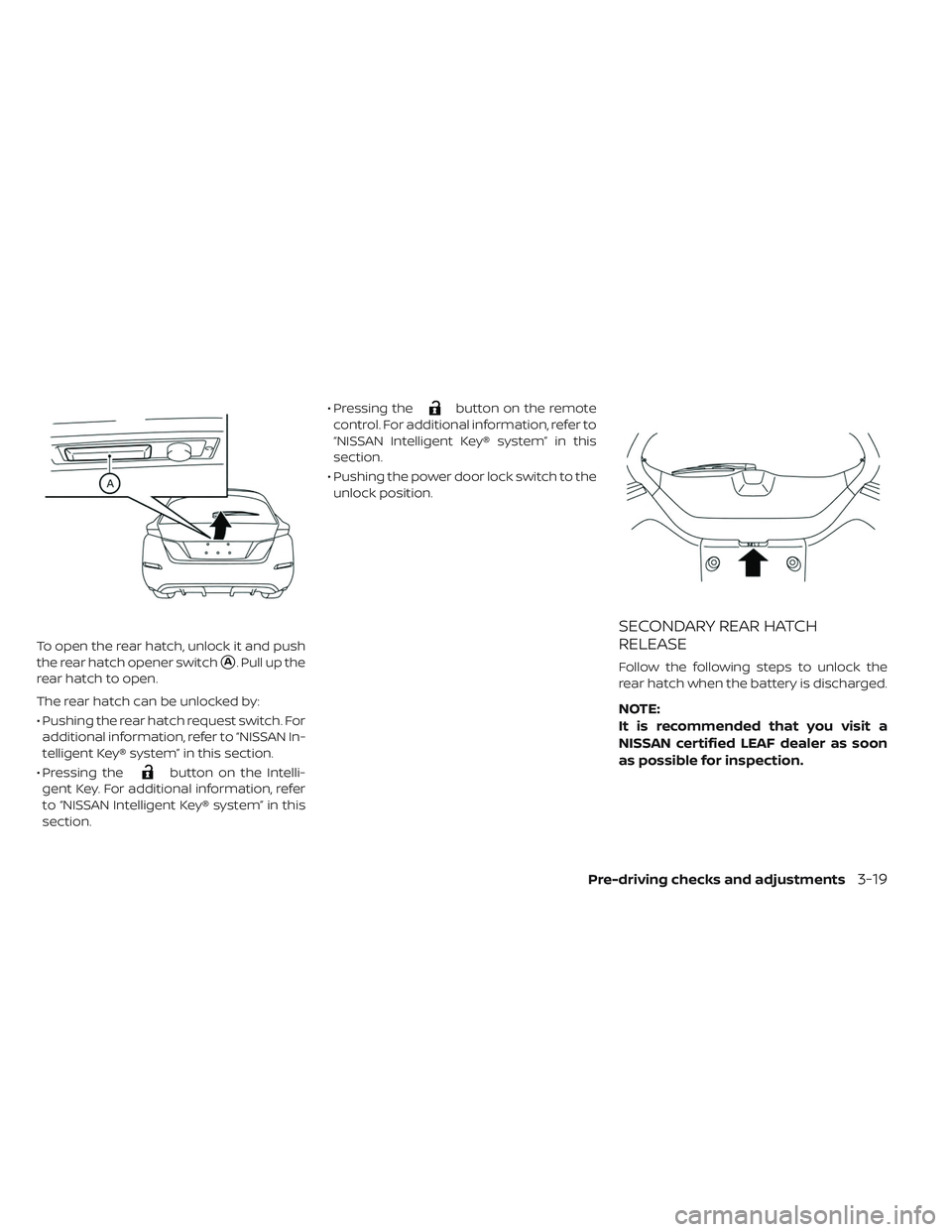
To open the rear hatch, unlock it and push
the rear hatch opener switch
�A. Pull up the
rear hatch to open.
The rear hatch can be unlocked by:
• Pushing the rear hatch request switch. For additional information, refer to “NISSAN In-
telligent Key® system” in this section.
• Pressing the
button on the Intelli-
gent Key. For additional information, refer
to “NISSAN Intelligent Key® system” in this
section. • Pressing the
button on the remote
control. For additional information, refer to
“NISSAN Intelligent Key® system” in this
section.
• Pushing the power door lock switch to the unlock position.
SECONDARY REAR HATCH
RELEASE
Follow the following steps to unlock the
rear hatch when the battery is discharged.
NOTE:
It is recommended that you visit a
NISSAN certified LEAF dealer as soon
as possible for inspection.
Pre-driving checks and adjustments
3-19
Page 274 of 610
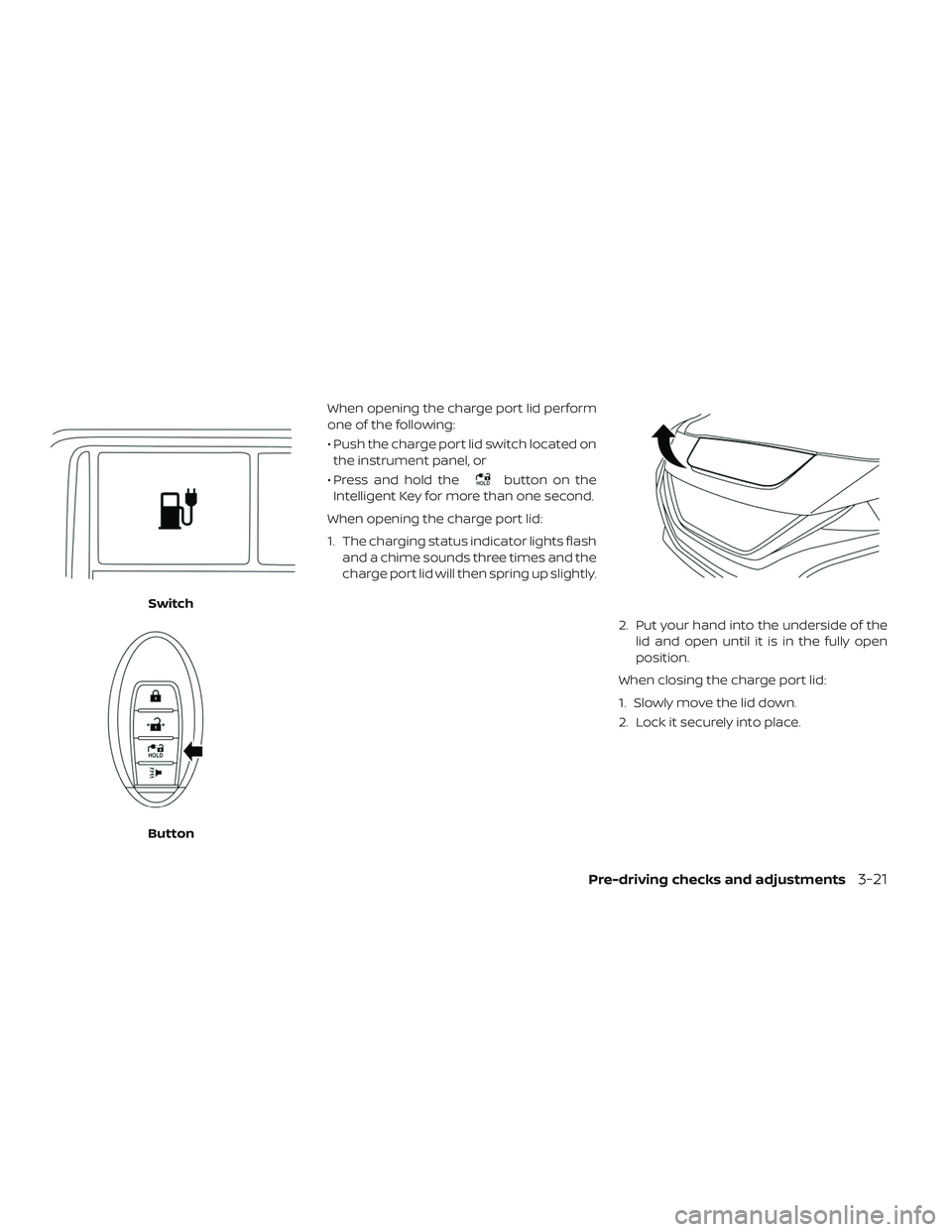
When opening the charge port lid perform
one of the following:
• Push the charge port lid switch located onthe instrument panel, or
• Press and hold the
button on the
Intelligent Key for more than one second.
When opening the charge port lid:
1. The charging status indicator lights flash and a chime sounds three times and the
charge port lid will then spring up slightly.
2. Put your hand into the underside of thelid and open until it is in the fully open
position.
When closing the charge port lid:
1. Slowly move the lid down.
2. Lock it securely into place.
Switch
Button
Pre-driving checks and adjustments3-21
Page 289 of 610
ADJUSTING THE SCREEN
(MODELS WITH 40 KWH BATTERY)
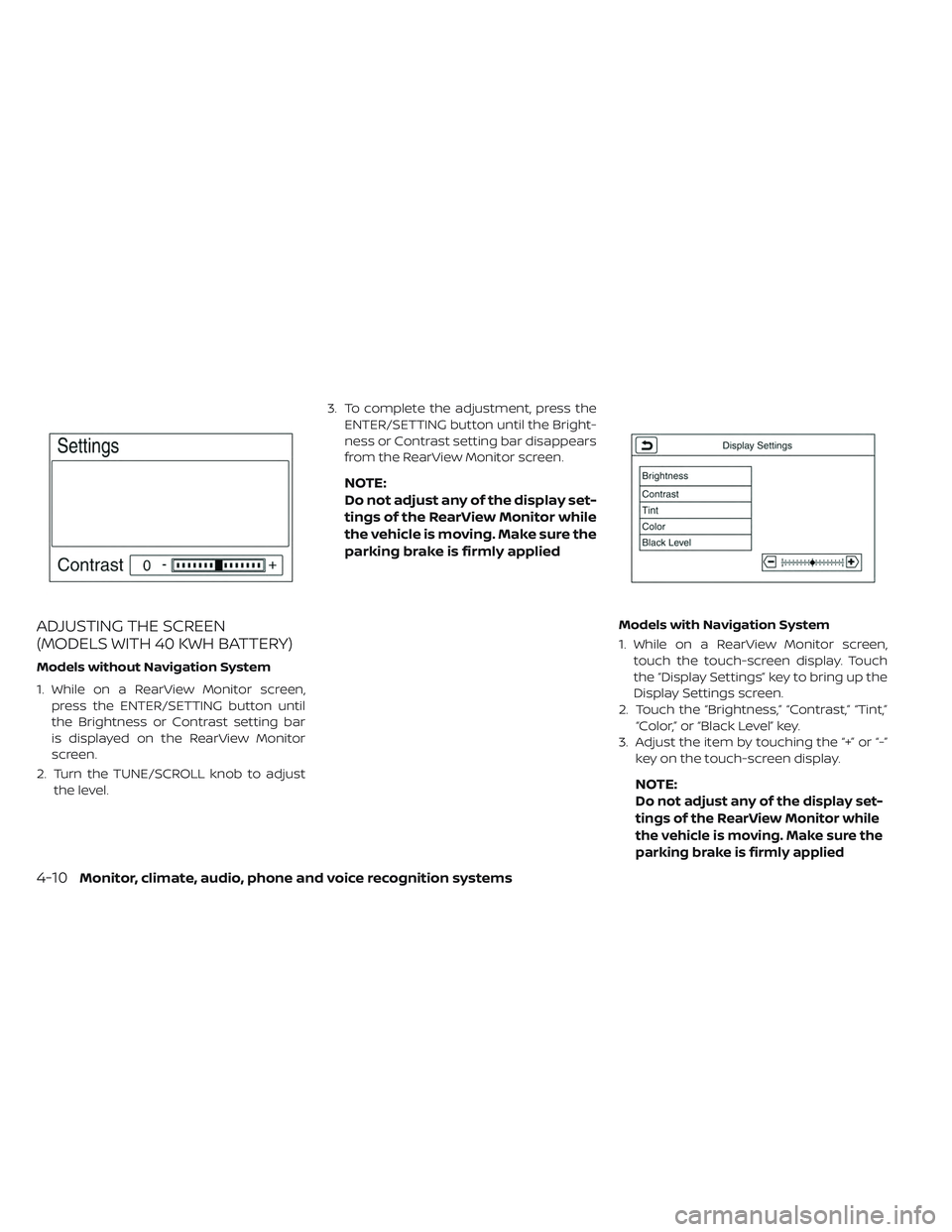
Models without Navigation System
1. While on a RearView Monitor screen,press the ENTER/SETTING button until
the Brightness or Contrast setting bar
is displayed on the RearView Monitor
screen.
2. Turn the TUNE/SCROLL knob to adjust the level. 3. To complete the adjustment, press the
ENTER/SETTING button until the Bright-
ness or Contrast setting bar disappears
from the RearView Monitor screen.
NOTE:
Do not adjust any of the display set-
tings of the RearView Monitor while
the vehicle is moving. Make sure the
parking brake is firmly applied
Models with Navigation System
1. While on a RearView Monitor screen,touch the touch-screen display. Touch
the “Display Settings” key to bring up the
Display Settings screen.
2. Touch the “Brightness,” “Contrast,” “Tint,” “Color,” or “Black Level” key.
3. Adjust the item by touching the “+” or “-” key on the touch-screen display.
NOTE:
Do not adjust any of the display set-
tings of the RearView Monitor while
the vehicle is moving. Make sure the
parking brake is firmly applied
4-10Monitor, climate, audio, phone and voice recognition systems