2019 NISSAN 370Z ROADSTER phone
[x] Cancel search: phonePage 247 of 460

4-80Center display, heater, air conditioner, audio, phone and voice recognition systems
SAA2555With navigation system
SAA2556Without navigation system
1. Audio source switch
2. Menu control switch (models with naviga-tion system) or audio tuning switch (mod-
els without navigation system)
3. Back switch
4. Volume control switch
STEERING-WHEEL-MOUNTED CON-
TROLS FOR AUDIO
Menu control switch (models with
navigation system) or audio tuning
switch (models without navigation
system)
While the display is showing a MAP
(navigation systems only), STATUS or
Audio screen, tilt the switch upward or
downward to select a station, track, CD or
folder. For most audio sources, tilting the
switch up/down for more than 1.5 sec-
onds provides a different function than
tilting up/down for less than 1.5 seconds.
AM and FM radio:
. Tilting up/down for less than 1.5
seconds will scroll up or down
through the preset station.
. Tilting up/down for more than 1.5
seconds will seek up or down to the
next station.
. Pushing the menu control switch will
show the list of preset stations. SiriusXM Satellite Radio (if so equipped):
. Tilting up/down for less than 1.5
seconds will scroll up or down
through the preset channel.
. Tilting up/down for more than 1.5
seconds will go to the next or previous
category.
. Pushing the menu control switch will
show the XM menu.
iPod® (models with navigation system):
. Tilting up/down for less than 1.5
seconds will scroll up or down
through the track number.
. Pushing the menu control switch will
show the iPod® menu.
CD:
. Tilting up/down for less than 1.5
seconds will scroll up or down
through the track number.
. Tilting up/down for more than 1.5
seconds will scroll up or down
through the folder number (if playing
compressed audio files).
. Pushing the menu control switch will
show the CD menu.
DVD (models with navigation system):
. Tilting up/down for less than 1.5
seconds will scroll up or down
through the track number.
Page 248 of 460

.Tilting up/down for more than 1.5
seconds will scroll up or down
through the title number.
. Pushing the menu control switch will
select an item from the DVD display.
. When the transparent operation
menu appears, the switch will control
the menu.
USB (models with navigation system):
. Tilting up/down for less than 1.5
seconds will scroll up or down
through the track number.
. Tilting up/down for more than 1.5
seconds will scroll up or down
through the folder number.
. Pushing the menu control switch will
show the USB menu.
Bluetooth® Audio (models with naviga-
tion system):
. Tilting up/down for less than 1.5
seconds will scroll up or down
through the track number.
AUX:
. Pushing the menu control switch will
show the AUX menu.BACK switch (models with
navigation system)
Push this switch to go back to the
previous screen or cancel the selection if
it is not completed.
Volume control switches
Push the upper (+) or lower (−) side switch
to increase or decrease the volume.
Audio source switch
Push the audio source switch to change
the mode to available audio source.
ANTENNA
Window antenna (for Coupe mod-
els)
The antenna pattern is printed inside the
rear window.
CAUTION
. Do not place metalized film near
the rear window glass or attach
any metal parts to it. This may
cause poor reception or noise.
. When cleaning the inside of the
rear window, be careful not to
scratch or damage the rear win-
dow antenna. Lightly wipe along
the antenna with a dampened
soft cloth.
Center display, heater, air conditioner, audio, phone and voice recognition systems4-81
Page 249 of 460
4-82Center display, heater, air conditioner, audio, phone and voice recognition systems
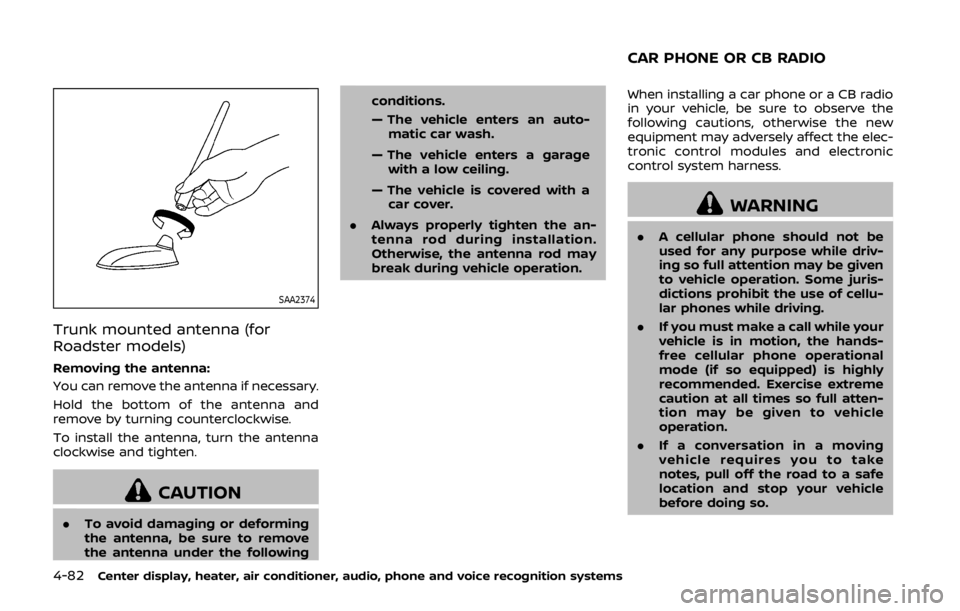
SAA2374
Trunk mounted antenna (for
Roadster models)
Removing the antenna:
You can remove the antenna if necessary.
Hold the bottom of the antenna and
remove by turning counterclockwise.
To install the antenna, turn the antenna
clockwise and tighten.
CAUTION
.To avoid damaging or deforming
the antenna, be sure to remove
the antenna under the following conditions.
— The vehicle enters an auto-
matic car wash.
— The vehicle enters a garage with a low ceiling.
— The vehicle is covered with a car cover.
. Always properly tighten the an-
tenna rod during installation.
Otherwise, the antenna rod may
break during vehicle operation. When installing a car phone or a CB radio
in your vehicle, be sure to observe the
following cautions, otherwise the new
equipment may adversely affect the elec-
tronic control modules and electronic
control system harness.
WARNING
.
A cellular phone should not be
used for any purpose while driv-
ing so full attention may be given
to vehicle operation. Some juris-
dictions prohibit the use of cellu-
lar phones while driving.
. If you must make a call while your
vehicle is in motion, the hands-
free cellular phone operational
mode (if so equipped) is highly
recommended. Exercise extreme
caution at all times so full atten-
tion may be given to vehicle
operation.
. If a conversation in a moving
vehicle requires you to take
notes, pull off the road to a safe
location and stop your vehicle
before doing so.
CAR PHONE OR CB RADIO
Page 250 of 460
CAUTION
.Keep the antenna as far away as
possible from the electronic con-
trol modules.
. Keep the antenna wire more than
8 in (20 cm) away from the
electronic control system har-
ness. Do not route the antenna
wire next to any harness.
. Adjust the antenna standing-
wave ratio as recommended by
the manufacturer.
. Connect the ground wire from the
CB radio chassis to the body.
. For details, it is recommended
you visit a NISSAN dealer.
WARNING
.Use a phone after stopping your
vehicle in a safe location. If you
have to use a phone while driving,
exercise extreme caution at all
times so full attention may be
given to vehicle operation.
. If you find yourself unable to
devote full attention to vehicle
operation while talking on the
phone, pull off the road to a safe
location and stop your vehicle
before doing so.
CAUTION
To avoid draining the vehicle battery,
use a phone after starting the en-
gine.
Your vehicle is equipped with Bluetooth®
Hands-Free Phone System. If you are an
owner of a compatible Bluetooth® en-
abled cellular phone, you can set up the
wireless connection between your cellu-
lar phone and the in-vehicle phone mod-
ule. With Bluetooth® wireless technology,
you can make or receive a telephone call with your cellular phone in your pocket.
Once a cellular phone is connected to the
in-vehicle phone module, no phone con-
necting procedure is required anymore.
Your phone is automatically connected
with the in-vehicle phone module when
the ignition switch is pushed to the ON
position with the registered cellular
phone turned on and carried in the
vehicle.
You can register up to 5 different Blue-
tooth® cellular phones in the in-vehicle
phone module. However, you can talk on
only one cellular phone at a time.
The NISSAN Voice Recognition system
supports the phone commands, so dial-
ing a phone number using your voice is
possible. For more details, see “NISSAN
Voice Recognition System (models with
navigation system)” (P.4-107).
Before using the Bluetooth® Hands-Free
Phone System, refer to the following
notes.
.
Wireless LAN (Wi-Fi) and the Blue-
tooth® functions share the same fre-
quency band (2.4 GHz). Using the
Bluetooth® and the wireless LAN func-
tions at the same time may slow down
or disconnect the communication and
cause undesired noise. It is recom-
mended that you turn off the wireless
Center display, heater, air conditioner, audio, phone and voice recognition systems4-83
Bluetooth® HANDS-FREE PHONE SYSTEM
(models with navigation system)
Page 251 of 460

4-84Center display, heater, air conditioner, audio, phone and voice recognition systems
LAN (Wi-Fi) when using the Bluetooth®
functions.
. Set up the wireless connection be-
tween a compatible cellular phone
and the in-vehicle phone module be-
fore using the Bluetooth® Hands-Free
Phone System.
. Some Bluetooth® enabled cellular
phones may not be recognized by
the in-vehicle phone module. Please
visit
www.nissanusa.com/bluetooth for a
recommended phone list.
. You will not be able to use a hands-
free phone under the following condi-
tions:
— Your vehicle is outside of the tele-
phone service area.
— Your vehicle is in an area where it is difficult to receive radio waves;
such as in a tunnel, in an under-
ground parking garage, behind a
tall building or in a mountainous
area.
— Your cellular phone is locked in order not to be dialed.
. When the radio wave condition is not
ideal or ambient sound is too loud, it
may be difficult to hear the other
person’s voice during a call. .
Immediately after the ignition switch
is pushed to the ON position, it may be
impossible to receive a call for a short
period of time.
. Do not place the cellular phone in an
area surrounded by metal or far away
from the in-vehicle phone module to
prevent tone quality degradation and
wireless connection disruption.
. While a cellular phone is connected
through the Bluetooth® wireless con-
nection, the battery power of the
cellular phone may discharge quicker
than usual.
. If the Bluetooth® Hands-Free Phone
System seems to be malfunctioning,
please visit www.nissanusa.com/blue-
tooth for troubleshooting help.
. Some cellular phones or other devices
may cause interference or a buzzing
noise to come from the audio system
speakers. Storing the device in a
different location may reduce or elim-
inate the noise.
. Refer to the cellular phone Owner’s
Manual regarding the telephone pair-
ing procedure specific to your phone,
battery charging, cellular phone an-
tenna, etc.
. The antenna display on the monitor
will not coincide with the antenna
display of some cellular phones. .
Keep the interior of the vehicle as
quiet as possible to hear the caller’s
voice clearly as well as to minimize its
echoes.
. If reception between callers is unclear,
adjusting the incoming or outgoing
call volume may improve the clarity.
REGULATORY INFORMATION
FCC Regulatory information
.CAUTION: To maintain compliance
with FCC’s RF exposure guidelines,
use only the supplied antenna. Un-
authorized antenna, modification, or
attachments could damage the trans-
mitter and may violate FCC regula-
tions.
. Operation is subject to the following
two conditions:
1. this device may not cause interfer- ence and
2. this device must accept any interfer- ence, including interference that may
cause undesired operation of the
device
Page 252 of 460

IC Regulatory information
.Operation is subject to the following
two conditions: (1) this device may not
cause interference, and (2) this device
must accept any interference, includ-
ing interference that may cause un-
desired operation of the device.
. This Class B digital apparatus meets
all requirements of the Canadian In-
terference-Causing Equipment Regu-
lations.
Bluetooth® trademark
Bluetooth® is a trademark
owned by Bluetooth SIG,
Inc., and licensed to Clarion
Co., Ltd.
VOICE COMMANDS
You can use voice commands to operate
various Bluetooth® Hands-Free Phone
System features using the NISSAN Voice
Recognition system.
For more details, see “NISSAN Voice Re-
cognition System (models with naviga-
tion system)” (P.4-107).
SAA2518
CONTROL BUTTONS1) PHONE button
2) TALK/PHONE SENDbutton
JVH0473X
CONNECTING PROCEDURE
1. Push the PHONE button or thebutton, and select the “Connect
Phone” key.
Center display, heater, air conditioner, audio, phone and voice recognition systems4-85
Page 253 of 460

4-86Center display, heater, air conditioner, audio, phone and voice recognition systems
SAA2520
2. A message screen is displayed. Oper-ate the cellular phone according to
the message, and then wait until “MY-
CAR” is displayed on the cellular
phone. After selecting “MY-CAR” on
your cellular phone, perform one of
the following procedures.
.Input the PIN code displayed on thescreen.
.Check that the PIN code displayedon the screen is the same as the
number displayed on the cellular
phone, and then select [Yes].
For phones that support Simple
Secure Pairing (SSP), check that
the PIN code on the vehicle dis-
played matches the PIN code dis- played on the phone.
The connecting procedure of the
cellular phone varies according to
each cellular phone. See the cellular
phone Owner’s Manual for the details.
You can also visit
www.nissanusa.com/bluetooth or call
NISSAN Consumer Affairs Department
for instructions on pairing NISSAN
recommended cellular phones.
When the connection process is com-
pleted, the screen will return to the
Phone menu display.
PHONE SELECTION
Up to 5 cellular phones can be registered
to the system. To switch to connect
another cellular phone, push PHONE but-
ton and select the “Connected Phones”
key. The registered cellular phones are
shown on the list. If you select a cellular
phone that is different from the one
currently connected, the newly selected
phone will be connected to the system.
QUICK DIAL
This vehicle has two phonebooks avail-
able for hands-free use. Depending on the
phone, the system may automatically
download the entire cell phone’s phone-
book into the “ Phonebook”. For the
details about downloading a phonebook,
see “Phone setting” (P.4-91). If a phone- book does not automatically download,
the Quick Dial may be set for up to 1.000
entries. This Quick Dial allows the record-
ing of a name to speak while using voice
recognition.
Page 254 of 460

JVH1509X
1. Push the PHONE button and select the“Quick Dial” key.
2. Select the “Add New” key at the top of the screen.
JVH1407X
3. Choose the method for entering the
Quick Dial entry. For this example,
select “Enter Number by Keypad”.
4. Input the name and phone number manually using the keypad displayed
on the screen. (See “How to use touch
screen” (P.4-5).)
JVH1194X
5. Select the “Voicetag” key to record a
name to speak when using the
NISSAN Voice Recognition system.
6. Select the “Store” key and prepare to speak the name after the tone.
7. When the voicetag is successfully saved, select the “OK” key to save the
Quick Dial entry.
8. After the Quick Dial entry is saved, it will show a screen that is ready to call
the number. Push the BACK button to
return to the Quick Dial.
There are different methods to input a
phone number. Select one of the follow-
ing options instead of “Enter Number by
Keypad” in step 3.
Center display, heater, air conditioner, audio, phone and voice recognition systems4-87