2019 MITSUBISHI OUTLANDER Rear lights
[x] Cancel search: Rear lightsPage 215 of 451

Rear Cross Traffic Alert
(RCTA) (if so equipped)
Features and controls 5-133
5
The detection area is shown as illustrated.
Never rely solely on the RCTA when back- ing up. The RCTA is an aid system. It isnot a substitute for your safe and carefuldriving. Always check
visually behind and
all around your vehicl
e for other vehicles,
persons, animals
or obstructions.
The performance of the RCTA may vary depending on driving,
traffic and/or sur-
rounding conditions.NOTE
The Blind Spot Warning lights in the outside rearview mirrors on bot
h sides will blink,
even when only one vehicle is approaching from one side.WA R N I N G
Detection areas
CAUTION In certain situations, the RCTA may not detect a vehicle in the detection areas. Some of these situations include;• When the reversing sp
eed of your vehicle is
approximately 5 mph (18 km/h) or higher.
• When an approaching vehicle speed is approximately 4 mph (7 km/h) or less.• If the sensor detection area is blocked by a nearby object, such as
wall or parked vehi-
cle.• When a vehicle is approaching fromstraight behind your vehicle.• When your vehicle is exiting from anangled parking spot.• Immediately after the RCTA has been turned on.• Immediately after the operation mode hasbeen put in ON.• When the bumper surface around the sensoris covered with dirt
, snow and ice, etc.
• When the sensor becomes extremely hot or cold, such as after the vehicle has been parked for a prolonged time under the blaz-ing sun or in cold weather.
If the bumper has experienced an impact, the sensor may have be
en damaged and the
RCTA may not function properly. Have the vehicle inspected at an
authorized Mitsubishi
Motors dealer.CAUTION
BK0264300US.book 133 ページ 2018年2月28日 水曜日 午後5時16分
Page 216 of 451

Rear Cross Traffic Alert
(RCTA) (if so equipped)
5-134 Features and controls
5
1. Press the Blind Spot Warning switch while the operation mode is put in ON. (Refer to “Blind Spot Warning (BSW): To operate” on page 5-128.)2. When the selector le
ver is moved to the
“R” (REVERSE) position, the RCTA will operate.
If the system detects a problem, a warning is displayed on the information screen in themulti-information display. Refer to “Blind Spot Warning (BSW): Sys- tem problem warning” on page 5-129.To operate
NOTE
Set the RCTA to OFF when towing. The Blind Spot Warning light in the outside rearview mirror may
not be visible due to
strong direct sunlight
or the glare from the
headlights of vehicl
es behind you during
night driving.
When a problem is detected in the system
BK0264300US.book 134 ページ 2018年2月28日 水曜日 午後5時16分
Page 220 of 451

Lane Departure Warning System (LDW) (if so equipped) 5-138 Features and controls
5
N00578100045
If a problem occurs with the system, a visual warning specific to the type of the problem is given together with an audible alarm.
The alarm shown below is displayed if the system becomes temporarily unavailable due to the high or low temperature of the sensor. After temperature of the sensor has been inrange, the system will automatically return to operation. If the alarm continues s
howing, there is a pos-
sibility that the LDW
has a malfunction. Con-
tact an authorized Mitsubishi Motors dealer for inspection of the system.
The LDW may not operat
e correctly in the
following situations and the LDW may notgive warnings or may
give false warnings:
• When lane markers are not clearly visi- ble due to rain, snow, fog, dark area, etc.• When the road surface is shiny.• When old lane markers remain on the road surface.• When the lane markers are double linesor the shape of the lane markers are complicated.• When driving in an extremely narrowlane.• When the distance between your vehicleand a vehicle in
front is short.
• When driving into the sun light.• When driving on curves.• When driving on bumpy roads.• When driving in construction zones.• When passing through a place where the brightness suddenly
changes, such as at
the entrance to or
exit of a tunnel.
• When the headlights
of an oncoming
vehicle are very bright. • When the rear of your vehicle is weigheddown with the weight of passengers andluggage.• When the headlights
of your vehicle are
not clean or are not properly aimed.• When the front windshield is not clean.• When the front windshield wipers do notclean the windshield properly.WA R N I N G
CAUTION To maintain proper function of the LDW:• Always keep the windshield and the head- lights clean.• Do not put anything, such as a sticker, onthe front windshield in front of the sensor.• Avoid applying a shock or load to the sen-sor.• Do not attempt to deta
ch or disassemble the
sensor.• Use only Mitsubishi Mo
tors Genuine parts
when replacing the
windshield wipers.
NOTE
When driving conditions are not suitable to use the LDW, turn off the LDW.
System problem warning
Sensor is too hot or cold
BK0264300US.book 138 ページ 2018年2月28日 水曜日 午後5時16分
Page 228 of 451

Multi Around Monitor (if so equipped) 5-146 Features and controls
5
N00587200055
The Multi Around Monitor system uses four cameras, “Front-view camera”, “Side-viewcameras (right and le
ft)” and “Rear-view
camera”, and displays
composite views from
those cameras on a screen in the DISPLAYAUDIO or the Smartphone Link Display Audio. The Multi Around Monitor
system wi
ll assist
the driver to park the vehicle in a narrow or parallel parking space.
CAUTION The reference lines for
distance and vehicle
width are intended to i
ndicate the distance to
a flat object such as a level, flat road surface. They may not indicate correct distance depending on the shape of an obstacle.For example, when there is an object behind the vehicle that has u
pper sections projecting
in the direction of the
vehicle, the reference
lines on the screen will
indicate that point A
is the farthest point an
d point B is the closest
point to the vehicle. In
reality, point A and B
are actually the same distance from the vehi- cle, and point C is fa
rther off than point A
and B.Case 2 A- Actual objects B- Objects shown on the screen
NOTE
Mirror image is displayed on the screen. On vehicles equipped with Smartphone Link Display Audio, it is possible to change the display language of the screen.For details, please refer to the separated owner’s manual. Under certain circumst
ances, it may become
difficult to see an image on the screen, even when the system is functioning correctly. • In a dark area, such as at night. • When water drops or
condensation are on
the lens. • When sun light or he
adlights shine directly
into the lens.
Multi Around Monitor
(if so
equipped)
WA R N I N G Before using the Multi Around Monitor system, read this entire section to fully understand the limitations of this system.Failure to follow instructions could result in an accident. The Multi Around Monitor system is an aid system to help observe around the vehicle. It is not a substitute for yourvisual confirmation. Never rely solely on the Multi Around Monitor system. The view on the screen is limited, and objects
outside the view can-
not be seen on the screen.
BK0264300US.book 146 ページ 2018年2月28日 水曜日 午後5時16分
Page 232 of 451
Multi Around Monitor (if so equipped) 5-150 Features and controls
5
N00587500045
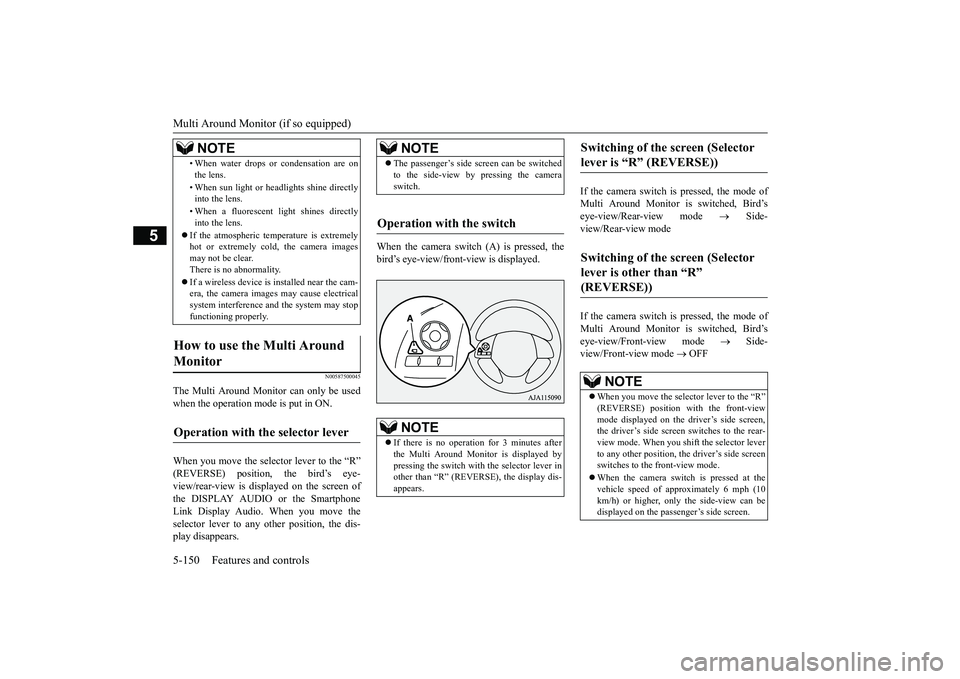
The Multi Around Monitor can only be used when the operation mode is put in ON. When you move the selector lever to the “R” (REVERSE) position, the bird’s eye- view/rear-view is displayed on the screen ofthe DISPLAY AUDIO or the Smartphone Link Display Audio. When you move the selector lever to any
other position, the dis-
play disappears.
When the camera switch (A) is pressed, the bird’s eye-view/front
-view is displayed.
If the camera switch is pressed, the mode of Multi Around Monitor is switched, Bird’s eye-view/Rear-view mode
Side-
view/Rear-view mode If the camera switch is pressed, the mode of Multi Around Monitor is switched, Bird’s eye-view/Front-view mode
Side-
view/Front-view mode
OFF
• When water drops or condensation are on the lens. • When sun light or he
adlights shine directly
into the lens. • When a fluorescent light shines directly into the lens.
If the atmospheric temperature is extremely hot or extremely cold, the camera images may not be clear.There is no abnormality. If a wireless device is installed near the cam- era, the camera images may cause electrical system interference and the system may stop functioning properly.
How to use the Multi Around Monitor
Operation with the selector lever
NOTE
NOTE
The passenger’s side sc
reen can be switched
to the side-view by pressing the cameraswitch.
Operation with the switch
NOTE
If there is no operation for 3 minutes after the Multi Around Monitor is displayed by pressing the switch with the selector lever in other than “R” (REVERSE), the display dis-appears.
Switching of the screen (Selector lever is “R” (REVERSE))
Switching of the screen (Selector lever is other than “R” (REVERSE))
NOTE
When you move the selector lever to the “R” (REVERSE) position with the front-view mode displayed on the driver’s side screen, the driver’s side screen switches to the rear-view mode. When you shift the selector lever to any other position, the driver’s side screen switches to the front-view mode. When the camera switch is pressed at the vehicle speed of appr
oximately 6 mph (10
km/h) or higher, only the side-view can be displayed on the passenger’s side screen.
BK0264300US.book 150 ページ 2018年2月28日 水曜日 午後5時16分
Page 292 of 451

Combination headlights and dimmer switch 5-210 Features and controls
5
Rotate the switch to operate the lights. The combinations of
switch operations and
illuminated lights differ in accordance with the following conditions. [When the engine is st
arted, and the parking
brake is released]
[When the engine is not
running, or when the
engine is running but the parking brake is notreleased] The engine starts when the lights are off.
Rotate the switch to operate the lights. The combinations of
switch operations and
illuminated lights differ in accordance withthe following conditions. [When the engine is st
arted, and the parking
brake is released]
When it rains, or wh
en the vehicle has been
washed, the inside of the lens sometimesbecomes foggy. This is the same as whenwindow glass mists up on a humid day, and does not indicate a pr
oblem. When the light
is switched on, the heat will dry out the fog.However, if water collects inside the light, have it checked by an authorized Mitsubishi Motors dealer or a re
pair facility of your
choice.
Ty p e 1
NOTE
OFF
The daytime running lights illumi- nated The daytime running lights illumi- nated Tail, front and rear
side-marker lights,
license plate, inst
rument panel lights
and downlight on Headlights and other lights onNOTE
Once the daytime running light come on, they do not go out until the ignition switch is turned to the “OFF” or “ACC” position or the operation mode is changed to OFF orACC.
OFF All lights off
Parking, tail, front
and rear side-
marker lights, license plate, instru- ment panel lights
and downlight on
Headlights and other lights on
Ty p e 2 OFF
The daytime running lights illumi- nated
AUTO
The daytime running lights illumi- nated (when it is
light outside the
vehicle) Headlights and other lights turn on and off automatically in accor-dance with outside light level.
BK0264300US.book 210 ページ 2018年2月28日 水曜日 午後5時16分
Page 293 of 451
![MITSUBISHI OUTLANDER 2019 Owners Manual (in English) Combination headlights and dimmer switch
Features and controls 5-211
5
[When the engine is not
running, or when the
engine is running but the parking brake is notreleased] The engine starts when t](/manual-img/19/34859/w960_34859-292.png "MITSUBISHI OUTLANDER 2019 Owners Manual (in English) Combination headlights and dimmer switch
Features and controls 5-211
5
[When the engine is not
running, or when the
engine is running but the parking brake is notreleased] The engine starts when t")
Combination headlights and dimmer switch
Features and controls 5-211
5
[When the engine is not
running, or when the
engine is running but the parking brake is notreleased] The engine starts when the lights are off.
N00532601649
If the following operation is performed with the combination headlights and dim- mer switch in the “ ” or “ ” position, the lights automatically turn off. [Except for vehicles equipped with the F. A . S . T. - k e y ]The ignition switch is turned to the “OFF” or “ACC” position or
the key is removed
from the ignition switch and the driver’sdoor is opened. [For vehicles equipped with the F.A.S.T.- key] The operation mode is changed to OFF orACC and the driver’s door is opened. If the following operation is performed with the combination headlights and dim- mer switch in the “ ” or “ ” position, the lights automatically turn off afterapproximately 3 minutes. [Except for vehicles equipped with the F. A . S . T. - k e y ] The ignition switch is turned to the “OFF”or “ACC” position or
the key is removed
from the ignition switch and the driver’s door is not opened.
The daytime running lights illumi- nated Tail, front and re
ar side-marker
lights, license pl
ate, instrument
panel lights and downlight on Headlights and other lights on
NOTE
Once the daytime running light come on, they do not go out until the ignition switch isturned to the “OFF” or “ACC” position or the operation mode is changed to OFF or ACC.OFF All lights off AUTO
Headlights and other lights turn on and off automatically in accor- dance with outside light level. Parking, tail, front
and rear side-
marker lights, license plate, instru- ment panel lights and downlight on Headlights and other lights on
NOTE
The sensitivity of the automatic on/off con- trol can be adjusted.For further informati
on, please contact your
authorized Mitsubishi
Motors dealer or a
repair facility
of your choice.
On vehicles equippe
d with the Smartphone
Link Display Audio, sc
reen operations can
be used to make the adjustment. Refer to the separate
owner’s manual for
details. Do not cover the sensor (A) for the automatic on/off control by affixing
a sticker or label to
the windshield. If the lights do not turn on or off with the switch in the “AUTO”
position, manually
operate the switch. Have the system checked by an authorized Mitsubishi Motors dealer ora repair facility of your choice.
Light auto-cutout function (headlights and other lights)
BK0264300US.book 211 ページ 2018年2月28日 水曜日 午後5時16分
Page 297 of 451

Combination headlights and dimmer switch
Features and controls 5-215
5
The sensitivity of the sensor can be temporar- ily lowering in the following ways. 1. Park your vehicle in
a safe place and the
ignition switch is turned to the “OFF” or “LOCK” position or the operation mode is put in OFF.2. Press the automatic high beam system switch more than 15 times within 5 sec- onds after operation mode is turned on.
• A vehicle in front
or oncoming vehicle is
hindered by any object such as continuousbends, elevated median
/island, traffic signs,
roadside trees. • Your vehicle passes
an oncoming vehicle
suddenly on a bend with poor visibility. • Another vehicle crosse
s ahead of your vehi-
cle.
The headlights may remain at low beam (or be switched from high beam to low beam) when a reflective object (e.g. street light, traffic signal, notic
eboard and signboard)
reflects light. Any of the following
factors may influence
the headlight beam switching timing: • How brightly the exteri
or lights of a vehicle
in front or oncoming
vehicle il
luminate.
• Movement or direction of a vehicle in front or oncoming vehicle. • Only right or left exte
rior light of a vehicle
in front or oncoming
vehicle is illuminat-
ing. • A vehicle in front or
oncoming vehicle is a
motorcycle. • Road conditions (gradient, bends and road surface). • The number of occupants and luggage load. The automatic high beam system recognises environmental conditi
ons by sensing a light
source ahead of your vehicle. Therefore, you may feel like someth
ing is not quite right
when the headlight beams are switched auto- matically.NOTE
The system may not de
tect a light vehicle
such as a bicycle. The system may not detect an ambient brightness precisely. Th
is causes the traffic
to be dazzled by high beam or the low beamto be maintained. In such cases, you should switch the headlight beams manually. • In bad weather (heavy rain, fog, snow or sandstorm). • The windshield is
dirty or fogged up.
• The windshield is cracked or broken.• The sensor is deformed or dirty. • A light, which is similar to the headlights or tail lights, is shin
ing around your vehicle.
• A vehicle in front
or oncoming vehicle is
driven without lights,
the exterior lights are
dirty or discoloured, or the direction of theheadlight beams is adjusted improperly. • It becomes dark and bright suddenly and continuously around your vehicle. • Your vehicle is driv
en on uneven surfaces.
• Your vehicle is driven on a winding road. • A reflective object su
ch as a noticeboard or
a mirror reflects a light ahead of your vehi- cle. • When lights of the vehi
cle in front or head-
lights of an oncoming ve
hicle blend into the
other lights. • The rear end of a vehicle in front (such as a container truck) re
flect a strong light.
• Your vehicle's headligh
t is broken or dirty.
NOTE
• Your vehicle is inclined
due to a flat tire or
towing. • The warning display appears. (Refer to “System problem warning” on page 5-216.)
Observe the precautions below to maintain good usage conditions: • Do not attempt to disassemble the sensor. • Do not affix a sticke
r or label on the wind-
shield near the sensor. • Avoid overload. • Do not modify your vehicle.• When the windshield is
replaced, use the
Mitsubishi Motors genuine parts.
To adjust the sensitivity of the sensor
NOTE
BK0264300US.book 215 ページ 2018年2月28日 水曜日 午後5時16分