2019 MERCEDES-BENZ SLC ESP
[x] Cancel search: ESPPage 57 of 306
Removing the child restraint system and deac-tivating the special seat belt retractor:
XMake sure you observe the child restraintsystem manufacturer's installation instruc-tions.
XPress the release button of the seat beltbuckle, hold the belt tongue and guide itback towards the belt loop.The special seat belt retractor is deactiva-ted.
Child restraint system
The use of seat belts and child restraint sys-tems is required by law in:
Rall 50 states
Rthe U.S. territories
Rthe District of Columbia
Rall Canadian provinces
You can obtain further information about thecorrect child restraint system from any author-ized Mercedes-Benz Center.
GWARNING
If the child restraint system is installed
incorrectly on a suitable seat, it cannot pro-
tect as intended. The child cannot then be
restrained in the event of an accident, heavy
braking or sudden changes of direction.
There is an increased risk of injury, possibly
even fatal.
Make sure that you observe the child
restraint system manufacturer's installation
instructions and the notes on use. Please
ensure, that the base of the child restraint
system is always resting completely on the
seat cushion. Never place objects, e.g. cush-
ions, under or behind the child restraint sys-
tem. Only use child restraint systems with
the original cover designed for them. Only
replace damaged covers with genuine cov-
ers.
GWARNING
If the child restraint system is installed
incorrectly or is not secured, it can come
loose in the event of an accident, heavy
braking or a sudden change in direction. The
child restraint system could be thrown
about, striking vehicle occupants. There is
an increased risk of injury, possibly even
fatal.
Always install child restraint systems prop-
erly, even if they are not being used. Make
sure that you observe the child restraint sys-
tem manufacturer's installation instructions.
Further information on stowing objects, lug-gage and loads securely can be found under“Stowing options/stowage compartments”(Ypage 225).
GWARNING
Child restraint systems or their securing sys-
tems which have been damaged or subjec-
ted to a load in an accident can no longer
protect as intended. The child cannot then
be restrained in the event of an accident,
heavy braking or sudden changes of direc-
tion. There is an increased risk of injury,
possibly even fatal.
Replace child restraint systems which have
been damaged or subjected to a load in an
accident as soon as possible. Have the
securing systems on the child restraint sys-
tem checked at a qualified specialist work-
shop, before you install a child restraint sys-
tem again.
The securing system of child restraint systemsis the seat belt system.
iIf you install a child restraint system onthe front passenger seat, be sure to observethe instructions and safety notes on the"Occupant Classification System (OCS)"(Ypage 46). There you will also find infor-mation on disabling the front passengerfront air bag.
All child restraint systems must meet the fol-lowing standards:
RU.S. Federal Motor Vehicle Safety Standards213 and 225
RCanadian Motor Vehicle Safety Standards213 and 210.2
Confirmation that the child restraint systemcorresponds to the standards can be found onan instruction label on the child restraint sys-
Children in the vehicle55
Safety
Z
Page 58 of 306
tem. This confirmation can also be found inthe installation instructions that are includedwith the child restraint system.
Observe the warning labels in the vehicle inte-rior and on the child restraint system.
Child restraint system on the front-
passenger seat
General notes
If you install a child restraint system on thefront-passenger seat, always observe theinstructions and safety notes on the "Occu-pant Classification System (OCS)" (Ypage 46).
You can thus avoid the risks that could ariseas a result of:
Ran incorrectly categorized person in thefront-passenger seat
Rdeactivating the front passenger front airbag unintentionally
Rthe unsuitable positioning of the childrestraint system, e.g. too close to the dash-board
Rearward-facing child restraint system
If circumstances require you to secure a childin a rearward-facing child restraint system onthe front-passenger seat, always make surethat the front passenger front air bag is deacti-vated. Only if the PASSENGER AIR BAG OFFindicator lamp is lit continuously (Ypage 39),is the front passenger front air bag deactiva-ted.
Always observe the child restraint systemmanufacturer's installation and operatinginstructions.
Forward-facing child restraint system
If you secure a child in a forward-facing childrestraint system on the front-passenger seat,always move the front-passenger seat as farback as possible. The entire base of the childrestraint system must always rest on the seatcushion of the front-passenger seat. The back-rest of the child restraint system must lie asflat as possible against the backrest of thefront-passenger seat. The child restraint sys-tem must not touch the roof or be subjectedto a load by the head restraint. Adjust theangle of the seat backrest and the head
restraint position accordingly. Always makesure that the shoulder belt strap is correctlyrouted from the front-passenger seat beltguide to the shoulder belt guide on the childrestraint system. The shoulder belt strap mustbe routed forward and down from the front-passenger seat belt guide.
Always observe the child restraint systemmanufacturer's installation and operatinginstructions.
Pets in the vehicle
GWARNING
If you leave animals unsupervised or unse-
cured in the vehicle, they may press buttons
or switches, for instance.
In this way, animals may:
Ractivate vehicle equipment and become
trapped, for example
Rswitch systems on or off and thereby
endanger other road users
Furthermore, unsecured animals may be
flung around inside the vehicle in the event
of an accident or abrupt steering or braking
maneuver, and thereby injure vehicle occu-
pants. There is a risk of accident and injury.
Never leave animals unattended in the vehi-
cle.
Always secure animals properly when driv-
ing, for instance with a suitable pet carrier.
Driving safety systems
Overview of driving safety systems
In this section, you will find information aboutthe following driving safety systems:
RABS (Anti-lockBrakingSystem)(Ypage 57)
RBAS (BrakeAssistSystem) (Ypage 57)
RActive Brake Assist (Ypage 58)
RAdaptive brake lights (Ypage 60)
RESP®(ElectronicStabilityProgram)(Ypage 60)
56Driving safety systems
Safety
Page 59 of 306
REBD (ElectronicBrake forceDistribution)(Ypage 63)
RADAPTIVE BRAKE (Ypage 64)
Important safety notes
If you fail to adapt your driving style or if youare inattentive, the driving safety systems canneither reduce the risk of an accident noroverride the laws of physics. Driving safetysystems are merely aids designed to assistdriving.
You are responsible for maintaining the dis-tance to the vehicle in front, for vehicle speed,for braking in good time, and for staying inlane. Always adapt your driving style to suitthe prevailing road and weather conditions andmaintain a safe distance from the vehicle infront. Drive carefully.
The driving safety systems described onlywork as effectively as possible when there isadequate contact between the tires and theroad surface. Pay particular attention to theinformation regarding tires, recommendedminimum tire tread depths etc. in the "Wheelsand tires" section (Ypage 267).
In wintry driving conditions, always use wintertires (M+S tires) and if necessary, snowchains. Only in this way will the driving safetysystems described in this section work aseffectively as possible.
ABS (Anti-lock Braking System)
General information
ABS regulates brake pressure in such a waythat the wheels do not lock when you brake.This allows you to continue steering the vehi-cle when braking.
The%ABS warning lamp in the instrumentcluster lights up when the ignition is switchedon. It goes out when the engine is running.
ABS works from a speed of about 5 mph(8 km/h), regardless of road-surface condi-tions. ABS works on slippery surfaces, evenwhen you only brake gently.
Important safety notes
iObserve the "Important safety notes" sec-tion (Ypage 57).
GWARNING
If ABS is malfunctioning, the wheels could
lock when braking. The steerability and
braking characteristics would be severely
affected. There is an increased danger of
skidding and accidents.
Drive on carefully. Have ABS checked imme-
diately at a qualified specialist workshop.
When ABS is malfunctioning, other systems,including driving safety systems, will alsobecome inoperative. Observe the informationon the ABS warning lamp (Ypage 210) anddisplay messages which may be shown in theinstrument cluster (Ypage 183).
Brakes
XIf ABS intervenes:continue to depress thebrake pedal vigorously until the braking sit-uation is over.
XTo make a full brake application:depressthe brake pedal with full force.
If ABS intervenes when braking, you will feel apulsing in the brake pedal.
The pulsating brake pedal can be an indicationof hazardous road conditions, and functions asa reminder to take extra care while driving.
BAS (Brake Assist System)
General information
BAS operates in emergency braking situations.If you depress the brake pedal quickly, BASautomatically boosts the braking force, thusshortening the stopping distance.
Important safety notes
iObserve the "Important safety notes" sec-tion (Ypage 57).
Driving safety systems57
Safety
Z
Page 62 of 306
4 mph (7 km/h). It uses radar sensor technol-ogy to assess the traffic situation.
Up to a speed of approximately 155 mph(250 km/h), Adaptive Brake Assist is capableof reacting to moving objects that havealready been detected as such at least onceover the period of observation.
Up to a speed of approximately 44 mph(70 km/h), Adaptive Brake Assist reacts tostationary obstacles.
If Adaptive Brake Assist demands particularlyhigh braking force, preventative passenger
protection measures (PRE-SAFE®) are activa-ted simultaneously (Ypage 53).
XKeep the brake pedal depressed until theemergency braking situation is over.ABS prevents the wheels from locking.
The brakes will work normally again if:
Ryou release the brake pedal
Rthere is no longer any danger of a collision
Rno obstacle is detected in front of your vehi-cle
Adaptive Brake Assist is then deactivated.
Important safety notes
GWARNING
Adaptive Brake Assist cannot always clearly
identify objects and complex traffic situa-
tions.
In such cases, Adaptive Brake Assist can:
Rintervene unnecessarily
Rnot intervene
There is a risk of an accident.
Always pay careful attention to the traffic
situation and be ready to brake. Terminate
the intervention in a non-critical driving sit-
uation.
GWARNING
Adaptive Brake Assist does not react:
Rto people or animals
Rto oncoming vehicles
Rto crossing traffic
Rwhen cornering
As a result, the Adaptive Brake Assist may
not intervene in all critical conditions. There
is a risk of an accident.
Always pay careful attention to the traffic
situation and be ready to brake.
Always adapt your speed to suit the prevail-
ing road and traffic conditions.
Due to the nature of the system, particularlycomplicated but non-critical driving conditionsmay also cause Adaptive Brake Assist to inter-vene.
If Adaptive Brake Assist is not available due toa malfunction in the radar sensor system, thebrake system remains available with full brakeboosting effect and BAS.
Adaptive brake lights
iObserve the "Important safety notes" sec-tion (Ypage 57).
If you brake sharply from a speed of more than50 km/h or if braking is assisted by BAS orBrake Assist with Cross-Traffic Assist, thebrake lamps flash rapidly. In this way, traffictraveling behind you is warned in an evenmore noticeable manner.
If you brake sharply from a speed of more than70 km/h to a standstill, the hazard warninglamps are activated automatically. If thebrakes are applied again, the brake lamps lightup continuously. The hazard warning lampsswitch off automatically if you travel fasterthan 10 km/h. You can also switch off thehazard warning lamps using the hazard warn-ing button (Ypage 99).
ESP®(Electronic Stability Program)
General notes
iObserve the "Important safety notes" sec-tion (Ypage 57).
ESP®monitors driving stability and traction,i.e. power transmission between the tires andthe road surface.
If ESP®detects that the vehicle is deviatingfrom the direction desired by the driver, one ormore wheels are braked to stabilize the vehi-cle. The engine output is also modified to keep
60Driving safety systems
Safety
Page 63 of 306
the vehicle on the desired course within physi-
cal limits. ESP®assists the driver when pulling
away on wet or slippery roads. ESP®can alsostabilize the vehicle during braking.
ETS (Electronic Traction System)
iObserve the "Important safety notes" sec-tion (Ypage 57).
ETS traction control is part of ESP®.
ETS brakes the drive wheels individually if theyspin. This enables you to pull away and accel-erate on slippery surfaces, for example if theroad surface is slippery on one side. In addi-tion, more drive torque is transferred to thewheel or wheels with traction.
ETS remains active when you deactivate ESP®.
Important safety notes
GWARNING
If ESP®is malfunctioning it will not provide
any vehicle stabilization. There is an
increased risk of skidding or of an accident.
Exercise caution when continuing to drive.
Have ESP®checked at a qualified specialist
workshop.
When towing the vehicle with the rear axle
raised, observe the notes on ESP®
(Ypage 264).
If the
Page 64 of 306
Spinning the wheels results in a cutting actionwhich provides better grip.
iActivate ESP®as soon as the situations
described above no longer apply. ESP®willotherwise not be able to stabilize the vehicleif the vehicle starts to skid or a wheel startsto spin.
!Avoid spinning the driven wheels for an
extended period with ESP®deactivated. Youcould otherwise damage the drivetrain.
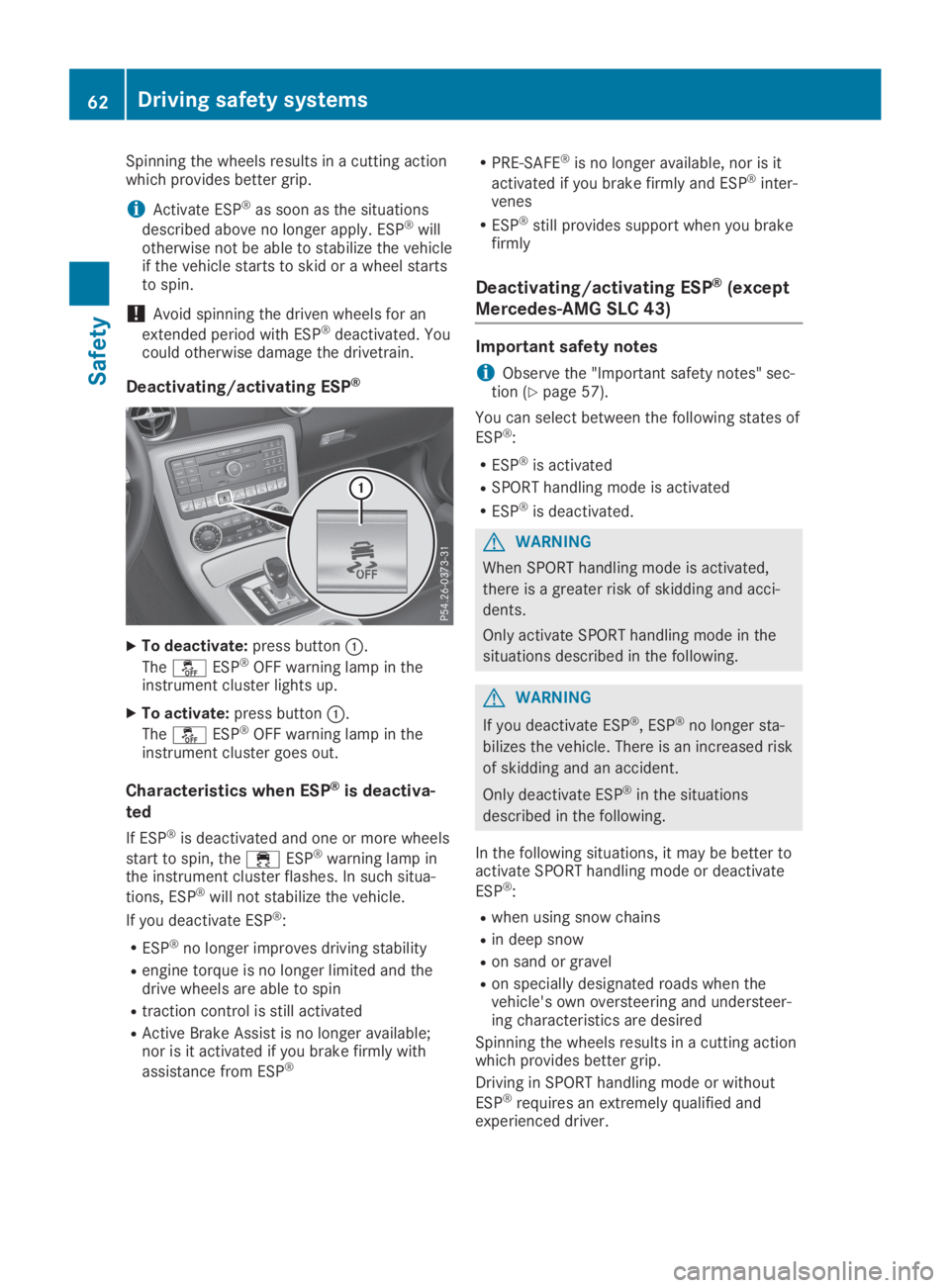
Deactivating/activating ESP®
XTo deactivate:press buttonC.
The
Page 65 of 306
iActivate ESP®as soon as the situations
described above no longer apply. ESP®willotherwise not be able to stabilize the vehicleif the vehicle starts to skid or a wheel startsto spin.
!Avoid spinning the driven wheels for an
extended period with ESP®deactivated. Youcould otherwise damage the drivetrain.
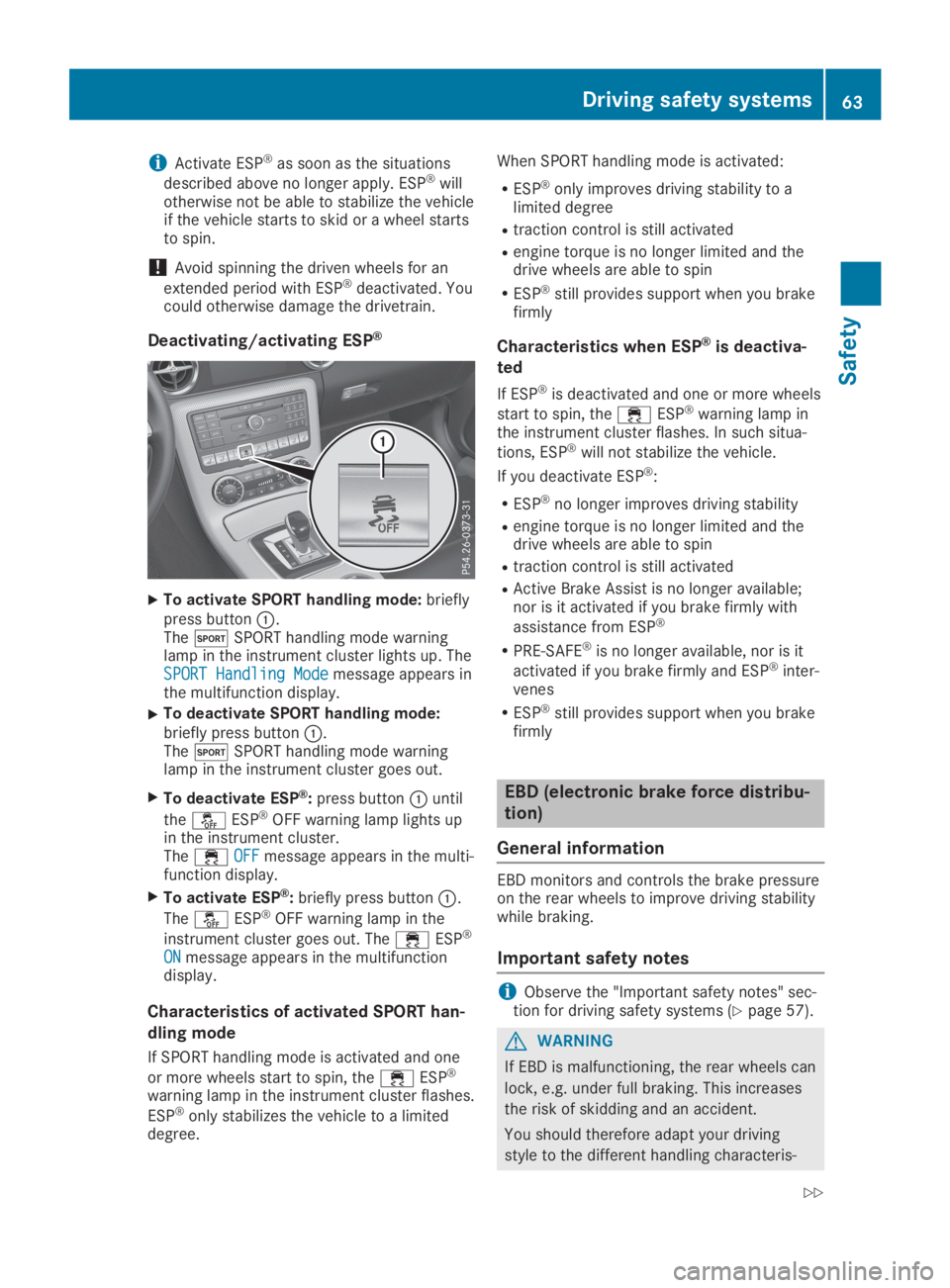
Deactivating/activating ESP®
XTo activate SPORT handling mode:brieflypress buttonC.ThetSPORT handling mode warninglamp in the instrument cluster lights up. TheSPORT Handling ModeSPORT Handling Modemessage appears inthe multifunction display.
XTo deactivate SPORT handling mode:briefly press buttonC.ThetSPORT handling mode warninglamp in the instrument cluster goes out.
XTo deactivate ESP®:press buttonCuntil
the
Page 69 of 306
Locking/unlocking centrally
You can start, lock or unlock the vehicle usingKEYLESS-GO. To do this, you only need carrythe SmartKey with you. You can combine thefunctions of KEYLESS-GO with those of a con-ventional SmartKey. Unlock the vehicle byusing KEYLESS-GO, for instance, and lock itusing the7button on the SmartKey.
The driver's door and the door at which thehandle is used, must both be closed. TheSmartKey must be outside the vehicle. Whenlocking or unlocking with KEYLESS-GO, thedistance between the key and the correspond-ing door handle must not be greater than 3 ft(1 m).
A check which periodically establishes a radioconnection between the vehicle and theSmartKey determines whether a valid Smart-Key is in the vehicle. This occurs, for example:
Rwhen starting the engine
Rwhile driving
Rwhen the external door handles are touched
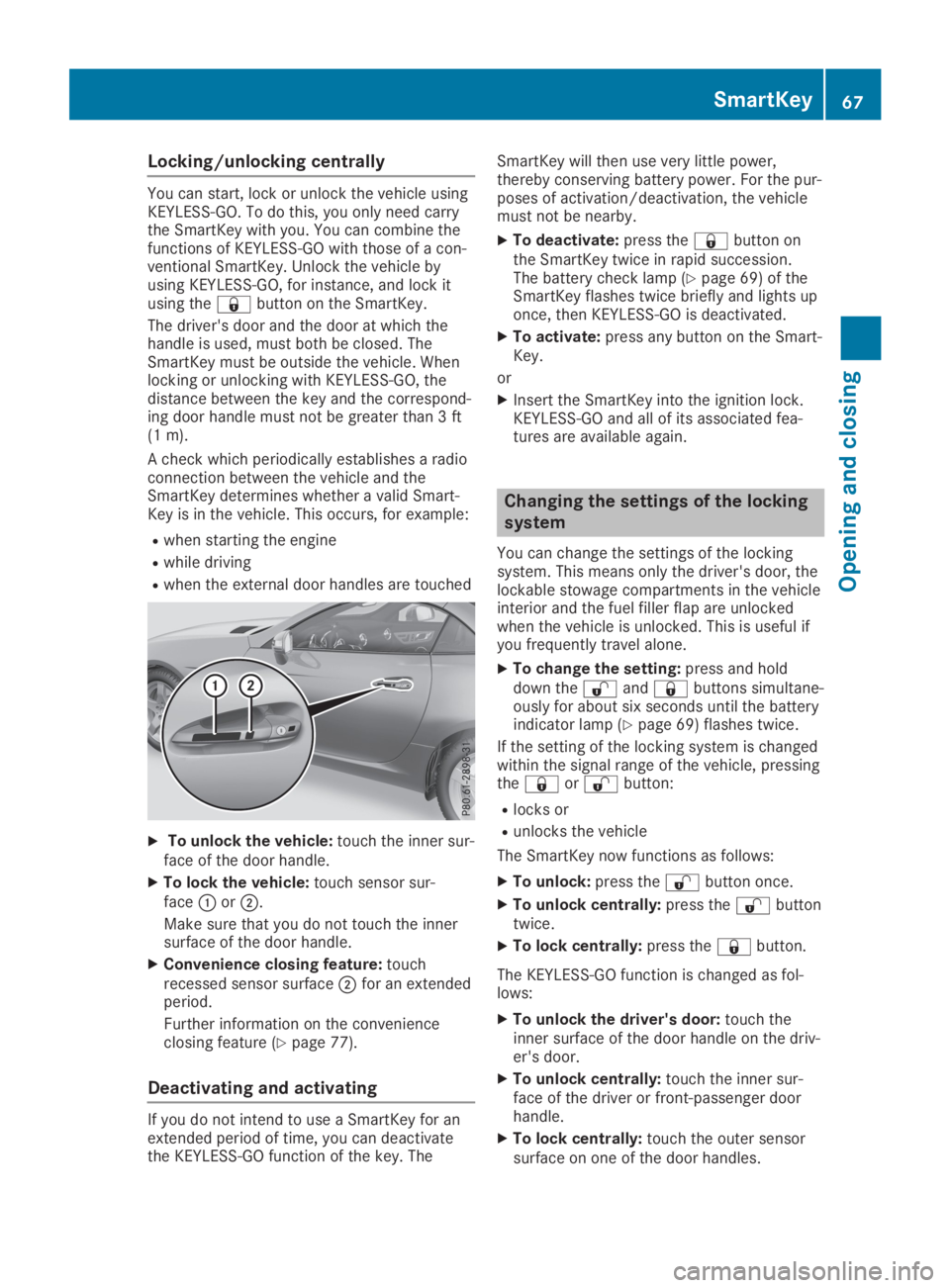
XTo unlock the vehicle:touch the inner sur-face of the door handle.
XTo lock the vehicle:touch sensor sur-faceCorD.
Make sure that you do not touch the innersurface of the door handle.
XConvenience closing feature:touchrecessed sensor surfaceDfor an extendedperiod.
Further information on the convenienceclosing feature (Ypage 77).
Deactivating and activating
If you do not intend to use a SmartKey for anextended period of time, you can deactivatethe KEYLESS-GO function of the key. The
SmartKey will then use very little power,thereby conserving battery power. For the pur-poses of activation/deactivation, the vehiclemust not be nearby.
XTo deactivate:press the7button onthe SmartKey twice in rapid succession.The battery check lamp (Ypage 69) of theSmartKey flashes twice briefly and lights uponce, then KEYLESS-GO is deactivated.
XTo activate:press any button on the Smart-Key.
or
XInsert the SmartKey into the ignition lock.KEYLESS-GO and all of its associated fea-tures are available again.
Changing the settings of the locking
system
You can change the settings of the lockingsystem. This means only the driver's door, thelockable stowage compartments in the vehicleinterior and the fuel filler flap are unlockedwhen the vehicle is unlocked. This is useful ifyou frequently travel alone.
XTo change the setting:press and holddown the6and7buttons simultane-ously for about six seconds until the batteryindicator lamp (Ypage 69) flashes twice.
If the setting of the locking system is changedwithin the signal range of the vehicle, pressingthe7or6button:
Rlocks or
Runlocks the vehicle
The SmartKey now functions as follows:
XTo unlock:press the6button once.
XTo unlock centrally:press the6buttontwice.
XTo lock centrally:press the7button.
The KEYLESS-GO function is changed as fol-lows:
XTo unlock the driver's door:touch theinner surface of the door handle on the driv-er's door.
XTo unlock centrally:touch the inner sur-face of the driver or front-passenger doorhandle.
XTo lock centrally:touch the outer sensorsurface on one of the door handles.
SmartKey67
Opening and closing
Z