2019 MERCEDES-BENZ SL CLASS engine
[x] Cancel search: enginePage 154 of 330

time. This may also occur after the vehicle hasbeen washed or driven through deep water.
You then have to depress the brake pedalmore firmly. Maintain a greater distance fromthe vehicle in front.
After driving on a wet road or having the vehi-cle washed, brake firmly while paying attentionto the traffic conditions. This will warm up thebrake discs, thereby drying them more quicklyand protecting them against corrosion.
Limited braking performance on salt-
treated roads
If you drive on salted roads, a layer of salt resi-due may form on the brake discs and brakepads. This can result in a significantly longerbraking distance.
RIn order to prevent any salt build-up, applythe brakes occasionally while paying atten-tion to the traffic conditions.
RCarefully depress the brake pedal and thebeginning and end of a journey.
RMaintain a greater distance to the vehicleahead.
Servicing the brakes
!The brake fluid level may be too low, if:
Rif the red brake warning lamp lights up inthe instrument cluster and
Ryou hear a warning tone while the engineis running
Observe additional warning messages in themultifunction display.
The brake fluid level may be too low due tobrake pad wear or leaking brake lines.
Have the brake system checked immedi-ately. Consult a qualified specialist work-shop to arrange this.
!As the ESP®system operates automati-cally, the engine and the ignition must beswitched off (the SmartKey must be in posi-tion
Page 155 of 330

New and replaced brake pads and discs onlyreach their optimum braking effect after sev-eral hundred kilometers of driving. Compen-sate for this by applying greater force to thebrake pedal. Keep this in mind, and adapt yourdriving and braking accordingly during thisbreak-in period.
Excessive heavy braking results in correspond-ingly high brake wear. Observe the brake sys-tem warning lamp in the instrument clusterand note any brake status messages in themultifunction display. Especially for high per-formance driving, it is important to maintainand have the brake system checked regularly.
Driving on wet roads
Hydroplaning
If water has accumulated to a certain depth onthe road surface, there is a danger of hydro-planing occurring.
For this reason, in the event of heavy rain or inconditions in which hydroplaning may occur,you must drive in the following manner:
Rlower your speed
Ravoid ruts
Ravoid sudden steering movements
Rbrake carefully
Driving on flooded roads
!Do not drive through flooded areas. Checkthe depth of any water before drivingthrough it. Drive slowly through standingwater. Otherwise, water could enter thevehicle interior or engine compartment. Itcan then damage the engine's or automatictransmission's electronic components. Itcan also be sucked in by the engine's airintake connection and cause engine dam-age.
Winter driving
GWARNING
If you shift down on a slippery road surface
in an attempt to increase the engine's brak-
ing effect, the drive wheels could lose their
grip. There is an increased danger of skid-
ding and accidents.
Do not shift down for additional engine brak-
ing on a slippery road surface.
GDANGER
If the exhaust pipe is blocked or adequate
ventilation is not possible, poisonous gases
such as carbon monoxide (CO) may enter
the vehicle. This is the case, e.g. if the vehi-
cle becomes trapped in snow. There is a risk
of fatal injury.
If you leave the engine or the auxiliary heat-
ing running, make sure the exhaust pipe and
area around the vehicle are clear of snow.
To ensure an adequate supply of fresh air,
open a window on the side of the vehicle
that is not facing into the wind.
Have your vehicle winter-proofed at a qualifiedspecialist workshop at the onset of winter.
Drive particularly carefully on slippery roadsurfaces. Avoid sudden acceleration, steeringand braking maneuvers. Do not use cruisecontrol.
If the vehicle threatens to skid or cannot bestopped when moving at low speed:
XShift the transmission to position\\.
The outside temperature indicator is notdesigned to serve as an ice-warning deviceand is therefore unsuitable for that purpose.Changes in the outside temperature are dis-played after a short delay.
Indicated temperatures just above the freezingpoint do not guarantee that the road surface isfree of ice. The road may still be icy, especiallyin wooded areas or on bridges. The vehiclecould skid if you fail to adapt your drivingstyle. Always adapt your driving style and driveat a speed to suit the prevailing weather condi-tions.
You should pay special attention to road con-ditions when temperatures are around freezingpoint.
For more information on driving with snowchains, see (Ypage 295).
For more information on driving with summertires, see (Ypage 295).
Driving tips153
Driving and parking
Z
Page 156 of 330

Observe the notes in the "Winter operation"section (Ypage 295).
Driving systems
Cruise control
General notes
Cruise control maintains a constant roadspeed for you. It brakes automatically in orderto avoid exceeding the set speed. On long andsteep downhill gradients, especially if the vehi-cle is laden, you must select a lower gear ingood time. By doing so, you will make use ofthe braking effect of the engine. This relievesthe load on the brake system and prevents thebrakes from overheating and wearing tooquickly.
Use cruise control only if road and traffic con-ditions make it appropriate to maintain asteady speed for a prolonged period. You canstore any road speed above 20 mph(30 km/h).
Important safety notes
If you fail to adapt your driving style, cruisecontrol can neither reduce the risk of an acci-dent nor override the laws of physics. Cruisecontrol cannot take into account the road,traffic and weather conditions. Cruise controlis only an aid. You are responsible for the dis-tance to the vehicle in front, for vehicle speed,for braking in good time and for staying inlane.
Do not use cruise control:
Rin road and traffic conditions which do notallow you to maintain a constant speed e.g.in heavy traffic or on winding roads
Ron slippery road surfaces. Braking or accel-erating could cause the drive wheels to losetraction and the vehicle could then skid
Rwhen there is poor visibility, e.g. due to fog,heavy rain or snow
If there is a change of drivers, advise the newdriver of the speed stored.
Cruise control lever
CTo store the current speed or a higherspeed
DTo store the current speed or calls up thelast stored speed
Page 158 of 330
Active Distance Assist DISTRONIC
General notes
Active Distance Assist DISTRONIC regulatesthe speed and automatically helps you main-tain the distance from the vehicle detected infront. Vehicles are detected with the aid of theradar sensor system. Active Distance AssistDISTRONIC brakes automatically to avoidexceeding the set speed or to maintain thedesignated distance from the vehicle in front.
You must select a lower gear in good time onlong and steep downhill gradients, especially ifthe vehicle is laden. By doing so, you will makeuse of the braking effect of the engine. Thisrelieves the load on the brake system and pre-vents the brakes from overheating and wear-ing too quickly.
If Active Distance Assist DISTRONIC detectsthat there is a risk of a collision with the vehi-cle in front, you will be warned visually andaudibly. Active Distance Assist DISTRONICcannot prevent a collision without your inter-vention. An intermittent warning tone will thensound and the distance warning lamp will lightup in the instrument cluster. Brake immedi-ately in order to increase the distance fromthe vehicle in front, or take evasive action, pro-vided it is safe to do so.
For Active Distance Assist DISTRONIC toassist you when driving, the radar sensor sys-tem must be operational.
Active Distance Assist DISTRONIC operates inthe speed range between 0 mph (0 km/h) and120 mph (200 km/h).
Do not use Active Distance Assist DISTRONICwhile driving on roads with steep gradients.
As Active Distance Assist DISTRONIC trans-mits radar waves, it can resemble the radardetectors of the responsible authorities. Youcan refer to the relevant chapter in the Opera-tor's Manual if questions are asked about this.
iUSA only:
This device has been approved by the FCCas a "Vehicular Radar System". The radarsensor is intended for use in an automotiveradar system only. Removing, tamperingwith, or altering the device will void any war-ranties, and is not permitted by the FCC. Donot tamper with, alter, or use in any non-approved way.
Any unauthorized modification to this devicecould void the user's authority to operatethe equipment.
iCanada only: This device complies withRSS-210 of Industry Canada. Operation issubject to the following two conditions:
1. This device may not cause interference,and
2. This device must accept any interferencereceived, including interference that maycause undesired operation of the device.
Removal, tampering, or altering of thedevice will void any warranties, and is notpermitted. Do not tamper with, alter, or usein any non-approved way.
Any unauthorized modification to this devicecould void the user's authority to operatethe equipment.
Important safety notes
GWARNING
Active Distance Assist DISTRONIC does not
react to:
Rpeople or animals
Rstationary objects in the road, e.g. stop-
ped or parked vehicles
Roncoming vehicles and crossing traffic
As a result, Active Distance Assist
DISTRONIC may neither give warnings nor
intervene in such situations. There is a risk
of an accident.
Always pay careful attention to the traffic
situation and be ready to brake.
GWARNING
Active Distance Assist DISTRONIC does not
react to:
Rpeople or animals
Rstationary objects in the road, e.g. stop-
ped or parked vehicles (vehicles without
the Driving Assistance package)
Rstationary objects in the road, e.g. stop-
ped or parked vehicles, if sufficient detec-
tion is not possible (vehicles with the Driv-
ing Assistance package)
Roncoming vehicles and crossing traffic
156Driving systems
Driving and pa rking
Page 162 of 330
cient distance behind the vehicle in front. Thespecified minimum distance is set using thecontrol on the cruise control lever.
The electric parking brake secures the vehicleautomatically if Active Distance AssistDISTRONIC is activated and:
Rthe driver's door is open and the driver'sseat belt is unfastened
Rthe engine is switched off, unless it is auto-matically switched off by the ECO start/stop function
Ra system malfunction occurs
Rthe power supply is not sufficient
If a malfunction in the electric parking brakeoccurs, then the transmission may also beshifted into position]automatically.
Setting a speed
Keep in mind that it may take a brief momentuntil the vehicle has accelerated or braked tothe speed set.
XTo adjust the set speed in 1 mph incre-ments (1 km/h increments):briefly pressthe cruise control lever upCto the pres-sure point for a higher speed, or downDfor a lower speed.Every time the cruise control lever ispressed up or down, the last speed stored isincreased or reduced.
XTo adjust the set speed in 5 mph incre-ments (10 km/h increments):brieflypress the cruise control lever upCpast thepressure point for a higher speed, ordownDfor a lower speed.Every time the cruise control lever ispressed up or down, the last speed stored isincreased or reduced.
Setting a specified minimum distance
You can set the specified minimum distancefor Active Distance Assist DISTRONIC by vary-ing the time span between one and two sec-onds. This determines the distance that ActiveDistance Assist DISTRONIC is to maintain fromthe vehicle in front, depending on the roadspeed. You can see this distance in the multi-function display (Ypage 160).
The specified minimum distance can bechanged while Active Distance AssistDISTRONIC is switched on or off.
Make sure that you maintain a sufficiently safedistance from the vehicle in front. Adjust thedistance to the vehicle in front if necessary.
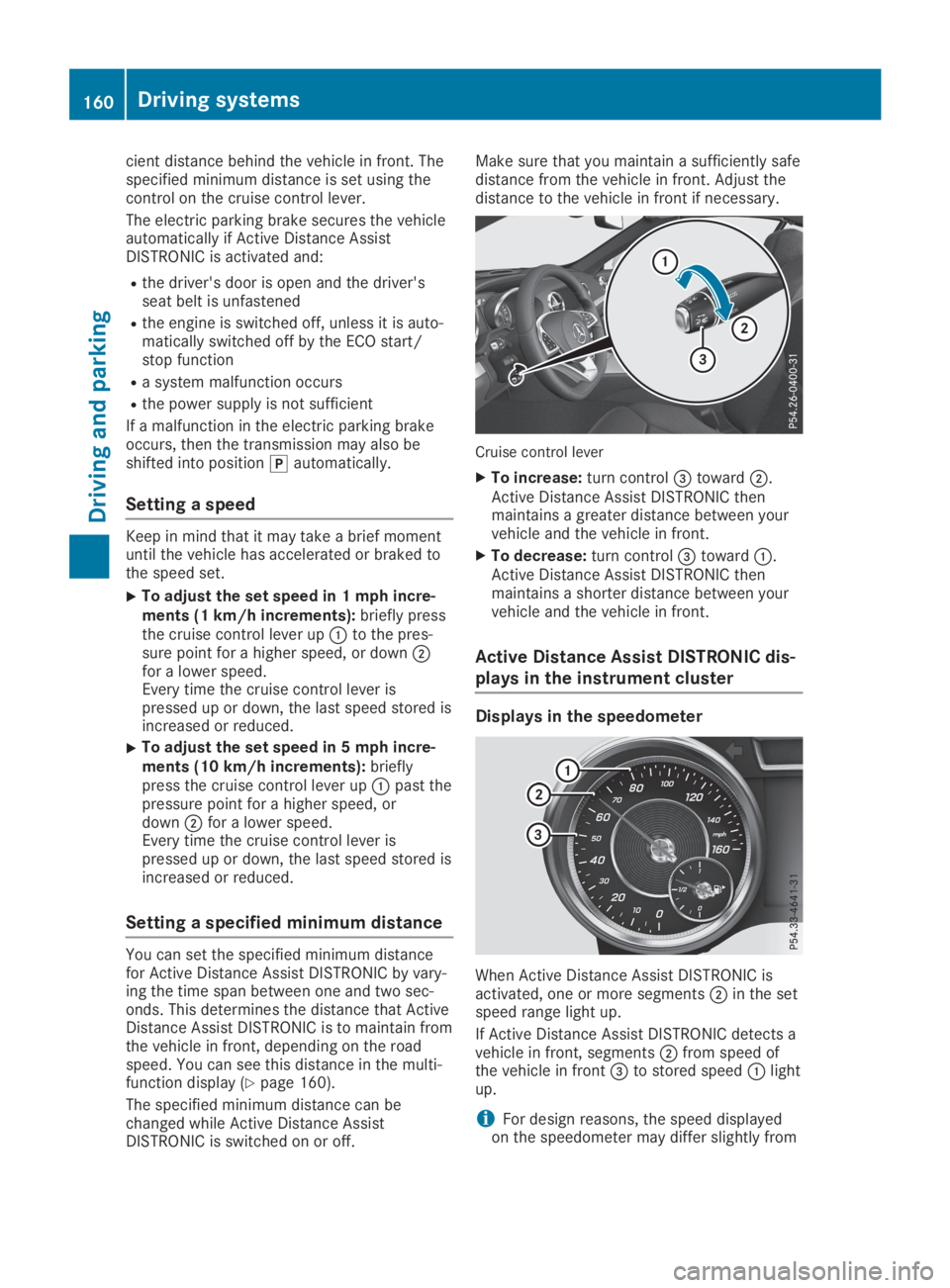
Cruise control lever
XTo increase:turn control
Page 167 of 330
HOLD function
General notes
The HOLD function can assist the driver in thefollowing situations:
RWhen pulling away, especially on steepslopes
RWhen maneuvering on steep slopes
RWhen waiting in traffic
The vehicle is kept stationary without thedriver having to depress the brake pedal.
The braking effect is canceled and the HOLDfunction deactivated when you depress theaccelerator pedal to pull away.
Important safety notes
GWARNING
If the vehicle is only braked using the HOLD
function, the vehicle may roll away in the fol-
lowing situations when you leave the vehi-
cle:
Rif there is a malfunction in the system or
in the voltage supply
Rif the HOLD function is deactivated by
depressing the accelerator pedal or brake
pedal, e.g. by a vehicle occupant
There is a risk of an accident.
Always deactivate the HOLD function and
secure the vehicle against rolling away
before you leave it.
!When Active Distance Assist DISTRONICor the HOLD function is activated, the vehi-cle brakes automatically in certain situa-tions.
To avoid damage to the vehicle, deactivateActive Distance Assist DISTRONIC and theHOLD function in the following or similar sit-uations:
Rwhen towing the vehicle
Rin the car wash
Deactivating the HOLD function (Ypage 165).
Activation conditions
You can activate the HOLD function if all of thefollowing conditions are fulfilled:
Rthe vehicle is stationary.
Rthe engine is running or if it has been auto-matically switched off by the ECO start/stop function.
Rthe driver's door is closed or your seat beltis fastened.
Rthe electric parking brake is released.
Rthe transmission is in position[,^or\\.
RActive Distance Assist DISTRONIC is deacti-vated
Activating the HOLD function
XMake sure that the activation conditions aremet.
XDepress the brake pedal.
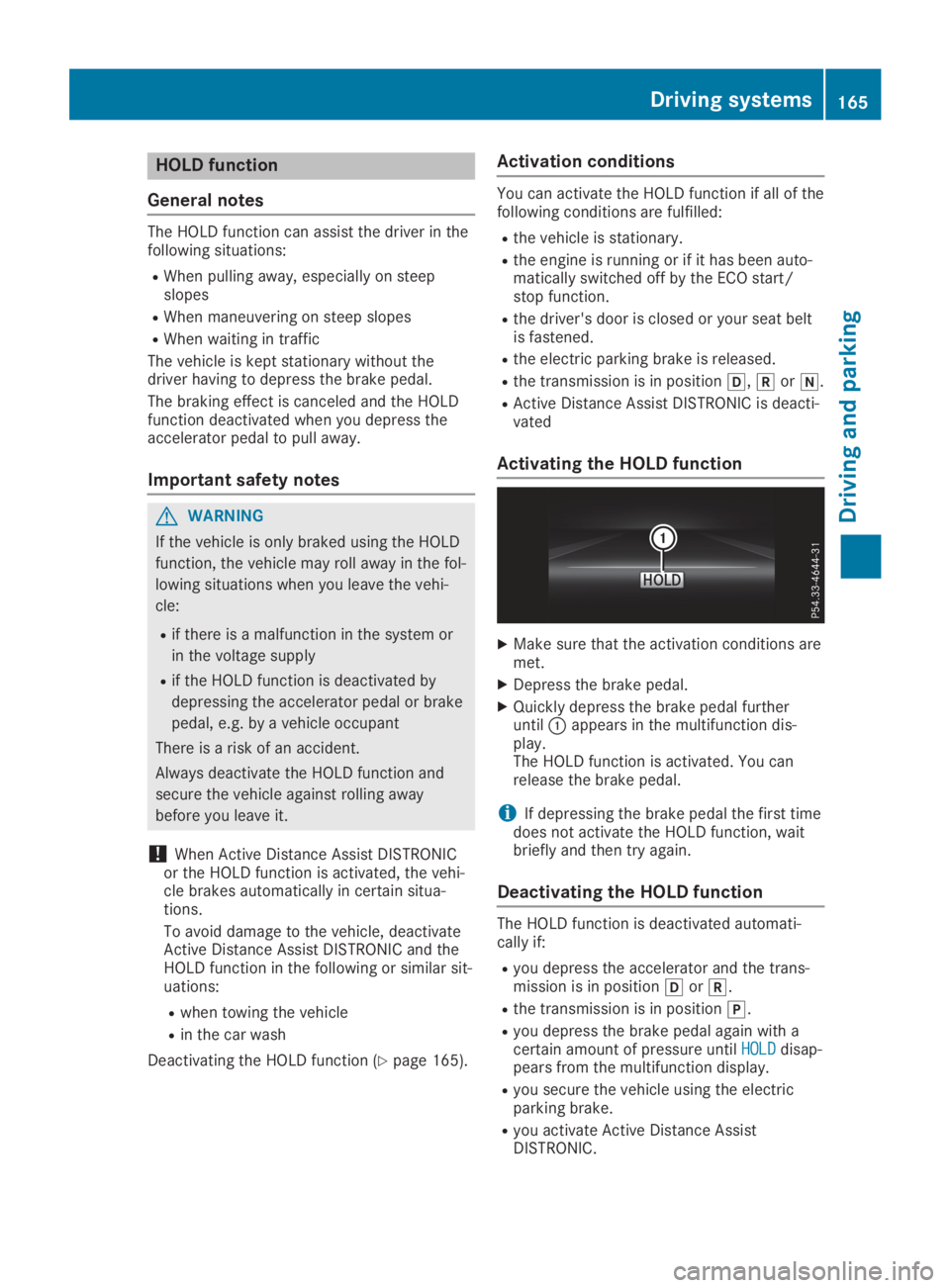
XQuickly depress the brake pedal furtheruntilCappears in the multifunction dis-play.The HOLD function is activated. You canrelease the brake pedal.
iIf depressing the brake pedal the first timedoes not activate the HOLD function, waitbriefly and then try again.
Deactivating the HOLD function
The HOLD function is deactivated automati-cally if:
Ryou depress the accelerator and the trans-mission is in position[or^.
Rthe transmission is in position].
Ryou depress the brake pedal again with acertain amount of pressure untilHOLDHOLDdisap-pears from the multifunction display.
Ryou secure the vehicle using the electricparking brake.
Ryou activate Active Distance AssistDISTRONIC.
Driving systems165
Driving and parking
Z
Page 168 of 330
![MERCEDES-BENZ SL CLASS 2019 Owners Manual iAfter a time, the electric parking brakesecures the vehicle and relieves the servicebrake.
When the HOLD function is activated, thetransmission is shifted automatically to posi-tion]if:
Rthe driver&](/manual-img/4/59125/w960_59125-167.png "MERCEDES-BENZ SL CLASS 2019 Owners Manual iAfter a time, the electric parking brakesecures the vehicle and relieves the servicebrake.
When the HOLD function is activated, thetransmission is shifted automatically to posi-tion]if:
Rthe driver&")
iAfter a time, the electric parking brakesecures the vehicle and relieves the servicebrake.
When the HOLD function is activated, thetransmission is shifted automatically to posi-tion]if:
Rthe driver's seat belt is not fastened and thedriver's door is open.
Rthe engine is switched off, unless it is auto-matically switched off by the ECO start/stop function.
The electric parking brake secures the vehicleautomatically if the HOLD function is activatedwhen the vehicle is stationary and:
Ra system malfunction occurs
Rthe power supply is not sufficient
If a malfunction in the electric parking brakeoccurs, the transmission may also be shiftedinto position]automatically.
RACE START
Important safety notes
iRACE START must not be used on normalroads. RACE START must only be activatedand used on dedicated road circuits, outsideof public road use.
iRACE START is only available forMercedes‑AMG vehicles.
RACE START enables optimal accelerationfrom a standing start. For this, a suitably high-grip road surface is required and the vehicleand tires must be in good working order.
GWARNING
If you use RACE START, individual tires may
start to spin and the vehicle could skid.
Depending on the selected ESP®mode,
there is an increased risk of skidding and
having an accident. Make sure that no per-
sons, animals or obstacles are within range
of the vehicle.
iObserve the safety notes on driving safetysystems (Ypage 60).
Be sure to read the safety notes and infor-
mation on ESP®(Ypage 65).
Activation conditions
You can activate RACE START if:
Rthe doors are closed.
Rthe engine is running and it has reached anoperating temperature of approximately160 ‡ (71 †). This is the case when the oiltemperature gage in the multifunction dis-play is shown in white.
Rthe engine is running and the engine andtransmission are at operating temperature.This is the case when the oil temperaturegage in the multifunction display is shown inwhite (Ypage 202).
RESP®is functioning correctly (Ypage 66)
Rthe drive programS,S+orRaceis selected(Ypage 133)
Rthe steering wheel is in the straight-aheadposition
Rthe vehicle is stationary and the brake pedalis depressed (left foot)
Rthe transmission is in position[
Activating RACE START
iWhen manual mode (Ypage 141) is active,the transmission automatically shifts up inthe RACE START drive program. This func-tion supports maximum acceleration withRACE START. After going through an accel-erating process once from a stationary posi-tion, this function is automatically deactiva-ted.
XDepress the brake pedal with your left footand keep it depressed.
XPull and hold both steering wheel paddleshifters.
XTheRACE START Confirm: Paddle UPRACE START Confirm: Paddle UPCancel: Paddle DOWNCancel: Paddle DOWNmessage appears inthe multifunction display.
XRelease both steering wheel paddle shifters.
iIf the activation conditions are no longerfulfilled, RACE START is canceled. TheRACE START CanceledRACE START Canceledmessage appears inthe multifunction display.
166Driving systems
Driving an d parking
Page 169 of 330
XTo cancel:pull the left-hand steering wheelpaddle shifter (Ypage 141).
or
XTo confirm:pull the right-hand steeringwheel paddle shifter (Ypage 141).TheRACE START Available DepressRACE START Available Depressgas pedal.gas pedal.message appears in the multi-function display.
iIf you do not depress the accelerator pedalwithin a few seconds, RACE START is can-celed. The multifunction display shows theRACE START CanceledRACE START Canceledmessage.
XDepress the accelerator pedal completely,until the engine speed stops increasing.TheRACE START Release brake toRACE START Release brake tostartstartmessage appears in the multifunctiondisplay.
iIf you do not release the brake pedalwithin five seconds, RACE START is can-celed. TheRACE START CanceledRACE START Canceledmessageappears in the multifunction display.
XTake your foot off the brake, but keep theaccelerator pedal depressed.The vehicle pulls away at maximum acceler-ation.
TheRACE START ActiveRACE START Activemessage appearsin the multifunction display.
RACE START is deactivated when the vehiclereaches a speed of approximately 30 mph(Canada: 50 km/h).
RACE START is deactivated immediately if yourelease the accelerator pedal during RACESTART or if any of the activation conditions areno longer fulfilled. TheRACE START Not Pos‐RACE START Not Pos‐sible See Operator's Manualsible See Operator's ManualorRACERACESTART CanceledSTART Canceledmessage appears in the mul-tifunction display.
iIf RACE START is used repeatedly within ashort period of time, it is only availableagain after the vehicle has been driven acertain distance.
Adaptive damping system
General notes
A suspension with the adaptive damping sys-tem provides improved driving comfort andcontinuously controls the calibration of thedampers. The damping characteristics adaptto the current operating and driving situation.
The damping is tuned individually to eachwheel and depends on:
Ryour driving style, e.g. sporty
Rthe road surface conditions
Rthe selected drive program (Ypage 132).
Selecting the Comfort or Economy
drive programs
In theComfortandEconomydrive programs,the driving characteristics of your vehicle aremore comfortable. Select one of these driveprograms if you favor a more comfortable driv-ing style. Also select these drive programswhen driving fast on straight roads, e.g. onstraight stretches of highway.
In urban traffic and stop-start traffic, drive pro-gramCis recommended.
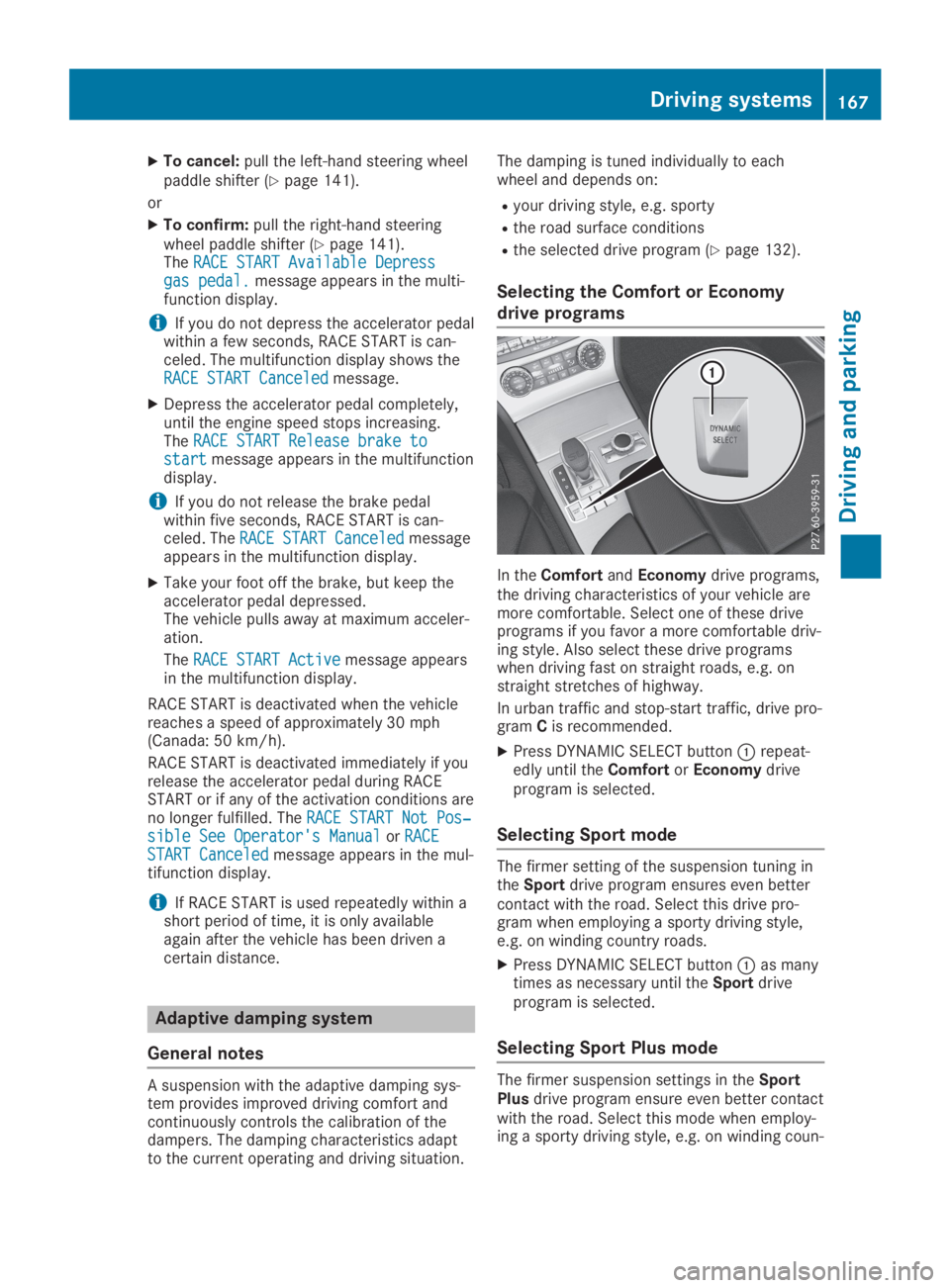
XPress DYNAMIC SELECT buttonCrepeat-edly until theComfortorEconomydriveprogram is selected.
Selecting Sport mode
The firmer setting of the suspension tuning intheSportdrive program ensures even bettercontact with the road. Select this drive pro-gram when employing a sporty driving style,e.g. on winding country roads.
XPress DYNAMIC SELECT buttonCas manytimes as necessary until theSportdriveprogram is selected.
Selecting Sport Plus mode
The firmer suspension settings in theSportPlusdrive program ensure even better contactwith the road. Select this mode when employ-ing a sporty driving style, e.g. on winding coun-
Driving systems167
Driving an d parking
Z