2019 MERCEDES-BENZ SL CLASS lock
[x] Cancel search: lockPage 107 of 330
Mirrors
Exterior mirrors
Adjusting the exterior mirrors
GWARNING
You could lose control of your vehicle if you
do the following while driving:
Radjust the driver's seat, head restraint,
steering wheel or mirrors
Rfasten the seat belt
There is a risk of an accident.
Adjust the driver's seat, head restraint,
steering wheel and mirror and fasten your
seat belt before starting the engine.
GWARNING
The exterior mirror on the front-passenger
side reduces the size of the image. Visible
objects are actually closer than they appear.
This means that you could misjudge the dis-
tance from road users traveling behind, e.g.
when changing lane. There is a risk of an
accident.
For this reason, always make sure of the
actual distance from the road users traveling
behind by glancing over your shoulder.
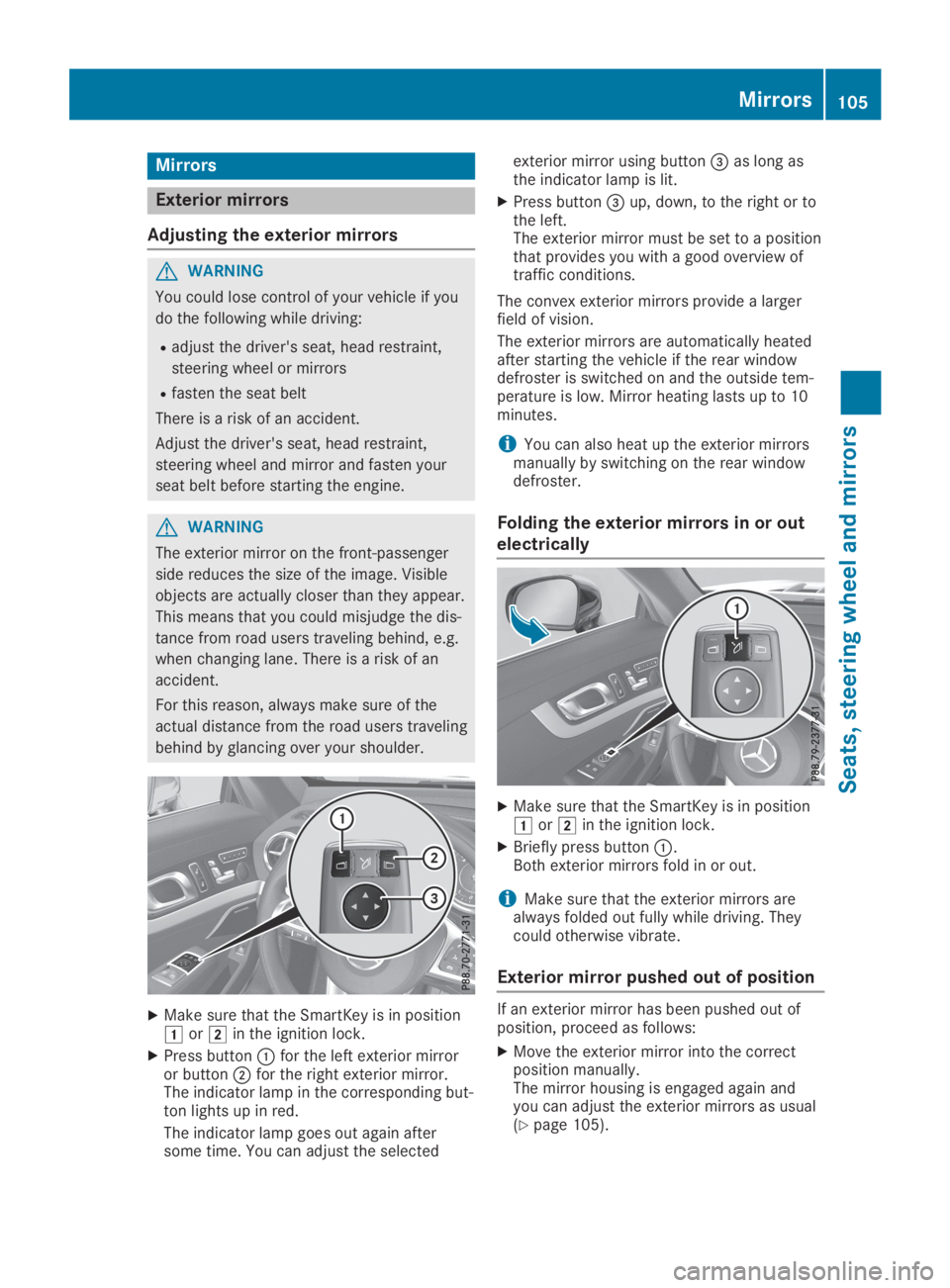
XMake sure that the SmartKey is in positionGorHin the ignition lock.
XPress buttonCfor the left exterior mirroror buttonDfor the right exterior mirror.The indicator lamp in the corresponding but-ton lights up in red.
The indicator lamp goes out again aftersome time. You can adjust the selected
exterior mirror using button
Page 110 of 330
When leaving the vehicle, always take the
SmartKey with you and lock the vehicle. This
also applies for the Digital Vehicle Key if the
"Digital Vehicle Key" function is activated via
Mercedes me connect.
The memory function can be activated at anytime, e.g. even when the SmartKey is not inthe ignition lock.
With the memory function, you can store up tothree different settings, e.g. for three differentpeople.
The following settings are stored as a singlememory preset:
RPosition of the seat, backrest and headrestraint
RDriver's side: steering wheel position
RDriver's side: position of the exterior mirrorson the driver's and front-passenger sides
XAdjust the seat electrically (Ypage 99).
XOn the driver's side, adjust the steeringwheel (Ypage 103) and the exterior mirrors(Ypage 105).
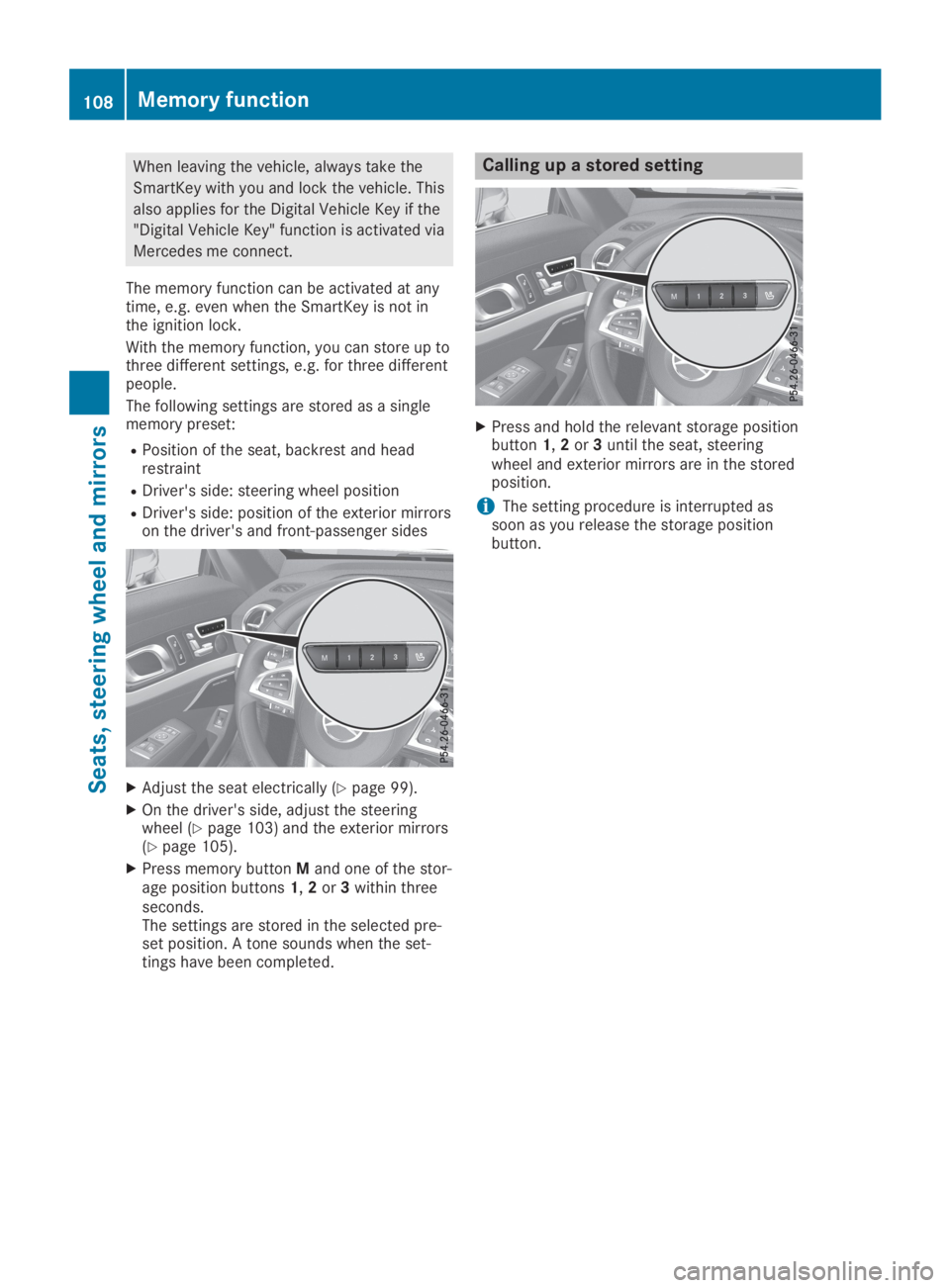
XPress memory buttonMand one of the stor-age position buttons1,2or3within threeseconds.The settings are stored in the selected pre-set position. A tone sounds when the set-tings have been completed.
Calling up a stored setting
XPress and hold the relevant storage positionbutton1,2or3until the seat, steeringwheel and exterior mirrors are in the storedposition.
iThe setting procedure is interrupted assoon as you release the storage positionbutton.
108Memory function
Seats, steering wheel and mirrors
Page 112 of 330

When the engine is running, the vehicle is sta-tionary and in bright ambient light: if you turnthe light switch to the`position, the day-time running lamps and parking lamps switchon.
If the engine is running and you turn the lightswitch toX, the manual settings take prec-edence over the daytime running lamps.
USA only:
The daytime running lamps improve the visibil-ity of your vehicle during the day. To do this,the daytime running lamps function must beswitched on using the on-board computer(Ypage 200).
If the engine is running and you turn the lightswitch to`orX, the manual settingstake precedence over the daytime runninglamps.
Low-beam headlamps
GWARNING
When the light switch is set toX, the
low-beam headlamps may not be switched
on automatically if there is fog, snow or
other causes of poor visibility due to the
weather conditions such as spray. There is a
risk of an accident.
In such situations, turn the light switch to
X.
Even if the light sensor does not detect that itis dark, the parking lamps and low-beam head-lamps switch on when the ignition is switchedon and the light switch is set to theXposi-tion. This is a particularly useful function in theevent of rain and fog.
XTo switch on the low-beam headlamps:turn the SmartKey to positionHin the igni-tion lock or start the engine.
XTurn the light switch toX.The greenXindicator lamp in the instru-ment cluster lights up.
Parking lamps
!If the battery charge is very low, the park-ing lamps or standing lamps are automati-cally switched off to enable the next enginestart. Always park your vehicle safely and ina well lit area, in accordance with the rele-vant legal stipulations. Avoid using the`parking lamps over a period of several
hours. If possible, switch on the right-handdor left-handcstanding lamps.
XTo switch on:turn the light switch to`.The green`indicator lamp in the instru-ment cluster lights up.
Standing lamps
Switching on the standing lamps ensures thecorresponding side of the vehicle is illumina-ted.
XTo switch on the standing lamps:theSmartKey is not in the ignition lock or it is inposition
Page 114 of 330

detects any other vehicles, it reactivates thehigh-beam headlamps.
The system's optical sensor is located behindthe windshield near the overhead controlpanel.
Important safety notes
GWARNING
Adaptive Highbeam Assist does not recog-
nize road users:
Rwho have no lights, e.g. pedestrians
Rwho have poor lighting, e.g. cyclists
Rwhose lighting is blocked, e.g. by a barrier
On very rare occasions, Adaptive Highbeam
Assist may fail to recognize other road users
that have lights, or may recognize them too
late. In this, or in similar situations, the auto-
matic high-beam headlamps will not be
deactivated or will be activated regardless.
There is a risk of an accident.
Always carefully observe the traffic condi-
tions and switch off the high-beam head-
lamps in good time.
Adaptive Highbeam Assist cannot take intoaccount road, weather or traffic conditions.Adaptive Highbeam Assist is only an aid. Youare responsible for adjusting the vehicle'slighting to the prevailing light, visibility andtraffic conditions.
In particular, the detection of obstacles can berestricted if there is:
Rpoor visibility, e.g. due to fog, heavy rain orsnow
Rdirt on the sensors or the sensors areobscured
Switching Adaptive Highbeam Assist
on/off
XTo switch on:turn the light switch toX.
XPress the combination switch beyond thepressure point in the direction of arrowC.The
Page 115 of 330
Interior lighting control
General notes
In order to prevent the vehicle's battery fromdischarging, the interior lighting functions areautomatically deactivated after some time,unless the SmartKey is in positionHin theignition lock.
The color and brightness of the ambient light-ing are set via the multimedia system(Ypage 200).
Automatic interior lighting control
XTo switch on:set the switch to center posi-tionK.
XTo switch off:set the switch to the3position.
The interior lighting automatically switches onif you:
Runlock the vehicle
Ropen a door
Rremove the SmartKey from the ignition lock
The interior lighting is switched on for a settime when the SmartKey is removed from theignition lock. You can activate this delayedswitch-off using the on-board computer(Ypage 201).
Replacing bulbs
The front and rear lamps of your vehicle areequipped with LED bulbs. Do not replace thebulbs yourself. Contact a qualified specialistworkshop which has the necessary specialistknowledge and tools to carry out the workrequired.
Bulbs and lamps are an important aspect ofvehicle safety. You must therefore make surethat these function correctly at all times. Havethe headlamp setting checked regularly.
Windshield wipers
Switching the windshield wipers
on/off
!Do not operate the windshield wiperswhen the windshield is dry, as this could
damage the wiper blades. Moreover, dustthat has collected on the windshield canscratch the glass if wiping takes place whenthe windshield is dry.
If it is necessary to switch on the windshieldwipers in dry weather conditions, always usewasher fluid when operating the windshieldwipers.
!If the windshield wipers leave smears onthe windshield after the vehicle has beenwashed in an automatic car wash, wax orother residues may be the reason for this.Clean the windshield using washer fluidafter washing the vehicle in an automaticcar wash.
!Intermittent wiping with rain sensor: dueto optical influences and the windshieldbecoming dirty in dry weather conditions,the windshield wipers may be activatedinadvertently. This could then damage thewindshield wiper blades or scratch the wind-shield.
For this reason, you should always switchoff the windshield wipers in dry weather.
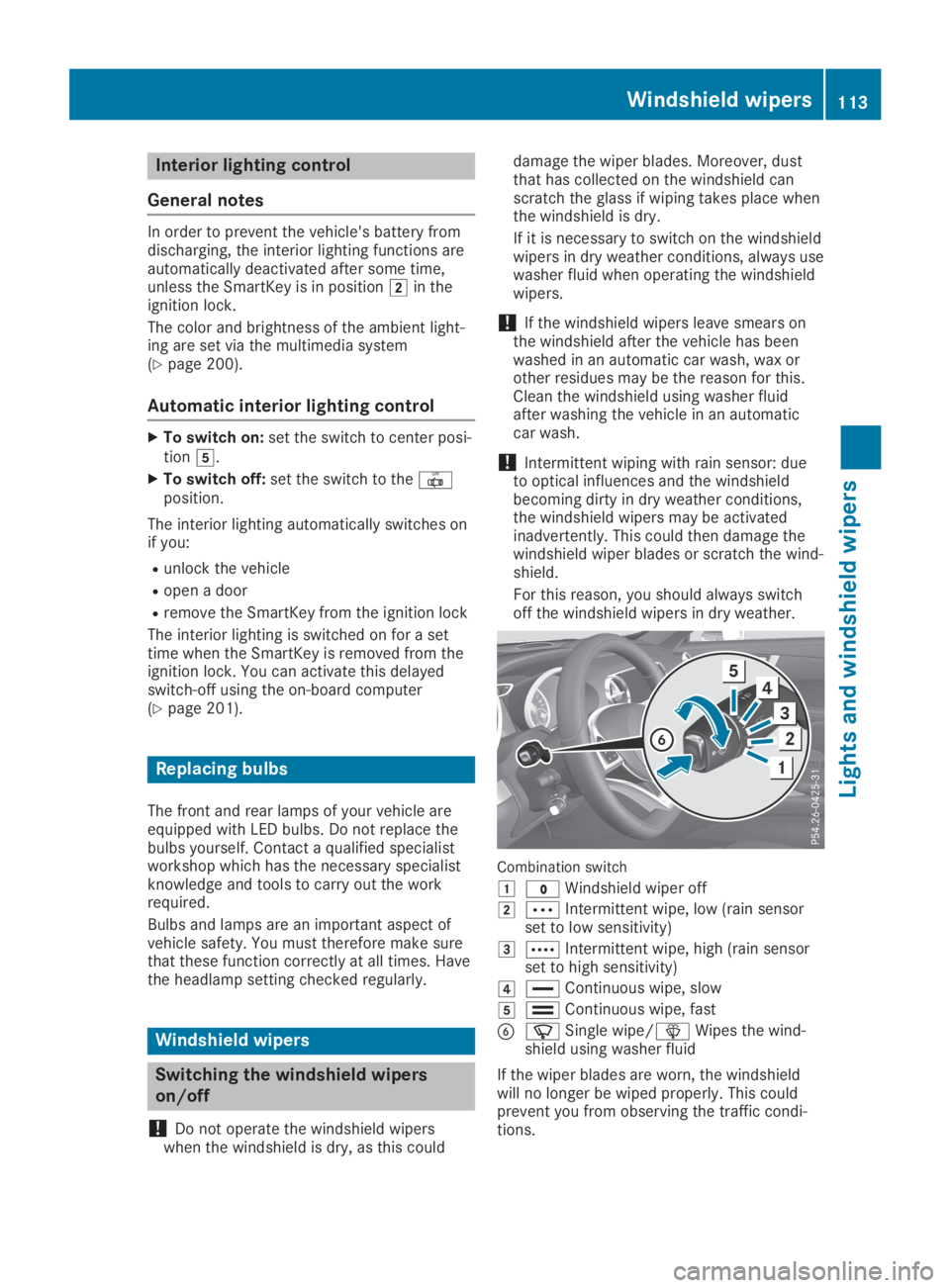
Combination switch
G?Windshield wiper off
HbIntermittent wipe, low (rain sensorset to low sensitivity)
IcIntermittent wipe, high (rain sensorset to high sensitivity)
J
Page 116 of 330
Replacing the wiper blades
Important safety notes
GWARNING
If the windshield wipers begin to move while
you are changing the wiper blades, you
could be trapped by the wiper arm. There is
a risk of injury.
Always switch off the windshield wipers and
ignition before changing the wiper blades.
!To avoid damaging the wiper blades, makesure that you touch only the wiper arm ofthe wiper.
!Never open the hood if a windshield wiperarm has been folded away from the wind-shield.
Never fold a windshield wiper arm without awiper blade back onto the windshield.
Hold the windshield wiper arm firmly whenyou change the wiper blade. If you releasethe windshield wiper arm without a wiperblade and it falls onto the windshield, thewindshield may be damaged by the force ofthe impact.
Mercedes-Benz recommends that you havethe wiper blades changed at a qualified spe-cialist workshop.
!Always position the windshield wiper armsvertically before folding them away from thewindshield. By doing so, you will avoid dam-age to the hood.
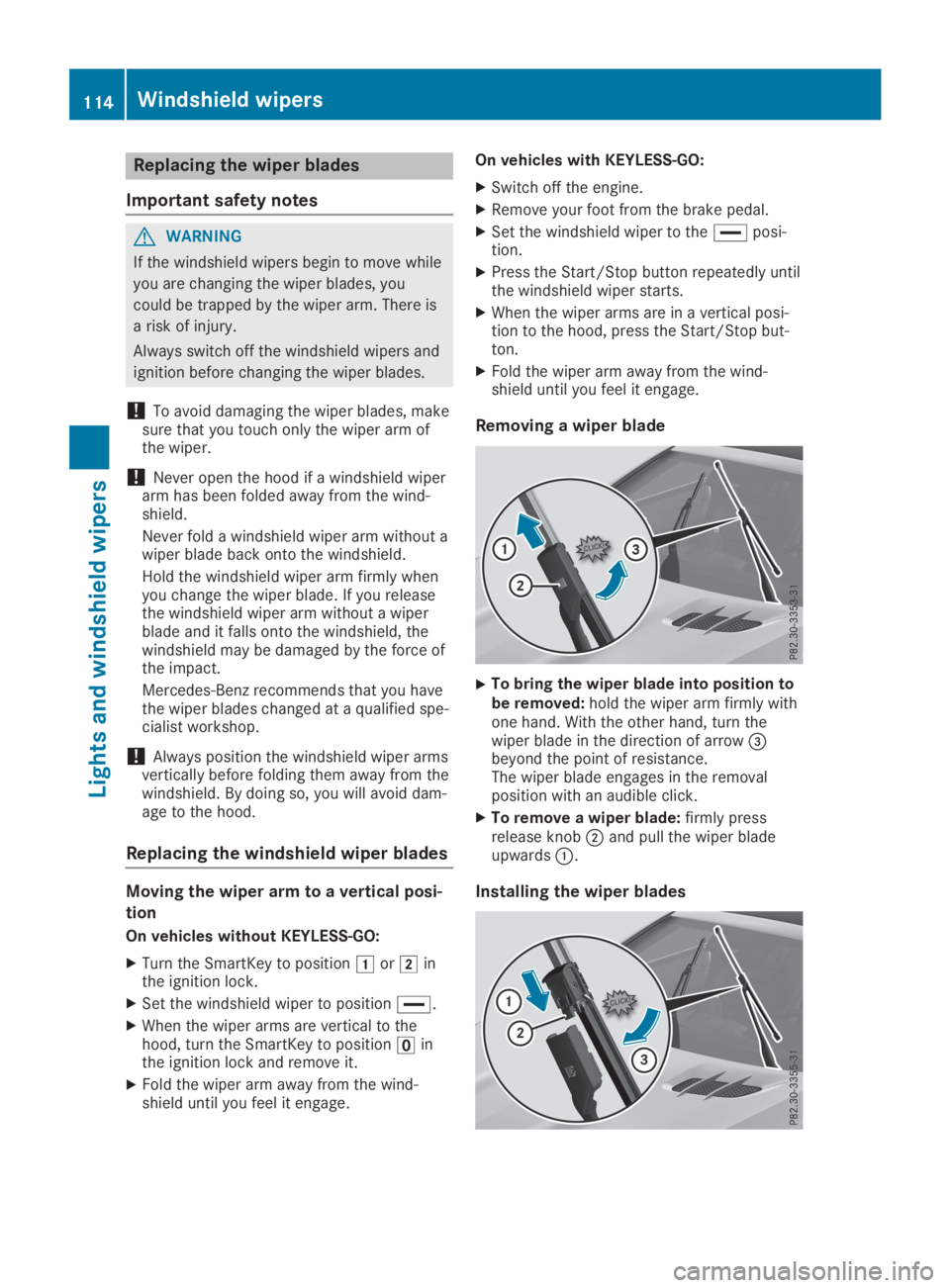
Replacing the windshield wiper blades
Moving the wiper arm to a vertical posi-
tion
On vehicles without KEYLESS-GO:
XTurn the SmartKey to positionGorHinthe ignition lock.
XSet the windshield wiper to position
Page 120 of 330

RUse the residual heat function if you want toheat or ventilate the vehicle interior whenthe ignition is switched off. The residualheat function can only be activated or deac-tivated with the ignition switched off.
RVehicles with COMAND:if you change thesettings of the climate control system, theclimate status display appears for three sec-onds at the bottom of the screen in theCOMAND display. You will see the currentsettings of the various climate control func-tions.
ECO start/stop function
During automatic engine switch-off, the cli-mate control system only operates at areduced capacity. If you require full climatecontrol capacity, the ECO start/stop functioncan be deactivated by pressing the ECO but-ton (Ypage 130).
Operating the climate control sys-
tems
Activating/deactivating climate con-
trol
General notes
When the climate control is switched off, theair supply and air circulation are also switchedoff. The windows could fog up. Therefore,switch off climate control only briefly
iActivate climate control primarily using theXbutton (Ypage 119).
Activating/deactivating
XTurn the SmartKey to positionHin the igni-tion lock (Ypage 126).
XTo activate:press theXbutton.The indicator lamp in theXbutton lightsup. Airflow and air distribution are set toautomatic mode.
or
XPress thexbutton.The indicator lamp in thexbutton goesout. The previously selected settings arerestored.
XTo deactivate:press thexbutton.The indicator lamp in thexbutton lightsup.
Switching cooling with air dehumidi-
fication on/off
General notes
If you deactivate the "Cooling with air-dehu-midification" function, the air inside the vehiclewill not be cooled. The air inside the vehiclewill also not be dehumidified. The windows canfog up more quickly. Therefore, deactivate thecooling with air-dehumidification function onlybriefly.
The "Cooling with air dehumidification" func-tion is only available when the engine is run-ning. The air inside the vehicle is cooled anddehumidified according to the temperatureselected.
Condensation may drip from the underside ofthe vehicle when it is in cooling mode. This isnormal and not a sign that there is a malfunc-tion.
Activating/deactivating
XTo activate:press theZbutton.The indicator lamp in theZbutton lightsup.
XTo deactivate:press theZbutton.The indicator lamp in theZorVbut-ton goes out. The "Cooling with air dehumid-ification" function has a delayed switch-offfeature.
The indicator lamp in theZbutton goesout. The "Cooling with air dehumidification"function has a delayed switch-off feature.
118Operating the climate control systems
Climate control
Page 121 of 330

Problems with the "Cooling with air dehumidification" function
ProblemPossible causes/consequences andPPSolutions
The indicator lamp intheZbutton flashesthree times or remainsoff. The "Cooling withair dehumidification"function cannot beswitched on.
Cooling with air dehumidification has been deactivated due to amalfunction.
XVisit a qualified specialist workshop.
Setting climate control to automatic
General notes
In automatic mode, the set temperature ismaintained automatically at a constant level.The system automatically regulates the tem-perature of the dispensed air, the airflow andthe air distribution.
The automatic mode functions optimally whenthe "Cooling with air dehumidification" func-tion is activated. If necessary, cooling with airdehumidification can be deactivated.
If you deactivate the "Cooling with air-dehu-midification" function, the air inside the vehiclewill not be cooled. The air inside the vehiclewill also not be dehumidified. The windows canfog up more quickly. Therefore, deactivate thecooling with air-dehumidification function onlybriefly.
Automatic control
XTurn the SmartKey to positionHin the igni-tion lock (Ypage 126).
XSet the desired temperature.
XTo activate:press theXbutton.The indicator lamp in theXbutton lightsup. Automatic air distribution and airflow areactivated.
iWhen automatic mode is enabled, the cli-mate mode can be selected (Ypage 119).
XTo switch to manual mode:press the