2019 MERCEDES-BENZ GLS SUV heating
[x] Cancel search: heatingPage 603 of 729
The
recommended octane number foryo ur vehi‐
cle can also be found on the instruction label in
th e fuel filler flap (/ page212).
As a temp orary measure, if there commended
fuel is not available, you may also use regular
unleaded petrol with at least 91RON. This may
re duce engine output and increase fuel con‐
sum ption.
Ne verre fuel using petrol with an even lo wer
RO N.
Fu rther information on fuel can be obtained at a
fi lling station or a qualified specialist workshop.
Information on additives in petrol
Obser vethe no tes on operating fluids
(/ page 597).
* NO
TEDama gefrom use of unsuitable
additives Even small amounts of
the wrong additive
may lead tomalfunctions occur ring. #
Only add cleaning additives recommen‐
ded byMercedes-Benz tothe fuel. Mercedes-Benz
recommends that you use fuel
brands that ha veadditives.
In some countries, the fuel available may not
ha ve suf ficient additives. Residue could build up
in the fuel injection sy stem as a result. In this
case, in consultation with a Mercedes-Benz
service centre, the fuel may be mixed with the
cleaning additive recommended byMercedes-
Benz. Be sure toobser vethe no tes and mixing
ra tios speci fied on the conta iner.
Information on fuel grades forve hicles with
a diesel engine
Gene ral no tes
Obser vethe no tes on operating fluids
(/ page 597). &
WARNING Risk offire from fuel mixture
If yo u mix diesel fuel with petrol, theflash
point of the fuel mixture is lo werth an that of
pure diesel fuel.
While the engine is running, component
pa rts in theex haust sy stem may overheat
without warning. #
Neverre fuel using petrol in diesel
engines. #
Never mix petrol with diesel fuel. *
NO
TEDama gecaused bythe wrong fuel Even small amounts of
the wrong fuel could
re sult in damage tothe fuel sy stem, the
engine and the emission control sy stem. #
Only refuel using sulphu r-free diesel
fuel that con form sto European stand‐
ard EN 590, or an equivalent specifica‐
tion.
In countries without sulphur-f ree diesel
fuel, refuel using only lo w-sulphur diesel
fuel with a sulphur content less than
50 ppm.
Ne verre fuel with one of thefo llowing fuels:
R petrol
R marine diesel
R heating oil
R pure bio-diesel fuel or vege table oil 600
Tech nical da ta
Page 607 of 729
&
WARNING Risk of an accident due to
va pour poc kets form ing in the brake sys‐
tem
The brake fluid constantly absorbs moisture
from the air. This lo wersthe boiling point of
th e brake fluid. If the boiling point is too lo w,
va pour poc kets may form inthe brake sys‐
te m when the brakes are applied hard.
This impairs the braking ef fect. #
Have the brake fluid rene we d at the
specified inter vals. Ha
ve the brake fluid regularly replaced at a
qu alified specialist workshop.
Only use brake fluid appr ovedby Mercedes-Benz
according toMB-F reigabe or MB-Appr oval 33 1.0.
Yo u can obtain fur ther information on brake fluid
in thefo llowing places:
R inthe Mercedes-Benz Specifications for
Operating Fluids
- at http://be vo.mercedes-benz.com
- inthe Mercedes-Benz BeVo App
R at a qualified specialist workshop Coolant
Note
s on coolant
Obser vethe no tes on operating fluids
(/ page 597). &
WARNING Risk offire ‑ and inju ryfrom
antifreeze
If antifreeze comes into contact with hot
component parts in the engine compart‐
ment, it may ignite. #
Allow the engine tocool down before
yo uto p up the antif reeze. #
Make sure that no antifreeze spills out
next tothefiller opening. #
Thoroughly clean the antif reeze from
component parts before starting the
ve hicle. *
NO
TEDama gecaused byincor rect cool‐
ant #
Only add coolant that has been pre‐
mixed with therequ ired antifreeze pro‐
te ction.
Information on coolant is available at thefo l‐
lowing locations:
R inthe Mercedes-Benz Specification for
Operating Fluids 310.1
- at http://be vo.mercedes-benz.com
- inthe Mercedes-Benz BeVo app
R at a qualified specialist workshop *
NO
TEOverheating at high outside tem‐
peratures If an inapp
ropriate coolant is used, the
engine cooling sy stem is not suf ficiently pro‐
te cted against overheating and cor rosion at
high outside temp eratures. #
Alw ays use coolant appr ovedby
Mercedes-Benz. 604
Tech nical da ta
Page 652 of 729
Display messages
Possible causes/consequences and M
MSolutions
Stop vehicle Leave engine
running Wait Transmission
cooling *T
he transmission is overheating. Pulling away may be temp orarily impaired or not possible. #
Pull over and stop theve hicle safely as soon as possible, paying attention toroad and traf fic conditions. Do not
continue driving under any circums tances. #
Lea vethe engine running. #
Wait until the display message disappears before pulling away.
Auxiliary battery malfunc-
tion *T
he auxiliary batteryforth e transmission is no longer being charge d. #
Consult a qualified specialist workshop. #
Untilthen, manually set the transmission toposition jbefore you swit choff the engine. #
Before leaving theve hicle, apply the electric parking brake.
Risk of vehicle rolling away
Apply parking brake See
Owner's Manual *T
he transmission position cannot be identified securel y. #
Use the electric parking brake tosecure theve hicle against rolling away. Ty
res Display messages
Possible causes/consequences and M MSolutions
Tyre pressure Check tyres *T
he tyre pressure loss warning sy stem has de tected a significant loss in pressure. Display messages and
warning/indicator lamps 649
Page 656 of 729
Display messages
Possible causes/consequences and M
MSolutions
h Rectify tyre pressure *T
he tyre pressure is too low in at least one of the tyres, or the tyre pressure dif fere nce between the wheels is too
great. #
Check the tyre pressure and add air, if necessar y. #
When the tyre pressure is cor rect, restart the tyre pressure monitoring sy stem (/ page574).
h
Warning tyre defect *T
he tyre pressure in one or more tyres has dropped suddenly. The wheel position is displa yed. &
WARNING Risk of an accident from driving wi thaflat tyre
Flat tyres are dangerous in thefo llowing ways:
R The tyres can overheat and cause a fire.
R ‑ The driving characteristics, steering and braking may be greatly impaired.
Yo u could then lose control of theve hicle. #
Do not drive with a flat tyre. #
Obse rveth e no tes on flat tyres. No
tes on flat tyres (/ page 550). #
Stop theve hicle, paying attention toroad and traf fic conditions. #
Check the tyres.
Tyre(s) overheated *A
t least one tyre is overheating. The af fected tyres are displ ayed in red. At temp eratures close tothe limit value,
th e tyres are displa yed in yello w. Displ
aymessa ges and warning/indicator lamps 653
Page 657 of 729
Display messages
Possible causes/consequences and M
MSolutions #
Drive more slowl y.
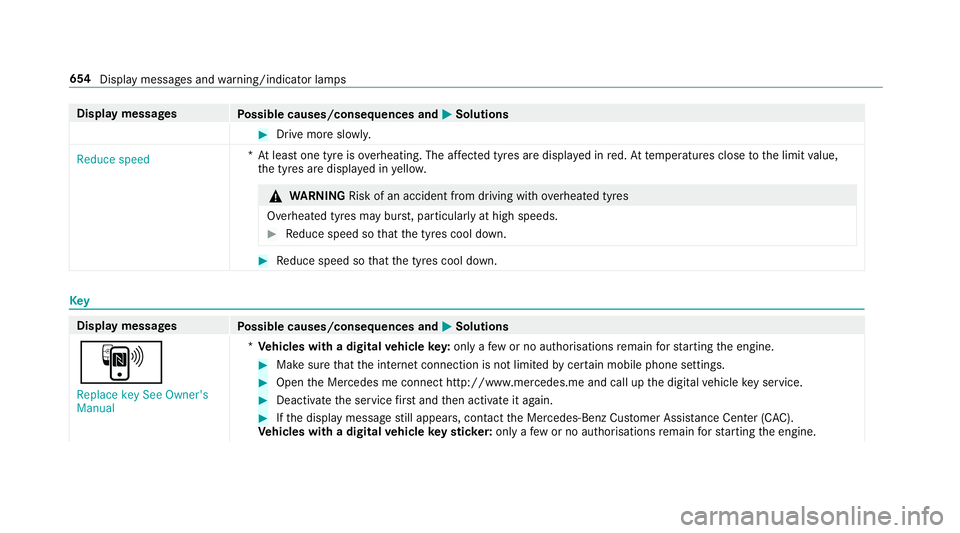
Reduce speed *A
t least one tyre is overheating. The af fected tyres are displ ayed in red. At temp eratures close tothe limit value,
th e tyres are displa yed in yello w. &
WARNING Risk of an accident from driving wi thove rheated tyres
Overheated tyres may bur st, particularly at high speeds. #
Reduce speed so that the tyres cool down. #
Reduce speed so that the tyres cool down. Key
Display messages
Possible causes/consequences and M
MSolutions
À Replace key See Owner's
Manual *
Ve hicles with a digital vehicle key:only a few or no authorisations remain forst arting the engine. #
Make sure that the internet connection is not limited bycer tain mobile phone settings. #
Open the Mercedes me connect http://www.mercedes.me and call up the digital vehicle key service. #
Deactivate the service firs t and then activate it again. #
Ifth e display message still appears, con tact the Mercedes-Benz Cus tomer Assis tance Center (C AC).
Ve hicles with a digital vehicle keyst icke r:on lyafe w or no authorisations remain forst arting the engine. 654
Display messages and warning/indicator lamps
Page 689 of 729
No
tes on risks and dangers ...................53
Re commended child restra int sys‐
te ms ...................................................... 56
Seats suita blefor belt-secu redch ild
re stra int sy stems ................................... 72
Seats suitable for i‑Size child
re stra int sy stems ................................... 66
Seats suitable for ISOFIX child
re stra int sy stems ................................... 61
Secu ring on the front passenger seat ....78
Secu ring on there ar seat ...................... 75
To pTe ther ..............................................70
Child ren
Av oiding dangers in theve hicle .............53
Basic instructions .................................. 52
Cho ck....................................................... 583
St orage location ..................................5 83
Cho ck
see Chock
CI+ module ............................................... 51 5
Calling up a menu ................................ 51 5
CI+ module (TV) Inserting a Smart Card ........................ .514 Cigar
ette lighter
Fr ont centre console ............................ 151
Cleaning see Care
Climate control ........................................ 175
Ac tivating/deactivating the A/C
function (cont rol panel) ...................... .177
Ac tivating/deactivating the A/C
function (multimedia sy stem) .............. 17 7
Ac tivating/deactivating the synchro‐
nisation function (cont rol panel) .......... 17 9
Ac tivating/deactivating the synchro‐
nisation function (multimedia sys‐
te m) ..................................................... 17 9
Air di stribution settings .......................1 78
Air-reci rculation mode ........................ .179
Au tomatic control ................................ 17 7
Au tomatic control (rear) ....................... 178
Calling up the air conditioning menu ... 17 7
Defrosting the windscreen ...................1 75
Demi sting windo ws.............................. 17 9
Fr ont air vents ..................................... 186
Glo vebox air vent ................................ 188
Inserting/removing theflacon (fra‐
gr ance sy stem) .................................... 180Ionisation .............................................1
80
No te ..................................................... 175
Re ar air vents ...................................... 187
Re ar compartment residual heat ......... 17 9
Re ar operating unit .............................. 176
Re sidual heat ....................................... 17 9
Setting (multimedia sy stem) ................1 77
Setting the air distribution ...................1 75
Setting the air flow ............................... 175
Setting the fragrance sy stem ............... 180
Setting thete mp erature ......................1 75
St ationary heater/ ventilation .............. 181
Switching on/off ................................. 17 7
Switching on/off (rear) ........................ 17 7
Switching there ar wind owheater
on/off .................................................. 175
THERMATIC contro l panel .................... 175
THERMOTRONIC contro l panel ............175
Ve ntilating theve hicle (con venience
opening) ................................................ 99
Wi ndsc reen heating ............................. 181
Coat hook ................................................ .146
Cock pit......................................................... 6
Overview ................................................. 6 686
Index
Page 690 of 729
Cof
fee cup symbol
see ATTENTION ASSIST
Collapsible spare wheel .......................... 589
Inflating ............................................... 591
No tes .................................................. 589
Re moving ............................................ 590
Combination switch ................................15 8
Compass .................................................. 444
Compu ter
see On-board computer
Connection status
Displ aying ............................................ 490
Overview ............................................ .490
Connectivity Switching transmission of theve hicle
position on/off .................................... 390
Contacts ................................................... 461
Calling up ............................................ 462
Deleting ............................................... 464
Deleting favo urites .............................. 464
Downloading (from mobile phone) ...... 462
Importing ............................................ 463
Importing (o verview) .......................... .463 Information .......................................... 461
Making a call ....................................... 463
Na
me form at ...................................... .462
Options ................................................ 463
Saving as a favo urite .......................... .464
Selecting options for suggestions ........ 464
St oring ................................................ 463
Con venience closing ...............................1 00
Conv enience opening ................................ 99
Coolant (engine) Levelch eck ......................................... 536
No tes .................................................. 604
Cooling see Climate control
Co pyright ...................................................35
Cornering light ........................................ .160
Co ver
see Side windo ws
Cross Traf fic Alert .................................. .299
Crosswind Assist Function/no tes ................................... 234 Cruise control
.......................................... 241
Ac tivating ............................................ 24 3
Buttons ................................................ 24 3
Calling up a speed .............................. .243
Deactivating ........................................ 24 3
Fu nction ............................................... 241
Re quirements ...................................... 24 3
Selecting ............................................. 24 3
Setting a speed ................................... 24 3
St oring a speed ................................... 24 3
Sy stem limitations ...............................2 41
Cup holder ................................................ 14 8
Re ar .................................................... .135
Switching the cooling/heating func‐
tion on/off .......................................... 14 9
use (co ckpit) ........................................ 14 8 D
Damage de tection (pa rked vehicle) .......226
Dashboard see Cockpit
Dashboard lighting see Instrument lighting Index
687
Page 701 of 729
Fr
ont (luxury head restra int) ................ 121
Re ar (adjusting) .................................. .121
Re ar (fitting/removing) ........................ 121
Re ar (luxury head restra int) ................ .122
Head-up display ....................................... 331
Ad justing display elements (on-board
compu ter) ............................................ 331
Ad justing the brightness (on-board
computer) ............................................ 331
Fu nction .............................................. 332
Menu (on-board compu ter) .................. 331
Operating the memory function ........... 131
Setting the position (on-board com‐
puter) ................................................... 331
Switching on/off ................................. 332
Headla mpflasher ................................... .158
Headphones (Rear Seat Entertain‐
ment Sy stem)
Overview ............................................ .523
Heating see Clima tecontrol
High beam Adaptive Highbeam Assist Plus .......... .162
Switching on/off ................................. 15 8HIGH RANGE
Shifting ................................................ 211
High-pressure cleaner (care) .................540
Hill Start Assist ....................................... 259
HOLD function ......................................... 260
Fu nction/no tes ................................... 260
Switching on/off ................................. 260
Home screen (media display) Overview ............................................. 354
Hotspot Setting up (Wi-Fi) ................................. 393 I
i-Size child seat securing sy stem
Fitting .................................................... 67
Seats suitable for attaching ................... 66
Identification plate Engine ................................................. 595
Ve hicle ................................................ 595
Ignition Switching on (S tart/S top button) ........ 189
Ignition key
see Key Immobiliser
.............................................. 108
Implied warranty
Ve hicle .................................................. 32
In Car Of fice ............................................ .468
Calling up ............................................ 468
Fe atures .............................................. 468
Managing e-mails ................................ 469
Marking a task as comple ted .............. 469
Selecting functions (calendar ent ry) .... 469
Selecting functions (Tasks & Calls) ...... 469
Wr iting e-mails .................................... .470
Indicator lamps see Warning/indicator lamps
Individual drive prog ram
Con figuring .......................................... 204
Selecting ............................................. 204
Inspection see ASS YST PLUS
Instrument clus ter
see Instrument display
Instrument display ..................................3 19
Ad justing the lighting ........................... 324
Fu nction/no tes .................................... 319698
Index