2019 MERCEDES-BENZ GLE COUPE climate settings
[x] Cancel search: climate settingsPage 6 of 697

Area pe
rmeable toradio wav es on the
windscreen ................................................ .163
Infrared-reflective windscreen function ...... 16 4Climate control
........................................ 16 5
Overview of climate contro l systems ..........1 65
Operating the climate control sy stem ......... 167 Driving and pa
rking ................................. 17 9
Driving ........................................................ 17 9
DY NA MIC SELECT switch ............................1 94
Au tomatic transmission .............................. 197
Fu nction of the 4MATIC .............................. 201
Re fuelling ................................................... 202
Pa rking ...................................................... .208
Driving and driving saf ety sy stems .............. 217
Tr ailer hit ch................................................ 296
Bicycle rack function .................................. 301
Ve hicle towing instructions ........................ .303 Instrument Display and on-board
comp uter.................................................. 304
Instrument display overview ...................... .304 Overview of
the buttons on thesteering
wheel ..........................................................3 05
Operating the on-board computer .............. 305
Ad justing the design of the instrument
display ........................................................ 307
Showing display conte nt onthe instru‐
ment clus ter ............................................... 307
Overview of displa yson the multifunc‐
tion display .................................................3 09
Ad justing the instrument lighting ................3 10
Menus and submenus ................................. 310
Head-up Display .......................................... 317 LINGU
ATRO NIC ......................................... 319
No tes on operating saf ety .......................... .319
Operation ................................................... 320
Using LINGU ATRO NIC ef fectively ............... 322
Essential voice commands ........................ .323 MBUX multimedia sy
stem ...................... 339
Overview and operation .............................. 339
Sy stem settings .......................................... 374
Na vigation .................................................. 384
Te lephone .................................................. .426 Online and Internet functions ..................... 466
Media .......................................................... 475
Ra dio .......................................................... 483
Sound .........................................................4 86
Re ar Seat En tertainment Sy stem ................4 88 Maintenance and care
.............................495
ASS YST PLUS service inter val display ........ 495
Engine compartment .................................. 496
Cleaning and care ...................................... .502 Breakdown assi
stance ............................. 513
Emergency ................................................. .513
Flat tyre ....................................................... 51 5
Battery (vehicle) .......................................... 521
To w- starting or towing away ....................... 527
Electrical fuses ........................................... 531 Wheels and tyres
..................................... 534
No tes on noise or unusual handling char‐
acteristics .................................................. .534
No tes on regularly inspecting wheels and
tyres ........................................................... 534 Contents
3
Page 20 of 697
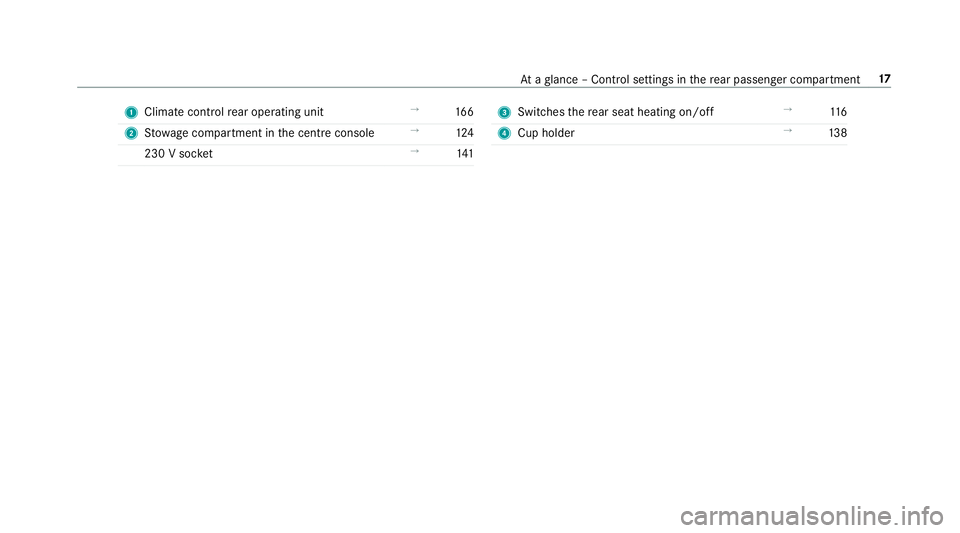
1
Climate cont rolre ar operating unit →
16 6
2 Stow age compartment in the cent reconsole →
124
230 V soc ket →
141 3
Switches there ar seat heating on/off →
11 6
4 Cup holder →
13 8 At
aglance – Control settings in there ar passenger compartment 17
Page 37 of 697
R
entered navigation destinations
R data about the use of internet services
This data can be sa ved locally in theve hicle or it
is located on a device which you ha veconnected
to theve hicle (e.g. a smartphone, USB flash
drive or MP3 pla yer). If this data is stored in the
ve hicle, you can dele teit at any time. This data
is sent tothird parties only at your requ est, par‐
ticular lywhen you use online services in accord‐
ance with the settings that you ha veselected.
Yo u can store or change con venience settings/
individualisations in theve hicle at any time.
Depending on the equipment, this includes, for
ex ample:
R settings forth e seat and steering wheel posi‐
tions
R suspension and climate control settings
R customisations such as interior lighting
If yo ur vehicle is accordingly equipped, you can
connect your smartphone or ano ther mobile end
device totheve hicle. You can cont rolth is by
means of the control elements integrated in the
ve hicle. Images and audio from the smartphone can be output via
the multimedia sy stem. Cer‐
ta in information is simultaneously transfer redto
yo ur smartphone.
Depending on the type of integration, this can
include:
R general vehicle data
R position data
This allo wsyouto use selected apps on your
smartphone, such as navigation or music play‐
bac k.There is no fur ther interaction between the
smartphone and theve hicle; in particular, vehi‐
cle data is not directly accessible. Which type of
fur ther data processing occurs is de term ined by
th e pr ovider of the specific app used. Which set‐
tings you can make, if an y,depends on the spe‐
cific app and the operating sy stem of your
smartphone. Online services
Wire
less network connection
If yo ur vehicle has a wireless network connec‐
tion, it enables data tobe exc hanged between
yo ur vehicle and additional sy stems. The wire‐ less network connection is enabled via
theve hi‐
cle's transmission and reception unit or via con‐
nected mobile end devices (e.g. sma rtphones).
Online functions can be used via the wireless
network connection. This includes online serv‐
ices and applications/apps pr ovided bythe man‐
ufacturer or other pr oviders.
Manu factu rer's se rvices
Re garding online services of the manufacturer,
th e individual functions are described bythe
manufacturer in a suita ble place (e.g. Owner's
Manual, website of the manufacturer) along with
th ere leva nt da taprotection information. Per‐
sonal data may be used forth e pr ovision of
online services. Data is exchanged via a secure
connection, e.g. the manufacturer's designated
IT sy stems. Personal data is collected, pro‐
cessed and used via the pr ovision of services
ex clusively on the basis of legal permissions or
with prior consent.
The services and functions (sometimes subject
to afe e) can usually be activated or deactivated.
In some cases, this also applies tothe entire
ve hicle's data connection. This excludes, in par‐
ticular, legally prescribed functions and services. 34
General no tes
Page 159 of 697
Ac
tivating welcome lighting #
Select Colour. #
Select Welcome.
When theve hicle is unloc ked, a special ambi‐
ent lighting sequence will run.
Ac tivating dependency on air conditioning
settings #
Select Colour. #
Select Climate.
If ch anges are made tothete mp erature set‐
ting in theve hicle, the colour of the ambient
lighting will change brief ly. Switching
the interior lighting switch-off
delay time on/off Multimedia sy
stem:
4 © 5
Settings 5
Lights
5 Int. light. del. sw. off #
Switch the lighting switch-off delay time on
or off.
When this function is active, the interior light‐
ing is lit up for short time af terth eve hicle
has been loc ked. Wi
ndscreen wipers and windscreen washer
sy stem Switching
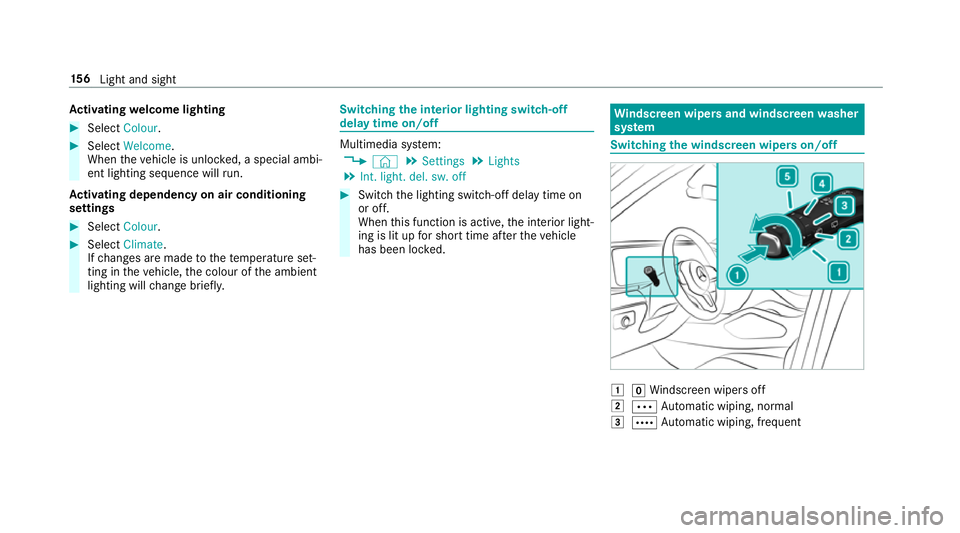
the windscreen wipers on/off 1
gWindsc reen wipers off
2 Ä Automatic wiping, normal
3 Å Automatic wiping, frequent 15 6
Light and sight
Page 168 of 697
Overview of climate control sy
stems Note
s on climate control An interior air
filter in combination with the pre‐
fi lter in the engine compartment must alw ays be
used so that the air conditioning sy stem, pollu‐
tion lebutton vel monitoring and the air filtration
wo rkcor rectly. Ma kesure that thefilter is ins tal‐
led cor rectly and thefilter housing in the engine
compartment is closed cor rectly using the cap
and alw ays tightly sealed when in operation. Use
fi lters recommended and appr ovedby
Mercedes-Benz. Alw ays ha veservice workcar‐
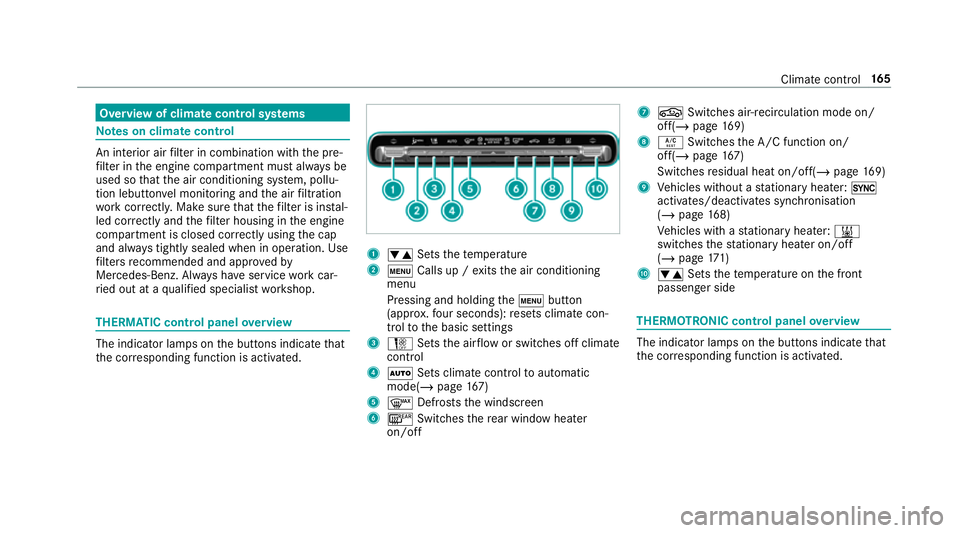
ri ed out at a qualified specialist workshop. THERMATIC control panel
overview The indicator lamps on
the buttons indicate that
th e cor responding function is activated. 1
w Setsthete mp erature
2 t Calls up / exits the air conditioning
menu
Pressing and holding thet button
(appr ox.fo ur seconds): resets climate con‐
trol tothe basic settings
3 H Setsthe air flow or switches off climate
control
4 Ã Sets climate control toautomatic
mode(/ page167)
5 ¬ Defrosts the windscreen
6 ¤ Switches there ar wind owheater
on/off 7
g Switches air-recirculation mode on/
off(/ page169)
8 Á Switches the A/C function on/
off(/ page167)
Switches residual heat on/off(/ page169)
9 Vehicles without a stationary heater: 0
activates/deactivates syn chronisation
(/ page 168)
Ve hicles with a stationary heater: &
swit ches thest ationary heater on/off
(/ page 171)
A w Setsthete mp erature on the front
passenger side THERMOTRONIC control panel
overview The indicator lamps on
the buttons indicate that
th e cor responding function is activated. Climate
control 16 5
Page 169 of 697
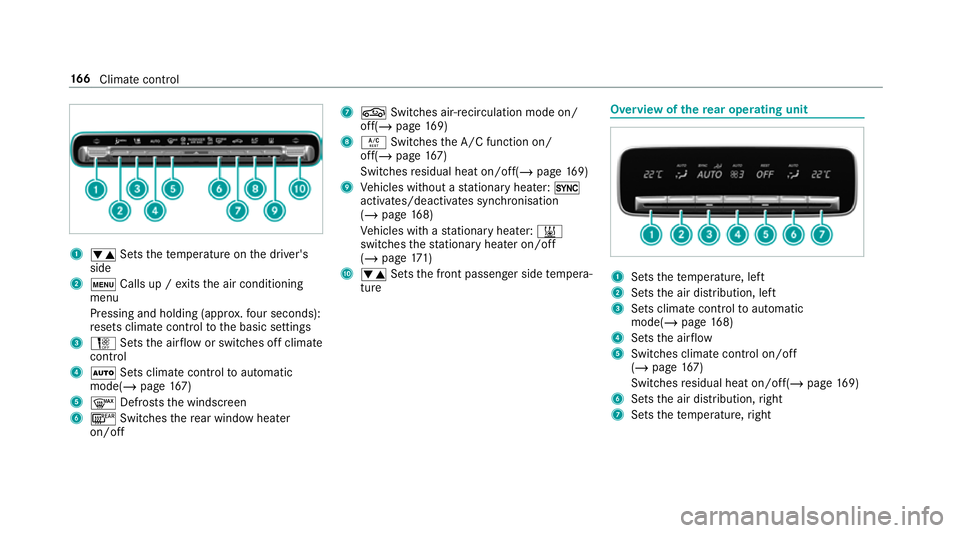
1
w Setsthete mp erature on the driver's
side
2 t Calls up / exits the air conditioning
menu
Pressing and holding (appr ox.fo ur seconds):
re sets climate contro lto the basic settings
3 H Setsthe air flow or switches off climate
control
4 Ã Sets climate control toautomatic
mode(/ page167)
5 ¬ Defrosts the windscreen
6 ¤ Switches there ar wind owheater
on/off 7
g Switches air-recirculation mode on/
off(/ page169)
8 Á Switches the A/C function on/
off(/ page167)
Switches residual heat on/off(/ page169)
9 Vehicles without a stationary heater: 0
activates/deactivates syn chronisation
(/ page 168)
Ve hicles with a stationary heater: &
swit ches thest ationary heater on/off
(/ page 171)
A w Setsthe front passenger side temp era‐
ture Overview of
there ar operating unit 1
Sets thete mp erature, left
2 Sets the air distribution, left
3 Sets climate control toautomatic
mode(/ page168)
4 Sets the air flow
5 Switches climate control on/off
(/ page 167)
Switches residual heat on/off(/ page169)
6 Sets the air distribution, right
7 Sets thete mp erature, right 16 6
Climate cont rol
Page 171 of 697
Au
tomatically controlling the climate control
in the rear In auto
matic mode, the set temp erature is regu‐
lated bythete mp erature of the dispensed air
and the air flow. #
Press theà button (/ page166). Overvi
ewof air distribution settings The symbols on
the display indicate which vents
th e air flow is being directed thro ugh:
¯ def
rost er and side air vents
P centre and side air
vents
O fo
ot we ll and side air vents
S centre, side and
foot we llve nts
a defros
ter,fo ot we ll and side air vents
_ all
vents
b defros
ter,middle and side air vents
W au
tomatic air distribution Setting
the air distribution #
Call up the air conditioning menu
(/ page 167). #
Select First row of seats orSecond row of
seats. #
Toset the air distribution: select¯,
P orO. #
Set the air flow.
% Several air distribution options can be selec‐
te d at the same time, forex ample toset the
te mp erature/air conditioning forth e wind‐
screen and thefo ot we lls simultaneousl y.
The ¯ climate contro lfo rth e windscreen
can only be selected forth efirs t seat row. Setting climate control
for the rear
passenger comp artment (multimedia sys‐
te m) Setting the
temperature #
Call up the air conditioning menu
(/ page 167). #
Select Second row of seats. #
Set thete mp erature.
Setting the airflow #
Call up the air conditioning menu
(/ page 167). #
Select Second row of seats. #
Set the air flow.
Controlling there ar climate control automat‐
ical ly #
Select REAR AUTO .
Re ar climate control is controlled automati‐
call y.
Deactivating rear climate control #
Select REAR OFF.
Re ar climate control is deactivated. Ac
tivating/deactivating the climate control
syn chro nisation function via the control
panel Climate control can be set centrally using
the
synchronisation function. The temp erature and 16 8
Climate cont rol
Page 172 of 697
air distribution setting
forth e driver side is adop‐
te d automatically for all clima tecontrol zones. #
Press the 0 button.
The synchronisation function is deactivated if
th e settings for one of theot her climate zones
are changed. Ac
tivating/deactivating the climate control
syn chro nisation function using the multime‐
dia sy stem Climate control can be set centrally using
the
synchronisation function. The driver's settings
fo rte mp erature, air quantity and air distribution
are adop ted automatically for all clima tezones. #
Call up the air conditioning menu
(/ page 167). #
Select First row of seats. #
Select SYNC.
Depending on the pr evious status, the func‐
tion is activated or deactivated. Demisting
the windo ws Wi
ndo wsmis ted up on the inside #
Press theà button. #
Ifth e windo wscontinue tomist up: press the
¬ button.
Wi ndo wsmis ted up on the outside #
Switch on the windscreen wipers. #
Press theà button. Switching air-recirculation mode on/off
#
Press theg button.
The interior air will be recirculated.
Air-reci rculation mode automatically swit ches to
fresh air mode af ter some time.
% If air-recirculation mode is switched on, the
windo wsmay mist up more quickl y.Switch
on ai r-re circulation mode only brie fly. Switches
there sidual heat on/off Re
quirements: R
theve hicle is par ked.
It is possible tomake use of there sidual heat
from the engine tocontinue heating or ventilat‐
ing the front compartment of theve hicle for
appr oximately 30 minutes, depending on the
te mp erature set. #
Toactivate: press button Á.
Re sidual heat will be switched off automaticall y. Switching
there sidual heat in there ar
on/off Re
quirements:
R theve hicle is par ked.
When there sidual heat of the engine is activated
in there ar compartment, you can heat or venti‐
la te there ar compartment for appro ximately
30 minutes. #
Press the 5 button (/ page166). Clima
tecontrol 16 9