2019 MERCEDES-BENZ GLE COUPE lights
[x] Cancel search: lightsPage 279 of 697
R
Red segments: obstacles at a very short
dis tance of appr ox. 0.3 m or less
When Parking Assist PARKTRONIC is operational
and no object is de tected, the segments of the
wa rning display are shown in gr ey.
% Ifth e entire sy stem fails, the segments of
th ewa rning display are shown in red. The
indicator lamp on thePA RKTRONIC but ton
lights up and theé symbol appears in
th e multifunction displa y.
If th e sy stem fails at there ar, the display of
th e segments changes as follo ws:
R The rear segments are shown in red
when reve rsing.
R The rear segments are hidden when driv‐
ing forw ards.
If Pa rking Assist PARKTRONIC is deacti vated,
th ewa rning display fades out (/ page 266). Guide lines
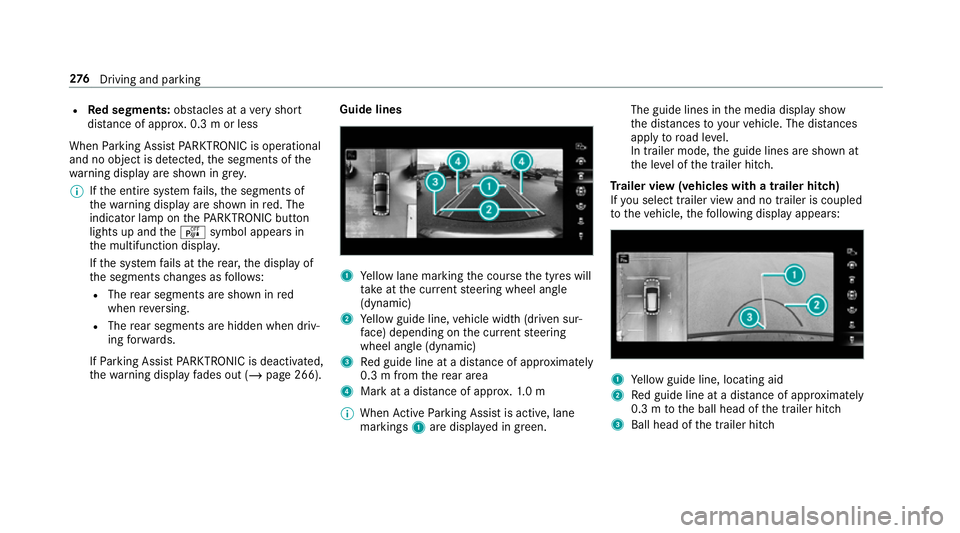
1
Yellow lane marking the course the tyres will
ta ke atthe cur rent steering wheel angle
(dynamic)
2 Yellow guide line, vehicle width (driven sur‐
fa ce) depending on the cur rent steering
wheel angle (dynamic)
3 Red guide line at a dis tance of appr oximately
0.3 m from there ar area
4 Mark at a dis tance of appr ox.1. 0 m
% When Active Parking Assist is active, lane
markings 1are displa yed in green. The guide lines in
the media display show
th e dis tances to yourvehicle. The dis tances
apply toroad le vel.
In trailer mode, the guide lines are shown at
th e le vel of the trailer hitch.
Tr ailer view (vehicles with a trailer hitch)
If yo u select trailer view and no trailer is coupled
to theve hicle, thefo llowing display appears: 1
Yellow guide line, locating aid
2 Red guide line at a dis tance of appr oximately
0.3 m tothe ball head of the trailer hitch
3 Ball head of the trailer hitch 276
Driving and pa rking
Page 293 of 697
R
The windscreen is dirty in the area of the
multifunction camera, or the camera is mis‐
te d up, damaged or co vered.
R Ifth e traf fic signs are ha rdtodetect, e.g. due
to dirt or sno w,or because they are co vered,
or due toinsuf ficient lighting.
R Ifth e information in the navigation sy stem's
digital map is incor rect or out-of-da te.
R The signs are ambiguous, e.g. traf fic signs on
construction sites or in adjacent lanes.
R Ifyo u turn sharpl y,yo u may pass traf fic signs
th at are outside the camera's field of vision.
Setting Traf fic Sign Assist
Re quirements:
R Only vehicles with Driving Assistance
Pa ckage:
Ac tive Dis tance Assi stDISTRONIC mu stbe
activated forth e automatic adoption of
speed limits. Multimedia sy
stem:
4 © 5
Settings 5
Assistance
5 Traffic Sign Assist
Ac tivating/deactivating automatic adoption
of speed limits (only vehicles with Driving
Assistance Package) #
Select Adopt limit. #
Activate or deacti vate the function.
The speed limits de tected byTraf fic Sign
Assi stare automatically adop tedby Active
Dis tance Assi stDISTRONIC.
% If one of thefo llowing sy stems is activated,
th e speed de tected can be manually adop ted
as the speed limit:
R Active Dis tance Assi stDISTRONIC
R Cruise control
R Variable limiter
Fu rther information (/ page 238).
Displaying de tected traf fic signs in the
medi a display #
Select Display in head unit. #
Activate or deacti vate the function.
Ad justing the type of warning #
Select Visual & audible ,Visual orNone.
Ad justing the warning threshold
This value de term ines the speed at which a
wa rning is issued when exceeded. #
Select Warning threshold. #
Set the desired speed. Blind Spot Assist and
Active Blind Spot
Assi stwith exitwa rning Fu
nction of Blind Spot Assist and Active
Blind Spot Assi stwith exitwa rning
Blind Spot Assist and Active Blind Spot Assi st
use two lateral, rear-facing radar sensors to
monitor the area up to40 m behind and 3 m
next toyour vehicle.
If a vehicle is de tected at speeds ab ove appr ox‐
imately 12km/h and this vehicle subsequently
enters the monitoring range di rectly next to your
ve hicle, thewa rning lamp in the outside mir ror
lights up red. 290
Driving and parking
Page 355 of 697
#
Toswitch off: take your hand back away
from the front passenger seat.
The sear chlight is switched off again.
Settings for the MBUX In terior Assistant
Multimedia sy stem:
4 © 5
Settings 5
System
5 Interior assistant #
Toswitch on full functionality of the
MBUX Interior Assistant: selectOn.
The option is activated #.#
Toactivate additional functions forre ad‐
ing and sear chlights: selectIncluding read-
ing light.
When the option is switched on, the display
button is activated.
The functions forth ere ading and sear ch
lights are activated in addition tothe pr oxim‐
ity functions. #
Toswitch off the MBUX Interior Assis‐
tant: select Off.
The option is activated #. Main functions
Calling up applications
1
y button
Calls up vehicle functions
2 z button
Calls up navigation
3 | button
Calls up radio or media
4 % button
Calls up thete lephone
5 ß button Press brief
ly: calls up favo urites
(/ page 361)
Press and hold: adds a favo urite
(/ page 361) or creates a new theme
(/ page 357)
Alternatively in the home screen: whenyou
st art theve hicle the home screen is shown in
th e media displa y. #
Select the application byswiping and tap‐
ping.
or #
In any displa y:press the© button on the
To uch Control or on theto uchpad.
or #
Tap on the© symbol on theto uchsc reen.
The applications are displa yed. #
Select the application byswiping and tap‐
ping.
Changing the ar rangement of applications on
th e home screen #
Call up the home screen. 352
MBUX multimedia sy stem
Page 417 of 697
Benefits of Ca
r-to -X-Communication:
R Haza rds are recognised au tomatical lyin the
bac kground bytheve hicle or may be repor‐
te dby the driver. These are then sent tovehi‐
cles with Car-to-X-Communication in the
immediate vicinity.
R Ifav ailable, cur rent de tails relating tohazard
spots near theve hicle's cur rent position are
re cei ved.
This gives you suf ficient time toadapt your
driving style to the traf fic conditions.
The use of Ca r-to -X-Communication requ ires the
re gular transmission of vehicle data toDaimler
AG . The da taisthen immediately pseudony‐
mised byDaimler AG. The vehicle data is dele ted
af te r an appro priate amount of time has elapsed
(se veralwe eks) and is not stored permanently.
% Data which ser ves as identification is
re placed during the pseudonymisation proc‐
ess. In this wa y,yo ur identity is pr otected
against access byunauthorised third parties. Displaying hazard
warnings
Multimedia sy stem:
4 © 5
Navigation (Navigation)
If hazard warnings are available these can be
shown as symbols on the map. The display
depends on the settings forth eTraffic andTraf-
fic incidents options. #
Set the options (/ page413).
The following displa ysare available:
R Show all symbols
The Traffic andTraffic incidents options are
swit ched on.
R Only show symbols on theex pected route
The Traffic option is swit ched off, theTraffic
incidents option is switched on.
R Show no symbols
The Traffic incidents option is switched off.
The following hazard warnings are shown on the
map:
R Broken-down vehicles
R Accidents R
Haza rdous weather
R Gene ral hazards
R Hazard warning lights, when switched on
R Crosswind warning
R Mobile roadwor ks
The display is not available in all countries
and regions.
In theFe deral Republic of Germany the dis‐
play is cur rently available in theFe deral State
of Hesse.
% Ifth eve hicle is approaching a hazard spot
with a vehicle speed of at least 60 km/h, the
vo ice output "T raffic incident ahead" is
issued.
The voice output is not issued for hazardous
we ather.
Sending haza rdwa rnings
Au tomatically de tected hazard warnings are sent
by theve hicle. #
Tosend a haza rdwa rning yourself: tap on
th e media display when the map is shown.
The navigation menu is shown. 414
MBUX multimedia sy stem
Page 439 of 697

Calling up
the car telephony settings
Multimedia sy stem:
4 © 5
Phone 5
Car phone 5
Z #
Select the desired settings.
The following settings are available:
R SIM card (/page 436)
R Withhold phone number (/page 436)
R Call waiting (/page 436)
R Select network provider (/page 437)
R Call forwarding (/page 437)
R Data usage, voice (/page 437)
Setting the SIM card
Multimedia sy stem:
4 © 5
Phone 5
Car phone 5
Z
5 SIM card
The following options are available: #
Tosave a PIN: pressthe button.
The LED symbol lights up. The SIM card PIN
is sa ved. #
Tore-enter a PIN: the PIN is entered auto‐
maticall y. #
Tocombine a SIM card with a speci fic
mobile phone: presstheActivation only
with device button.
The LED symbol lights up. Use of the SIM
card with a specific mobile phone is activa‐
te d. The name of the associated mobile
phone is shown. #
Touse the SIM card alone: presstheActi-
vation only with device button again.
The LED symbol goes out. Use of the SIM
card with a specific mobile phone is deacti‐
va ted. #
Tochange the associa ted mobile phone:
when the LED symbol opposite Activation
only with device is lit, pressthe button twice.
The LED symbol firs t goes out and then lights
up again. #
Answer theSIM card connected. Do you
want to use this SIM card with only one par-
ticular device? query with Yes. #
Select a mobile phone that has been author‐
ised or connect a new mobile phone. Setting
telephone number transmission
Multimedia sy stem:
4 © 5
Phone 5
Car phone 5
Z
5 Withhold phone number
The following options are available: #
Withhold own number #
Show own number #
Network standard
Setting the call waiting function
Multimedia sy stem:
4 © 5
Phone 5
Car phone 5
Z
5 Call waiting #
Toactivate call waiting: pressthe button.
The LED symbol lights up. The function is
active. #
Todeactivate call waiting: pressthe but‐
to n.
The LED symbol goes out. The function is
deacti vated. 436
MBUX multimedia sy stem
Page 440 of 697
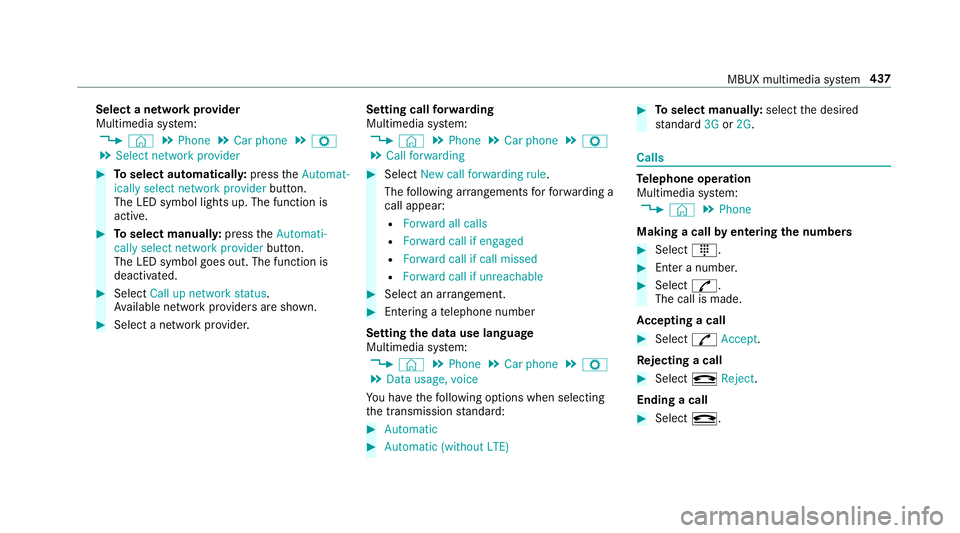
Select a network pr
ovider
Multimedia sy stem:
4 © 5
Phone 5
Car phone 5
Z
5 Select network provider #
Toselect automaticall y:press theAutomat-
ically select network provider button.
The LED symbol lights up. The function is
active. #
Toselect manuall y:press theAutomati-
cally select network provider button.
The LED symbol goes out. The function is
deactivated. #
Select Call up network status.
Av ailable network pr oviders are shown. #
Select a network pr ovider. Setting call
forw arding
Multimedia sy stem:
4 © 5
Phone 5
Car phone 5
Z
5 Call forwarding #
Select New call forwarding rule .
The following ar rangements forfo rw arding a
call appear:
R Forward all calls
R Forward call if engaged
R Forward call if call missed
R Forward call if unreachable #
Select an ar rangement. #
Entering a telephone number
Setting the data use language
Multimedia sy stem:
4 © 5
Phone 5
Car phone 5
Z
5 Data usage, voice
Yo u ha vethefo llowing options when selecting
th e transmission standard: #
Automatic #
Automatic (without LTE) #
Toselect manuall y:select the desired
st andard 3Gor2G . Calls
Te
lephone operation
Multimedia sy stem:
4 © 5
Phone
Making a call byentering the numbers #
Select _. #
Enter a number. #
Select R.
The call is made.
Ac cepting a call #
Select RAccept.
Re jecting a call #
Select kReject .
Ending a call #
Select k. MBUX multimedia sy
stem 437
Page 589 of 697

Display messages
Possible causes/consequences and M
MSolutions #
Consult a qualified specialist workshop.
Check brake pads See
Owner's Manual *T
he brakepads ha vereached thewe ar limit. &
WARNING Risk of accident due torestricted braking po wer
When the brake pads ha vereached their wear limit, the braking po wer may be restricted. #
Drive on carefully. #
Have the brake sy stem checked immediately at a qualified specialist workshop. #
Consult a qualified specialist workshop.
6 Restraint sys. malfunction
Consult workshop *T
herestra int sy stem is faulty (/ page37). &
WARNING Risk of inju rydue tomalfunctions in there stra int sy stem
If th ere stra int sy stem is malfunctioning, restra int sy stem components may be triggered unintentionally or may
not deploy as intended during an accident. This may af fect the seat belt tensioner or airbag, forex ample. #
Have there stra int sy stem checked and repaired immediately at a qualified specialist workshop. Re
cognition of a restra int sy stem fault:
R The restra int sy stem warning lamp 6does not light up when the ignition is switched on.
R The restra int sy stem warning lamp 6lights up continuously or repeatedly during a journe y. #
Consult a qualified specialist workshop immediatel y.586
Display messages and warning/indicator lamps
Page 590 of 697
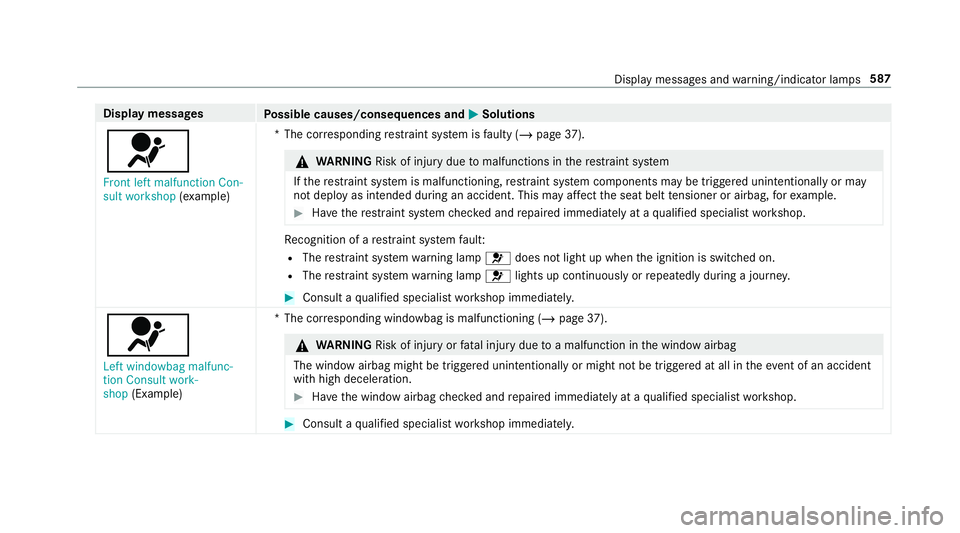
Display messages
Possible causes/consequences and M
MSolutions
6 Front left malfunction Con-
sult workshop (exa mp le) *T
he cor responding restra int sy stem is faulty (/ page37). &
WARNING Risk of inju rydue tomalfunctions in there stra int sy stem
If th ere stra int sy stem is malfunctioning, restra int sy stem components may be triggered unintentionally or may
not deploy as intended during an accident. This may af fect the seat belt tensioner or airbag, forex ample. #
Have there stra int sy stem checked and repaired immediately at a qualified specialist workshop. Re
cognition of a restra int sy stem fault:
R The restra int sy stem warning lamp 6does not light up when the ignition is switched on.
R The restra int sy stem warning lamp 6lights up continuously or repeatedly during a journe y. #
Consult a qualified specialist workshop immediatel y.
6
Left windowbag malfunc-
tion Consult work-
shop (Example) *T
he cor responding windowbag is malfunctioning (/ page37). &
WARNING Risk of inju ryor fata l injury due toa malfunction in the window airbag
The window airbag might be triggered unintentionally or might not be triggered at all in theev ent of an accident
with high deceleration. #
Have the window airbag checked and repaired immediately at a qualified specialist workshop. #
Consult a qualified specialist workshop immediatel y. Displ
aymessa ges and warning/indicator lamps 587