2019 MERCEDES-BENZ GLE COUPE alarm
[x] Cancel search: alarmPage 4 of 370
Index
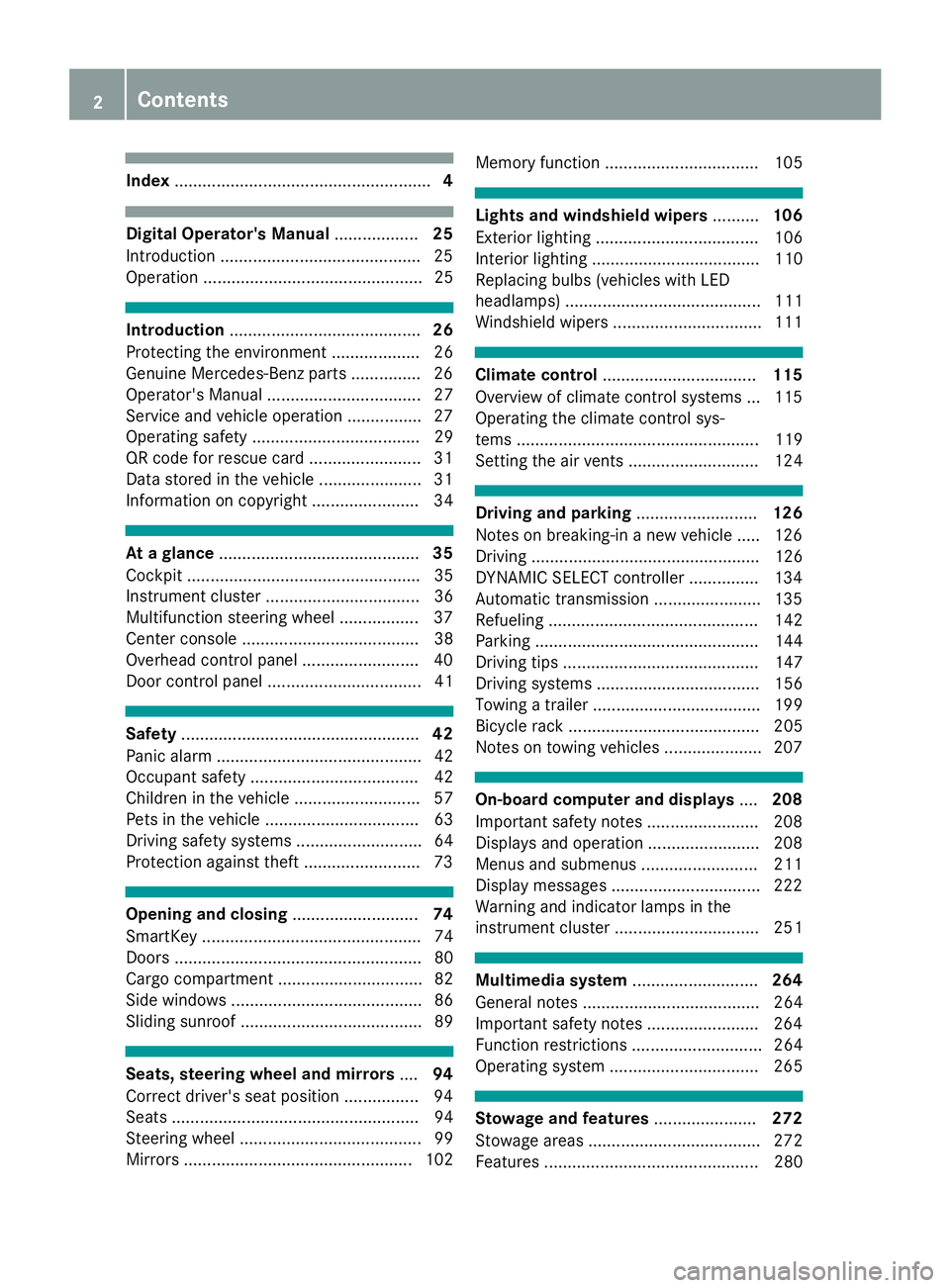
....................................................... 4Digital Operator's Manual
..................25
Introduction .......................................... .25
Operation ............................................... 25 Introduction
......................................... 26
Protecting the environment ...................26
Genuine Mercedes-Benz parts .............. .26
Operator's Manual ................................. 27
Service and vehicle operation ................27
Operating safety .................................... 29
QR code for rescue card ........................ 31
Data stored in the vehicle ......................31
Information on copyright ....................... 34 At a glance
........................................... 35
Cockpit .................................................. 35
Instrument cluster .................................36
Multifunction steering wheel ................. 37
Center console ...................................... 38
Overhead control panel .........................40
Door control panel ................................. 41 Safety
................................................... 42
Panic alarm ............................................ 42
Occupant safety .................................... 42
Children in the vehicle ........................... 57
Pets in the vehicle ................................. 63
Driving safety systems ........................... 64
Protection against theft ........................ .73Opening and closing
...........................74
SmartKey ............................................... 74
Doors ..................................................... 80
Cargo compartment ...............................82
Side windows ......................................... 86
Sliding sunroof ....................................... 89 Seats, steering wheel and mirrors
....94
Correct driver's seat position ................ 94
Seats ..................................................... 94
Steering wheel ....................................... 99
Mirrors ................................................. 102 Memory function ................................. 105 Lights and windshield wipers
..........106
Exterior lighting ................................... 106
Interior lighting .................................... 110
Replacing bulbs (vehicles with LED
headlamps) .......................................... 111
Windshield wipers ................................ 111 Climate control
................................. 115
Overview of climate control systems ... 115
Operating the climate control sys-
tems .................................................... 119
Setting the air vents ............................ 124 Driving and parking
..........................126
Notes on breaking-in a new vehicle ..... 126
Driving ................................................. 126
DYNAMIC SELECT controller ............... 134
Automatic transmission ....................... 135
Refueling ............................................. 142
Parking ................................................ 144
Driving tips .......................................... 147
Driving systems ................................... 156
Towing a trailer .................................... 199
Bicycle rack ......................................... 205
Notes on towing vehicles ..................... 207 On-board computer and displays
....208
Important safety notes ........................ 208
Displays and operation ........................ 208
Menus and submenus ......................... 211
Display messages ................................ 222
Warning and indicator lamps in the
instrument cluster ............................... 251 Multimedia system
...........................264
General notes ...................................... 264
Important safety notes ........................ 264
Function restrictions ............................ 264
Operating system ................................ 265 Stowage and features
......................272
Stowage areas ..................................... 272
Features .............................................. 280 2
Contents
Page 7 of 370
ADS PLUS (Adaptive Damping Sys-
tem)
Function/notes ............................ .169
Air bags
Deployment ..................................... 54
Display message ............................ 233
Front air bag (driver, front
passenger) ....................................... 48
Important safety notes .................... 47
Introduction ..................................... 47
Knee bag .......................................... 48
Occupant Classification System
(OCS) ............................................... 49
PASSENGER AIR BAG indicator
lamps ............................................... 43
Side impact air bag .......................... 49
Window curtain air bag .................... 49
AIR FLOW .......................................... .120
Air vents
Glove box ....................................... 125
Important safety notes .................. 124
Rear ............................................... 125
Setting .......................................... .124
Setting the center air vents ........... 124
Setting the side air vents .............. .124
Air-conditioning system
see Climate control
AIRMATIC package
ADS PLUS (Adaptive Damping
System) ......................................... 169
Function/notes ............................ .168
Alarm
ATA (Anti-Theft Alarm system) ......... 73
Switching off (ATA) .......................... 73
Switching the function on/off
(ATA) ................................................ 73
Alarm system
see ATA (Anti-Theft Alarm system)
AMG
Adaptive sport suspension sys-
tem ................................................ 172
AMG menu (on-board computer) ..... 220
Anti-lock braking system
see ABS (Anti-lock Braking System)
Anti-skid chains
see Snow chains
Approach/departure angle .............. 155
Ashtray ............................................... 282 Assistance display (on-board com-
puter)
................................................. .216
Assistance menu (on-board com-
puter) ................................................. .216
ASSYST PLUS
Displaying a service message ....... .300
Hiding a service message .............. 300
Resetting the service interval dis-
play ................................................ 300
Service message ............................ 300
Special service requirements ......... 300
ATA (Anti-Theft Alarm system)
Activating/deactivating ................... 73
Function .......................................... .73
Switching off the alarm .................... 73
ATTENTION ASSIST
Activating/deactivating ................. 217
Display message ............................ 239
Function/note s............................. 189
Audio menu (on-board computer) .... 214
Authorized Mercedes-Benz Center
see Qualified specialist workshop
Authorized workshop
see Qualified specialist workshop
AUTO lights
Display message ............................ 235
see Lights
Automatic car wash (care) ............... 301
Automatic engine start (ECO start/
stop function) .................................... 132
Automatic engine switch-off (ECO
start/stop function) .......................... 131
Automatic headlamp mode .............. 106
Automatic transmission
Accelerator pedal position ............. 137
Changing gear ............................... 137
DIRECT SELECT lever ..................... 135
Display message ............................ 247
Drive program ................................ 138
Drive program display .................... 136
Driving tips .................................... 137
DYNAMIC SELECT controlle r......... 134
Emergency running mode .............. 141
Engaging drive position .................. 136
Engaging neutral ............................ 135
Engaging park position automati-
cally ............................................... 135 Index
5
Page 18 of 370

P
Paddle shifters see Steering wheel paddle shifters
Paint code number ............................358
Paintwork (cleaning instructions) ... 303
Panic alarm .......................................... 42
Panorama roof with power tilt/
sliding panel
Important safety notes .................... 89
Operating ......................................... 90
Operating the roller sunblinds for
the sliding sunroof ........................... 91
Problem (malfunction) ..................... 92
Rain closing feature ......................... 91
Reversing feature ............................ .90
Parcel shelf ........................................2 77
Parking
Important safety notes .................. 144
Parking brake ................................ 145
Position of exterior mirror, front-
passenger side ............................... 104
Rear view camera .......................... 180
see PARKTRONIC
Parking aid
see 360° camera
see Exterior mirrors
see PARKTRONIC
Parking Assist PARKTRONIC
Deactivating/activating ................. 175
Driving system ............................... 173
Function/notes ............................ .173
Important safety notes .................. 173
Problems (malfunctions) ................ 176
Sensor range ................................. 173
Towing a trailer .............................. 173
Warning displa y............................. 174
Parking assistance
see Driving system
Parking brake
Applying automaticall y................... 146
Applying or releasing manually ...... 145
Display message ............................ 226
Electric parking brake .................... 145
Emergency braking ........................ 146
General notes ................................ 145
Releasing automaticall y................. 146
Warning lamp ................................. 259 Parking lamps
Switching on/of f........................... 107
PASSENGER AIR BAG
Display message ............................ 233
Indicator lamps ................................ 43
Problem (malfunction) ................... 233
Pets in the vehicle ............................... 63
Phone book
see also Digital Operator's Man-
ual .................................................. 264
Plastic trim (cleaning instruc-
tions) .................................................. 307
Power locks ......................................... 81
Power washers .................................. 302
Power windows
see Side windows
PRE-SAFE ®
(anticipatory occupant
protection)
Display message ............................ 230
Operation ......................................... 56
PRE-SAFE ®
PLUS (anticipatory
occupant protection PLUS)
Display message ............................ 230
Operation ......................................... 57
Protection against theft
ATA (Anti-Theft Alarm system )......... 73
Immobilizer ...................................... 73
Protection of the environment
General notes .................................. 26
Pulling away
Automatic transmission ................. 130
General notes ................................ 130
Hill start assist ............................... 130
Trailer ............................................ 130 Q
QR code Mercedes-Benz Guide App ................. 1
Rescue card ..................................... 31
Qualified specialist workshop ........... 30 R
RACE TIMER (on-board computer,
Mercedes-AMG vehicles) .................. 221
Radiator cover ................................... 29716
Index
Page 40 of 370
Center console
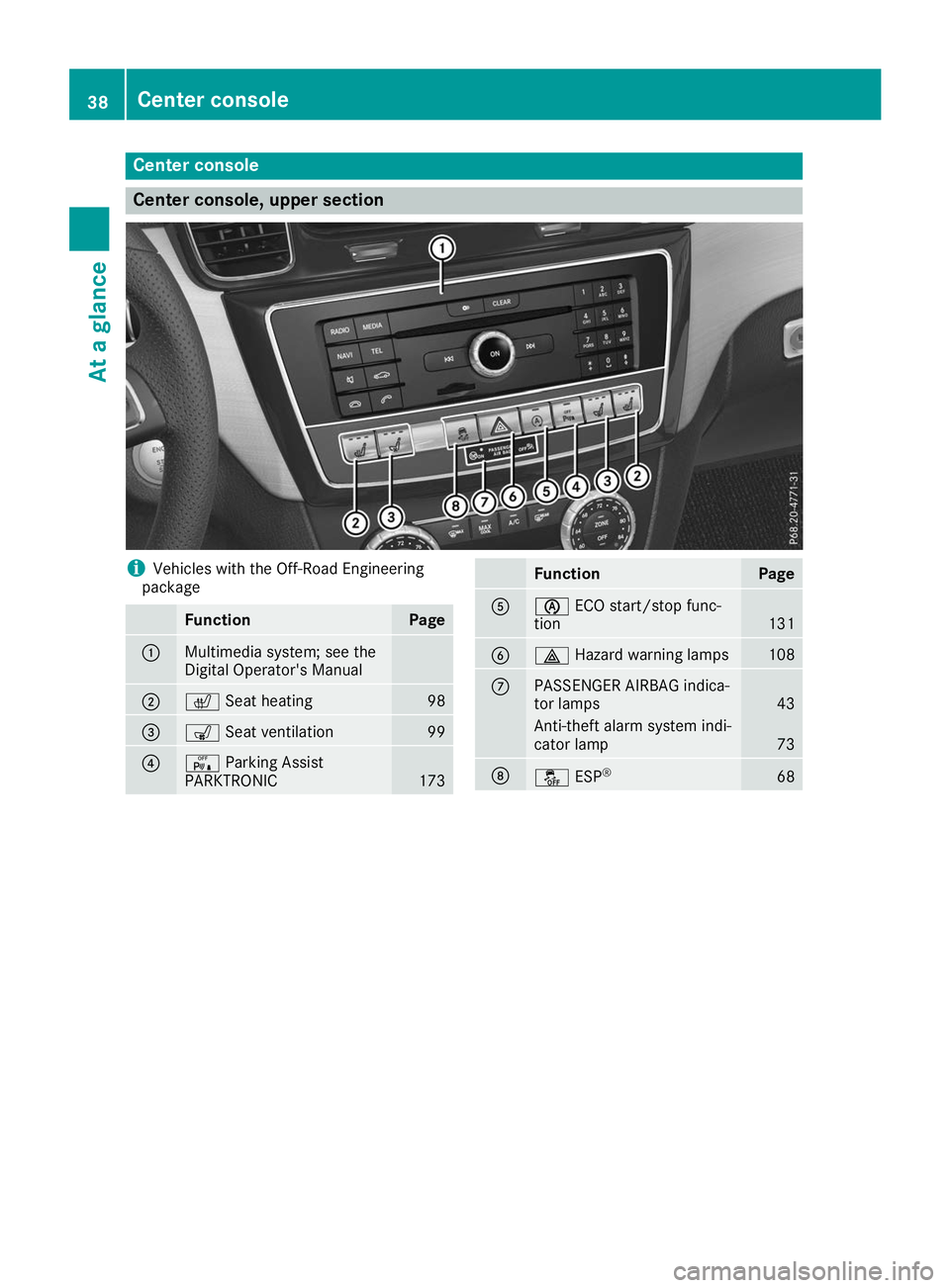
Center console, upper section
i
Vehicles with the Off-Road Engineering
package Function Page
0043
Multimedia system; see the
Digital Operator's Manual
0044
0072
Seat heating 98
0087
008E
Seat ventilation 99
0085
008F
Parking Assist
PARKTRONIC 173 Function Page
0083
00D6
ECO start/stop func-
tion 131
0084
002F
Hazard warning lamps 108
006B
PASSENGER AIRBAG indica-
tor lamps 43
Anti-theft alarm system indi-
cator lamp 73
006C
00BB
ESP® 6838
Center consoleAt a glance
Page 44 of 370

Panic alarm
X
To activate: press0033button 0043for
approximately one second.
A visual and audible alarm is triggered if the
alarm system is armed.
X To deactivate: press0033button 0043again.
or X Insert the SmartKey into the ignition lock.
or, on vehicles with KEYLESS‑GO:
X Press the Start/Stop button.
The SmartKey must be in the vehicle. Occupant safety
Introduction to the restraint system
The restraint system can reduce the risk of vehi- cle occupants coming into contact with parts of
the vehicle's interior in the event of an accident.
The restraint system can also reduce the forces to which vehicle occupants are subjected during
an accident.
The restraint system includes the following com-
ponents:
R seat belt system
R air bags
R child restraint system
R child seat securing systems
The components of the restraint system work in
conjunction with each other. They can only
deploy their protective function if, at all times, all
vehicle occupants:
R have fastened their seat belts correctly
(Y page 45)
R have the seat and head restraint adjusted
properly (Y page 94) As the driver, you also have to make sure that
the steering wheel is adjusted correctly.
Observe the information relating to the correct
driver's seat position (Y page 94).
You also have to make sure that an air bag can
inflate properly if deployed (Y page 47).
An air bag supplements a correctly worn seat
belt. As an additional safety device, the air bag
increases the level of protection for vehicle
occupants in the event of an accident. For exam- ple, if, in the event of an accident, the protectionoffered by the seat belt is sufficient, the air bags
are not deployed. When an accident occurs, only
the air bags that increase protection in that par- ticular accident situation are deployed. How-
ever, seat belts and air bags generally do not
protect against objects penetrating the vehicle
from the outside.
Information on restraint system operation can
be found under "Triggering of the Emergency
Tensioning Devices and air bags" (Y page 54).
See "Children in the vehicle" for information on
children traveling with you in the vehicle as well
as on child restraint systems (Y page 57). Important safety notes
G
WARNING
Modifications to the restraint system may
cause it to no longer work as intended. The
restraint system may then not perform its
intended protective function and may fail in an accident or trigger unexpectedly, for example.
This poses an increased risk of injury or even fatal injury.
Never modify parts of the restraint system.
Never tamper with the wiring, the electronic
components or their software.
If it is necessary to modify components of the
restraint system to accommodate a person with
disabilities, contact an authorized Mercedes-
Benz Center for details. USA only: for further
information contact our Customer Assistance
Center at 1-800 FOR-MERCEDES
(1‑800‑367‑6372).
Mercedes-Benz recommends that you only use
driving aids which have been approved specifi-
cally for your vehicle by Mercedes-Benz. 42
Occupant safetySafety
Page 75 of 370

No steering assistance is provided from STEER
CONTROL, if:
R ESP ®
is deactivated
R ESP ®
is malfunctioning
R the steering is malfunctioning
If ESP ®
is malfunctioning, you will be assisted
further by the electrical power steering. Protection against theft
Immobilizer
X To activate with the SmartKey: remove the
SmartKey from the ignition lock.
X To activate with KEYLESS-GO: switch the
ignition off and open the driver's door.
X To deactivate: switch on the ignition.
The immobilizer prevents your vehicle from
being started without the correct SmartKey.
When leaving the vehicle, always take the
SmartKey with you and lock the vehicle. Anyone
can start the engine if a valid SmartKey has been left inside the vehicle.
i The immobilizer is always deactivated when
you start the engine.
In the event that the engine cannot be started (yet the vehicle's battery is charged), the sys-
tem is not operational. Contact an authorized Mercedes-Benz Center or call
1-800 FOR-MERCEDES (in the USA) or
1-800-387-0100 (in Canada). ATA (anti-theft alarm system) X
To arm: lock the vehicle with the SmartKey or
KEYLESS-GO.
Indicator lamp 0043flashes. The alarm system
is armed after approximately 15 seconds.
X To disarm: unlock the vehicle with the Smart-
Key or KEYLESS-GO.
or X Insert the SmartKey into the ignition lock.
A visual and audible alarm is triggered if the
alarm system is armed and you open: R a door
R the vehicle with the mechanical key
R the tailgate
R the hood
X To switch the alarm off with the Smart-
Key:
press the 0036or0037 button on the
SmartKey.
The alarm is stopped.
or
X Remove the Start/Stop button from the igni-
tion lock.
X Insert the SmartKey into the ignition lock.
The alarm is stopped.
X To stop the alarm using KEYLESS-GO:
grasp the outside door handle. The SmartKey
must be outside the vehicle.
The alarm is stopped.
or
X Press the Start/Stop button on the dash-
board. The SmartKey must be inside the vehi-
cle.
The alarm is stopped.
The alarm is not switched off, even if you close
the open door that triggered it, for example.
i If the alarm continues for more than
30 seconds, the mbrace emergency call sys-
tem automatically notifies the Customer
Assistance Center. This is done either by text
message or data connection. The emergency call system sends the message or data provi-
ded that:
R you have subscribed to the mbrace service.
R the mbrace service has been activated
properly.
R the necessary mobile phone network is
available. Protection against theft
73Safety Z
Page 78 of 370
KEYLESS-GO start function
General notes Bear in mind that the engine can be started by
any of the vehicle occupants if there is a Smart-
Key in the vehicle (Y page 129).Changing the settings of the locking
system
You can change the settings of the locking sys-
tem. This means that only the driver's door and
the fuel filler flap are unlocked when the vehicle is unlocked. This is useful if you frequently travelalone.
X To change the setting: press and hold down
the 0036 and0037 buttons simultaneously
for about six seconds until the battery indica-
tor lamp flashes twice (Y page 77).
If the setting of the locking system is changed
within the signal range of the vehicle, pressing
the 0037 or0036 button:
R locks or
R unlocks the vehicle
The SmartKey now functions as follows:
X To unlock: press the0036button once.
X To unlock centrally: press the0036button
twice.
X To lock centrally: press the0037button.
The KEYLESS-GO function is changed as fol-
lows:
X To unlock the driver's door: touch the inner
surface of the door handle on the driver's
door.
X To unlock centrally: touch the inner surface
of the door handle on the front-passenger
door or the rear door.
X To lock centrally: touch the outer sensor
surface on one of the door handles
(Y page 75).
X To restore the factory settings: press and
hold down the 0036and0037 buttons simul-
taneously for approximately six seconds until
the battery check lamp flashes twice
(Y page 77). Mechanical key
General notes If the vehicle can no longer be locked or
unlocked with the SmartKey or with KEYLESS-
GO, use the mechanical key.
If you use the mechanical key to unlock and
open the driver's door, the anti-theft alarm sys- tem will be triggered. Switch off the alarm
(Y page 73).
If you unlock the vehicle using the mechanical
key, the fuel filler flap will not be unlocked auto-
matically.
X To unlock the fuel filler flap: insert the
SmartKey into the ignition lock.
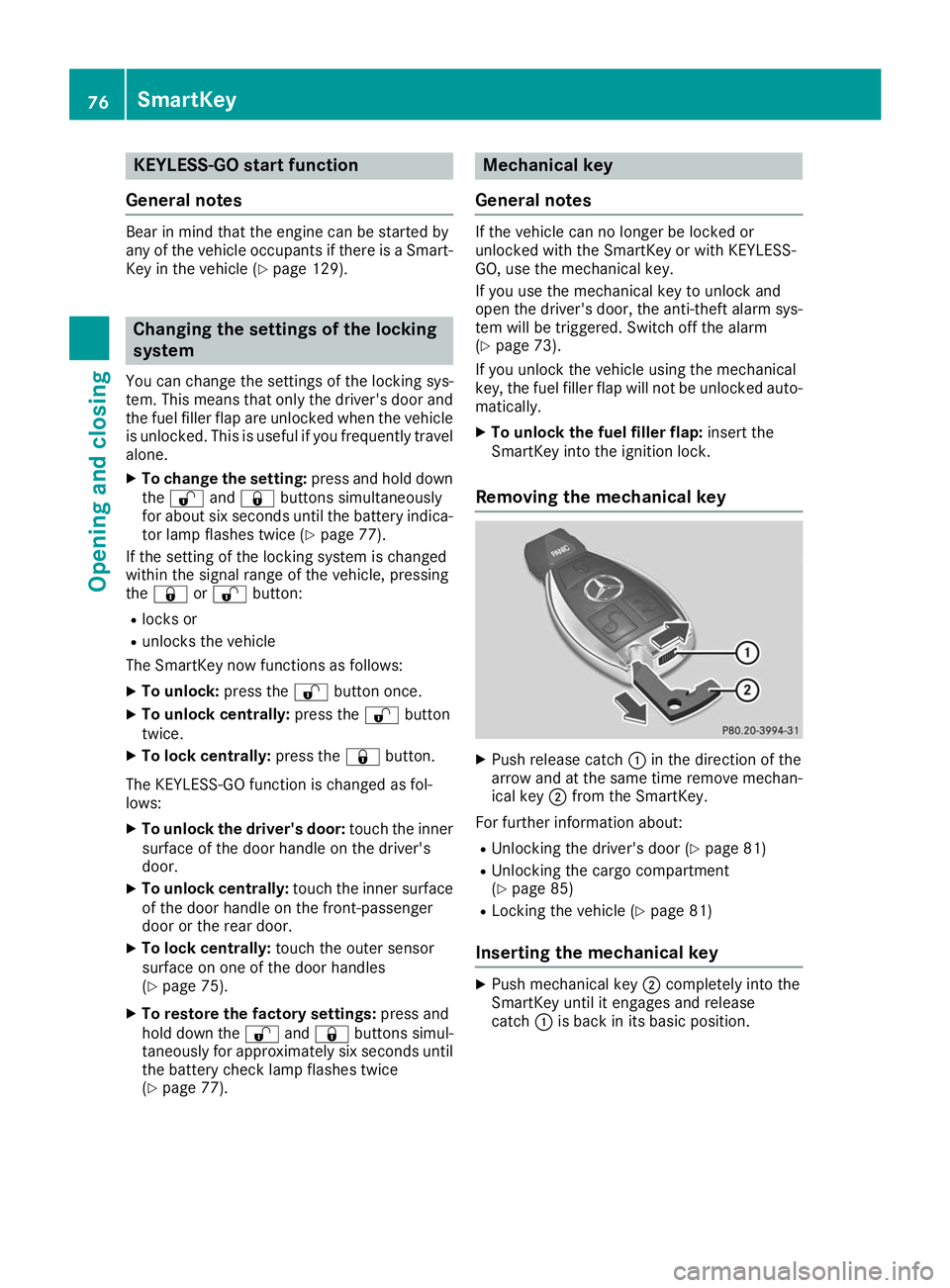
Removing the mechanical key X
Push release catch 0043in the direction of the
arrow and at the same time remove mechan- ical key 0044from the SmartKey.
For further information about:
R Unlocking the driver's door (Y page 81)
R Unlocking the cargo compartment
(Y page 85)
R Locking the vehicle (Y page 81)
Inserting the mechanical key X
Push mechanical key 0044completely into the
SmartKey until it engages and release
catch 0043is back in its basic position. 76
SmartKeyOpening and closing
Page 82 of 370
Doors
Important safety notes
G
WARNING
If children are left unsupervised in the vehicle, they could:
R open the doors, thus endangering other
people or road users.
R get out and disrupt traffic.
R operate the vehicle's equipment.
Additionally, children could set the vehicle in
motion if, for example, they:
R release the parking brake.
R shifting the automatic transmission out of
park position P
R Start the engine.
There is a risk of an accident and injury.
When leaving the vehicle, always take the
SmartKey with you and lock the vehicle. Never
leave children or animals unattended in the
vehicle. Always keep the SmartKey out of
reach of children. Unlocking and opening doors from
the inside
You can open a door from inside the vehicle
even if it has been locked. You can only open the rear doors from inside the vehicle if they are not
secured by the child-proof locks (Y page 63).
If the vehicle has previously been locked from
the outside, opening a door from the inside will
trigger the anti-theft alarm system. Switch off
the alarm (Y page 73). X
Front door: pull door handle 0044.
If the door is locked, locking knob 0043pops up.
The door is unlocked and can be opened.
X Rear door: pull door handle 0044.
If the door is locked, locking knob 0043pops up
and the door unlocks.
X Pull door handle 0044again.
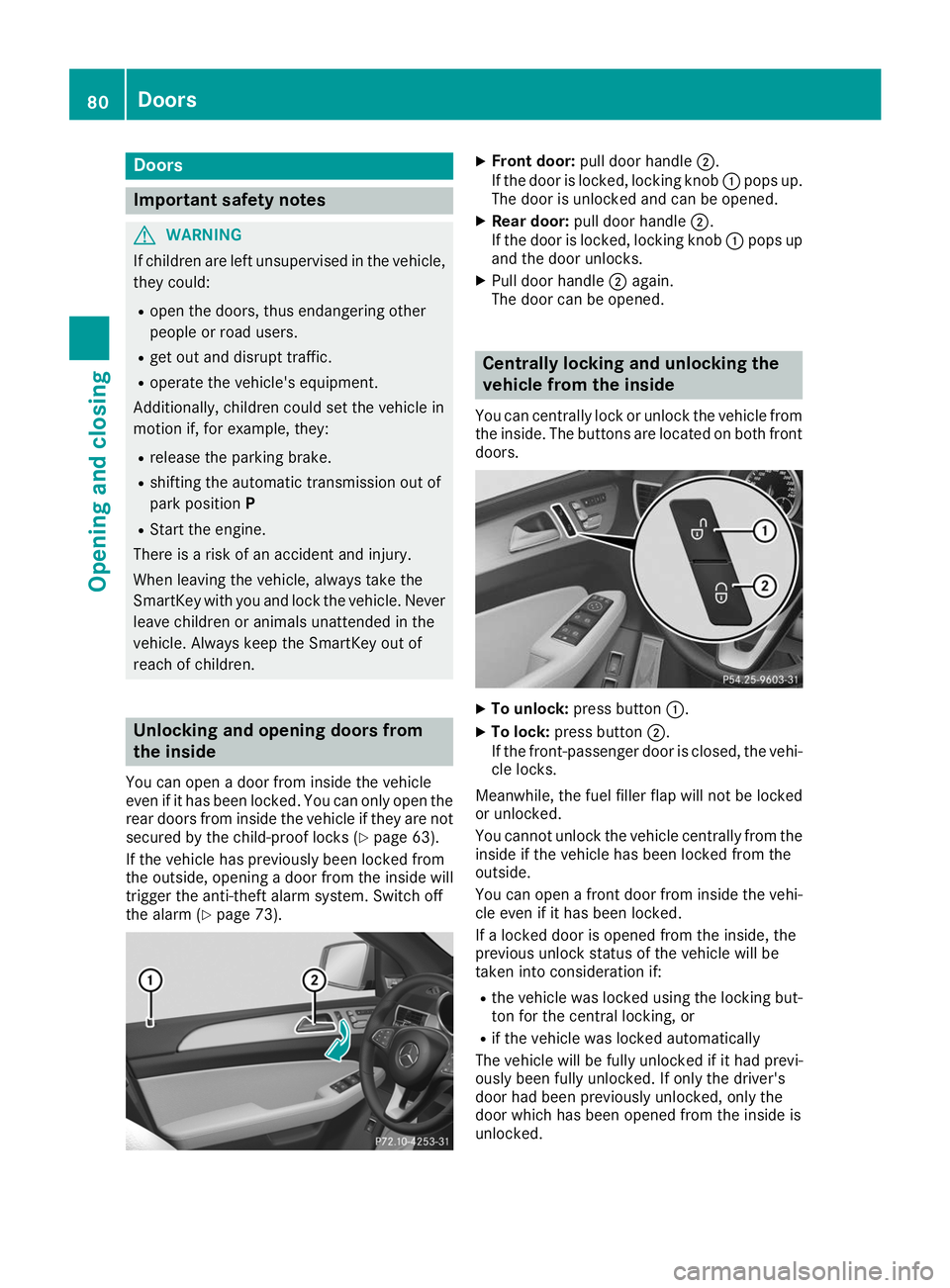
The door can be opened. Centrally locking and unlocking the
vehicle from the inside
You can centrally lock or unlock the vehicle from the inside. The buttons are located on both frontdoors. X
To unlock: press button 0043.
X To lock: press button 0044.
If the front-passenger door is closed, the vehi-
cle locks.
Meanwhile, the fuel filler flap will not be locked
or unlocked.
You cannot unlock the vehicle centrally from the
inside if the vehicle has been locked from the
outside.
You can open a front door from inside the vehi-
cle even if it has been locked.
If a locked door is opened from the inside, the
previous unlock status of the vehicle will be
taken into consideration if:
R the vehicle was locked using the locking but-
ton for the central locking, or
R if the vehicle was locked automatically
The vehicle will be fully unlocked if it had previ-
ously been fully unlocked. If only the driver's
door had been previously unlocked, only the
door which has been opened from the inside is
unlocked. 80
DoorsOpening and closing