2019 MERCEDES-BENZ GLC tailgate
[x] Cancel search: tailgatePage 189 of 370
Object detection only works in wide-angle view.
To ensure that you can use the function, it mustbe switched on in the multimedia system (seethe Digital Operator's Manual).
360° Camera
General notes
The 360° camera is a system consisting of fourcameras.
The system processes images from the follow-ing cameras:
RRear view camera
RFront camera
RTwo side cameras in the exterior mirrors
The cameras cover the immediate surroundingsof the vehicle. The system supports you, forexample when parking or if vision is restricted atan exit.
You can show images from the 360° camera infull-screen mode or in seven different split-screen views on the multimedia system. A split-screen view also includes a top view of the vehi-cle. This view is calculated from the data sup-plied by the installed cameras (virtual camera).
The seven split-screen views are:
RTop view and picture from the rear view cam-era (130° viewing angle)
RTop view and image from the front camera(130° viewing angle without displaying themaximum steering wheel angle)
RTop view and enlarged rear view
RTop view and enlarged front view
RTop view and trailer view (vehicles with trailertow hitch)
RTop view and images from the rear-facing sidecameras (rear wheel view)
RTop view and images from the forward-facingside cameras (front wheel view)
When the function is active and you shift thetransmission from[or^to\\, the guidelines on the multimedia system are hidden.
When you shift between transmission positions[and^, you see the previously selected frontor rear view.
Distances measured by Parking AssistPARKTRONIC will also be optically displayed:
Rin split screen view as red or yellow bracketsaround the vehicle icon in the top view, or
Rat the bottom right as red or yellow bracketsaround the vehicle symbol in full-screen mode
The line thickness and color of the bracketsshow how far the vehicle is from an object.
Ryellow brackets with thin lines: Parking AssistPARKTRONIC is active
Ryellow brackets with normal lines: an object ispresent in close range of the vehicle
Rred line: an object is present in the immediateclose range of the vehicle
Important safety notes
The 360°camera is only an aid and may show adistorted view of obstacles, show them incor-rectly or not at all. The 360°camera is not asubstitute for attentive driving.
You are always responsible for safe maneuver-ing and parking. Make sure that there are nopersons, animals or objects in the maneuveringarea while maneuvering and parking in parkingspaces.
You are always responsible for safety, and mustalways pay attention to your surroundings whenparking and maneuvering. This applies to theareas behind, in front of and beside the vehicle.You could otherwise endanger yourself and oth-ers.
The 360° camera will not function or will func-tion in a limited manner:
Rif the doors are open
Rif the exterior mirrors are folded in
Rif the tailgate is open
Rin heavy rain, snow or fog
Rat night or in very dark places
Rif the cameras are exposed to very bright light
Rif the area is lit by fluorescent bulbs or LEDlighting (the display may flicker)
Rif the camera lenses fog up, e.g. when drivinginto a heated garage in winter, causing a rapidchange in temperature
Rif the camera lenses are dirty or covered
Rif the vehicle components in which the cam-eras are installed are damaged. In this case,have the camera position and setting checkedat a qualified specialist workshop
Driving systems187
Driving and parking
Z
Page 191 of 370
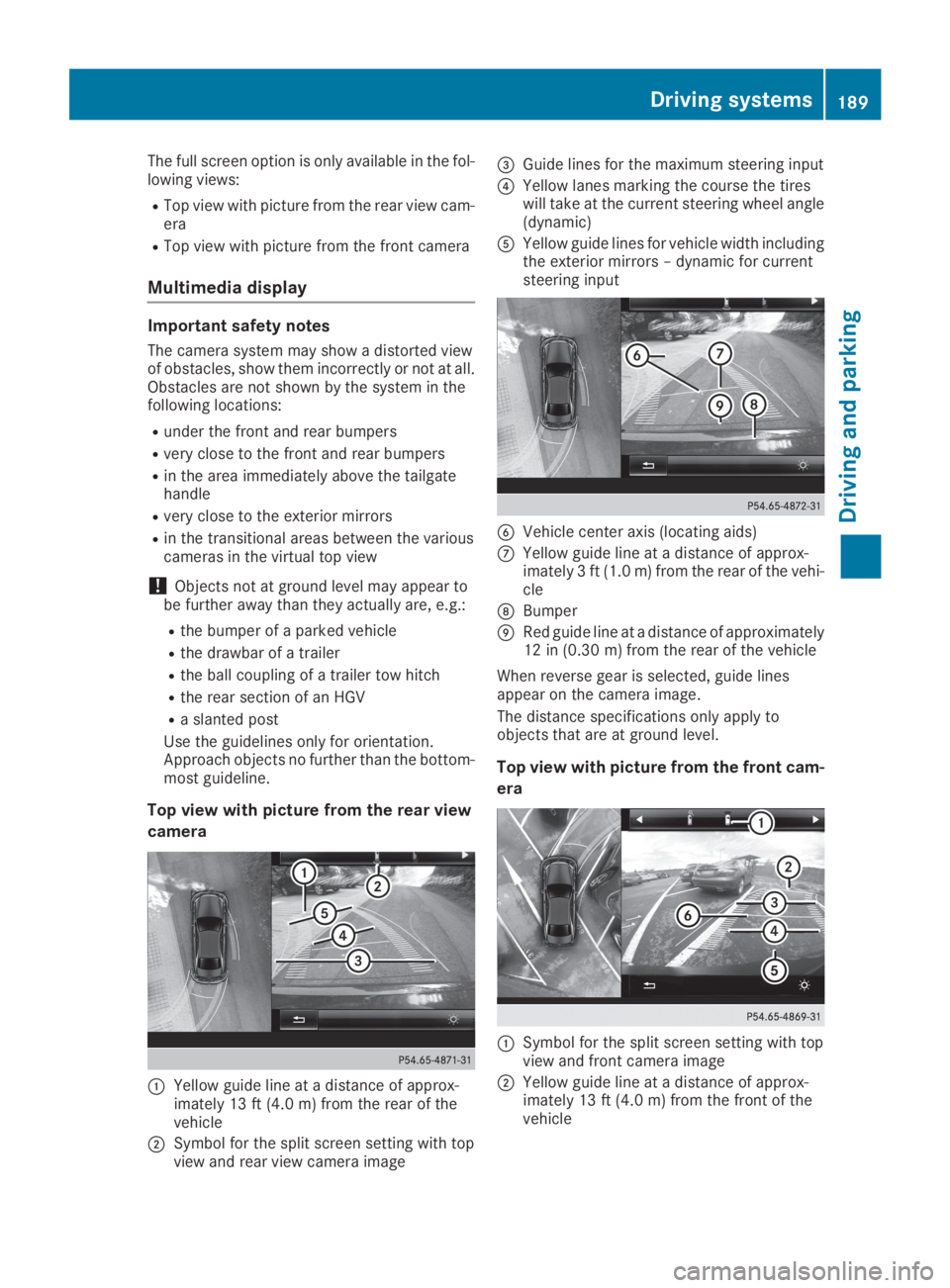
The full screen option is only available in the fol-lowing views:
RTop view with picture from the rear view cam-era
RTop view with picture from the front camera
Multimedia display
Important safety notes
The camera system may show a distorted viewof obstacles, show them incorrectly or not at all.Obstacles are not shown by the system in thefollowing locations:
Runder the front and rear bumpers
Rvery close to the front and rear bumpers
Rin the area immediately above the tailgatehandle
Rvery close to the exterior mirrors
Rin the transitional areas between the variouscameras in the virtual top view
!Objects not at ground level may appear tobe further away than they actually are, e.g.:
Rthe bumper of a parked vehicle
Rthe drawbar of a trailer
Rthe ball coupling of a trailer tow hitch
Rthe rear section of an HGV
Ra slanted post
Use the guidelines only for orientation.Approach objects no further than the bottom-most guideline.
Top view with picture from the rear view
camera
CYellow guide line at a distance of approx-imately 13 ft (4.0 m) from the rear of thevehicle
DSymbol for the split screen setting with topview and rear view camera image
Page 207 of 370
XSwitch off the engine.
XClose the doors and tailgate.
XCouple up the trailer.
XEstablish the electrical connection betweenthe vehicle and the trailer.
XCheck that the trailer lighting system is work-ing.
XPush the combination switch upwards/down-wards and check whether the correspondingturn signal on the trailer flashes.
A trailer that is connected is recognized onlywhen the electrical connection is establishedcorrectly and when the lighting system is work-ing properly. The function of other systems alsodepends on this, for example:
RESP®
RPARKTRONIC
RActive Parking Assist
RActive Blind Spot Assist
RActive Lane Keeping Assist
Vehicles with AIR BODY CONTROL: if you coupleup a trailer, the vehicle always remains at high-way level. Observe the following note when cou-pling up a trailer:
RUnless highway level has been set manually,the vehicle is automatically lowered to high-way level. If a speed of 5 mph (8 km/h) hasbeen reached, this may be the case.
These restrictions apply to accessories that aresupplied with power via the trailer socket in yourvehicle, e.g. a rear bicycle rack.
Observe the maximum permissible trailerdimensions (width and length).
Most U.S. states and all Canadian provincesrequire by law:
RSafety chains between the towing vehicle andthe trailer. The chains should be cross-woundunder the trailer drawbar. They must be fas-tened to the vehicle's trailer coupling, not tothe bumper or the axle.
Leave enough play in the chains to make tightcornering possible.
RA separate brake system for certain types oftrailer.
RSafety switch for braked trailers. Check thespecific legal requirements applicable to yourstate.
If the trailer becomes detached from the tow-ing vehicle, the safety feature applies thetrailer brakes.
Towing a trailer
There are several legal requirements for towinga trailer, e.g. the maximum permissible speed.Make sure that your car/trailer combinationcomplies with the local regulations:
Rin your place of residence
Rat your destination
The police and local authorities can provide reli-able information.
To accumulate driving experience and accustomyourself to the new handling characteristics,practice the following at a location where thereis no traffic:
RCornering
RStopping
RBacking up
Check the following before the journey:
RTrailer tow hitch
RSafety switch for braked trailers
RSafety chains
RElectrical connections
RLighting system
RWheels and tires
RLoad securing
Adjust the exterior mirrors so that you have aclear view of the rear section of the trailer.
If the trailer is equipped with electronically con-trolled brakes, pull away carefully in the car/trailer combination. Brake manually using thebrake controller and check whether the brakesfunction correctly.
Regularly check that the load is secure.
When towing a trailer, your vehicle's handlingcharacteristics will be different in comparisonwith when driving without a trailer.
The vehicle/trailer combination:
Ris heavier
Ris restricted in its acceleration and gradient-climbing capability
Rhas an increased braking distance
Ris affected more by strong crosswinds
Rdemands more sensitive steering
Rhas a larger turning circle
Avoid sudden steering movements.
Avoid braking abruptly. If possible, brake gentlyat first to allow the trailer to run on. Then,increase the braking force rapidly.
Towing a trailer205
Driving and parking
Z
Page 208 of 370
When overtaking, pay particular attention to theextended length of your vehicle/trailer combi-nation.
Due to the length of the vehicle/trailer combi-nation, you require additional road space whenovertaking before you can change back to theoriginal lane.
If the automatic transmission repeatedly shiftsbetween gears on uphill or downhill gradients,shift to a lower gear.
Driving in a lower gear and at a reduced speeddecreases the risk of engine damage.
If the coolant temperature increases signifi-cantly when climate control is switched on,switch climate control off.
Coolant heat can also be dissipated by openingthe windows and switching the ventilationblower and the interior temperature to the high-est level.
Decoupling a trailer
GWARNING
If you uncouple a trailer with the overrun
brake engaged, you could trap your hand
between the vehicle and the trailer drawbar.
There is a risk of injury.
Do not uncouple a trailer if the overrun brake
is engaged.
GWARNING
Vehicles with level control:
The vehicle is lowered as soon as you discon-
nect the trailer cable. This could result in your
limbs or those of other people that are
between the vehicle body and tires or under-
neath the vehicle being trapped. There is a
risk of injury.
Make sure that nobody is in the immediate
vicinity of the wheel housings or under the
vehicle when you disconnect the trailer cable.
!Do not disconnect a trailer with an engagedoverrun brake. Otherwise, your vehicle couldbe damaged by the rebounding of the overrunbrake.
XApply the vehicle's parking brake manually.
XShift the transmission to position].
XClose all doors and the tailgate.
XSwitch off the engine.
XSecure the vehicle and trailer against rollingaway.
XRemove the trailer cable.
XRemove the safety chains, if there are any.
XUncouple the trailer.
Removing the ball coupling
XObserve the manufacturer's installationinstructions.
XPress the protective cap into the ball couplingrecess.
XMake sure that the protective cap is firmly inplace.
Observe the loading guidelines (Ypage 278)and the safety notes regarding stowage spaces(Ypage 278).
Information on cleaning and care of the trailertow hitch (Ypage 310).
Trailer power supply
!Accessories with a maximum power con-sumption of 180 W can be connected to thepermanent power supply.
You must not charge a trailer battery using thepower supply.
The trailer socket of your vehicle is equipped atthe factory with a permanent power supply.
The permanent power supply is supplied viatrailer socket pin 4.
The trailer's permanent power supply isswitched off in the event of low vehicle supplyvoltage and after six hours at the latest.
A qualified specialist workshop can providemore information about installing the trailerelectrics.
Permissible trailer loads and trailer
drawbar noseweights
Weight specifications
The gross trailer weight is calculated as theweight of the trailer plus the weight of the loadand the trailer's equipment.
206Towing a trailer
Driving and parking
Page 256 of 370
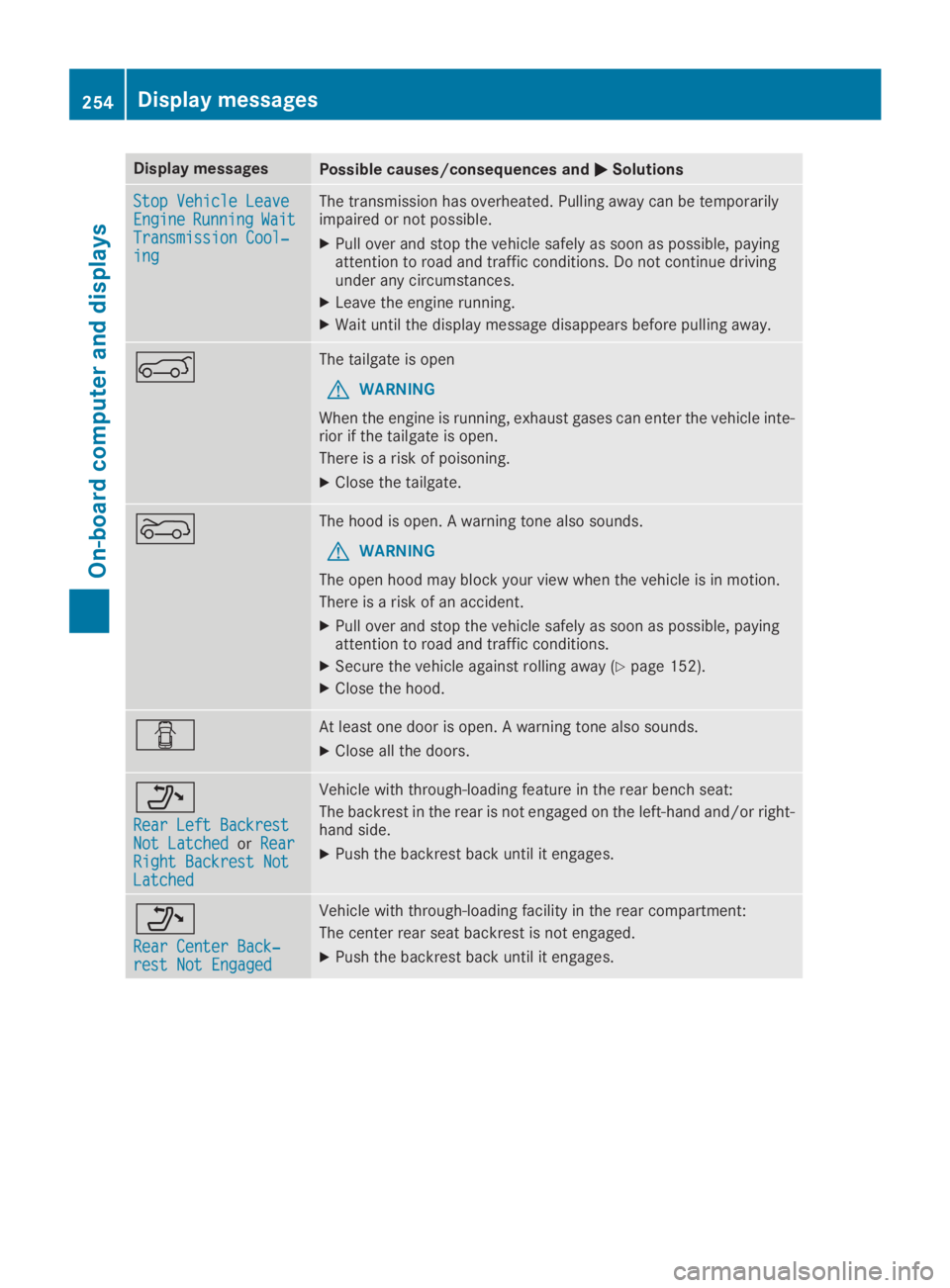
Display messagesPossible causes/consequences andPPSolutions
Stop Vehicle LeaveStop Vehicle LeaveEngineEngineRunningRunningWaitWaitTransmission Cool‐Transmission Cool‐inging
The transmission has overheated. Pulling away can be temporarilyimpaired or not possible.
XPull over and stop the vehicle safely as soon as possible, payingattention to road and traffic conditions. Do not continue drivingunder any circumstances.
XLeave the engine running.
XWait until the display message disappears before pulling away.
eThe tailgate is open
GWARNING
When the engine is running, exhaust gases can enter the vehicle inte-rior if the tailgate is open.
There is a risk of poisoning.
XClose the tailgate.
fThe hood is open. A warning tone also sounds.
GWARNING
The open hood may block your view when the vehicle is in motion.
There is a risk of an accident.
XPull over and stop the vehicle safely as soon as possible, payingattention to road and traffic conditions.
XSecure the vehicle against rolling away (Ypage 152).
XClose the hood.
QAt least one door is open. A warning tone also sounds.
XClose all the doors.
o
Rear Left BackrestRear Left BackrestNot LatchedNot LatchedorRearRearRight Backrest NotRight Backrest NotLatchedLatched
Vehicle with through-loading feature in the rear bench seat:
The backrest in the rear is not engaged on the left-hand and/or right-hand side.
XPush the backrest back until it engages.
o
Rear Center Back‐Rear Center Back‐rest Not Engagedrest Not Engaged
Vehicle with through-loading facility in the rear compartment:
The center rear seat backrest is not engaged.
XPush the backrest back until it engages.
254Displaymessages
On-b oard computer and displays
Page 280 of 370
Stowage areas
Loading guidelines
GDANGER
Combustion engines emit poisonous exhaust
gases such as carbon monoxide. Exhaust
gases can enter the vehicle interior if the tail-
gate is open while the engine is running, espe-
cially if the vehicle is in motion. There is a risk
of poisoning.
Always switch off the engine before opening
the tailgate. Never drive with the tailgate
open.
GWARNING
If objects, luggage or loads are not secured or
not secured sufficiently, they could slip, tip
over or be flung around and thereby hit vehicle
occupants. There is a risk of injury, particu-
larly in the event of sudden braking or a sud-
den change in direction.
Always store objects so that they cannot be
flung around. Secure objects, luggage or
loads against slipping or tipping before the
journey.
GWARNING
The exhaust tail pipe and tail pipe trim can
become very hot. If you come into contact
with these parts of the vehicle, you could burn
yourself. There is a risk of injury.
Always be particularly careful around the
exhaust tail pipe and the tail pipe trim. Allow
these components to cool down before touch-
ing them.
The handling characteristics of a laden vehicleare dependent on the distribution of the loadwithin the vehicle. For this reason, you shouldobserve the following notes when transporting aload:
RNever exceed the maximum permissiblegross vehicle mass or the gross axle weightrating for the vehicle (including occupants).The values are specified on the vehicle iden-
tification plate on the B-pillar of the driver'sdoor.
RThe cargo compartment is the preferred placeto carry objects.
RPosition heavy loads as far forward as possi-ble and as low down in the cargo compart-ment as possible.
RThe load must not protrude above the upperedge of the seat backrests.
RAlways place the load behind unoccupiedseats if possible.
RHook in the cargo net when loading.
RSecure the load with sufficiently strong andwear-resistant tie-downs. Pad sharp edges forprotection.
Stowage spaces
Important safety notes
GWARNING
If you transport objects in the vehicle interior
and these are not adequately secured, they
could slip or be flung around and thereby
strike vehicle occupants. In addition, cup
holders, open stowage spaces and mobile
phone brackets may not always be able to
hold the objects placed in them in the event of
an accident. There is a risk of injury, particu-
larly in the event of sharp braking or sudden
changes of direction.
RAlways stow objects in such a way that they
cannot be tossed about in these or similar
situations.
RAlways make sure that objects do not pro-
trude out of the stowage spaces, luggage
nets or stowage nets.
REnsure that closable stowage spaces are
shut before beginning your journey.
RAlways stow and secure heavy, hard, poin-
ted, sharp-edged, fragile or large objects in
the cargo compartment.
Observe the loading guidelines (Ypage 278).
278Stowage areas
Stowage and features
Page 309 of 370
RLight bulbs
RSeals
RTrim elements
RVentilation slots
Damaged seals or electrical components canlead to leaks or failures.
!Vehicles with decorative film: parts of yourvehicle are covered with decorative film.Maintain a distance of at least 27.5 in (70 cm)between the film-covered parts of the vehicleand the nozzle of the power washer.
Information about the correct distance isavailable from the equipment manufacturer.
Move the power washer nozzle around whencleaning your vehicle.
The water temperature of the power washermust not exceed 140 ‡ (60 †).
!If the SmartKey is within the rear detectionrange of KEYLESS-GO, the following situa-tions, for example, could lead to the uninten-tional opening of the tailgate:
Rwhen using an automatic car wash
Rwhen using a power washer
Make sure that the SmartKey is at least 10 ft(3 m) away from the vehicle.
Cleaning the paintwork
!Do not affix:
Rstickers
Rfilms
Rmagnetic plates or similar items
to painted surfaces. You could otherwisedamage the paintwork.
Scratches, corrosive deposits, areas affected bycorrosion and damage caused by inadequatecare cannot always be completely repaired. Insuch cases, visit a qualified specialist workshop.
XRemove dirt immediately, where possible,while avoiding rubbing too hard.
XSoak insect remains with insect remover andrinse off the treated areas afterwards.
XSoak bird droppings with water and rinse offthe treated areas afterwards.
XRemove tree resin, oils, fuels and greases byrubbing gently with a cloth soaked in petro-leum ether or lighter fluid
XRemove coolant and brake fluid with a moistcloth and clear water.
XUse tar remover to remove tar stains.
XUse silicone remover to remove wax.
When water no longer forms beads on the paintsurface, use the care product Paint Care, whichhas been approved for Mercedes-Benz. This isthe case approximately every three to fivemonths, depending on the climate conditionsand the care product used.
The cleaning product Paint Cleaner, which hasbeen recommended and approved forMercedes-Benz, should be used when dirt haspenetrated the paint surface.
Also use Paint Cleaner on paint that has becomedull.
Do not use these care products in the sun or onthe hood while the hood is hot.
XUse a suitable touch-up stick, e.g. MB Touch-Up Stick, to repair slight damage to the paint-work quickly and provisionally.
Matte finish care
!Never polish the vehicle or the light alloywheels. Polishing causes the finish to shine.
!The following can give the paint a glossyappearance and thus reduce the matt effect:
RRubbing hard with unsuitable agents
RWashing the vehicle in direct sunlight
!Never use paint cleaner, buffing or polishingproducts, or gloss preserver, e.g. wax, for thepurpose of paintwork care. These productsare only suitable for high-gloss surfaces. Theiruse on vehicles with matte paintwork leads toconsiderable surface damage or, more spe-cifically, to shiny, spotted areas.
Always have paintwork repairs carried out at aqualified specialist workshop.
!Only use automatic car washes which cor-respond to the latest technological stand-ards. Never use wash programs which finishby treating the vehicle with hot wax.
Observe these notes if your vehicle has a clearmatte finish. This will help you to avoid damageto the paintwork due to incorrect treatment.
These notes also apply to light alloy wheels witha clear matte finish.
Use only insect remover and car shampoo fromthe range of approved Mercedes-Benz careproducts.
Care307
Maintenance and care
Z
Page 316 of 370
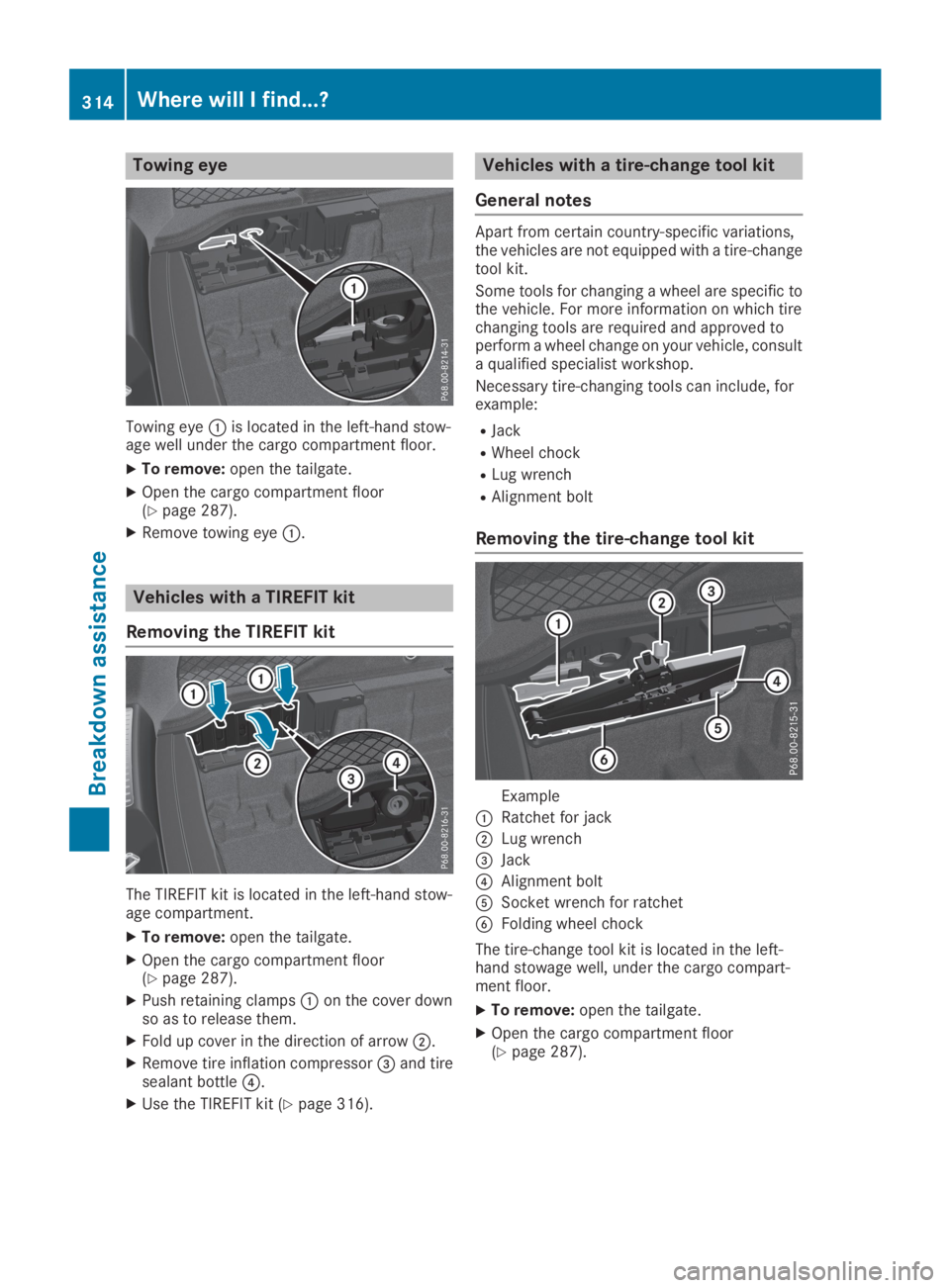
Towing eye
Towing eyeCis located in the left-hand stow-age well under the cargo compartment floor.
XTo remove:open the tailgate.
XOpen the cargo compartment floor(Ypage 287).
XRemove towing eyeC.
Vehicles with a TIREFIT kit
Removing the TIREFIT kit
The TIREFIT kit is located in the left-hand stow-age compartment.
XTo remove:open the tailgate.
XOpen the cargo compartment floor(Ypage 287).
XPush retaining clampsCon the cover downso as to release them.
XFold up cover in the direction of arrowD.
XRemove tire inflation compressor