2019 MERCEDES-BENZ GLB SUV belt
[x] Cancel search: beltPage 570 of 689
Occupant saf
ety Display messages
Possible causes/consequences and M
MSolutions
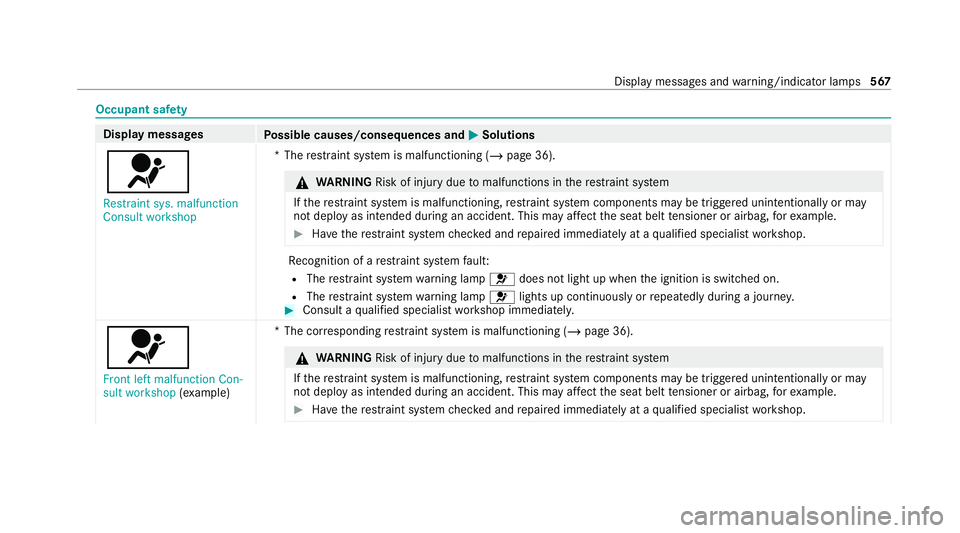
6 Restraint sys. malfunction
Consult workshop *T
herestra int sy stem is malfunctioning (/ page 36). &
WARNING Risk of inju rydue tomalfunctions in there stra int sy stem
If th ere stra int sy stem is malfunctioning, restra int sy stem components may be triggered unintentionally or may
not deploy as intended during an accident. This may af fect the seat belt tensioner or airbag, forex ample. #
Have there stra int sy stem checked and repaired immediately at a qualified specialist workshop. Re
cognition of a restra int sy stem fault:
R The restra int sy stem warning lamp 6does not light up when the ignition is switched on.
R The restra int sy stem warning lamp 6lights up continuously or repeatedly during a journe y. #
Consult a qualified specialist workshop immediatel y.
6
Front left malfunction Con-
sult workshop (examp le) *T
he cor responding restra int sy stem is malfunctioning (/ page 36). &
WARNING Risk of inju rydue tomalfunctions in there stra int sy stem
If th ere stra int sy stem is malfunctioning, restra int sy stem components may be triggered unintentionally or may
not deploy as intended during an accident. This may af fect the seat belt tensioner or airbag, forex ample. #
Have there stra int sy stem checked and repaired immediately at a qualified specialist workshop. Display messages and
warning/indicator lamps 567
Page 627 of 689
Indicator and
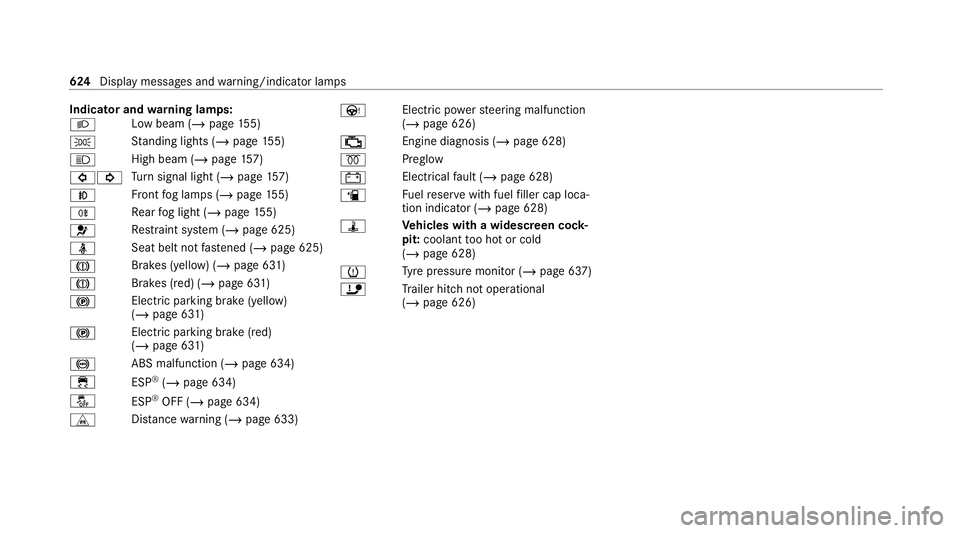
warning lamps:
L Low beam (/
page155)
T St
anding lights (/ page155)
K High beam (/
page157)
#! Tu
rn signal light (/ page157)
N Fr
ont fog lamps (/ page155)
R Re
ar fog light (/ page155)
6 Re
stra int sy stem (/ page 625)
ü Seat belt not
fastened (/ page 625)
J Brakes (yellow) (/
page 631)
J Brakes (red) (/
page 631)
! Elect
ric pa rking brake (yellow)
(/ page 631)
! Electric parking brake (red)
(/
page 631)
! ABS malfunction (/
page 634)
÷ ESP®
(/ page 634)
å ESP®
OFF (/ page 634)
L Distance warning (/ page 633) Ù
Electric powerst eering malfunction
(/ page 626)
; Engine diagnosis (/
page 628)
% Preglow
# Elect
rical fault (/ page 628)
æ Fu
elreser vewith fuel filler cap loca‐
tion indicator (/ page 628)
ÿ Ve
hicles with a widescreen cock‐
pit: coolant too hot or cold
(/ page 628)
h Ty
re pressure monitor (/ page 637)
ï Trailer hit chnot operational
(/ page 626) 624
Displaymessa ges and warning/indicator lamps
Page 628 of 689
Occupant saf
ety Wa
rning/indicator lamp
Possible causes/consequences and M
MSolutions
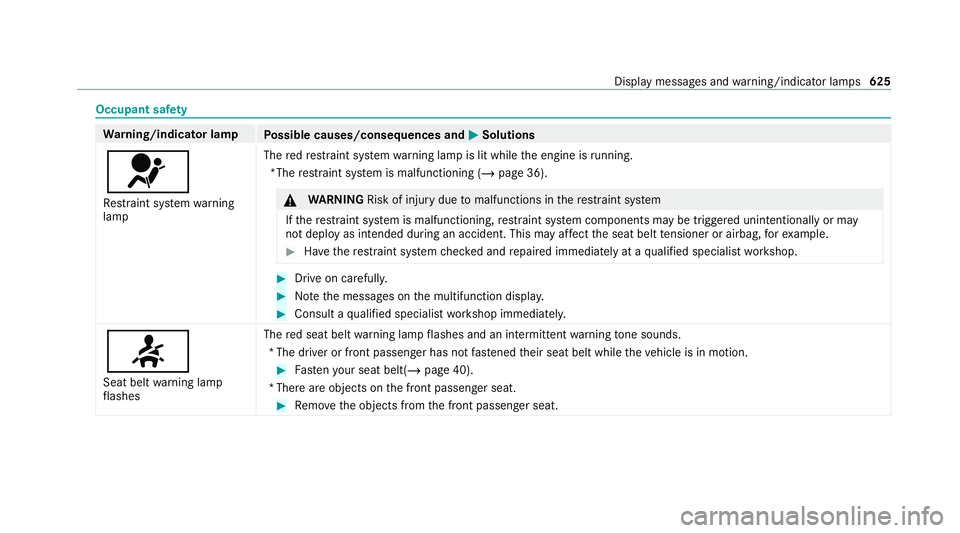
6 Re stra int sy stem warning
lamp The
redre stra int sy stem warning lamp is lit while the engine is running.
*The restra int sy stem is malfunctioning (/ page 36). &
WARNING Risk of inju rydue tomalfunctions in there stra int sy stem
If th ere stra int sy stem is malfunctioning, restra int sy stem components may be triggered unintentionally or may
not deploy as intended during an accident. This may af fect the seat belt tensioner or airbag, forex ample. #
Have there stra int sy stem checked and repaired immediately at a qualified specialist workshop. #
Drive on carefully. #
Notethe messages on the multifunction displa y. #
Consult a qualified specialist workshop immediatel y.
7
Seat belt warning lamp
fl ashes The
red seat belt warning lamp flashes and an intermit tent wa rning tone sounds.
*T he driver or front passenger has not fastened their seat belt while theve hicle is in motion. #
Fasten your seat belt(/ page 40).
*T here are objects on the front passenger seat. #
Remo vethe objects from the front passenger seat. Display messages and
warning/indicator lamps 625
Page 629 of 689
Wa
rning/indicator lamp
Possible causes/consequences and M
MSolutions
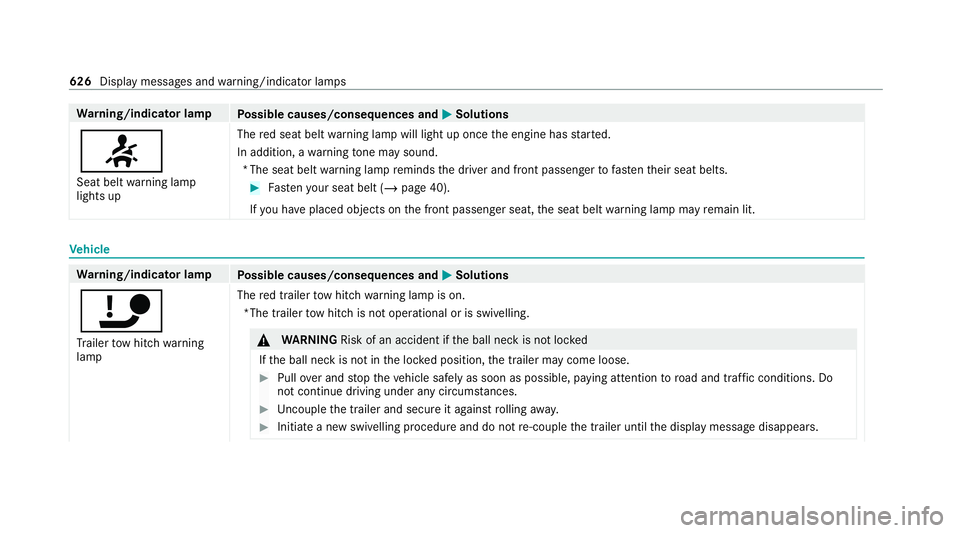
7 Seat belt warning lamp
lights up The
red seat belt warning lamp will light up once the engine has star ted.
In addition, a warning tone may sound.
*T he seat belt warning lamp reminds the driver and front passenger tofast entheir seat belts. #
Fasten your seat belt (/ page 40).
If yo u ha veplaced objects on the front passenger seat, the seat belt warning lamp may remain lit. Ve
hicle Wa
rning/indicator lamp
Possible causes/consequences and M
MSolutions
ï Tr ailer tow hit chwarning
lamp The
red trailer tow hit chwarning lamp is on.
*The trailer tow hit chis not operational or is swivelling. &
WARNING Risk of an accident if the ball neck is not loc ked
If th e ball neck is not in the loc ked position, the trailer may come loose. #
Pull over and stop theve hicle safely as soon as possible, paying attention toroad and traf fic conditions. Do
not continue driving under any circums tances. #
Uncouple the trailer and secure it against rolling away. #
Initiate a new swivelling procedure and do not re-couple the trailer until the display message disappears. 626
Display messages and warning/indicator lamps
Page 646 of 689
Au
tomatic front passen ger front air‐
bag shu toff .......................................... 44, 46
Fu nction of the automatic front
passenger front airbag deactivation
sy stem ................................................... 44
PA SSENGER AIR BAG indicator lamp .... .46
Au tomatic mir rorfo lding function
Ac tivating/deactivating ...................... .174
Au tomatic transmission
DIRECT SELECT le ver .......................... 203
Drive program display .......................... 19 9
Drive programs .................................... 19 8
DY NA MIC SELECT switch .................... 19 8
Engaging drive position ....................... 205
Engaging neutral ................................. 204
Engaging pa rkposition ........................ 204
Enga gingreve rsege ar ........................ .204
Kickdown ............................................ 206
Manual gear changing ........................ .205
St eering wheel gearshift paddles ........ 205
Tr ansmission position display .............. 203
Tr ansmission positions ........................ 203
Au tomatic transmission (problem)
see Transmission (problem) Axle load
Perm issible .......................................... 550
Tr ailer operation .................................. 565 B
Bag hook .................................................. 13 9
Ball ne ck
Fo lding out/in .................................... .288
BA S (Brake Assist Sy stem) .................... .226
Battery Cha rging (Remo teOnline) .................... 189
Ke y ........................................................ 84
Re mo tecontrol (s tationary heater) ...... 182
Battery see Battery (vehicle)
Battery (vehicle) ...................................... 514
Charging .............................................. 513
Charging (Remo teOnline) .................... 189
No tes .................................................. 509
No tes (s tarting assis tance and
ch arging) .............................................. 511
Re placing .............................................5 14
St arting assis tance .............................. 513Belt
see Seat belt
Bic ycle rack
Tr ailer operation .................................. 291
Blind Spot Assist .................................... .282
Ac tivating/deactivating ...................... .285
Fu nction .............................................. 282
Sy stem limitations ...............................2 82
Blo wer
see Climate control
BlueTEC see AdBlue ®
Blue tooth ®
............................................... 366
Information .......................................... 366
Setting up an Internet connection ....... 460
Switching on/off ................................. 366
Bonnet Resetting (active bonnet) .................... 485
Boot lid see Tailgate
Brake Assist Sy stem
see BAS (Brake Assi stSystem) Index
643
Page 648 of 689
Care
.......................................................... 499
Air-water duct ...................................... 491
Car wash ............................................. 491
Carpet .................................................4 99
Decorative foil .................................... .495
Displ ay................................................ 499
Exterior lighting ................................... 497
High-pressure cleaner ......................... 492
Matt finish ........................................... 494
Pa int wo rk ............................................ 494
Plastic trim .......................................... 499
Re alwo od/trim elements ...................4 99
Re versing camera ................................ 497
Re versing camera/360° Camera ........ 497
Ro of lining ...........................................4 99
Seat belt .............................................. 499
Seat co ver ........................................... 499
Sensors ............................................... 497
Ta ilpipes .............................................. 497
Tr ailer hit ch......................................... 497
Wa shing byhand ................................. 493
Wheels/rims ....................................... 497
Wi ndo ws .............................................. 497
Wi per blades .......................................4 97
Carpet (Care) .......................................... .499 Changing bulbs
........................................ 16 5
Dipped beam ....................................... 16 6
Fitting/removing co ver (front wheel
ar ch ) .................................................... 16 6
Main beam ...........................................1 66
No tes ................................................... 16 5
Overview ............................................. 16 5
Re versing lights .................................. .167
Tu rn signal lights (rear) ........................ 167
Changing gears ........................................ 205
Manually .............................................. 205
Changing hub caps ................................. 539
Changing the lights Driving ab road (symm etrical low
beam) .................................................. 15 5
Cha rging
Bat tery (vehicle) ...................................5 13
USB port ..............................................1 50
Child saf ety lock
Re ar door .............................................. 79
Re ar side wind ows................................. 80
Child seat Appr oval categories .............................. .58
At tach ing (no tes) ................................... 57Basic instructions .................................. 50
Fr
ont passenger seat (no tes) ................. 77
Fr ont passenger seat (without auto‐
matic airbag shutoff) ............................. 76
ISOFIX/i-Size (fitting) ............................ 67
No tes on risks and dangers ...................51
Re commended child restra int sys‐
te ms ...................................................... 55
Seats suita blefor belt-secu redch ild
re stra int sy stems ................................... 72
Seats suitable for i‑Size child
re stra int sy stems ................................... 65
Seats suitable for ISOFIX child
re stra int sy stems ................................... 61
Secu ring on the front passenger seat ....78
Secu ring on there ar seat ...................... 75
To pTe ther ..............................................70
Child ren
Av oiding dangers in theve hicle .............. 51
Basic instructions .................................. 50
Cho ck....................................................... 538
St orage location ..................................5 38
Cho ck
see Chock Index
645
Page 668 of 689
N
Na vigation
Menu (on-board computer) .................. 303
Overview ............................................. 379
Showing/hiding the menu ...................3 78
Switching on ........................................ 378
Up dating the map data ........................ 41 5
Vo ice commands (LINGU ATRO NIC) ...... 315
Na vigation
see Destination
see Destination entry
see Map
see Parking service
see Route
see Route guidance
see Traf fic information
Na vigation announcements
Ac tivating/deactivating ...................... .400
Ad justing thevo lume .......................... .401
Re peating ............................................ 401
Switching audio fadeout on/off ...........4 01
Na vigation messages
On-board computer ............................. 303 Ne
arField Communication (NFC) .......... 428
Connecting the mobile phone tothe
multimedia sy stem .............................. 428
General information ............................4 28
Locking theve hicle (digital vehicle
ke yst icke r) ............................................ 88
Locking theve hicle (mobile phone) .......88
St arting theve hicle (Digital Vehicle
Ke yst icke r) .......................................... 187
St arting theve hicle (mobile phone) ..... 187
Switching mobile phones .................... 428
Un locking theve hicle (digital vehicle
ke yst icke r) ............................................ 88
Un locking theve hicle (mobile phone) ....88
Using a mobile phone .......................... 428
Ne utral
Engaging ............................................. 204
NFC see Near Field Communication (NFC)
No n-operational time
Ac tivating/deactivating standby
mode .................................................. .224
St andby mode function ...................... .224 No
tifications Centre ................................ 352
Calling up a notification ....................... 353
Editing a notification ........................... 353
Global sea rch (o verview) .................... .354
Noti fication types ................................ 352
Overview ............................................. 352
Selecting actions for a notification ..... .353
Using theglobal sear ch....................... 354 O
Occupant saf ety
Pe ts in theve hicle ................................. 80
Occupant saf ety
see Airbag
see Automatic front passenger front
airbag shutoff
see PRE-SAFE ®
(anticipatory occu‐
pant pr otection)
see PRE-SAFE ®
PLUS (anticipatory
occupant pr otection plus)
see Restra int sy stem
see Seat belt
Odome ter
see Total dis tance Index
665
Page 672 of 689
Re
ading light
Switching on/off using poses .............. 341
Re ading light
see Interior lighting
Re alwo od (Care) .................................... .499
Re ar door (child saf ety lock) .................... 79
Re ar fog light
Switching on/off .................................1 56
Re ar seat
see Seat
see Third rowof seats
Re ar seat belt
St atus display ........................................ 41
Re ar seat belt status display .................... 41
Re ar window
Changing the wiper blade .................... 17 0
Re ar window heater ................................ 175
Re ar window wipers
Ac tivating/deactivating ...................... .168
Re ar-view mir ror
see Outside mir rors Re
cycling
see Take -ba ckof end-of-life vehicles
Re ducing agent
see AdBlue ®
Re fuelling
Re fuelling theve hicle .......................... 209
To pping up AdBlue ®
............................. 213
Re gistration
Ve hicle .................................................. 30
Re mo tecont rol (stationa ryheater/
ve ntilation)
Displa ys............................................... 181
Problems ............................................. 183
Re placing the battery .......................... 182
Setting ................................................. 180
Re mo teOnline
Charging the battery ............................1 89
Cooling or heating theve hicle inte‐
ri or .......................................................1 89
St arting theve hicle ............................. 189
Re placing a bulb
see Changing bulbs
Re scue card ............................................... 31Re
ser ve
Fu el ..................................................... 556
Re set function (multimedia sy stem) .....3 72
Re sidual heat ...........................................1 78
Re storing (factory settings)
see Reset function (multimedia sy stem)
Re stra int sy stem ...................................... .35
Basic instructions forch ildren .............. .50
Fu nction in an accident ........................ .36
Fu nctionality .......................................... 36
Malfunction ........................................... 36
Pr otection ..............................................35
Re duced pr otection ...............................35
Self-test ................................................. 36
Wa rning lamp ........................................ 36
Re versege ar
Inserting .............................................. 204
Re versing camera .................................. .263
Care .................................................... 497
Fu nction .............................................. 263
Opening the camera co ver (360°
Camera) ............................................. .270
Switching auto matic operation
on/off (360° Camera) ......................... 270 Index
669