2019 MERCEDES-BENZ GLB SUV belt
[x] Cancel search: beltPage 234 of 689
R
Intheeve nt of se vere swerving, the engine
output is also reduced and all wheels are
braked.
ESP ®
trailer stabilisation may be impaired or
may not function if:
R The trailer is not connec ted cor rectly or is
not de tected prope rly by theve hicle. Fu
nction of EBD (Electronic Brake forc e Dis‐
tribution) EBD is
characterised bythefo llowing:
R Monitoring and regulating the brake pressure
on there ar wheels.
R Impr oved driving stability when braking,
especially on bends. Fu
nction of STEER CONT ROL ST
EER CONTROL helps youby transmitting a
noticeable steering forc eto thesteering wheel in
th e direction requ ired forve hicle stabilisation. This
steering recommendation is given pa rticu‐
larly in thefo llowing situations:
R both right wheels or bo thleft wheels are on a
we t or slippe ryroad sur face when you brake
R theve hicle starts toskid
Sy stem limits
ST EER CONTROL may be impaired or may not
function in thefo llowing situations:
R ESP ®
is deactivated.
R ESP ®
is malfunctioning.
R The steering is malfunctioning.
If ESP ®
is malfunctioning, you will be assis ted
fur ther by the electric po werst eering. Fu
nction of Active Brake Assi st Ac
tive Brake Assi stconsi sts of thefo llowing
functions:
R Distance warning function
R Autonomous braking function
R Situation-dependent braking assi stance R
Vehicles with Driving Assistance Pack‐
age: Evasi veSteering Assist and cornering
function
Ac tive Brake Assi stcan help youto minimise the
ri sk of a collision with vehicles, cyclists or
pedestrians, or reduce the ef fects of su cha colli‐
sion.
If Ac tive Brake Assi sthas de tected a risk of colli‐
sion, a warning tone sounds and theL dis‐
ta nce warning lamp lights up in the instrument
clus ter.
Ve hicles with PRE-SAFE ®
:depending on the
countr y,an additional haptic warning occurs in
th efo rm of slight, repeated tensioning of the
seat belt.
If yo u do not react tothewa rning, autonomous
braking can be initiated in critical situations.
In especially critical situations, Active Brake
Assi stcan initia teautonomous braking direct ly.
In this case, thewa rning lamp and warning tone
occur simultaneously wi th the braking applica‐
tion. Driving and parking
231
Page 235 of 689
If
yo u apply the brake yourself in a critical situa‐
tion or apply the brake during autonomous brak‐
ing, situation-dependent braking assis tance
occu rs. The brake pressure increases up tomax‐
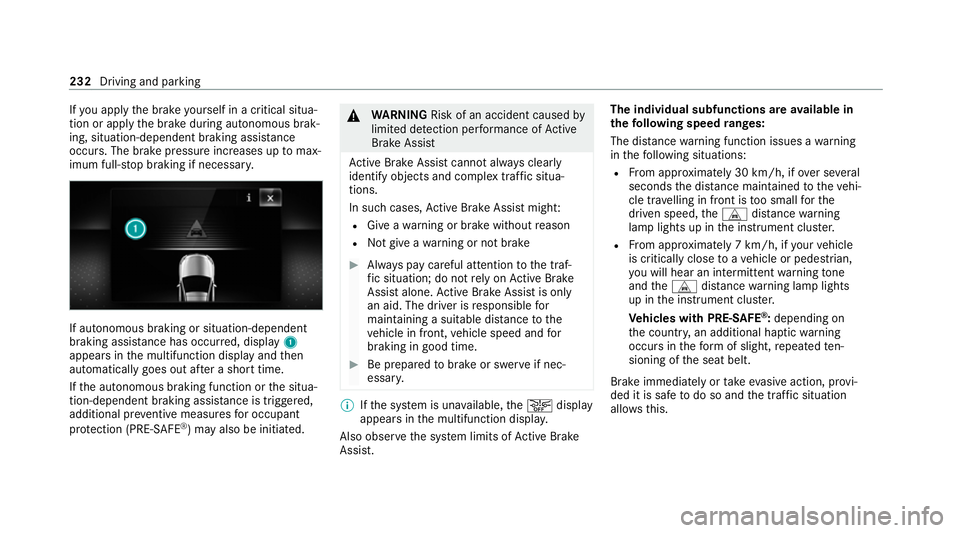
imum full-s top braking if necessar y.If autonomous braking or situation-dependent
braking assis
tance has occu rred, display 1
appears in the multifunction display and then
automatically goes out af ter a short time.
If th e autonomous braking function or the situa‐
tion-dependent braking assis tance is trig gered,
additional pr eventive measu resfo r occupant
pr otection (PRE-SAFE ®
) may also be initiated. &
WARNING Risk of an accident caused by
limited de tection per form ance of Active
Brake Assi st
Ac tive Brake Assi stcannot al ways clear ly
identify objects and complex traf fic situa‐
tions.
In su chcases, Active Brake Assi stmight:
R Give a warning or brake without reason
R Not give a warning or not brake #
Alw ays pay careful attention tothe traf‐
fi c situation; do not rely on Active Brake
Assi stalone. Active Brake Assi stis only
an aid. The driver is responsible for
maintaining a suita ble distance tothe
ve hicle in front, vehicle speed and for
braking in good time. #
Be prepared tobrake or swer veif nec‐
essar y. %
Ifth e sy stem is una vailable, theæ display
appears in the multifunction displa y.
Also obser vethe sy stem limits of Active Brake
Assi st. The individual subfunctions are
available in
th efo llowing speed ranges:
The dis tance warning function issues a warning
in thefo llowing situations:
R From appr oximately 30 km/h, if over se veral
seconds the dis tance maintained totheve hi‐
cle tr avelling in front is too small forthe
driven speed, theL distance warning
lamp lights up in the instrument clus ter.
R From appr oximately 7 km/h, if your vehicle
is critically close toave hicle or pedestrian,
yo u will hear an intermit tent wa rning tone
and theL distance warning lamp lights
up in the instrument clus ter.
Ve hicles with PRE-SAFE ®
:depending on
th e count ry, an additional haptic warning
occurs in thefo rm of slight, repeated ten‐
sioning of the seat belt.
Brake immediately or take evasive action, pr ovi‐
ded it is safe todo so and the traf fic situation
allo wsthis. 232
Driving and parking
Page 259 of 689
*
NO
TEDama gefrom auto matic braking If one of
thefo llowing functions is switched
on, theve hicle brakes automatically in cer‐
ta in situations:
R Active Brake Assi st
R Active Dis tance Assi stDISTRONIC
R HOLD function
R Active Parking Assist
To avo id damage totheve hicle, deactivate
th ese sy stems in thefo llowing or similar sit‐
uations: #
During towing #
In a car wash Re
quirements:
R The vehicle is stationar y.
R The driver's door is closed or the seat belt on
th e driver's side is fastened.
R The engine is running or has been au tomati‐
cally switched off bythe ECO start/ stop
function. R
The electric parking brake is released.
R Active Dis tance Assi stDISTRONIC is deacti‐
va ted.
R Vehicles with automatic transmission: the
transmission is in position h,kori
Ac tivating the HOLD function #
Dep ress the brake pedal and af ter a short
time quickly depress fur ther until theë
display appears in the multifunction displa y. #
Release the brake pedal.
Deactivating the HOLD function #
Depress the accelerator pedal topull away.
or #
Depress the brake pedal until theë dis‐
play disappears from the multifunction dis‐
pla y.
The HOLD function is deactivated in thefo llow‐
ing situations:
R Active Dis tance Assi stDISTRONIC is acti va‐
te d.
R Vehicles with automatic transmission: the
transmission is switched toposition j. R
The vehicle is secured with the electric park‐
ing brake.
In thefo llowing situations, theve hicle is held by
transmission position jand/or bythe electric
parking brake:
R The seat belt is unfas tened and the driver's
door is opened.
R The vehicle is switched off.
R There is a malfunction in the sy stem or the
po we r supp lyis insuf ficient.
Ve hicles with manual transmission:
The Brake immediately messagemay also
appear in the multifunction display: #
Immediately depress the brake pedal firm ly
until thewa rning message disappears.
The HOLD function is deactivated.
A horn sounds at regular inter vals if, despite the
Brake immediately message,you turn off the
engine, remo veyour seat belt and open the driv‐
er's door. If you attem pttolock theve hicle, the
horn tone becomes louder. The vehicle cannot
be loc ked until you ha vedeactivated the HOLD
function. 256
Driving and parking
Page 281 of 689
when
the engine is re-sta rted. The last selected
sensitivity le velre mains stored.
Sy stem limits
AT TENTION ASSIST is active in the 60 km/h to
200 km/h speed range.
The functionality of ATTENTION ASSIST is
re stricted, and warnings may be dela yed or not
occur at all in thefo llowing situations:
R Ifyo u ha vebeen driving for less than appr ox‐
imately 30 minutes.
R Ifth ero ad condition is poor (une venro ad
sur face or po tholes).
R Ifth ere is a strong side wind.
R Ifyo u adopt a sporty driving style (high cor‐
nering speeds or high rates of acceleration).
R Ifth eSt eering Assist function of Active Dis‐
ta nce Assi stDISTRONIC is acti ve.
R Ifth e time has been set incor rectly.
R In acti vedriving situations, if youch ange
lanes and vary your speed frequentl y.The
ATTENTION ASSIST tiredness or alertness
assessment is dele ted and restar ted when con‐
tinuing the journey in thefo llowing situations:
R Ifyo u swit choff the engine.
R Ifyo u unfas tenyo ur seat belt and open the
driver's door (e.g. changing drivers or taking
a break).
Setting ATTENTION ASSI ST
Multimedia sy stem:
4 © 5
Settings 5
Assistance
5 Attention Assist
Setting options #
Select Standard, SensitiveorOff.
Suggesting a rest area #
Select Suggest rest area . #
Activate or deacti vate the function.
If AT TENTION ASSIST de tects fatigue or
increasing la ckof attention, it suggests a
re st area in the vicinit y. #
Select the sugges tedre st area.
Yo u are guided tothe selected rest area. Speed Limit Assist
Fu
nction of Speed Limit Assist
% The availability of thefo llowing function is
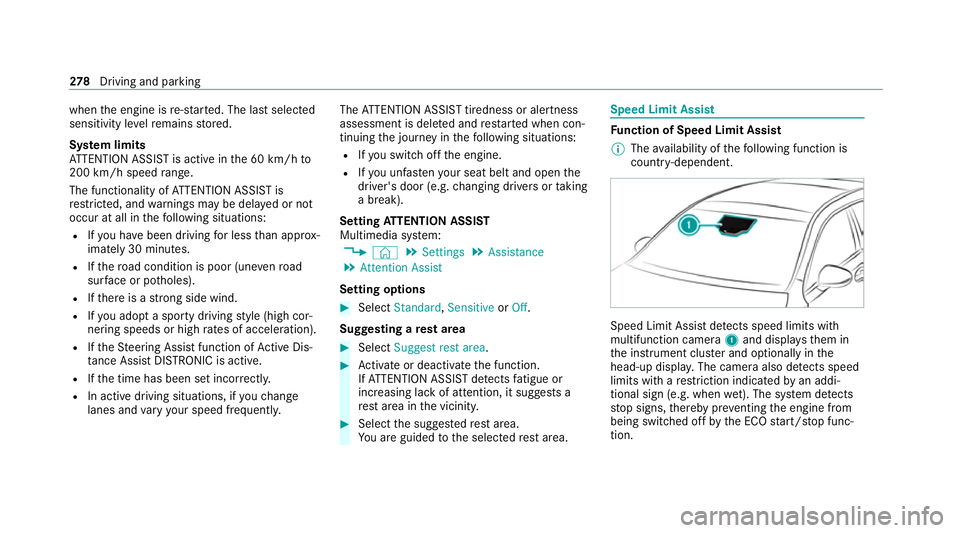
countr y-dependent. Speed Limit Assist de
tects speed limits wi th
multifunction camera 1and displa ys them in
th e instrument clus ter and optionally in the
head-up displa y.The camera also de tects speed
limits wi thare striction indicated byan addi‐
tional sign (e.g. when wet). The sy stem de tects
st op signs, thereby pr eventing the engine from
being switched off bythe ECO start/ stop func‐
tion. 278
Driving and pa rking
Page 344 of 689
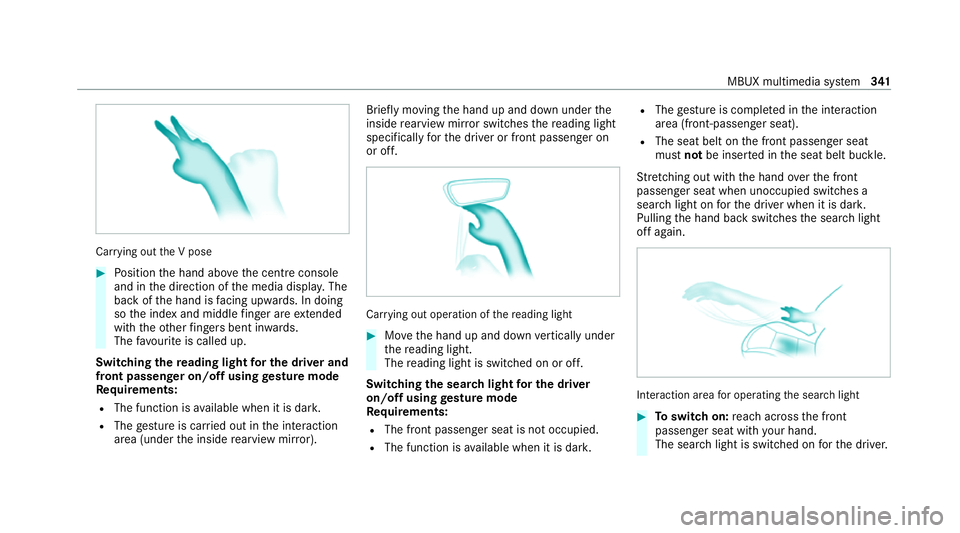
Car
rying out the V pose #
Position the hand abo vethe cent reconsole
and in the direction of the media displa y.The
back of the hand is facing up wards. In doing
so the index and middle finger are extended
wi th th eot her fingers bent in wards.
The favo urite is called up.
Swit ching there ading light for the driver and
front passen ger on/o ffusing gesture mode
Re quirements:
R The function is available when it is dar k.
R The gesture is car ried out in the interaction
area (under the inside rearview mir ror). Brief
lymoving the hand up and down under the
inside rearview mir ror switches there ading light
specifically forth e driver or front passenger on
or off. Car
rying out operation of there ading light #
Movethe hand up and down vertically under
th ere ading light.
The reading light is swit ched on or off.
Switching the sear chlight for the driver
on/o ffusing gesture mode
Re quirements:
R The front passen ger seat is not occupied.
R The function is available when it is dar k.R
The gesture is co mplete d in the interaction
area (front-passen ger seat).
R The seat belt on the front passenger seat
must notbe inser ted in the seat belt buckle.
St retching out wi th the hand overth e front
passenger seat when unoccupied switches a
sear chlight on forth e driver when it is dar k.
Pulling the hand back switches the sear chlight
off again. Interaction area
for operating the sear chlight #
Toswitch on: reach across the front
passenger seat with your hand.
The sear chlight is switched on forth e driver. MBUX multimedia sy
stem 341
Page 368 of 689
Setting
the da te #
Select Set date . #
Set a da te.
% Invehicles with GPS, a date cannot be set
eve n wi thactive manual time adjustments.
The date is then set automatically thro ugh
th e selected time zone. Switching
voice amplification tothere ar
on/off (vehicles with long wheelbase)Re
quirements:
R Your vehicle is equipped with the Burmes ter®
sur round sound sy stem or the Burmes ter®
high-end 3D sur round sound sy stem.
R The ignition is switched on.
R Doors, side windo wsand the panorama slid‐
ing sunroof are closed.
R Atleast one seat belt is fastened on there ar
ben chseat. Multimedia sy
stem:
4 © 5
Settings 5
System 5
Audio
5 Voice amplification
The function supports communication between
th e driver and front passenger with passengers
in there ar compartment. When voice amplifica‐
tion torear is activated, the signals pic ked up by
th e microphone are amplified and pla yed back
ove rth e speakers in there ar compartment,
depending upon vehicle noise le vels. An auto‐
matic adjustment occurs based on speaker vol‐
ume and ambient noise in order toimpr ove
speech intelligibility and maintain the natural‐
ness of speech. #
Activate or deacti vate the function.
Setting the intensity of thevo ice amplifica‐
tion #
Select Voice amplification - intensity. #
Set the intensity on the control.
Depending on the intensity set, thevo ice
amplification tothere ar is inc reased or
re duced. Connectivity
Switching transmission of
theve hicle posi‐
tion on/off
Re quirements:
R a Mercedes me account is available.
R at least one service is activated in the
Mercedes me por tal which has access tothe
transmitted position da ta.
% The function is count ry-dependent. For more
information, consult a Mercedes-Benz
service centre.
Multimedia sy stem:
4 © 5
Settings 5
System
5 Wi-Fi & Bluetooth #
Select Transmit vehicle position . #
Activate or deacti vate the function. MBUX multimedia sy
stem 365
Page 457 of 689
th
eSOS NOT READY display disappears once
th e ignition is switched on.
R G: The icon appears in the display during
an active emer gency call.
% Ifth ere is a malfunction in the emer gency
call sy stem (e.g. a fault with the speaker,
microphone, airbag, SOS button), a cor re‐
sponding message appears inthe multifunc‐
tion display of the instrument clus ter.
Tr iggering an automatic emer gency call
Re quirements:
R The ignition is switched on.
R The star ter battery is suf ficiently charge d.
Bo th th e Mercedes-Benz emer gency call sy stem
as well as the11 2 emergency call sy stem (EU
eCall) automatically initiate an emer gency call in
th efo llowing situations:
R After activation of there stra int sy stems such
as airbags or seat belt tensioners af ter an
accident.
R After an auto maticallyinitiated emer gency
st op byActive Emergency Stop Assist. The emer
gency call has been made:
R Avo ice connection is es tablished with the
emer gency call centre.
R A messa gewith accident data is transmit ted
to the emer gency call centre.
The SOS button in theov erhead control panel
fl ashes until the emer gency call is finished.
If no connection can be made tothe public
emer gency services, a cor responding message
appears inthe displa y. #
Dial the11 2 emer gency number or an appro‐
pria telocal emer gency call number on your
mobile phone.
If an eme rgency call has been initiated:
R Remain in theve hicle if thero ad and traf fic
conditions permit youto do so until a voice
connection is es tablished with the emer‐
ge ncy call centre.
R Onthe basis of the call, the emer gency call
centre decides wh ether it is necessary tocall
re scue teams and/or the police tothe acci‐
dent site. R
If no vehicle occupant answers, an ambu‐
lance is sent totheve hicle immediatel y.
Tr iggering a manual emer gency call #
Touse the SOS but ton in theov erhead
control panel: pressthe SOS button at least
one second long (/ page447). #
Touse voice control: usethe LINGUA‐
TRONIC voice commands (/ page319).
The emer gency call has been made:
R Avo ice connection is es tablished with an
emer gency call centre.
R Remain in theve hicle if thero ad and traf fic
conditions permit youto do so until a voice
connection is es tablished with the emer‐
ge ncy call centre.
R Onthe basis of the call, the emer gency call
centre decides wh ether it is necessary tocall
re scue teams and the police tothe accident
site.
R A message with accident data is transmit ted
to the emer gency call centre. 454
MBUX multimedia sy stem
Page 502 of 689
Note
s on care of the interior &
WARNING Risk of inju ryfrom pla stic
parts breaking off af terth e use of sol‐
ve nt-based care products
Ca reand cleaning products con taining sol‐
ve nts can cause su rfaces in the cockpit to
become porous. When
the airbags are deplo yed, plastic parts
may break away. #
Do not use any care or cleaning prod‐
ucts containing sol vents toclean the
cockpit. &
WARNING Risk of inju ryor death from
bleached seat belts
Bleaching or dyeing seat belts can se verely
we aken them.
This can, forex ample, cause seat belts to
te ar or fail in an accident. #
Never blea chor dye seat belts. Obser
vethefo llowing information: Cleaning and car
eA voiding vehicle damage
Seat belts Clean with lukewarmand soapy water. R
Do not use chemical cleaning agents.
R Do not dry seat belts byheating them toove r 80 °C or
ex posing them todirect sunlight.
Display Cleanthe sur face carefully wi tha mic rofibre clo thand a suit‐
able display care product (TFT/LCD). R
Swit choff the display and let it cool down.
R Do not use any other agents.
Plastic trim R
Clean with a damp microfibre clo th.
R For heavy soiling: use a care product recommended for
Mercedes-Benz. R
Do not attach sticke rs,fi lms or similar materials.
R Do not allow cosmetics, insect repellent or sun cream to
come in contact wi th the plastic trim. Maintenance and care
499