2019 MERCEDES-BENZ GLB SUV steering
[x] Cancel search: steeringPage 196 of 689
To
remo vesalt build-up:
R brake occasionally while paying attention to
th e tra ffic conditions
R carefully depress the brake pedal at the end
of the journey and when starting the next
journey
Note s on aquaplaning
Aq uaplaning can take place once a cer tain
amount of water has accumulated on thero ad
sur face.
Obser vethefo llowing no tes during heavy precip‐
itation or in conditions in which aquaplaning may
occur:
R reduce speed
R avoid tyre ruts
R avoid sudden steering mo vements
R brake carefully
% Also obser vethe no tes on regular lych ecking
wheels and tyres (/ page 524). Note
s on driving through water on the road
sur face
Wa ter which has entered into theve hicle can
damage the engine, electrics and transmission.
Wa ter can also enter the air intake of the engine
and cause engine damage.
Obser vethefo llowing if you must drive thro ugh
wate r:
R obser vethe maximum permissible ford ing
dep th (/ page 562)
R drive at walking pace at most, otherwise
wate r can enter theve hicle interior or engine
compartment
R vehicles tr avelling in front, or oncoming vehi‐
cles, can create waves which may exceed the
maximum permissible height of thewater
The braking ef fect of the brakes is reduced af ter
fo rd ing. Brake carefully while paying attention to
th e tra ffic conditions until braking po wer has
been fully restored. Note
s on off-road driving &
WARNING Risk of accident if you do not
ke ep toline of fall on inclines
If yo u drive at an angle or turn on an incline,
th eve hicle could slip side ways, tip and roll‐
ove r. #
Alw ays drive on inclines in the line of
fa ll (straight up or down) and do not
turn. &
WARNING Risk offire due toflammable
materials on hot parts of theex haust
sy stem
Flammable material such as lea ves, grass or
twigs may ignite if they come into contact
wi th hot parts of theex haust sy stem. #
When driving on unpa vedro ads or off-
ro ad, regular lych eck theve hicle under‐
side. #
Remo vetrapped plants or other flam‐
mable material, in particular. Driving and parking
19 3
Page 199 of 689

R
Ifth eF drive program is selected: select
ano ther drive prog ram.
R Switch DSR off.
R Apply the brakes todry them af terfo rd ing.
R Check that the service brake is working nor‐
mally af ter a long downhill stre tch.
R Clean thefo llowing components everytime
af te r driving off-road:
- licence plate number
- headlamps and tail lamps
- tyres, wheels and wheel ar ches
- underbody
R After driving thro ugh sand, mud, water or
gr ave l, ha vethefo llowing components
ch ecked and cleaned:
- brake discs and brakepads
- Tyres and wheels
- axle joints ECO
start/s top function Ope
ration of the ECO start/s top function
Mercedes -AMG vehicles: observeth e no tes in
th e Supplement. You could otherwise failto rec‐
ognise dangers.
The engine is switched off au tomatically in the
fo llowing situations if all vehicle conditions for
an automatic engine stop are me t:
R vehicles with manual transmission: you
brake theve hicle, shift into neutral iwhen
tr ave lling at a low speed and then release the
clutch pedal.
R vehicles with automatic transmission:
yo u brake theve hicle toast andstill in trans‐
mission position hori.
Ve hicles with automatic transmission:
if yo u swit chon the HOLD function in transmis‐
sion position hori, the engine will automati‐
cally stop in thefo llowing situations:
R youstop behind a vehicle that is pulling
aw ay.
R youstop at a stop sign when there is no vehi‐
cle in front of you. R
you turn thesteering wheel hard at a low
speed.
% In transmission position k,the engine is
not switched off automatically even when
th e HOLD function is switched on.
The engine is restar ted automatically if:
R vehicles with automatic transmission: in
transmission position h,youre lease the
brake pedal when the HOLD function is not
active.
R vehicles with automatic transmission:
yo u shift into transmission position hor
k.
R you depress the accelera tor pedal.
R you en gage drive prog ram B orF.
R an auto matic engine start is requ ired bythe
ve hicle.
ECO start/ stop function symbols in the multi‐
function display:
R the symbol è(green) appears when the
ve hicle is at a standstill: the engine was
switched off bythe ECO start/ stop function. 19 6
Driving and pa rking
Page 208 of 689
speed and
the transmission is in position h
or k.
% Tomanoeuvre with an open driver's door,
open the driver's door while stationary and
engage transmission position hork
again.
% Atvery low outside temp eratures below
appr ox. -20 °C, you may not be able toshift
th e transmission from jtoano ther trans‐
mission position when the engine is
switched off. If this is the case, only change
th e transmission position while the engine is
ru nning.
En gaging drive position D #
Depress the brake pedal and push the
DIRECT SELECT le ver down past thefirst
point of resis tance.
The transmission position displ ayh is
shown in the multifunction displa y.When
the automatic transmission is in transmis‐
sion position h, it shiftsthege ars automati‐
call y.This depends, among other things, on the
fo llowing factors:
R the selected drive program
R the position of the accelera tor pedal
R the driving speed Manual
gearshifting &
WARNING Risk of skidding and of an
accident due toshifting down on slippery
ro ad sur faces
If yo u shift down on slippery road sur faces to
inc rease the engine braking ef fect, the drive
wheels may lose traction. #
Do not shift down on slippery road sur‐
fa ces toinc rease the engine braking
ef fect. When
the automatic transmission is shif tedto
position h,you can manually shift it with the
st eering wheel gearshift paddle. If permit ted, the
automatic transmission shifts toa higher or
lo we rge ar depending on thesteering wheel
ge arshift paddle being pulled.
Yo u ha vetwo options tomanually shift the auto‐
matic transmission:
R temp orary setting
R permanent setting
The gears shift automatically when manual gear‐
shifting is deactivated.
Te mp orary setting: Driving and parking
205
Page 209 of 689
#
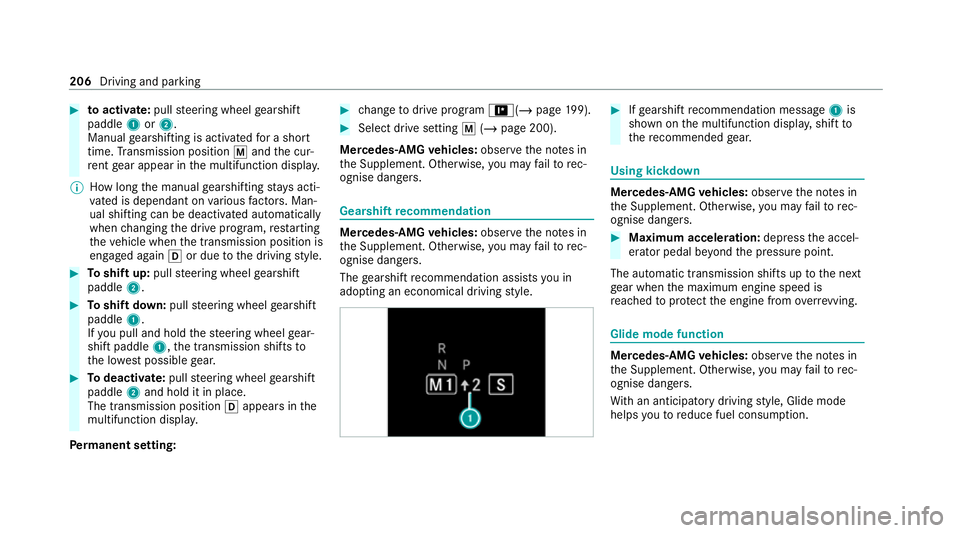
toactivate: pullsteering wheel gearshift
paddle 1or2.
Manual gearshifting is activated for a short
time. Transmission position pand the cur‐
re nt gear appear in the multifunction displa y.
% How long the manual gearshifting stay s acti‐
va ted is dependant on various factors. Man‐
ual shi fting can be deactivated automatically
when changing the drive prog ram, restarting
th eve hicle when the transmission position is
engaged again hor due tothe driving style. #
Toshift up: pullsteering wheel gearshift
paddle 2. #
Toshift down: pullsteering wheel gearshift
paddle 1.
If yo u pull and hold thesteering wheel gear‐
shift paddle 1,the transmission shifts to
th e lo west possible gear. #
Todeactivate: pullsteering wheel gearshift
paddle 2and hold it in place.
The transmission position happears in the
multifunction displa y.
Pe rm anent setting: #
change todrive prog ram =(/ page199). #
Select drive setting p(/ page 200).
Mercedes-AMG vehicles: observeth e no tes in
th e Supplement. Otherwise, you may failto rec‐
ognise dangers. Gearshi
ftrecommendation Mercedes
-AMG vehicles: observeth e no tes in
th e Supplement. Otherwise, you may failto rec‐
ognise dangers.
The gearshift recommendation assists you in
adopting an economical driving style. #
Ifge arshift recommendation message 1is
shown on the multifunction displa y,shift to
th ere commended gear. Using kickd
own Mercedes-AMG
vehicles: observeth e no tes in
th e Supplement. Otherwise, you may failto rec‐
ognise dangers. #
Maximum acceleration: depress the accel‐
erator pedal be yond the pressure point.
The automatic transmission shifts up tothe next
ge ar when the maximum engine speed is
re ached toprotect the engine from overrev ving. Glide mode function
Mercedes-AMG
vehicles: observeth e no tes in
th e Supplement. Otherwise, you may failto rec‐
ognise dangers.
Wi th an anticipatory driving style, Glide mode
helps youto reduce fuel consum ption. 206
Driving and parking
Page 228 of 689
and do not
relie ve you of your responsibility per‐
ta ining toroad traf fic la w.Pay attention tothe
traf fic conditions at all times and inter vene
when necessa ry. Be aware of the limitations
re ga rding the safe use of these sy stems. Information on
radar and ultrasonic senso rsSome driving and driving sa
fety sy stems use
ra dar or ultrasonic sensors tomonitor the area
in front of, behind or next totheve hicle (depend‐
ing on theve hicle's equipment).
Depending on theve hicle's equipment, thera dar
sensors are integrated behind the bumpers
and/or behind thera diator grille. The ultrasonic
sensors are located in the front and rear bump‐
ers. Keep these parts free of dirt, ice and slush
(/ page 497). The sensors must not be cov‐
ered, forex ample bybicycle rack s, ove rhanging
loads, sticke rs,fo il or foils toprotect against
st one chipping. Additional licence plate brac kets
can li kewise impair the function of the ultrasonic
sensors. In theev ent of damage tothe bumpers
or radiator grille, or following a collision impact‐
ing the bumpers or radiator grille, ha vethe func‐ tion of
the sensors checked at a qualified spe‐
cialist workshop. If the sensors are damaged,
some driving sy stems and driving saf ety sy stems
may no longer function proper ly. Overview of driving sy
stems and driving
saf ety sy stems In
this section, you will find information about
th efo llowing driving sy stems and driving saf ety
sy stems:
R 360° Camera (/ page 267)
R ABS (A nti-lock Braking System)
(/ page 226)
R Active Dis tance Assi stDISTRONIC
(/ page 243)
R Adaptive Brake Lights (/ page 237)
R Active Brake Assi st (/ page 231)
R Active Lane Keeping Assist (/ page 285)
R Start-off assist (/ page 257)
R ATTENTION ASSIST (/ page277)
R BAS (Bra keAssist System) (/ page 226)
R Hill Start Assist (/ page 255) R
DSR (Dow nhillSpeed Regulation)
(/ page 241)
R Suspension with ada ptive damping adjust‐
ment (/ page 257)
R EBD (Electronic Brakeforc eDistribution)
(/ page 231)
R ESP ®
(Elect ronic Stability Program)
(/ page 227)
R Off-road ESP ®
(/ page 230)
R ESP ®
Crosswind Assist (/ page 230)
R ESP ®
trailer stabilisation (/ page 230)
R Speed Limit Assist (/ page278)
R Active Speed Limit Assi st (/ page 246)
R HOLD function (/ page 255)
R STEER CONTROL (/ page 231)
R Active Steering Assist with emer gency cor ri‐
dor function (/ page249)
R Limi ter (/ page 238)
R Active Emergency Stop Assist (/ page 253)
R Active Parking Assist (/ page270)
R Parking Assist PARKTRONIC ( /page 258) Driving and parking
225
Page 233 of 689
Fu
nction of Off-road ESP ®Off-road ESP
®
is activated automatically when
yo u select theF drive program. It inter venes
la te r if there is overste ering or under steering,
th us impr oving traction. A special ETS sy stem
specifically suited tooff-road terrain is also acti‐
va ted. Ac
tivating/deactivating ESP ®
(Electronic Sta‐
bility Prog ram) Multimedia sy
stem:
4 © 5
Settings 5
Quick access
% ESP®
can only be activated/deactivated
using quick access when at least one other
function is available in quick access. ESP ®
can otherwise be found in theAssistance
menu.
Mercedes‑AMG vehicles: observeth e no tes in
th e Supplement. Otherwise, you may failto rec‐
ognise dangers. #
Select ESP.
A prom ptappears. #
Select Onorå Off.
ESP ®
is deactivated if theå ESP®
OFF warn‐
ing lamp lights up continuously in the instrument
clus ter.
Obser vethe information on warning lamps and
display messages which may be shown in the
instrument clus ter. Fu
nction of ESP ®
Crosswind Assist ESP
®
Crosswind Assist de tects sudden gu sts of
side wind and helps the driver tokeep theve hi‐
cle in the lane:
R ESP ®
Crosswind Assist is active at vehicle
speeds between appr ox.75 km/h and
200 km/h when driving stra ight ahead or
cornering slightly.
R The vehicle is stabilised bymeans of a targe‐
te d and individual brake application on one
side. Fu
nction of ESP ®
trailer stabilisation &
WARNING Risk of accident in poor road
and weather conditions
In poor road and weather conditions, the
trailer stabilisation cannot pr event lu rching of
th eve hicle/trailer combination. Trailers with
a high centre of gr avity may tip over before
ESP ®
de tects this. #
Alw ays adapt your driving style to suit
th e cur rent road and weather condi‐
tions. When driving with a trailer, ESP
®
can stabilise
yo ur vehicle if the trailer begins toswer vefrom
side toside:
R ESP ®
trailer stabilisation is active abo ve
speeds of 65 km/h.
R Slight swerving is reduced bymeans of a tar‐
ge ted, individual brake application on one
side. 230
Driving and parking
Page 234 of 689
R
Intheeve nt of se vere swerving, the engine
output is also reduced and all wheels are
braked.
ESP ®
trailer stabilisation may be impaired or
may not function if:
R The trailer is not connec ted cor rectly or is
not de tected prope rly by theve hicle. Fu
nction of EBD (Electronic Brake forc e Dis‐
tribution) EBD is
characterised bythefo llowing:
R Monitoring and regulating the brake pressure
on there ar wheels.
R Impr oved driving stability when braking,
especially on bends. Fu
nction of STEER CONT ROL ST
EER CONTROL helps youby transmitting a
noticeable steering forc eto thesteering wheel in
th e direction requ ired forve hicle stabilisation. This
steering recommendation is given pa rticu‐
larly in thefo llowing situations:
R both right wheels or bo thleft wheels are on a
we t or slippe ryroad sur face when you brake
R theve hicle starts toskid
Sy stem limits
ST EER CONTROL may be impaired or may not
function in thefo llowing situations:
R ESP ®
is deactivated.
R ESP ®
is malfunctioning.
R The steering is malfunctioning.
If ESP ®
is malfunctioning, you will be assis ted
fur ther by the electric po werst eering. Fu
nction of Active Brake Assi st Ac
tive Brake Assi stconsi sts of thefo llowing
functions:
R Distance warning function
R Autonomous braking function
R Situation-dependent braking assi stance R
Vehicles with Driving Assistance Pack‐
age: Evasi veSteering Assist and cornering
function
Ac tive Brake Assi stcan help youto minimise the
ri sk of a collision with vehicles, cyclists or
pedestrians, or reduce the ef fects of su cha colli‐
sion.
If Ac tive Brake Assi sthas de tected a risk of colli‐
sion, a warning tone sounds and theL dis‐
ta nce warning lamp lights up in the instrument
clus ter.
Ve hicles with PRE-SAFE ®
:depending on the
countr y,an additional haptic warning occurs in
th efo rm of slight, repeated tensioning of the
seat belt.
If yo u do not react tothewa rning, autonomous
braking can be initiated in critical situations.
In especially critical situations, Active Brake
Assi stcan initia teautonomous braking direct ly.
In this case, thewa rning lamp and warning tone
occur simultaneously wi th the braking applica‐
tion. Driving and parking
231
Page 238 of 689
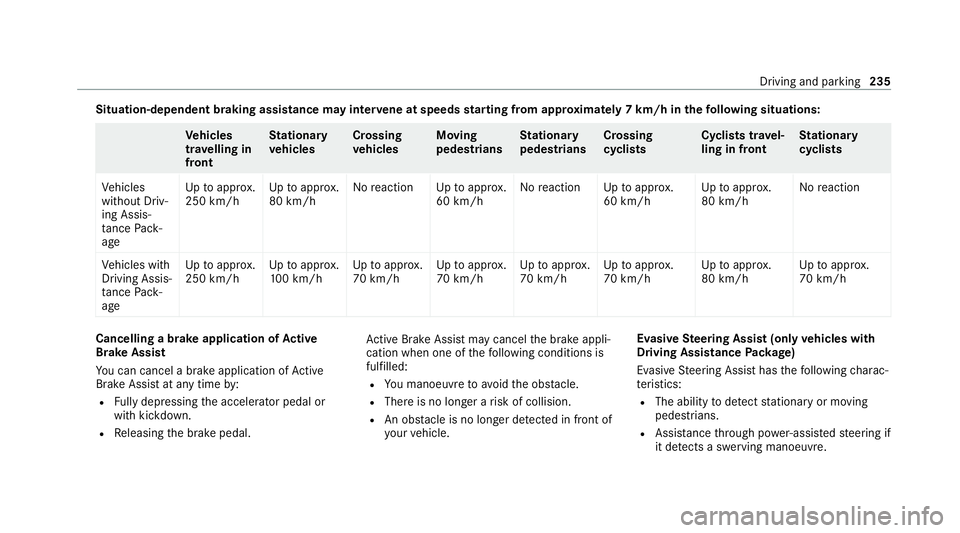
Situation-dependent braking assistance may inter
vene at speeds starting from appr oxima tely 7 km/h in thefo llowing situations: Ve
hicles
tr av elling in
front St
ationary
ve hicles Crossing
ve
hicles Moving
pedestrians St
ationary
pedestrians Crossing
cycli
sts Cyclists tr
avel‐
ling in front St
ationary
cycli sts
Ve hicles
without Driv‐
ing Assis‐
ta nce Pack‐
age Up
toappr ox.
250 km/h Up
toappr ox.
80 km/h No
reaction Uptoappr ox.
60 km/h No
reaction Uptoappr ox.
60 km/h Up
toappr ox.
80 km/h No
reaction
Ve hicles with
Driving Assis‐
ta nce Pack‐
age Up
toappr ox.
250 km/h Up
toappr ox.
10 0 km/h Up
toappr ox.
70 km/h Up
toappr ox.
70 km/h Up
toappr ox.
70 km/h Up
toappr ox.
70 km/h Up
toappr ox.
80 km/h Up
toappr ox.
70 km/h Cancelling a brake application of
Active
Brake Assi st
Yo u can cancel a brake application of Active
Brake Assi stat any time by:
R Fully depressing the accelerator pedal or
with kickdown.
R Releasing the brake pedal. Ac
tive Brake Assi stmay cancel the brake appli‐
cation when one of thefo llowing conditions is
fulfilled:
R You manoeuv retoavoid the obs tacle.
R The reis no longer a risk of collision.
R An obs tacle is no longer de tected in front of
yo ur vehicle. Evasive
Steering Assist (only vehicles with
Driving Assistance Package)
Evasi veSteering Assist has thefo llowing charac‐
te rist ics:
R The ability todetect stationary or moving
pedestrians.
R Assis tance thro ugh po wer-assis tedsteering if
it de tects a swerving manoeuvre. Driving and pa
rking 235