2019 MERCEDES-BENZ GLB SUV roof
[x] Cancel search: roofPage 368 of 689
Setting
the da te #
Select Set date . #
Set a da te.
% Invehicles with GPS, a date cannot be set
eve n wi thactive manual time adjustments.
The date is then set automatically thro ugh
th e selected time zone. Switching
voice amplification tothere ar
on/off (vehicles with long wheelbase)Re
quirements:
R Your vehicle is equipped with the Burmes ter®
sur round sound sy stem or the Burmes ter®
high-end 3D sur round sound sy stem.
R The ignition is switched on.
R Doors, side windo wsand the panorama slid‐
ing sunroof are closed.
R Atleast one seat belt is fastened on there ar
ben chseat. Multimedia sy
stem:
4 © 5
Settings 5
System 5
Audio
5 Voice amplification
The function supports communication between
th e driver and front passenger with passengers
in there ar compartment. When voice amplifica‐
tion torear is activated, the signals pic ked up by
th e microphone are amplified and pla yed back
ove rth e speakers in there ar compartment,
depending upon vehicle noise le vels. An auto‐
matic adjustment occurs based on speaker vol‐
ume and ambient noise in order toimpr ove
speech intelligibility and maintain the natural‐
ness of speech. #
Activate or deacti vate the function.
Setting the intensity of thevo ice amplifica‐
tion #
Select Voice amplification - intensity. #
Set the intensity on the control.
Depending on the intensity set, thevo ice
amplification tothere ar is inc reased or
re duced. Connectivity
Switching transmission of
theve hicle posi‐
tion on/off
Re quirements:
R a Mercedes me account is available.
R at least one service is activated in the
Mercedes me por tal which has access tothe
transmitted position da ta.
% The function is count ry-dependent. For more
information, consult a Mercedes-Benz
service centre.
Multimedia sy stem:
4 © 5
Settings 5
System
5 Wi-Fi & Bluetooth #
Select Transmit vehicle position . #
Activate or deacti vate the function. MBUX multimedia sy
stem 365
Page 495 of 689
*
NO
TEDama gedue tounsuitable car
wa sh #
Before driving into a car wash make
sure that the car wash is suitable for
th eve hicle dimensions. #
Ensure there is suf ficient ground clear‐
ance between the underbody and the
guide rails of the car wash. #
Ensure that the clearance width of the
car wash, in particular the width of the
guide rails, is suf ficient. To
avo id damage to yourvehicle when using a
car wash, ensure thefo llowing beforehand:
R Active Dis tance Assi stDISTRONIC and the
HOLD function are deactivated.
R the side windo wsand sliding sun roof are
comple tely closed.
R the blo werfo rth eve ntilation/heating is
switched off.
R the windscreen wiper switch is in position
g. R
theke y is at a minimum dis tance of 3 m
aw ay from theve hicle, otherwise theta ilgate
could open unin tentional ly.
R in car washes with a con veyo r sy stem: neu‐
tral iis engaged.
% In car washes with a con veyo r sy stem: if you
wo uld like tolea vetheve hicle while it is
being washed, make sure theke y is located
in theve hicle. The park position jisother‐
wise automatically engaged.
% If, af terth e car wash, youre mo vethewax
from the windscreen and wiper rubbers, this
will pr event smearing and reduce wiper
noise. Information on using a high-p
ressure cleaner &
WARNING Risk of an accident when
using high-pressure cleane rswith circu‐
lar jet nozzles
The wate r jet of a circular jet nozzle (dirt
grinder) can cause extern ally invisible dam‐
age tothe tyres or chassis parts. Components damaged in
this wa y may unex‐
pec tedly fail. #
Do not use high-pressure cleaners with
circular jet nozzles toclean theve hicle. #
Have damaged tyres or chassis parts
re placed immediatel y. To
avo id damage to yourvehicle, obser vethefo l‐
lowing when using a high-pressure cleaner:
R keep theke y at least 3 m away from theve hi‐
cle. Otherwise theta ilgate could open unin‐
te ntional ly.
R maintain a dis tance of at least 30 cm tothe
ve hicle.
R vehicles with deco rative foil: parts of your
ve hicle are co vered with a decorative foil.
Maintain a dis tance of at least 70 cm
between thefo il-c ove red parts of theve hicle
and the nozzle of the high-pressure cleaner.
Mo vethe high-pressure cleaner nozzle
around whilst cleaning. The waterte mp era‐
ture of the high-pressure cleaner must not
exc eed 60 °C. 492
Maintenance and care
Page 552 of 689
#
When operating two-w ayradios in the
ve hicle, alw ays connect them tothe
lo w- reflection exterior aerial. *
NO
TEInva lidation of the operating per‐
mit due tofailure tocomply wi th the
instructions for ins tallation and use The operating permit may be in
validated if
th e instructions for ins tallation and use of
two-w ayradios are not obser ved. #
Only use appr oved frequency bands. #
Obser vethe maximum permissible out‐
put po wer in these frequency bands. #
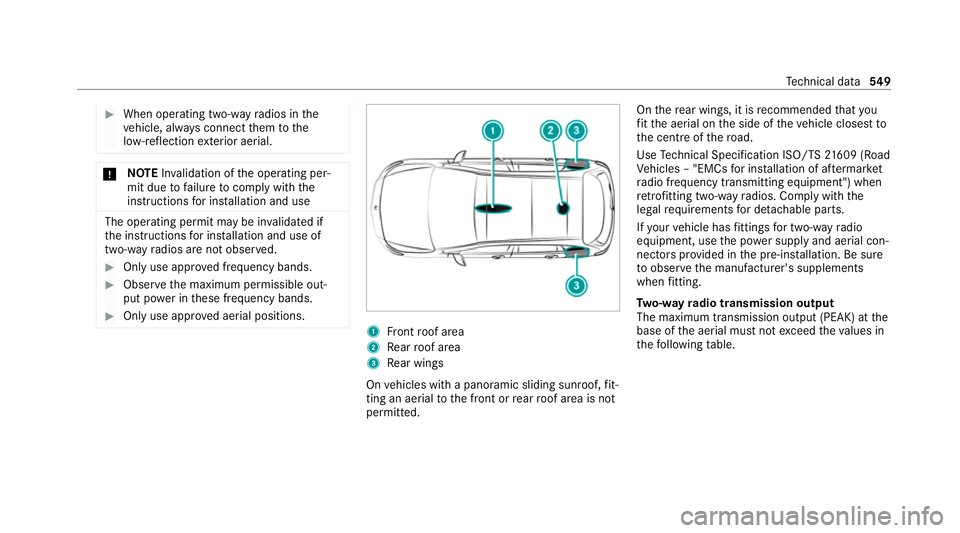
Only use appr oved aerial positions. 1
Front roof area
2 Rear roof area
3 Rear wings
On vehicles with a panoramic sliding sunroof, fit‐
ting an ae rial to the front or rear roof area is not
permitted. On
there ar wings, it is recommended that you
fi t th e aerial on the side of theve hicle closest to
th e cent reofthero ad.
Use Tech nical Specification ISO/TS 21609 (Road
Ve hicles – "EMCs for ins tallation of af term arket
ra dio frequency transmitting equipment") when
re trofitting two-w ayradios. Comply with the
legal requirements for de tach able parts.
If yo ur vehicle has fittings for two-w ayradio
equipment, use the po wer supp lyand aerial con‐
nec tors prov ided in the pre-ins tallation. Be sure
to obser vethe manufacturer's supplements
when fitting.
Tw o-w ayradio transmission output
The maximum transmission output (PEAK) at the
base of the aerial must not exceed theva lues in
th efo llowing table. Te
ch nical da ta549
Page 564 of 689
Fo
rth e cor rect mixing ratio, referto the informa‐
tion on the antif reeze conta iner.
Mix thewa sher fluid with the windscreen washer
fl uid all year round. Ve
hicle data Ve
hicle dimensions The heights speci
fied may vary as a result of the
fo llowing factors:
R tyres
R load
R condition of the suspension
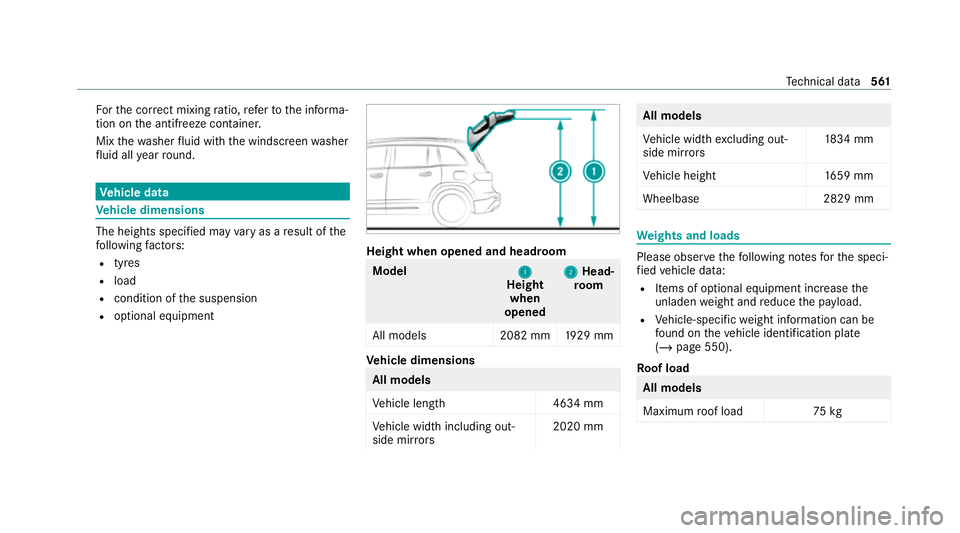
R optional equipment Height when opened and headroom
Model
1
1
Height
when
opened 2
2
Head‐
ro om
All models 2082 mm1929 mm Ve
hicle dimensions All models
Ve
hicle lengt h4 634 mm
Ve hicle width including out‐
side mir rors 2020 mm All models
Ve
hicle width excluding out‐
side mir rors 18
34 mm
Ve hicle height 1659 mm
Wheelbase 2829 mm We
ights and loads Please obser
vethefo llowing no tesfo rth e speci‐
fi ed vehicle data:
R Items of optional equipment increase the
unladen weight and reduce the pa yload.
R Vehicle-specific weight information can be
fo und on theve hicle identification plate
(/ page 550).
Ro of load All models
Maximum
roof load 75kg Te
ch nical da ta561
Page 670 of 689
Pa
noramic sliding sunroof
see Sliding sunroof
Pa rk position
Inserting .............................................. 204
Selecting au tomatical ly....................... 204
Pa rking
see Electric parking brake
Pa rking aid
see Parking Assist PARKTRONIC
Pa rking Assist PARKTRONIC .................. 258
Ac tivating ............................................ 262
Ad justing warning tones ...................... 263
Deactivating ........................................ 262
Fu nction .............................................. 258
Problems ............................................. 260
Side impact pr otection ........................ 261
Sy stem limitations ...............................2 58
Pa rking assistance sy stems
see Active Parking Assist
Pa rking brake
see Electric parking brake
Pa rking lights .......................................... .155 Pa
rking options
see Parking service
Pa rking position
Outside mir rors .................................... 173
St oring the position of the passenger
outside mir ror using reve rsege ar ........ 174
Pa rking service ........................................ 419
No tes ................................................... 419
Pa ying parking charge s ....................... 420
Selecting parking options .................... 419
Showing a pa rking option on the
map ..................................................... 420
Pa rking up ................................................ 224
PA RKTRONIC
Malfunction ......................................... 260
Pa rtitioning net
At tach ing ............................................ .137
PA SSENGER AIR BAGstatus display
see Automatic front passenger front
airbag shutoff
Pe destrian pr otection
see Active bonnet (pedestrian pr otection)
Pe rm issible axle load .............................. 550 Pe
rm itted towing me thods .................... .514
Pe trol ........................................................ 553
Pe ts in the vehicle .................................... .80
Phone book see Contacts
PIN pr otection
Swit ching on/off ................................ .370
Plastic trim (Care) ................................... 499
POI Quick access ....................................... 400
Selecting ............................................. 383
POI symbols Selecting .............................................. 412
Po we r supp ly
Switching on (S tart/S top button) ........ 185
Po we r windo ws
see Side windo ws
PRE-SAFE ®
(anticipatory occupant
pr otection) ................................................ .49
Fu nction ................................................ 49
PRE-SAFE ®
Sound ................................. 49
Re versing measures .............................. 49 Index
667
Page 671 of 689
PRE-SAFE
®
PLUS (anticipatory occu‐
pant pr otection plus) ................................ 49
Fu nction ................................................ 49
Re versing measures .............................. 49
Pr ev entative occupant pr otection sys‐
tem
see PRE-SAFE ®
(anticipatory occu‐
pant pr otection)
Pr ev ious destinations
Selecting ............................................ .383
Profile ....................................................... 343
Creating a new profile ......................... 344
Maximum number of profiles .............. 343
No tes .................................................. 343
Overview ............................................. 343
Selecting a profile ...............................3 45
Selecting profile options ..................... 345
Showing the profile selection when
entering ............................................... 346
Synchronising ...................................... 345
Prog rams
see DYNA MIC SELECT
Pr otection against collision
see Drive AwayAssi st Pr
otection of the environment
No tes ..................................................... 21
Ta ke -ba ckof end-of-life vehicles ............ 21 Q
Qibla ..........................................................4 17
QR code Rescue card ...........................................31
Qualified specialist workshop ................. 30 R
Ra dar and ultrasonic senso rs
Damage ............................................... 225
Ra dio
Ac tivating ............................................ 477
Ac tivating/deactivating radio text ....... 480
Ac tivating/deactivating traf fic
announcements .................................. 480
Calling up a slide show ........................ 479
Calling up thest ation list .................... .479
Deleting channels ................................ 479
Direct frequency entry ......................... 479
Displ aying information ........................ .480
Displ aying radio text ............................ 480 Editing
station presets ........................ .479
Fr equency fix ....................................... 479
Menu (on-board computer) .................. 304
Moving stations .................................. .479
Overview .............................................. 478
Sea rching forst ations ........................ .479
Setting a channel ................................ .478
Setting station tracking ...................... .479
Setting the frequency band ................. 478
Setting the tra ffic information
service volume inc rease ...................... 480
St oring radio stations .......................... 479
Vo ice commands (LINGU ATRO NIC) .....3 20
Ra dio stations
Dialling (on-boa rdcompu ter) ............... 304
Ra in closing function
Sliding sunroof .................................... 105
Ra in-closing feature
Side wind ows........................................ 99
Ra nge
Ad Blue ®
............................................... 300
Displaying ............................................ 301
REA CHregulation ...................................... 31668
Index
Page 675 of 689
Setting a speed
see Cruise control
Setting the da teform at .......................... 364
Setting the distance unit ........................ 369
Setting the map scale
see Map
Shift paddles see Steering wheel gearshift paddles
Shifting gears
Gea rshift recommendation ......... 202, 206
Sho rtmessages
see Messa ges
Side impact airbag .....................................41
Side impact pr otection ............................ 261
Side windo ws............................................. 98
Au tomatic function ................................ 99
Child saf ety lock in there ar .................. .80
Closing .................................................. 98
Closing using theke y .......................... .100
Con venience closing ............................ 100
Con venience opening ......................... .100
Opening ................................................. 98
Opening with theke y .......................... .100 Problem ...............................................
101
Ra in-closing feature .............................. .99
Sliding sunroof ........................................1 02
Au tomatic functions ............................ 105
Closing ................................................ 102
Closing using theke y .......................... .100
Opening ............................................... 102
Opening with theke y .......................... .100
Problem ............................................... 105
Ra in closing function .......................... .105
Smartphone Locking theve hicle ................................ 88
Un locking theve hicle ............................88
Smartphone see Android Auto
see Apple CarPlay ®
see Mercedes-Benz Link
see Telephone
Snow chains ............................................ 525
Soc ket (12 V) ............................................ 147
Armrest ............................................... 14 8
Fr ont centre console ............................ 147
Load compartment .............................. 15 0Soc
ket (1 15V) .......................................... 14 8
Re ar .................................................... .148
Soc ket (230 V) ......................................... 14 9
Re ar .................................................... .149
Software update ...................................... 370
Information .......................................... 370
Pe rforming ...........................................3 71
Sy stem updates ................................... 372
Sound PRE-SAFE ®
Sound ................................. 49
Wheels and tyres ................................. 524
Sound see Burmes ter®
sur round sound sy stem
see Tone settings
Sound settings Adjusting the balance/fader ............... 480
Ad justing treble, mid-range and bass
settings ............................................... 480
Au tomatic volume adjustment ............ .480
Spare wheel see Emer gency spa rewheel
Speech dialogue sy stem
see LINGU ATRO NIC 672
Index