2019 MERCEDES-BENZ EQC SUV ESP
[x] Cancel search: ESPPage 174 of 629
Drive prog
ramV ehiclecharacteristics
; (Eco) R
efficient and economical driving style
R pressure point in the haptic accelera tor pedal indica tes an ef ficient, economical driving style
R When thero ute option Optimised for EQ is switched on and route guidance is active, a chequered flag
in the speedome ter indica testh e maximum permissible speed recommended byactive range moni tor‐
ing (/ page 354).
Í (MaxRange) R
maximum range and consu mption optimisation
R particular lyefficient overru n mode and maximum ef ficient recuperation in hÃ
R pressure point in the haptic accelerator pedal:
- automatically limits the speed tothe maximum permissible speed de tected bytheTraf fic Sign
Assi st
- additionally limits the speed tothe maximum permissible speed recommended byactive range
moni toring (/ page 354).
R green segments in the speedome ter show the speed range between the cur rent speed and the limit
speed Supplementary information on
the drive pro‐
gr am Í
Í (MaxRange)
The functions of the drive prog ram are only
to ols. The driver is responsible for maintaining a suita
ble dis tance totheve hicle in front, vehicle
speed and for braking in good time.
The limit speed set bythe pressure point in the
haptic accelerator pedal is displa yed in the
speedome ter.The segments between the cur‐ re
nt speed displ ayand the limit speed light up in
green. For ef ficiency reasons, small deviations
from the limit speed are permitted.
If yo ustep on the accelera tor pedal be yond the
pressure point, the limit speed is deactivated. Driving and parking
171
Page 178 of 629
%
Tomanoeuvre with an open driver's door,
open the driver's door while stationary and
engage transmission position hork
again.
% Ifyo u ha veengaged park position jor
switched off the drive sy stem and no trans‐
mission position display is displa yed, secure
th eve hicle from rolling away ( /page 196).
Engaging drive position D #
Depress the brake pedal and push the
DIRECT SELECT le ver down past thefirst
point of resis tance.
The transmission position displ aysho wsh
in the multifunction displa y.Fu
nction of flexible all-wheel distribution
The flex ible all-wheel distribution means the
drive is alw ays ideally distributed between the
two axles. Depending on the situation, only the
front axle or only there ar axle can be driven, or
th e drive can be distributed continuously
between bo thaxles. This allo
ws the maximum recur rent delay tobe
achie ved (/ page161). The resulting recupera‐
tion increases theve hicle's range.
To get her with ESP ®
and 4ETS, theflex ible all-
wheel distribution impr ovesth e traction of your
ve hicle whene ver a driven wheel spins due to
insuf ficient traction.
If yo ufa ilto adapt your driving style, theflex ible
all-wheel distribution can neither reduce therisk
of accident nor override the la wsof ph ysics. It
cannot take into account road, weather or traf fic
conditions. The flex ible all-wheel distribution is
only an aid. You are responsible especially for
maintaining a safe dis tance from theve hicle in
front, forve hicle speed, for braking in good time
and forst ay ing in lane.
% In wint ryroad conditions, the maximum
ef fect of theflex ible all-wheel distribution
can be achie ved only if you use winter tyres
(M+S tyres), with sn ow chains if necessar y. Cha
rging the high-voltage bat tery Note
s oncharging the high-voltage bat tery *
NO
TEAccelerated ageing of the high-
vo ltage battery due tofrequent charging
to full Fr
equent charging tofull (charge le vel10 0%)
ch arging of the high-voltage batter y,espe‐
cially when this process is not direct lyfol‐
lo we dby a journe y,accelerates the ageing of
th e high-voltage batter y. #
Char gethe high-voltage battery on
ave rage toach arge leve l of 80%.
Be yond a charge leve l of 80%, the
ch arging time is considerably pro‐
lon ged. Driving and parking
175
Page 195 of 629
#
Press pr eviously prog rammed button 1,2
or 3 repeatedly until the door closes.
When the door closes, programming is com‐
ple ted.
% Please also read the operating instructions
fo rth e door drive.
Tr oubleshooting when prog ramming the
re mo tecont rol #
Check if the transmit ter frequency of remo te
control 5is suppo rted. #
Replace the batteries in remo tecontrol 5. #
Hold remo tecontrol 5atvarious angles
from a dis tance of 1 cm to8 cm in front of th
e inside rearview mir ror.Yo u should test
eve ryposition for at least 25 seconds before
trying ano ther position. #
Hold remo tecontrol 5atthe same angles
at various dis tances in front of the inside rear
view mir ror.Yo u should test eve ryposition
fo r at least 25 seconds before trying ano ther
position. #
Notethat some remo tecontrols transmit
only for a limi ted period, press button 6on
re mo tecontrol 5again before transmission
ends. #
Align the aerial line of the door opener unit
with there mo tecontrol.
% Support and additional information on pro‐
gramming:
R Onthe HomeLink ®
Hotline on (0) 08000
466 354 65 or +49 (0) 6838 907-2 77.
R Onthe Internet at http://
www.homelin k.com.
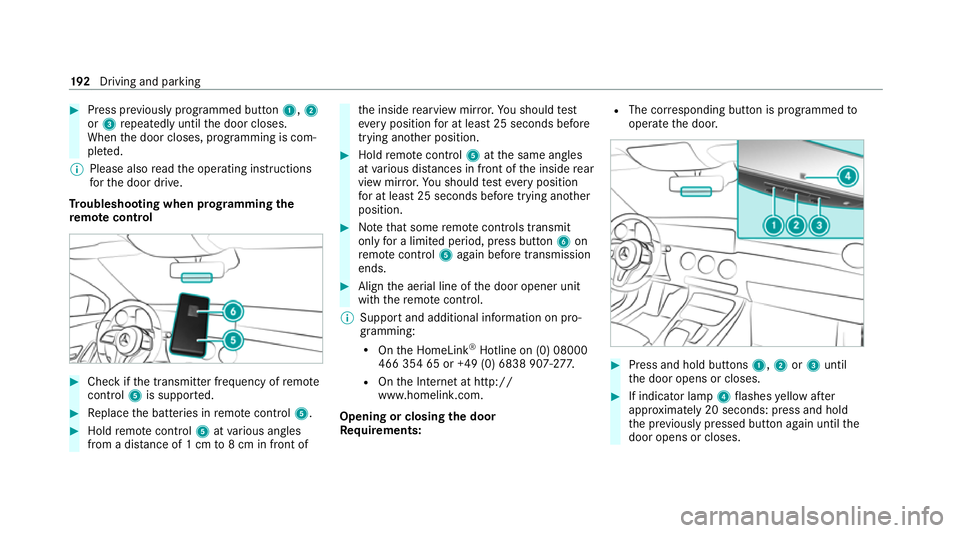
Opening or closing the door
Requ irements: R
The cor responding button is programmed to
operate the door. #
Press and hold buttons 1,2or3 until
th e door opens or closes. #
If indicator lamp 4flashes yellow af ter
appr oximately 20 seconds: press and hold
th e pr eviously pressed button again until the
door opens or closes. 19 2
Driving and pa rking
Page 200 of 629

R
The electric parking brake is not applied. Driving and driving saf
ety sy stems Driving sy
stems and your responsibility Yo
ur vehicle is equipped with driving sy stems
which assist you in driving, parking and manoeu‐
vring theve hicle. The driving sy stems are aids
and do not relie ve you of your responsibility per‐
ta ining toroad traf fic la w.Pay attention tothe
traf fic conditions at all times and inter vene
when necessa ry. Be aware of the limitations
re ga rding the safe use of these sy stems. Information on
radar and ultrasonic senso rsSome driving and driving sa
fety sy stems use
ra dar or ultrasonic sensors tomonitor the area
in front of, behind or next totheve hicle (depend‐
ing on theve hicle's equipment).
Depending on theve hicle's equipment, thera dar
sensors are integ rated behind the bumpers
and/or behind the Mercedes star. The ultrasonic
sensors are located in the front and rear bump‐
ers. Keep these parts free of dirt, ice and slush (/
page 469). The sensors must not be cov‐
ered, forex ample bybicycle rack s, overhanging
loads, sticke rs,fo il or foils toprotect against
st one chipping. Additional license plate brac kets
can li kewise impair the function of the ultrasonic
sensors. In theeve nt of dama getothe bumpers
or radiator grille, or following a collision impact‐
ing the bumpers or radiator grille, ha vethe func‐
tion of the sensors checked at a qualified spe‐
cialist workshop. If the sensors are damaged,
some driving sy stems and driving saf ety sy stems
may no longer function properly. Overview of driving sy
stems and driving
saf ety sy stems In
this section, you will find information about
th efo llowing driving sy stems and driving saf ety
sy stems:
R 360° Camera (/ page 235)
R ABS (Anti-lock Braking System)
(/ page 198)
R Active Dis tance Assi stDISTRONIC
(/ page 212) R
Adaptive Brake Lights (/ page 208)
R Active Brake Assi st (/ page 202)
R Active Lane Keeping Assist (/ page 253)
R ATTENTION ASSIST (/ page245)
R BAS (Bra keAssist System) (/ page198)
R Hill Start Assist (/ page 224)
R EBD (Elect ronic Brakeforc eDistribution)
(/ page 201)
R ESP ®
(Elect ronic Stability Program)
(/ page 198)
R ESP ®
Crosswind Assist (/ page 201)
R ESP ®
trailer stabilisation (/ page 201)
R Speed Limit Assist (/ page246)
R Active Speed Limit Assi st (/ page 216)
R HOLD fu nction (/ page 225)
R STEER CONTROL (/ page 202)
R Active Steering Assist with rescue lane func‐
tion (/ page219)
R Limi ter (/ page 209)
R Active Emergency Stop Assist (/ page 222) Driving and parking
197
Page 201 of 629
R
Active Parking Assist (/ page 239)
R Parking Assist PARKTRONIC ( /page 227)
R Reversing camera (/ page 232)
R Active Lane Change Assi st (/ page 221)
R Cruise control (/ page 208)
R Blind Spot Assist and Active Blind Spot Assi st
with exitwa rning (/ page 250)
R Traf fic Sign Assi st (/ page 248) Fu
nction of ABS (Anti-lock Braking Sy stem) ABS
regulates the brake pressure in critical driv‐
ing situations:
R During braking, e.g. at full brake application
or insuf ficient tyre traction, the wheels are
pr eve nted from lo cking.
R Vehicle steerability while braking is ensured.
If ABS inter venes when braking, you will feel a
pulsing in the brake pedal. The pulsating brake
pedal can be an indication of hazardous road
conditions and can ser veas a reminder totake
ex tra care while driving. Sy
stem limitations
R ABS is active from speeds of appr ox.
8 km/h.
R ABS may be impai red or may not function if a
malfunction has occur red and theye l‐
low ! ABSwarning lamp lights up contin‐
uously in the instrument clus ter af terthe
drive sy stem is star ted. Fu
nction of BAS (Brake Assist Sy stem) &
WARNING Risk of an accident caused by
a malfunction in BAS (Brake Assi stSys‐
te m)
If BA S is malfunctioning, the braking dis tance
in an eme rgency braking situation is
increased. #
Depress the brake pedal with full force
in emer gency braking situations. ABS
pr eve nts the wheels from locking. BA
S suppo rts yo ur eme rgency braking situation
with additional brake forc e. If
yo u depress the brake pedal quickl y,BA S is
acti vated:
R BAS au tomatical lyboosts the brake pres‐
sure.
R BAS can sho rten the braking dis tance.
R ABS pr events the wheels from locking.
The brakes will function as usual once you
re lease the brake pedal. BAS is deactivated. Fu
nction of ESP ®
(Electronic Stability Pro‐
gr am) &
WARNING Risk of skidding if ESP ®
is
malfunctioning
If ESP ®
is malfunctioning, ESP ®
cannot car ry
out vehicle stabilisation. In addition, other
driving saf ety sy stems are switched off. #
Drive on carefull y. #
Have ESP ®
ch ecked at a qualified spe‐
cialist workshop. 19 8
Driving and pa rking
Page 202 of 629
&
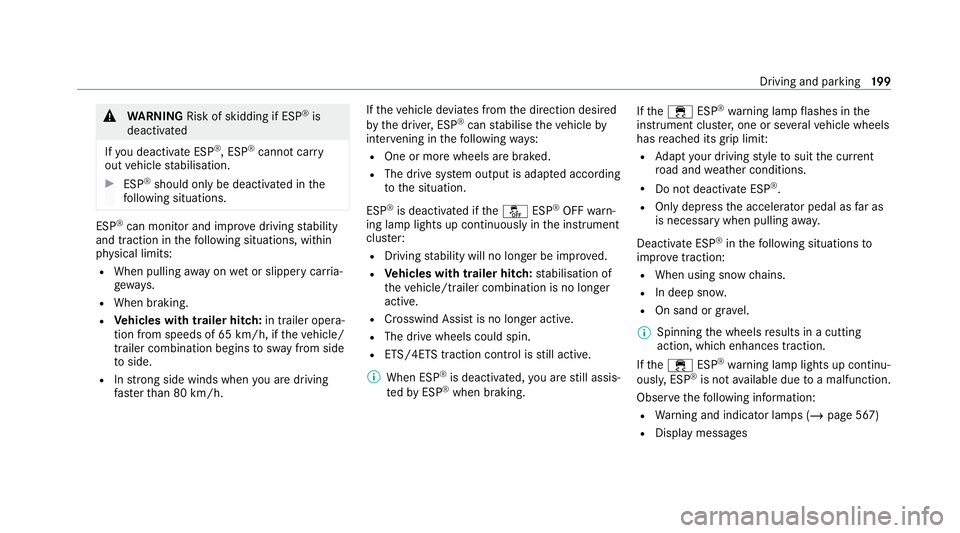
WARNING Risk of skidding if ESP ®
is
deactivated
If yo u deactivate ESP ®
, ESP ®
cannot car ry
out vehicle stabilisation. #
ESP ®
should on lybe deactivated in the
fo llowing situations. ESP
®
can monitor and impr ovedriving stability
and traction in thefo llowing situations, within
ph ysical limits:
R When pulling away on wet or slippe rycar ria‐
ge wa ys.
R When braking.
R Vehicles with trailer hitch: in trailer opera‐
tion from speeds of 65 km/h, if theve hicle/
trailer combination begins tosw ay from side
to side.
R Instro ng side winds when you are driving
fa ster than 80 km/h. If
th eve hicle deviates from the direction desired
by the driver, ESP ®
can stabilise theve hicle by
inter vening in thefo llowing ways:
R One or more wheels are braked.
R The drive sy stem output is adap ted according
to the situation.
ESP ®
is deactivated if theå ESP®
OFF warn‐
ing lamp lights up continuously in the instrument
clus ter:
R Driving stability will no lon ger be impr oved.
R Vehicles with trailer hitch: stabilisation of
th eve hicle/trailer combination is no longer
active.
R Crosswind Assist is no longer active.
R The drive wheels could spin.
R ETS/4ETS traction control is still active.
% When ESP ®
is deactivated, you are still assis‐
te dby ESP ®
when braking. If
th e÷ ESP®
wa rning lamp flashes in the
instrument clus ter,one or se veralve hicle wheels
has reached its grip limit:
R Adapt your driving style to suit the cur rent
ro ad and weather conditions.
R Do not deactivate ESP ®
.
R Onlydepress the accelera tor pedal as far as
is necessary when pulling away.
Deactivate ESP ®
in thefo llowing situations to
impr ove traction:
R When using snow chains.
R In deep sn ow.
R On sand or gr avel.
% Spinning the wheels results in a cutting
action, which enhances traction.
If th e÷ ESP®
wa rning lamp lights up continu‐
ousl y,ESP ®
is not available due toa malfunction.
Obse rveth efo llowing information:
R Warning and indicator lamps (/ page 567)
R Display messages Driving and parking
19 9
Page 203 of 629
ETS/4ETS (Electronic
Traction Sy stem)
ETS/4E TStraction control is pa rtof ESP ®
and
makes it possible topull away and accelerate on
a slippe rycar riag ewa y.
ETS/4ETS can impr ovetheve hicle's traction by
inter vening in thefo llowing ways:
R The drive wheels are braked individually if
they spin. R
More drive torque is transferred tothe wheel
or wheels with traction.
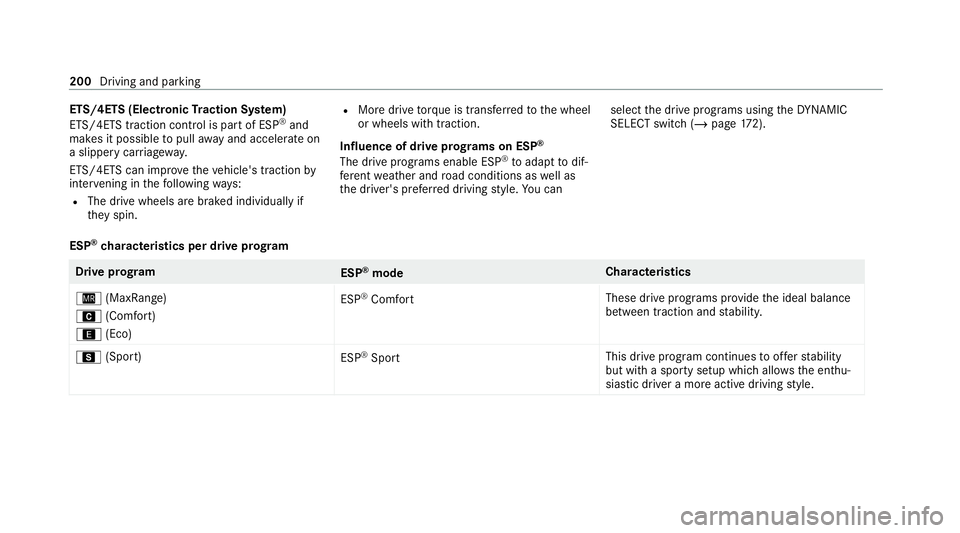
Influence of drive prog rams on ESP ®
The drive prog rams enable ESP ®
to adapt todif‐
fe re nt we ather and road conditions as well as
th e driver's prefer red driving style. You can select
the drive prog rams using theDY NA MIC
SELECT switch (/ page172).
ESP ®
ch aracteristics per drive prog ramDrive prog
ram
ESP®
mode Cha
racteristics
Í (MaxRange)
A (Comfort)
; (Eco) ESP
®
Comfort These drive programs pr
ovide the ideal balance
between traction and stabilit y.
C (Sport)
ESP®
Sport This drive program continues
toofferst ability
but with a sporty setup which allo wsthe enthu‐
siastic driver a more active driving style. 200
Driving and parking
Page 204 of 629
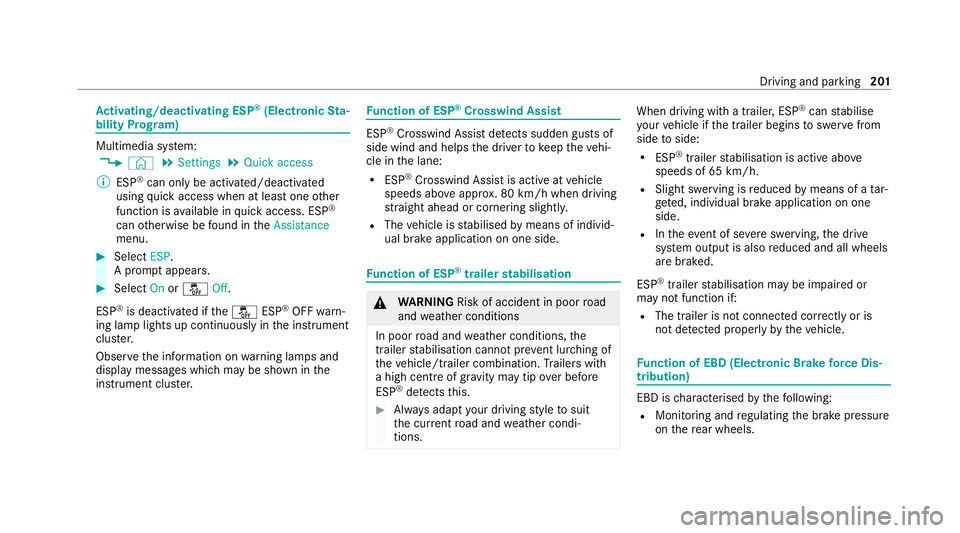
Ac
tivating/deactivating ESP ®
(Electronic Sta‐
bility Prog ram) Multimedia sy
stem:
4 © 5
Settings 5
Quick access
% ESP®
can only be activated/deactivated
using quick access when at least one other
function is available in quick access. ESP ®
can otherwise be found in theAssistance
menu. #
Select ESP.
A prom ptappears. #
Select Onorå Off.
ESP ®
is deactivated if theå ESP®
OFF warn‐
ing lamp lights up continuously in the instrument
clus ter.
Obser vethe information on warning lamps and
display messages which may be shown in the
instrument clus ter. Fu
nction of ESP ®
Crosswind Assist ESP
®
Crosswind Assist de tects sudden gu sts of
side wind and helps the driver tokeep theve hi‐
cle in the lane:
R ESP ®
Crosswind Assist is active at vehicle
speeds abo veappr ox. 80 km/h when driving
st ra ight ahead or cornering slightly.
R The vehicle is stabilised bymeans of individ‐
ual brake application on one side. Fu
nction of ESP ®
trailer stabilisation &
WARNING Risk of accident in poor road
and weather conditions
In poor road and weather conditions, the
trailer stabilisation cannot pr event lur ching of
th eve hicle/trailer combination. Trailers with
a high centre of grav ity may tip over before
ESP ®
de tects this. #
Alw ays adapt your driving style to suit
th e cur rent road and weather condi‐
tions. When driving with a trailer, ESP
®
can stabilise
yo ur vehicle if the trailer begins toswer vefrom
side toside:
R ESP ®
trailer stabilisation is active abo ve
speeds of 65 km/h.
R Slight swerving is reduced bymeans of a tar‐
ge ted, individual brake application on one
side.
R Intheeve nt of se vere swerving, the drive
sy stem output is also reduced and all wheels
are braked.
ESP ®
trailer stabilisation may be impaired or
may not function if:
R The trailer is not connec ted cor rectly or is
not de tected prope rly by theve hicle. Fu
nction of EBD (Electronic Brake forc e Dis‐
tribution) EBD is
characterised bythefo llowing:
R Monitoring and regulating the brake pressure
on there ar wheels. Driving and parking
201