2019 MERCEDES-BENZ EQC SUV service
[x] Cancel search: servicePage 164 of 629
R
copper: driving at con stant speed or with
mode rate acceleration
R blue: recuperation (cha rging the high-voltage
battery) or overrun mode Re
generative brake sy stem Fu
nction of there ge nerative brake sy stem
Depending on the selected recuperation le vel,
th e electric mo tor is operated as an alternator
when in overru n mode and du ring braking in
order tocharge the high-voltage battery while
driving. As soon as youre lease the accelera tor
pedal when theve hicle is in motion, recupera‐
tion in overru n mode is initia ted.
The rege nerati vebrake sy stem has thefo llowing
ch aracteristics:
R suppo rts braking with an electronically con‐
trolled brake forc e boosting
R con verts th e kinetic energy of theve hicle
into electric energy
In the drive program, you can use thesteering
wheel gearshift paddles tomanually adju st theintensity of
recuperation in overru n mode
(/ page 161).
Sy stem limits
The braking ef fect of the electric mo tor during
re cuperation in overru n mode may be reduced or
may not be available at all in thefo llowing situa‐
tions:
R when the high-voltage battery charge level
inc reases
R ifth e high-voltage battery is not yet at a nor‐
mal operating temp erature
R when driving at speeds close tozero
R in transmission position i
R during and af ter ESP ®
inter venes
In these cases, the desired deceleration is set by
th e brake control sy stem. Also brake with the
service brake if necessar y.
Manually setting recuperative deceleration
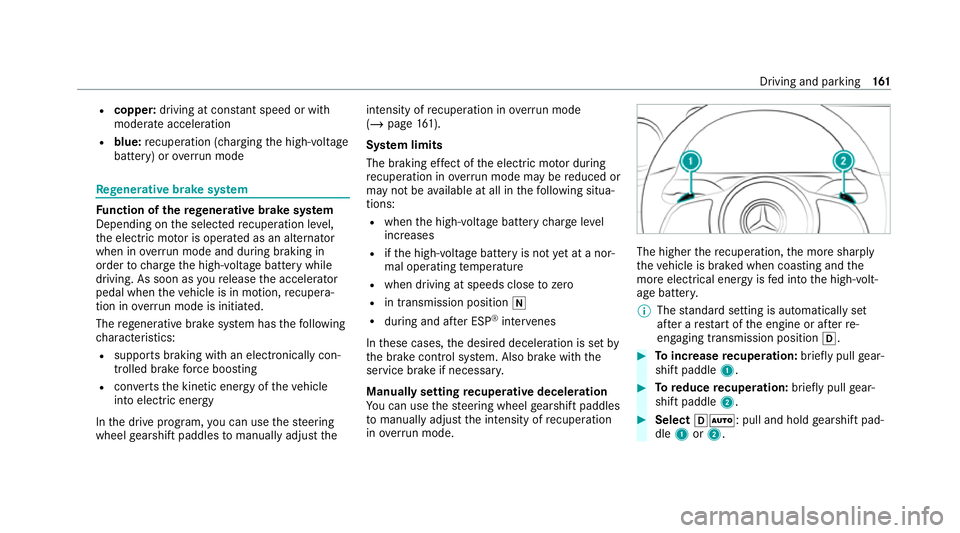
Yo u can use thesteering wheel gearshift paddles
to manually adju stthe intensity of recuperation
in ove rrun mode. The higher
there cuperation, the more sharply
th eve hicle is braked when coasting and the
more electrical energy is fed into the high-volt‐
age batter y.
% The standard setting is automatically set
af te r a restart of the engine or af terre-
engaging transmission position h. #
Toincrease recuperation: briefly pull gear‐
shift paddle 1. #
Toreduce recuperation: briefly pull gear‐
shift paddle 2. #
Select hÃ: pull and hold gearshift pad‐
dle 1or2. Driving and parking
161
Page 167 of 629
%
You can swit choff the drive sy stem while
driving bypressing button 1for about three
seconds or bypressing button 1three
times wi thin thre e seconds. The transmis‐
sion shifts toneutral iautomatically. Press
button 1again, the drive sy stem starts
again and you can en gage drive position h
again. Be sure toobser vethe saf ety no tes
under "Driving tips" (/ page165).
St arting theve hicle with a Digital Vehicle
Key
Re quirements:
R one of thefo llowing versions of the Digital
Ve hicle Key is available:
- suitable mobile phone
- Digital Vehicle Keyst icker
R theve hicle is equipped with the "Digital Vehi‐
cle Key" function.
R the "Digital Vehicle Key" function is activated
via Mercedes me connec t:http://
www.mercedes.me.
R the mobile phone is suf ficiently charge d. %
You can check the suitability of your mobile
phone byentering the phone number at
http://www.mercedes.me.
Information about suitable mobile phones
can be obtained from your Mercedes-Benz
service centre or at http://www.mercedes-
benz.com/connect.
% Mercedes-Benz recommends that you car ry
th e emer gency key in case of function
re strictions.
% The function is only available in combination
with Mercedes me connect and on lyin cer‐
ta in countries.
% Protective cases around the mobile phone
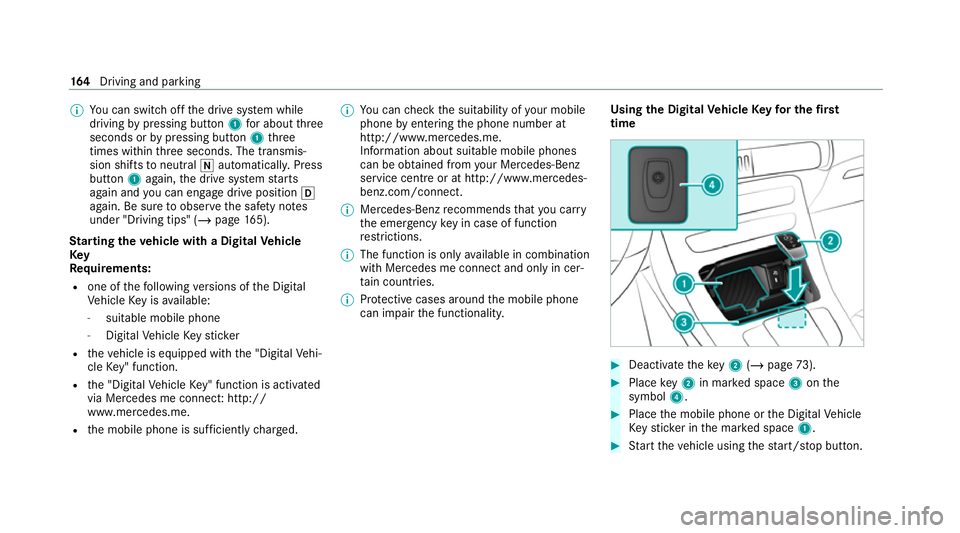
can impair the functionality. Using
the Digital Vehicle Keyfo r the first
time #
Deactivate theke y2 (/ page 73). #
Place key2 in mar ked space 3onthe
symbol 4. #
Place the mobile phone or the Digital Vehicle
Ke yst icke r in the mar ked space 1. #
Start theve hicle using thest art/ stop button. 16 4
Driving and pa rking
Page 168 of 629

Any fu
rther starts with th e DigitalVehicle
Key
The key is not needed for any fur ther starts. #
Place the mobile phone or the Digital Vehicle
Ke yst icke r in the mar ked space 1. #
Start theve hicle using thest art/ stop button.
The õ display appears in the multifunction
display: theve hicle can be driven.
The "Digital Vehicle Key" service can be deacti‐
va ted in Mercedes me connect at http://
www.mercedes.me. The function is then deacti‐
va ted in the mobile phone via an online connec‐
tion. If connection tothe Internet is not possible,
e.g. af terth e mobile phone or the Digital Vehicle
Ke yst icke r has been stolen, theke y function can
be deacti vated at a Mercedes-Benz service
centre.
St arting theve hicle in emer gency operation
mode
If th eve hicle does not start and thePlace the
key in the marked space See Owner's Manual
display message appears in the multifunction displa
y,yo u can start theve hicle in emer gency
operation mode. #
Makesure that mar ked space 2is em pty. #
Remo vekey1 from theke yring. #
Place key1 in mar ked space 2onthe
symbol 3.
The vehicle will start af ter a short time. When
youre mo vetheke y1 from the
mar ked space 2theve hicle can be driven.
Fo r fur ther engine starts ho wever,ke y1
must be located in mar ked space 2on sym‐
bol 3during the entire journe y. #
Have theke y1 checked at a qualified spe‐
cialist workshop.
If th eve hicle does not star t: #
place key1 in mar ked space 2and lea ve
it th ere. #
Depress the brake pedal and start theve hi‐
cle using thest art/ stop button.
% You can also swit chon the po wer supp lyor
th e ignition with thest art/ stop button. Note
s on driving &
WARNING Risk of accident due to
objects in the driver's foot we ll
Objects in the driver's foot we ll may impede
pedal tr avel or block a depressed pedal. Driving and parking
16 5
Page 193 of 629
#
Bring theve hicle toast andstill byapplying
th e brake pedal. #
On uphill or downhill gradients, turn the front
wheels so that theve hicle rolls towa rdsthe
ke rb if it starts moving. #
App lythe electric parking brake. #
Enga getransmission position jin a station‐
ary vehicle with the brake pedal applied
(/ page 174). #
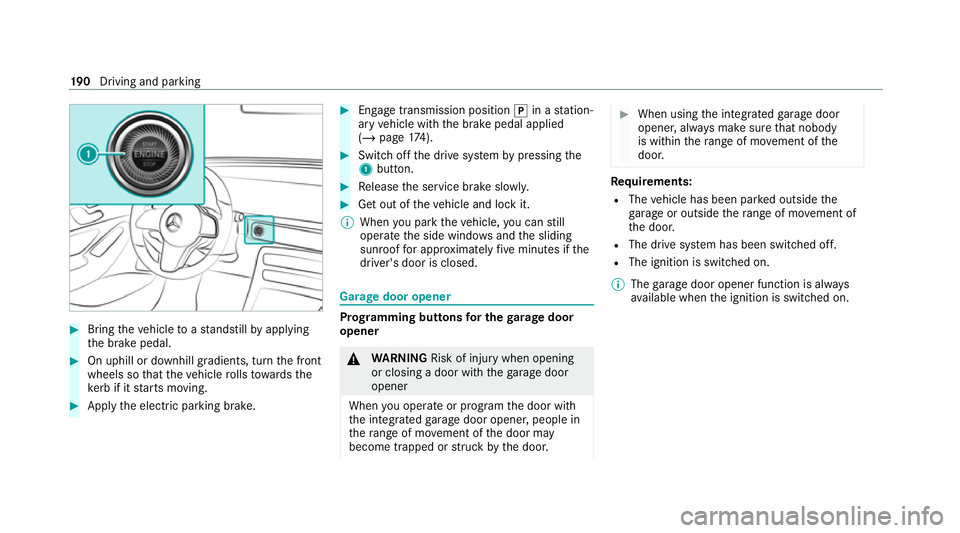
Switch off the drive sy stem bypressing the
1 button. #
Release the service brake slowl y. #
Get out of theve hicle and lock it.
% When you park theve hicle, you can still
opera tethe side windo wsand the sliding
sunroof for appro ximately five minutes if the
driver's door is closed. Garage door opener
Prog
ramming buttons for the garage door
opener &
WARNING Risk of inju rywhen opening
or closing a door with thega rage door
opener
When you operate or program the door with
th e integrated garage door opener, people in
th era nge of mo vement of the door may
become trapped or stru ck bythe door. #
When using the integrated garage door
opener, alw ays make sure that nobody
is within thera nge of mo vement of the
door. Re
quirements:
R The vehicle has been par ked outside the
ga rage or outside thera nge of mo vement of
th e door.
R The drive sy stem has been switched off.
R The ignition is switched on.
% The garage door opener function is alw ays
av ailable when the ignition is switched on. 19 0
Driving and pa rking
Page 267 of 629
VO
L: control knob, adjusts thevo lume or
switches the sound off 8(press)
6 Makes/accepts a call
~ Rejects/ends a call
5 ò Calls up the home screen
6 Touch Control multimedia sy stem
7 % Back button Operating
the on-boa rdcompu ter &
WARNING Risk of di stra ction from infor‐
mation sy stems and communications
equipment
If yo u operate information and communica‐
tion equipment integ rated in theve hicle
when driving, you will be distracted from the
traf fic situation. This could also cause youto
lose control of theve hicle. #
Only operate this equipment when the
traf fic situation permits. #
Ifyo u cannot be sure of this, stop the
ve hicle whilst paying attention toroad and traf
fic conditions and ope rate the
equipment with theve hicle stationar y. Obser
vethe legal requ irements forth e count ry
in which you are cur rently driving when operat‐
ing the on-board computer.
% The on-board computer displa yswill appear
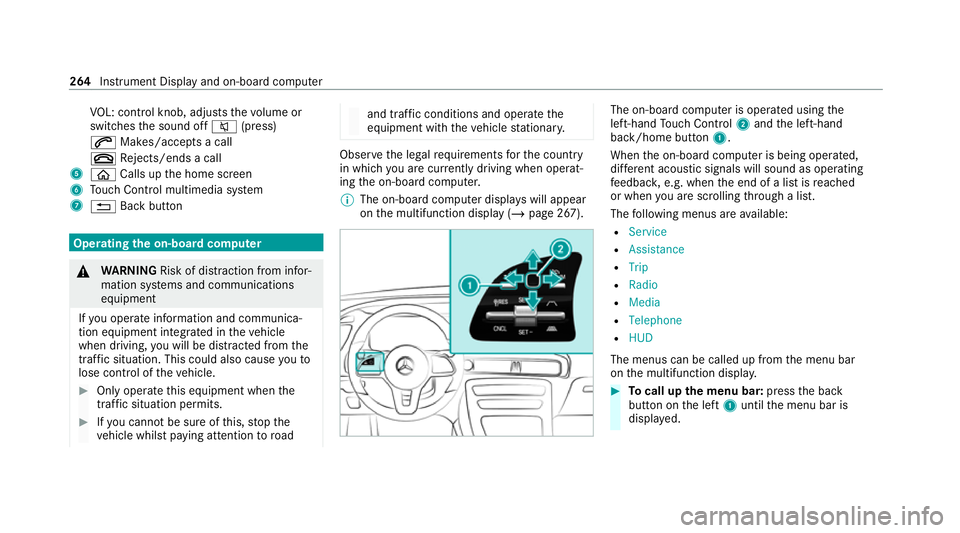
on the multifunction display (/ page 267). The on-board computer is operated using
the
left-hand Touch Control 2and the left-hand
back/home button 1.
When the on-board computer is being operated,
dif fere nt acoustic signals will sound as operating
fe edbac k,e.g. when the end of a list is reached
or when you are sc rolling thro ugh a list.
The following menus are available:
R Service
R Assistance
R Trip
R Radio
R Media
R Telephone
R HUD
The menus can be called up from the menu bar
on the multifunction displa y. #
Tocall up the menu bar: pressthe back
button on the left 1until the menu bar is
displa yed. 264
Instrument Display and on-board computer
Page 268 of 629
%
Press theò button tocall up the menu
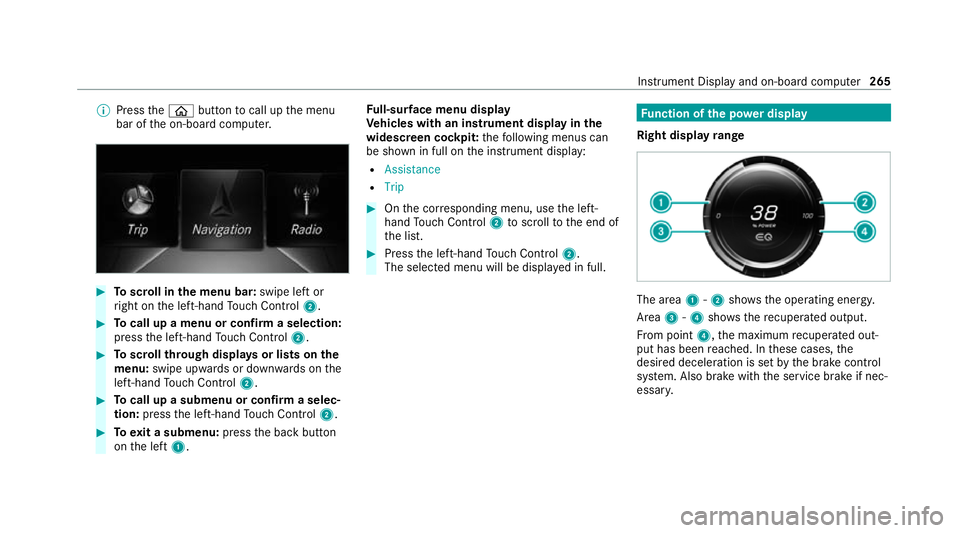
bar of the on-board computer. #
Toscroll in the menu bar: swipe left or
ri ght on the left-hand Touch Control 2. #
Tocall up a menu or confirm a selection:
press the left-hand Touch Control 2. #
Toscroll through displa ysor lists on the
menu: swipe upwards or down wards on the
left-hand Touch Control 2. #
Tocall up a submenu or confirm a selec‐
tion: press the left-hand Touch Control 2. #
Toexit a submenu: pressthe back button
on the left 1. Fu
ll-sur face menu display
Ve hicles with an instrument display in the
widescreen cockpit: thefo llowing menus can
be shown in full on the instrument display:
R Assistance
R Trip #
Onthe cor responding menu, use the left-
hand Touch Control 2toscroll tothe end of
th e list. #
Press the left-hand Touch Control 2.
The selected menu will be displ ayed in full. Fu
nction of the po wer display
Right display range The area
1-2 showsthe operating energy.
Area 3-4 showsthere cuperated output.
Fr om point 4,the maximum recuperated out‐
put has been reached. In these cases, the
desired deceleration is set bythe brake control
sy stem. Also brake with the service brake if nec‐
essar y. Instrument Display and on-board computer
265
Page 271 of 629
#
Turn brightness control 1up or down.
The lighting of the instrument display and in
th e control elements of theve hicle interior is
adjus ted. Menus and submenus
Calling up functions on
the service menu of
th e on-boa rdcompu ter On-board computer:
4 Service #
Toselect a function: swipe upwards or
down wards on the left-hand Touch Control. #
Press the left-hand Touch Control.
Fu nctions on theServicemenu:
R Message memory (/ page 520)
R Tyres:
- Check the tyre pressure with the tyre
pressure monitor (/ page 493)
- Restart the tyre pressure monitor
(/ page 494) R
ASSYST PLUS: call up the service due date
(/ page 459) Calling up displa
yson the Assistance menu On-board computer:
4 Assistance
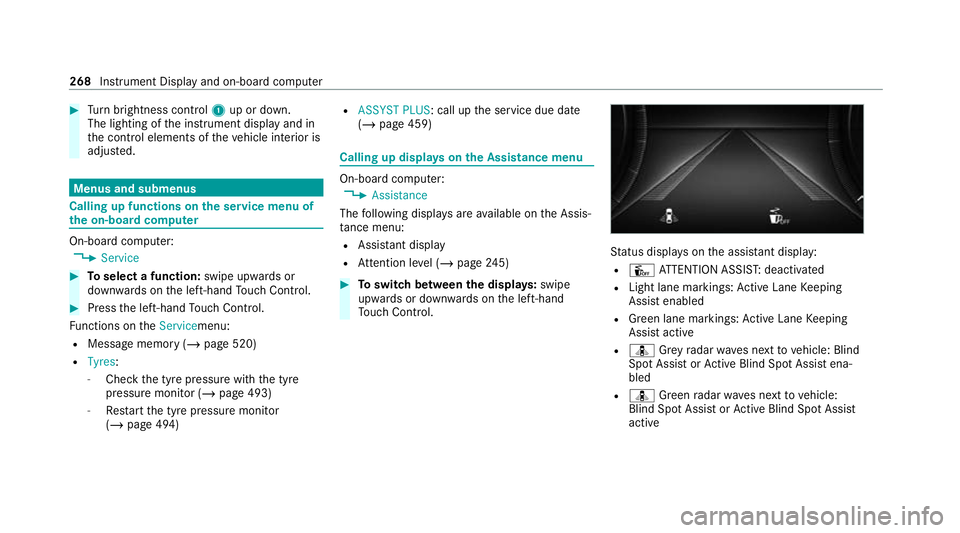
The following displa ysare available on the Assis‐
ta nce menu:
R Assi stant display
R Attention le vel (/ page 245) #
Toswitch between the displa ys:swipe
upwards or down wards on the left-hand
To uch Control. St
atus displa yson the assis tant displ ay:
R Û ATTENTION ASSIS T:deactivated
R Light lane markings: Active Lane Keeping
Assist enabled
R Green lane markings: Active Lane Keeping
Assist active
R ¸ Grey radar waves next tovehicle: Blind
Spot Assist or Active Blind Spot Assi stena‐
bled
R ¸ Green radar waves next tovehicle:
Blind Spot Assist or Active Blind Spot Assi st
active 268
Instru ment Display and on-board computer
Page 282 of 629
R
Continued dialogue: saytheHelp voice
command during a voice dialogue. Foreve ry
st ep of the dialogue youre cei vematching
information.
R Speci fic function: saythevo ice command
fo rth e desired function, e.g. with "Hello
Mercedes, I need help with thera dio" or af ter
pressing the£ rock er switch on the multi‐
function steering wheel up, say theHelp for
the telephone voice command, forex ample. Note
s on optimal use of LINGU ATRO NIC No
tes on how toimpr overecognition:
R Activate online voice control (/ page278).
R Onlyoperate LINGU ATRO NIC from the driv‐
er's seat.
R Say thevo ice commands cohe rently and
clear ly, but do not exaggerate thewo rds.
R Avoid loud noises that cause inter fere nce
while making a voice command ent ry, e.g.
th e enter tainment in there ar-passen ger
compa rtment.
R Forte lephone or add ress book entries: -
Only create sensible address book entri es
in the sy stem/mobile phone, e.g. enter
surname and firs t name in the cor rect
fi eld.
- Do not use any abbr eviations, unneces‐
sary spaces or special characters.
R Forra dio or TVprog ramme names: say
th eRead out station list voice command and
say the desired station name in thewa ythe
vo ice output reads aloud to you.
% Toimpr overecognition, depending on the
outside temp erature, either the blo wersfor
ve ntilation or heating are reduced when LIN‐
GU ATRO NIC is star ted. Note
s on online voice control Online
voice control impr oves recognition and
makes additional results available as a result of
ex tern al information, e.g. information about POIs
and about thewe ather. Wetherefore recom‐
mend that you activate online voice control.
Yo u will need a Mercedes me user account for
th is. If you do not yet ha vea user account youha
ve tocrea teone and connect it with your vehi‐
cle (/ page419).
Then call up your Mercedes me user account.
The Mercedes me services are shown and can
be activated (/ page419).
In additio n, onlinevoice control must be activa‐
te d (/ page278). Essential
voice commands Note
s onthevo ice commands Aside from
theex act voice commands (see the
"Voice command" column in thefo llowing tables)
to call up specific functions, in most cases LIN‐
GU ATRO NIC also under stands a great ma nypar‐
aphrases from daily usage. Examples of these
are lis ted in the "Colloquial examples" column.
Fo r some languages ho weverth ese examples
are on lyavailable toa limited extent. LING
UATRONIC 279