2019 MERCEDES-BENZ CLA brake fluid
[x] Cancel search: brake fluidPage 8 of 330

Automatic transmission emer-
gency mode.......................................139
B
Back button....................................... 232
Backup lamp
Display message ............................ 205
BAS (Brake Assist System)................. 61
Battery (SmartKey)
Checking .......................................... 73
Important safety notes .................... 73
Replacing ......................................... 73
Battery (vehicle)
Charging ........................................ 281
Display message ............................ 208
Important safety notes .................. 279
Jump starting ................................. 282
Replacing ....................................... 281
Belt
see Seat belts
Belt warning......................................... 44
Blind Spot Assist
Activating/deactivating (on-
board computer) ............................ 188
Display message ............................ 210
Notes/function .............................. 174
Bluetooth®
Searching for a mobile phone ........235
Searching for a mobile phone
(device manager) ........................... 236
see also Digital Operator's Man-
ual ..................................................231
Telephony ...................................... 235
Brake Assist System
see BAS (Brake Assist System)
Brake fluid
Display message ............................ 199
Notes ............................................. 322
Brake force distribution
see EBD (electronic brake force
distribution)
Brake lamp
Replacing bulbs .............................107
Brake lamps
Display message ............................ 204
Brakes
ABS ..................................................61
BAS .................................................. 61
Brake fluid (notes) ......................... 322
Braking assistance appropriate to
the situation ..................................... 63
Display message............................ 194
EBD .................................................. 67
Hill start assist ............................... 126
HOLD function ............................... 158
Important safety notes .................. 147
Maintenance .................................. 148
Parking brake ................................ 143
Riding tips ...................................... 147
Warning lamp ................................. 221
Braking assistance appropriate to
the situation
Function/notes................................ 63
Breakdown assistance
Where will I find...? ........................ 273
see Flat tire
see Tow-starting
see Towing away
Brightness control (instrument
cluster lighting)................................... 33
Buttons on the steering wheel......... 179
C
California
Important notice for retail cus-
tomers and lessees .......................... 25
Calling up a malfunction
see Display messages
Car
see Vehicle
Care
Car wash ........................................ 265
Carpets .......................................... 272
Display ........................................... 270
Exhaust pipe .................................. 270
Exterior lights ................................ 269
Gear or selector lever .................... 271
Interior ........................................... 270
Matte finish ................................... 267
Notes ............................................. 265
Paint .............................................. 267
Plastic trim .................................... 270
Power washer................................ 266
Rear view camera .......................... 269
6Index
Page 19 of 330
Folding the backrest (rear com-
partment) forwards/back .............. 242
Important safety notes .................... 91
Seat heating problem ...................... 96
Storing settings (memory func-
tion) ............................................... 100
Switching seat heating on/off ......... 95
Section
Trunk ............................................... 78
Securing cargo.................................. 243
Selector lever
Cleaning ......................................... 271
Sensors (cleaning instructions)....... 269
Service center
see Qualified specialist workshop
Service Center
see Qualified specialist workshop
Service menu (on-board com-
puter).................................................. 188
Service message
see ASSYST PLUS
Service products
Brake fluid ..................................... 322
Coolant (engine) ............................ 323
Engine oil ....................................... 322
Fuel ................................................ 319
Important safety notes .................. 319
Refrigerant (air-conditioning sys-
tem) ............................................... 324
Washer fluid ................................... 323
Setting the air distribution............... 117
Setting the airflow............................ 118
Setting the date/time format
see also Digital Operator's Man-
ual .................................................. 231
Setting the language
see also Digital Operator's Man-
ual .................................................. 231
Setting the time
see also Digital Operator's Man-
ual .................................................. 231
Settings
Factory (on-board computer) ......... 190
On-board computer ....................... 188
SETUP (on-board computer,
Mercedes-AMG vehicles).................. 191
Side impact air bag............................. 47
Side marker lamp (display mes-
sage)................................................... 206
Side windows
Cleaning ......................................... 268
Convenience closing feature ............ 84
Convenience opening feature .......... 83
Important safety information ........... 82
Opening/closing .............................. 83
Problem (malfunction) ..................... 85
Resetting ......................................... 85
Reversing feature ............................. 83
SIRIUS services
see also Digital Operator's Man-
ual .................................................. 231
Sliding sunroof
see Panorama roof with power
tilt/sliding panel
SmartKey
Changing the battery ....................... 73
Changing the programming ............. 72
Checking the battery ....................... 73
Convenience closing feature ............ 84
Convenience opening feature .......... 83
Display message............................ 218
Door central locking/unlocking ....... 70
Important safety notes .................... 70
KEYLESS-GO start function .............. 71
Loss ................................................. 74
Mechanical key ................................ 72
Positions (ignition lock) ................. 123
Problem (malfunction) ..................... 74
Starting the engine ........................ 125
SmartKey positions (ignition lock).. 123
Smartphone
Starting the engine ........................ 125
SMS
see also Digital Operator's Man-
ual .................................................. 231
Snow chains...................................... 293
Sockets
Center console .............................. 247
General notes ................................ 247
Rear compartment ......................... 248
Trunk ............................................. 248
Sound
Switching on/off........................... 232
Special seat belt retractor.................. 55
Index17
Page 23 of 330
U
Unlocking
Emergency unlocking .......................77
From inside the vehicle (central
unlocking button) ............................. 76
Upshift indicator (on-board com-
puter, Mercedes-AMG vehicles)....... 190
USB devices
Connecting to the Media Inter-
face ............................................... 238
V
Vanity mirror (in the sun visor)........ 246
Vehicle
Correct use ...................................... 28
Data acquisition ............................... 29
Display message............................ 215
Equipment ....................................... 25
Individual settings .......................... 188
Limited Warranty ............................. 29
Loading .......................................... 301
Locking (in an emergency) ............... 77
Locking (SmartKey).......................... 70
Lowering ........................................ 314
Maintenance .................................... 26
Parking for a long period ................ 145
Pulling away ................................... 126
Raising ........................................... 312
Reporting problems ......................... 28
Securing from rolling away ............ 312
Transporting .................................. 287
Unlocking (in an emergency) ........... 77
Unlocking (SmartKey)...................... 70
Vehicle data ................................... 325
Vehicle data
Roof load (maximum) ..................... 325
Vehicle dimensions........................... 325
Vehicle emergency locking................ 77
Vehicle identification number
see VIN
Vehicle identification plate.............. 318
Vehicle tool kit.................................. 274
Ventilation
Setting the vents ........................... 121
Video
Operating the DVD ......................... 185
see also Digital Operator's Man-
ual .................................................. 231
VIN
Seat ............................................... 319
Type plate ...................................... 318
W
Warning and indicator lamps
ABS ................................................ 222
Active Brake Assist ........................ 229
Brakes ........................................... 221
Check Engine ................................. 226
Coolant .......................................... 227
Distance warning ........................... 229
ESP®.............................................. 223
ESP®OFF ....................................... 224
Fuel tank ........................................ 226
Overview .......................................... 33
PASSENGER AIR BAG ...................... 41
Reserve fuel ................................... 226
Restraint system ............................ 226
Seat belt ........................................ 220
SPORT handling mode ................... 224
Tire pressure monitor .................... 230
Warranty.............................................. 25
Washer fluid
Display message ............................ 218
Weather display (COMAND)
see also Digital Operator's Man-
ual .................................................. 231
Wheel and tire combinations
Tires ............................................... 315
Wheel bolt tightening torque........... 314
Wheel chock...................................... 312
Wheels
Changing a wheel.......................... 310
Checking ........................................ 290
Cleaning ......................................... 268
Emergency spare wheel ................. 315
Important safety notes .................. 290
Information on driving .................... 290
Interchanging/changing ................ 310
Mounting a new wheel ................... 313
Removing a wheel.......................... 313
Storing ........................................... 311
Tightening torque ........................... 314
Wheel size/tire size ....................... 315
Index21
Page 31 of 330
The following text is reproduced as required ofall manufacturers under Title 49, Code of U.S.Federal Regulations, Part 575 pursuant to theNational Traffic and Motor Vehicle Safety Act of1966.
If you believe that your vehicle has a defectwhich could cause a crash or could cause injuryor death, you should immediately inform theNational Highway Traffic Safety Administration(NHTSA) in addition to notifying Mercedes-BenzUSA, LLC.
If NHTSA receives similar complaints, it mayopen an investigation, and if it finds that a safetydefect exists in a group of vehicles, it may ordera recall and remedy campaign. However, NHTSAcannot become involved in individual problemsbetween you, your dealer, or Mercedes-BenzUSA, LLC.
To contact NHTSA, you may call the VehicleSafety Hotline toll-free at 1-888-327-4236(TTY: 1-800-424-9153);go tohttp://www.safercar.gov; or write to: Administrator,NHTSA, 400 Seventh Street, SW., Washington,DC 20590.
You can also obtain other information aboutmotor vehicle safety from
http://www.safercar.gov
Limited Warranty
!Observe the notes in this Operator's Manualregarding the correct operation of your vehi-cle and possible damage to the vehicle. Dam-age to the vehicle which is caused by violationof these notes is not covered by theMercedes-Benz implied warranty or the newor used-vehicle warranty.
QR code for rescue card
The QR codes are secured in the fuel filler flapand on the opposite side on the B-pillar. In theevent of an accident, rescue services can usethe QR code to quickly find the appropriate res-cue card for your vehicle. The current rescuecard contains the most important informationabout your vehicle in a compact form, e.g. therouting of the electric cables.
You can find more information underwww.mercedes-benz.de/qr-code.
Data storage
Data storage
A wide range of electronic components in yourvehicle contain data memories.
These data memories temporarily or perma-nently store technical information about:
Rthe vehicle's operating state
Rincidents
Rmalfunctions
In general, this technical information docu-ments the state of a component, a module, asystem or the surroundings.
These include, for example:
Roperating conditions of system components.For example, fluid levels
Rthe vehicle's status messages and those of itsindividual components, e.g. number of wheelrevolutions/speed, deceleration in move-ment, lateral acceleration, accelerator pedalposition
Rmalfunctions and defects in important systemcomponents, e.g. lights, brakes
Rvehicle reactions and operating conditions inspecial driving situations, e.g. air bag deploy-ment, intervention of stability control sys-tems
Rambient conditions, e.g. outside temperature
This data is of an exclusively technical natureand can be used to:
Rassist in recognizing and rectifying malfunc-tions and defects
Ranalyze vehicle functions, e.g. after an acci-dent
Roptimize vehicle functions
The data cannot be used to trace the vehicle'smovements.
When your vehicle is serviced, technical infor-mation can be read from the event data memoryand malfunction data memory.
Services include, for example:
Rrepair services
Rservice processes
Rwarranties
Rquality assurance
The vehicle is read out by employees of the ser-vice network (including the manufacturer) usingspecial diagnostic testers. More detailed infor-mation is obtained from it, if required.
Data storage29
Introduction
Z
Page 128 of 330
GWARNING
Limbs could be crushed or trapped if the
engine is started unintentionally during ser-
vice or maintenance work. There is a risk of
injury.
Always secure the engine against uninten-
tional starting before carrying out mainte-
nance or repair work.
Make sure that the engine cannot be started viayour smartphone before carrying out mainte-nance or repairs. You can prevent an enginestart via your smartphone, for example, if you:
Rswitch on the hazard warning lamps
Rdo not lock the doors
Ropen the hood
Pulling away
General notes
GWARNING
If the engine speed is above the idling speed
and you engage transmission position:
orF, the vehicle could pull away suddenly.
There is a risk of an accident.
When engaging transmission position:or
F, always firmly depress the brake pedal
and do not simultaneously accelerate.
Depress the accelerator carefully when pullingaway.
The vehicle locks centrally once you have pulledaway. The locking knobs in the doors drop down.
You can open the doors from the inside at anytime.
You can also deactivate the automatic lockingfeature (Ypage 189).
Vehicles with automatic transmission:it ispossible to shift the transmission from position]to the desired position only if you depressthe brake pedal. Only then can the parking lockbe deactivated.
All vehicles (except Mercedes-AMG vehi-cles):if you do not depress the brake pedal, theDIRECT SELECT lever can still be moved but theparking lock remains engaged.
Mercedes-AMG vehicles:if you do not depressthe brake pedal, the selector lever can still bemoved but the parking lock remains engaged.
At transmission fluid temperatures below
Page 134 of 330
away carefully to check whether the desiredtransmission position is engaged. Ideally, youshould select transmission position[anddrive programEorS.
Engaging park position P
!If the engine speed is too high or the vehicleis coasting, do not shift the automatic trans-mission directly from[to^, from^to[or directly to]. Otherwise, the automatictransmission may be damaged.
XPush the DIRECT SELECT lever switch in thedirection of arrow].Transmission position display]is shown inthe multifunction display.
When you have engaged park position], makesure that the transmission position displayshows]in the multifunction display.
You can engage park position]only when thevehicle is stationary; do not switch directly topark position]at high engine speed.
Depressing the brake and pushing the DIRECTSELECT lever up or down disengages the park-ing lock. The transmission is in neutral\\.
At transmission fluid temperatures below
Page 150 of 330
helps you to avoid overheating the brakes andwearing them out excessively.
When you take advantage of engine braking, itis possible that a drive wheel will not rotate forsome time, e.g. on a slippery road surface.This could cause damage to the drive train.This type of damage is not covered by theMercedes-Benz warranty.
Briefly depressing the accelerator pedal ondownhill gradients while the manual drive pro-gramMis temporarily activated: the automatictransmission may switch to the last active auto-matic drive programEorS. The automatic trans-mission may shift to a higher gear. This canreduce the engine's braking effect.
Heavy and light loads
GWARNING
If you rest your foot on the brake pedal while
driving, the braking system can overheat. This
increases the stopping distance and can even
cause the braking system to fail. There is a
risk of an accident.
Never use the brake pedal as a footrest. Never
depress the brake pedal and the accelerator
pedal at the same time.
!Depressing the brake pedal constantlyresults in excessive and premature wear tothe brake pads.
If the brakes have been subjected to a heavyload, do not stop the vehicle immediately. Driveon for a short while. This allows the airflow tocool the brakes more quickly.
Wet roads
If you have driven for a long time in heavy rainwithout braking, there may be a delayed reac-tion from the brakes when braking for the firsttime. This may also occur after the vehicle hasbeen washed or driven through deep water.
You have to depress the brake pedal morefirmly. Maintain a greater distance from thevehicle in front.
After driving on a wet road or having the vehiclewashed, brake firmly while paying attention tothe traffic conditions. This will warm up thebrake discs, thereby drying them more quicklyand protecting them against corrosion.
Limited braking performance on salt-
treated roads
If you drive on salted roads, a layer of salt resi-due may form on the brake discs and brakepads. This can result in a significantly longerbraking distance.
RIn order to prevent any salt build-up, apply thebrakes occasionally while paying attention tothe traffic conditions.
RCarefully depress the brake pedal and thebeginning and end of a journey.
RMaintain a greater distance to the vehicleahead.
Servicing the brakes
!The brake fluid level may be too low, if:
Rif the red brake warning lamp lights up inthe instrument cluster and
Ryou hear a warning tone while the engine isrunning
Observe additional warning messages in themultifunction display.
The brake fluid level may be too low due tobrake pad wear or leaking brake lines.
Have the brake system checked immediately.Consult a qualified specialist workshop toarrange this.
!A function or performance test should onlybe carried out on a 2-axle dynamometer. Ifyou wish to operate the vehicle on such adynamometer, please consult a qualified spe-cialist workshop in advance. You could oth-erwise damage the drive train or the brakesystem.
!As the ESP®system operates automatically,the engine and the ignition must be switchedoff (the SmartKey must be in position
Page 151 of 330
If the brake system has only been subject tomoderate loads, you should test the functional-ity of your brakes at regular intervals.
You can find a description of Brake Assist (BAS)on (Ypage 61).
Mercedes-Benz recommends that you only havebrake pads/linings installed on your vehiclewhich have been approved for Mercedes-Benzvehicles or which correspond to an equivalentquality standard. Brake pads/linings which havenot been approved for Mercedes-Benz vehiclesor which are not of an equivalent quality couldaffect your vehicle's operating safety.
Mercedes-Benz recommends that you only usebrake fluid that has been specially approved foryour vehicle by Mercedes-Benz, or which corre-sponds to an equivalent quality standard. Brakefluid which has not been approved forMercedes-Benz vehicles or which is not of anequivalent quality could affect your vehicle'soperating safety.
Checking brake lining thickness
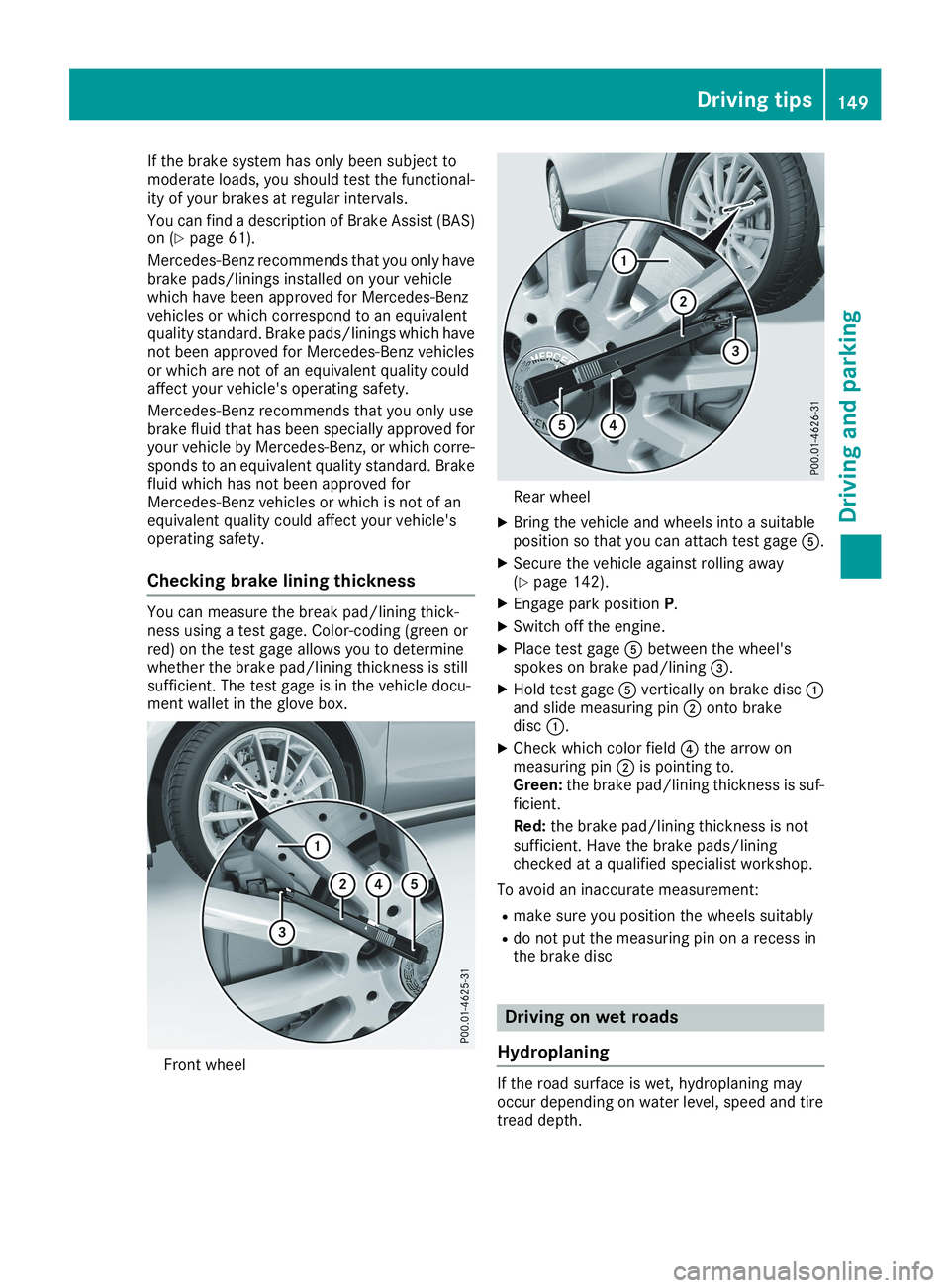
You can measure the break pad/lining thick-ness using a test gage. Color-coding (green orred) on the test gage allows you to determinewhether the brake pad/lining thickness is stillsufficient. The test gage is in the vehicle docu-ment wallet in the glove box.
Front wheel
Rear wheel
XBring the vehicle and wheels into a suitableposition so that you can attach test gage