2019 MERCEDES-BENZ C-CLASS SEDAN wheel
[x] Cancel search: wheelPage 256 of 534

Ov
ervie wand oper ation Ov
ervie wof themu ltim edia system 000A
WARNIN GRisk ofdist ra ction from infor‐
mati onsystems andcomm unication s
eq uipment
If yo uoper ateinf ormat ionand comm unic a‐
tio neq uipme ntintegratedin theve hicle
when driving, youwill bedistract ed from the
tr af fic situ ation. Thiscou ldalso cau seyouto
lose control of theve hicle. 0007
Onlyoper ateth is eq uipmen twhen the
tr af fic situ ation per mits. 0007
Ifyo ucan notbe sur eof this, stop the
ve hicle whilstpa ying attention toroad
and traffic condi tions andoperate the
eq uipment withth eve hicle statio nary. Yo
umus tobse rveth eleg alrequ iremen tsforth e
cou ntryin whi chyouar ecur rentl ydr ivi ng when
op erati ng themultimedia system. 1
Touc hCon trol
Mult imed iasystem butt ongroup onthe
st eer ing wheel (0013 page22 7)
2 Media display
3 Main function buttongroup
(0013 page258)
4 Touc hpad
5 Con trol kn ob •
Ad jus tsthevo lume (0013 page26 1)
• Swit ches thesound on/off
(0013 page260)
Fo rMer cedes- AMGvehicles withAMG Per‐
fo rm anc eex haus tsy stem:
• Turn:ad jus tsthevo lume
• Press: switc hesthemultimedia system
on/ off
6 00D0 button
• Switc hesmultimedia system on/ off
Fo rMer cedes- AMGvehicles withAMG Per‐
fo rm anc eex haus tsy stem:
• Se tsthevo lume oftheAMG Perfor mance
ex haus tsy stem
7 Contr oller No
teson themed iadisp lay 000E
NO
TEScr atches onthedispla y The
displa yhas ahighly sensitive, high-g loss
sur face. Thereisarisk ofitbecoming
scr atc hed. 25
4
Multimedia system
Page 262 of 534
0007
Movethefa vo rite to thedesir edposition .
If afa vo rite has already been added atthis
posit ion,itwill beove rwritt en.
De letin gfa vo rite s 0007
Press the© button.
The main functionsar edispla yed. 0007
Navig atedo wn wardsonce. 0007
Select afa vo rite . 0007
Navig atedo wn wardsonce.
The Favorite smenu appears. 0007
Todel ete: selec tDele te. 0007
Sele ctYes. 0007
Toresto reall favo rite s: select ResetAll.
A pr om ptappear s. 0007
Select Yes.
The favo rite sar ere se tto thefa ct or yse t‐
tings . Sw
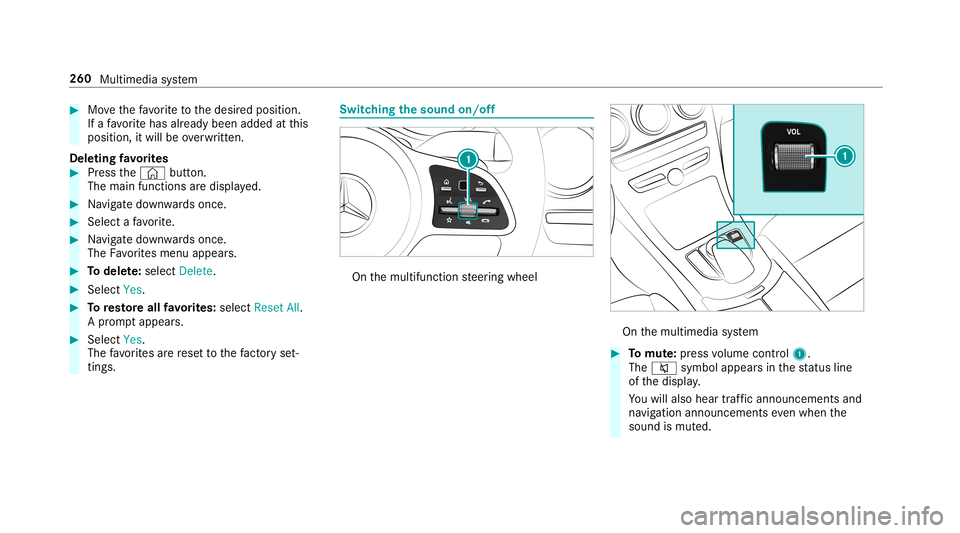
itchin gthe sound on/o ff On
themultifunc tionsteer ing wheel On
themultimedia system 0007
Tomut e:pres svo lume control 1.
The 0063 symbol appearsin thest atus line
of thedispla y.
Yo uwill also hear traffic annou ncements and
na vig ation annou ncements even when the
sound ismut ed. 260
Multimedia system
Page 263 of 534

0007
Toswitc hon: chang eth emedia sourceor
tur nvo lume control 1. Ad
jus tingthe volum e On
themultifunc tionsteer ing wheel On
themultimedia system 0007
Turn volume control 1.
The volume ofthecur rent radio ormedia
sour ceisset.The volume ofother audi o
sour cescan beadjus tedsepar ately.
Ad jus tth is in thefo llo wing situat ions:
R during atraf fic annou ncement
R during ana vig ation anno uncement The
volume ofthena vig ation announ ce‐
ment chang esinacc ordanc ewit hth evo l‐
ume ofthecur rent med iasou rce.
R during ate lephon ecall
R when entering orexitin gapar kingspace
while using ActivePa rking Assist
or 0007
Selec tSyst eminthemultimedia system. 0007
Select Audio. 0007
Select avo lume setting. 0007
Setth evo lume. Ent
ering charact ers Usi
ngthech aract erinput functi on 000A
WARNIN GRisk ofdist ra ction from infor‐
mati onsystems andcomm unication s
eq uipment
If yo uoper ateinf ormat ionand comm unic a‐
tio neq uipme ntintegratedin theve hicle
when driving, youwill bedistract ed from the Multimedia
system 26
1
Page 277 of 534

ENER
GIZIN Gcomf ortpr og ram ove rview
Pr og ram ove rview Pr
og ramF unction
Re fresh
Canmaketa rgeted chang estotheint erior climat eto refresh vehicle occupants. Coolingairflow and ioniza‐
tio npur ifytheair .The vehicle interior isillu minat edwithcool color sand theseats areve ntil ated .
Wa rmth
Canincrease thecomf ortle ve lof theoccupant s.The vehicle's panel,seatandsteer ing wheel heaterpro‐
duce acoz ywa rmth.The airis pu rified using ionizat ionand apleasant fragr ance isreleased. Thevehicle
int erior isillu minat edwithwa rm light ing.
Vi tali ty
Cancoun tera ct fatig ue inmono tonou sdr ivi ng situa tions. Fast-pa ced music and avit alizi ng mas sage pro‐
vide invigor ating stimulatio nfo rth eve hicle occupants. Theairispur ified using ionization andapleasa nt
fr agr ance isreleased. Thevehicle interior isillu minat edinast imulatin ghue and theseat isventil ated .
Pl eas ure
Canpr omo teaposit ive moo din theoccupant s.Moder atelyfa st musi cis pla yedand amassag epr ogr am is
activ ated. The airispur ified using ionization andapleasant fragr ance isreleased. Thevehicle interior is
illu minat edwithamicable lighting.
We llbeing
Canaidtheph ysical and men talre lax ation ofocc upant s.Abac kmassag ecom bined withlocal warmthpro‐
vide relax ation .The airispur ified using ionization andapleasant fragr anc eis released. Themusic player
pla ysselections ofcalming musicandtheve hicle interior isillu minat edwithpleasa ntlighting.
Tr aini ng
Cancount eract theonse tof muscle tensi on, limbs falling asleep orstre ss wit hta rgeted relax ation orstim‐
ulation exercises. Theexercises aredemon stra tedin shor tvideos. Theairispur ified using ionization anda
pleasant fragr ance isreleased. Thevehicle interior isillu minat edwithlighting appropriateto theex ercise. Multimedia
system 27
5
Page 292 of 534

R
Possible lane2
In this lane, youwill onlybe able tocom plet e
th ene xt chang eof dir ect ion.
R Lan eno tre comme nded3
In this lane, youwill notbe able tocom plet e
th ene xt chang eof dir ect ion without chang ‐
ing lane .
Dur ing thech ang eof dir ect ion,ne wlane sma y
be added.
0009 Lanere comme ndations canalso be dis‐
pl ay ed intheIns trument Displayand inthe
Hea d-up Display.
Ov ervie wof des tinat ionreac hed
Once thedes tinat ionisreac hed, youwill see the
Í checkeredflag. Routeguidan ceisfinis hed .
Whe nan intermed iate des tination hasbeen
re ac hed, youwill see theint ermediat edes tina‐
tion flag withth enumber ofyour Î inter‐
med iatedes tinatio n.Afterth is, routeguidan ceis
co ntinue d. Swit
ching navig ation announ cement son/of f
Re quirement s:
R Routeguidan ceisact ive. 0007
Toswitc hof f:pr ess thevo lume control on
th emultifunc tionsteer ing wheel during a
na vig ation announ cement(0013 page260).
or 0007
Press thevo lume control on thecent ercon ‐
sole during ana vig ation announ cement
(0013 page260).
The Voice Guidance hasbeen deactivat ed.
messag eappear s.
or 0007
Sho wthena vig ation menu (0013 page27 7). 0007
Select ! VoiceGuidance .
The symbo lch ang esto# . 0007
Toactiv ate: sele ct# VoiceGuida nce .
The current navig ation anno uncement is
pl ay ed. 0009
Inthefo llo wing situat ions,na vig ation
ann ounc emen tsareswitc hedonaut omat i‐
call y:
R Ane wrouteguidan ceisstar ted.
R The routeis recal cul ated.
0009 Youcan add andcallupthis func tion asa
fa vo rite und erVoic eGuidan ceOn/O ff.
Swit ching navig ation announ cement son/of f
dur ing aphone call 0007
Selec tSyst em. 0007
Selec tõ Audio. 0007
Selec tNavigat ionand Traff icAn noun ce-
men ts. 0007
Swit chVoice Guidance During Callon 0073 or
of f0053.
Ad jus tingthe volum eof navig ation
announ cement s
Re quirement s:
R Routeguidan ceisact ive. 0007
On themu ltifunct ionsteer ing wheel or
on themu ltim edia system: turnth evo lume 290
Multim ediasystem
Page 293 of 534

contr
olon themultifunc tionsteer ing wheel
dur ing ana vig ation announ cement.
or 0007
Turn thevo lume control on thecent ercon ‐
sole during ana vig ation announ cement
(0013 page26 1).
0009 Inthefo llo wing situat ions,th evo lume is
ra ised tothemaximum volume orlowe redto
th eminimum volume:
R Ane wrouteguidan ceisstar ted.
R The routeis recal cul ated.
0009 The mini mum volume canbeindiv iduall yse t
at an aut hor ized Mercedes -Benz Cent er. 0007
Viasy stem settings: selectSyst em. 0007
Sele ctõ Audio. 0007
Sele ctNavig ation andTrafficAnnoun ce-
men ts. 0007
Sele ctVoic eGuidanc eVolume . 0007
Setth evo lume. 0007
Toswitc haud iofadeo uton/o ffdur ing
na vig atio nanno unceme nts: select System . 0007
Select õ Audio. 0007
Select Nav igation andTraffic Announce -
ments . 0007
Swi tchAud ioFad eou tDuri ngVoi ceGuidance
on 0073 oroff0053.
Re peati ngnavig atio nanno unceme nts
Re quirement s:
R Aro utehas already been creat ed.
R Routeguidan ceisact ive.
Mult imed iasystem:
0018 Navigation 0007
Select !Voice Guidance . 0007
Select #Voice Guidance .
The current navig ation anno uncement is
re peat ed.
0009 Youcan add andcallupthis func tion asa
fa vo rite und erRepeat VoiceGuidan ce.
Cancel ingrout eguidanc e
Re quirement s:
R Aro utehas already been creat ed.
R Routeguidan ceisact ive. Mult
imed iasystem:
0018 Navigation 0007
Select %Cancel RouteGuidance .
Ov ervie wof routeguidanc eto an off-r oad
des tinatio n
An off-r oad destinatio nis wit hin thedigit almap.
The map contains noroads that lead tothedes‐
tinat ion.
Yo ucan enterge o-coor dinatesorath re ewo rd
addr essforof f-r oad destinations onthemap.
Ro uteguidan ceguides youfo ras long aspossi ‐
ble withna vig ation announcements anddisplays
on roads that arekn ow nto themultimedia sys‐
te m.
Shor tlybef oreyo ure ac hth elas tkn ow npo sitio n
on themap, youwill hear the"Please follo wthe
dir ect ion arrow "ann oun cem ent.The displ ay
sho wsadir ect ion arrow and thelinear distance
to thedes tinat ion. Multimedia
system 29
1
Page 310 of 534
Multimedia
system:
0018 Phone 0019
Z Option s0019
Phone
This function ensur esoptimal languag equ alit y. 0007
Select Recepti onVol ume orTra nsmi ssion
Vol ume. 0007
Setth evo lume.
Fu rther information onthere comme ndedrecep‐
tion andtransm ission volume: http:/ /
www .mercedes-ben z.com/ connect
Ad jus tingthe calland ringt one volum e
Multime diasystem:
0018 System 0019
õ Audio 0019
Phone 0007
Select CallVolume orRington eVolume. 0007
Setth evo lume.
St arting/ stopping mobilephon evo ice recog‐
nit ion
Re quirement s:
R The mobile phoneis con nectedto themulti‐
media system (0013 page304). St
arting mobi lephone voice recognit ion 0007
Press and hold the00E3 buttononthemulti‐
func tion steer ing wheel formor eth an one
sec ond.
Yo ucan usemob ilephon evo ice recogni tion.
St opp ingmobil eph one voice recognit ion 0007
Press the0063 or0076 buttononthemulti‐
func tion steer ing wheel. Calls
Using
thete lephone
Multime diasystem:
0018 Phone 0019
ª Contac ts
Making acall 0007
Select Numerical Keypad. 0007
Enterth enumber . 0007
Select 0097.
The callismade.
Ac cep tingacall 0007
Select Accep t. Re
jec tingaca ll 0007
Select Reject .
En din gaca ll 0007
Select 005A.
Ac tiv atin gfunc tions dur ingacal l 0007
Tosho wall functions, navig atedo wn.
The follo wing functionsar eav ailable during a
call:
R EndCall
R Mak eAdd ition alCall
R Keybo ard(sho wto send DTMF tones)
R Swi tchMu teMicon 0073 oroff0053.
R Private Mode(a nacti vecal lin ha nds-fr ee
mod eis transf erredove rto thete lephon e)
Conduct ingcalls withse ve ralpar ticip ants
Re quirement s:
R Ther eis an act ive call (0013 page308).
R Another call isbeing made. 308
Multimedia system
Page 317 of 534

App
leCar Play™ Ov
ervie wof App leCar Play™ 000A
WARNIN GRisk ofdist ra ction from infor‐
mati onsystems andcomm unication s
eq uipment
If yo uoper ateinf ormat ionand comm unic a‐
tio neq uipme ntintegratedin theve hicle
when driving, youwill bedistract ed from the
tr af fic situ ation. Thiscou ldalso cau seyouto
lose control of theve hicle. 0007
Onlyoper ateth is eq uipmen twhen the
tr af fic situ ation per mits. 0007
Ifyo ucan notbe sur eof this, stop the
ve hicle whilstpa ying attention toroad
and traffic condi tions andoperate the
eq uipment withth eve hicle statio nary. Yo
umus tobse rveth eleg alrequ iremen tsforth e
cou ntryin whi chyouar ecur rentl ydr ivi ng when
op erati ng themultimedia system.
iPhone ®
func tionscan beused viathemultime‐
dia system using Apple CarPla y™.Theyar eoper‐
at ed using thecent ralcon trol elemen tor the Sir
i®
vo ice- oper ated con trol system. Youcan
act ivat eth evo ice- opera tedcon trol system by
pr essing andholding the00E3 buttononthe
multifu nctionsteer ing wheel.
When usingApple CarPla y™viathevo ice- oper‐
at ed con trol system, themultimedia system can
st ill be oper ated via theVo ice Cont rolSy stem
(0013 page239).
Onl yone mobile phoneatatime canbecon nec‐
te dvia Apple CarPla y™tothemultimedia sys‐
te m.
The availabilit yof App leCarPla y™mayva ry
acc ordin gto thecount ry.
The service prov ider isresponsible forth is appli‐
cat ion and theser vices andcontent conne cted
to it.
Inf orma tion onApp leCar Play™
While usingApple CarPla y™various funct ionsof
th emultimedia system, e.g.telephon yor the
media sourcesBlue tooth®
audio andiPod ®
,ar e
una vailable.
Onl yone routeguidan cecan beact ive at atim e.
If ro uteguidan ceisact ive on themultimedia sys‐ te
m, itis closed whenrouteguidan ceisstar ted
on themobile phone.
Connecting aniPhone ®
via Apple CarPla y™
Re quirement s:
R Apple ®
oper atingsy stem version iOS 8.3or
abo veisins talled ontheiPhone ®
.
R AnInterne tcon nect ionisrequ ired forth efull
ra ng eof func tions forApple CarPla y™.
R The iPho ne®
is connect edtothemultimedia
sy stem viatheUSB port00C2 using asuit a‐
ble cable (0013 page333).
Multimedia system:
0018 Connec t0019
Apple CarPlay
Se tting automat icor manu alstar t
A messa geappear swhen connectedfo rth efirs t
tim e. 0007
Automatic star t:select Automatically.
Start Automatically isactiv ated 0073.
Apple CarPla y™will nowstar timm ediat ely
af te rth eiPhone ®
is con nect edtothemulti‐
media system using aUSB cable. Multimedia
system 31
5