2019 MERCEDES-BENZ C-CLASS SEDAN wheel
[x] Cancel search: wheelPage 210 of 534

Guide
lines 1
Yello wlane markingth ecour sethetir es will
ta ke atthecur rent steer ing wheel angle
(dynamic)
2 Yello wguide line,vehicle width(dr iven sur‐
fa ce) dep endi ngon thecur rent steer ing
wheel angle(dynamic)
3 Redguide lineatadis tance ofapprox imat ely
12 in(0. 3m) from there ar area
4 Markat adis tance ofappr ox.3.3 ft(1.0 m)
0009 When ActivePa rking Assistis act ive, lanes
1 aredispla yedin green. The
guide linesinthemultimedia system dis‐
pla ysho wthedis tances toyour vehicle. The
dis tances apply toroad leve l.
Side viewof themir rorca mer as
The side sof theve hicle canbeseen inthis vie w. 1
Guide lineofextern al vehicle dimensions
wit houtside mirrors folded out
2 Markerof thewheel contact poi nts
Sy stem failur e
If th er eis no oper ational readin ess, thefo llo wing
mess ageappear sin themultimedia system: Sy
stem limita tions
The 360° Camera willnotfun ction orwill only
par tiall yfun ction inthefo llo wing situat ions:
R The door sar eopen .
R The side mirrors arefo lded in.
R The trunk lidisopen .
R Ther eis hea vyrain, sno wor fog.
R The ambient lightcondit ionsarepoor ,e.g. at
night.
R The camer alens isobs truct ed, dirtyor fog‐
ge dup.
R Ifcamera sor vehicle component sin whic h
th ecamer asareins talled aredamag ed.In 208
Drivin gand parking
Page 214 of 534

0007
Wher eneces sary,select thepar king direc‐
tion :fo rw ards orreve rse.
Ve hicle path3 issho wn, depending on
select edpar king space 4and thepar king
dir ect ion. 0007
Conf irm select edpar king space 4.
0009 The turnsignal indicat orisswitc hedonaut o‐
maticall ywhen thepar king procedur e
begins. Theturnsignal indicat orisswitc hed
of faut omaticall ywhen youswit chto005B .
Yo uar ere sponsible forsele cting thetur nsignal
in accor dance withth etraf fic condi tions.If nec‐
ess ary, select thetur nsignal accordingly. 000A
WARNIN GRisk ofacci dent dueto vehi‐
cle swinging outwhile parking orpulli ng
out ofapar king space
While parking orexitin gapar kingspace, the
ve hicle swings outand candrive ont oar eas
of theonc oming lane.
This could cause youto coll ide wi th object s
or other road user s. 0007
Payatt ention toobject sand other road
user s. 0007
Wher enec essar y,stop theve hicle or
cancel thepar king procedur ewit h
Ac tivePa rking Assist. 0007
If,forex am ple, thePlease Engage Reverse
Gear messag eappear sin themultimedia sys‐
te m disp lay: sele ctthecor responding trans‐
mission position.
Ve hicl eswith automatic transmiss ion:
The vehicle drives intoth eselect edpar king
space.
On com pletion ofthepar king procedur e,the
Parking AssistFinished, TakeContr olof Vehicle
displa ymessag eappear s.Fu rther maneuv ering
ma yst ill be nec essar y. 0007
Aftercom pletion ofthepar king procedur e,
saf eguar dth eve hicle agains tro lling away.
When requ ired bylegalrequ iremen tsor local
con dition s:tur nth ewheels towa rdsth ecurb.
0009 Youcan stop theve hicle andchang eth e
tr ans missi on positio ndu ring thepar king pro‐
cedur e.The system then calculat esane w ve
hicle path.The parking procedur ecan
th en be con tinued. Ifno newvehicle pathis
av ailable, thetransmission positionwillbe
ch ang edagain. Ifth eve hicle hasnotye t
re ac hed thepar king space, thepar king pro‐
cedur ewill becanc eled, should age ar be
ch ang ed.
Exit ingapa rking spacewit hAc tiv ePa rking
Assis t
Re quirement s:
R The vehicle hasbeen parkedwit hAc tive
Pa rking Assist.
Please note that youar ere sponsible forth eve hi‐
cle and surround ingsdur ing theent ire par king
pr ocedur e. 0007
Startth eve hicle. 21
2
Driving and parking
Page 224 of 534
Ac
tiv atin g/deac tivatin gBli nd Spo tAs sist or
Ac tiv eBli nd Spo tAs sist
Multimedia system:
0018 Vehicle 0019
k Assist ance
0019 Blind SpotAssist 0007
Activate0073 ordeacti vate 0053 thefunc tion. Ac
tiv eLan eKe eping Assist Fu
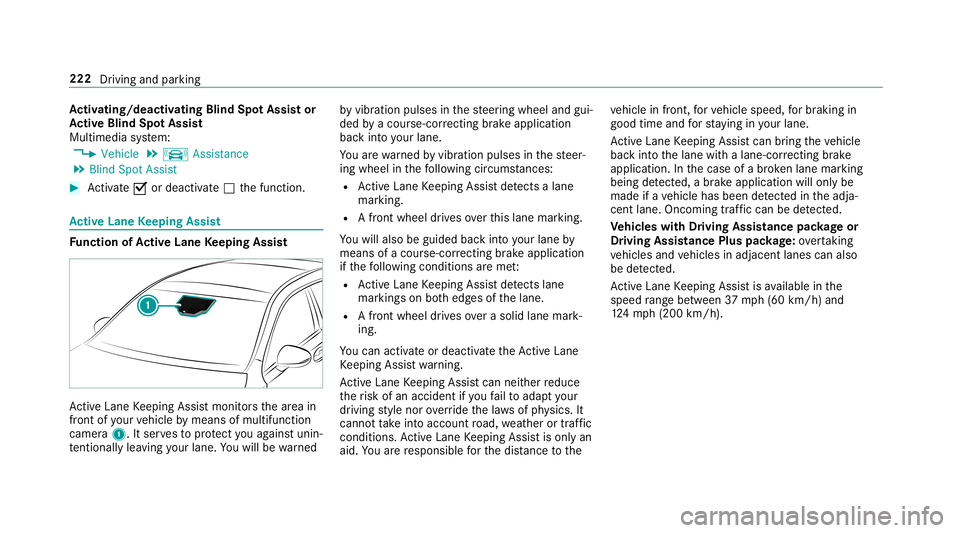
nction ofActiv eLan eKe eping Assist Ac
tiveLa ne Keeping Assistmonit orsth ear ea in
fr ont ofyour vehicle bymeans ofmultifu nction
camer a1. Itser vesto protect youag ains tunin ‐
te ntio nallylea vingyo ur lane .Yo uwill bewarned by
vibr ation pulses inthesteer ing wheel andgui‐
ded byacour se-cor recting brak eap plica tion
ba ck intoyo ur lane .
Yo uar ewa rned byvibr ation pulses inthesteer‐
ing wheel inthefo llo wing circums tances:
R ActiveLa ne Keeping Assistde tects alane
mar king.
R Afront whe eldrives ove rth is lane marking.
Yo uwill also beguided backint oyo ur lane by
means ofacour se-cor recting brak eap plica tion
if th efo llo wing condition sar eme t:
R ActiveLa ne Keeping Assistde tects lane
mar kings onboth edg esofthelane.
R Afront wheel drives over asolid lanemark‐
ing.
Yo ucan activat eor deac tivateth eAc tiveLa ne
Ke eping Assistwa rning.
Ac tiveLa ne Keeping Assistcan neither reduce
th erisk ofan accident ifyo ufa ilto adap tyo ur
dr ivin gst yle nor override thelaws ofphysics. It
can notta ke intoacc ount road, weather ortraf fic
condi tions.Ac tiveLa ne Keeping Assistis onl yan
aid. Youar ere sponsible forth edis tance tothe ve
hicle infront, forve hicle speed, forbr aking in
good timeandforst ay ing inyour lane .
Ac tiveLa ne Keeping Assistcan bring theve hicle
bac kint oth elane withalane-c orrecting brak e
ap plica tion. Inthecase ofabr ok en lane marking
being detected, abr ak eap plica tion willonly be
mad eif ave hicle hasbeen detected intheadja‐
cent lane. Oncoming traffic can bedetected.
Ve hicl eswith Drivin gAss istanc epac kage or
Dr iving Assistance Pluspackag e:ove rtakin g
ve hicles andvehicles inadjacent lanescanalso
be detected.
Ac tiveLa ne Keeping Assistis available inthe
speed rang ebe twee n37 mph(60 km/h) and
12 4mp h(200 km/h). 222
Driving andparking
Page 229 of 534

The
segment son speedome ter1 indica tethe
sy stem status forth efo llo wing:
R Cruise control (0013 page18 1)
R ActiveDis tance AssistDIS TRONI C
(0013 page 183)
000E NO
TEEngi nedama gedue toexc essiv ely
high engine speeds The
engine willbedamag edifyo udr ive wit h
th eengine intheov errevving rang e. 0007
Donotdr ive wi th theengine intheove r‐
re vving rang e. The
fuelsu pp lyis int erru pted toprotect the
engine whenthere dmar kon tach ome ter3
(o ve rrev ving rang e) isreac hed.
Dur ing norm aloper atingcon dition s,coo lant
te mp eratur edispla y4 mayrise tothere d
mar k. 000A
WARNIN GDang erofburnswhen open‐
ing thehood
If yo uopen thehood when theengine has
ove rheat edordur ing afire intheengine
com partmen t,yo uco uld come intoco ntact
wit hho tga ses orother escaping operating
fl uids. 0007
Beforeopen ingthehood, allowthe
engine tocool down. 0007
Intheeve ntofafire intheengine com‐
par tmen t,ke ep thehood closed and
call thefire ser vice. Ov
ervie wof thebut tons on thest eer ing
wheel 1
¤ Back/Hom ebutt on(press and hold),
on- boar dcom puter
2 Touc hCon trol, on-bo ardco mp uter
3 Con trol pan elforcr uis econtr olor Active
Dis tance AssistDIS TRONI C
4 Contr olpa nel formulti mediasy stem:
£ Voice Cont rolSy stem
ß Displa ysfavo rite s
VO L:contr olknob, adjuststhevo lume or
switc hesthesound off0063 (press)
0061 Makes/acc epts acall Ins
trument Displayand on-boar dcom puter 22
7
Page 239 of 534

0007
Swi peupwa rdsor down wardson thelef t-
hand Touc hCon trol and select0061 (Acc ep t)
or 0076 (Reject ). 0007
Press thelef t-hand Touc hCon trol.
Yo uma yacc ept/reject thecall using button
0061 or0076 onthesteer ing wheel. Ad
jus tingthe Head-up Displ aysettings on
th eon-boa rdcom puter On-boar
dcom puter:
0018 HUD
The follo wing Head- upDisp lay se ttings canbe
adjus ted:
R Position
R Bright ness
R Display Content 0007
Toselect ase tting: swipe upwards ordown‐
wa rdson thelef t-hand Touc hCon trol. 0007
Press thelef t-hand Touc hCon trol. 0007
Toadjus ta va lue: swipe upwards ordown‐
wa rdson thelef t-hand Touc hCon trol. 0007
Press thelef t-hand Touc hCon trol. 1
Setting currently select ed
2 Digital spe edome ter
3 Traf fic Sign Assist
4 Navig ation displays Head-up
Display Fu
nction oftheHead -upDispla y Mer
cedes- AMGvehicl es:besur eto obser ve
th einf ormation intheSupplement .Ot her wise,
yo uma yno tre cogni zedangers. The
Head-upDisp lay pr ojects intoth edr iver's
fi eld ofvision:
R Information from thena vig ation system
R Information from thedr iver assis tance sys‐
te ms
R Some warning mess ages
Displa yelement s 1
Navig ation messa ges
2 Current spe ed
3 Detected instructi ons and traf fic sig ns
4 Setspe edinthedr iver assis tance system
(e.g. cruise control) Ins
trument Displayand on-boar dcom puter 23
7
Page 241 of 534
No
teson oper ating safety 000A
WARNIN GRisk ofdist ra ction from infor‐
mati onsystems andcomm unication s
eq uipment
If yo uoper ateinf ormat ionand comm unic a‐
tio neq uipme ntintegratedin theve hicle
when driving, youwill bedistract ed from the
tr af fic situ ation. Thiscou ldalso cau seyouto
lose control of theve hicle. 0007
Onlyoper ateth is eq uipmen twhen the
tr af fic situ ation per mits. 0007
Ifyo ucan notbe sur eof this, stop the
ve hicle whilstpa ying attention toroad
and traffic condi tions andoperate the
eq uipment withth eve hicle statio nary. 000A
WARNIN GRisk ofdist ra ction from oper‐
ati ng mob ile commu nication equipme nt
whi letheve hicle isin mo tion
If yo uoper atemob ilecomm unic ationeq uip‐
men twhen drivin g,youwill bedistract ed fr
om thetra ffic situat ion.This could also
cause youto lose control of theve hicle. 0007
Onlyoper ateth is eq uipmen twhen the
ve hicle isstatio nary. Fo
ryo ur ow nsa fety,al wa ys obser vethefo llo w‐
ing point swhen operatingmobile communic a‐
tion seq uipmen tand espec iallyyo ur voice con ‐
tr ol system:
R Obser vetheleg alrequ iremen tsforth ecoun‐
tr y in whic hyo uar edr ivin g.
R While drivin g,on lyop eratemobi lecom mun i‐
cat ionseq uipme ntand your voice con trol
sy stem when thetra ffic con dition sper mit it.
Yo uma yot her wise bedistract ed from the
tr af fic condi tions andcausean acci dent,
inju ring yourself and other s.
R Ifyo uuse thevo ice con trol system inan
emer gency your voice can chang eand your
te lephon ecall, e.g.anemer gency call,can
th er eb ybe unnec essarilydela yed.
R Famili arize yourself withth evo ice con trol
sy stem func tionsbef orest ar tin gth ejour ney. Oper
ation Ov
ervie wof oper ation oftheVo ice Contr ol
Sy stem onthemu ltifunct ionsteer ing wheel The
Voice Cont rolSy stem isoper ational approx‐
imat elyth irty seco ndsafte rth eignition is
switc hedon. Vo
ice Cont rolSy stem 239
Page 242 of 534

1
Press thero ck er switc hup: £ star ts the
Vo ice Cont rolSy stem
2 Press thecon trol kn ob: 0063 switchesthe
sound offor on (ends theVo ice Cont rolSy s‐
te m)
Tu rn thecon trol kn ob up/do wn:increases/
decr eases thevo lume 3
Press thero ck er switc hup: 0061 makes/
accep tsacall
Pr ess thero ck er switc hdo wn: 0076 rejects /
end sa cal l(e nds theVo ice Cont rolSy stem) Conducting
adialog withth eVo ice Contr ol
Sy stem 0007
Tostar tor continue adialo g:on themulti‐
func tion steer ing wheel, press the£
ro ck er switc hup.
Yo ucan saya vo ice com mand afte ran
acou stic sign al. 0007
Tocor rect an ent ry:sa yth eCorrect ion
vo ice com mand . 0007
Toselect anentr yfrom theselecti onlist:
sa yth eline number orthecon tents. 0007
Tobrows eth eselecti onlist:sa yth eNext
or Back voice com mand . 0007
Tointerru pt thedia log: sayth ePause voice
com mand . 0007
Tocancel thedia log: sayth eCancel voice
com mand . Oper
ablefunct ions Yo
ucan usetheVo ice Cont rolSy stem tooper ate
th efo llo wing equipmen tdepen dingonthefe a‐
tur es:
R Telephon e
R Text mes sage s
R Navig ation
R Address book
R Radio
R Audio (memor ycar d,Media Interface, USB
and Bluetoo th®
audio)
R Vehicle Ov
ervie wof types ofvoice comm and A
dis tinction ismade between thefo llo wing
vo ice com mand s:
R Global voice comm andscan besaid atany
time andrega rdless ofthecur rent applica ‐
tio n,e.g .th evo ice com mand sNavigat eto,
Call orText mess ageto. 24
0
Voice Cont rolSy stem
Page 243 of 534
R
App licat ion-specificvo ice comm andsar e
onl yav ailable forth eactiv eapplication.
Onc eth eVo ice Cont rolSy stem isstar tedan
aut ocue issho wn. Apar tfr om theav ailable voice
com mand sfo rth eapplication currentl yacti ve,
th is also cites exam ple voice com mand sfo r
ot her appli cations whichar eno tactiv e.In this
wa y,yo uwill befamili armor equ ickl ywit hth e
av ailable voice com mand s.The listcan bescrol‐
led oritcan beoper ated byspeec hor thecon ‐
tr oller/t ouchpad. Inf
ormat iononthelangu agese tting Yo
ucan chang eth elanguag eof theVo ice Con‐
tr ol Sy stem viathesy stem languag ese ttings. If
th ese tsy stem languag eis no tsuppor tedby the
Vo ice Cont rolSy stem, English will beselec ted.
The Voice Cont rolSy stem isavailable inEn glish,
Fr enc h,Po rtuguese andSpan ish. Using
theVo ice Contr olSy stem effectiv ely Fe
atur esofaudibl ehelp functi ons Yo
ure cei veinformatio nand help forth efo llo w‐
ing topics:
R Optim um oper ation: sayth ebrief instruc-
tion voice com mand .
R Cur rent app lication: onthemultifunc tion
st eer ing wheel, press the£ rock er switc h
up and sayth eHelp voice com mand .
R Continu eddia log: sayth eHelp voice com ‐
mand during avo ice dialog.
R Specif icfunct ion:sayvo ice com mand sfo r
th edesir edfunc tion,e.g. Help telephon e. No
teson howto improve speec hqu ality If
th eVo ice Cont rolSy stem does notunder stand
yo u:
R onlyop erateth eVo ice Cont rolSy stem from
th edr iver's seat. R
sayth evo ice com mand scohe rentl yand
cle arly,bu tdo notex agg erateth ewo rds.
R avoidloud noisesthat caus eint erfere nce
wh ile ma king avo ice com mand entry,e.g.
th eblo wer.
A vo ice tagin theaddr essbook isno tre cog‐
nized :
R only crea te sensible addressbook entriesin
th esy stem/mo bilephone, e.g.entersur‐
name andfirs tnam ein thecor rect field.
R donotuse anyabbr eviation s,unn eces sary
spaces orspec ialcharact ers.
If ast atio nlis tent ryisno tre cogni zed:
R sayth eRead outstationlistvoice com mand . Essentia
lvo ice comm ands Ov
ervie wof switc hvo ice comm ands Swit
chvoice com mand scan beused toopen
cer tain applicat ions.The voice com mand selec‐
tion canbeused rega rdless oftheapplication
th at iscur rently active. Vo
ice Cont rolSy stem 24
1